

The CRA Benefit Statement email is a phishing scam impersonating the Canada Revenue Agency. It falsely claims that a 2025–2026 benefit document is ready and uses a government-style button to lure recipients toward a fake Webmail login.
Do not select Review Your Statement or enter your email password. The Canada Revenue Agency is legitimate but has no connection to this message, and an official CRA document would not require a login on an unrelated third-party domain.
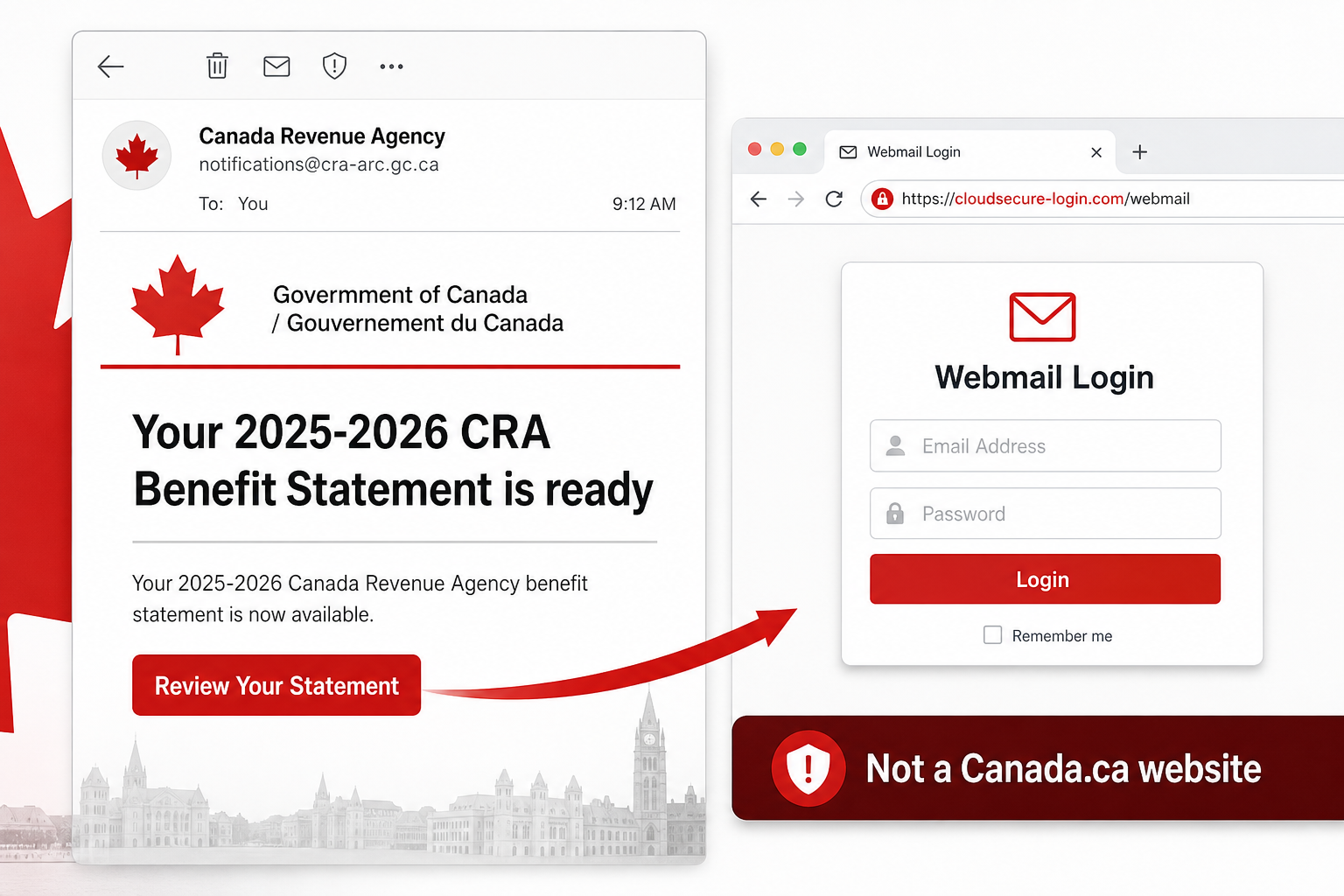
CRA Benefit Statement Email Scam Overview
This campaign copies the tone of Canadian government correspondence and uses both English and French to appear official. The email claims that the recipient’s 2025–2026 CRA Benefit Statement is available, naming programs such as the Canada Child Benefit, GST/HST Credit and Climate Action Incentive. Familiar program names make the message sound personally relevant even though the same template can be sent to many addresses.
A button labeled Review Your Statement appears to provide the document. It does not open Canada.ca or a legitimate CRA portal. The observed link led to an unrelated cloud-hosted website displaying a generic Webmail login form. The form may pre-fill the recipient’s email address, creating the impression that a trusted service recognizes the user. In reality, the page is operated for credential theft.
The request itself exposes the deception. A tax or benefit statement should not require the password for a private email mailbox. Anything typed into the fake form goes to the scammers. A stolen inbox can reveal government correspondence, financial documents, personal identifiers and password-reset messages for other services. The attacker can also impersonate the victim when targeting relatives, coworkers or tax professionals.
Details used to make the message convincing
- Canada Revenue Agency and Government of Canada branding.
- Bilingual English and French wording.
- A claim that the 2025–2026 benefit statement is ready.
- Mentions of the Canada Child Benefit and GST/HST Credit.
- A Review Your Statement button.
- A pre-filled email address on the counterfeit Webmail page.
- Official-sounding footer language telling recipients not to reply.
None of those visual details establishes authenticity. Scammers can copy public names, colors and program descriptions. The decisive clue is that an unsolicited benefit notice sends the user away from the official government domain and asks for an email password.
How the Fake CRA Benefit Statement Scam Works
Step 1: The email impersonates a trusted government agency
The CRA name gives the message immediate authority. Recipients may assume the email concerns taxes, a payment or an official entitlement and give it more attention than ordinary spam.
Step 2: Real benefit programs make the claim personal
The email mentions recognizable programs and a specific statement period. These details create relevance without proving that the sender knows anything private about the recipient.
Step 3: A document button hides an unrelated destination
Review Your Statement sounds like a safe document action. The button conceals a link that does not belong to Canada.ca, the CRA or the recipient’s genuine email provider.
Step 4: A fake Webmail form requests the wrong credential
Instead of a government sign-in, the page asks for an email address and password. Pre-filling the address makes the page feel customized, but a phishing site can read it from the link or URL parameters.
Step 5: The password is sent to the criminals
Submitting the form gives the attackers a credential they can test against the victim’s mailbox and other services. Reused passwords can turn one submission into several account takeovers.
Step 6: The mailbox is exploited for identity and financial fraud
The criminals can read tax-related messages, reset linked accounts, steal documents and send new scams from a trusted address. They may search specifically for refunds, bank details and conversations with accountants.
How to Tell the CRA Email Is Fake
The destination is not an official Government of Canada website
Inspect the link before opening it. A random cloud tenant, app-hosting address or unrelated domain is not transformed into a government page by adding a maple leaf or CRA text.
The page asks for an email password
Your mailbox credential belongs only on the genuine login page of your email provider. It is not a key for downloading a CRA statement. Close any government-themed page making that request.
The message creates a document you were not expecting
Unexpected availability notices deserve verification. Open your CRA account through a saved bookmark or manually entered Canada.ca address and check for the document there.
The sender details do not match the claimed organization
Expand the full sender and Reply-To addresses. Attackers can spoof display names and use addresses that contain words such as tax, benefit or Canada without being connected to the government.
Bilingual formatting is used as decoration
Real Canadian government correspondence is often bilingual, which is exactly why scammers imitate it. Correct formatting can improve the disguise but cannot validate the link or sender.
What to Do If You Received the Fake CRA Email
- Do not click Review Your Statement or reply to the sender.
- Open Canada.ca independently if you need to check a real CRA notice.
- Report the phishing message through your email provider and appropriate government reporting channel.
- Delete the email after preserving any evidence required by your employer.
- Warn family members or coworkers if the same campaign is circulating.
- Block the sender and destination domain when you administer the mail system.
If you opened the page but entered nothing, close it. A security scan is sensible if anything downloaded or the site asked you to install software. The observed campaign is credential phishing, so merely viewing the page does not mean the Mac or PC was automatically infected.
What to Do If You Entered Credentials
Change the email password immediately
Use a separate trusted device and open the real provider directly. Set a unique password that is not used for the CRA account, banking or any other service. Change reused passwords everywhere they appear.
End active sessions and review security methods
Sign out other devices, revoke app passwords and remove unknown connected applications. Check recovery addresses, phone numbers, authenticator apps, passkeys and backup codes for unauthorized changes.
Inspect mailbox rules and forwarding
Look for rules that forward, delete or hide messages. Attackers use them to monitor tax correspondence and conceal password-reset notifications. Review delegates, aliases and automatic replies as well.
Protect the CRA and linked financial accounts
Open the genuine CRA account separately and inspect recent activity. Review bank and payment accounts that use the mailbox for recovery. Contact the relevant institution if personal information or money may be exposed.
Warn contacts about impersonation
Check Sent, Deleted and Draft folders for messages you did not create. Tell contacts to ignore unusual tax, benefit, document or payment requests from your address until the account is secured.
Document the incident for work accounts
Notify the organization’s security team promptly. A compromised business inbox may contain employee tax documents, payroll details or customer information and can require a broader investigation.
How to Avoid Government-Impersonation Phishing
- Reach government services through bookmarks or manually entered official addresses.
- Use a password manager that checks the domain before filling credentials.
- Enable multi-factor authentication on email and government accounts.
- Never use an email password to unlock a tax or benefit document.
- Verify unexpected notices in the official account portal.
- Treat urgent refund, benefit and document messages as common phishing themes.
- Keep browsers and security software updated.
The Bottom Line
The CRA Benefit Statement email is a confirmed phishing scam that borrows the name and bilingual style of a real government agency. Its Review Your Statement button leads to a counterfeit Webmail login rather than an official CRA service.
Do not enter credentials or trust the page because it looks Canadian. Check the real CRA portal independently. If a password was submitted, secure the mailbox, review the CRA account and financial services, remove hidden forwarding rules and warn contacts before the attackers can use the stolen identity.

Join the discussion
0 commentsShare your experience or ask a question about this article.
Discussion
Start the conversation
Have a question or something useful to share? Add the first comment.