

An automated-looking cPanel alert says a mailbox is 98% full. New messages may stop arriving, customer replies could bounce, and the account may be permanently disabled unless storage is upgraded immediately.
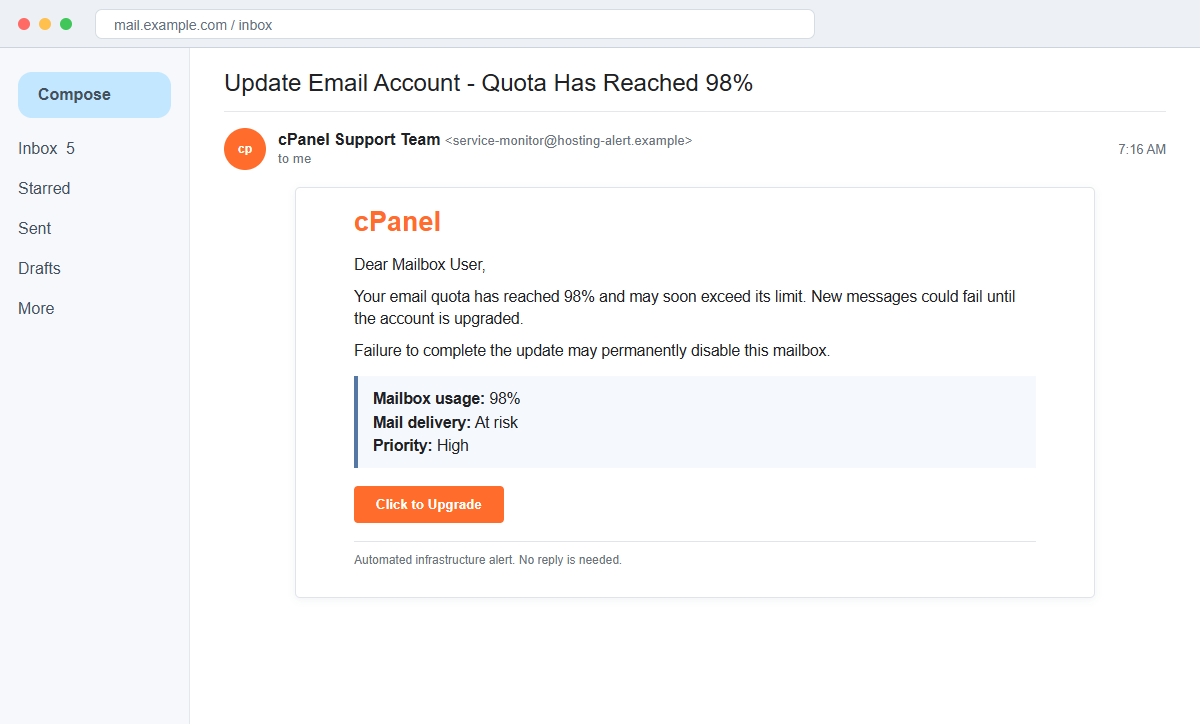
The cPanel Email Quota Limit scam uses a real hosting concern to push recipients toward a counterfeit webmail login. The form does not increase storage; it captures the address and password entered into it.
Some messages impersonate a cPanel Support Team, while others call themselves the cPanel Service Monitor and describe a critical disk threshold. Both versions turn a technical warning into the same credential request.
Do not use the upgrade button. Sign in through the hosting provider's known portal, inspect actual mailbox usage there, and contact the administrator independently if the figures need confirmation.
Overview
A familiar storage problem creates immediate business pressure
The first variant says the mailbox has consumed 98% of its quota and may be unable to send or receive messages. It threatens permanent disablement if the user fails to upgrade.
A second variant claims that a hosting disk quota reached a critical threshold and that incoming mail may bounce. Warnings about lost customer messages make a fast click feel safer than waiting for an administrator.
Real cPanel branding hides an unrelated destination
The message copies the cPanel name, orange styling, copyright text, and automated-monitor language. Those elements can be taken from public product pages and placed into any email template.
The button leads away from the recipient's hosting provider to a fraudulent page, sometimes placed on a legitimate cloud-storage service that allows users to publish web content.
The upgrade form collects credentials instead of changing quota
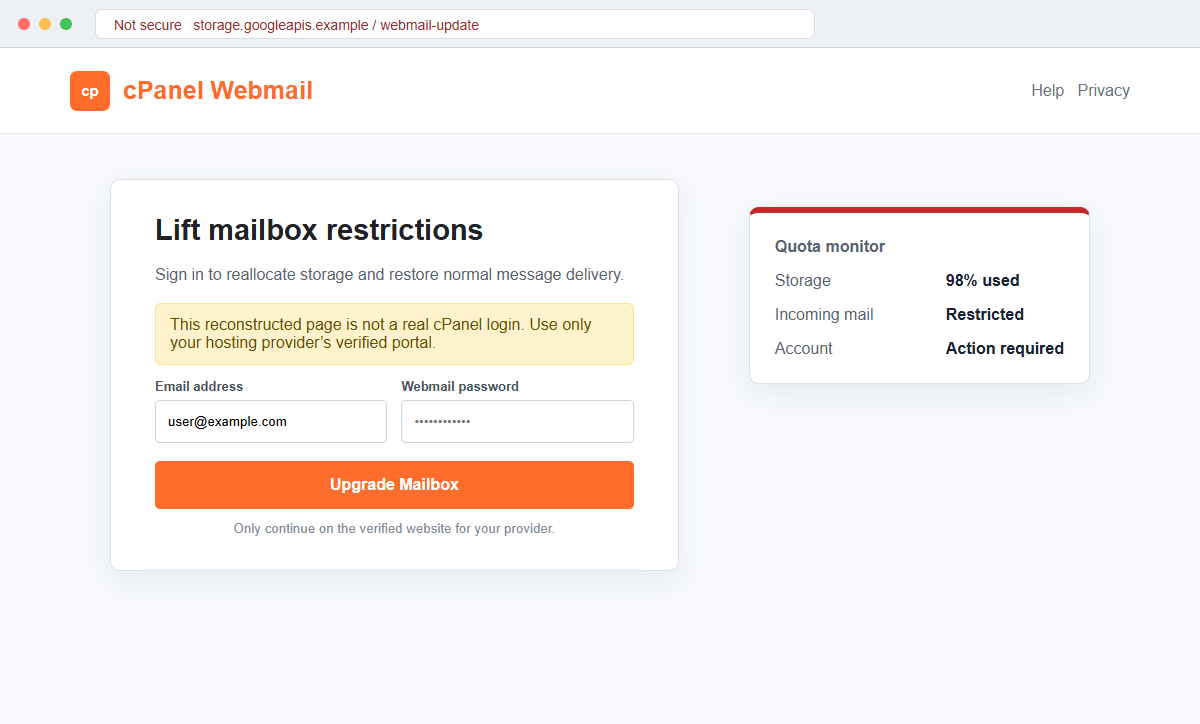
The destination displays cPanel or webmail branding and asks for the email address and current password. It may promise to reallocate storage, lift restrictions, or restore normal delivery after sign-in.
A mailbox quota is controlled by the server or hosting account. Sending a password to an unrelated website cannot safely change that limit, but it can give an attacker access to the mailbox.
- The message claims that mailbox usage has reached 98%.
- Recipients are warned that new messages may fail or bounce.
- Permanent account disablement is threatened.
- cPanel Support Team or cPanel Service Monitor branding is copied.
- A Click to Upgrade or Disk Manager button supplies the only solution.
- The destination does not match the known hosting-provider portal.
- Some versions use a cloud-storage address to host the phishing page.
- The fake form requests the full email address and password.
- No authenticated cPanel notification is shown before the request.
- Stolen credentials can expose business correspondence and reset links.
How Real cPanel Email Quotas Are Managed
cPanel is legitimate server-management software used by many hosting providers.
It does not mean every customer signs in at one universal cPanel domain, because providers normally expose the control panel through their own hostname and account infrastructure.
Official cPanel documentation shows that mailbox quotas are visible and managed inside the Email Accounts interface. Depending on the hosting plan, an administrator can edit an account's quota or the provider may offer an authenticated Buy More option.
That process occurs after a user or administrator reaches the known control panel. An unsolicited message does not need to collect the webmail password on a separate cloud-hosted page.
Mailbox usage warnings can be real. A full account may reject incoming mail, and local quota information can sometimes update slowly. The existence of a real technical problem makes verification more important, not the email button more trustworthy.
A hosting customer should identify who controls the mailbox: the employer, web developer, managed-service provider, or hosting company. That party can confirm the quota inside the server and explain whether storage can be increased.
cPanel branding alone cannot identify the hosting provider, account, or server. A generic warning that omits the provider's real portal, ticket history, plan, and authenticated account information deserves careful scrutiny.
What the Fake Quota Page Reveals About the Phishing Attempt
The campaign combines precise-sounding percentages with vague account details.
A 98% figure appears authoritative, yet the message may not identify the real hosting plan, current usage in megabytes, server hostname, account owner, or administrative ticket.
The threat of permanent disablement is stronger than an ordinary capacity warning. It compresses the decision into a false choice between clicking now and losing the mailbox.
The destination may be hosted through Firebase Storage or another legitimate cloud platform. Such services provide infrastructure to many users but do not endorse the pages that individual users upload.
The phishing form asks for the mailbox password before showing any authenticated usage data. This reverses a safe process, where the user first reaches a known provider portal and then reviews the account state.
A real quota change would be reflected inside cPanel, the hosting-provider dashboard, or an administrator's server configuration. A generic external page cannot prove that it is connected to the relevant account.
The form may display HTTPS and a polished logo. HTTPS encrypts the password on its way to the fraudulent host; it does not establish that cPanel or the hosting provider receives it.
How the cPanel Email Quota Limit Scam Works
Step 1: A quota warning arrives at a domain-based mailbox
Attackers send the message to addresses found on business websites, WHOIS history, data breaches, or common aliases such as info, sales, billing, and support. The address itself often reveals the associated domain.
The lure works best against accounts that already use webmail or a hosting control panel, but the campaign can be distributed broadly because many recipients recognize the cPanel name.
Step 2: A 98% figure makes the warning sound measured
The email says the quota is almost exhausted and describes possible mail-delivery failures. A specific percentage feels like data retrieved from the server.
The sender does not prove access to the server. The same fixed figure can be inserted into thousands of messages regardless of each recipient's actual storage.
Step 3: Business continuity language discourages delay
The message warns that mail may bounce, customers may not receive replies, or the account could be disabled. It labels the alert high priority and says immediate action is required.
Recipients who manage important shared mailboxes may click because the cost of missing a genuine warning appears greater than the perceived risk of signing in.
Step 4: Copied cPanel design creates borrowed authority
The campaign uses cPanel logos, colors, legal text, and technical phrases such as Service Monitor or Disk Manager. These public elements make the message look like server-generated mail.
The From display name can say cPanel even when the underlying address belongs to an unrelated domain. Header details and link destinations provide stronger evidence than branding.
Step 5: The button opens a counterfeit webmail login
Click to Upgrade or Access cPanel Disk Manager leads to a page that resembles a hosting login. It asks for the email address and password before displaying any real account information.
The domain may belong to a cloud-storage provider, compromised website, or newly registered host rather than the recipient's known hosting company.
Step 6: Submitted credentials are tested against the real mailbox
The phishing server records the fields and may redirect to a harmless page or show an error. Attackers can then try the credentials against webmail, cPanel, Microsoft 365, Google Workspace, or other services.
Password reuse increases the damage. One successful combination may expose hosting controls, cloud storage, social accounts, or payment tools in addition to email.
Step 7: The compromised mailbox supports further fraud
Criminals can read messages, reset passwords, create forwarding rules, impersonate staff, and target customers with invoices or malicious links. They may also hide login alerts and replies.
For a domain administrator, control of email can support website resets, DNS changes, and certificate requests. The incident should therefore be treated as more than an isolated mailbox password leak.
Company and Checkout Checks
Use the hosting provider's saved control-panel address
Open the portal from a password manager, bookmark, contract, or known support record. Do not search through sponsored results and do not use the alert's link.
Check the mailbox quota and account status only after confirming the complete hostname and valid login context.
Ask the real server administrator to confirm the reading
Contact the employer's IT team, web developer, managed-service provider, or host through a known telephone number or ticket system. Provide the message as an attachment without opening its button.
An administrator can compare actual storage use, server logs, and account limits without requesting the password by email.
Compare the warning with authenticated cPanel data
A genuine interface should identify the account, domain, storage amount, quota, and available management options. The numbers should match the provider's own dashboard.
If the email claims 98% while the authenticated interface shows normal use, preserve the mismatch as phishing evidence.
Treat password entry on another host as unacceptable
The mailbox password belongs only on the verified provider login or configured mail client. A cloud-storage address, shortened link, or unrelated domain cannot become cPanel merely by displaying its logo.
Close the page if the domain does not match the established login route, even when the browser shows a lock icon.
Warning Signs to Check Before You Act
- The warning gives a fixed 98% figure without verifiable account data.
- The message threatens permanent disablement rather than explaining the plan.
- cPanel appears as the sender even though the domain is unrelated.
- A generic greeting replaces the account owner's real identity.
- The provider, server hostname, and ticket number are missing.
- The upgrade button is the only route offered.
- The link points to cloud storage or another unrelated host.
- A webmail password is requested before usage is displayed.
- The page promises an immediate quota increase after sign-in.
- No matching alert appears inside the authenticated hosting portal.
- The footer and copyright notice are treated as proof of origin.
- The message pressures a shared mailbox owner to act without IT review.
A real mailbox can reach its quota, but that fact must be confirmed inside the known hosting environment. Never solve a storage warning by sending the password to a page reached from the warning itself.
What to Do if You Have Fallen Victim to This Scam
- Change the webmail password through the verified provider. Use the known cPanel, hosting, or mail-provider portal and create a strong, unique password. Do not revisit the quota page, and replace the credential anywhere it was reused.
- Secure the hosting account as well as the mailbox. If the same password or email address protects cPanel, billing, domain registration, or DNS, change those credentials and enable strong multi-factor authentication on each service.
- Revoke active sessions and mail-client access. Sign out other sessions and inspect app passwords, OAuth grants, mobile devices, IMAP clients, and connected applications. Remove anything that the account owner or administrator cannot identify.
- Inspect forwarding, filters, and delegates. Delete unknown forwarding addresses, inbox rules, autoresponders, delegates, and filters that hide security notices. Review sent, deleted, junk, and archive folders for unauthorized activity.
- Check the website and domain control plane. Review cPanel users, FTP accounts, SSH keys, cron jobs, DNS records, redirects, administrator accounts, and recently modified web files. A stolen hosting credential may affect more than email.
- Warn employees and external contacts. Tell users to distrust recent quota warnings, file shares, password prompts, and payment instructions. Ask customers and vendors to verify sensitive messages sent during the compromise window.
- Review authentication and delivery logs. The hosting provider or administrator should inspect login IP addresses, user agents, forwarding changes, SMTP activity, and failed attempts. Preserve relevant records before normal retention removes them.
- Scan devices that opened or downloaded content. Run a complete Malwarebytes scan or use another trusted security product if a file, extension, or installer was downloaded. Remove unfamiliar software and apply browser and operating-system updates.
- Block the phishing infrastructure. AdGuard or another reputable DNS and content blocker can prevent some known phishing pages and malicious advertisements from loading. Administrators should also add confirmed sender, URL, and domain indicators to company filters.
- Report the impersonation and hosting abuse. Send the original email with full headers to the real hosting provider, cPanel abuse or security channels where appropriate, the cloud host serving the page, and the relevant national fraud authority.
- Refuse unsolicited technical recovery help. Do not grant remote access or pay someone who claims the mailbox can be restored only through a special tool. Work with the known provider, employer, insurer, law enforcement, or a verified incident-response specialist.
Frequently Asked Questions
Is the cPanel Email Quota Limit message legitimate?
The reviewed campaign is phishing. It uses a quota warning to send recipients to an unrelated page that requests webmail credentials. Confirm real usage inside the known hosting portal.
Can a genuine mailbox stop receiving mail when full?
Yes. Quotas are real and a full mailbox can cause delivery problems. That technical possibility does not authenticate an email or justify entering a password on an unfamiliar domain.
Does cPanel send every customer the same upgrade link?
No. cPanel is software used by many hosting providers, and login routes vary. Quotas are managed through the provider's authenticated interface or by its administrator.
Why is the phishing page hosted on a trusted cloud service?
Cloud platforms allow customers to publish content. Criminal use of one hosted page does not mean the cloud company created, reviewed, or endorsed the login form.
What if I clicked but did not enter my password?
Close the page and verify the account through the real host. If nothing was downloaded and no credential was entered, takeover risk is lower, but the link should still be reported.
Should I delete email to fix a real quota problem?
Removing unneeded mail may free space, but first confirm usage inside the real account and preserve business-retention requirements. An administrator can also adjust the quota when the hosting plan permits it.
The Bottom Line
The cPanel Email Quota Limit scam takes a plausible 98% storage warning and turns it into a counterfeit webmail sign-in page.
Real quotas are checked and managed inside the hosting provider's authenticated cPanel environment. A logo, technical footer, cloud-hosted page, or HTTPS connection does not make an external password form legitimate.
If credentials were entered, change them immediately, protect the hosting account, revoke sessions, inspect forwarding and website controls, warn contacts, and report the campaign through verified channels.

Join the discussion
0 commentsShare your experience or ask a question about this article.
Discussion
Start the conversation
Have a question or something useful to share? Add the first comment.