

A notice says your domains will expire soon. Because you are supposedly the registrant contact, every website, mailbox, and connected product could stop working unless you review and renew immediately.
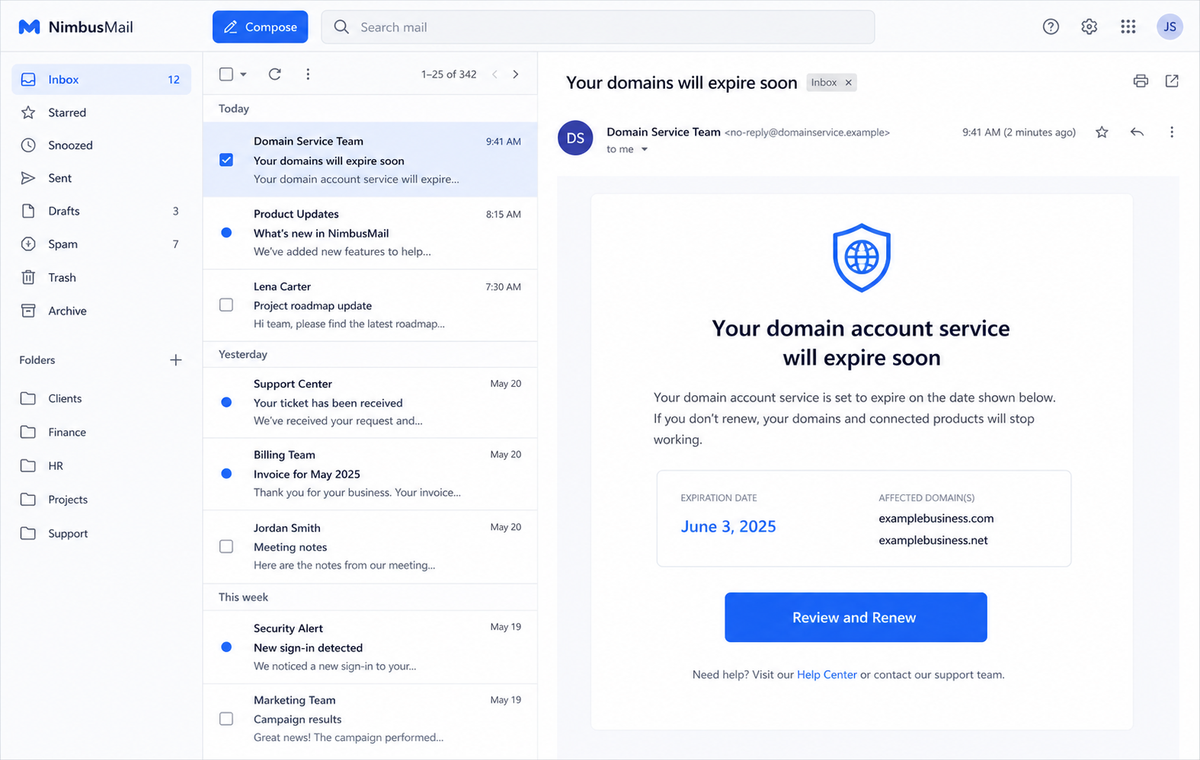
The Domain Account Service Expiration Email Scam turns a real business concern into a credential and payment trap. Its button does not prove who manages the domain, and the destination may collect both a mailbox password and card information.
That combination is unusually persuasive. A domain expiration can disrupt websites and email, so a hurried owner may treat the warning as routine administration rather than a new payment request from an unknown sender.
Do not renew through the message. Open the registrar account from a saved bookmark, compare the exact domain and expiration date, and pay only inside the provider portal you already use.
Overview
The email borrows the language of a genuine renewal notice
The subject says “Your domains will expire soon,” while the body calls the recipient the registrant contact. It claims the domain account service is approaching expiration and warns that connected products will stop working.
A Review and Renew button supplies the apparent solution. The reviewed message also displayed a specific expiration date and a polished copyright footer, details that make a bulk phishing template feel tied to a real account.
Domain service and email service are deliberately blurred
A domain registration, hosted mailbox, website plan, DNS service, and security certificate are different products. The message compresses them into one vague “domain account service,” so almost any business owner can imagine something important is at risk.
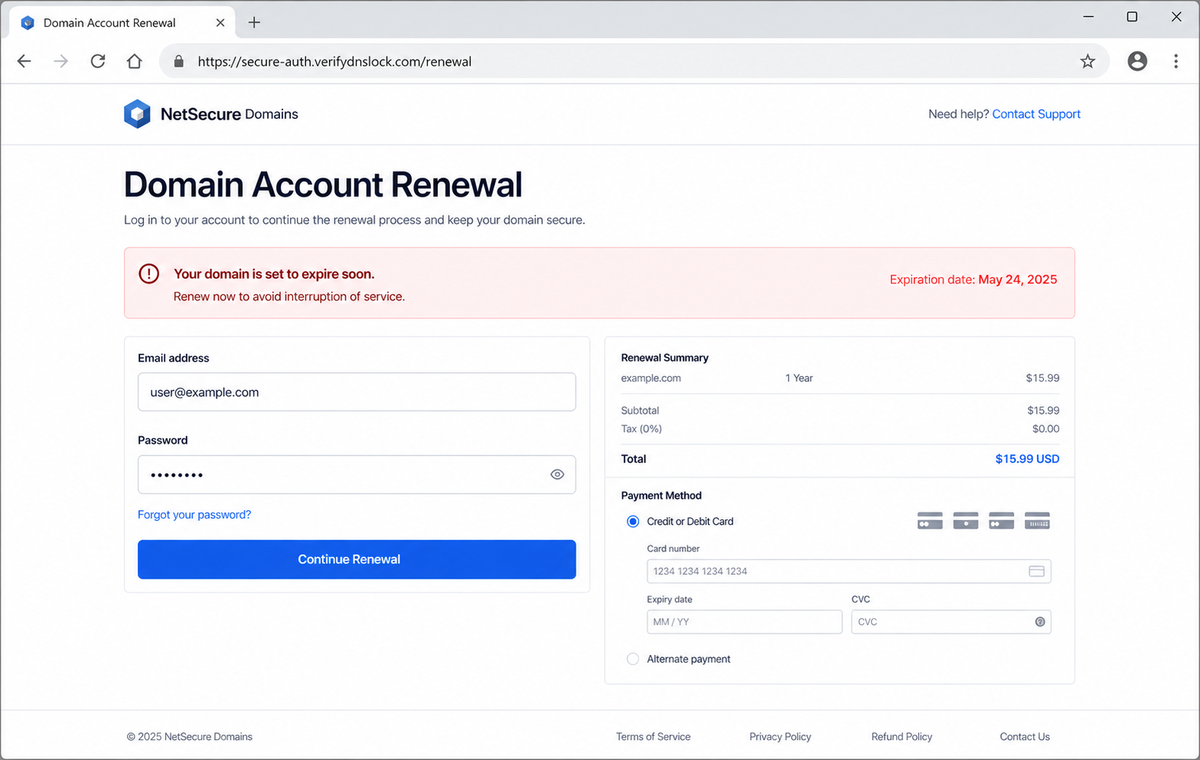
The ambiguity also gives the destination room to ask for unrelated information. A supposed renewal page may demand the current email password before showing a price, then request card data even when the real registrar uses another billing method.
The fake renewal page can harvest two valuable data sets
The campaign destination was inactive when later examined, but the email was built to lead toward a renewal workflow. Such pages commonly imitate a provider sign-in and can add payment fields under the pretext of extending service.
A stolen mailbox password can unlock private messages and password resets. Card details create a separate financial risk, while the email address, domain name, telephone number, and billing identity can support more convincing follow-up fraud.
- The subject warns that one or more domains will expire soon.
- The recipient is described as the registrant contact without proof.
- Websites, mailboxes, and connected products are threatened together.
- The product requiring renewal is never defined precisely.
- A Review and Renew button becomes the only obvious route forward.
- A fixed expiration date makes a mass email feel account-specific.
- The sender discourages replies instead of offering verifiable support.
- The landing page may request the existing mailbox password.
- Payment fields may collect card number, expiration date, and CVC.
- The genuine registrar account can be checked without touching the email.
How Real Domain Expiration and Renewal Notices Work
Real domain registrations do expire, and a missed renewal can eventually interrupt the services that depend on the name. That truth is why an expiration lure can sound more credible than a generic mailbox warning.
ICANN rules require accredited registrars to provide renewal notices around one month and one week before expiration, plus another notice after expiration in relevant circumstances. Those notices go to the registrant contact recorded for the domain.
The existence of a real notification duty does not authenticate an individual email. A criminal can copy the expected timing, renewal vocabulary, and service warnings without having access to the registrar account.
A registrant should be able to sign in independently and see the domain, current expiration date, renewal price, payment method, and automatic-renewal status.
The record inside that established account is stronger evidence than a date printed in an unsolicited message.
ICANN also explains that registrars must make renewal and restoration fees reasonably available. A page that hides every detail until the user supplies an email password is not behaving like a transparent registrar billing portal.
If the domain truly is near expiration, renewing it through the known provider solves the problem without trusting the message. If the account shows a different date or registrar, the discrepancy exposes the lure.
Why This Domain Expiration Message Cannot Be Trusted
The phrase “domain account service” avoids naming the product that supposedly expires. Legitimate records distinguish the registered name from hosting, email, website builders, privacy services, and certificates because each can have a separate term.
The email says connected products will stop working, but it does not show authoritative account identifiers, renewal term, existing payment method, auto-renew status, or a route that begins from the registrar's known domain.
A copyright footer is decorative text, not identity proof. Scammers can paste a real or plausible company name, address, and date into a template without sending from that organization's mail system.
The button destination is the decisive check. If its registered hostname is unrelated to the established registrar, a lock icon and HTTPS only encrypt the connection to the wrong operator.
Requesting a mailbox password as part of domain billing is another major inconsistency. The registrar may use an account login, but it should not need the current password for an unrelated mailbox merely to display a renewal invoice.
Card entry on a surprise page multiplies the exposure. Even a small, believable renewal total can be used to capture full payment details or confirm that the card is active for later unauthorized charges.
How the Domain Account Service Expiration Email Scam Works
Step 1: The campaign finds public domain contacts and business mailboxes
Company websites, registration history, contact pages, marketing databases, and breached records can reveal domain names and likely administrative addresses. Attackers can also guess common inboxes such as admin, billing, webmaster, and info.
The sender does not need access to the registrar. Knowing that an organization owns a domain is enough to create a warning that feels relevant.
Step 2: A believable expiration story creates operational fear
The message claims the recipient is responsible for renewal and warns that attached products will stop working. For a small business, that suggests lost email, website downtime, missed orders, and customer confusion.
The fear is practical rather than dramatic, which can make the scam seem like ordinary vendor administration.
Step 3: A specific date makes the warning appear personalized
A displayed expiration date and account-style footer suggest that the sender queried a real record. The date can actually be fixed in the template, loosely based on public data, or entirely invented.
Recipients often remember the general renewal season but not the exact day, giving the fabricated detail room to work.
Step 4: Review and Renew opens an attacker-controlled workflow
The button can pass the email address or domain through the URL so the landing page appears prefilled. A familiar name on the screen can distract from an unrelated hostname in the address bar.
Redirects may also hide the final destination until the browser has already left the message.
Step 5: The page collects account credentials before billing
A fake renewal portal may say the session expired or identity must be verified. It requests an email address and password, then can deliberately reject the first entry to capture a second password.
Those values are sent to the attacker, not validated by the real registrar or mail provider.
Step 6: A convincing renewal total captures card information
After the login form, the page may show a modest annual price and request a card number, expiration date, CVC, name, address, or one-time bank code. A low total is chosen to avoid triggering suspicion.
The criminal can attempt unauthorized purchases or resell the payment data even when no domain renewal occurs.
Step 7: Compromised email and domain knowledge fuel further fraud
Mailbox access can expose invoices, hosting notices, customer records, and password resets. The attacker may create forwarding rules, impersonate the owner, or target the real registrar with a more informed account-recovery attempt.
Contacts may then receive payment-change requests from a genuine business address, making the original domain lure the first stage of a broader compromise.
Company and Checkout Checks
Open the registrar from a saved bookmark
Do not use Review and Renew. Sign in through the provider address stored in your password manager, an earlier verified invoice, or the official application, then inspect the domain portfolio.
A real expiration date, renewal price, and billing status should be visible there without using the email link.
Confirm the registrar and domain record independently
Use the organization's documentation and an established registration-data lookup to identify the registrar. Ask the person who normally manages domains whether the sender and renewal cycle match company records.
Never treat the provider name printed in the message as proof of where the domain is registered.
Compare the requested credentials with the real workflow
A domain renewal should use the registrar's existing account and recorded payment process. A page that asks for the password to a separate mailbox or introduces an unknown checkout deserves immediate rejection.
Read the entire hostname from right to left and confirm the registered domain, not merely a reassuring word placed before it.
Call support using previously verified details
For a valuable business domain, contact the registrar through the number in the authenticated account or a prior contract. Give support the domain name and ask whether a renewal notice was sent.
Do not call a telephone number or reply address supplied only by the suspicious message.
Warning Signs to Check Before You Act
- The email does not identify the exact domain product that is expiring.
- Several unrelated services are threatened with one vague deadline.
- The sender calls you the registrant contact without an account identifier.
- The expiration date cannot be matched inside the real registrar account.
- Review and Renew points outside the known registrar domain.
- A copied company footer is used as the main trust signal.
- The destination requests the existing mailbox password.
- Card details are requested before a verifiable invoice appears.
- The renewal price or term differs from the established account.
- The site relies on a lock icon while the hostname is unrelated.
- The message discourages replies but offers no independent support route.
- The domain portfolio shows no matching alert after direct sign-in.
A real expiration may still exist at the same time as the phishing email. Resolve it inside the known registrar account, where the domain, dates, fees, and payment history can be verified together.
What to Do if You Have Fallen Victim to This Scam
- Change the exposed password immediately. Open the registrar's official account portal and the email provider's security dashboard through a saved bookmark or its official application, not through the Domain Account Service Expiration message. Create a fresh, unique password for the account exposed by that domain-account message. Replace similar passwords anywhere else they were reused.
- Start with the credentials exposed to the domain service expiration notice. Create a fresh, unique password for the account exposed by that domain-account message. Replace similar passwords anywhere else they were reused. Compare every sign-in method after this domain-account case with the owner's devices. Unrecognized numbers, addresses, keys, and app passwords must go.
- End the access created through the domain service expiration notice. Sign out all other sessions from the registrar and hosting dashboards, revoke unfamiliar OAuth grants, and reconnect trusted mail applications only after the password change. This closes tokens that can survive a simple reset.
- Review the mailbox for changes connected with the domain service expiration notice. Remove unknown forwarding addresses, delegates, inbox rules, filters, and automatic replies. Examine mail activity from the time of this domain-account incident. Unfamiliar sent messages or deleted security alerts can reveal what followed this domain-account incident.
- Protect the wider account chain. Prioritize domain, hosting, email, and any card used on the fake renewal page. Reset credentials on services whose recovery messages reach the inbox exposed by that domain-account message. Begin with financial and administrator accounts.
- Contact the card issuer and protect the domain account. If card data was entered, lock the card and call the issuer using the number on the card or official application. Separately change the registrar password, enable strong multi-factor authentication, review domain contacts, transfer locks, nameservers, and recent account activity.
- Check the device used to open the domain service expiration notice. Run a complete Malwarebytes scan if that domain-account message delivered a file, extension, or remote-support tool. Clean the device before changing sensitive passwords there.
- Reduce the chance of reopening a related page. AdGuard or another reputable DNS and content blocker may stop known phishing hosts and malicious advertisements tied to the domain service expiration notice. Blocklists may not recognize the next domain used for this domain-account case. Verify every address before entering account information.
- Report the phishing message. Use the mail provider's Report Phishing control and notify the registrar, hosting provider, card issuer, and the organization's IT or security team. The raw headers from this domain-account incident should be preserved before reporting. They are especially valuable when the campaign reached multiple inboxes.
- Warn domain owner, registrar, card issuer, and site administrator through a separate channel. Explain that the domain service expiration notice may have exposed the account and ask them to distrust recent file shares, password requests, invoices, payment changes, or urgent replies until the timeline is confirmed.
- Expect follow-up fraud based on the domain service expiration notice. A supposed recovery expert mentioning this domain-account incident may belong to the same operation. Work only with a professional you verify yourself. Choose recovery help for this domain-account phishing attempt through organizations you contact independently. Avoid strangers who appear in messages or search ads.
Frequently Asked Questions
Is every domain expiration email a scam?
No. Registrars send genuine renewal notices, but the reviewed lure cannot be trusted on appearance alone. Verify the same domain and date by opening the registrar account independently.
Can an expired domain really stop email and websites?
Yes. Services that depend on the domain can fail as it moves through expiration and deletion stages. That real risk is exactly what makes the phishing story persuasive.
Why would a renewal page ask for my email password?
A registrar login may use an email address as the username, but it should not ask for the password to an unrelated mailbox. That request is a strong sign of credential theft.
What if the domain date in the email is correct?
Public or breached data may reveal a plausible date. Accuracy of one detail does not authenticate the sender, button destination, login form, or payment page.
What if I entered card details but no charge appeared?
Contact the issuer immediately. Criminals may test the card later, use it elsewhere, or sell the details, so waiting for a visible charge increases the risk.
Does HTTPS prove the renewal site is legitimate?
No. HTTPS protects data while it travels to the site shown in the address bar. It does not prove that the site belongs to your registrar or deserves your password.
The Bottom Line
The Domain Account Service Expiration Email Scam mixes a genuine renewal concern with a fake path that can steal both mailbox credentials and payment-card information.
Ignore the button and begin from the registrar account you already know. Compare the exact domain, expiration date, renewal term, account owner, and payment history before making any change.
If information was submitted, secure the mailbox and registrar, revoke sessions, inspect domain settings, contact the card issuer, warn the organization, scan downloaded files, and report the campaign quickly.








