

The message says someone you know is hosting a graduation party, birthday, or summer gathering.
The only missing detail is the address, hidden behind a bright Open Invitation button. A fake party invitation feels personal enough to click and harmless enough to trust.
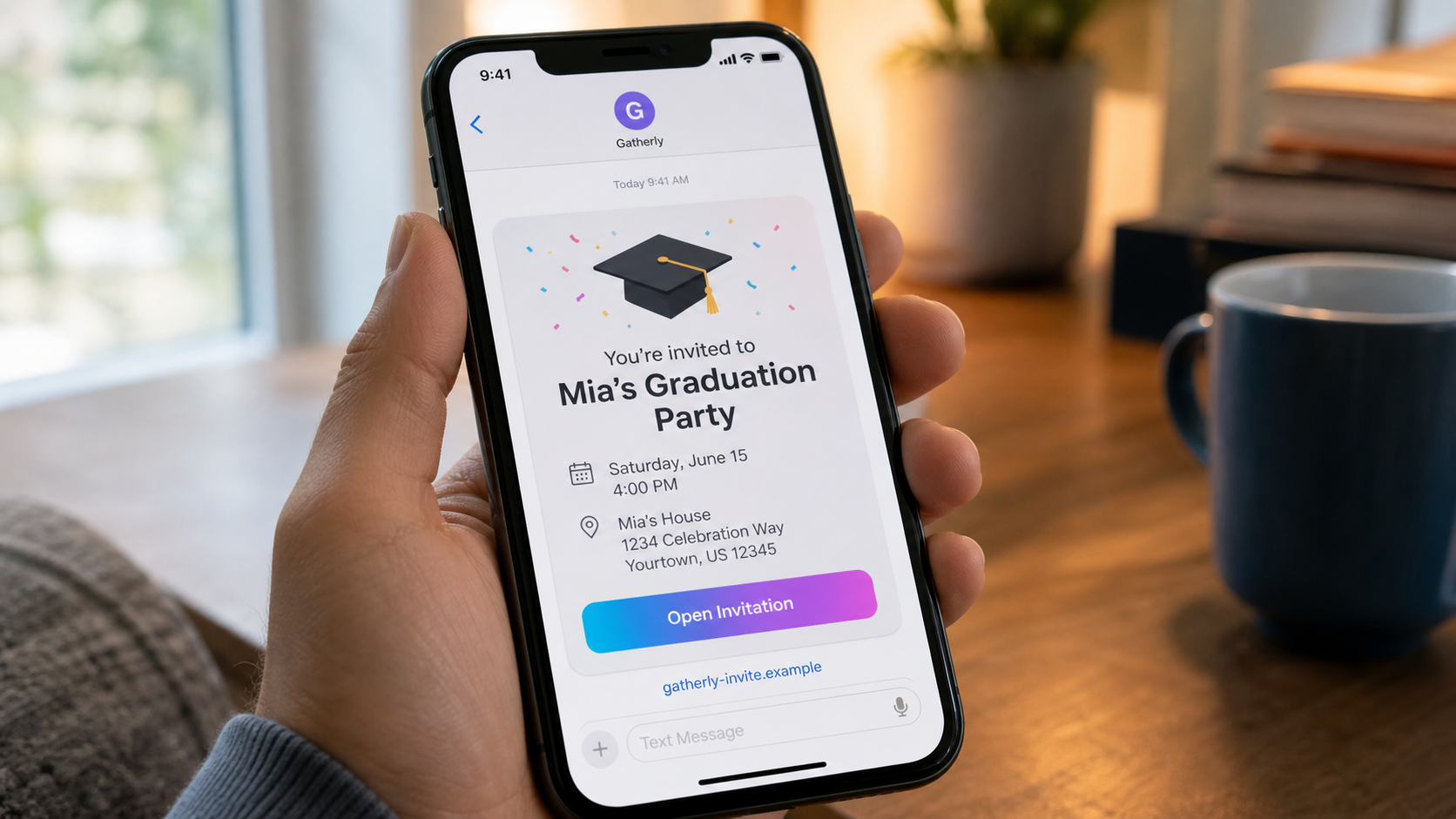
The invitation can arrive by text or email and may resemble a familiar digital invitation service. It sometimes names a real contact as the host, which gives the recipient an immediate reason to open it.
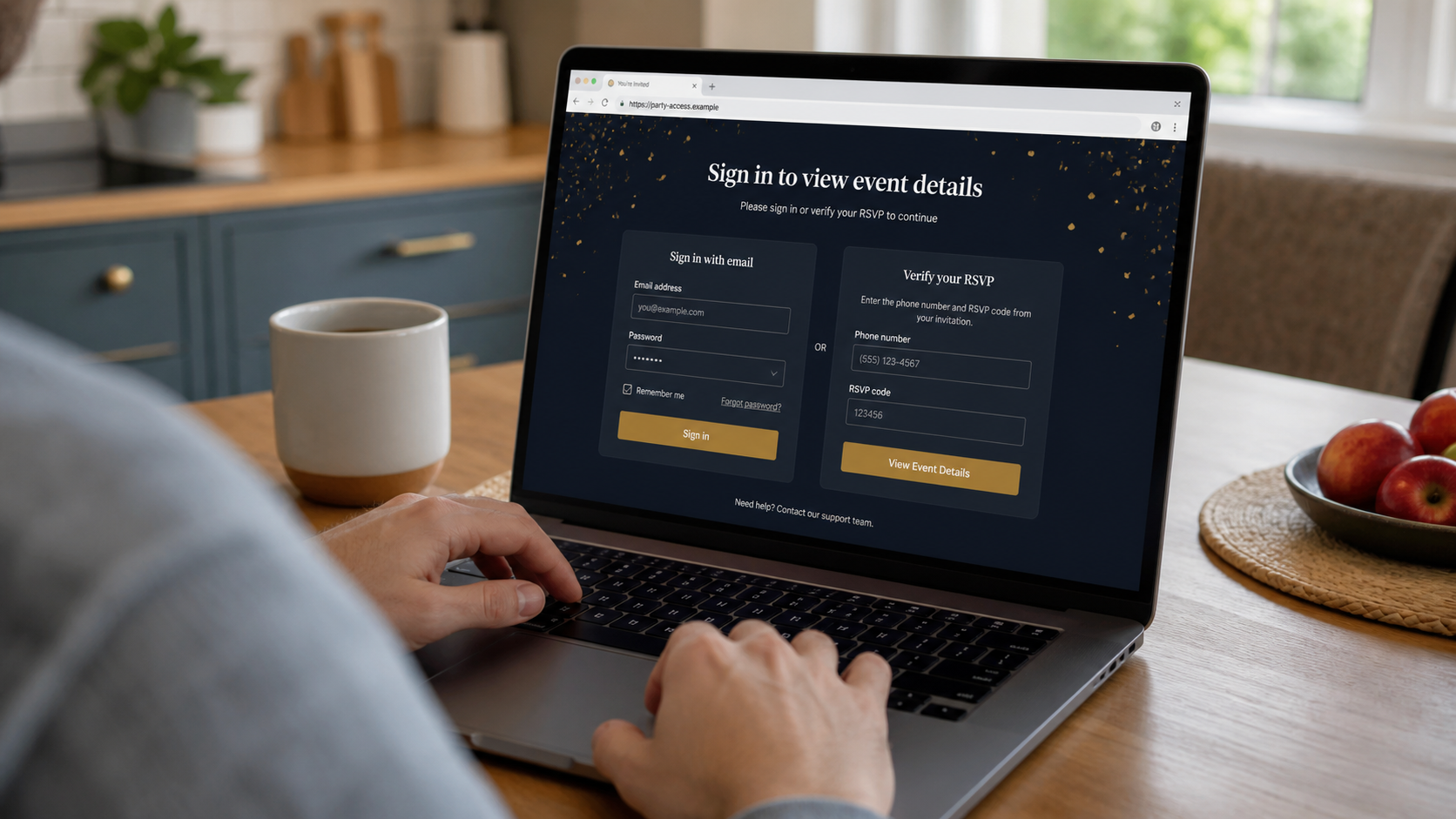
Instead of simply showing the event, the page requests an email username and password. Another version asks for a phone number followed by a special code sent to the device.
That code may actually authorize a password reset, account login, or transfer. Sharing it can give the scammer exactly what a second security step was designed to protect.
Overview
The page behind it may be trying to take control of an email or phone account.
The invitation turns ordinary curiosity into a login request
Real invitations may ask guests to confirm attendance, but they should not require the password to a personal email account. The event service has no legitimate need to read the recipient's mailbox.
The phishing page frames the login as a way to identify the guest, protect private event details, or view the host's message. Those explanations make an abnormal request seem polite and routine.
A familiar host name may come from a compromised account
The message might genuinely arrive from a friend's email or messaging account after a scammer took it over. The sender name can therefore be real even when the invitation is fraudulent.
Once another recipient enters credentials, the scammer can repeat the campaign to that person's contacts. Each compromised account supplies a new layer of social proof.
The stolen inbox becomes a doorway to other accounts
Email is often the recovery channel for shopping, banking, social media, cloud storage, and workplace services. An attacker who controls it can request password resets and hide the notices.
The target may initially see no financial charge, which makes the incident easy to underestimate. The real loss can develop later through account takeover, impersonation, fraud, and exposure of private messages.
- An invitation arrives unexpectedly from a service or person you recognize.
- The event details remain hidden until you sign in.
- The page asks for your personal email password rather than an RSVP.
- A phone number and one-time code are requested to reveal the location.
- The domain is a lookalike rather than the invitation service's known address.
- The host cannot confirm sending the invitation.
- After login, the page errors or redirects without showing a real event.
- Similar invitations begin reaching contacts from the compromised account.
Why a Digital Invitation Is Such an Effective Phishing Story
Invitations carry several emotions at once. Curiosity, fear of missing out, and concern about appearing rude can push a recipient to open the message before checking it closely.
Seasonal timing adds credibility. Graduation, wedding, holiday, and summer party periods naturally produce more invitations, so an unexpected message does not immediately feel unusual.
A host name increases the pressure. The recipient may wonder whether a family member forgot to mention the event or whether declining to open it will create an awkward conversation.
Digital invitation pages also vary widely in design. People do not have one fixed interface in mind, which gives a fake page room to invent a login or verification process.
The safest check happens outside the invitation. Contact the supposed host using a phone number or conversation you already trust, and ask whether the invitation and service are real.
What the FTC Warning Says About Fake Invitations
The FTC reported in May 2026 that unexpected You're Invited texts and emails were being used as phishing lures. The messages resembled well-known invitation platforms and sometimes listed someone the recipient knew as the host.
The agency warned that some pages requested an email username and password before showing the event. Others asked for a phone number and a special code to RSVP.
According to the FTC, that is not how a legitimate invitation should work. The purpose may be to steal account information or reset access to an existing account.
The FTC advised recipients not to click an unexpected invitation and to confirm it directly with the host. It also recommended two-factor authentication and immediate password changes if information was entered.
Phishing emails can be forwarded to reportphishing@apwg.org, suspicious texts can be forwarded to 7726, and attempted fraud can be reported at ReportFraud.ftc.gov.
How the Fake Party Invitation Phishing Scam Works
Step 1: The scammer creates a believable social occasion
The lure mentions a graduation, birthday, wedding, reunion, or summer party. The date may be close enough to create urgency but far enough away that the recipient has not heard other details.
A generic celebration can be sent widely. A targeted version may use names and relationships collected from social media or a compromised contact list.
Step 2: The message imitates a familiar invitation service
Colors, envelope icons, RSVP buttons, and phrases such as private event make the text or email resemble a normal notification. The real destination is hidden behind a button or shortened link.
The visible sender name may be forged or may belong to a real compromised account. Neither one proves the linked domain is legitimate.
Step 3: The page withholds the details behind a login
After the click, the page shows the host name and event theme but hides the address, guest list, or message. It says signing in is necessary to confirm the recipient.
The domain may differ by one word, letter, or subdomain from the legitimate service. On a phone, that difference can be difficult to notice.
Step 4: Email credentials or a reset code are collected
One version asks for the recipient's full email address and password. Another requests a phone number, then asks the person to enter a code received by text.
The code may be generated by a genuine provider in response to the attacker's password-reset request. Sending it to the fake page hands the attacker the second factor.
Step 5: The phishing page hides the successful theft
After submission, the page may display an error, claim the invitation expired, or redirect to a real invitation website. The victim assumes a technical problem instead of an account compromise.
Meanwhile, the attacker tests the password against email and other services. Reused credentials can open several accounts.
Step 6: The stolen account is used to reach trusted contacts
The scammer sends the invitation from the real inbox, making the next round more convincing. Existing message threads and contact names can be used to personalize it.
The attacker may also create forwarding rules, delete security alerts, or change recovery details so the owner does not immediately notice.
Step 7: Account access becomes impersonation and fraud
The compromised email can support fake requests for money, payroll changes, password resets, shopping, and access to cloud files. Personal messages may supply answers to identity questions.
The invitation was only the entry point. Recovery must cover the email account and every important service that depended on it.
Company, Address, and Fulfillment Checks
The invitation brand may be copied, not involved
Compare the sender domain and link destination with the service's official website. A familiar logo or host name does not establish that the real platform sent the message.
Open the legitimate service separately through a known address. Do not use the link you are trying to verify.
The web address may lead through several disposable domains
Phishing links often redirect through tracking pages, shortened URLs, or newly registered domains. The final page can disappear quickly after reports begin.
Search the full domain, registration age when available, and exact page wording. A hosting address or server location does not identify the scammer, but rapid domain changes weaken accountability.
Support may be another route back to the attacker
A fake invitation page may include chat, a help email, or a phone number. Contacting it can reveal that the target is engaged and invite more requests for codes or personal information.
Use only support details obtained from the invitation platform's independently opened official site.
The data flow must match the simple task
An RSVP needs a response and perhaps a name or meal choice. It does not need an email password, bank login, identity document, or one-time account recovery code.
When the information requested is more powerful than the task requires, stop. That mismatch is stronger evidence than polished design.
How to Check an Invitation Without Opening the Trap
Message the host in an existing conversation or call a number already saved. Do not reply to the invitation itself if you are unsure who controls the sender.
Press and hold the link on a phone, or hover over it on a computer, to inspect the destination without opening it. Look for misspellings, extra words, and unrelated domains.
Open the known invitation service independently and sign in there if you already have an account. A real pending invitation should be accessible without entering credentials into an unfamiliar page.
Treat every one-time code as confidential. Read the entire text that accompanies it. Providers often state exactly what action the code authorizes and warn not to share it.
Use a password manager when possible. It will usually refuse to fill a saved password on a lookalike domain, providing an important warning that the site changed.
When in doubt, declining to click is not rude. A genuine host can resend details through a trusted channel.
Warning Signs to Watch For
- The invitation was unexpected and the host has not mentioned the event.
- Event details are hidden behind an email login.
- The page requests the password to a personal mailbox.
- A one-time code must be entered to see the address.
- The code message describes a login or password reset, not an RSVP.
- The domain differs from the invitation brand shown.
- The page errors immediately after credentials are submitted.
- The host says they never sent the invitation.
- The same message suddenly reaches many contacts from one account.
A party invitation can ask whether you are coming. It should never ask for the keys to the account where the invitation arrived.
What to Do if You Have Fallen Victim to This Scam
- Change the email password immediately. Use a clean device and create a strong, unique passphrase. If the password was reused, change it on every important account where it appeared.
- Secure recovery and multifactor settings. Review recovery email addresses, phone numbers, security keys, app passwords, trusted devices, and active sessions. Remove anything you do not recognize.
- Check for hidden mailbox changes. Inspect forwarding rules, filters, delegated access, sent mail, deleted mail, and recent sign-ins. Attackers often hide security alerts or copy incoming messages.
- Protect accounts tied to that inbox. Start with banking, shopping, cloud storage, social media, workplace services, and the mobile carrier. Reset passwords through official apps or manually typed addresses.
- Warn the host and your contacts. Tell them the invitation was phishing and that messages from your account may be unsafe. Use another channel if you are not yet certain the inbox is secure.
- Scan devices used on the phishing page. Most fake invitations steal data through the form, but some may deliver files or malicious redirects. Run a full Malwarebytes scan and remove unfamiliar apps or browser extensions.
- Block repeat phishing pages and ads. AdGuard can reduce access to known malicious domains and tracking links. It cannot undo stolen credentials, so complete the account recovery steps first.
- Preserve and report the message. Save screenshots, headers, domains, texts, and code messages. Forward phishing emails to reportphishing@apwg.org, texts to 7726, and file at ReportFraud.ftc.gov.
- Watch for follow-up recovery scams. Anyone who promises to retrieve an account for a fee or asks for another code may be exploiting the same incident. Work only through the provider's official recovery process.
Frequently Asked Questions
Do real digital invitations ever require an account?
Some platforms offer accounts, but an invitation should not require the password to your personal email provider. Open the platform independently to verify.
Why was a real friend's name shown as the host?
The scammer may have used public social information, forged a sender name, or taken over the friend's account and contact list.
What is the special RSVP code really for?
It may be a genuine one-time code for an account login or password reset. Read the provider's message and never enter it on an unrelated site.
Is changing the password enough?
Not always. End active sessions, remove forwarding rules and unfamiliar recovery methods, and secure every important account linked to that inbox.
Can I safely ask the host by replying to the invitation?
Use a separate, trusted conversation or phone number. Replying to a compromised account may only reach the scammer.
Will Malwarebytes or AdGuard recover my email?
No. They can help with malicious software and domains, but account recovery must be completed through the email provider's official security settings.
The Bottom Line
A fake party invitation succeeds because the recipient expects an event, not a security test. The decisive warning is a request for email credentials or a one-time account code before the details appear.
Verify the invitation with the host through a trusted conversation and open the real platform separately. Never give an RSVP page control of your personal email account.
If you already entered information, act before the attacker settles in. Change passwords, remove hidden access, protect linked accounts, warn contacts, and report the phishing trail.








