

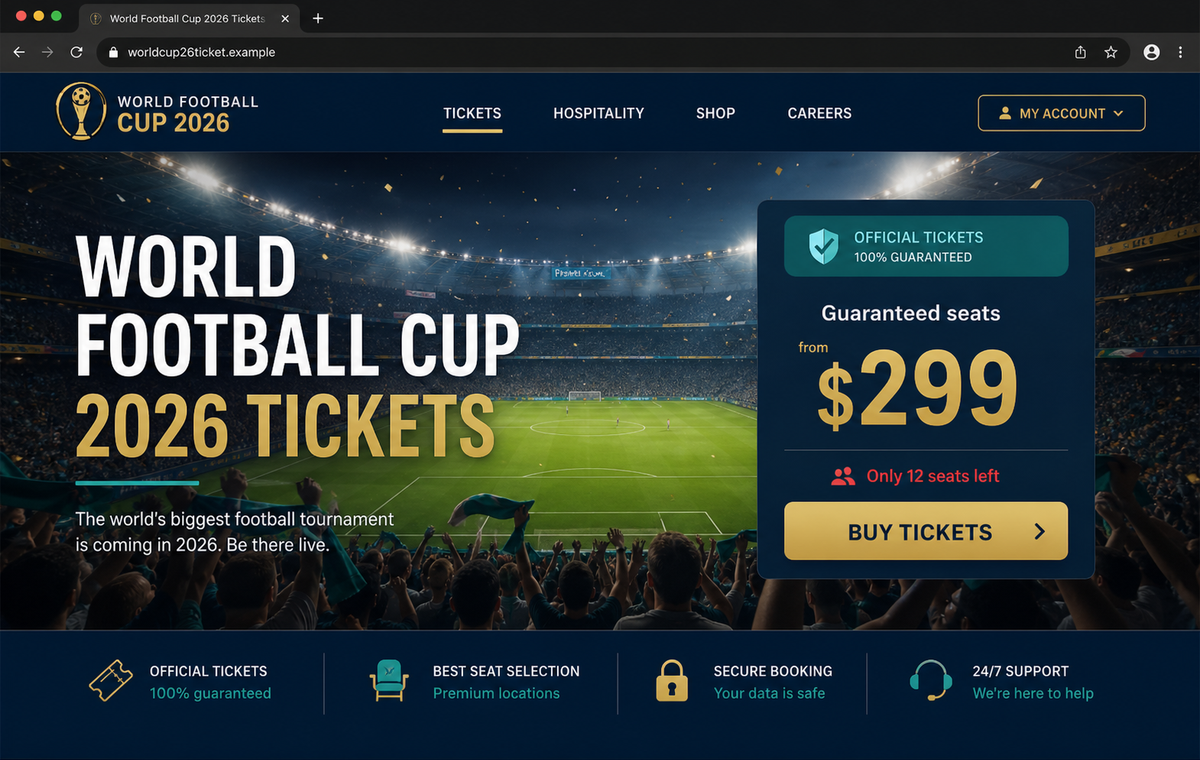
A website says it still has guaranteed 2026 World Cup seats from $299. The page looks official, the reservation timer is already running, and a checkout form is ready before the visitor has time to ask who actually owns the domain.
FIFA 2026 World Cup Scams are not limited to one fake ticket store. The campaign includes imitation hospitality portals, merchandise shops, careers pages, login forms, and typo-filled copies of FIFA's real website.
The shared goal is to convert tournament excitement into fast trust. Victims may pay for tickets that do not exist, submit card and identity data, reveal reused passwords, or send job documents to an operator posing as an official organizer.
The FBI and IC3 have warned that spoofed FIFA domains are already active and more are expected through the tournament. Start at fifa.com, avoid sponsored imitators, and verify the precise sales or careers route before entering information.
Overview
One tournament theme supports several different frauds
Fake ticket pages advertise scarce seats, premium matches, and guaranteed delivery.
Imitation hospitality sites sell invented packages, counterfeit stores collect payment for merchandise, and careers portals harvest résumés, identification, and banking information.
Some variants add a false FIFA login or account-verification page. A visitor who reuses a password may expose email, shopping, travel, or financial accounts even if no purchase is completed.
Spoofed domains are designed for a quick glance
The FBI says threat actors use minor misspellings, extra words, misleading subdomains, and alternative top-level domains to imitate fifa.com.
Addresses built around tickets, jobs, hiring, stores, or World Cup 2026 can sound official without belonging to FIFA.
A page may copy logos, event photography, partner names, venue lists, and support language. Those assets are public and easy to reproduce, while the registered hostname remains the stronger indicator of who controls the site.
The checkout can steal more than the ticket price
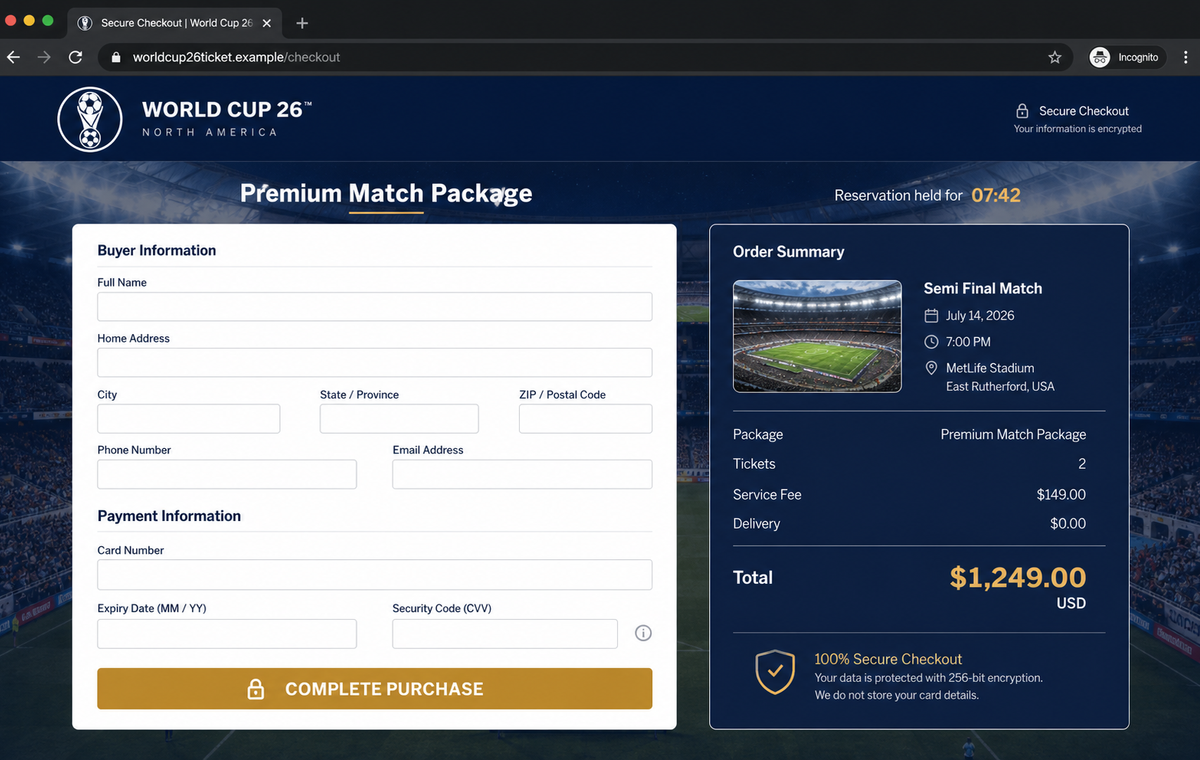
Fraudulent checkouts request names, home addresses, telephone numbers, email addresses, card details, and security codes. A failed payment message may encourage the victim to try another card, giving the operator multiple usable accounts.
The collected profile can support unauthorized charges, identity fraud, account takeover, and targeted follow-up messages. A fake job portal may obtain passports, tax details, résumés, and bank information without processing any payment at all.
- Fake ticket stores promise guaranteed or sold-out seats.
- Invented hospitality packages use premium prices and urgency.
- Counterfeit merchandise shops copy official-looking products.
- Careers pages collect résumés, identity documents, and banking details.
- Imitation login screens steal email and reused passwords.
- Typosquatted domains differ from fifa.com by small details.
- Sponsored results and social ads can place impostors above organic links.
- Checkout timers pressure visitors to complete payment quickly.
- Victims may receive no ticket, product, interview, or refund.
- FIFA routes should be reached from the official fifa.com website.
What the FBI Warning Says About 2026 World Cup Spoofing
In a May 2026 public-service announcement, the FBI warned that threat actors were spoofing FIFA websites ahead of the tournament. The agency expects additional fraudulent domains to appear leading up to and throughout the event.
The identified activity is broader than simple counterfeiting. Spoofed sites can collect names, addresses, phone numbers, email addresses, and banking information, sell fake tickets or hospitality products, and support other malicious activity.
The FBI's examples include domains built around FIFA, tickets, careers, hiring, and World Cup 2026. Some contain misspellings such as extra or substituted letters, while others use convincing words on unrelated domain endings.
Its safety advice is practical: type fifa.com directly, verify that the address is correct, avoid sponsored search results that may be paid imitators, and reach subdomains through the official homepage rather than guessing them.
Official ticket availability can change, which is exactly why scarcity claims are effective.
A sold-out session, long queue, or high resale price may drive fans toward a page that promises immediate inventory without explaining its authorization or ticket-delivery process.
The existence of a real match, venue, team, sponsor, or sale phase does not authenticate the seller. Criminals can copy accurate tournament details and place them around an invented inventory and fraudulent checkout.
How Fake Ticket, Store, Hospitality and Careers Pages Differ
Ticket pages concentrate on scarcity. They advertise guaranteed seats, show low-inventory warnings, and hold a reservation for several minutes. The timer makes comparing the seller, seat category, refund rules, and domain ownership feel risky.
Hospitality versions use premium language, lounges, transport, hotels, or VIP access to justify larger charges. They may copy legitimate package descriptions while replacing the authorized sales route with an attacker-controlled payment page.
Counterfeit stores focus on discounts and event-branded products. Some simply take payment and disappear, while others ship low-quality goods that do not establish any authorization or protect the card data submitted at checkout.
Careers portals replace purchase urgency with opportunity. Applicants are told that tournament hiring is moving quickly and may be asked for a passport, Social Security or tax identifier, direct-deposit form, background-check fee, or equipment payment.
Login variants ask visitors to create or verify a FIFA account before viewing inventory. A familiar email and password combination can then be tested against the real mailbox and other services through credential stuffing.
Across every version, the domain is the unifying weakness. A copied design, HTTPS lock, real venue, and working customer-service chat do not make an address outside FIFA's documented routes official.
How the FIFA 2026 World Cup Scams Work
Step 1: Ads, messages and search results target tournament demand
Operators buy sponsored search placements, run social-media advertisements, create fan posts, send phishing emails, and share links through WhatsApp or Telegram. The offer is positioned where a fan is already looking for scarce tickets or official merchandise.
A compromised account belonging to a friend, travel page, or sports community can make the recommendation feel personal.
Step 2: A typo or extra word creates an official-looking domain
The address may add “tickets,” “store,” “jobs,” or “2026” to FIFA's name, swap a letter, or use an unusual ending. The visitor recognizes the event words and may never isolate the registered domain.
Subdomains and long paths can place fifa.com-like text on the left while the operator's actual domain appears farther to the right.
Step 3: Copied branding and accurate details establish credibility
The page reproduces event colors, stadium photography, schedules, city names, partner references, and product images. Accurate public details help the fake inventory blend with the real tournament.
Customer counters, review badges, availability maps, and support widgets can be fabricated directly in the page code.
Step 4: Scarcity or opportunity blocks careful comparison
Ticket and hospitality pages show low stock and countdowns. Stores display a short discount window, while job pages claim interviews or application slots are filling quickly.
The emotional pressure differs, but each version tells the visitor that independent verification could cost the opportunity.
Step 5: The form harvests payment, login or identity data
A checkout collects contact and card information. A login page records credentials, and a careers form may request a résumé, passport, tax details, bank account, or fee for screening and equipment.
Fields that look standard are dangerous when the recipient has not verified the organization receiving them.
Step 6: Errors and follow-ups extract additional value
The payment may fail deliberately so the buyer tries another card. A fake agent may call to request a one-time code, bank transfer, cryptocurrency payment, identity scan, or additional processing fee.
Job applicants can be moved to encrypted messaging where impostors send checks, request equipment purchases, or collect more documents away from the public site.
Step 7: The domain vanishes while stolen data fuels new fraud
No valid ticket, package, product, or job materializes. The website can disappear after complaints and return under another address with the same template.
Payment data may be used for unauthorized charges, credentials tested elsewhere, and identity details reused in account creation or highly personalized follow-up scams.
Company and Checkout Checks
Start every World Cup journey at fifa.com
Type the address directly or use a trusted bookmark. Navigate from the official homepage to tickets, hospitality, merchandise, or careers instead of guessing a domain or trusting a sponsored result.
If an offer cannot be reached or confirmed through the official route, do not pay or submit documents.
Verify the seller and ticket-delivery chain
Identify the legal seller, authorization, seat category, delivery method, refund terms, support details, and charge descriptor. Search official FIFA information for the named provider rather than relying on badges shown by the seller.
A promise of guaranteed seats is not evidence that the seller controls valid inventory.
Inspect the entire registered hostname
Read the address carefully for duplicated letters, substitutions, extra hyphens, unusual endings, and misleading subdomains. Remember that a padlock proves encryption to the displayed host, not FIFA ownership.
Avoid sponsored results when searching, as the FBI specifically warns that paid imitators can divert traffic.
Treat job requests like a formal hiring process
Confirm the vacancy through the official careers route and communicate through documented corporate channels. A real employer should not require gift cards, cryptocurrency, wire transfers, or payment for equipment before employment.
Do not send identity or bank documents until the employer, role, interviewer, and secure application system have been independently verified.
Warning Signs to Check Before You Act
- The seller promises guaranteed seats that are unavailable through official channels.
- A countdown says the reservation will disappear within minutes.
- The domain adds tickets, hiring, store, or 2026 around FIFA's name.
- The result is marked Sponsored and leads outside a documented FIFA route.
- The page treats a lock icon as proof of authorization.
- The legal seller and ticket-delivery method are unclear.
- Card entry occurs before a verifiable seat or order record appears.
- A failed payment prompts the buyer to try another card.
- Payment is requested by wire transfer, cryptocurrency, or gift card.
- A job recruiter moves the interview to a private messaging app immediately.
- An applicant must pay for screening, training, or equipment.
- The same offer cannot be confirmed from fifa.com.
Tournament excitement changes quickly, but verification does not. A genuine seller or employer should survive a direct check through FIFA's official site, documented partners, and established payment or hiring records.
What to Do if You Have Fallen Victim to This Scam
- Stop all payments and communication. Do not send another fee, card, document, code, or explanation. Save the page and messages first, then block the operator and avoid links in any follow-up claiming to confirm or refund the order.
- Call the card issuer or bank immediately. Use the number on the card or official application. Explain that the payment involved a fraudulent event site, dispute eligible charges, replace exposed cards, and ask whether pending transfers can be stopped.
- Secure any password entered on the site. Change it through the real service, starting with the email account. Replace reused or similar passwords, revoke sessions, enable strong multi-factor authentication, and review recovery methods and forwarding rules.
- Protect identity information submitted to a job or checkout form. Document exactly what was shared. Use IdentityTheft.gov or the relevant national service to create a recovery plan, and consider fraud alerts, credit freezes, and replacement documents when appropriate.
- Preserve the complete transaction record. Keep the domain, screenshots, product or ticket description, seat claims, receipt, merchant name, charge descriptor, emails, chats, telephone numbers, and payment records. Do not alter originals.
- Confirm whether any ticket or order exists officially. Contact FIFA or the documented provider through fifa.com. A fake confirmation number shown on the scam site is not evidence that a valid ticket, hospitality package, product order, or application was created.
- Scan the device if anything was installed. Run a full Malwarebytes scan if the page delivered a ticket app, browser extension, PDF reader, remote-support tool, or other download. Remove unfamiliar software and update the browser and operating system.
- Add protection against malicious ads and domains. AdGuard or another reputable content and DNS blocker can stop some known scam pages and advertisements. Continue typing official addresses directly because new tournament domains may appear before blocklists update.
- Report the website and advertisement. File a complaint with the FBI IC3 or your national cybercrime authority, notify FIFA, report the advertisement or social account, and send the domain and evidence to the hosting provider and registrar.
- Warn travel companions and contacts. Tell anyone who received the link, shared payment, or supplied passenger details. If a compromised social or email account promoted the offer, warn its contacts through another channel.
- Reject refund and ticket-recovery guarantees. Criminals may pose as investigators, FIFA agents, banks, or chargeback specialists. Do not pay an upfront recovery fee or share remote access, one-time codes, card data, or identity documents with an unsolicited helper.
Frequently Asked Questions
Are the FIFA 2026 World Cup websites described here genuine?
No. They are spoofed pages built to sell fake tickets or services and collect payments, credentials, or identity information while impersonating FIFA and related partners.
What is the safest place to buy World Cup tickets?
Begin at fifa.com and follow the current official ticketing route published there. Do not rely on sponsored search results, social advertisements, or domains that merely contain FIFA-related words.
Does HTTPS prove a ticket site is official?
No. HTTPS encrypts the connection to the domain in the address bar. A scammer can obtain a certificate for a lookalike domain and still operate a fraudulent checkout.
Can a fake careers page steal my identity?
Yes. A résumé, passport, tax identifier, address, telephone number, and bank details can support impersonation and financial fraud even when no job or fee exists.
What if the site showed a real match and stadium?
Public schedules and venue details are easy to copy. Accurate event information does not prove the seller owns tickets, is authorized, or protects payment data.
What should I do after paying for fake tickets?
Contact the payment provider immediately, preserve evidence, dispute eligible charges, secure exposed accounts, report the domain and advertisement, and ignore unsolicited recovery offers.
The Bottom Line
FIFA 2026 World Cup Scams use one global event to support several forms of theft. Fake ticket, hospitality, store, login, and careers pages can all look polished while operating from domains that FIFA does not control.
Type fifa.com directly and navigate from the official homepage. Verify the seller, inventory, delivery, refund, payment, and hiring route before submitting money, passwords, card data, or identity documents.
If you were caught, act quickly with the bank, secure exposed accounts, protect identity records, preserve the website and transaction evidence, scan downloaded files, report the campaign, and reject anyone promising guaranteed recovery for another fee.

Join the discussion
0 commentsShare your experience or ask a question about this article.
Discussion
Start the conversation
Have a question or something useful to share? Add the first comment.