

The phone already knows the name of your bank. The voice on the other end sounds tired in a helpful way. There is a problem with the card, they say. A hold. A security check. They stay on the line while you unlock the phone, while you allow an install, while you grant a permission that looks like customer support. Then they ask you to tap the contactless card on the back of the handset, just to verify the account. You are still holding the plastic.
Overview
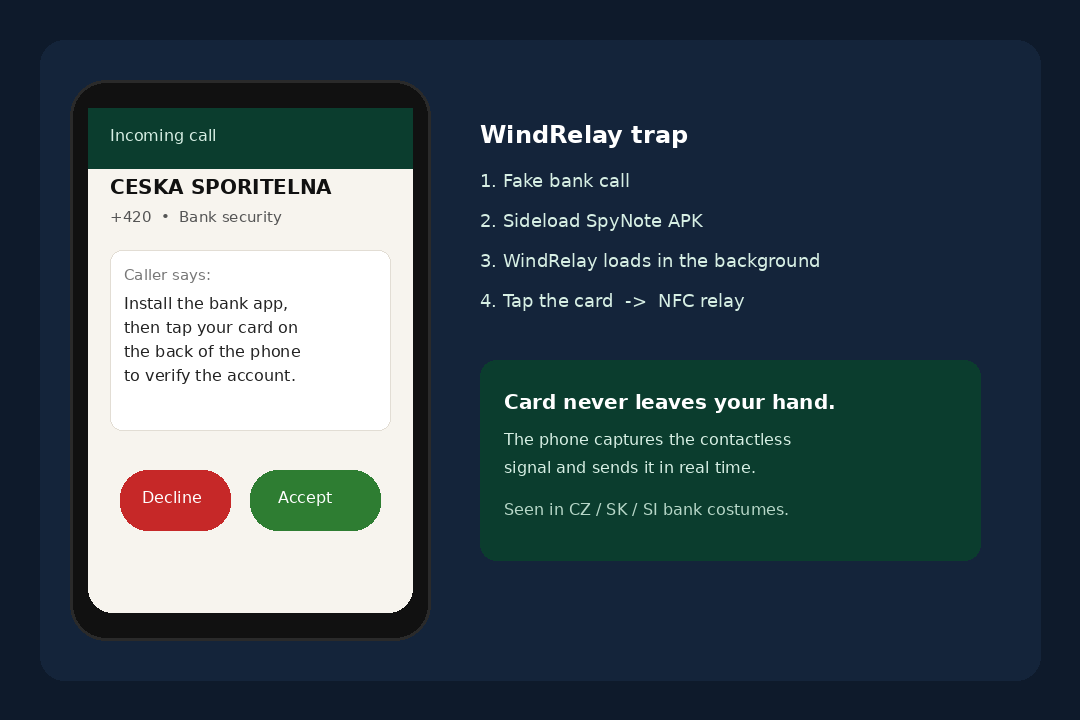
They take the card. They get it with a fake bank call that talks you into an install, then a tap on your own phone that relays the contactless handshake live. After you cooperate, a purchase or a cash-out happens somewhere else while the plastic is still in your hand. You are told the tap will confirm the account. What it confirms is a payment you did not mean to make.
The call is the trap, not a tour of Android threats. A fake bank employee talks you into sideloading an APK. That first file is SpyNote, a real remote access trojan with a builder that can dress each copy in a new name, icon, and package. Once SpyNote is in, WindRelay can arrive without a second conversation. Then comes the sentence that does the damage: tap your card on the phone to verify.
This is not ransomware. Nobody locks your photos and leaves a note. The damage is a contactless payment or a cash-out that the bank later ties to a relay, plus a phone that may still be answering to a stranger. If you already tapped, treat the card as used and start with the bank, not with a search for a miracle cleaner.
The tap is the product
Most phone scams want a code, a password, or a transfer you type yourself. This one wants a physical gesture you already trust. You tap that same card on buses, grocery readers, and the back of a friend’s phone when they are collecting for dinner. The motion feels ordinary. The caller is counting on that.
A contactless card does not hand over a static number the way a photo of the plastic would. Each tap produces a short, one-time conversation between the chip and a reader. WindRelay’s job is to sit in the middle of that conversation and stream it live. The person on the other end of the relay can present that same live exchange to a real terminal or to a cash machine that accepts a tap. The card stays in your kitchen. The purchase does not.
That is why the caller stays on the line. A text with a link can be ignored. A voicemail can wait until morning. A live voice can answer your hesitation, tell you the install is normal, and time the tap so the other end is already standing at a reader. Group-IB’s case study of this pairing ran inside a single 13-minute call. The victim installed the first app. Everything after that was done by the person on the phone.
Two apps share one phone call
Keep the names straight, because the campaign depends on mixing them up. SpyNote is a remote access trojan. It has been around for years as a real RAT, the kind of tool that lets someone else drive a phone after you grant the wrong permission. In this scheme it is the door. It is the app you are talked into installing while the caller pretends to be from the bank.
WindRelay is the NFC piece. It is not a second bank. It is not a security update. It is the app that talks to the card when you tap, then sends that live exchange out over the internet. Group-IB tracks the pairing as a toolkit: remote control for the device, and a cash-out channel that uses the card you are still holding.
You may only remember installing one thing. That is expected. SpyNote is the install you consent to under pressure. WindRelay is the install you may never be asked about. The caller does not need you to understand package names. They need you to stay on the line, keep NFC on, and put the card on the glass when they say verify.
A costume from a local bank
The samples Group-IB tied to this family were not sold as a generic “card helper” with a cartoon icon. They wore the look of local banks. The public research points to campaigns aimed at Czechia, Slovakia, and Slovenia, with language and costumes that match those countries. The caller ID can look like the bank you already use. The app label can look like a support tool from that same desk.
Do not treat a familiar bank name on a download as proof. A real bank does not call you out of the blue and walk you through an APK from outside Google Play. A real bank already has an app in the store you have used for years. If a voice tells you to install a fresh package to “secure the card,” the voice is not the bank. The costume is doing the work that a Play listing cannot do, because this malware is not on Google Play.
The builder behind SpyNote makes that costume cheap to reprint. Operators can set a new app name, a new icon, and a new package for each target. Some copies even use a personal label, so the thing you install looks like it was made for you. That is not a compliment. It is a way to remove the one cue people are trained to notice: a strange name on an unknown file.
What the phone takes from the card
People picture card theft as a skimmer that stores a number, or a photo of the front and back. WindRelay is after something more specific and more time-sensitive. When you tap, the chip produces authentication data for that moment. A relay that happens in real time can carry that one-time exchange to a reader that is not in the room with you.
The caller often asks for the PIN as well. They will say it is part of the verification, or that the bank needs it to lift a hold. A PIN typed while a relay is live is not a test. It is the approval the other end needs. Group-IB described transactions that went through on the PIN the victim entered during the same call. You thought you were proving you still had the card. You were signing the purchase.
In the same session, the remote-access half can open the real banking app you already installed from the store and try a second cash-out, such as a loan in your name. That is a separate wound from the tap. It is why a “I still have the card in my wallet” check is not the end of the story. The phone may have been used as you, not only as a reader.
Why the plastic in your hand is not proof
Every older fraud story taught the same comfort: if you can see the card, nobody else can use it. Contactless relay breaks that comfort on purpose. The chip is doing what it was designed to do. It is talking to a reader that is a few centimeters away. The crime is that the reader is your phone, and the phone is forwarding the talk.
You will not feel a second tap. You will not see a shop receipt print in the kitchen. You may hear the caller say “one more time” or “hold it still” the way a cashier does when a reader is slow. Those lines are staging. They keep the card in range while the other end completes a payment. When the call ends, the first proof may be a notification from the real bank, or a charge that looks like a store you never visited.
That delay is part of why people freeze. The card is still there. The wallet is still there. The phone looks the same. The damage is on a statement, not on the lock screen. If a charge appears after a “bank security” call, do not wait to see whether it reverses itself. Call the number on the card and say you tapped the plastic on your own phone because a caller told you to.
The fake bank call and the card relay
The fake bank call is the door. A voice that already knows your bank stays on the line while you unlock the phone, allow an install, and grant a permission that looks like support. The costume can match a local bank. The caller ID can look like the desk you already use. The next copy will not be named WindRelay on the home screen. It will be named like a bank, or like you.
The card relay is the product. You are told to tap the contactless card on the phone to verify. The phone captures the live handshake and sends it out while someone else pays or withdraws. You are still holding the plastic. The money still moves.
Activity has been visible since at least November 2025. Group-IB counted 23 samples on VirusTotal between that month and July 2026. That is not a one-week stunt. It is a product with new costumes. A clean scan five minutes after the call is not a blessing. The behavior is the tell: a cold call, a sideload, a tap.
How The Scam Works
You do not need a lab diagram to stay safe, and this page will not teach anyone how to build a relay. What you need is the plot, because each step is designed to feel like help. A call. An install. A permission. A tap. Then a charge that does not match the room you are standing in.
1. The call that already knows your bank
The first contact is a voice. That matters. A phishing page can be closed. A caller who already says the name of your bank, and already claims there is a problem with the card, has you in a conversation before you have had time to doubt the number. They will talk about a hold, a suspicious payment, a card that will be blocked if you do not verify. Urgency is the product. The malware is the checkout.
This is vishing, a voice scam, not a Google Play listing. The person may have your name. They may have a partial card number. They may have nothing and still sound official because they use the same words a real fraud desk uses. Caller ID can be spoofed. A green “bank security” label on the screen is not a badge. It is paint.
The honest move at this point is boring and it works. Hang up. Unlock the phone only far enough to find the number printed on the back of the card, or the number in the official banking app you already had yesterday. Call that. Ask whether anyone from the bank is on an active security call with you. If the answer is no, the first voice was the scam.
2. You are walked into a sideload
If you stay on the line, the next ask is an install. Not from Google Play. From a link, a browser download, a file the caller tells you to open, or a package installer prompt that Android shows when an APK arrives from outside the store. The caller will treat that warning as a nuisance. They will say “tap Allow,” “tap Install anyway,” “it is our new security app.” Those sentences exist to override the one dialog that might have saved you.
Sideloading is the official name for installing an app that did not come from Play. Google documents how that path works, and how Play Protect can still warn you, in the Play Protect help pages. A bank that actually needs you to use an app already published that app in the store. A voice that needs you to leave the store needs you to leave the store for a reason.
The file can wear a calm name. Bank support. Card verify. A label that includes your own first name. The builder is there so the icon on the home screen does not look like malware. It looks like the call you are still on. If Android asks whether you want to install from that source, the answer for a surprise bank call is no. You can finish the sentence after you hang up.
3. The first app is SpyNote, not the bank
Once the package is on the phone, the caller needs control. SpyNote is a remote access trojan. In plain language, it lets the person on the call drive parts of the device after you grant the kind of permission a real support tool should never need. Accessibility is the common ask. The screen will talk about helping with gestures, or reading the display for you, or giving full control so the “agent” can fix the problem faster.
That permission is the hinge. After it is on, you are no longer the only person who can tap Install. You are no longer the only person who can open the real banking app you already trust. Group-IB’s account of the pairing is blunt about this split. The victim installed the RAT. The fraudster did the rest. No screen-share window has to pop up for that to be true. Remote access and a shared desktop cartoon are not the same thing.
If you already granted Accessibility to an app you installed during a bank call, treat the phone as occupied. Do not open the banking app “just to check.” Do not type a password to see the balance. Do that from a different device after you have called the number on the card. The first app is not a security update. It is a seat for someone else.
4. WindRelay loads without another yes
This is the quiet scene. You may still be holding the phone to your ear. You may be watching a progress bar the caller told you not to close. In the background, a second app can be pushed through the same package installer. That second app is WindRelay. You are not asked to shop for it. You are not asked to read a second privacy screen. The first compromise is used to place the relay.
WindRelay needs NFC, because the card talk happens over that radio. It needs internet, because the live exchange has to leave the phone. Group-IB also described contacts access and a diagnostics-style permission used to inspect the device and resist security tools. Those are not the permissions of a calculator. They are the permissions of a reader that wants to stay on the phone after the call ends.
If you later scroll your app list and see a second unknown icon with a bank costume, or a name that matches the call, that is not a bonus feature. That is the relay sitting where a game used to sit. Do not open it to “see what it is.” Uninstall is the move, after you have already called the bank about the card.
5. Permissions that sound like support
Android permission screens are written for engineers and then shown to people who are scared. NFC sounds like tap-to-pay, which you already use. Internet sounds like every app. Contacts sounds like a bank that wants to warn your family. Diagnostics sounds like a technician. The caller will translate each prompt into care. “That is so we can see the card.” “That is so we can check the phone for viruses.” “That is so we can call you back.”
Read the prompts as if a stranger in a parking lot asked for the same things. Would you let that stranger turn on the contactless radio, read your contacts, and inspect the phone while you hold your card against the glass? The call is that parking lot, with better lighting. A real bank employee who reached you on a recorded line does not need your contacts list to lift a hold. They need your date of birth on a system they already have, and they need you to call them back on the number they printed on the plastic.
If a prompt mentions Accessibility, device admin, or the ability to install other apps, that is the stop sign. Those are not card-verification tools. Those are control tools. Deny them. Hang up. If you already allowed them, the recovery section below starts with taking them back, after the card is frozen.
6. Tap the card to verify
This is the moment the whole call was built for. The voice gets warmer. They tell you the install worked. They tell you the last step is a tap, the same tap you do at a store. Hold the card to the back of the phone. Wait for the vibration. Enter the PIN if the screen asks. Keep the card there. Do not move. Some callers will ask for a second tap if the first one “did not read.”
There is no honest reason for a bank to collect a live contactless handshake on your personal phone during an inbound call. Your bank already issued the card. Your bank already knows the account. A tap on your own glass does not prove you are you in a way a callback would. It only proves the chip is in range of a reader the caller now controls.
If you have not tapped yet, do not. Put the card down. End the call. If you already tapped, assume the relay happened. The rest of this page is written for that assumption, not for a wish that the reader was broken.
7. The live relay
On your side, the scene is small. A phone. A card. A voice. On the other side, Group-IB describes a second device that presents the same live exchange to a real merchant terminal or, in some cases, a cash machine that accepts contactless withdrawals. The two ends are talking through the internet as if they were a few centimeters apart. That is the relay. It is why the timing is tight, and why the caller will not let you “do it later.”
This page will not walk through radios, emulators, or server tricks. The consumer fact is enough. A tap on an infected phone can be spent in another room, in another town, while you are still holding the card. The approval can be the PIN you typed because you were told the bank needed it. The notification can arrive after the voice is gone.
Public research on this family does not publish a victim dollar figure that belongs in a headline, and nobody here will invent one. The loss is whatever the terminal accepted while the tap was live, plus whatever the remote-access half did inside the real banking app. That can be a purchase. It can be cash. It can be a loan you did not walk into a branch to request. Ask the bank to look at all three, not only the last shop name on the statement.
8. After you hang up
The call ending is not the all-clear. WindRelay is still an app until you remove it. SpyNote is still a seat until you revoke it. The card is still a live instrument until the bank blocks it. Group-IB wrote that physical card transactions started showing up after the call, and that the bank later tied them to NFC relay activity. That sequence is the one to expect: a quiet kitchen, then a notification.
The samples behind this are not a single APK that everyone on earth received. Twenty-three copies landed on VirusTotal between November 2025 and July 2026, aimed at those Central European bank costumes, with new names as needed. The next victim will not search for WindRelay. They will search for the bank that seemed to call. If that is you, search the bank’s real site on a computer you type yourself, not a link from the person who called.
Google Play is not the distribution path. If a friend forwards an APK “from the bank,” that is the same sideload with a different voice. The store listing you already have is the only bank app that should be on the phone. Anything that arrived during a scare call is a suspect, even if the icon looks expensive.
What To Do If You Already Tapped the Card
If the card already touched the phone, stop proving things to the caller. The next moves are practical and they have an order. The card first. Then the phone. Then the logins. Shame is not a step. Plenty of careful people have tapped a card because a calm voice used the bank’s name. The work now is to make the next tap useless.
- Hang up and use the number on the card.
End the call. Do not call back the number that just rang. Do not send a code if a text arrives “from the same desk.” Turn the plastic over and use the printed service number, or open the official banking app you already had on a different device, or use the number on the bank’s real website that you type from memory. Say this sentence in plain words: someone claiming to be from the bank had me install an app and tap my contactless card on my own phone.
Ask them to block the card. Ask them to watch for contactless payments and cash-machine taps, not only online orders. Ask them to look at loans, new payees, and transfers that started during the call. If you typed a PIN, say so. If you granted Accessibility, say so. The fraud desk cannot see the kitchen. They can see the session if you give them the time.
If the bank offers an instant freeze in the official app, use that on a device that did not take the call. A freeze is not rude. It is the difference between one tap and a night of them. You can argue about a replacement card after the live instrument is dead.
- Treat the card as already used.
Leave the card in a drawer until the bank says it is blocked. Do not tap it on a bus to “see if it still works.” Do not tap it on a store reader to check the balance. Every extra tap is another chance for a phone that may still be relaying. If you have a second card on the same account, ask the bank whether that one should be blocked too. Some people keep a backup in the same wallet. The caller may have asked about that backup.
Watch the official statement, the official app, and the SMS alerts the bank already had configured yesterday. A charge that looks like a supermarket you never entered is not a glitch. A cash withdrawal in a city you are not in is not a glitch. A pending amount that later settles is still a reportable event. Write down times. Write down what the caller asked you to tap. You do not need a perfect dossier. You need a timeline a fraud agent can use.
If money already moved, say so in the first minute of the bank call. Speed beats a polished story. In the United States you can also file at the FTC fraud report form and, for a cyber crime record, at the FBI’s IC3. If you are in Czechia, Slovakia, Slovenia, or anywhere else, use your national police cyber report and the bank’s local fraud line. Keep the filename of the APK if it is still in Downloads. Keep the time of the call. You are building a file, not waiting for a movie arrest.
- Uninstall the unknown apps.
On the phone that took the call, open the app list and look at anything installed today. Bank-looking icons you did not download from Play yesterday. A package with your own name. A “support” tool the caller mentioned. Uninstall those. Android’s own steps for deleting an app are enough. You do not need a third-party uninstaller from a search ad.
If an app refuses to disappear, it may have grabbed device-admin rights. Open Settings, search for device admin or device administrators, and revoke anything you do not recognize that arrived with the call. Then try uninstall again. If the phone will not let go, a factory reset is the honest later step, after the card is blocked and the bank passwords are changed from another device. A reset is not the first button. It is the clean floor after you have saved the accounts.
Do not keep the APK “for evidence” in a cloud folder that syncs to other phones. Copy a filename onto paper if you want a record. Then delete the file from Downloads. A souvenir installer is how the same package gets opened next week by someone else in the house who is trying to be helpful.
- Take Accessibility back.
Settings, Accessibility, installed services. Turn off any service you enabled while the caller was talking. If you do not remember the name, turn off every service you do not use for a real disability feature or a keyboard you chose on purpose. You can turn a genuine service back on later. You cannot un-send a session that is still live.
Then look at special app access: install unknown apps, display over other apps, usage access, notification access. Revoke those for anything that arrived today. The goal is to stop the phone from being someone else’s remote, not to win a settings quiz. If a menu is confusing, the bank fraud line and a phone-savvy friend in the room are better than a YouTube video that wants you to download one more APK.
NFC can be switched off in Settings while you sort this out. That will not undo a tap that already happened. It will stop the next one if an app is still sitting there. You can turn NFC back on when the unknown apps are gone and the bank has issued a new card.
- Scan with the antivirus you already trust.
Use the security app that is already on the phone, the one you chose on purpose or the one the manufacturer shipped. Update it if the phone can do a short, supervised update. Run a full scan. If the result mentions Android/Spy.NGate.AR or HEUR:Trojan-Banker.AndroidOS.NGate.c, you have a name for the bank call. Quarantine or delete what it finds. Then keep going with the account work. A scan is not the whole cleanup.
Do not install a new “WindRelay remover” from a search result. Do not install a second antivirus because a comment promised a miracle. That search is how people add a second infection to a phone that already has one. Play Protect, if it is on, can stay on. Google describes it in the same Play Protect help pages linked above. It is a layer, not a pardon. It does not make a sideload from a vishing call safe.
If the phone is a work device, tell IT the same day. If it is a family phone, tell the other adult who shares the account. The contacts permission on WindRelay exists for a reason. People you know may get a follow-up call that uses your name. A short warning is kinder than silence.
- Change bank logins from another device.
Pick up a tablet, a laptop, or a second phone that did not take the call. Open the real banking site or the official app already installed there. Change the password. Turn on the strongest extra sign-in the bank offers. Review devices and sessions. Kick anything you do not recognize. If the bank shows recent password changes or new payees, treat those as part of the same incident.
Do not change that password on the infected phone. Do not approve a new device prompt that pops up on the infected phone while you are working on the clean one. If a push ask arrives, deny it and call the bank. The remote-access half of this pairing is built to sit inside the real app. A new password typed on the dirty glass is a new key copied in the hallway.
Email next if that inbox is the recovery address for the bank. Change it on a clean device. Check forwarding rules. Then any payment app that was on the same Android: a wallet, a peer-to-peer app, a shopping login that stored the card. You do not need to burn every account at 1 a.m. You do need the money paths and the inbox that can reset them. CISA’s household list on Secure Our World is the dull version of that advice: unique passwords, multi-factor authentication, and software you did not collect from a stranger on a call.
- If someone else in the house answered.
Parents, grandparents, and anyone who still treats a bank call as a civic duty are the easiest marks for this script. If that is your person, stay on the practical path. Get the time of the call. Get the name they thought they heard. Get the card that was tapped. Then do the same freeze, the same uninstall, the same Accessibility revoke. Do not start with a lecture about malware families. Start with the number on the card.
If they already typed a PIN, say that in the first sentence to the bank. If they already installed “the new bank app,” look at the home screen together and delete it. If they are embarrassed, let them be embarrassed after the card is dead. The caller wrote the script so a kind person would comply. Kindness is not the failure. Staying on the line was the failure, and that is reversible if you move.
A factory reset is reasonable when the phone belonged to someone who granted everything the voice asked for and you cannot tell which icon is the relay. Back up only photos you are sure are photos. Do not back up Downloads. Do not restore a full device backup that will put the same APK back. Set the phone up as new, install the official bank app from Play, and leave NFC off until the replacement card arrives.
The Bottom Line
The call is the trap. A voice that already knows your bank walks you into a tap on your own phone. That tap is not a verification. It is a live contactless relay while the plastic is still in your hand.
Real banks do not walk you through an APK on an inbound line, and they do not need a tap on your own glass to prove you have the card. If the tap already happened, hang up, freeze the card from a number you already trust, remove the unknown apps, and change the bank login from another device.

Join the discussion
0 commentsShare your experience or ask a question about this article.
Discussion
Start the conversation
Have a question or something useful to share? Add the first comment.