

Cool Cove appears in ads as a simple answer to an uncomfortable room. The device is small, the price looks low, and the page says cooling starts within minutes.
Searching the name creates a more basic problem. Several Cool Cove websites are active, but they do not agree on what the product is or how it works.
That leaves two important questions before checkout: which machine will arrive, and which company is responsible for the order?
Overview
Cool Cove is a marketing name, not one consistent appliance
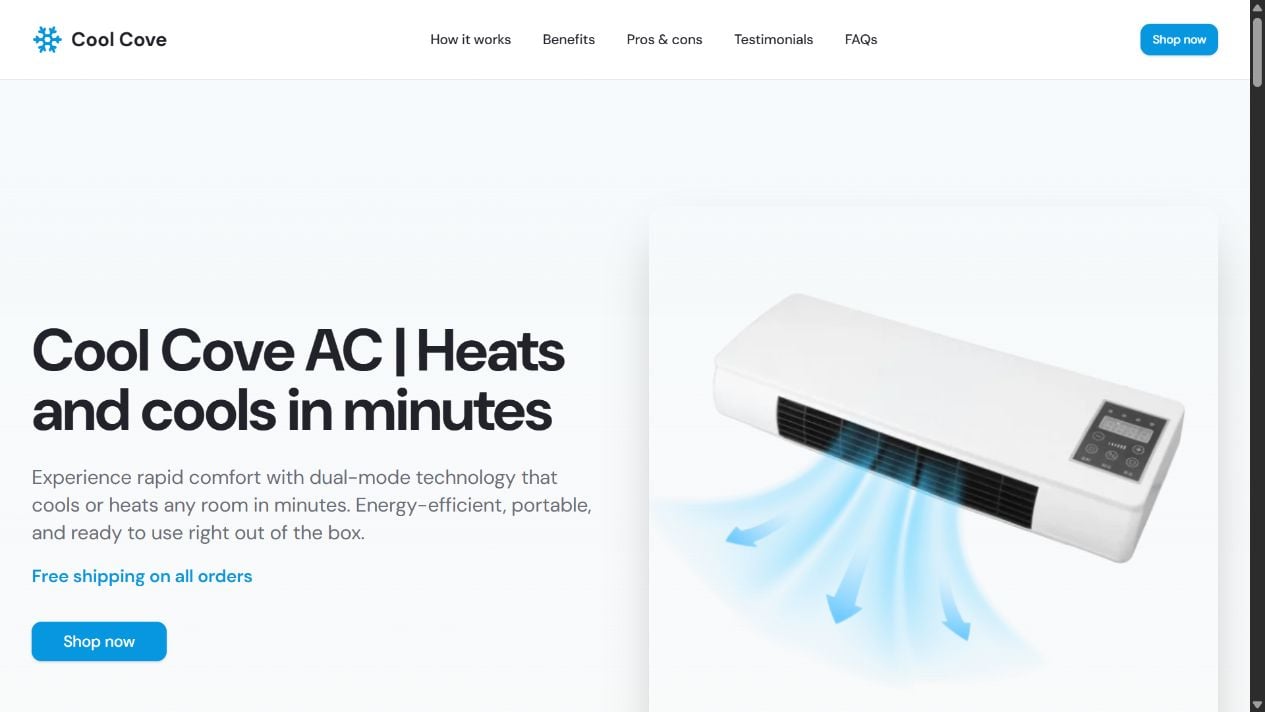
The active pages disagree about the product’s appearance, cooling method, tank, coverage, power, price, and time needed to work. Those are core specifications, not minor regional differences. A trustworthy appliance brand should let a buyer identify the exact model before leaving the promotional page.
The sales pages hand buyers to other domains
Coolcove.net sent its Shop Now buttons to RushMyOffer. Coolcove-us.org used a PremierDiscountLink redirect. Coolcove-ac.net sent purchase clicks to Buy4Now, which then forwarded the browser again. These hops separate the persuasive claims from the party that may process payment or handle a return.
Complaint patterns go beyond weak cooling
Independent reviewers describe products that work like ordinary fans, long shipping delays, expensive returns, unwanted quantities, refund trouble, and disputed add-on charges. Reviews are allegations rather than adjudicated facts, but their themes match the risks visible in the funnel.
- Coolcove.net version: A slim heater and evaporative cooler with a water tank, advertised for up to 350 square feet.
- Coolcove-us.org version: A no-tank Cool Cove said to work in under ten minutes, promoted from $329.99 to $99.99.
- Coolcove-ac.net version: A wall or tabletop heater and fan, listed at 400 to 800 watts and advertised for 549 square feet.
- Checkout structure: Promotional pages route buyers through unrelated affiliate and redirect domains.
- Main warning: The Cool Cove name does not tell you which product, seller, return policy, or billing arrangement you are about to receive.
Three Sites, Three Conflicting Products
The fastest way to see the problem is to compare the live offers. These claims can change, and the final checkout may show another version. The details below record what each page said during our review.
- coolcove.net: An evaporative cooler and ceramic heater with a refillable water tank. It claims 350-square-foot coverage, 73% lower energy use, and $40 to $80 in monthly savings. Its buttons lead to rushmyoffer.com.
- coolcove-us.org: A no-tank cooling and heating unit said to work in under ten minutes. It shows a $329.99 crossed-out price, a $99.99 offer, and 1,887 reviews. Its purchase route uses premierdiscountlink.com.
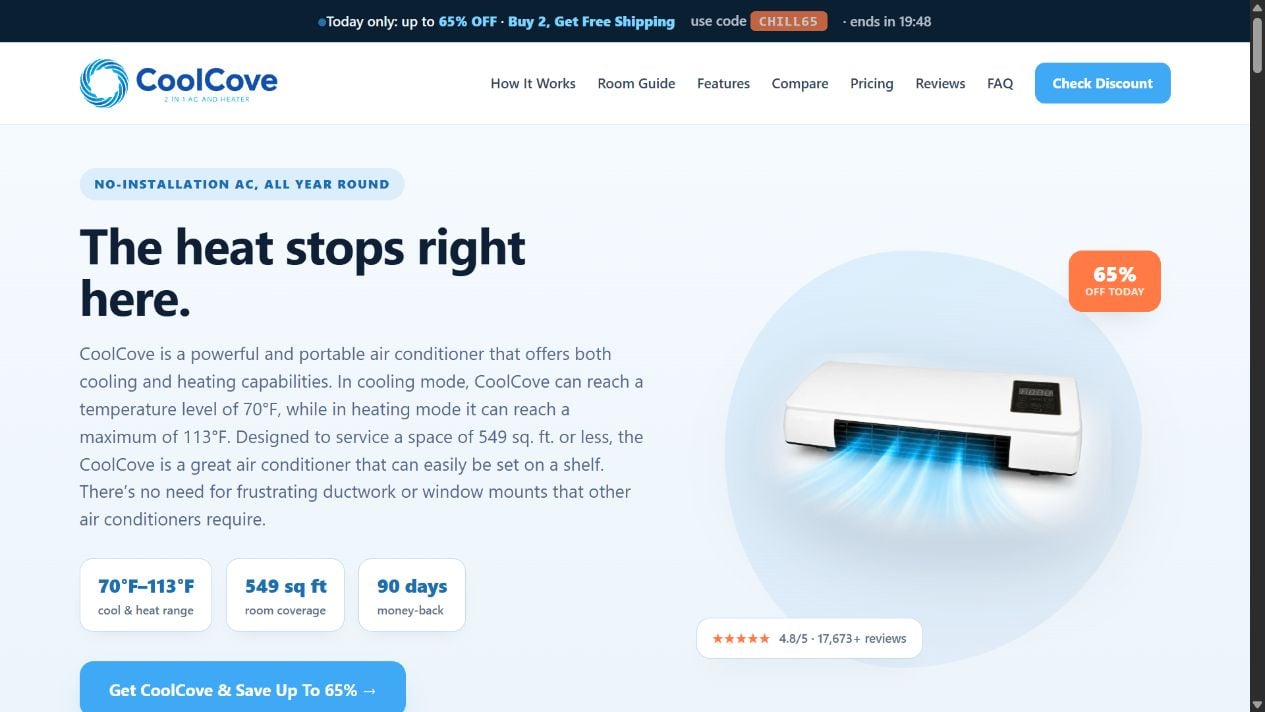
- coolcove-ac.net: A wall or tabletop fan heater with no hose or water tank. It claims 70°F cooling, 113°F heating, and 549-square-foot coverage. Its buttons lead to buy4now.click and then another redirect.
One product cannot both require a filled water tank and advertise “no water tank” as a defining advantage. A 350-square-foot evaporative cooler is also not the same appliance as a 549-square-foot wall heater. The photos confirm that the pages are not merely translating one manual or changing a plug.
The review counts are just as unstable. One site referred generally to thousands of satisfied customers. Another displayed 1,887 reviews. Coolcove-ac.net showed more than 17,000. None of these pages linked the large number beside the offer to an auditable set of verified transactions for the exact model pictured.
The brand therefore works like a reusable label. A marketer can attach it to the version producing the most sales, keep the familiar cooling story, and change the page or delivery route without explaining the switch.
The Hardware Claims Do Not Add Up
A refrigerated air conditioner must move heat from inside to outside. The U.S. Department of Energy’s portable air conditioner definition includes a refrigeration source. Conventional portable units use a compressor, refrigerant, heat exchangers, and an exhaust path.
Coolcove.net instead describes evaporative cooling, which uses water evaporation. That mechanism can produce a cooler airstream in dry conditions, but it adds moisture and does not behave like compressor AC. A small reservoir also needs cleaning to prevent odor and buildup.
Coolcove-ac.net makes a different claim. Its comparison graphic says the unit needs no hose or water tank, yet calls it a “compact dual-mode AC” that can be wall mounted or placed on a tabletop. The page gives heating power but does not explain a refrigeration circuit, condensate handling, or how indoor heat exits during cooling.
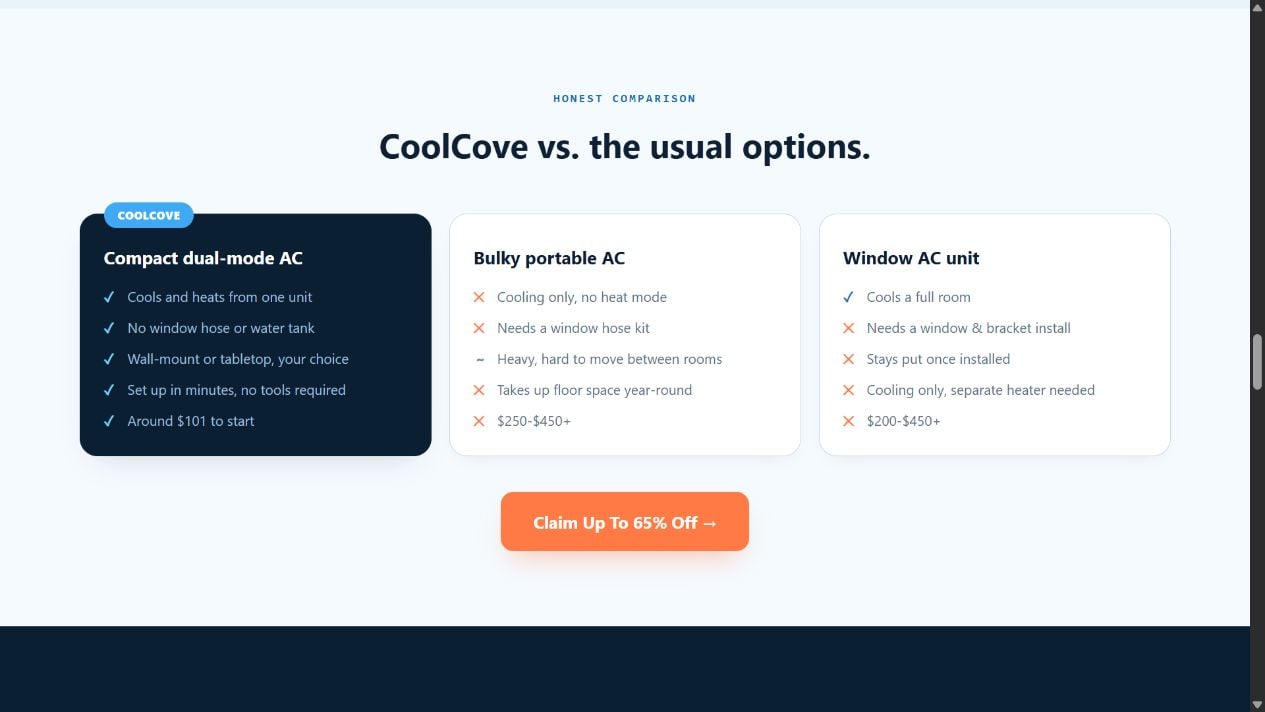
A ceramic heating element can plausibly produce warm air. Reversing that result is not as simple as selecting a blue icon. A fan can circulate room-temperature air and make skin feel cooler, but it cannot continuously lower the room temperature without moving heat elsewhere or using an evaporative process.
The specified weight raises another question. Coolcove-ac.net listed 2.7 pounds for a device said to heat or cool up to 549 square feet. That is closer to a compact space heater or wall fan than a full-room refrigerated AC. No BTU cooling capacity, refrigerant type, compressor specification, or recognized performance test was displayed.
Even the target temperature is misleading without context. A page can print 70°F beside a snowflake, but that does not establish that the outlet air reaches that temperature or that a large room will. Buyers need measured capacity, test conditions, safety certifications, and a model-specific manual.
How the Cool Cove AC Funnel Works
Step 1: An ad or review video sells relief from heat
The campaign starts with the result everyone wants: quick cooling without a window unit, contractor, hose, or large electricity bill. A presenter or advertorial frames conventional AC as expensive and inconvenient, then treats the compact device as a newly discovered alternative.
Step 2: A polished promotional page supplies instant trust
The landing page uses a clean logo, product renders, star ratings, testimonials, a guarantee, and comparisons with real air conditioners. The design looks like a manufacturer site even when the footer later says the page is an affiliate that neither sells nor supports the product.
Step 3: The Cool Cove name is attached to a changing machine
Visitors on different domains see different housings and incompatible mechanisms. The name, cooling promise, and discount remain, so search familiarity transfers to the new creative. A buyer may assume that every Cool Cove review concerns the device now being offered, although the models do not match.
Step 4: Contradictory specifications are scattered across separate sites
A shopper who sees only one page may never discover the water-tank conflict or the jump from 350 to 549 square feet. The funnel does not provide a universal model number that could connect the offer, manual, certification, warranty, and independent test.
Step 5: The Buy button leaves the page that made the claims
Instead of opening a transparent cart on the same domain, the buttons lead through RushMyOffer, PremierDiscountLink, Buy4Now, or another redirect. The final merchant may have different terms, support details, and a different name on the card statement. If the offer vanishes, the buyer must reconstruct the path from browser history.
Step 6: Bundle pricing raises the order value
Coolcove-ac.net promoted one-, two-, and three-unit packages. The displayed price dropped from $125.99 for one to $100.79 per unit for three. A large discount makes the multi-pack look efficient before the buyer knows whether one device can perform the promised job.
Step 7: Add-ons or disputed service charges can follow
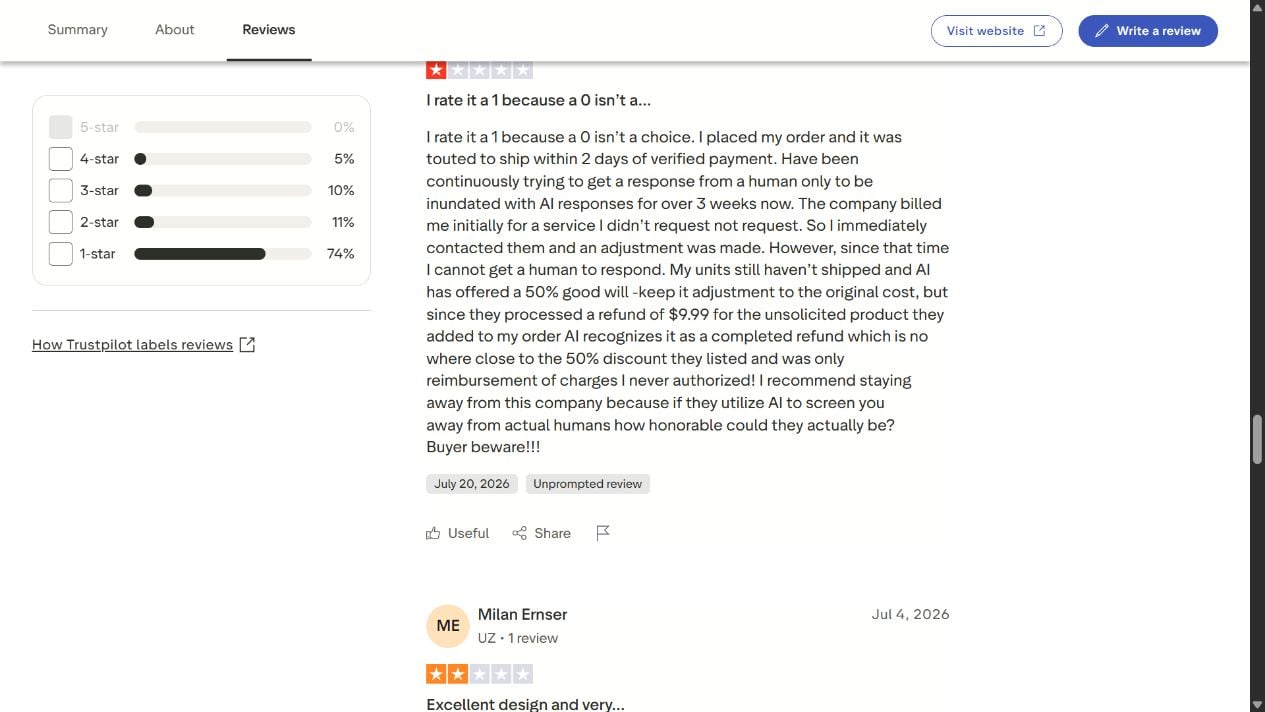
A Trustpilot reviewer alleged a $9.99 charge for a product or service they did not request. Other buyers discuss return postage or order quantities. One complaint cannot prove a system-wide enrollment practice, but it is enough reason to inspect every checkout line, confirmation, and later card statement.
Step 8: Returns become a maze of brands and departments
When the product disappoints, the promotional site can point to its affiliate disclaimer. The redirect domain has no obvious customer-facing identity, and support may answer under another business name. Buyers then face requests for photos, tracking, or return postage while the original ad continues to send new customers elsewhere.
The Affiliate Disclosures Change Who Is Responsible
Coolcove-us.org states in its footer that it is a promotional and affiliate site. It says it does not sell the product, process payments, fulfill orders, provide customer service, or handle refunds. That is a critical disclosure, but it appears after a page full of product claims, reviews, pricing, and purchase buttons.
An affiliate can still be responsible for its advertising claims, while the merchant remains responsible for the sale. For the buyer, the problem is simple: the page that persuaded you may not know your order number, while the company charging your card may not control that page.
Coolcove-ac.net also identifies itself as an advertisement and affiliate page. Its purchase link first reached Buy4Now and then redirected again to MyOfferLink during our test. The second destination displayed no useful checkout content in that session, so we could not verify the final price, consent controls, or recurring terms.
This is why a screenshot of the landing page is not enough. Save the final checkout domain, merchant name, legal terms, total, and bank descriptor. If the path changes after clicking, record each hop. Those details determine where a refund or dispute must be directed.
Reviews Describe Weak Cooling, Delays, and Refund Friction
The Trustpilot profile associated with Cool Cove showed a 2.1 score from 19 reviews when checked, with 74% rated one star. A recent reviewer said the cooling function was simply a fan, the advertising led to an order for three units, and return shipping was charged.
Other reviews alleged late or missing deliveries, limited cooling, expensive returns, and poor refund handling. Several called the device a “glorified fan.” These reports are not laboratory tests and may involve different Cool Cove versions, which is precisely part of the problem.
A mixed product identity makes the review score difficult to interpret. A complaint about a small desk cooler may not describe the wall heater on today’s page. Conversely, praise imported for one housing cannot establish performance for another. Model-level verification is impossible when the seller does not give a stable model number.
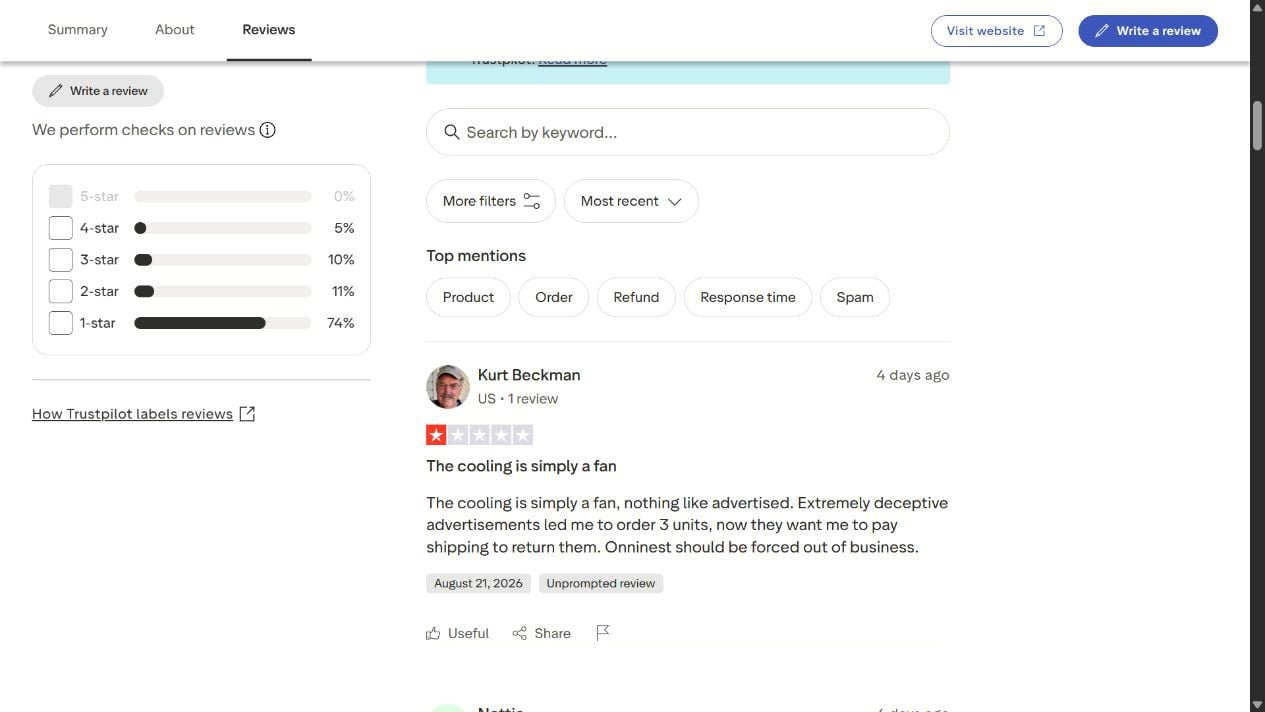
The review profile is still useful as a risk signal when read carefully. It tells prospective buyers which evidence to preserve and which questions to ask. It does not establish that every seller, shipment, or charge connected with the Cool Cove name is identical.
Before relying on a five-star testimonial on a sales page, search the exact domain and checkout descriptor. Sort independent reviews by newest and lowest rating. Look for concrete order totals, dates, response emails, return addresses, and photographs rather than broad praise or anger.
The existing MalwareTips article explains the earlier Cool Cove rebranding formula. This investigation adds the current multi-domain evidence: the same name is now attached to conflicting products and multiple affiliate routes.
Company, Address, and Fulfillment Checks
Coolcove.net does not identify a clear legal merchant
The page lists support@coolcove.com and the marketing-style number 1-800-COOLCOVE. That is not a standard numeric telephone number a shopper can independently dial. Its Privacy Policy and Terms links pointed only to the page itself during our check, leaving no accessible company or return procedure behind them.
Coolcove-us.org says it is only an affiliate
The domain was registered in June 2026 with registrant details hidden by a privacy service. Its footer disclaims sales, payments, fulfillment, customer service, and refunds. Buyers must therefore identify the actual merchant after leaving the promotional page, not assume the Cool Cove domain will solve an order problem.
Coolcove-ac.net names Unbind Gear as its operator
The footer identifies Unbind Gear, support@unbindgear.com, +1 888 698 8842, and 312 W. 2nd St #2683, Casper, Wyoming. Unbind Gear’s catalog also listed CoolCove and a separate “Cool Cove Cooling Max,” reinforcing that the name covers more than one offer.
The redirect path obscures fulfillment and returns
None of the three promotional routes gave us a single consistent seller, warehouse, and return address before the final checkout. A corporate address is not automatically a returns center. Never send a parcel there without written authorization, and verify whether international postage or restocking fees apply.
The Disputed $9.99 Charge Shows Why Receipts Matter
One detailed Trustpilot complaint alleged an unsolicited $9.99 product or service charge. The reviewer said support treated a refund as completed even though the issue remained unresolved. The complaint associated the transaction with Onninest, a name that also appears in other Cool Cove review narratives.
This remains one consumer’s account. We did not reproduce the checkout charge, and the blank redirect prevented us from auditing current consent controls. It would be unfair to state that every Cool Cove order includes the same add-on.
The correct lesson is procedural. A checkout should show every one-time and recurring line item before payment, with no preselected add-on. The confirmation should match that screen. If a later statement contains $9.99 or another unfamiliar amount, search the descriptor and contact the issuer promptly.
How to Evaluate a Cool Cove Offer Before Paying
- Write down the exact domain, product photo, model number, dimensions, wattage, cooling mechanism, and square-foot claim.
- Check whether the page says the unit has a water tank, then compare that statement with the checkout and manual.
- Look for BTU cooling capacity, compressor, refrigerant, exhaust method, condensate handling, and recognized safety certification.
- Reverse-search the product image and search the title without the Cool Cove name to locate generic listings.
- Expand every package and verify the total quantity, price per unit, shipping, taxes, warranties, and services.
- Read the footer before clicking Buy and determine whether the page is a seller, manufacturer, or affiliate.
- Record every redirect and stop if the merchant identity or final terms are missing.
- Search the phone, email, address, company, and bank descriptor in quotation marks.
- Confirm the return location and who pays postage before ordering.
- Use a payment method with meaningful dispute rights and save the full checkout.
Do not let a room-size claim substitute for a model number. “Up to” coverage can be meaningless without capacity, insulation, outdoor conditions, humidity, and a test method. A tiny fan may provide local airflow while failing every whole-room expectation created by the page.
Be equally skeptical of perfect product renders. Several Cool Cove scenes look heavily composited or computer generated. We cannot prove which assets used an AI tool, but they are not neutral photographs of a measured test. Ask for unedited video showing the room, thermometer, runtime, noise, and electrical meter.
Finally, remember that checkout encryption does not validate the offer. HTTPS protects data in transit. It does not prove that the cooling claim is accurate, the reviews are verified, the quantity is correct, or the merchant will honor a refund.
What to Do if You Have Fallen Victim to This Scam
- Preserve the entire funnel. Save the ad or video, Cool Cove page, every redirect, checkout, terms, guarantee, confirmation, tracking page, support messages, package label, and bank descriptor.
- Identify which Cool Cove version you received. Photograph the housing, label, model number, plug, power rating, tank, manual, and box. Compare them with the page that influenced your purchase.
- Audit the order line by line. Confirm the quantity, unit price, shipping, warranty, priority handling, accessories, services, and any recurring item. Note every difference between the saved checkout and confirmation.
- Cancel add-ons in writing. Revoke authorization for unwanted warranties, memberships, services, or renewals. Ask the merchant to confirm the cancellation and the date no further charges will occur.
- Request a documented refund. Quote the specific cooling, product, quantity, or guarantee representation that was not met. Ask for the authorized return address and a prepaid label when the item was materially misrepresented.
- Contact the card issuer quickly. If the merchant refuses, the quantity changed, or an add-on was not knowingly approved, ask about a dispute. Describe the initial authorized purchase separately from any disputed later charge.
- Track the return. Photograph the product and sealed parcel, use tracked shipping, keep the receipt, and record delivery. Do not mail the device to a corporate or promotional address without written return authorization.
- Report misleading advertising. U.S. consumers can report the transaction to the FTC at ReportFraud.ftc.gov and their state attorney general. Use the relevant advertising and consumer authority in other countries.
- Secure your device and accounts. If the funnel prompted an app, browser extension, attachment, or reused password, change the password and scan the device with Malwarebytes. This does not resolve billing, but it can detect unwanted software.
- Reduce repeat targeting. A blocker such as AdGuard can limit many sponsored redirects and tracking scripts used for retargeting. It cannot verify an appliance or merchant, so continue doing the company checks.
Keep the product until the issuer or merchant says the dispute is closed. A buyer may need to demonstrate that the delivered model differs from the advertised one or that the seller refused a proper return. A short dated timeline will make the evidence easier to follow.
Frequently Asked Questions
Is Cool Cove AC a real air conditioner?
The Cool Cove pages we examined did not establish one consistent refrigerated air conditioner. One described evaporative cooling with a tank, while another described a no-tank wall fan and heater. Ask for the exact model, BTU capacity, refrigeration components, exhaust method, and independent test.
Why do Cool Cove websites show different products?
The evidence indicates that Cool Cove is being used as a marketing label across separate affiliate offers. The sites do not explain the model changes. Different housings, mechanisms, coverage figures, prices, and redirects mean buyers should not treat every page as one manufacturer’s catalog.
Does Cool Cove cool 350 or 549 square feet?
Those figures came from different Cool Cove pages advertising different devices. Neither number should be trusted without a model-specific capacity rating and controlled test. The contradiction itself shows why a brand-level promise is not enough.
Who actually sells Cool Cove AC?
That depends on the route. Coolcove-us.org says it is only an affiliate, coolcove-ac.net identifies Unbind Gear as its operator, and purchase buttons pass through separate redirect domains. The final checkout and card descriptor are the evidence for a particular transaction.
What should I do about an unfamiliar $9.99 charge?
Check the confirmation and saved checkout for a service, warranty, or renewal. Cancel it in writing if you did not want it, preserve the response, and ask the card issuer about disputing and blocking further charges. Do not assume replacing the card automatically cancels recurring authority.
Is the old MalwareTips Cool Cove warning still useful?
Yes. It explains the generic rebranding, exaggerated cooling, review, bundle, and markup pattern. This second investigation covers a newer development: multiple active Cool Cove domains now describe incompatible products and send buyers through different affiliate routes.
The Bottom Line
Cool Cove is no longer just one questionable mini-cooler offer. It is a moving brand attached to conflicting machines. A water-tank evaporative cooler, a no-tank wall heater, and a claimed 549-square-foot “AC” cannot all share one trustworthy specification story.
Do not buy the name. Verify the exact model, mechanism, capacity, seller, checkout total, recurring terms, and return address. If the Buy button leaves the page through several unrelated domains or the product changes when you compare sites, close the funnel before it gets your card.








