

Cool Cove AC is being promoted online as a small portable cooling device that can help you stay comfortable without buying a real air conditioner.
The offer looks simple. Big discount, fast cooling claims, easy setup, and happy customer reviews.
But before ordering, there are serious red flags buyers should understand.
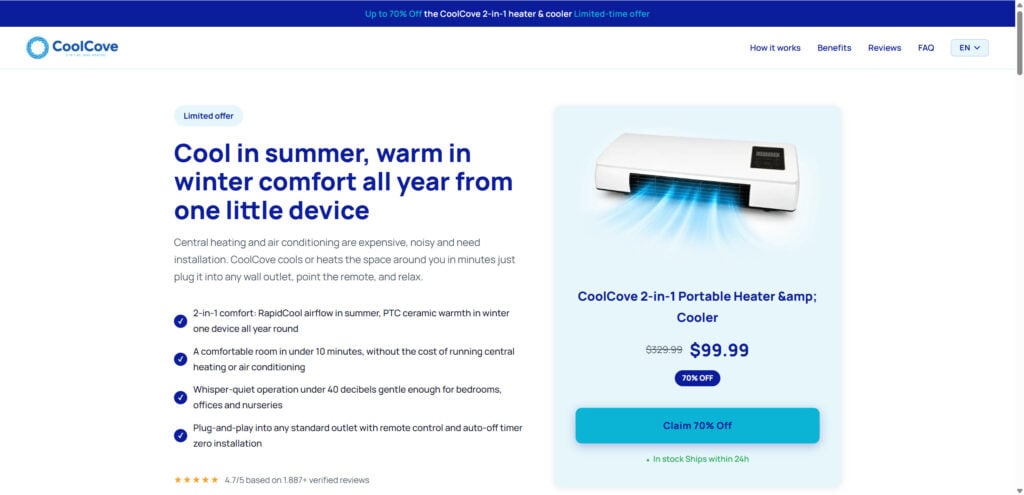
Overview
Cool Cove AC is advertised as a compact cooling gadget for bedrooms, offices, dorm rooms, apartments, and small spaces.
The ads make it look like an easy replacement for a real air conditioner. You may see claims about fast cooling, low energy use, no installation, and simple plug-in operation.
At first, that sounds useful.
Real air conditioners can be expensive. They are heavy, noisy, and often need a window kit, exhaust hose, or professional installation. So when a small device claims to solve the same problem for much less money, people naturally pay attention.
That is exactly why products like Cool Cove AC spread so quickly on social media.
The problem is that Cool Cove AC does not appear to be a real air conditioner in the normal sense. It looks much more like a small generic fan or fan-heater gadget. Similar devices can be found on Chinese wholesale websites for very low prices, sometimes around $5 to $15 per unit depending on the supplier and order size.
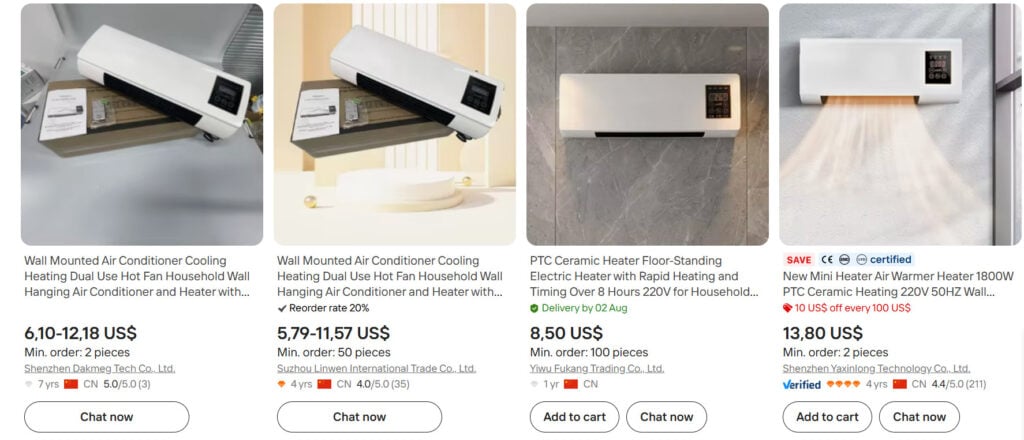
That matters because the same cheap product can be rebranded and sold under many different names.
One website may call it Cool Cove AC. Another site may call it a different “portable AC” or “mini cooling system.” The branding changes, but the product often looks nearly the same.
This is a common pattern with viral online gadgets.
A cheap generic product is sourced from China. A new brand name is created. A professional-looking website is built around it. Then ads are pushed on Facebook, Instagram, TikTok, YouTube, and other platforms.
The product is then sold at a much higher price.
The biggest concern is the word “AC.”
Most people understand “AC” to mean air conditioner. A real air conditioner removes heat from a room. It uses a compressor, refrigerant, coils, and a way to push hot air outside.
A small desk fan cannot do that.
A fan can blow air toward you. That may feel cooler on your skin. But it does not lower the temperature of the room like a real AC unit.
If the room is hot, the fan is mostly moving hot air around.
Some versions of this product also appear to include a PTC ceramic heater. That means it may be able to blow warm air in winter. But a small heater function does not make it a real cooling system.
So the key issue is expectation.
If Cool Cove AC were sold honestly as a small fan or small fan-heater, buyers could decide if they want it. But when it is promoted as a powerful cooling solution or “portable AC,” many people may expect much more than the product can deliver.
Another red flag is the type of marketing used.
These websites often show:
- Huge discounts
- Countdown timers
- “Limited stock” warnings
- Glowing reviews
- Fake-looking media logos
- Trust badges
- Dramatic product images
- AI-style videos or edited demonstrations
- Claims that sound too good for a small gadget
These elements are designed to make the offer feel urgent and trustworthy.
But trust symbols on a sales page do not prove the product works.
A website can show media logos without being truly featured by those media companies. It can show five-star reviews without using an independent review platform. It can show a “money-back guarantee” while still making returns difficult in practice.
That is where many buyers get stuck.
They order because the page looks professional. Then the product arrives and feels cheap, weak, or different from what they expected. When they ask for a refund, customer support may be slow, unclear, or difficult to deal with.
Some buyers may also face another issue: receiving or being charged for more units than they intended to order.
This can happen when checkout pages use bundle offers, confusing quantity selectors, or post-purchase upsells. A buyer may think they ordered one unit, but the final charge may include two, three, or more.
That is why Cool Cove AC should be approached carefully.
The product itself may turn on. It may blow air. It may work as a small personal fan. But that is not the same as cooling a full room.
A real air conditioner and a small fan are not the same product.
And if the ads blur that line, buyers can lose money.
How The Operation Works
1. A Cheap Generic Product Is Found
The operation usually starts with a simple product already available from Chinese suppliers.
These products are often mass-produced and sold in bulk. They may be described as wall-mounted air conditioner fans, cooling and heating fans, PTC ceramic heaters, or mini hot air fans.
The wording on wholesale sites can be loose. Some suppliers use terms like “air conditioner” even when the product is not a true AC unit.
Resellers then take that same product and give it a new brand name.
That is how a generic fan becomes Cool Cove AC.
The physical item may not be special. The branding makes it look special.
2. The Product Gets a New Name and Story
Once the product is chosen, the seller builds a story around it.
Instead of saying, “This is a small fan,” the website may describe it as a breakthrough cooling device.
The product may be presented as:
- A smart portable AC
- A personal cooling system
- A room cooling device
- A summer heat solution
- A cheaper alternative to expensive air conditioners
This type of wording is powerful because it targets a real problem.
People want relief from heat. They want lower energy bills. They want something easy to use.
The story makes the product sound like the perfect answer.
But the story may be bigger than the product.
3. A Professional Sales Page Is Created
The website is usually clean, simple, and designed to sell fast.
It may show a high original price and a much lower sale price. For example, the product may appear to be discounted by 50%, 60%, or 70%.
This makes buyers feel like they found a special deal.
The page may also use urgent messages such as:
- “Limited time offer”
- “Only a few left”
- “Summer sale ending soon”
- “Today only”
- “High demand”
These messages push people to buy before they think too much.
A normal shopper might compare prices, search for reviews, or check other stores. The countdown timer tries to stop that.
It creates pressure.
4. The Ads Make the Cooling Look Stronger Than It Is
Social media ads are a big part of this model.
The ads often show people sweating in a hot room. Then they plug in a small device and suddenly the room looks cool and comfortable.
Sometimes the visuals appear heavily edited. Some ads may use AI-generated images, AI-style videos, stock footage, or unrealistic airflow effects.
The goal is simple.
The ad wants you to believe that a small cheap gadget can cool a room like a real AC.
That is the part buyers should question.
A small fan can move air. It cannot remove heat from the room. Without a compressor, refrigerant, and proper heat exhaust, it cannot work like a true air conditioner.
This does not mean the device does nothing.
It may blow air. It may feel nice if placed close to you. But it should not be expected to cool a full bedroom, living room, or office.
5. Fake-Looking Reviews Build Confidence
Many Cool Cove AC style pages show positive reviews from happy customers.
The reviews often say the product is amazing, easy to use, fast, quiet, and worth the money.
But there is a problem.
These reviews are usually displayed on the seller’s own website. That means buyers cannot easily verify if they are real.
Real reviews should come from independent platforms or trusted retailers. They usually include a mix of positive and negative feedback.
Real customers mention details. They talk about shipping, packaging, noise, power, weaknesses, and problems.
Fake or staged reviews often sound too perfect.
They may all use similar wording. They may avoid real complaints. They may not show verified purchase proof.
This does not prove every review is fake. But it means buyers should not rely on them.
On a sales page, reviews are part of the marketing.
6. Media Logos Are Used to Create Trust
Some viral gadget websites display media logos to make the product look famous.
You may see logos from news websites, TV networks, magazines, or review platforms.
This creates the impression that the product was featured or recommended.
But unless those logos link to real articles, they mean very little.
A logo can be copied onto a website. That does not mean the company reviewed, tested, or approved the product.
This is one of the easiest tricks used by questionable sales pages.
The buyer sees familiar names and feels safer.
But there may be no real endorsement behind the logos.
7. The Checkout May Push Extra Units
The checkout process is another place where buyers need to be careful.
Some websites use bundle offers to increase the order size. You may start by wanting one Cool Cove AC, but the site may push you toward buying two, three, or four units.
The offer may say the best deal is a family pack or multi-pack.
Sometimes the layout can be confusing. The selected option may not be the one you expected. Some pages also show post-purchase upsells after you enter payment details.
This can lead to unwanted charges.
A buyer may think they ordered one device but later see a much higher total.
Before placing any order, always check:
- Quantity
- Final price
- Shipping cost
- Taxes
- Add-ons
- Warranty charges
- Subscription terms
- Currency
- Merchant name
Do not click quickly through checkout pages.
That is where many mistakes happen.
8. The Product May Arrive Looking Cheap
If the product arrives, some buyers may notice that it looks different from the polished ads.
It may feel light, small, plastic, or generic. The box may not look premium. The manual may be poorly written. The branding may look added later.
In some cases, the product may look almost identical to low-cost versions sold on wholesale sites.
This can be frustrating.
The buyer thought they were ordering a special cooling product. Instead, they may receive what looks like a cheap fan or heater.
The biggest disappointment usually comes when they try to cool a room.
The device may blow air, but the room temperature may not change much. If it is not pointed directly at the user, the effect may be weak.
That is not real air conditioning.
That is personal airflow.
9. Returns Can Become Difficult
The sales page may promise a guarantee, but the refund process can be very different.
Some buyers may be told to contact another seller. Others may be asked to return the product at their own cost. Some may have to ship it overseas.
That can make the return pointless.
If return shipping costs nearly as much as the product, many buyers give up.
Customer support may also offer a small partial refund instead of a full refund. For example, they may offer $10 or $15 and tell you to keep the product.
This is common with low-cost imported gadgets.
The seller may know that most buyers will not spend time or money sending the item back.
So the refund policy may look good on the website but feel useless in real life.
10. The Same Product Can Be Sold Again Under Another Name
When complaints build up, the product may not disappear.
It may simply be renamed.
A new website appears. A new logo is added. New reviews are shown. New ads start running.
The same generic gadget is promoted again as a new product.
This is why buyers may see many similar cooling devices online. They may have different names but nearly identical photos, claims, and checkout pages.
That makes research harder.
If you search only for “Cool Cove AC reviews,” you may not find much at first. But if you search by product image or product style, you may find the same item sold much cheaper elsewhere.
That is often the clearest warning sign.
11. The Profit Comes From the Markup
The business model is based on the gap between cost and perceived value.
The product may cost very little from a supplier. The sales page makes it feel like an advanced cooling device. Then it is sold at a much higher price.
The buyer pays for the promise.
The seller profits from the markup.
This is why the ads, images, reviews, discounts, and urgency are so important. They create the feeling that the product is worth more than it really is.
The operation does not need the product to be completely fake.
It only needs the product to be oversold.
That is what makes this kind of offer risky.
What To Do If You Have Fallen Victim
- Stay calm and collect your information
Do not panic. These websites are designed to look convincing.
Start by collecting everything related to your order.
Save:
- Order confirmation email
- Product page screenshots
- Checkout screenshots
- Refund policy screenshots
- Tracking number
- Customer support emails
- Photos of the product
- Photos of the packaging
- Bank or card statement showing the charge
This information will help if you need to request a refund or dispute the charge.
- Check how much you were charged
Look at your bank or credit card statement.
Make sure the charge matches what you expected.
Check for:
- Extra units
- Duplicate charges
- Higher shipping costs
- Warranty add-ons
- Foreign transaction fees
- Subscription charges
- Different merchant names
If you ordered one item but were charged for more, take screenshots immediately.
- Contact customer support in writing
Send a clear message to the seller.
Include your order number and explain the problem.
For example, say that the product was not as advertised, does not cool a room, or that you were charged for more units than ordered.
Ask for a full refund.
Also ask for:
- Return address
- Return deadline
- Refund amount
- Who pays return shipping
- Written confirmation that no more charges will be made
Keep all replies.
Do not rely only on phone calls.
- Do not accept a tiny refund too quickly
Some sellers may offer a small partial refund.
They may say you can keep the product and receive a small amount back.
Think carefully before accepting.
If you paid a high price for a product that does not work as advertised, a small refund may not be fair.
Once you accept a partial refund, it may be harder to fight for the full amount later.
- Be careful with overseas returns
If the seller asks you to ship the product overseas, check the cost first.
International tracked shipping can be expensive.
Before sending anything back, get the full return instructions in writing.
Make sure you have:
- Full return address
- Return authorization
- Refund confirmation
- Tracking number
- Proof of postage
Do not send the product to a vague address.
- Contact your bank or credit card provider
If the seller refuses to help, contact your bank or credit card company.
Explain that the product was not as advertised or that you were charged incorrectly.
Provide your screenshots and emails.
Credit cards often give better protection than debit cards, but you should act quickly.
Ask about opening a dispute or chargeback.
- Watch for future charges
Monitor your account after the purchase.
If you see another charge from the same merchant, contact your bank immediately.
You can ask them to block future payments from that seller.
If you are worried your card details may be misused, ask for a replacement card.
- Report the ad or website
Report the ad on the platform where you saw it.
You can report misleading ads on Facebook, Instagram, TikTok, YouTube, and other platforms.
You can also report the website to consumer protection agencies in your country.
Include as many details as possible.
- Leave an honest review
If you can review the product on an independent platform, share your experience.
Keep it factual.
Mention:
- What you ordered
- What arrived
- Whether it cooled the room
- Whether you were charged correctly
- How customer service handled your request
This can help other buyers avoid the same problem.
- Use reverse image search next time
Before buying viral gadgets, search the product image online.
If the same product appears on wholesale sites for $5 to $15 while another website sells it for much more, be careful.
Also search the product name with words like:
- scam
- complaints
- refund
- reviews
- fake
- chargeback
- does it work
This quick step can save you money.
The Bottom Line
Cool Cove AC should be treated with caution.
It appears to be marketed like a portable air conditioner, but it looks much more like a generic small fan or fan-heater sold through aggressive online ads.
A small fan cannot cool a room like a real AC.
It may blow air near your desk or bed, but that is not the same as lowering the temperature of a full room.
The red flags include cheap similar products from China, multiple websites selling similar devices, fake-looking reviews, unverified media logos, AI-style ads, big discounts, difficult returns, and the risk of being charged for more units than you intended to order.
If you need real cooling, buy a proper air conditioner from a trusted retailer.
If you only need personal airflow, a normal fan from a known brand is likely safer, cheaper, and more honest.

Join the discussion
0 commentsShare your experience or ask a question about this article.
Discussion
Start the conversation
Have a question or something useful to share? Add the first comment.