

A text says New York has approved your tax refund. The money can arrive within two business days, but only if you provide updated payment information before a strict deadline.
The message looks official enough to create a moment of doubt. It names a government department, talks about a familiar tax process, and offers a result most people would welcome.
That moment is exactly what the sender needs. Before following the link, look closely at the agency name, the web address, and what the message is asking you to hand over.
Overview
The message invents a New York agency
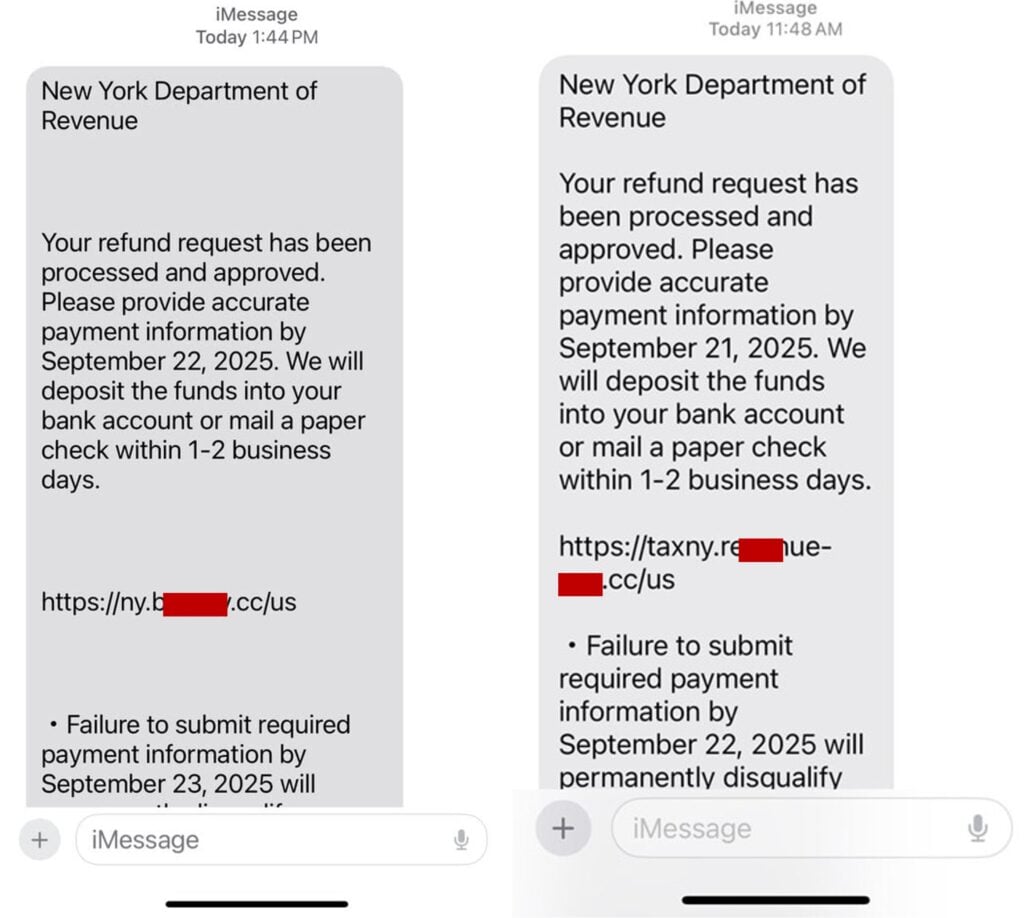
The text identifies its sender as the “New York Department of Revenue.” That official-sounding name is the first major warning sign. New York’s real state tax agency is the New York State Department of Taxation and Finance.
A familiar location and the word “Revenue” can be enough to make the label feel plausible. The scam depends on recipients recognizing the idea of a tax agency without checking the precise name.
A refund deadline creates urgency
Observed messages say a refund request was processed and approved. They ask for “accurate payment information” by a date only days away and promise a bank deposit or paper check shortly afterward.
The reward and deadline work together. The victim is encouraged to treat the link as a routine administrative step instead of asking why a government agency needs bank details through an unsolicited text.
The link leads away from New York government systems
The URLs shown in real examples use unrelated domains ending in extensions such as .cc. Some place words like “taxny” or “revenue” before the actual domain ending to imitate an official address.
New York’s Tax Department uses tax.ny.gov. A page can copy seals, colors, forms, and logos, but it cannot turn an unrelated domain into a government website.
- The sender calls itself the New York Department of Revenue.
- The message claims a refund was already approved.
- A near-term deadline pressures the recipient to respond.
- The link does not end in ny.gov.
- The page may ask for identity, bank, or card information.
- A threat of disqualification discourages independent checking.
- The requested data can support account theft or identity fraud.
The Agency Name Gives Away the Impersonation
Scammers often choose a name that sounds generic and credible. “Department of Revenue” is used by agencies in some states, so it can pass a quick mental check even though it is not the correct name for New York’s tax authority.
The legitimate agency identifies itself as the New York State Department of Taxation and Finance, often shortened to the NYS Tax Department. Its public services, account access, forms, alerts, and reporting pages are under tax.ny.gov.
This naming error matters because the rest of the message is designed to borrow trust from a real institution. If the sender cannot state the agency’s name correctly, the refund claim deserves no further engagement.
Real tax communication has a verifiable trail
A legitimate state tax matter connects to a filed return, an online tax account, or official correspondence. You should be able to verify it independently without using the link or contact details in the unexpected message.
The NYS Tax Department says it does not use text messages, email, or social media to request or discuss personal or tax information. That policy directly conflicts with a text asking for payment details.
The sender name on a phone is not authentication
A message can display an organization name, arrive from an email-to-text gateway, or appear in the same conversation as previous spam. None of those details prove that a government system sent it.
Mobile interfaces often hide the full sender address and shorten long URLs. Open no link to investigate. Visit tax.ny.gov by typing it yourself or use a bookmark you already trust.
The Refund Story Is Built to Collect Payment Data
The wording frames the request as a benefit. Rather than demanding that the recipient pay a tax debt, the text says money is waiting and only accurate payment information is missing.
That approach lowers resistance. People may expect a refund after filing, may have heard about state rebate programs, or may assume a spouse or preparer submitted something they do not remember.
The fake page can ask for a name, address, date of birth, Social Security number, driver’s license, bank routing details, account number, card number, or online banking credentials.
Each field has value. A complete identity profile can support account recovery fraud, new credit applications, tax identity theft, targeted phone calls, or additional phishing that references the data already supplied.
A small verification charge can expose the card
Some phishing funnels ask for a small processing or identity-verification payment. The amount is not the main target. The card number, expiration date, security code, billing address, and confirmation response can be more valuable.
A declined message may be fake. It can be used to persuade the victim to try a second card, giving the operator another set of financial details.
The threat may replace the refund on another version
The same impersonation can claim an unpaid balance, penalty, suspended refund, or legal deadline. The emotional direction changes from reward to fear, but the action remains the same: click an unrelated link and submit private information.
MalwareTips has documented the same pattern in the ATO tax refund text scam. The agency and country change while the false deadline and data request remain familiar.
What New York’s Tax Department Actually Says
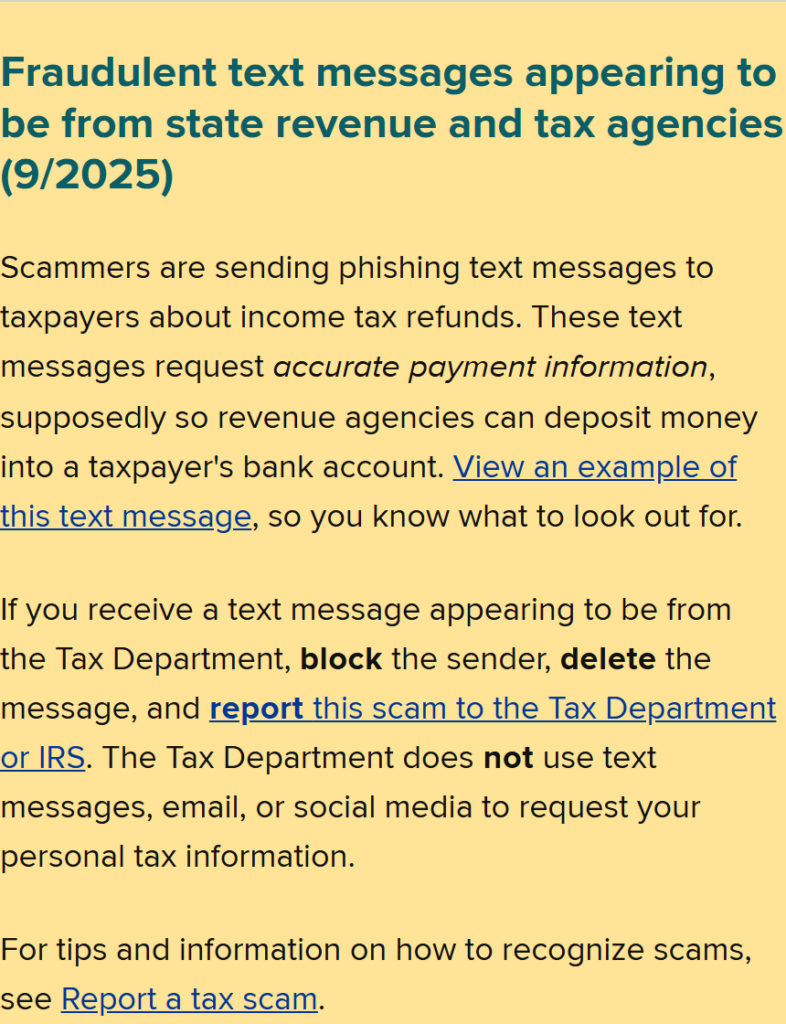
The Tax Department’s current scam alerts specifically address fraudulent messages appearing to come from state revenue and tax agencies. The warning says scammers request accurate payment information so they can supposedly deposit a refund.
The official advice is direct: block the sender, delete the message, and report it. The department also states that it does not use text messages, email, or social media to request personal tax information.
New York may send legitimate mail and may ask a taxpayer to use a secure account. A real notice also gives the taxpayer an opportunity to verify, question, or appeal a claimed balance.
A text that threatens permanent disqualification unless bank details are entered through an unrelated .cc link does not match that process.
The correct domain is more important than the logo
Official pages use tax.ny.gov or another verified ny.gov service. A scam URL may contain “ny,” “tax,” “revenue,” or “refund” in a subdomain or path while its controlling domain is completely unrelated.
Read a web address from right to left before the first slash. The meaningful registered domain sits immediately before the domain extension. Decorative words placed farther left do not establish government ownership.
A refund does not require secrecy or panic
A genuine tax issue can be checked through the official account and published telephone numbers. It does not disappear because you took five minutes to verify the sender.
Warnings that a refund will be permanently lost are meant to keep the victim inside the scammer’s deadline. Independent verification breaks that control.
How the New York Department of Revenue Scam Works
Step 1: A bulk text reaches New York phone numbers
The campaign can send large volumes of messages without knowing who filed a return. Tax language is broad enough to feel relevant to many adults, especially near filing, refund, or rebate periods.
Receiving the message does not mean the sender has access to state tax records. A phone number and approximate location may come from marketing lists, breaches, data brokers, or random generation.
Step 2: The invented agency supplies authority
The sender uses the New York name and a government-sounding department. The wording is formal, the deadline is precise, and the outcome sounds administratively possible.
Recipients who do not know the exact agency name may focus on the refund and overlook the impersonation.
Step 3: A refund or penalty creates emotion
One version promises money. Another can threaten an overdue bill, legal action, or loss of eligibility. Both are designed to trigger action before verification.
The message may include a specific date so waiting feels costly. The date is part of the script, not proof that a real case exists.
Step 4: The link imitates an official tax page
The destination may copy government colors, seals, navigation, and form labels. It can display a progress bar or reference number to make the process feel connected to a record.
Visual design is easy to copy. The domain remains the most reliable first check.
Step 5: The form builds an identity profile
Fields may request identity, address, tax, bank, and card information. The page can collect each entry as it is typed, even if the victim never reaches the final button.
The operator can use partial data for a follow-up call that sounds more informed and convincing.
Step 6: A bank or card step expands the loss
The site may request online banking credentials, a card verification, or a one-time code. A code received during the session can authorize a login, new device, transfer, or card transaction.
No government refund agent needs a code sent by your bank while you are completing an unexpected text link.
Step 7: The victim sees confirmation or an error
A fake success page can say the refund will arrive soon, reducing the chance that the victim contacts a bank immediately. A fake error can request another card or a second submission.
Either result is controlled by the phishing page and says nothing about a real tax refund.
Step 8: Follow-up fraud uses the collected details
The victim may receive calls from a supposed bank fraud team, Tax Department investigator, or identity-protection service. The caller references submitted details to make the new story credible.
Recovery offers can also demand an upfront payment. Treat unsolicited help as another attempt to monetize the original data theft.
Company, Address, and Fulfillment Checks
The named department does not match New York’s agency
“New York Department of Revenue” is not the name used by the state’s tax authority. The correct institution is the New York State Department of Taxation and Finance.
The web address does not belong to New York government
Observed links use unrelated domains rather than tax.ny.gov. A government logo, padlock icon, or “taxny” subdomain does not change ownership of the registered domain.
The sender provides no verifiable case record
The text does not connect to a secure account, mailed notice, filed return, or published agency contact. A recipient cannot verify the claimed refund without relying on the sender’s own link.
The promised refund has no legitimate payment trail
A real state refund can be checked through official tax services. The phishing page instead collects payment data before proving that a refund, amount, or taxpayer record exists.
Warning Signs in the Fake Tax Text
- The message names a New York Department of Revenue.
- You did not request the claimed refund through that channel.
- The deadline is only a few days away.
- Failure supposedly causes permanent disqualification.
- The URL ends outside ny.gov.
- The page asks for bank, card, or identity information.
- The sender discourages calling an official number.
- A code from your bank is requested during the process.
- The form reports an error and asks for another card.
- The refund cannot be found in your real tax account.
A similar warning applies to fake traffic and government-payment notices. The Ohio BMV unpaid ticket text scam also uses authority, a short deadline, and an unrelated payment link.
How to Verify a New York Tax Message Safely
Do not reply and do not open the link. Type tax.ny.gov into a new browser window or use a trusted bookmark, then review the official account and current scam alerts.
If the message claims you owe money, find the Tax Department’s contact information on its own website. Ask the caller or sender for nothing and do not use a number supplied in the text.
Compare any claimed notice with your filed return and mailed correspondence. A preparer can confirm what was submitted, but should not need you to forward bank credentials or a one-time code.
Report the message before deleting it. Forwarding scam texts to 7726 can help the mobile provider identify the campaign, while New York and federal reporting gives investigators the domains and wording being used.
What to Do if You Have Fallen Victim to This Scam
- Stop using the phishing page. Close it and do not submit another form, card, password, or verification code. Do not call any number that appears on the page.
- Contact your bank and card issuer immediately. Use the number on the card or official banking app. Explain what data was entered and ask about card replacement, account locks, transfer recalls, and fraud monitoring.
- Secure your email and financial accounts. Change passwords from a clean device, enable multi-factor authentication, review sessions, and remove unknown recovery addresses, devices, or connected applications.
- Protect your tax account. Contact the NYS Tax Department through tax.ny.gov and review your account for unfamiliar filings, refund changes, or correspondence. If federal tax data was exposed, follow IRS identity-theft guidance.
- Freeze or monitor your credit. If a Social Security number or driver’s license was entered, contact the credit bureaus and follow the recovery plan at IdentityTheft.gov.
- Preserve evidence. Save screenshots, the full sender address, telephone number, URL, dates, submitted fields, bank alerts, and any follow-up messages. Do not revisit the phishing page to collect more evidence.
- Check the affected device. Install Malwarebytes from its official website and run a full scan. Use AdGuard to help block known phishing pages and malicious advertising during recovery.
- Report the campaign. Use the NYS Tax Department scam-reporting page, forward the text to 7726, and submit it to ReportFraud.ftc.gov.
- Report serious identity or account theft. File cyber-enabled financial losses with IC3 and provide the domain, transaction details, and complete timeline.
- Reject recovery calls. A real agency will not charge cryptocurrency, gift cards, or a wire to restore a refund or delete stolen information.
Frequently Asked Questions
Is the New York Department of Revenue a real agency?
Not under that name. New York’s state tax authority is the New York State Department of Taxation and Finance. The incorrect name is one of the clearest warning signs in these messages.
Does the NYS Tax Department send refund texts?
The department says it does not use text messages, email, or social media to request or discuss personal or tax information. Verify refunds through tax.ny.gov and official correspondence.
Can a .cc link belong to New York government?
An observed .cc link is not an ny.gov address. A scammer can place “ny,” “tax,” or “revenue” inside a longer URL, but the registered domain still belongs outside New York government.
What if I was expecting a tax refund?
Expectation makes the lure more convincing, but it does not authenticate the text. Check the refund through the official state account, your filed return, and contact information typed from tax.ny.gov.
What if I clicked but entered nothing?
Close the page, clear the tab, and avoid returning. Risk is higher if you downloaded a file, granted permissions, entered credentials, or installed an app. Run a security scan and watch for follow-up phishing.
Where should I report the message?
Report it to the NYS Tax Department, forward it to 7726, and submit the details to the FTC. If money, credentials, or identity data were stolen, also notify the bank and IC3.
The Bottom Line
The New York Department of Revenue scam text turns an invented agency name and a tempting refund into a request for bank and identity information. The deadline is there to stop you from checking the claim.
Do not use the link. Verify through tax.ny.gov, where the real agency name, account, alerts, and reporting channels can be checked without giving the text control of the conversation.








