

In recent weeks, many Australians have been receiving suspicious text messages claiming to be from the Australian Taxation Office (ATO). The messages often state that your tax return has been processed or deposited into your bank account. Understandably, these messages are causing a lot of confusion and concern.
This article will provide an in-depth look at this text message scam – how it works, what to do if you receive one, and most importantly, how to protect yourself. With tax time coming up, it’s crucial to be aware of scams targeting your personal information and money.
Keep reading to learn everything you need to know about the ATO text scam so you can avoid falling victim.
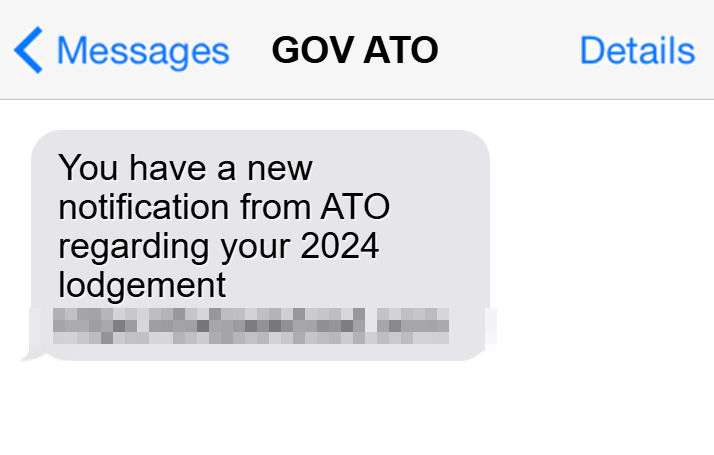
Scam Overview
The ATO text scam involves receiving a text message that claims to be from the ATO, Australia’s tax authority. The message usually states that your tax return has been processed or deposited early into your bank account.
Some common examples of these fake ATO messages include:
- “From ATO: Your tax return of $950 has been processed. Your refund has been deposited into your bank account.”
- “ATO MSG: We have sent you an early refund of $850 based on your projected tax return. Check your bank account.”
- “ATO Alert: Your 2024 tax return has been finalized. A refund of $1,200 has been issued to your bank account today.”
The goal of these messages is to trick you into clicking on a malicious link or calling a fraudulent phone number. The scammers aim to steal your personal information and money or infect your device with malware.
The surge in these fake ATO text scams correlates with tax time each year in Australia. Scammers take advantage of taxpayers eagerly awaiting their refunds and wanting to believe the money has come early.
However, the reality is the ATO does not initiate contact via text message or calls regarding tax returns and refunds. Any communication claiming to be from the ATO with links or phone numbers should ring alarm bells.
Why the Scam Works
There are several reasons this ATO text scam has been so successful at deceiving Australians:
- Familiarity with the ATO – Most Australians have filed taxes and are familiar with receiving correspondence from the ATO. This makes the scam messages appear more legitimate.
- Promise of money – Claiming you have received an early tax refund is tantalizing, especially when many people are facing financial struggles. The promise of unexpected money is compelling.
- Creates urgency – By stating the refund has already been deposited, the scammers introduce urgency to click their link and “claim” the money. This pressures victims to act quickly without thinking it through.
- Cybercrime on the rise – In general, scam calls and texts are increasing in Australia. People are more likely to fall for scams in an environment saturated with cybercrime.
- Tax time urgency – Many taxpayers file their returns at the last minute in June. The rush to get refunds makes them more vulnerable to tricks promising early money.
Scope of the Problem
The ATO scam text messages exploded in prevalence in 2023 with the ATO receiving over 34,000 reports of scam texts in April-May alone. However, many more scam texts are likely going unreported.
Online forums reveal the incredibly widespread nature of this scam:
- On Twitter, hundreds of users have also shared experiences receiving the fraudulent ATO messages.
- In Queensland, the police commissioner estimated 10,000 residents reported the scam texts in just one month.
- One victim online stated 20 of his friends and family members had received the text scam.
The Australian Competition and Consumer Commission (ACCC) has warned that Australians have lost over $7 million to tax scams this year, with text-based scams making up a majority of losses.
This demonstrates how unsuspecting taxpayers across Australia are being bombarded with these messages and falling prey at an alarming rate. The widespread nature of this scam makes awareness and caution extremely important.
How the ATO Text Scam Works
Now that you understand the common types of fake ATO texts being sent and their goal, let’s break down exactly how this scam operates at each step:
Step 1: Receiving the Text
The scam begins with the victim receiving an unsolicited text message claiming to be from the ATO. The sender typically masks the number to appear as an official source. For example, the text may come from “ATO-Gov” or “ATO-TaxRefund.”
The message is short and urges the victim to take immediate action regarding their “tax refund deposit.” Scammers aim to incite panic or excitement that money is waiting.
Step 2: Clicking the Link
The text message includes a link, typically branded with “ATO” to look official. If the recipient clicks the link, it will take them to a fake ATO website designed to mirror a real ATO portal.
This malicious website prompts the victim to enter personal details like their name, birthdate, address, tax file number, driver’s license number, and bank account information.
In the rush to claim their “refund,” victims end up handing over valuable personal data to scammers.
Step 3: Calling the Number
Some versions of the scam text will not include a link but rather instruct the recipient to call a phone number regarding their “refund.”
This phone number connects to a scammer claiming to be an ATO agent. They advise the victim to verify personal details or make an upfront payment via gift cards to release the fake refund.
Either way, through the link or call, scammers are gathering private information and money from victims who believe the tax refund is real.
Step 4: Stealing Money and Identity
Once scammers secure the victim’s personal information through the website or call, they can steal their identity and drain their bank account in various ways:
- File a fake tax return in the victim’s name and have the refund deposited into a fraudulent account.
- Use the bank account details to withdraw or transfer funds from the victim’s account.
- Take out loans or credit cards using the victim’s identity.
- Sell the personal information like tax file numbers on the dark web.
- Hack into the victim’s email, bank, or government accounts using security details gained.
The ATO will never ask for personal information over text. Providing data through these scams leads to serious financial and identity theft consequences.
Step 5: Spreading Malware
In some cases, the link in the scam text message leads to a website infected with malware instead of a phishing form. If the victim clicks the link on their smartphone, the malware can infect their device.
Signs of malware infection include:
- Pop up ads, notifications, and alerts
- Apps crashing frequently
- Slow device performance
- Overheated battery
- Strange activity like texts sending automatically
The malware allows scammers to monitor the victim’s device activities, contacts, accounts, and more. It also leaves the device vulnerable to data breaches.
What to Do If You Receive the ATO Text Scam
If you receive a suspicious text message claiming to be from the ATO, here are the steps to take:
1. Avoid clicking any links or calling phone numbers.
This gives scammers direct access to steal your personal information or money. Never click or call numbers in unverified messages.
2. Do not respond to the message.
Replying lets scammers know your number is active. Simply delete the text message instead.
3. Report the scam text to the ATO.
Forward the text message to 0428 792 698. This helps the ATO gather data on scammers impersonating their agency.
4. Report the scam to your phone carrier.
Alert your mobile provider (e.g. Telstra, Optus, Vodafone) about the fraudulent message so they can take action and block numbers.
5. Check your bank accounts and credit history.
Look for any signs of unauthorized transactions, accounts opened in your name, or money withdrawn. Report anything suspicious to your financial institutions.
6. Reset account passwords and enable two-factor authentication.
Update passwords on your important accounts like online banking, MyGov, email, etc. Enable two-factor authentication for an extra layer of security on accounts.
7. Scan devices for malware if you clicked any links.
Use security software to run a scan that detects and removes any malware that may have infected your phone or computer if you clicked the scam link.
Being proactive protects you in the case any personal data was compromised by scam links or calls. Make sure your accounts and devices are secure.
What to Do If You Fall Victim to the Scam
Unfortunately, many Australians have fallen victim to the ATO text scam and had their personal information, money, or identity stolen. If this happens to you, here are the necessary steps to take:
1. Contact your bank immediately.
If you notice any unauthorized transactions, report them to your bank right away so they can attempt to recover the funds or reverse transfers. Cancel any compromised cards.
2. Change passwords and security questions for all accounts.
Secure your online accounts by updating your passwords, security questions/answers, and enabling two-factor authentication everywhere you can. Prioritize accounts tied to your finances.
3. Report identity theft to IDCARE.
This non-profit organization can help with recovery steps if scammers stole and misused your personal information. They provide customized identity theft support.
4. Check your credit reports and set up credit alerts.
Pull your credit reports from Equifax, Experian, and TransUnion to check for any accounts opened fraudulently in your name. Set up credit alerts that notify you of new activity.
5. File a scam report with the ACCC.
Report the scam to the ACCC’s Scamwatch so they can investigate and warn others. Provide details on how the scam occurred and the losses inflicted.
6. Notify the ATO if your tax file number was compromised.
If scammers now have your TFN, inform the ATO immediately. They can place additional security measures on your tax records.
7. Wipe and restore any infected devices.
If clicking a scam link infected your smartphone or computer with malware, perform a factory reset to wipe it entirely. Ensure all data is erased, then restore from a clean backup.
8. Monitor accounts and credit reports for suspicious activity.
Be vigilant in watching your financial accounts and credit reports for signs of further misuse of your personal information. Report any new unauthorized activity right away.
Is Your Device Infected? Run a Free Malware Scan
Slow performance, constant pop-ups, or strange behavior? These are classic signs of a malware infection. The fastest way to find out is to scan your device with Malwarebytes Free — one of the most trusted malware removal tools available.
The free version detects and removes the most common threats, including:
- Adware — the cause of those annoying pop-ups
- Browser hijackers — unwanted redirects and changed homepages
- Trojans and spyware — hidden programs stealing your data
- Potentially unwanted programs (PUPs) — software you never asked for
👉 Select your device below — Windows, Mac, or Android — then follow the simple steps to download Malwarebytes, scan your system, and remove any threats it finds. The scan usually takes 5 to 20 minutes.
Run a Malware Scan with Malwarebytes for Windows
Malwarebytes is one of the most popular and trusted anti-malware tools for Windows — and it’s completely free for removing infections. It catches threats that many antivirus programs miss, including adware, browser hijackers, and trojans. Follow the steps below to scan and clean your PC in just a few minutes.
Download Malwarebytes
Click the button below to download the latest version of Malwarebytes for Windows from the official source. The free version is all you need — it will scan your computer and remove adware, browser hijackers, and other malicious software at no cost.
Download MalwarebytesOfficial installer for Windows 11 and 10. Your download starts right away.Want real-time protection? See Malwarebytes Premium Malwarebytes Free for WindowsScans and removes malware at no cost
-
Install Malwarebytes
When the download finishes, open your Downloads folder and double-click the MBSetup file. If Windows shows a User Account Control pop-up, click “Yes” to allow the installation.

Follow the On-Screen Prompts to Install Malwarebytes
The setup wizard will walk you through a few quick screens:
-
Choose where you’re installing the program — “Personal Computer” or “Work Computer” — then click Next.

-
Malwarebytes will now install on your device. This usually takes under a minute.

-
When installation is complete, the “Welcome to Malwarebytes” screen will open automatically.

-
On the final screen, click Open Malwarebytes to launch the program.

-
Enable “Scan for Rootkits”
Before scanning, turn on rootkit detection so Malwarebytes can find even the most hidden threats. Click the Settings gear icon on the left side of the screen.

In the settings menu, find “Scan for rootkits” and click the toggle so it turns blue.

Done? Click “Dashboard” in the left pane to return to the main screen.
Start the Scan
Click the blue Scan button. Malwarebytes will automatically update its virus database and start checking your computer for malware.

-
Wait for the Scan to Finish
The scan checks your entire system for browser hijackers and other malicious programs, so it can take 5 to 20 minutes depending on your computer. Feel free to do something else — just check back occasionally to see the progress.

-
Quarantine the Detected Threats
When the scan is done, you’ll see a list of everything Malwarebytes found — malware, adware, and potentially unwanted programs. Click the “Quarantine” button to remove all of them at once.

Malwarebytes will now remove the malicious files and registry entries and move them safely into quarantine.

-
Restart Your Computer
Some threats can only be fully removed after a reboot. If Malwarebytes asks you to restart, click Yes. Once you’re logged back in, Malwarebytes has finished removing the threats it found.

That’s it — your Windows PC is now clean of trojans, adware, and other malware, and should be back to running smoothly.
If you are still having problems with your computer after completing these instructions, then please follow one of the steps:
- Run a computer scan with ESET Online Scanner
- Ask for help in our Windows Malware Removal Help & Support forum.
Run a Malware Scan with Malwarebytes for Mac
Malwarebytes for Mac is a free on-demand scanner that removes the malware other security software tends to miss — adware, browser hijackers, and unwanted programs included. Cleaning an infected Mac with Malwarebytes has always been completely free, and it’s our go-to recommendation. Follow the steps below to scan and clean your Mac in just a few minutes.
-
Download Malwarebytes for Mac
Click the button below to download the latest version of Malwarebytes for Mac.
Download MalwarebytesOfficial installer for macOS. Your download starts right away.Want real-time protection? See Malwarebytes PremiumMalwarebytes Free for MacScans and removes malware at no cost -
Open the Malwarebytes setup file
When the download finishes, open your Downloads folder and double-click the setup file to begin the installation.

-
Follow the On-Screen Prompts to Install Malwarebytes
The Malwarebytes for Mac Installer will guide you through a few quick screens. Click “Continue” and keep following the prompts until the installation completes.



When the installation is complete, Malwarebytes opens to the Welcome to Malwarebytes screen. Click “Get started“.
-
Select “Personal Computer” or “Work Computer”
Malwarebytes will ask what type of computer you’re installing it on. Click either Personal Computer or Work Computer, whichever applies.

-
Start the Scan
Click the “Scan” button. Malwarebytes will automatically update its detection database and begin checking your Mac for malware.

-
Wait for the Scan to Finish
Malwarebytes will scan your Mac for adware, browser hijackers, and other malicious programs. This can take a few minutes, so feel free to do something else — just check back occasionally to see the progress.

-
Quarantine the Detected Threats
When the scan is done, you’ll see a list of everything Malwarebytes found. Click the “Quarantine” button to remove all the threats at once.

-
Restart Your Mac
Malwarebytes will now remove all the malicious files it found. Some threats can only be fully removed after a reboot — if Malwarebytes asks you to restart, allow it. Once you’re logged back in, your Mac is clean.

That’s it — your Mac is now free of adware, rogue browser extensions, and other potentially harmful software.
If you are still experiencing problems while trying to remove a malicious program from your computer, please ask for help in our Mac Malware Removal Help & Support forum.
Run a Malware Scan with Malwarebytes for Android
Malwarebytes for Android automatically detects and removes dangerous threats like malware and ransomware so you don’t have to worry about your most-used device being compromised. Aggressive detection of adware and potentially unwanted programs keeps your Android phone or tablet running smooth.
-
Download Malwarebytes for Android.
You can download Malwarebytes for Android by clicking the link below.
Get Malwarebytes for AndroidOpens Google Play in a new tab.Want real-time protection? See Malwarebytes Premium for AndroidMalwarebytes for AndroidScans your phone and removes malware at no cost -
Install Malwarebytes for Android on your phone.
In the Google Play Store, tap “Install” to install Malwarebytes for Android on your device.

When the installation process has finished, tap “Open” to begin using Malwarebytes for Android. You can also open Malwarebytes by tapping on its icon in your phone menu or home screen.

-
Follow the on-screen prompts to complete the setup process
When Malwarebytes will open, you will see the Malwarebytes Setup Wizard which will guide you through a series of permissions and other setup options.
This is the first of two screens that explain the difference between the Premium and Free versions. Swipe this screen to continue.
Tap on “Got it” to proceed to the next step.
Malwarebytes for Android will now ask for a set of permissions that are required to scan your device and protect it from malware. Tap on “Give permission” to continue.
Tap on “Allow” to permit Malwarebytes to access the files on your phone.
-
Update database and run a scan with Malwarebytes for Android
You will now be prompted to update the Malwarebytes database and run a full system scan.

Click on “Update database” to update the Malwarebytes for Android definitions to the latest version, then click on “Run full scan” to perform a system scan.

-
Wait for the Malwarebytes scan to complete.
Malwarebytes will now start scanning your phone for adware and other malicious apps. This process can take a few minutes, so we suggest you do something else and periodically check on the status of the scan to see when it is finished.

-
Click on “Remove Selected”.
When the scan has been completed, you will be presented with a screen showing the malware infections that Malwarebytes for Android has detected. To remove the malicious apps that Malwarebytes has found, tap on the “Remove Selected” button.

-
Restart your phone.
Malwarebytes for Android will now remove all the malicious apps that it has found. To complete the malware removal process, Malwarebytes may ask you to restart your device.
That’s it — your Android phone is now clean — no more malicious apps, adware, or browser redirects.
If you are still having problems with your phone after completing these instructions, then please follow one of the steps:
- Restore your phone to factory settings by going to Settings > General management > Reset > Factory data reset.
- Ask for help in our Mobile Malware Removal Help & Support forum.
Stay Protected: Block Ads and Malicious Sites
Now that your device is clean, keep it that way. Most infections start with a malicious ad or a fake download button — so blocking them at the source is your best defense.
We recommend AdGuard, which blocks malicious ads, phishing pages, and dangerous redirects before they can reach you.
👉 Download AdGuard and browse safely
Frequently Asked Questions About the ATO Text Scam
1. How can I tell if an ATO text message is fake?
The ATO will never contact you via text message about tax refunds or returns. Any text claiming to be from the ATO with details about a refund is a scam. Other red flags include being addressed as “Dear Customer” instead of your name, links to click, instructions to call a phone number, and threats of penalties.
2. What are some examples of the fake ATO refund texts?
Common fake ATO text examples include:
“ATO Alert: We’ve processed your 2023 tax return. A refund of $950 has been deposited in your account.”
“Dear Customer, the ATO has issued you a refund of $850. Please click here to confirm details.”
“ATO-TaxRefund: Your 2024 refund of $1200 has been direct deposited today. Call 000-000-0000 immediately.”
3. What do the scammers want from the ATO text scam?
The scammers aim to steal your personal information and money. The texts lure you to click links leading to fake websites that harvest your data. Calling provided numbers gives scammers info directly. They use the details to drain your bank account, steal your identity, and access your accounts.
4. What should I do if I receive one of these ATO refund text scams?
If you get one of these scam texts, do not click any links or call any phone numbers it provides. Delete the text immediately and report it to the ATO. Check your account transactions and credit reports for unauthorized activity just in case.
5. How can I report the fake ATO text messages?
You can report the ATO text scam by:
- Forwarding the text to 0428 792 698
- Using the ‘Report scam’ function on the ATO app
- Calling the ATO Scam Hotline at 1800 008 540
- Filing a scam report with Scamwatch or your local police
6. How can I protect myself from the ATO text refund scam?
Protect yourself by:
- Knowing the ATO never contacts taxpayers via text
- Checking messages for red flags like links, phone numbers, threats
- Enabling two-factor authentication on your accounts
- Keeping software on devices updated
- Checking your accounts often for unauthorized transactions
7. What should I do if I already fell victim to the ATO text scam?
If you provided your information, take these steps:
- Contact your bank about any suspicious transactions
- Monitor credit reports and set up alerts
- Change online account passwords immediately
- Report identity theft to IDCARE if relevant
- Notify the ATO if your tax file number was compromised
8. How can I best avoid all tax scams during filing season?
Avoid tax scams by:
- Knowing common red flags like pressure to act urgently
- Checking the ATO’s website for its current advice
- Being wary of any contact requesting personal details
- Consulting a tax professional if you have concerns
- Only using myGov for ATO communication and transactions
The Bottom Line
The ATO text message scam exploiting taxpayers is widespread in Australia. While the messages look legitimate, the ATO does not contact Australians via text or calls about tax refunds.
These scams aim to trick victims into providing personal information and money to fraudsters through misleading links and phone numbers. The consequences can be disastrous in the form of identify theft, financial account draining, and malware infections.
If you receive a suspicious text claiming to be from the ATO, do not click any links or call phone numbers provided. Report the scam to the ATO and relevant institutions immediately. Monitor your accounts closely for unauthorized activity.
Staying vigilant and informed is your best defense against tax scams. Share this knowledge with family and friends to help protect them during tax time. With awareness of common red flags, Australians can outsmart cybercriminals seeking to take advantage of those awaiting refunds.

Join the discussion
0 commentsShare your experience or ask a question about this article.
Discussion
Start the conversation
Have a question or something useful to share? Add the first comment.