

A premium FIFA World Cup package appears to be waiting behind a polished booking page. Team badges, official-looking menus, match choices, and a familiar hospitality partner make the offer feel far removed from an ordinary phishing site.
The price is substantial, but that can make the page seem more believable. Hospitality packages really are expensive, and fans expect a serious checkout process for a once-in-a-lifetime event.
The fake FIFA hospitality scam becomes most dangerous after the card form appears. One small prompt can turn a convincing ticket purchase into something entirely different.
Overview
The scam copies a real premium hospitality experience
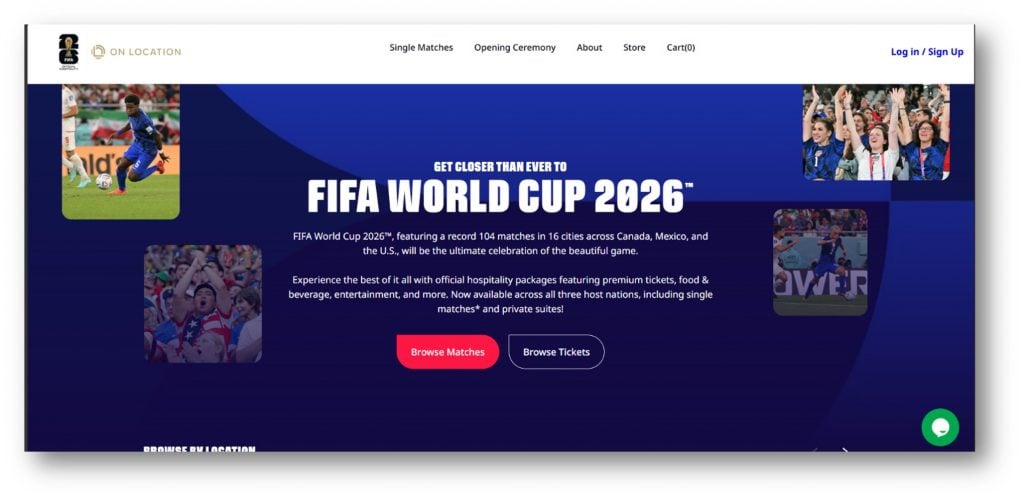
The operation documented in this report imitates the FIFA World Cup 2026 hospitality portal. It uses FIFA and On Location branding, team imagery, match navigation, a shopping cart, and account controls to make visitors believe they reached an authorized premium-ticket seller.
That choice of target is deliberate. FIFA appointed On Location as the official hospitality provider for the tournament. A visitor who already recognizes both names may treat the pairing as proof, even when the page is running on an unrelated domain.
The copied page is not connected to FIFA, On Location, or their legitimate services. The visible branding tells the story the operator wants visitors to believe. The registered hostname tells them who actually controls the page.
The imitation extends beyond logos and colors
This is not a simple form with a stolen badge at the top. The page reviewed for this investigation copied layouts, loaded convincing tournament assets, linked to genuine social accounts, and displayed legal-looking material. It also used automatic translation, allowing the same trap to address fans in multiple languages.
Some links can even lead to real FIFA pages. That does not authenticate the page containing them. A fraudulent store can link to a genuine privacy notice, social profile, video, or press release while keeping its login and payment forms under the scammer’s control.
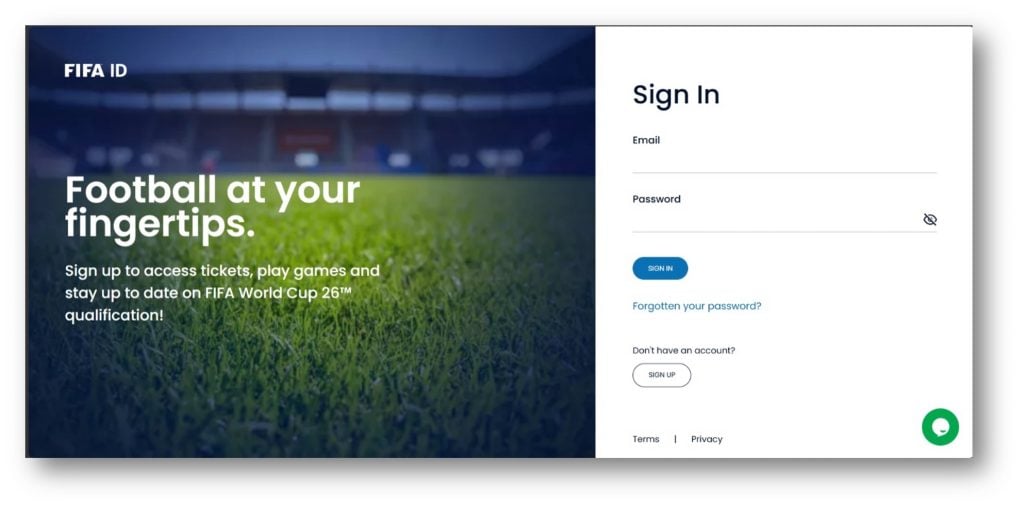
The fake login also accepts information without performing a real account check. Its purpose is not to connect the fan to a FIFA account. It is to capture an email address and password before the visitor reaches the payment stage.
The checkout is built for a live bank-code interception
The most serious part of this campaign happens after the victim enters card details. According to the documented flow, the operator can use those details for a separate transaction while the victim remains on the fake checkout page.
If the bank challenges that transaction, it sends the real cardholder a one-time verification code. The fake page then asks for that code as though it were approving the hospitality purchase. Entering it can authorize the operator’s transaction instead.
The funnel can therefore collect several valuable items in one visit:
- An email address and a password from the fake FIFA ID screen
- The buyer’s name, address, phone number, and travel interest
- A card number, expiration date, and security code
- A bank verification code that may approve a live transaction
- Evidence that the victim responds quickly to urgent purchase prompts
The Real FIFA Hospitality Route Is Narrower Than the Copycat Suggests
FIFA states that On Location is the only official hospitality provider for the 2026 World Cup. FIFA directs buyers to its own hospitality route and publishes information about authorized sales agents. That controlled path is very different from a random search result or social advertisement using tournament graphics.
The official relationship is easy for scammers to imitate because it is public. Logos, package descriptions, stadium names, match schedules, and promotional photographs can all be copied. Their presence proves only that the page designer found the same public material that fans can find.
The safest starting point is FIFA.com/hospitality, typed directly into the address bar. FIFA’s own announcement also confirms On Location’s official role and explains how approved sales channels are presented.
This distinction matters because hospitality can include premium seats, lounges, food, entertainment, and other experiences. High prices and elaborate descriptions are normal in that market. A scammer can hide inside those normal expectations without offering any valid ticket or package.
Why the Fake FIFA Login Is More Than a Ticket Problem
A victim may realize that no hospitality booking exists and focus only on the card charge. The copied login creates a second problem. If the password was reused, the same credentials may unlock email, shopping, travel, social media, or financial accounts.
Email access is especially valuable because it can expose receipts, reset links, identity documents, travel plans, and contacts. It can also let an intruder reset other passwords and hide security alerts before the account owner sees them.
The fact that a fake login lets any entry continue is a useful warning, but it is not safe to test suspicious forms with real information. Data can be transmitted as each field is typed, before a visitor presses the final button.
Use a password manager as an additional warning system. A manager that saved credentials for the genuine FIFA domain should not automatically offer them on an unrelated hostname. That mismatch is a reason to stop and inspect the address.
How the Fake FIFA Hospitality Scam Works
Step 1: A fan is pushed toward an unofficial link
The journey can begin with a search result, advertisement, social post, message, or link shared in a fan group. The page promises access to desirable matches or premium packages while demand is high.
Paid placement is not proof of approval. The FTC warns World Cup fans that fraudsters use paid search results and social media to send people to copycat sites. A polished result can still lead outside FIFA’s official network.
Step 2: A copied hospitality portal lowers suspicion
The landing page resembles a real ticket-inclusive hospitality store. Familiar logos, match menus, team badges, and professional photographs answer the visitor’s first question, “Does this look real?” before the browser address receives the same attention.
Real links and remotely loaded assets reinforce the illusion. None of them transfers ownership of the surrounding page to FIFA or On Location.
Step 3: The visitor is sent through a fake FIFA ID login
The site requests an email address and password before packages can be purchased. The layout resembles an account gateway, but the information is collected by the imitation site.
A credential form on the wrong domain should be treated as phishing, even when it has a password-reset link or terms page. Those elements are easy to reproduce.
Step 4: Packages and prices make the session feel real
The victim browses matches, chooses an experience, and sees a cart total. This stage creates investment. After comparing options and imagining the event, abandoning the purchase feels like losing an opportunity.
Scarcity can intensify that pressure. Limited seats and important match dates are real concepts, but a countdown or availability message on an unauthorized page is not independently verified inventory.
Step 5: The checkout collects card and personal details
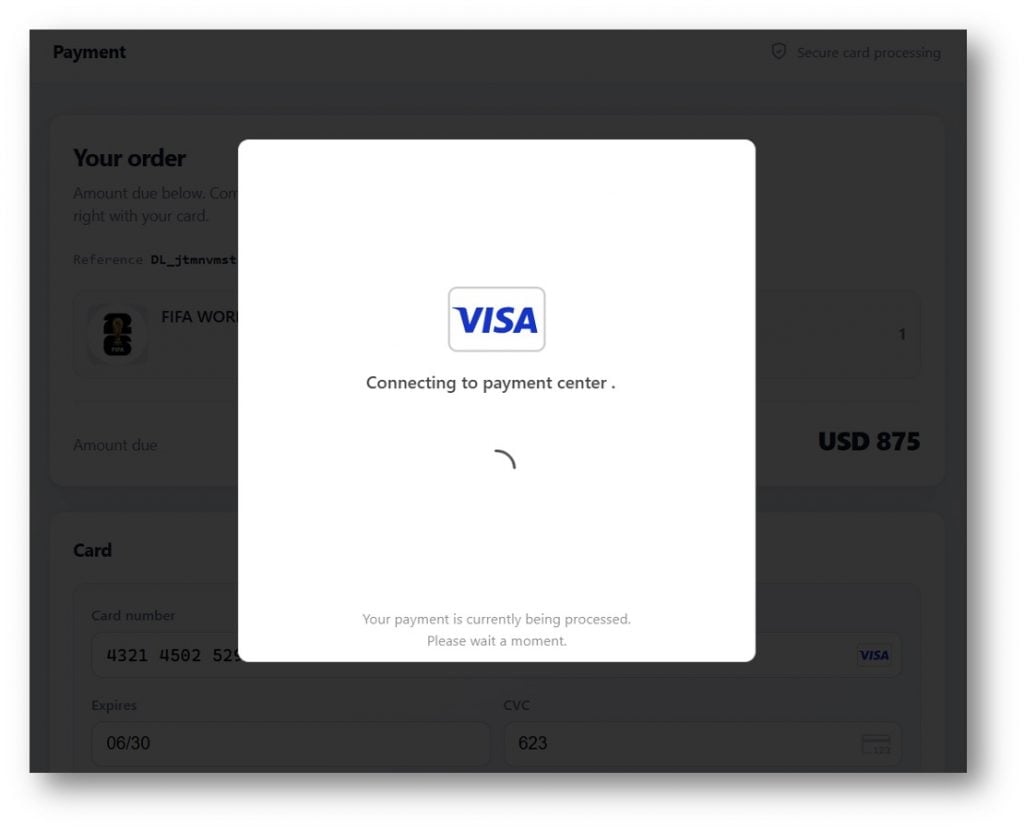
The payment form asks for the same fields as a normal online purchase. It may show card-network logos, a secure-processing message, and a substantial order total. HTTPS only encrypts the connection to that site. It does not make the operator legitimate.
The submitted card details can reach the operator immediately. A fake processing animation keeps the victim waiting while activity happens elsewhere.
Step 6: The operator attempts a different transaction
In the documented campaign, the operator can try to use the stolen card while the victim is still engaged. The merchant and amount involved in that attempted purchase may not match the hospitality package shown on screen.
This is why the text of the bank message matters. It may identify a merchant, amount, or action that conflicts with the story on the webpage.
Step 7: The fake page asks for the bank’s verification code
The bank sends a genuine one-time code to the cardholder. The scam page presents a box for it and frames the request as a routine checkout step. The code is real, but the transaction it authorizes may be the operator’s transaction.
The FTC advises people not to share verification codes when they did not initiate the underlying contact or action. A code is an authorization key, not a customer-service reference number.
Step 8: A fake confirmation delays discovery
After the code is submitted, the site can display an order number or success screen. The victim leaves expecting tickets or a hospitality confirmation, while the unauthorized charge may already be processing.
That delay gives the operator time to abandon the domain, change the payment page, or reuse the stolen credentials. A professional confirmation page does not prove that a valid booking exists.
Company, Address, and Fulfillment Checks
The copied brands are not the website operator
FIFA and On Location are real organizations with a documented hospitality relationship. That relationship does not extend to every site displaying their names. The page reviewed was an impersonation, and its forms were not part of the official account or sales system.
A logo in the header, a card-network mark, or a link to a genuine policy does not identify the legal party receiving the data. Look for ownership that can be verified through the official FIFA route.
The hostname is the address that matters
The documented copycat used a domain ending in `.shop`, while FIFA directs buyers through FIFA.com. An alternative ending, added word, misspelling, or unrelated checkout hostname can place the entire transaction under different control.
The FBI has warned about spoofed FIFA domains using alternate spellings, extra words, and different top-level domains. Its examples show that the names can rotate quickly, so a list of known domains will never be complete.
Support inside the clone cannot verify itself
A chat bubble or contact link on the suspicious page simply returns the visitor to the same unverified system. Real confirmation should come from contact information reached independently through FIFA or the appointed hospitality provider, not from the page being questioned.
Do not send an identity document or bank code to “support” so it can locate a missing order. A legitimate helper does not need a one-time authorization code to search for a booking.
There may be nothing to fulfill
The copied catalog does not prove access to seats, lounges, or hospitality inventory. No independently verifiable seller, booking record, or authorized-agent relationship was established for the imitation site reviewed here.
Digital infrastructure can be rebuilt faster than a real hospitality operation. A new domain can reuse the same design, images, forms, and scripts after an earlier address is blocked. Judge each hostname and sales authorization, not only the visual template.
The Verification Code Is the Moment to Stop
A bank code often arrives from a genuine sender, which makes the surrounding scam feel legitimate. Read the complete message. Banks commonly state what the code is for and warn customers not to share it.
If the merchant, amount, currency, or action is unexpected, do not type the code into the webpage. Close the page and contact the card issuer using the number on the back of the card or inside the official banking app.
Do not rely on a phone number supplied by the ticket site, a pop-up, or a follow-up caller. The same operator may pose as a bank investigator and claim the code is needed to reverse the transaction.
The code may expire, but the stolen card and password do not. Even if no charge is visible, treat those credentials as compromised and act before the operator tries another merchant.
A temporary card lock can limit immediate activity, but ask the issuer whether replacement is necessary. Unlocking the same exposed card later can reopen the risk.
Warning Signs That Matter More Than the Page Design
- The hospitality page was reached through an ad, message, or unofficial fan post.
- The hostname is not reached through FIFA.com or an authorized-agent listing.
- A supposed FIFA login appears on an unrelated domain.
- The page accepts obviously invalid login information and still continues.
- Checkout moves to a different or unfamiliar hostname.
- The bank message describes a merchant or amount that does not match the package.
- The page asks for a one-time code while a “processing” animation keeps running.
- Support asks for card data, passwords, or verification codes.
- The site offers no independently verifiable booking or authorized-seller record.
MalwareTips has a broader guide to FIFA 2026 World Cup scams, including fake tickets, stores, jobs, and rotating domains. This report focuses on the live hospitality checkout and bank-code interception.
What to Do if You Have Fallen Victim to This Scam
- Stop using the page. Do not submit another card, code, password, or identity document. Save the URL before closing it if you can do so safely.
- Call the card issuer immediately. Use the number on the back of the card or the official banking app. Explain that card details and possibly a verification code were entered into a phishing checkout.
- Ask for the card to be blocked and replaced. Review pending and posted transactions with the issuer. Dispute unauthorized charges and ask whether any digital-wallet enrollment or account change was attempted.
- Change the exposed password. Start with the email account if the same password was reused there. Then change every account using that password and sign out other sessions.
- Secure important accounts. Enable multi-factor authentication, preferably with an authenticator app or security key where available. Review recovery email addresses, phone numbers, forwarding rules, and trusted devices.
- Preserve evidence. Keep screenshots, the full domain, messages, search ads, order pages, bank alerts, timestamps, amounts, and correspondence. Do not redact the copy you give to your bank or investigators.
- Check the device. If the page downloaded a file, profile, app, or browser extension, remove it and run a full scan with Malwarebytes. A scan helps detect malware or unwanted software that may have accompanied the phishing page.
- Reduce repeat exposure. AdGuard can block many malicious advertising and tracking requests before they load. It cannot authenticate a seller, so continue to type official addresses directly.
- Report the operation. Send the domain and transaction details to IC3 and ReportFraud.ftc.gov. Also report the ad or result to the platform where it appeared.
- Expect recovery impersonators. Someone who knows the loss details may promise tickets, a refund, or fund recovery for an advance fee. Work only with the bank and authorities reached through verified channels.
Frequently Asked Questions
Is On Location really FIFA’s hospitality provider?
Yes. FIFA appointed On Location as the official hospitality provider for the 2026 World Cup. That real relationship is exactly what the copycat abuses. Start at FIFA.com/hospitality and verify any sales agent through FIFA’s own pages.
Does a FIFA logo prove that a hospitality site is official?
No. Logos, match schedules, photos, and links can be copied or loaded from legitimate servers. Verify the complete hostname and the seller’s presence on an official FIFA or On Location list.
Why would a fake checkout need my bank verification code?
The operator may be attempting a separate purchase with the stolen card. The code sent by the bank can approve that transaction. Read the bank message and never enter a code when the merchant or action does not match.
What if the site showed a successful order confirmation?
A confirmation screen can be fabricated. Verify the booking through contact details obtained independently from FIFA’s official hospitality pages, and check the card account for unfamiliar pending transactions.
What if I entered a password but did not enter my card?
Change that password immediately wherever it was reused. Secure the associated email account, review active sessions and recovery settings, and enable multi-factor authentication.
Where can I safely buy FIFA World Cup hospitality?
Begin at FIFA.com/hospitality. FIFA says On Location is the only official hospitality provider and identifies authorized sales routes. Avoid reaching the purchase page through a sponsored result, unsolicited message, or unknown reseller link.
The Bottom Line
The fake FIFA hospitality scam is not just selling an imaginary premium package. Its copied portal can collect a password, card details, personal information, and the bank code needed to complete an unauthorized transaction while the victim waits.
The defense is simple but strict: begin at FIFA.com, verify the complete hostname, and stop whenever a bank message does not match the purchase on screen. A familiar logo can be copied. A verification code can move real money.








