


An email says somebody has opened your Robinhood account from an unfamiliar device. It carries the Robinhood name, looks polished, and may even appear to come from a verified @robinhood.com sender.
That should make the warning trustworthy. In one unusually convincing campaign, it did not. The message itself became the doorway into a phishing and cryptocurrency theft operation.
Overview
A Real Sender Address Did Not Make the Message Safe
The most sophisticated version appeared in late April 2026. Attackers abused Robinhood’s account creation process to place attacker-controlled HTML inside an automated email generated by Robinhood’s own system.
The email therefore came from noreply@robinhood.com and could pass standard SPF and DKIM authentication. Some inboxes also displayed the verified sender treatment that people are normally taught to trust.
Robinhood said the incident was an abuse of the account creation flow, not a breach of customer accounts. The abused field was removed, and the phishing destination identified in public reporting is now offline.
The Fake Alert Was Only the Beginning
The warning claimed an unrecognized device, phone number change, or login from another country had been detected. A button such as “Review Activity Now” sent the reader away from Robinhood to a domain controlled by the attacker.
Parallel campaigns used texts and ordinary spoofed emails instead. Some claimed that a $1,972.53 withdrawal was pending and told recipients to call a number. Others led to fake login pages or supposed security specialists.
Once contact began, the scam could shift from credential theft to direct crypto theft. A caller might ask about wallet balances, request a verification code, or instruct the victim to transfer assets to a supposedly protected wallet.
The Request Matters More Than the Logo
A perfect sender address is useful evidence, but it is not absolute proof that every button or sentence inside a message is safe. Automated systems can be abused, legitimate accounts can be compromised, and email threads can contain deceptive material.
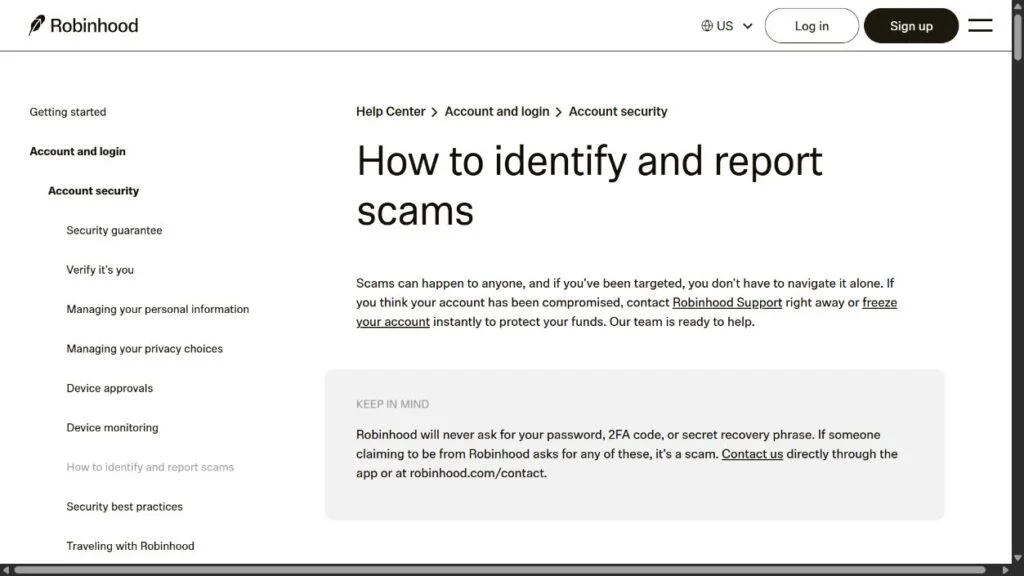
Robinhood’s current safety guidance is more decisive. Support will not ask for a password, 2FA code, secret recovery phrase, remote-access software, or a transfer of money or crypto for protection.
- The April 2026 email abuse was confirmed and has been fixed.
- The message could originate from a legitimate Robinhood email system.
- The button led away from Robinhood to a phishing destination.
- Other versions used fake support numbers, texts, and AI-assisted calls.
- Any request to move crypto to “secure” it is a critical warning sign.
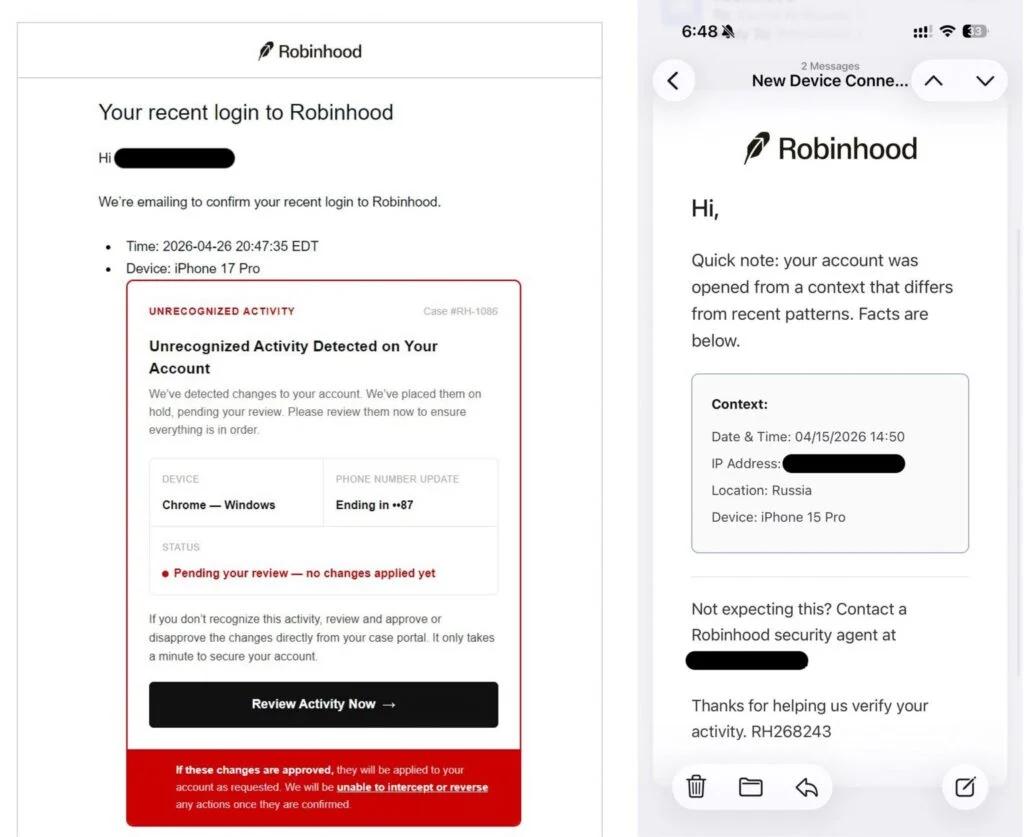
The first example shows why this campaign was so difficult to judge by appearance alone. A normal login notification contained an injected security warning, a case number, unfamiliar device details, and a button urging the recipient to review the activity.
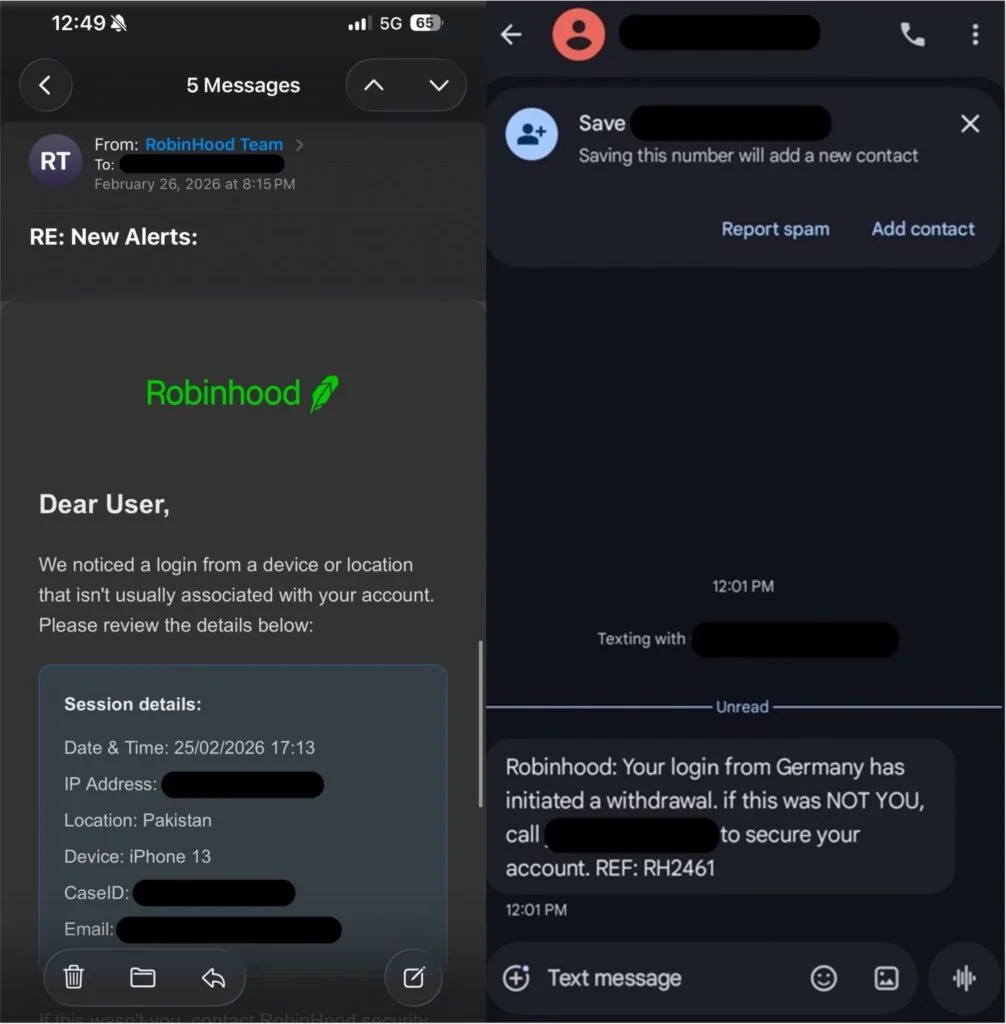
Other versions used ordinary-looking emails, text messages, and phone numbers. They named foreign locations, pending withdrawals, or account changes, then told the recipient to call a supposed security agent immediately.
The details changed, but the goal stayed consistent. The attacker wanted the recipient to trust the alert, leave the Robinhood app, and follow instructions controlled by the scammer.
What Happened in the Verified Robinhood Email Incident
Robinhood’s onboarding system automatically sent account-related messages containing details such as time, approximate location, IP information, and the device used during registration. One device field did not safely neutralize embedded HTML.
Attackers placed their own formatted content inside that field. When Robinhood generated the automated message, the recipient’s email client rendered the inserted material as part of the legitimate email.
The result looked like a professional security notice rather than raw device information. It contained a red warning panel, account-change language, fabricated case details, and a prominent review button.
Public technical reporting found that the button directed users to robinhood.casevaultreview.com. That was not a Robinhood subdomain. The important registered domain was casevaultreview.com, with the word “robinhood” placed before it to create visual confusion.
Why Email Authentication Could Not Detect the Deception
SPF helps receiving servers check whether a message came from an authorized sending system. DKIM attaches a cryptographic signature that helps show whether a signed message was altered after it was sent.
Those protections worked as designed. The message really was generated and signed by an authorized Robinhood email system. The problem was that the system had accepted and rendered malicious input before the final message was created.
A verified sender mark answers a narrow question about the sending identity. It does not independently inspect the business logic that produced every button, case number, phone number, or destination in the email.
This distinction is useful far beyond Robinhood. Scammers have abused contact forms, calendar invitations, account notifications, document-sharing services, and other legitimate platforms to deliver content that inherits trust from the service.
How Text Messages and AI Voice Calls Extend the Same Story
The verified-email incident was unusual, but it sat beside more familiar Robinhood impersonation methods. Text messages claimed a large withdrawal was pending and urged the recipient to call a supplied number before the money left the account.
The exact amount, such as $1,972.53, was chosen to sound like a real transaction rather than a generic warning. It was large enough to create fear but ordinary enough to seem plausible for an investment account.
Email versions described logins from Russia, Pakistan, Germany, or another unfamiliar location. They added device models, case IDs, partial phone details, and timestamps that looked as if they had been copied from an internal security dashboard.
The attacker did not need those details to be true. Their purpose was to give the recipient several small facts to process while the urgent call-to-action remained simple: call now or review the account immediately.
Some targets also reported unsolicited calls using a polished, highly consistent voice. Generative audio can help a scammer operate a scripted support conversation, but a human call-center agent can create the same effect by reading from a prepared workflow.
Long pauses before each answer, repeated phrasing, and an inability to respond naturally to an unexpected question can suggest automation. They are useful clues, but the decisive red flag is still the request for credentials, remote access, or a transfer.
Robinhood says users should request support through the app or its official contact page. An inbound caller who claims to be Robinhood security should not be trusted simply because the caller knows a name, email address, or supposed case number.
Personal information can come from older breaches, data brokers, public records, or earlier phishing. Knowing who you are does not prove who the caller is.
How the Robinhood Login Alert Scam Works
Step 1: The Alert Creates an Immediate Account Emergency
The message reports a foreign login, new device, changed phone number, or pending withdrawal. These are believable security events, especially for someone who holds investments or crypto.
Precise-looking details increase the pressure. A timestamp, partial IP address, device model, location, case ID, and exact amount can make a fabricated event feel like a live fraud investigation.
Step 2: Familiar Branding Suppresses Normal Suspicion
The recipient sees Robinhood’s name, logo, layout, and security language. In the account-creation abuse, the legitimate sender address and authentication results added a layer that ordinary phishing messages rarely possess.
In less technical versions, scammers imitate the same visual design or spoof the caller ID. A familiar display name is easy to copy, and phone numbers shown on a screen can be manipulated.
Step 3: The Message Moves the Victim Outside the Official App
The alert includes a button, link, or support number. This is the control point. Instead of asking the user to open the Robinhood app independently, it directs the entire verification process through a channel selected by the attacker.
A fake domain may place “robinhood” at the beginning of a longer address. A fraudulent phone line may answer with a polished menu, hold music, and an agent who already knows the supposed case number.
Step 4: The Fake Site or Agent Collects Security Information
A phishing page can request the email address, password, account details, Social Security number, or 2FA code. A caller can ask the same questions conversationally while pretending to verify ownership.
The scammer may also ask what assets the victim holds and how much crypto is available. That information tells the operation whether the target is worth escalating and which transfer instructions may work.
Step 5: A Second Contact Makes the Case Feel Official
Some operations use another caller who claims to be a senior security agent, blockchain specialist, or wallet technician. The second person repeats the same case details, creating the illusion of an internal handoff.
An AI-generated or scripted voice can keep the conversation consistent. A long pause before answers, an unnaturally even tone, or a caller who refuses to leave the approved script can reveal the performance.
Step 6: “Protecting” the Crypto Becomes the Theft
The victim is told that the account cannot be secured while the assets remain exposed. The supposed solution is to send crypto to a safe wallet, verification wallet, cold-storage address, or temporary holding account.
That address belongs to the scammer. Blockchain transfers generally cannot be recalled like a card transaction. The moment the transfer is confirmed, the criminal can move the funds through additional wallets or exchanges.
Step 7: Recovery Scammers Target the Victim Again
After the loss, another person may offer blockchain tracing, a guaranteed refund, or access to frozen funds. They demand a tax, network fee, legal charge, or wallet activation payment before releasing the money.
This is usually a second scam. Genuine investigators cannot guarantee crypto recovery, and no hidden payment can force an unknown wallet owner to return transferred assets.
Company, Address, and Fulfillment Checks
The Robinhood Name Does Not Identify the Person Contacting You
Robinhood is a real regulated financial services brand, but a caller, text sender, or website can borrow that identity. The correct logo and a known company name do not identify the human on the other end.
Open the installed app yourself and review account activity there. Contact support only through the in-app process or an address reached by typing robinhood.com directly.
The Domain Reveals Where the Button Really Goes
Read a web address from right to left around the final registered domain. In robinhood.casevaultreview.com, the controlling domain was casevaultreview.com, not robinhood.com.
Words placed before an unrelated domain are labels chosen by that domain’s owner. They do not make the page part of Robinhood, even when the page uses the correct colors and branding.
Fake Support Can Vanish as Soon as the Transfer Clears
Fraudulent support numbers may work only during an active campaign. Agents can stop answering, block the victim, or route later calls to voicemail once the wallet transfer is complete.
Do not test a number inside the suspicious message. Robinhood says phone support should be requested through the app or its official contact page.
A Wallet Address Is Not a Verifiable Security Department
A blockchain address does not display a customer-service department, legal office, or protected ownership role. It is simply a destination capable of receiving assets.
Before any transfer, the sender must independently know and trust the recipient. A case ID, QR code, or claim that the wallet is monitored does not establish who controls its private key.
The Red Flags That Still Work When the Email Looks Perfect
The visual quality of phishing has improved, so the safest test focuses on the action being requested. Ask what the message wants you to do and who controls the next step.
- It reports a frightening event but does not appear inside the official app.
- It asks you to use a link or number contained in the warning.
- The destination is not an exact robinhood.com address.
- A caller requests a password, 2FA code, recovery phrase, or screen access.
- You are told to transfer money or crypto to protect it.
- The agent discourages you from contacting official support independently.
One red flag is enough to stop. You do not need to prove exactly how the message was generated before refusing the requested action.
What to Do if You Have Fallen Victim to This Scam
- Stop contact and do not send another transfer. Hang up, close the page, and block the fraudulent number. Do not pay a supposed unlock fee, tax, tracing charge, or recovery deposit.
- Open Robinhood independently and freeze the account. Use the installed app or type robinhood.com yourself. Contact official support immediately and ask for the account to be frozen if credentials or account details may have been exposed.
- Change compromised credentials from a clean device. Update the Robinhood password and the password of the connected email account. Use unique passwords and review unknown devices, forwarding rules, recovery addresses, and active sessions.
- Protect two-factor authentication. Tell support if you disclosed a 2FA code or approved an unexpected device. Contact the mobile carrier if there are signs of SIM swapping, lost service, or unauthorized account changes.
- Report the wallet transfer immediately. Give Robinhood, the sending exchange, and any receiving exchange you can identify the transaction hash, wallet address, time, amount, and complete communication record. Speed matters, although recovery is not guaranteed.
- Contact banks and linked payment providers. If cards or bank accounts were exposed, ask the issuer to block unauthorized transactions, replace affected cards, and add fraud monitoring.
- Save evidence before deleting messages. Preserve full email headers, screenshots, URLs, phone numbers, case IDs, wallet addresses, transaction hashes, and recordings or voicemails. Report the incident to the FTC, IC3, and Robinhood’s phishing channel.
- Scan the device if you downloaded anything. Run a complete Malwarebytes scan if the page delivered a file, browser extension, or remote-access tool. Malwarebytes can identify credential stealers and remote-control software that may survive a password change.
- Block the malicious advertising path. AdGuard can reduce exposure to known malicious pages, deceptive redirects, and scam ads. It is an additional barrier, not a substitute for checking account alerts inside the official app.
- Ignore guaranteed recovery offers. Anyone promising certain crypto recovery in exchange for an advance payment is likely attempting another theft. Share new contacts with the original investigator instead of engaging.
Frequently Asked Questions
Can a phishing email really come from noreply@robinhood.com?
Yes, the April 2026 campaign abused Robinhood’s account creation flow to place malicious content inside a legitimate automated email. Robinhood said customer accounts were not breached, and the specific flaw was fixed.
Does a Gmail verified sender mark prove every link is safe?
No. It helps authenticate the sending identity, but it does not guarantee that every piece of content generated by an automated system is trustworthy. Check sensitive alerts inside the official app.
Will Robinhood call me and ask me to move crypto?
No legitimate security process requires sending crypto to a stranger’s wallet. Robinhood’s guidance says support will not ask users to send money or crypto to someone claiming to protect the account.
What if the suspicious login does not appear inside my account?
That strongly suggests the message is false. Do not use its link or number. Contact Robinhood through the app if you still want confirmation.
Can Robinhood reverse a crypto transfer sent to a scammer?
Crypto transfers are generally irreversible. Report the transaction immediately because an exchange may sometimes identify or restrict a destination, but nobody can promise recovery.
Was Robinhood itself responsible for the scam?
The criminal campaign impersonated and abused Robinhood. Robinhood stated that the verified-email incident was an abuse of account creation, not a breach of customer accounts, and fixed the exploited path.
The Bottom Line
The Robinhood login alert scam proved that a message can inherit real technical trust signals and still contain a fraudulent instruction. A logo, sender address, blue check, case number, or caller ID cannot make an off-platform transfer safe.
Open the Robinhood app independently, verify the activity there, and use official support. If anyone asks for credentials, a recovery phrase, remote access, or crypto for “protection,” stop immediately.

Join the discussion
0 commentsShare your experience or ask a question about this article.
Discussion
Start the conversation
Have a question or something useful to share? Add the first comment.