

An email says law enforcement requested information connected to your Google account. It names a federal court and agency, yet asks for no money and makes no accusation.
The Google Subpoena Email creates exactly the kind of uncertainty scammers exploit: a message can be genuine, copied, or altered by one crucial link.
Overview
Google really does email users about government data requests
Google’s official government-request policy says it generally emails the affected user account before disclosing information, unless notification is legally prohibited or an emergency or account condition prevents notice.
A subpoena notice therefore cannot be dismissed merely because it arrived by email. Google may send one after receiving legal process that names an account, identifier, message, payment, device, or group of users.
A notice also does not prove the recipient is a criminal suspect. The account may be linked to a broader investigation or to another person, event, conversation, or identifier.
A recent message looked frightening but was probably genuine
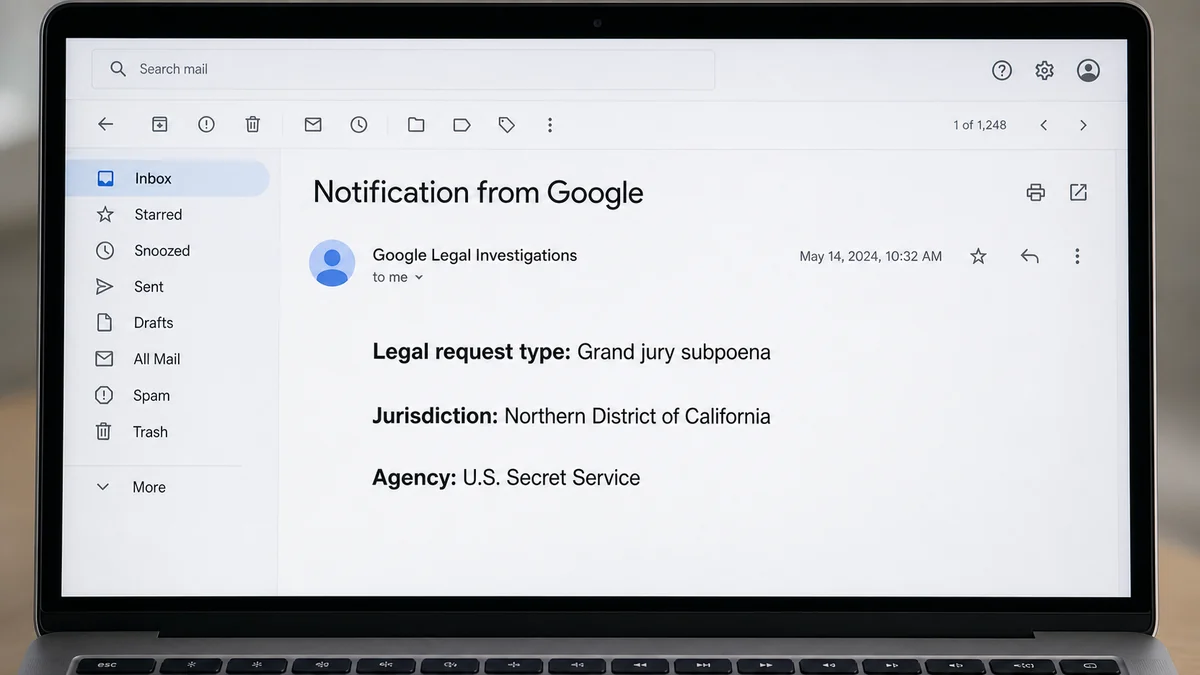
A recent Reddit report described an email naming a grand jury subpoena, the Northern District of California, and the U.S. Secret Service. The recipient asked whether a Google account dashboard could verify it.
The message reportedly did not ask for a password, Social Security number, payment, or immediate call. Commenters correctly noted that authentic legal notices can look alarming while simply reporting that Google received a request.
We cannot authenticate that individual email from a Reddit description. The crucial point is that its format matches a real process, which makes the same format useful to phishers.
The fake version adds a credential or payment step
Google’s Transparency Report FAQ says user-notification emails will not ask for a password or Social Security number. A message requesting those details is probably a scam.
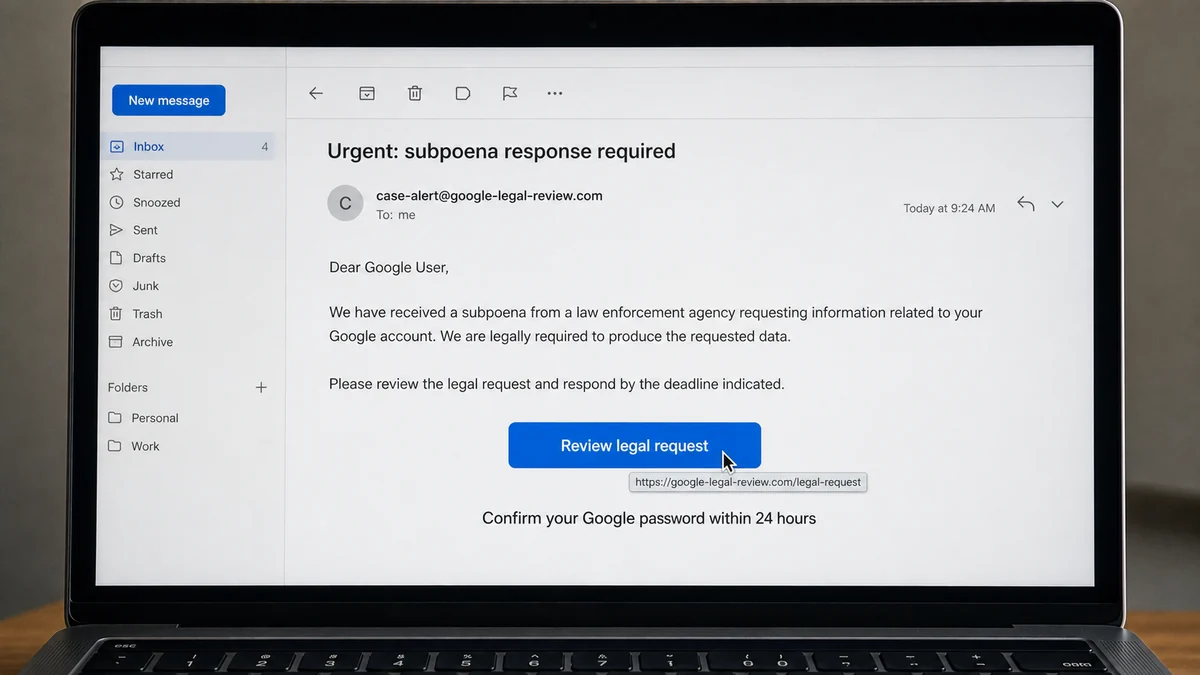
A copycat may add a button to review the subpoena, a deadline to confirm identity, a telephone number for “legal support,” an attachment, or a threat that the account will be closed.
Before interacting, examine the full message:
- Does the sender domain end exactly in google.com?
- Do SPF, DKIM, and DMARC pass in the original headers?
- Does the message ask for a password or one-time code?
- Does a button lead outside google.com?
- Is there an attachment you were told to enable or install?
- Does the sender demand payment to stop disclosure?
- Does it threaten arrest unless you call immediately?
- Does the case number remain consistent throughout?
- Can you reach Google’s policy page independently?
- Would legal advice be needed before any formal objection?
Realistic names and case details are not sufficient. Scammers can copy public legal language word for word.
What a Genuine Google Legal Notice Means
Government agencies can ask Google for subscriber information, IP records, content, or other account data using different legal instruments. The required process depends on the data and jurisdiction.
Google says it reviews each request for legal validity, scope, applicable law, and company policy. It may seek to narrow a request or object to producing information.
When notice is permitted, Google sends the account holder an email. A court order or statute can delay notification until a secrecy period ends.
The timing matters. Some notices describe a request that Google has already answered. Others may identify a period during which a person can seek legal relief.
Do not infer your status from the agency name alone. A large investigation can involve accounts belonging to witnesses, victims, contacts, buyers, sellers, commenters, or people sharing an identifier.
Google generally cannot explain the entire investigation. The requesting agency and court control much of the underlying information.
A legitimate notice may provide a reference or case identifier and a route for requesting a copy of legal process. Follow only contact information confirmed through Google’s official policy pages.
Do not reply with a long narrative about your activities. If you believe you may be a target, a lawyer can advise whether to respond, preserve information, or seek to quash a request.
Do not delete data because a notice frightened you. Destruction after learning of legal process can create separate problems. Preserve the email and obtain qualified legal advice.
This article explains scam detection and account safety, not the merits of any subpoena or a recipient’s legal duties.
How the Fake Google Subpoena Email Scam Works
Step 1: The phisher copies authentic legal language
The attacker borrows wording about legal process, user information, disclosure, jurisdiction, and case identifiers. Public examples make the structure easy to imitate.
A real agency or court name supplies authority without requiring the scammer to impersonate an individual police officer.
Step 2: Fear suppresses normal verification
The recipient worries about arrest, reputation, employment, or private messages becoming public. Even an innocent person may feel compelled to act quickly.
The scammer does not need a detailed accusation. Ambiguity lets the victim imagine something worse.
Step 3: A fake review button creates the handoff
The email offers a link to view the subpoena, confirm the account, request details, or object before a deadline. The visible text may mention Google while the destination uses a lookalike domain.
A hover preview or long press can reveal the mismatch before the page opens.
Step 4: The copied page steals Google credentials
The landing page resembles a Google login and asks for an email, password, passkey approval, or one-time code. The attacker relays the information to the real service.
If the victim approves a sign-in prompt, the criminal may enter the account immediately.
Step 5: Email access unlocks the victim’s digital life
A Gmail takeover exposes password-reset links, receipts, travel plans, documents, contacts, and conversations. The attacker can reset financial and social accounts.
They may also delete the original phishing message and security alerts to reduce evidence.
Step 6: A fake legal agent demands payment
Some variants direct the victim to call. A supposed investigator says a bond, confidentiality fee, tax, or verification payment can stop disclosure or arrest.
Real subpoenas are not canceled by gift cards, cryptocurrency, wire transfer, or a payment-app deposit.
Step 7: Recovery scammers appear after the compromise
A fake hacker or lawyer promises to erase the subpoena, trace the agency, or restore the account for an advance fee. This adds financial loss to the credential theft.
Use an attorney found independently for legal questions and Google’s own recovery routes for account access.
How to Authenticate the Email Without Clicking
Open Gmail directly and locate the message there. A forwarded screenshot cannot prove the original sender or authentication results.
Use Gmail’s More menu and choose “Show original.” The header view displays SPF, DKIM, and DMARC results and the technical routing information.
A pass result is useful, but do not stop there. Forwarding systems and compromised accounts can complicate headers, while a fake display name can coexist with an obviously unrelated address.
Inspect the complete From address and Reply-To. A reply route outside google.com is a strong warning when the message claims to come from Google Legal Investigations.
Hover over every link without opening it. The registered domain immediately before the first slash must be google.com for a Google destination, not a longer name that merely contains the word Google.
Type Google’s Transparency Report address yourself. Compare the message’s claims with the official explanation that notices do not request passwords or Social Security numbers.
Do not upload the email or subpoena to a random “verification” website. Legal documents and headers may contain account identifiers, investigation details, and personal information.
If a PDF is attached, do not enable macros, install a viewer, or sign in through the document. Save it for a lawyer or trusted security professional if necessary.
Check the Google Account Security page for unfamiliar devices, recovery changes, app passwords, and third-party access. A legal notice itself should not create new sign-ins.
If the email is authentic but you need case details, use the contact process identified on Google’s official policy pages. Never rely only on a telephone number in the message.
Real Notice, Fake Notice, or Unverified?
Classify the message based on evidence rather than emotion. “Real” means the original headers authenticate a Google sender and the content matches the company’s documented process.
“Fake” means the sender, links, attachment, or requested action conflicts with that process. A password request, payment demand, remote-access request, or non-Google login page is decisive.
“Unverified” is a valid temporary conclusion. If the headers are missing, a corporate filter rewrote the message, or a screenshot is all you have, do not guess.
An authentic message can contain an old HTTP link in quoted policy text or a plain reference address. That alone is weaker evidence than the actual destination and authenticated sender.
A fake message can include only real Google links and wait for the victim to reply. The attacker may then shift the conversation to a different address or telephone number.
Personalization is not proof. Names, email addresses, and court dockets can be obtained from breaches, public records, or earlier compromises.
Grammar is also a weak test. Modern phishing can be polished, while real legal templates can contain awkward wording.
The requested action is the strongest practical clue. A legitimate notification informs and may explain lawful options. A phishing message needs you to disclose, approve, install, pay, or surrender control.
What Not to Do After Receiving the Notice
Do not click every link to see which one works. A single visit can expose browser details, and a copied login page may capture credentials before you recognize the domain.
Do not call an unverified telephone number. A convincing operator can turn uncertainty into a payment demand or persuade you to install remote-control software.
Do not send a photograph of identification to prove you own the account. Google already has account-authentication methods, and a random legal mailbox does not need a passport selfie.
Do not share a one-time code. A caller may say the code opens the case file when it actually approves a Google login or password reset.
Do not pay a bond, fine, confidentiality charge, tax, or processing fee. A gift card or cryptocurrency transfer cannot cancel legal process.
Do not forward the message publicly without redaction. Headers and attachments may contain case identifiers, account addresses, telephone numbers, or information about other people.
Do not delete the email after reporting it. Preserve the original in case Google, a lawyer, or law enforcement needs the technical headers.
Do not erase account data because you are frightened. If the process is real, destruction could complicate the legal situation. Seek advice before changing records.
Do not assume that silence means arrest is imminent. Authentic user notices often provide information without requiring any immediate action from the account holder.
Do not assume that a copied court seal or agency name authenticates the sender. Public legal documents supply criminals with accurate formatting and terminology.
Do not let a countdown replace verification. A genuine deadline should be evaluated from the legal process itself, preferably with a qualified lawyer.
Do not ask a social-media stranger to “trace” the subpoena. They cannot access a court or Google system, and the offer may be a recovery scam.
Do not reuse the current Google password after a suspected phish. Change it from a clean device and revoke other sessions.
Do not focus only on Gmail. Review Drive, Photos, payment profiles, saved passwords, third-party access, and recovery channels for changes.
Finally, do not confuse technical authentication with legal advice. A security professional can evaluate headers and links, while a lawyer evaluates rights, deadlines, and consequences.
If the sender mentions a motion to quash, do not download a form from the email and submit it blindly. Deadlines, standing, jurisdiction, and procedure require case-specific analysis.
If the notice arrived in a managed work or school account, contact the organization’s security or legal administrator through a known channel. Google may notify the administrator rather than the individual user in managed environments.
If the message refers to an account you do not recognize, do not attempt to sign in to it. Preserve the mismatch because it may indicate mistyped identifiers, forwarded mail, or a phishing list.
Use a separate, verified communication path for every question. One safe browser tab for Google’s policy page and another for account security are better than navigating from the alarming email.
Write down what you verified and when. A short record of headers, domains, account checks, and legal advice prevents repeated panic and gives support a clearer starting point.
Company, Address, and Fulfillment Checks
Verify the sending domain
Check the full From, Reply-To, return path, and authentication results. A display name reading Google Legal Investigations is not enough.
Preserve the original message rather than only a screenshot.
Verify every destination
Inspect links before opening them and type official Google addresses independently. A lookalike domain with Google in a subdomain or path is not google.com.
Never enter credentials after following a legal-warning link.
Verify the legal references
Check whether the named court and agency exist, but remember that scammers can copy real names. A lawyer can evaluate a case number or deadline.
Do not call a number simply because the email associates it with an agency.
Define what the message asks you to do
A real notice may inform you or describe legal options. It should not need your Google password, Social Security number, payment, gift card, or remote-control access.
The requested action often reveals the scam more clearly than the letterhead.
What to Do if You Have Fallen Victim to This Scam
- Stop interacting. Close the phishing page, end calls, and do not approve another sign-in prompt.
- Change the Google password. Use a clean device and create a unique password that is not reused elsewhere.
- Revoke sessions. Review devices, recent security activity, recovery methods, app passwords, passkeys, and third-party access.
- Secure recovery channels. Change the passwords for backup email accounts and protect the mobile-carrier account.
- Preserve the original email. Save headers, sender, Reply-To, links, attachments, timestamps, and screenshots before reporting it.
- Report phishing to Google. Use Gmail’s phishing-report control and official account-recovery pages.
- Contact financial providers. If you paid or exposed card details, lock the method and dispute unauthorized activity immediately.
- Run Malwarebytes. Scan the device if you opened an attachment, installed software, or entered credentials through the fake page.
- Use AdGuard as a supporting layer. It can reduce malicious ads and known phishing exposure, but it cannot authenticate legal process.
- Get independent legal advice. If the notice may be genuine and a deadline or investigation concerns you, consult a qualified lawyer.
- File fraud reports. Use ReportFraud.ftc.gov and local cybercrime channels for losses or identity theft.
- Ignore recovery promises. Nobody can erase a real subpoena or recover an account through a private-message payment.
Frequently Asked Questions
Does Google really send subpoena notices by email?
Yes. Google says it emails account holders about government requests when notice is legally permitted. A real process can therefore arrive through email.
Does receiving one mean I am under investigation?
Not necessarily. An account may be connected to a broad request, another person, or an identifier. Only the underlying process and facts can clarify your role.
Where can I verify the notice in my Google Account?
Google does not describe a universal account dashboard for every legal notice. Verify the original email headers and use contact information from Google’s official policy pages.
Will Google ask for my password in the notice?
No. Google’s Transparency Report FAQ says user-notification emails do not ask for passwords or Social Security numbers. Such a request strongly indicates phishing.
Should I reply to ask whether it is real?
First verify the sender and Google’s official process independently. If legal consequences may apply, ask a lawyer before sending substantive information.
Can SPF, DKIM, and DMARC prove everything?
They help authenticate the sending domain but do not validate every link, attachment, claim, or requested action. Use them as part of a wider check.
The Bottom Line
The most dangerous Fake Google Subpoena Email is not a ridiculous threat. It is a careful copy of a notification Google genuinely sends, altered with one credential-stealing link, payment demand, or callback number.
Do not assume the notice is fake, and do not assume it is real. Preserve it, inspect the original headers, verify domains independently, and compare the requested action with Google’s official guidance. If the issue is legally significant, account security and qualified legal advice should proceed together.








