


A pending-orders subject is the kind of mail a busy inbox actually opens, because payment actions sound like work that will not wait until Friday. Pending Orders & Payment Actions #011016 is specific enough to look like a ticket a clerk already filed, which is why people read it before they finish the rest of the folder.
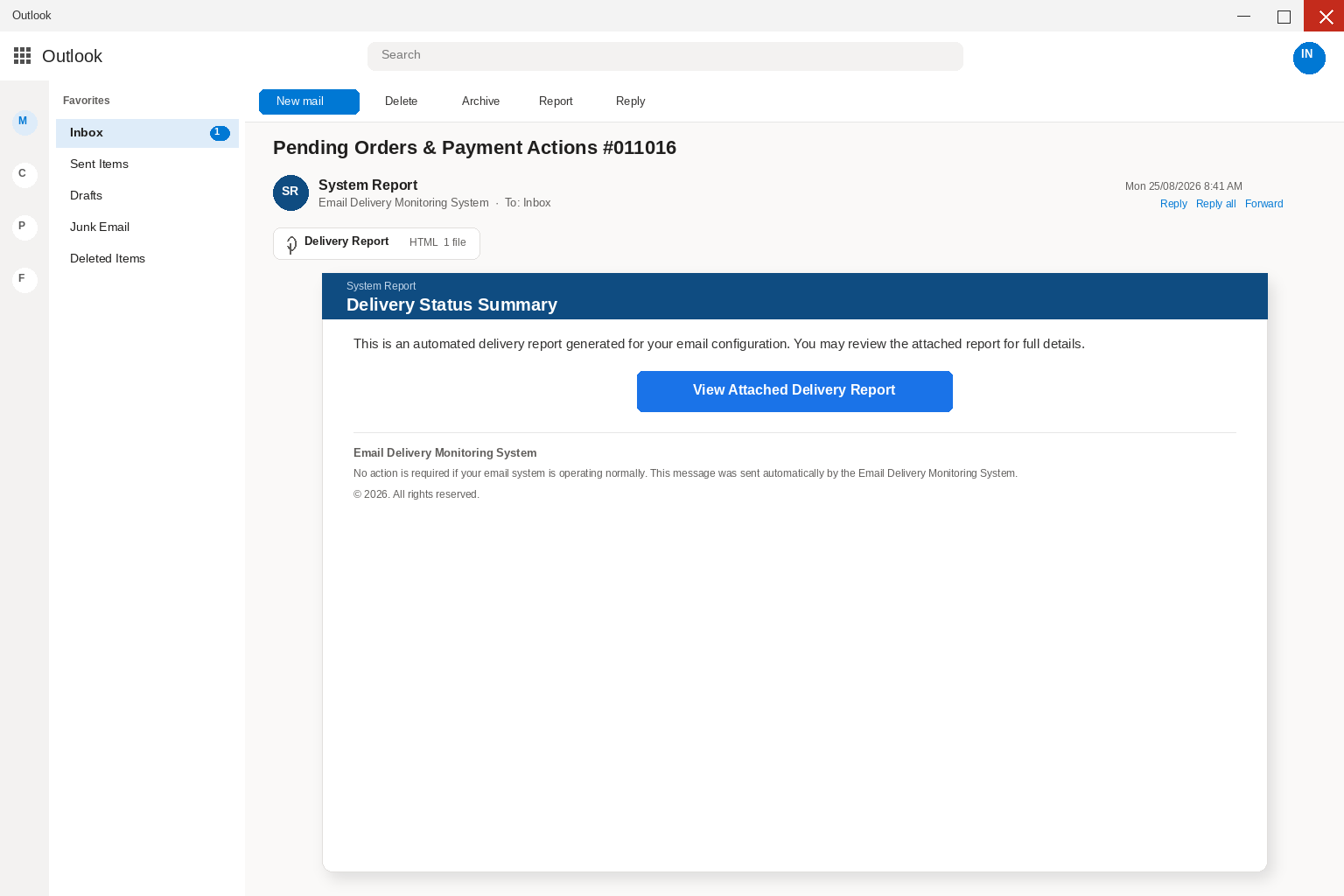
The body writes in the calm voice of a system that already watches the mailbox, and it arrives as a System Report with Delivery Status Summary sitting on the card like a finished log. It says this is an automated delivery report generated for your email configuration, and that you may review the attached report for full details. A control labeled View Attached Delivery Report sits in the body, and an HTML file sits on the message while the footer signs as the Email Delivery Monitoring System. A 2026 copyright line adds that no action is required if your email system is operating normally, which is the kind of quiet close people skip while they look for the report.
If a real delivery report is waiting, you get it from the mailbox you already open, or from the thread you already have, rather than from a surprise attachment. Leave the attached report where it is while you check the account the way you always check it. A delivery summary that cannot wait for a page you type is asking you to hurry for a reason that is not in the footer.
Overview
View Attached Delivery Report is not a log your host already keeps for pending mail, and it does not open a status page you can print or compare with last week’s traffic. The control in the body leads nowhere, and the real ask is the HTML file attached to the message. When that file opens, the browser loads a page that copies Gmail’s login and asks you to verify the email address by typing the mailbox password. There is no delivery report waiting behind that form, because the form is collecting the login for the inbox you are already sitting in.
What they take first is the password for that mailbox, and after that they take the mailbox itself. That includes the threads with vendors, the reset codes that land an hour later, and the people who already answer when your name is on the From line. A delivery-status story is useful costume for that harvest, because an automated system report sounds like operations rather than like a stranger asking for a secret. Pending orders and payment actions make the errand feel like work you already meant to finish, which is why those words sit in the subject. Once the fake Gmail page has the password, the people who wrote the report can read the real mail and impersonate the address. They can also reset other logins that all send their recovery mail to the same place, which is why a mailbox password is worth more than a single delivery report.
Google is a real company, and Gmail is a real mailbox product that millions of people already use, which is exactly why those names are useful on a copied login. Anyone can paste a Verify Email Address heading onto a page that looks like Gmail, and anyone can pre-fill the address they already mailed. A tidy heading does not prove that Google asked you to sign in from an attached file, and a familiar layout does not make the form honest. Google does not collect a mailbox password through a surprise HTML attachment in a cold Delivery Status Summary, and a real mailbox does not need you to prove you own a box that just received mail. If you need the real Gmail sign-in, type gmail.com yourself in a new tab, then look at mail from a page you already trust.
The fake page does not live on a host you type for webmail, because it loads from the HTML file on the computer after you open the attachment. That is why a padlock on a later tab is not the check that matters here, and why hunting for a website name after you close the file is wasted work. Do not open the attachment again to see whether a delivery report then appears, because curiosity is how they learn the bait landed. A second copy of the password is how they finish the theft, even when the window later looks empty or broken.
The Federal Trade Commission describes this shape in ordinary language in How To Recognize and Avoid Phishing Scams, where it says criminals use email to steal passwords, account numbers, or Social Security numbers. A common story, the Commission adds, is a problem with an account when there is no problem, which is exactly how a fake delivery report earns an open. Another common story is that you must confirm personal information right now, when you do not have a real problem to confirm. The Commission’s advice is to contact the company with a phone number or website you already know is real, not with the information in the unexpected message. A View Attached Delivery Report control that arrived inside a Pending Orders & Payment Actions letter is information in the email, which is why it is a poor place to start a mailbox check.
CISA says the same thing from the systems side on avoiding social engineering and phishing, where it tells people not to reveal personal or financial information in email. It also tells people not to use a link from a surprise message to reach a login they already have, which is the whole move inside an HTML attachment that then presents a Gmail costume. If a delivery status summary feels off, you verify it without using anything in the report, which is the opposite of typing your mailbox password so a pending order can finish delivering. Google’s advice on phishing in Gmail is blunt on this point, because Gmail will not ask you for your password over email. An attached file that then presents a login is still not a sign-in you should finish, even when the heading says Verify Email Address and your address is already sitting in the box.
A real delivery problem can exist, because mail really does bounce, queues really do stall, and a panel you already pay can show you a status without asking you to retype the password on a stranger’s Gmail copy. That check still lives on a page you reach the way you always reach the account, by opening the webmail bookmark you already keep or by typing the host you already use. It does not live inside a cold HTML file that chose the next screen for you after a surprise letter. The letter already arrived in the mailbox it claims needs a delivery report, which is a contradiction you can sit with longer than the attached file wants.
How The Scam Works
The campaign is built from a few quiet pieces that look like ordinary mail admin rather than like a prize, and that quiet is the reason a careful person still opens it. A pending-orders subject, a System Report display name, a Delivery Status Summary heading, a button that does not work, and an HTML file that opens a Gmail costume are the whole machine. If you understand those pieces, you do not need a secret decoder or a case number to stay out of the next screen. You need a habit of never giving the password to a page you did not type yourself, and of never treating an attached HTML file as a delivery log.
1. A delivery status summary lands
The message arrives in the same Outlook or hosted webmail you already trust, with the subject Pending Orders & Payment Actions #011016. The display name says System Report, which is how a monitoring desk talks when it already has a queue and wants the card to feel like Tuesday. There is no long pitch and no demand for a wire in the first line, and the whole card fits on a phone screen on purpose. A short delivery notice is easier to believe than a letter that asks for a routing number before coffee, which is why the copy stays small. If you are already signed in to webmail, the folders on the left and the search bar on the top make the fake note feel native. You are not visiting a strange site yet, because you are still reading mail, and that is the moment the costume is strongest.
The letter only has to survive the few seconds between the subject and the attached file, and people who would ignore a lottery note will still open a delivery report that looks like the system they already pay. Accounts payable lives on that kind of dread, and so does anyone whose job is to keep orders moving through a Monday, because a stalled payment is a vendor who thinks you went silent. A heading that says Delivery Status Summary is enough to invent the rest of the afternoon, whether that is a pending order or a client who will not wait. A mailbox the boss will ask about is enough of a reason for the same click, which is why the heading does not need a longer story. The costume only has to last until the file opens, and the rest of the theft happens after that click.
2. The name copies a monitoring desk
Email Delivery Monitoring System is a pile of words people already associate with mail servers, bounce logs, and the quiet notices hosts actually send. You do not need a long story when the letterhead already sounds like the window you use to read mail and the desk that already delivers that mail. Those words already live in the muscle memory of people who keep a work mailbox, which is why the costume works in a few seconds. The people who wrote the letter are not Google and are not the desk that runs your real mail. They borrowed the language of a system report so a five-second glance would survive, which is the whole job of a display name. A 2026 copyright line and a note that no action is required do the rest of that glance, and neither line is a certificate you can take to a real help desk.
A real desk would not need that costume, because a real desk already has a panel you can open without a surprise attachment. A thief does need it, because the thief is not inside the product and is not inside your host. Display names are cheap, and anyone can set From to System Report, which Microsoft’s guide to spotting phishing treats as a reason to slow down rather than as a badge you can trust. The names are there so you will skip the check, and a support desk you already pay does not need a cold HTML file to prove you own the mailbox it just delivered mail into.
3. Pending orders are the hurry
The body does not threaten arrest or dangle a prize, and instead it claims an automated delivery report has been generated for your email configuration. That is a quieter hurry than a lockout clock, and quieter hurry is harder to refuse when the inbox is already full of real work. Pending Orders & Payment Actions #011016 is the subject a busy desk already fears missing, and it is specific enough to feel like a log and vague enough to be a template. You may review the attached report for full details is the second beat of the same hurry, because a report that is already attached feels like work you can finish in one click.
Urgency is the point of the pending-orders claim, not evidence of a real queue that a host would enforce through an HTML file in a cold email. A real delivery problem, when a host actually has one, is visible inside the mailbox you already open, and it usually comes with a path you can walk without proving your password to a stranger. A fake one cannot wait, because the people who wrote it need you to open the attached report before you notice that the button in the body does nothing. They also need you to miss that the same mailbox just received the warning it claims you still need to review.
4. The button is decoy, the file is the door
You might press View Attached Delivery Report because that is what a review control is for, and the click is the moment the costume can drop. The control is non-functional and leads nowhere, which is a useful piece of theater, because a dead button makes the attached file feel like the only remaining way to do the job. The next move is not a delivery folder with pending orders you can match against last week’s mail. It is an HTML file the letter already attached, and there is no honest reason for a delivery review to live inside a surprise file you reached from an unexpected email. You are already sitting inside the mailbox that supposedly generated the report, which is the contradiction the attached file hopes you will not sit with.
A real review would open inside the webmail you already use, or it would sit as a banner on the panel your host already gave you. It would not ask you to prove you are you so a pending order can finish landing, and it would not need a fresh Gmail costume to show you mail the same account just listed as delivered. CISA tells people not to follow a link in a message that then asks for that kind of information. An HTML attachment is the same detour from a letter you trust to a page you should not finish. The button is written as a report you can open, and what the file actually does is hand you a login the letter already chose.
5. The HTML file opens a Gmail costume
When the attachment loads, the browser opens a page that imitates Gmail’s login interface, which is useful because a familiar inbox feels like a system talking rather than like a stranger asking for a key. On that page sits a heading that says Verify Email Address, with a prompt for the email address and the password, and with the recipient’s address already filled in so the form feels recognized. The page copies the colors and labels people already see every morning, which is how a delivery report turns into a copied inbox without changing the story on the card. That is why the form feels like a continuation rather than like a new request, and why a careful person still types.
Padlock icons and HTTPS do not establish that the page belongs to the host it imitates, because the file is opening from the computer rather than from a site you typed. Encryption on a later hop does not repair that, and a familiar logo does not become a certificate just because the layout looks like last week’s sign-in. Your address sitting in the box can feel like recognition even though the address was taken from the message, the attachment, or the bulk list that received the same report. Do not finish that form to see whether the pending orders then appear, because a copied login does not become safer when you only wanted a delivery summary. The file on that tab is a door you should stop using rather than a clue you need to collect. A screenshot with the attachment unopened is enough if you need a second pair of eyes, and repeating the file later only helps the next inbox get the same card.
6. They want the mailbox password
If you type the password they have the first key, and if a text, an authenticator prompt, or an email code arrives while that Gmail costume is still open they want the second key too. The story will sound helpful, asking you to confirm so the delivery report can continue, or to approve so the pending orders can be released. It may also ask you to enter a code to verify your work account, and each line is the same request for access to the mailbox you were already sitting in. The Delivery Status Summary was never sitting behind that box, because the mailbox was, and the people who wrote the letter designed the pending-orders subject so you would not notice the swap.
Microsoft’s phishing page tells you to change the password on every affected account if you think you typed it on the wrong site, and to turn on multifactor authentication if it is not already on. That is the same advice the FTC gives in consumer language, and it still applies after a copied Gmail page even when the window now looks dead. Treat the password as burned and treat the code as burned, and do not reuse either one on the next page that promises to unlock a delivery report. You should not type the same password into the host, the bank, or payroll as a courtesy refresh, because a copied Gmail page does not get to supervise those other accounts either. Change those passwords on sites you open yourself, one at a time, after the fake tab is gone, because a copied login does not get to supervise the cleanup.
Once they can open the account they are not hunting for a delivery log that exceeded a quota, because they are reading the last invoice you sent and the last invoice you received. They also read the thread with a vendor who pays by wire, and then they write the next message in your voice, which is how a system report becomes a payment problem. A bill that looks like last month’s bill is enough, and a new-account, same-firm line is enough. If they add a forwarding rule they can keep a copy after you change the password until someone deletes the rule. A compromised mailbox is not a nuisance in that setting, because it is a way to move a payment without ever calling you again. That is why a delivery report that asked for a password was never about delivery, even when the subject still sounds like a queue you meant to clear.
7. A second crew sells recovery
The last move is often social, and it may not even be the same people, because a day later you can get a call or a text that already knows you opened a Delivery Status Summary. They will offer to release the pending orders, restore the mailbox, or recover a payment action you never started. Then they will ask for a code, a remote-access session, a second password, or a cleanup fee. Hang up, because a stranger who found you is not your incident responder, and a monitoring desk that called after View Attached Delivery Report is not the product named on the card.
That is why a quiet admission that you already opened the file, even if you did not pay anyone, is not the end of the story, because you may not have paid while the person who trusts you might. Tell the people who send you money and the people you pay, and tell a real coworker on a number you already have rather than on a number that arrived after the HTML file. A 30-second call from you is cheaper than a week of wires that look like your week. The second crew is counting on shame to keep you quiet long enough for the first crew’s mail to land.
What To Do If You Have Fallen Victim to This Scam
If you only opened the email and closed it without opening the attachment, you are not finished with the message, but you are not looking at a device infection from reading alone. If you opened the HTML file and then typed a password, a code, or personal information, treat the account as touched and move in this order, because speed matters more than naming the kit. The goal is to take the mailbox back before someone else sends the next purchase order or invoice in your name.
- Write down what you typed, including the time and the subject Pending Orders & Payment Actions #011016, then stop using that tab. Note whether you opened the HTML attachment, whether you entered a password on a Verify Email Address page, and whether you approved a code or an app prompt. Close the fake Gmail page and do not keep checking it to see if a delivery report appears, and do not forward the live file to a friend so they can look. Send a screenshot with the attachment unopened, or send the raw message as an attachment to a person you already know.
- Open your real mail yourself in a new tab you type, then change the password to one you have not used anywhere else. Use the official site or the app you already trust, and do not return to the Delivery Status Summary for a reset link. If this is a Google account, follow Google’s published steps to recover a hacked or compromised Google Account from a page you type yourself. If you cannot sign in, use the official reset path, not a link from the delivery report, and if this is Outlook or a workplace portal, open that product the same way from an address you typed.
- Sign out of other sessions everywhere you can, then turn multifactor authentication back on before you do anything else with the mailbox. Review recent activity and sign out of sessions you did not start, then confirm the extra lock is on with an authenticator app, a passkey, or a security key rather than a text message alone. If you approved a prompt you did not start, assume that session is not yours until you kill it, and remove recovery phones and recovery addresses you did not add. A password change that leaves an old session running is only half a change, so if you reused that password on banking, payroll, or shopping, change those on their own sites after you type those sites yourself.
- Look for inbox rules, automatic forwarding, and mail that left without you, because those are the quiet ways a stolen mailbox keeps working after a password change. Check the Sent folder and look for a new mailbox delegate, a new app that can read mail, or a filter that hides replies. Delete what you did not create, and search for other Delivery Status Summary notes you did not expect. If this is a work account, call IT before you spend an hour hunting, because they can dump sessions and pull the audit faster than you can. Also look at Deleted, Junk, and custom folders, because an attacker who is already inside often hides the security alerts that would have told you they were there.
- Protect every account that shares the inbox, starting with banking, cloud storage, shopping, social media, payroll, and any portal that sends reset mail to the same address. Replace reused passwords while you revoke suspicious sessions on those sites too, after you type those sites yourself rather than following anything in the report. If personal, financial, or identity information went into the fake Gmail form, contact the relevant bank or provider directly. Use a number from a statement or a card in the drawer, not a number that appeared after View Attached Delivery Report. United States victims can use IdentityTheft.gov to build a recovery plan based on the information that was stolen. That plan is more useful than waiting to see whether a vendor already paid on a fake order.
- Tell the people who might get the next copy of this letter, including contacts who already received messages from your account this week. Warn them not to open unexpected delivery-report files that appeared to come from you, and tell them to call you on a number they already have. If you handle invoices, payroll, or vendor payments at work, tell your administrator the same day, because a hijacked mailbox can change payment instructions in a thread that already looks like yours. A 30-second call on a number you already have is cheaper than a week of wires that look like your week, and shame is the delay the second shift is counting on.
- Report the email through the controls your mail product already publishes, then scan the device if the HTML file saved a copy or pushed a viewer. In Outlook, use Report and then Report phishing, the path Microsoft publishes on its phishing help page, and in Gmail use Google’s reporting control from the same phishing help page they publish for this. Forward a copy to the Anti-Phishing Working Group at reportphishing@apwg.org, file at the FTC’s ReportFraud site, and send a cyber report to the FBI’s IC3 if money or identity data moved. If the attached file saved a copy or pushed a viewer, run a full scan with Malwarebytes or the antivirus you already keep updated. The scan does not get a password back, because the password change on the real site is what does that work.
If someone forwarded you the notice, send them this page instead of the HTML file, because these delivery reports travel in office threads when they look like work. Do not install a new cleaner you just searched for because a follow-up email recommended it, and do not approve a remote-access session for a person who already knows the subject line. A stranger who found you after Delivery Status Summary is not your incident responder, and a recovery desk that called after Verify Email Address is not the product named on the system report.
If you actually keep mail on Gmail or another host, treat this letter as a reminder to open that product from a bookmark you already keep, not from an attached file, and look at the real inbox. If the account shows no pending delivery report, then no report is waiting, and a real bounce will still sit in a bounce you can read without typing a password into a copied login. A fake delivery summary does not become real because you were waiting on an order, and waiting is the opening they wrote the subject for.
The Bottom Line
A note that says Delivery Status Summary, arrives as a System Report, and writes as the Email Delivery Monitoring System is a login hunt wearing a mailbox log. It claims an automated delivery report was generated for your email configuration, sits under Pending Orders & Payment Actions #011016, and offers View Attached Delivery Report as if those orders were waiting behind a button. The products whose names were borrowed are real, and they are not the senders of this mail, and they do not ask you to verify a Gmail password from an unsolicited HTML attachment just to see a delivery summary. View Attached Delivery Report is decoy, and the HTML file is how they get you onto that Gmail costume. Verify Email Address is how they collect the password, and the mailbox is what they use next, including the contacts, the reset codes, and the vendor threads that already trust your name.
Open the mail service you already use by typing it yourself if you need to know whether anything is wrong with the account. Open the real inbox the same way if you need to know whether a real message is waiting. If you already typed the password, change it on the provider’s own page, kill the other sessions, and inspect forwarding rules. Tell the people who send you money before the next email goes out as you, because that call is cheaper than a week of invoices that look like yours. The pending orders were only costume for a password harvest, and the attached report was how they asked you to hand the inbox over.

Join the discussion
0 commentsShare your experience or ask a question about this article.
Discussion
Start the conversation
Have a question or something useful to share? Add the first comment.