

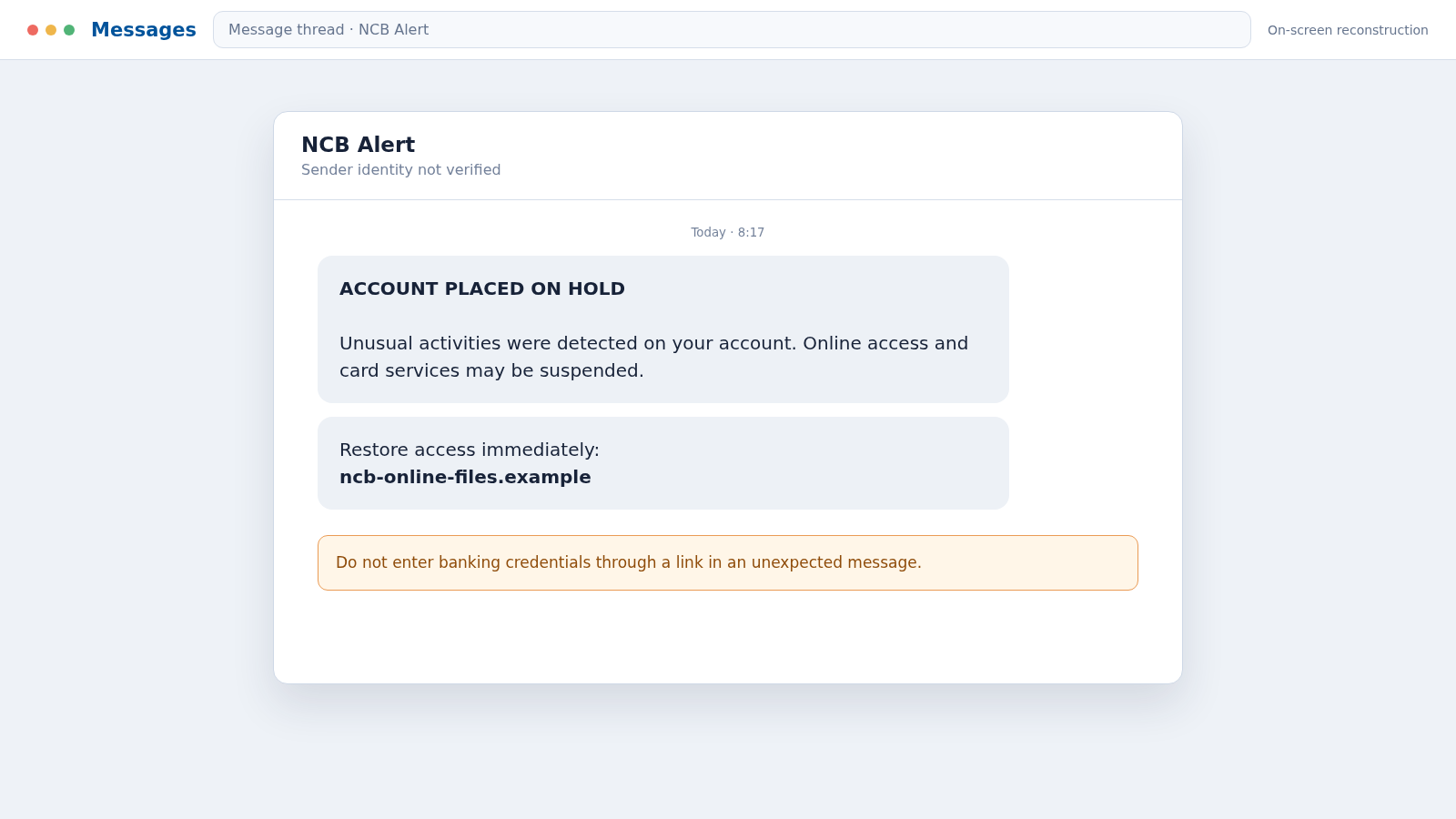
A text carrying the NCB name says unusual activity has put your account on hold. It offers a link that appears to solve the problem before your money or banking access is affected.
The warning is meant to feel urgent and personal. That pressure is what gives the NCB account hold text scam a chance to work.
Overview
The text impersonates National Commercial Bank Jamaica
The NCB account hold text scam is a smishing attack that uses the name and visual identity of National Commercial Bank Jamaica. It falsely claims an account was restricted because of unusual activity, a failed security review, or an unrecognized transaction.
The message includes a link or phone number and urges the recipient to restore access immediately. NCB is a real bank, but the sender and the linked page are not part of the bank.
The fake banking page requests the keys to the account
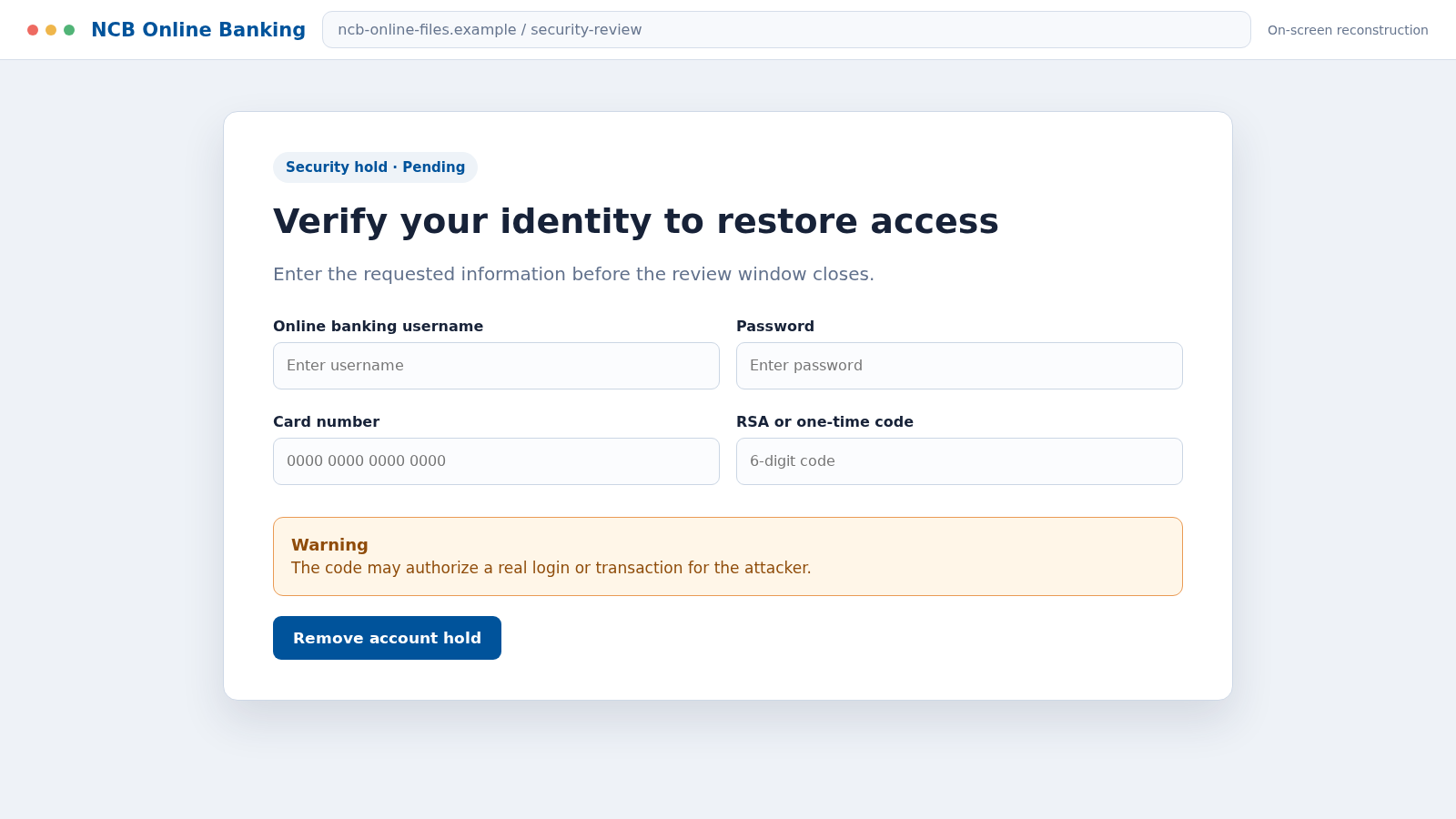
A copied login screen may ask for a username, password, card number, PIN, RSA token value, or one-time password. Personal questions can include a date of birth, address, taxpayer number, or identification document.
Once submitted, those details can be used to attempt a real login, reset access, add a payee, authorize a transfer, or support a convincing follow-up call.
The account hold story is only one version
Scammers rotate the pretext while keeping the same theft process. Typical NCB impersonation messages claim:
- Your account is on hold because of unusual activity
- A transfer or card purchase must be reviewed
- Online banking access will expire today
- Your identity or mobile number needs verification
- A refund or reward is waiting to be accepted
- A new security feature must be activated through a link
The bank’s name, logo, or a Jamaican phone number cannot authenticate the message. The safe test is whether the issue exists inside the official account reached independently.
Why a Fake Account Hold Alert Feels Convincing
Bank fraud alerts are real and useful, which gives criminals an ideal cover story. A recipient may be more afraid of ignoring a genuine warning than of opening a fraudulent link.
The message often avoids naming a specific transaction. Vague wording such as “unusual activities” lets the recipient imagine the problem and makes the same template usable against thousands of people.
Some campaigns include part of a name, phone number, or card detail obtained from an earlier breach. That information proves the criminal has data, not that the message came from NCB.
The linked domain may contain “ncb,” “online,” “secure,” or “files,” but it is still unrelated to the real bank. A familiar word inside a domain is easy to register and has no official meaning.
After credentials are submitted, the page may show a loading animation or error message while the attacker uses the information. A request for an OTP can then appear at exactly the moment the real bank sends one.
That synchronization is deliberate. The code may authorize a login or payment, even though the fake page labels it as a routine identity check.
Warning Signs of an NCB Account Hold Scam
- The alert arrives unexpectedly and demands immediate action.
- A link in the text leads directly to an online banking login.
- The domain is not an official NCB-controlled address.
- The message uses a random mobile number or spoofed sender name.
- You are asked for a PIN, password, RSA token, or one-time code.
- The page requests a card number and security code together.
- A caller says money must be moved to a “safe” account.
- The sender refuses to let you hang up and call the bank yourself.
- The language contains odd errors, unusual spacing, or generic greetings.
- The supposed security process asks you to install an app or share your screen.
Do not rely only on spelling. A professional-looking alert can still be fraudulent, while a genuine automated message can be brief. Focus on the route, the request, and independent verification.
Caller ID is also unreliable. Fraudsters can spoof a recognizable number or follow the text with a call that seems to come from the bank.
How the NCB Account Hold Text Scam Works
Step 1: The scammer sends an urgent banking alert
The campaign delivers texts to broad lists of Jamaican numbers or to people identified through leaked records and earlier phishing. The sender label may show NCB even when the bank did not send it.
The message claims an account hold, unauthorized payment, or security failure. The recipient is given a short deadline to create the impression that waiting will make the problem worse.
Step 2: Fear directs attention toward the supplied link
The criminal wants the recipient to react to the possibility of blocked funds. A button or URL is presented as the fastest route to restoring access.
Because the link appears inside the alert, every later step occurs in an environment chosen by the attacker. Independent verification is replaced with a scripted journey.
Step 3: A copied NCB page collects login details
The website uses colors, logos, and language copied from the bank. It may display security statements or a copyright footer to reduce suspicion.
The web address remains the key clue. HTTPS only encrypts data sent to the site; it does not confirm that NCB owns or operates it.
Step 4: The form expands into identity verification
After the username and password, the site asks for card details, PIN information, security answers, identification numbers, or a photograph of an ID.
Each new request is described as necessary to remove the hold. The gradual sequence makes a highly unusual amount of disclosure feel like one routine process.
Step 5: The attacker tries the information against the real account
While the victim sees a progress message, the criminal attempts to sign in through genuine banking channels. If the credentials work, the bank may generate a real OTP or security prompt.
A failed first password can cause the phishing page to ask again. This may be a trick to collect multiple passwords rather than a genuine authentication error.
Step 6: A one-time code authorizes the criminal’s action
The fake form asks for the code as the final step to release the account. The victim may enter it because it arrived from a genuine banking sender at the expected moment.
The code can approve a new device, password reset, payee, or transfer. One-time means it is powerful for a short period, not safe to share.
Step 7: Funds, cards, or account access are abused
The attacker may transfer funds, make card-not-present purchases, change contact details, or gather statements and personal records. Fast changes can make recovery harder.
If direct access fails, the stolen identity information may still be used in another banking, loan, mobile, or impersonation scam.
Step 8: A fake fraud agent deepens the loss
A caller may say the phishing activity has been detected and offer to secure the account. They can quote the details just submitted, creating the illusion that they are viewing an internal bank file.
The caller may request another OTP, remote access, or a transfer to protect funds. A genuine bank does not need a customer to move money into an account controlled by a stranger.
Company, Address, and Fulfillment Checks
Check the account through the official banking route
Open the NCB app you already use or type the known bank address yourself. Do not use the text link, search advertisement, or a number supplied by the same sender.
If an account restriction is real, the official channel or customer care team should be able to confirm it without asking you to reveal a password or OTP.
Contact NCB using independently verified details
NCB’s security page directs customers to its official 24-hour Customer Care Centre at 888-NCB-FIRST, or 888-622-3477. Use a number taken from the bank’s real site or the back of your card.
Explain the exact text, sender, link, and information entered. Do not merely ask whether the displayed number belongs to the bank because caller ID can be spoofed.
Inspect the destination and business identity
A genuine banking domain should match the bank’s known address exactly. Extra words, misspellings, subdomains placed before an unrelated main domain, and recently created sites are warning signs.
Copied branch addresses, legal names, and privacy text do not prove ownership. Public information can be pasted into a phishing page in minutes.
Verify whether the promised action occurred
A fake page may claim that an account hold was removed or a transaction was cancelled. Confirm that inside the real account and review balances, payees, devices, contact details, and recent activity.
Keep screenshots and reference numbers from the official bank. A success message on the suspicious page is not evidence that anything was protected.
What an Authentic Banking Security Check Should Not Require
No incoming text or caller needs your full online banking password, card PIN, or complete one-time code. Those secrets authenticate you, so handing them over can authenticate the criminal.
A bank may ask identity questions when you contact it through a trusted channel. That is different from an unexpected sender directing you to an unknown page.
Do not install remote-control software to help someone “secure” online banking. Remote access lets the operator see codes, move money, and hide what is happening on the screen.
Do not transfer funds to a temporary, secure, holding, or investigation account. Moving money because an incoming caller instructed you to do so is a classic bank impersonation tactic.
When uncertain, end the conversation. A genuine fraud team can record the concern and allow you to call back through a verified number.
Pay attention to what the security message says a code will do. A genuine OTP notice may state that it approves a login, card purchase, payee, or transfer. That description matters more than the explanation given by a caller or copied webpage.
If the bank contacts you after suspicious activity, you can still end the call and reconnect through a known number. This simple reset breaks the scammer’s control of the conversation and gives you time to inspect the real account.
What to Do if You Have Fallen Victim to This Scam
- Stop using the fake page. Close it, end any call, and do not reply to the sender or approve another prompt.
- Call NCB through an official number immediately. Ask the bank to secure online banking, review sessions and payees, and place appropriate controls on the account.
- Change the online banking password safely. Use the official app or site on a trusted device. Do not reuse the replacement password anywhere else.
- Report any OTP or RSA token exposure. Tell the bank exactly which code was entered and when. This can help identify the action it may have authorized.
- Block or replace exposed cards. Review pending and completed transactions, dispute unauthorized activity, and ask whether a new card number is needed.
- Secure the email and mobile accounts. Change reused passwords, enable multifactor authentication, and look for forwarding rules, recovery changes, or signs of a SIM swap.
- Preserve evidence. Save the text, sender number, full URL, screenshots, call times, payment records, and official case reference.
- Review other accounts for credential reuse. Change matching passwords on email, shopping, social, and financial services before attackers test them.
- Scan any affected device. If a file or app was installed, run a complete Malwarebytes scan and remove threats it detects.
- Reduce exposure to malicious destinations. AdGuard can block many known phishing pages, deceptive ads, and tracking requests used by scam campaigns.
- Report the phishing message to NCB. NCB’s official security page asks customers to forward suspicious emails, social messages, or SMS messages to the bank and contact customer care promptly.
- Watch for recovery scams. Do not pay anyone who unexpectedly promises to recover funds or unlock the account. Work only with the bank and recognized authorities.
Frequently Asked Questions
Is every NCB account hold text fraudulent?
Not necessarily, but an unexpected link that asks for banking credentials should be treated as dangerous. Verify the alert inside the official app or by calling a trusted bank number.
Can the sender name NCB be spoofed?
Yes. A displayed sender name or caller ID is not reliable authentication. Criminal messages may also be grouped into a thread that contains genuine alerts.
Does NCB need my password or OTP to remove a hold?
No incoming text or representative should ask you to disclose those secrets. Contact the bank through its official route and never relay a one-time code to an unsolicited caller.
What if I clicked the link but entered nothing?
Close the page and do not download anything. If a file or app opened, scan the device. Continue monitoring the account for targeted follow-up attempts.
What if the fake page said the account was restored?
Ignore that message. Check the real account and contact NCB. The success screen may only be a way to delay discovery after collecting your information.
Where can NCB customers report suspicious activity?
Use the bank’s official Privacy & Security page or call the official Customer Care Centre at 888-622-3477. Do not use contact details from the suspicious text.
The Bottom Line
The NCB account hold text scam turns a familiar banking safeguard into a phishing trap. Its urgency is meant to stop you from noticing that the sender controls the link and every screen that follows.
Open your account independently, never share passwords or one-time codes, and contact NCB quickly if anything was entered. A short pause can protect both the account and the identity behind it.








