

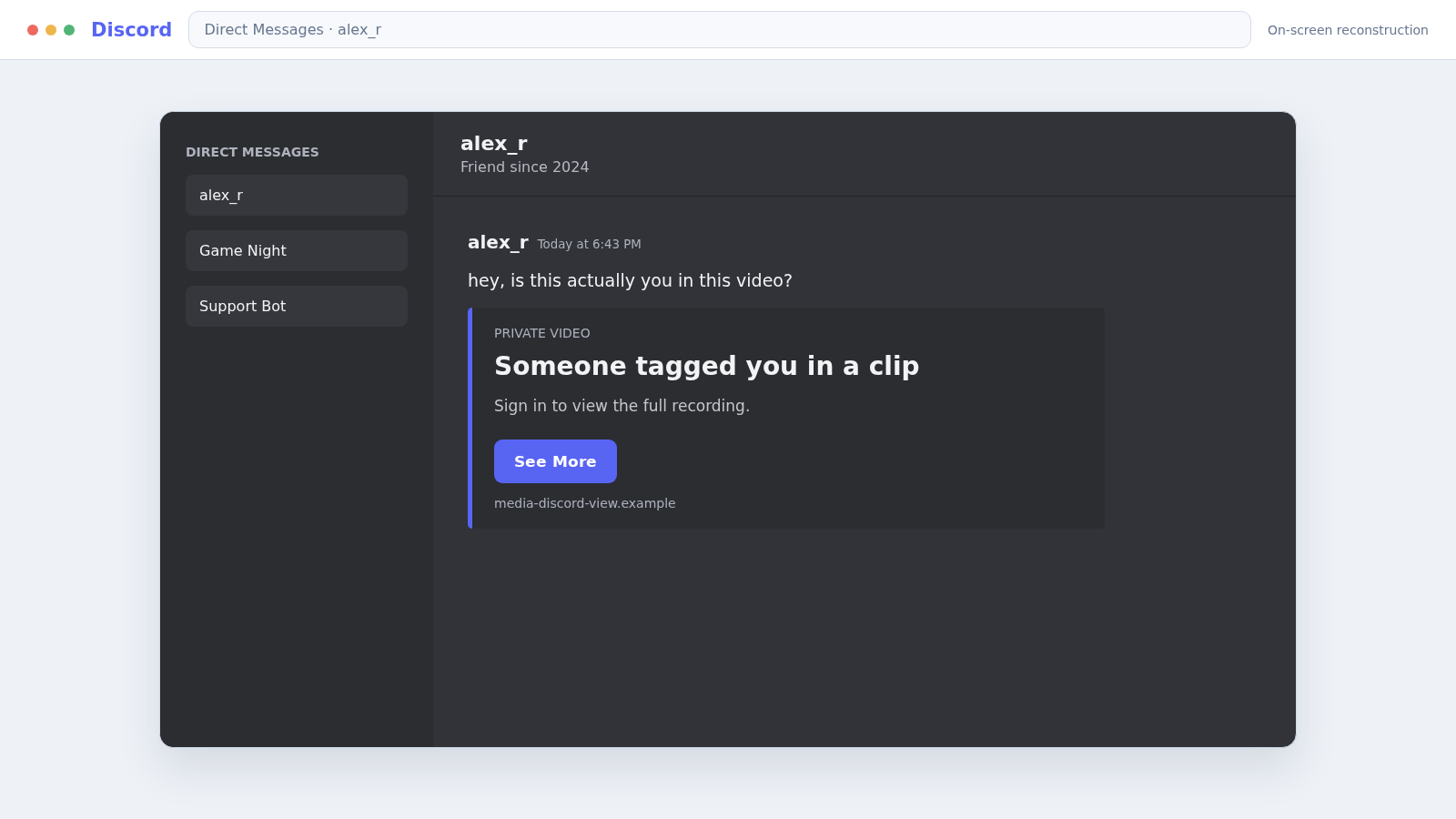
A Discord message from a familiar account asks, “Is this you?” Beneath it sits an image preview and a tempting “See More” link that appears to hide the rest of a photo, video, or conversation.
That tiny prompt is designed to make curiosity move faster than caution. The Discord See More scam relies on that split-second reaction.
Overview
The message uses curiosity and a trusted account
The Discord See More scam is a phishing tactic delivered through direct messages, server channels, or compromised accounts. It claims there is a photo, video, report, giveaway, or private message the recipient needs to view.
The sender may be a stranger, bot, or real friend whose account was already stolen. That last version is especially convincing because the message appears to come from someone the victim knows.
The preview sends users outside Discord
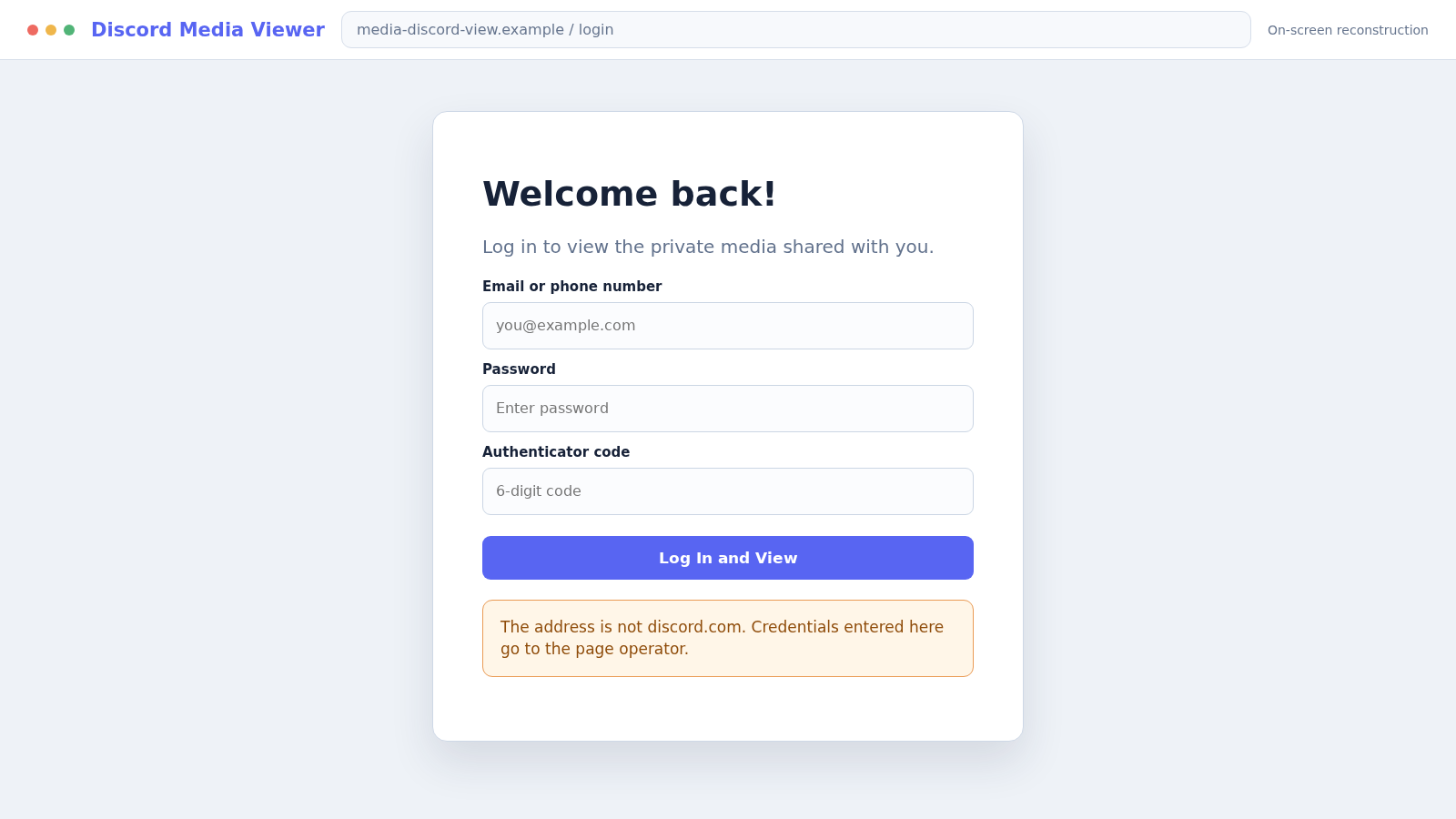
A fake button, shortened link, or manipulated rich preview opens a website that imitates Discord login, authorization, age verification, or media viewing. It may also offer a file described as a viewer, game, beta, or security update.
The page is not revealing hidden content. It is collecting credentials, persuading the user to authorize a malicious app, or delivering software that can steal session tokens and other passwords.
A stolen account becomes the next delivery system
Once criminals gain control, they send the same lure to the victim’s friends and servers. Recipients recognize the name and may trust the message without noticing that the person’s writing style or behavior has changed.
Common hooks include:
- “Is this you in the video?” followed by See More
- A supposedly private image or leaked conversation
- A free Nitro, game item, or cryptocurrency giveaway
- A copyright or account report that needs review
- A game test, mod, or beta download from a friend
- A server verification page that requests a new login
The content changes, but the safe response remains the same: do not follow the message path. Verify with the sender through another channel and use only Discord’s official app or discord.com.
Why the “See More” Link Is So Effective
Most phishing messages rely on fear or reward. This one often uses a quieter emotion: the need to know what someone else has seen. A vague photo accusation encourages the recipient to click before asking questions.
Discord’s link previews can make an external destination look like a native part of the conversation. A thumbnail, title, and short description may appear polished even when the link leads somewhere unrelated.
On mobile, a long domain can be difficult to inspect. A short link hides it completely. The victim may see familiar Discord colors and immediately assume the login page is genuine.
Some fake pages request a password. Others abuse OAuth authorization and ask the user to grant an app access to profile or server features. A download version may steal browser cookies and session tokens.
Multifactor authentication helps but is not a complete shield. A real-time phishing kit can request the current code, while token-stealing malware may hijack an already authenticated session.
The attack also benefits from speed. Once an account is compromised, automated messages can reach many friends before the owner understands what happened and warns them.
Warning Signs of the Discord See More Scam
- A friend sends an unexplained “is this you?” message.
- A See More button opens a website outside discord.com.
- The message uses a shortened or misspelled domain.
- A media preview requires you to log in again unexpectedly.
- The page requests a QR-code scan to view ordinary content.
- A bot offers free products, Nitro, crypto, or game items.
- A friend asks you to download an executable or archive.
- An authorization screen requests broad server permissions.
- The sender ignores questions or repeats a scripted response.
- The message is sent to many members in quick succession.
A correct profile picture and username are not enough. Either can be copied, and an authentic account can send malicious messages after being compromised.
Contact the person by text, voice, or another platform. Ask a question that the attacker cannot answer from public profile information.
How the Discord See More Scam Works
Step 1: An account, bot, or server is prepared
The criminal creates a fake profile, deploys a bot, or takes over a real Discord account. Compromised accounts are valuable because they already have friends, direct-message history, and trusted server memberships.
The attacker may also copy a moderator’s name and avatar. Small differences in the username or account age can be easy to miss during a fast conversation.
Step 2: A curiosity hook is sent
The target receives a vague message implying that a photo, recording, or accusation involves them. The sender avoids details because uncertainty makes the recipient want to inspect the link personally.
Other versions promise a giveaway or request help testing a game. The social pressure may include a short deadline or a claim that the content will be deleted soon.
Step 3: The preview disguises an external destination
The message contains a rich embed, shortened URL, fake button, or image designed to resemble a Discord interface control. Clicking leaves the platform even if the transition is visually subtle.
Redirects can move through several domains before the phishing page loads. Checking only the first visible text is therefore not enough.
Step 4: The fake site requests login or authorization
A copied Discord page says the session expired, age must be verified, or content is restricted. It asks for an email address, phone number, password, and sometimes a multifactor code.
An OAuth variation sends the user to a real authorization screen but asks for access on behalf of an untrusted app. A genuine Discord page can still be part of a dangerous permission request.
Step 5: A download may install an information stealer
The page can claim a special viewer, codec, game build, or verification tool is required. The downloaded archive or executable may steal browser passwords, cookies, crypto wallets, and Discord session data.
Running the file is more serious than merely visiting the page. The attacker may retain access even after the Discord password changes if the device remains infected.
Step 6: The criminal takes control of the account
Using stolen credentials, a code, token, or malicious authorization, the attacker changes the email or password and reviews connected servers and billing information.
They may purchase Nitro, abuse saved payment methods, demand a ransom for the account, or impersonate the owner in private conversations.
Step 7: The same bait spreads to friends and servers
Automated scripts send the See More message to contacts, while the attacker may post malicious links in popular channels. Familiarity with the owner helps the next wave look legitimate.
Server administrators can face additional damage if the account had moderation permissions. Channels, roles, bots, and webhooks may be altered or deleted.
Step 8: Recovery scams and repeated attacks follow
After the theft becomes visible, someone may offer paid recovery or claim to be Discord staff. Discord says staff do not contact users directly inside the app for support matters.
Stolen emails, passwords, and browser data may also be tested on gaming, shopping, social media, and financial accounts. Recovery must extend beyond Discord.
Company, Address, and Fulfillment Checks
Inspect the actual destination before signing in
The official service uses discord.com. Look at the registrable domain, not a familiar word placed in a subdomain or path of an unrelated address.
Do not sign in because the page has a padlock or Discord logo. Criminal websites can use HTTPS and copied branding.
Verify the sender outside the suspicious conversation
Contact the friend through another established channel. If that is not possible, ask a specific question based on a shared private experience.
Avoid warning them only by replying to the compromised account because the attacker may be reading and answering those messages.
Review the app or bot developer and permissions
Before authorizing anything, confirm why the app needs access, who operates it, and whether its permissions match its stated function. A media viewer does not need broad server administration rights.
Discord’s official guidance says unsolicited bots offering products or requesting link clicks should be disregarded and reported.
Confirm whether the promised content or benefit exists
A real image does not require a separate Discord login on an unknown site. A legitimate giveaway should have clear rules, an identifiable organizer, and no request for passwords, recovery phrases, or upfront payment.
If a download claims to be a game or tool, verify it through the developer’s known website or established store. Do not rely on a file supplied only in a direct message.
Password Theft, OAuth Abuse, and Token Stealers Are Different Risks
A password phishing page captures information you type. Changing the password quickly can limit that route, especially when the connected email account remains secure.
An OAuth scam persuades you to approve an application. The remedy includes removing the unwanted app from Discord’s Authorized Apps settings, not only changing the password.
A token stealer runs on the device and takes session or browser data. Password changes may be undermined until the malware is removed and active sessions are revoked.
These methods can appear in the same campaign. A victim may enter credentials, authorize an app, and download a file during one apparently simple attempt to view content.
That is why recovery should be based on what happened, not on the label of the scam. Record every click, field, authorization, QR scan, and download before cleaning up.
Server owners should also inspect audit logs, role changes, new integrations, and outbound messages. Removing one visible scam post is not enough if the attacker created a webhook or gave a second account administrative access.
Friends who received the lure need a clear warning that the account was compromised and the shared link was malicious. A vague “ignore my last message” may not reach people who already signed in or downloaded the file.
What to Do if You Have Fallen Victim to This Scam
- Stop interacting with the message. Close the page, cancel the download, and do not send the link to anyone else.
- Warn the real sender through another channel. Their account may be compromised. Tell shared server moderators if the link appeared in a community.
- Change the Discord password. Use a clean device if malware may have run, choose a unique password, and secure the associated email account first.
- Enable multifactor authentication. Prefer an authenticator app or security key and save recovery codes somewhere safe and offline.
- Review Authorized Apps and connections. Remove anything unfamiliar and revoke sessions or integrations that the scam may have added.
- Check Discord email notices. If the account email was changed, use the recovery link in Discord’s genuine notification where available and contact official support.
- Report the message and account in Discord. Use the built-in report option. Server moderators should remove the link and review compromised roles, bots, and webhooks.
- Inspect billing activity. Report unauthorized Discord transactions through official support and notify the card issuer if payment information may be exposed.
- Scan any device that ran a file. Disconnect it from sensitive accounts and complete a full Malwarebytes scan before trusting new logins.
- Block known malicious destinations. AdGuard can help stop many phishing pages, malicious ads, and tracking requests used in similar campaigns.
- Change reused passwords. Prioritize email, gaming, social media, shopping, and financial accounts. Review their login histories and recovery settings.
- Ignore paid recovery offers. Use Discord’s official support route at dis.gd/hackedaccount. Anyone demanding money through a direct message may be attempting a second scam.
Frequently Asked Questions
Is the See More button an official Discord feature?
A link preview may display inside Discord, but the destination can still be external and malicious. Ordinary media should not require a fresh login on an unknown site.
Can a message from my real friend be a scam?
Yes. The friend’s account may already be compromised. Verify through another channel before clicking unusual links or downloading files.
What if I entered my password but use multifactor authentication?
Change the password immediately and review active sessions and Authorized Apps. If you also entered a code or ran a file, assume the attacker may have obtained more access.
Can scanning a QR code compromise Discord?
A malicious flow can misuse Discord’s QR login feature to authorize another session. Never scan a login QR code supplied by a stranger, bot, or external verification page.
What if I downloaded the file but did not open it?
Delete it without running or previewing it, empty the recycle bin, and scan the device. If the file did execute or you are unsure, take the stronger recovery steps.
Does Discord contact users through direct messages for support?
Discord’s official guidance says staff will not contact users directly in the app for support-related matters. Use the official support site rather than a helper who messages you.
The Bottom Line
The Discord See More scam turns an ordinary preview into a gateway for stolen passwords, dangerous permissions, or malware. Its strongest disguise is often a real account that was compromised moments earlier.
Verify the sender elsewhere, inspect every destination, and never install a viewer or sign in on an unknown site to see a message. If you interacted, secure Discord, email, apps, and the device as one connected incident.








