

A honeymoon inquiry sounds like welcome business for a hotel. The destination is flexible, the budget is clear, and the sender appears ready to discuss options.
The attached-looking spreadsheet turns that pleasant request into something else. Reservation teams should understand what happens before treating it like an ordinary lead.
Overview
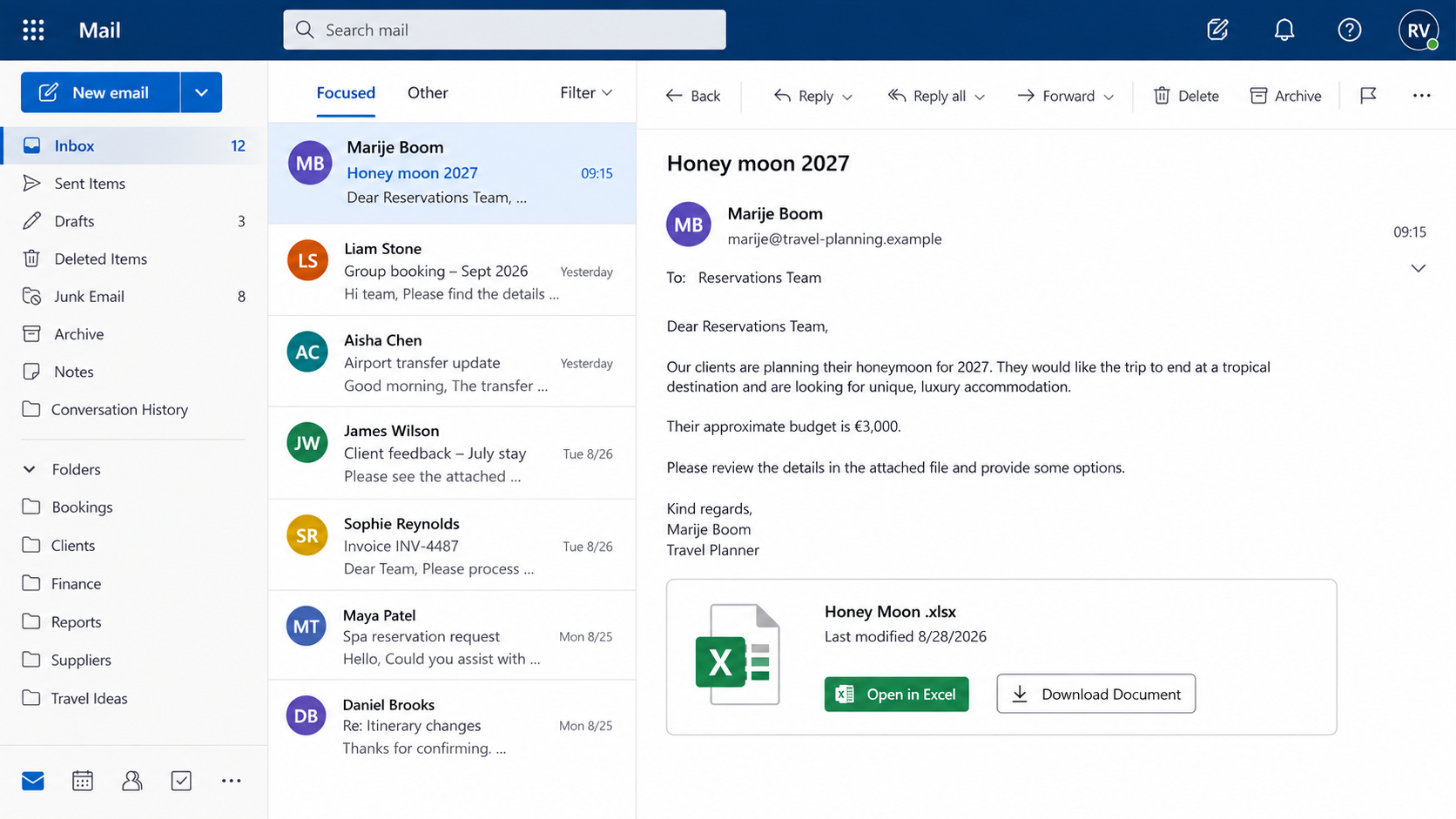
The travel request shown in the email
The Room for Honeymoon email poses as a travel professional arranging a 2027 trip. It asks a hotel for unique, luxurious accommodation at a tropical destination.
An approximate €3,000 budget makes the inquiry feel commercially useful. A named sender, Dutch job title, and Netherlands address add a layer of professional detail.
The message displays what appears to be a spreadsheet named “Honey Moon .xlsx.” Buttons invite the recipient to open it in Excel or download the document.
What investigators observed instead
The spreadsheet panel is part of the email body, not a genuine attached workbook. Both controls direct the recipient to an external phishing site.
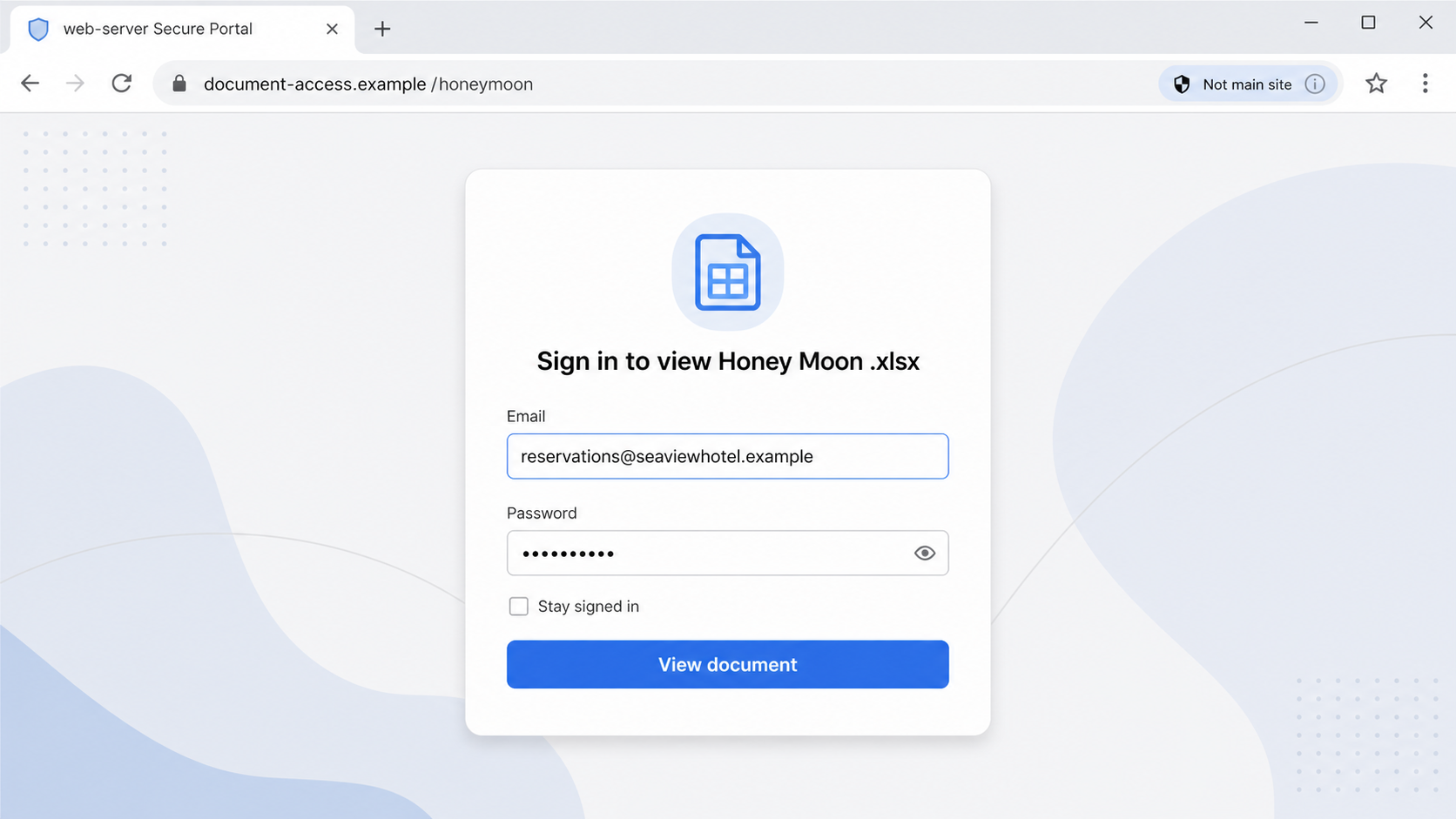
The examined destination displayed a “web-server Secure Portal” and a Google-like sign-in form. The recipient’s email address appeared prefilled before a password request.
Google did not operate the campaign. The fake styling was used to collect email credentials from people expecting travel details.
Why the targeting is unusually effective
- Hotels routinely receive requests from travelers and agencies they do not yet know.
- The booking value is attractive without appearing impossibly large.
- The named traveler profile gives a mass email a personal feel.
- The fake spreadsheet resembles a rooming list or itinerary.
- Two document buttons create the illusion of normal attachment controls.
- A reservations inbox can expose future guests and payment conversations.
This lure avoids the obvious contradiction of an unexpected bank notice. New travel contacts are normal, and staff members are expected to respond quickly.
The right response is not to distrust every inquiry. It is to separate customer service from authentication and open files only through approved systems.
Check whether the message contains a real attachment before clicking. An image styled like a workbook does not become a file because it has an Excel icon.
How the Room for Honeymoon Email Scam Works
Step 1: Operators choose a business that welcomes strangers
Hotels, resorts, travel agents, and wedding venues depend on inquiries from people outside their existing contacts. An unknown sender is not automatically suspicious.
That openness makes reservation teams attractive phishing targets. Staff must read messages from new guests while also identifying deceptive requests.
The attacker does not need detailed knowledge of one property. A tropical or luxury theme can be sent to many hospitality addresses found online.
Role-based inboxes such as reservations or bookings are particularly visible. They may also be shared by several employees, complicating accountability.
Step 2: A plausible honeymoon story earns attention
The sender describes clients planning a honeymoon and seeking something distinctive. This story naturally explains why the accommodation requirements might arrive in a separate file.
A budget near €3,000 sounds valuable yet believable. It encourages the hotel to prioritize the lead without triggering the skepticism attached to enormous sums.
The 2027 date gives staff time to imagine a long sales process. There is no obvious need for immediate payment, which makes the opening feel less aggressive.
Names, titles, and postal details add texture. However, copied or invented identity details do not establish that the sender controls a real travel business.
Step 3: A picture masquerades as an Excel attachment
The email body contains a file-style card labeled “Honey Moon .xlsx,” including a modification date and familiar-looking document controls.
It is not necessarily an attached workbook. The entire visual area can be an image or linked HTML element that sends clicks to a website.
This trick avoids some attachment scanning because no spreadsheet travels with the message. The dangerous interaction begins after the user leaves the inbox.
Check the email client’s actual attachment list. Genuine files normally appear as separate objects with size, type, and download controls supplied by the client.
Step 4: Both choices lead to the same external portal
“Open in Excel” and “Download Document” suggest two different actions. In the examined email, both directed recipients toward the same deceptive destination.
Multiple buttons increase the chance of a click. A cautious employee avoiding downloads may choose the browser option and still reach the credential trap.
The recorded domain had no credible connection to the named traveler, hotel, Google, or a recognized document platform.
Inspecting the destination before opening it can expose the mismatch. On mobile devices, forward the message to security rather than trying to reveal the URL manually.
Step 5: The portal requests the hotel mailbox password
A generic secure-portal page claims authentication is required to view the spreadsheet. Google-like styling makes the form seem familiar.
The target address may already be filled in. That detail comes from the campaign’s recipient list or link, not from a genuine relationship with Google.
Submitting the password can deliver it to the operator. A fake loading indicator or error may appear afterward to conceal what happened.
If the account uses multi-factor authentication, the attacker may attempt a real login at once and prompt the victim for approval.
Step 6: Reservation data creates a valuable second stage
A hotel inbox can contain guest names, dates, confirmation numbers, special requests, invoices, and payment discussions. That information makes later impersonation precise.
An intruder could plausibly contact guests about a reservation problem or revised payment link. This is a risk of compromise, not a confirmed outcome for every recipient.
Supplier conversations may also expose airport transfers, tour operators, event planners, and cleaning services. One mailbox can map much of the property’s business network.
Privacy consequences extend beyond money. Passport copies, dietary needs, addresses, and personal travel details may appear in reservation correspondence.
Step 7: Forwarding and reply control hide the intrusion
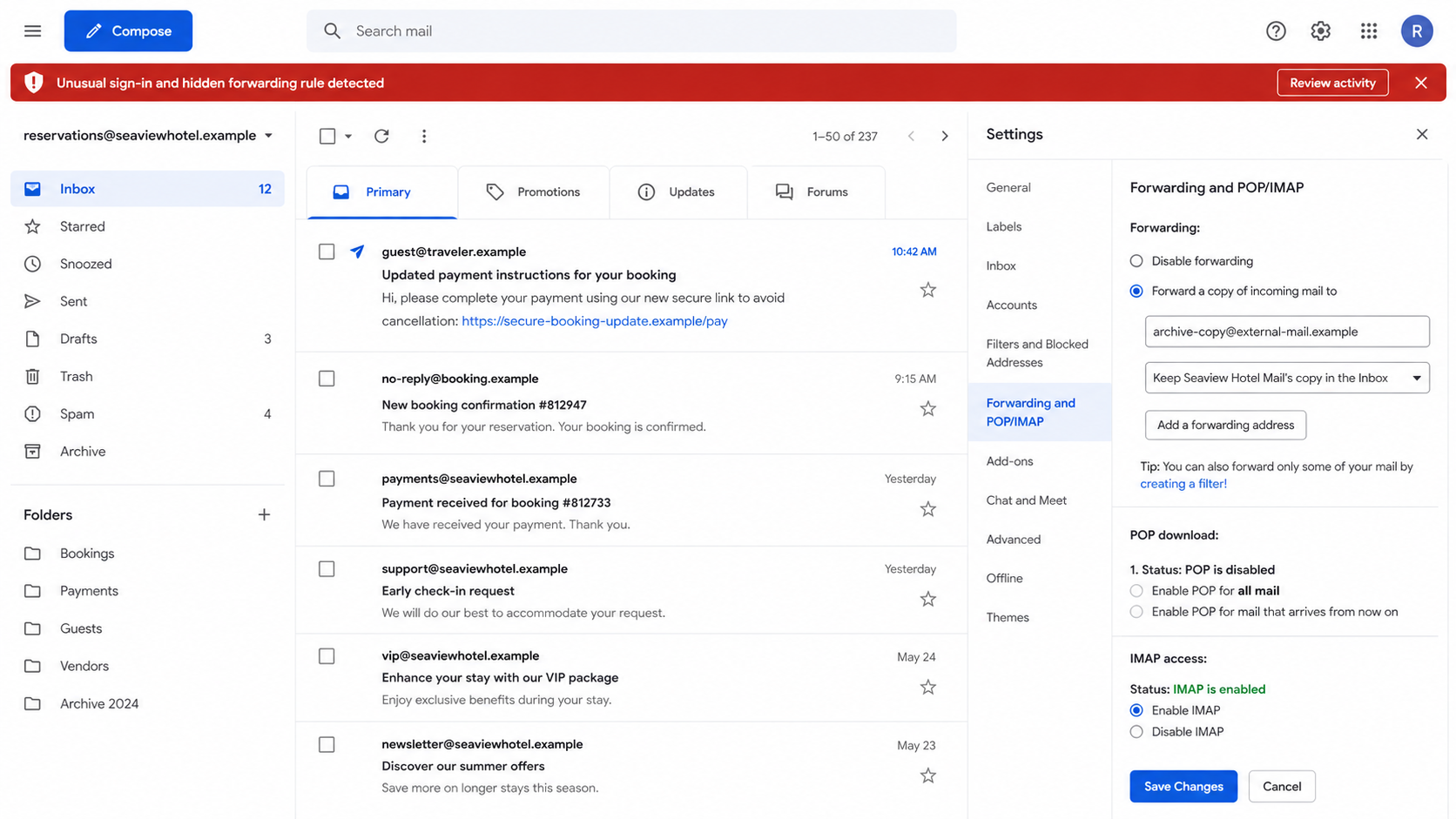
An attacker may add rules that copy booking mail elsewhere or hide security notices. Replies to fraudulent guest messages can be moved out of sight.
Shared inboxes make subtle changes harder to notice because employees assume another colleague sent or filed a message.
Connected applications, delegates, and app passwords can create additional entry points. A standard password reset may leave those paths untouched.
Hospitality organizations should treat account cleanup as an incident, not a personal password problem. Guest communication and payment processes may require review.
Why Hotels and Travel Businesses Are Targeted
Unknown senders are part of normal work
A reservations agent cannot ignore every first-time contact. Phishers exploit that service expectation by imitating customers rather than administrators.
The strongest defense is a safe workflow: read the inquiry, verify attachments, and authenticate only through approved platforms.
Booking conversations carry useful personal data
Travel dates and confirmation details can make fraudulent messages convincing. They can also expose when guests are away from home.
Properties should limit mailbox access, retain audit logs, and avoid sending sensitive documents through ordinary unencrypted email whenever possible.
Payment urgency can be introduced later
The first message does not request money. Establishing a conversation before mentioning deposits can reduce suspicion and improve the attacker’s credibility.
Staff should verify unusual payment methods, refunds, overpayments, and bank changes through documented procedures, even after a friendly exchange.
How Hospitality Teams Can Screen New Inquiries
Separate the guest story from the technical request
A honeymoon plan may sound credible while its document workflow remains unsafe. Staff can acknowledge the inquiry without opening an unverified external portal.
Ask the sender to place requirements in plain text or use the property’s approved upload channel. A real customer can continue without collecting employee credentials.
This preserves hospitality while controlling risk. Security does not require an accusatory reply or immediate rejection of the potential booking.
Use role accounts with limited privileges
A public reservations address should not automatically control banking, payroll, administration, or broad cloud storage. Limited access reduces the value of one stolen password.
Individual staff accounts also improve audit trails. Shared credentials make it harder to identify which session, rule, or message was unauthorized.
Where a shared mailbox is necessary, use delegated access and multi-factor authentication rather than distributing one password among many employees.
Create a payment-message verification routine
Guests should know the official domain, payment portal, and telephone number used by the property. Consistent communication makes imitations easier to identify.
Before sending any changed link, staff should confirm the booking record and document the reason. Unexpected urgency should trigger supervisor review.
During an incident, temporarily warn guests through verified channels. A timely notice can prevent a mailbox compromise from becoming multiple payment losses.
Company, Address, and Fulfillment Checks
A detailed signature can still be fictional
A name, Dutch title, and Netherlands address create specificity, but each can be copied from public records or assembled from unrelated sources.
Search for the agency independently and compare its official domain, staff directory, and telephone details. Do not rely on links inside the inquiry.
The sender domain must belong to the claimed business
Free mail, recently created domains, spelling variations, and mismatched reply addresses deserve scrutiny. A polished signature cannot repair an unrelated domain.
Even an authentic domain can be compromised. Confirm unusual file-sharing requests with the agency through a previously known channel when possible.
The document host reveals the real handoff
A spreadsheet supposedly sent by a travel professional should not require an email password on an obscure domain. That authentication boundary makes no business sense.
Google-like graphics do not establish Google ownership. Read the registered domain in the address bar and close the page when it does not match.
Contact details should survive independent verification
Call the agency using a number found in a trusted trade directory or prior contract. Ask whether the employee and honeymoon inquiry are genuine.
Addresses may belong to residences, virtual offices, or unrelated businesses. Location alone is not proof, but contradictions add weight to other warning signs.
Hotels should document which file-sharing services are approved. Staff can then reject ad hoc login pages without debating their appearance during a busy shift.
When the request is genuine, the sender can resend details as plain text or through the property’s secure guest portal. Legitimate customers have safe alternatives.
What to Do if You Have Fallen Victim to This Scam
- Shut the false document portal. Do not submit another password, download a replacement file, or approve any authentication request triggered by the page.
- Alert the hotel’s security contact. Use a trusted telephone or internal channel. Shared-mailbox owners and managers need to know immediately.
- Reset exposed credentials. Open the genuine provider directly from a clean device. Replace reused passwords across every affected service.
- Revoke sessions and tokens. Sign out all devices, remove unfamiliar trusted sessions, regenerate app passwords, and disconnect unknown applications.
- Inspect mailbox configuration. Check forwarding, rules, delegates, recovery methods, automatic replies, and shared-inbox permissions for unauthorized changes.
- Review guest communications. Search sent, deleted, archived, spam, and recoverable mail for payment links, reservation changes, or requests nobody authorized.
- Warn potentially affected guests. Use verified contact information and neutral language. Tell them not to pay through unexpected links while the incident is reviewed.
- Protect financial workflows. Pause unusual refunds, deposits, bank changes, and vendor payments. Confirm each request outside email before releasing money.
- Scan any downloaded content. If a file or program opened, isolate the device and run Malwarebytes before reconnecting it to reservation systems.
- Filter future malicious paths. AdGuard can block some known phishing domains and advertising redirects. Maintain email filtering and browser protections as well.
- Preserve and report evidence. Keep the original message, headers, URLs, sign-in logs, forwarding changes, guest reports, and transaction records for investigation.
If nobody clicked, report and quarantine the email across the organization. Search for similar subjects and sender patterns in other hospitality mailboxes.
If the portal received a password, assume the shared inbox may have been observed. Review the exposure window and follow applicable guest-notification requirements.
Frequently Asked Questions
Is the Honey moon 2027 inquiry a real booking request?
The examined message is phishing. It uses a fabricated attachment interface that redirects to a credential-harvesting portal.
Is Honey Moon .xlsx actually attached?
No genuine workbook was attached in the examined email. The visible file card and its buttons were links embedded in the message.
Why does the portal already show the hotel email?
The operator targeted that address and can pass it through the link. Prefilling is personalization, not proof that the portal belongs to your provider.
Was Google involved in the campaign?
No evidence indicates that. The phishing page copied familiar sign-in styling, while its domain had no legitimate Google connection.
Could guests be contacted after a mailbox breach?
Yes. Reservation details could support convincing payment messages. Review sent mail and warn affected guests if evidence shows unauthorized access.
What is the safest way to receive travel requirements?
Use an approved booking or file-sharing portal. Confirm new agency contacts independently and never authenticate through an unexpected external document link.
The Bottom Line
The Room for Honeymoon email turns a promising hotel inquiry into a mailbox credential trap. Its spreadsheet is an interface imitation, not the promised travel document.
Verify the agency, inspect real attachments, and keep authentication inside approved services. After exposure, secure the mailbox and examine guest communications, rules, and payment activity.

Join the discussion
0 commentsShare your experience or ask a question about this article.
Discussion
Start the conversation
Have a question or something useful to share? Add the first comment.