

A payment confirmation usually closes a task rather than creating one. That comfortable expectation makes a shared invoice easy to open during an ordinary accounting day.
The message appears restrained, professional, and useful for recordkeeping. Several small choices reveal why the document deserves a safer route.
Overview
What the invoice notification claims
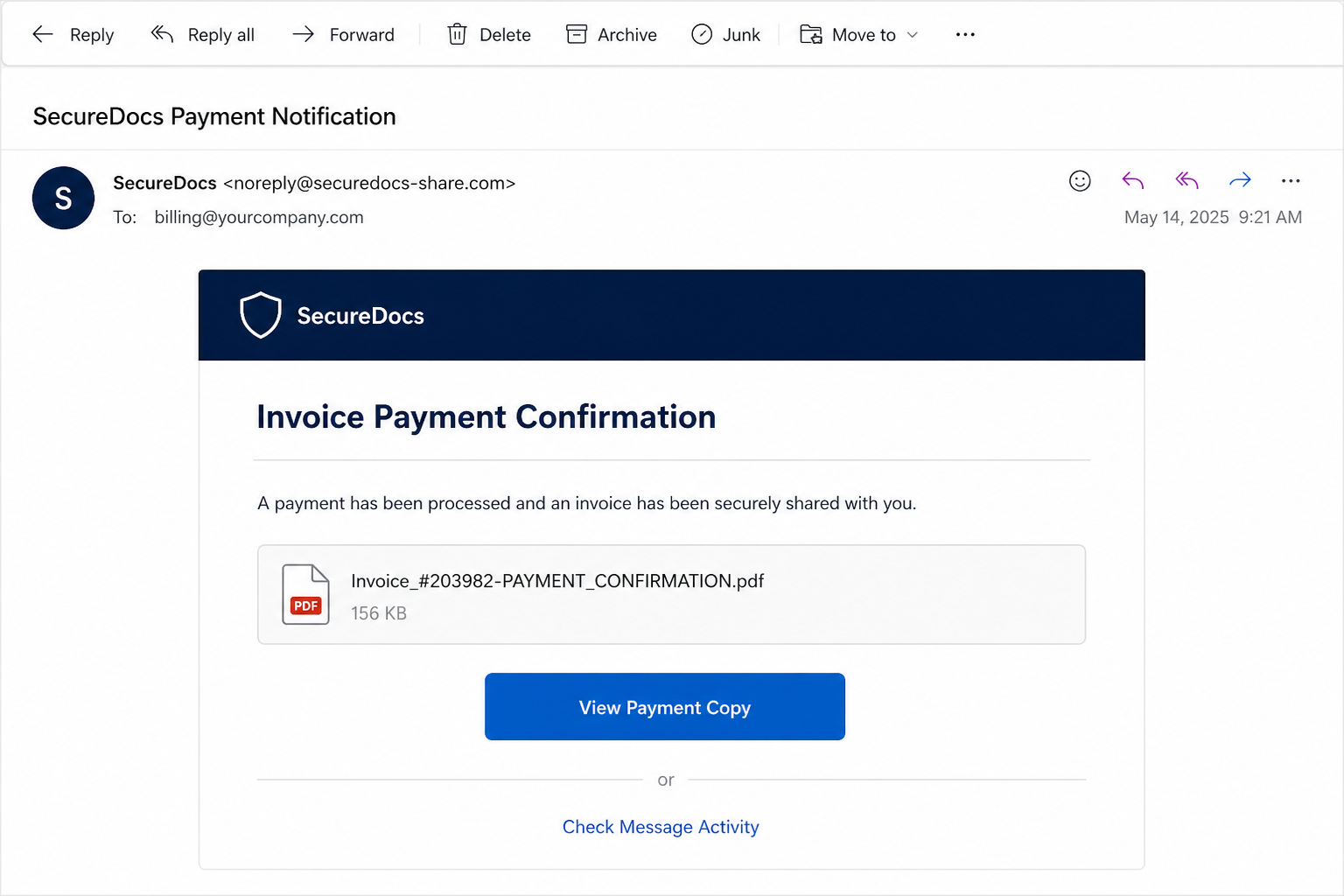
The Invoice Payment Confirmation scam arrives as a SecureDocs notice and may use the subject “Document Delivery via Microsoft OneDrive.”
It says a payment has been processed and an invoice was securely shared. A file name such as Invoice_#203982-PAYMENT_CONFIRMATION.pdf gives the request specificity.
Buttons offer to view the payment copy or check message activity. The recipient is encouraged to open the record for accounting purposes.
What the link is designed to collect
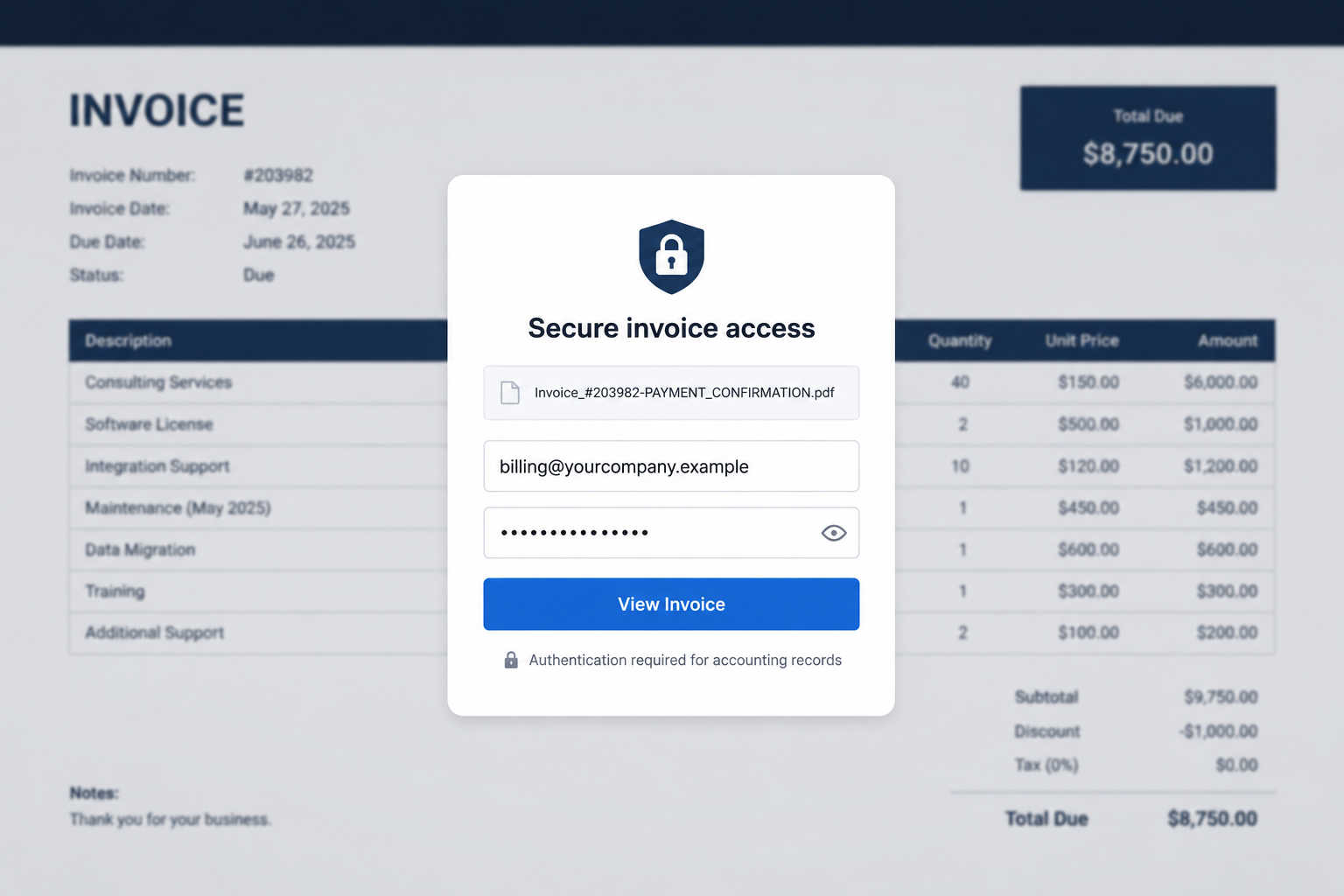
The promised PDF is a pretext. The destination presents a counterfeit email sign-in page that asks the recipient to authenticate before viewing the invoice.
An observed version imitated a familiar mailbox provider and used an unrelated domain. Credentials entered there can be transmitted directly to the phishing operator.
Microsoft and OneDrive are not involved simply because their names appear in the subject. The campaign borrows trusted business language to disguise the destination.
Quick indicators of invoice phishing
- No matching payment or invoice exists in company records.
- The sender is absent from the original transaction thread.
- The file-sharing name conflicts with the sender’s actual domain.
- A PDF viewing page asks for the mailbox password.
- The amount, supplier, purchase order, or payer remains unclear.
- The link uses an unrelated host rather than the stated service.
A real invoice can arrive through document-sharing software, so one unfamiliar notification is not conclusive. The payment must still reconcile with known records.
Accounts staff should verify the invoice number, payer, amount, and bank movement inside systems they already trust.
When those details are missing, the fastest safe action is contacting the supposed sender through a known channel, not testing the email’s buttons.
How the Invoice Payment Confirmation Scam Works
Step 1: The subject line enters the accounting workflow
Invoices, remittance notices, and payment confirmations are exchanged every day. Finance teams expect attachments and shared documents from people outside their organization.
The subject avoids sounding promotional. “Document Delivery” and “Payment Confirmation” resemble the labels used by automated business systems.
Attackers may send the campaign widely or target addresses such as billing, finance, accounts, or bookkeeping. Public websites often reveal those roles.
The lure succeeds when the employee treats it as reconciliation work. Their attention shifts toward the payment record instead of the login route.
Step 2: A precise file name manufactures context
An invoice number, payment label, and PDF extension make the document feel concrete. The recipient wants to discover which customer or supplier it concerns.
Specificity does not require inside knowledge. A random number formatted like an accounting reference can look authentic enough to invite inspection.
Some variants list several purchase orders and large totals. Others remain deliberately vague so they can reach recipients across different industries.
Before opening anything, search the accounting platform for that reference. A real payment should leave evidence outside the incoming email.
Step 3: Multiple service names create a security theater
The message may mention SecureDocs, OneDrive, and a payment-processing context together. Each term adds a layer of apparent professionalism.
Yet the combination can be incoherent. A document brand in the message does not explain why an unrelated sender or domain controls access.
Icons, shields, copyright lines, and automated-notice language are visual props. They can be reproduced without permission from any legitimate service.
Authentication should occur on a domain already associated with the stated provider or the recipient’s organization. Familiar words cannot replace that requirement.
Step 4: Curiosity leads to the counterfeit document portal
The button suggests the PDF will open immediately. Instead, the user sees a sign-in card placed over a blurred invoice preview.
The background implies the file has already loaded and only a small security step remains. This design makes turning back feel unnecessary.
A prefilled email address can reinforce the illusion. The attacker may have placed that address inside the original link.
Inspect the hostname, not the page artwork. If the domain is unrelated to the mailbox provider, payer, or sharing service, do not enter anything.
Step 5: The login form captures valuable business credentials
The page asks for the mailbox password, supposedly to authorize access. Once submitted, the value can be stored or transmitted to the attackers.
A fake error may encourage another submission. The victim sees no invoice, but the operator may now possess more than one password candidate.
When multi-factor authentication is enabled, a push notification can arrive seconds later. Approving it may complete the criminal’s real login.
No document sender should ask a recipient to read a verification code aloud. Codes and approval prompts belong only to logins the user intentionally started.
Step 6: The intruder studies genuine payment conversations
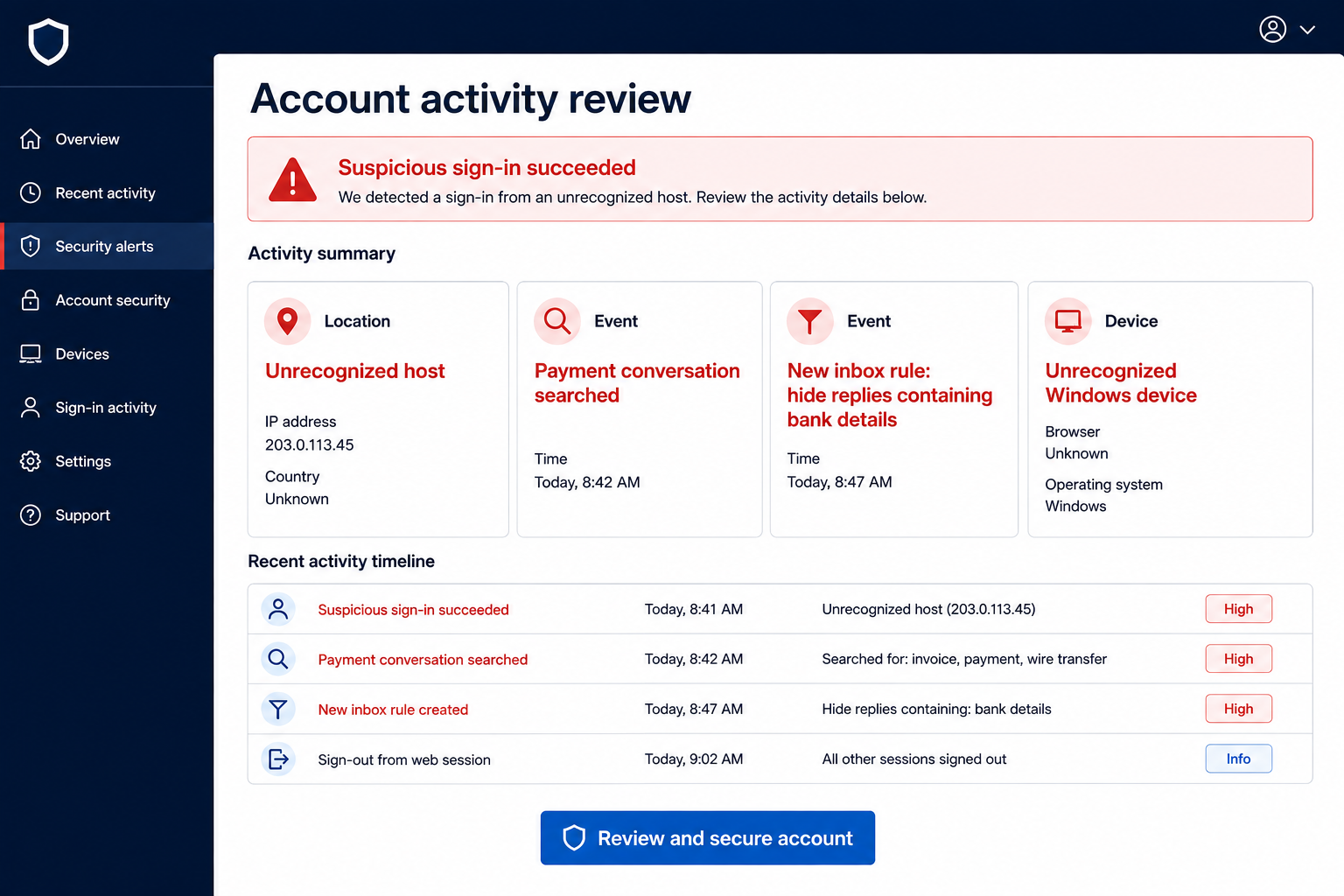
An accounting mailbox can reveal invoices, bank accounts, approval chains, overdue balances, suppliers, and the times employees normally process payments.
Criminals search for conversations they can monetize. A real upcoming transfer is more useful than the fictional invoice that captured the password.
They may create inbox rules that hide messages containing “bank details,” “fraud,” or a supplier’s domain. Replies then disappear from the owner’s normal view.
Forwarding can quietly copy every new message to an external address. This gives the attacker continuing intelligence even after the initial phishing page vanishes.
Step 7: A real invoice is altered inside a trusted conversation
After observing an active transaction, the intruder can send replacement payment instructions from a genuine account or a nearly identical address.
The fraudulent request may quote the correct invoice, amount, project, and names. Those details came from the compromised mailbox, not from a legitimate bank change.
If the recipient transfers money, it goes to an account controlled by criminals or a recruited money mule. Recovery becomes harder once funds move again.
Finance teams should verify any changed bank information by calling a previously known number. Email continuity alone is not enough after account compromise.
How to Reconcile the Message Without Opening It
Search internal records first
Enter the invoice number into the accounting platform, not a search box supplied by the email. Look for the matching customer, amount, and payment status.
Check the bank feed independently. A payment confirmation without a corresponding transaction requires clarification before document access.
Return to the existing conversation
Find the original invoice thread in sent mail or the customer record. Contact the known person from that history rather than replying to a new notification.
If the sender is genuine, ask them to upload the document through the established portal or resend it within the trusted thread.
Use known cloud access
Open the organization’s OneDrive or document service from a bookmark. A real shared file may appear under recent or shared items.
Do not sign in through a page reached only from an unexpected invoice. The document should remain available after independent authentication.
Why Finance Accounts Are High-Value Targets
Finance mailboxes combine authority with timing. They receive real instructions and often communicate with parties who expect money to move.
An attacker can learn which employee approves exceptions, which supplier recently changed staff, and how the company formats remittance notices.
The mailbox may also contain tax forms and identity details. Even without stealing a payment, the intruder can cause privacy and account-recovery harm.
Shared inboxes sometimes have weaker ownership because several people assume someone else will notice unusual behavior. Clear responsibility reduces that gap.
Every finance user should have individual access with strong authentication. Shared passwords make containment and audit trails much harder.
How Business Email Compromise Hides in Plain Sight
The criminal may avoid changing the password immediately because disruption alerts the owner. Quiet access is more valuable than a noisy lockout.
Messages can be marked read, moved, or deleted automatically. A hidden rule creates the impression that customers simply stopped responding.
Attackers also register lookalike domains differing by one character. They can move a conversation outside the compromised account while preserving a familiar display name.
Payment instructions often change near a deadline. Urgency and authentic thread history make the final request difficult to challenge.
Organizations should treat changed bank details as a separate high-risk event. Verification must occur through an established number and with authorized staff.
Controls That Reduce Invoice Phishing Losses
Require multi-factor authentication that resists casual push approval. Security keys or number-matching methods provide stronger protection than repeated generic prompts.
Configure alerts for new forwarding rules, recovery changes, impossible travel, and unfamiliar application consent. Send important alerts through more than the affected mailbox.
Use dual approval for bank-detail changes and large payments. One compromised inbox should not be able to redirect company funds.
Maintain verified supplier telephone numbers in the accounting system. Do not replace them using contact details contained in the requested change.
Train staff with realistic quiet lures, not only dramatic threats. The most convincing email may look like a boring piece of daily paperwork.
Encourage rapid reporting without blame. An employee who reports a click immediately gives the organization a chance to revoke the session before exploitation.
If the Message Contained an Actual Attachment
The observed version uses a link, but criminals frequently change delivery methods. A PDF, archive, HTML file, or Office document may appear in later campaigns.
A PDF can contain a link to the same login trap. An HTML attachment may render the fake sign-in page locally inside the browser.
Archives and script files deserve particular caution. Do not enable macros, run scripts, or install viewers suggested by an unexpected invoice.
Opening a message is usually different from executing its content. Tell security exactly what was clicked, downloaded, opened, and enabled.
That detail determines whether the response should focus on credential theft, malware, or both. Guessing can waste the most valuable containment time.
Company, Address, and Fulfillment Checks
Confirm the payer as a legal business
The notification should name the organization that paid, not only a document service. Compare that identity with contracts, customer records, and prior invoices.
Search independently sourced contact details and ask the accounts contact to confirm the payment reference. Do not use a number inserted into the suspicious email.
Check whether the document service relationship exists
SecureDocs can function as generic marketing language, while OneDrive names a real Microsoft service. Neither label authenticates the sender.
The recipient should know which platform the customer normally uses. A sudden new service deserves out-of-band confirmation.
An address on an invoice can be copied
Physical addresses, tax numbers, and company registrations are public in many jurisdictions. Their presence does not prove the email came from that business.
Compare the document with existing records and confirm changes directly. Scammers often combine genuine company details with criminal contact information.
There is no merchandise fulfillment to verify
This scam impersonates a payment record and seeks account access. Tracking pages, warehouses, and shipping labels are not relevant proof.
The critical chain runs from the real invoice to the real bank movement, authenticated sender, approved document platform, and verified account portal.
What to Do if You Have Fallen Victim to This Scam
- End the session. Save the email, file name, URL, and timeline. Do not submit additional passwords to make the invoice appear.
- Reset the affected account. Use the genuine provider portal on a trusted device and choose a password never used on another service.
- Revoke access broadly. End active sessions, remove unknown devices, cancel suspicious application consent, and replace exposed recovery codes.
- Review mailbox configuration. Search for hidden forwarding, deletion rules, delegates, changed recovery details, and unfamiliar multi-factor methods.
- Escalate to security and finance. Ask for login-log review, message tracing, supplier warnings, and a hold on unverified bank-detail changes.
- Inspect transactions. Reconcile recent payments and contact counterparties through known numbers if any instruction changed after the suspected compromise.
- Protect reused accounts. Replace matching passwords on banking, cloud, shopping, social, and business systems, starting with those recoverable through email.
- Scan if content ran. Use Microsoft Defender and Malwarebytes when a file, script, extension, or suggested viewer was downloaded or opened.
- Use additional web filtering. AdGuard can block many known phishing and advertising hosts, although safe accounting procedures remain essential.
- Report financial loss immediately. Contact the bank’s fraud team, request a transfer recall, preserve case numbers, and notify law enforcement where appropriate.
Frequently Asked Questions
Is the Invoice Payment Confirmation email genuine?
The examined SecureDocs message is phishing. Verify any real payment through accounting records and the known payer, not through its buttons.
Did Microsoft OneDrive send the notification?
No evidence supports that claim. The campaign uses the OneDrive name while directing recipients to an unrelated credential page.
Why is the invoice number so specific?
A formatted number creates curiosity and business context. It can be invented unless it matches an entry in your own accounting system.
What if the bank shows a matching payment?
Access records through trusted systems and contact the payer independently. A real transaction does not make a separately received link safe.
Can a compromised mailbox change payment instructions?
Yes. Intruders can study real conversations and impersonate participants. Verify bank changes through a previously known telephone number.
Do I need a malware scan after only entering a password?
Credential containment comes first. Scan as well if the page downloaded a file, installed an extension, or persuaded you to run anything.
The Bottom Line
The Invoice Payment Confirmation scam hides a password request inside routine accounting language. Its specific file name and security styling are manufactured trust signals.
Reconcile payments independently and never authenticate through an unexpected invoice link. If credentials were entered, protect the mailbox and verify every pending financial change.








