


A payment-settlement email can land at exactly the wrong moment, when invoices are already moving and everyone assumes somebody else checked the details.
This notice uses ordinary finance language and a simple review button. Its quiet tone deserves the same scrutiny as a much louder warning.
Overview
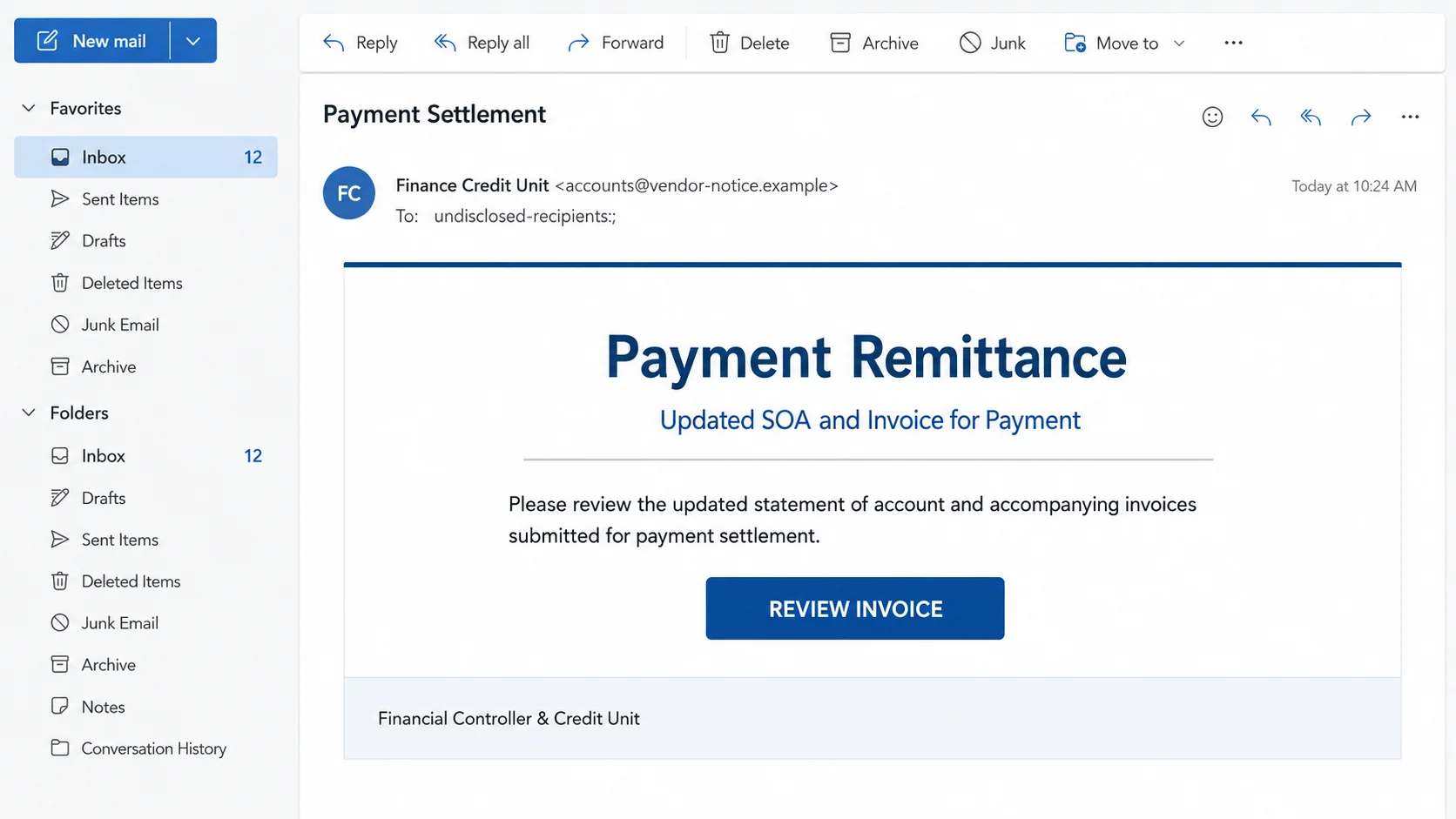
The payment request presented to recipients
The Updated SOA and Invoice for Payment email poses as a finance department. Its subject may read “Payment Settlement,” suggesting an existing obligation rather than a new offer.
The body asks the recipient to review an updated statement of account and invoices. A “REVIEW INVOICE” button supposedly opens the payment documents.
No meaningful supplier history, invoice total, purchase-order reference, or known contact establishes the sender’s identity. Generic finance wording carries the entire story.
What can be confirmed about the campaign
The examined email is fraudulent and has no connection to a legitimate finance department. Its button pointed to an external destination that was inactive during later inspection.
That dead page limits what can be claimed about its final payload. The design strongly fits credential phishing, but the exact content was unavailable for independent observation.
This distinction matters. A responsible investigation separates what the email demonstrably does from what similar invoice campaigns commonly attempt.
Why finance teams should treat it seriously
- The email invokes payment without naming a verifiable supplier relationship.
- It replaces attached accounting records with an external review button.
- The sender uses a generic department identity instead of an established contact.
- The landing destination is unrelated to the recipient’s normal invoice workflow.
- The subject encourages staff to treat the request as an existing settlement.
- A compromised finance mailbox could later support convincing payment diversion.
A dead destination does not make the message harmless. Campaign links can expire, be disabled by providers, or change behavior according to location and browser.
Recipients should not search for another copy of the portal. They should verify the purported invoice through accounting records and independently known supplier contacts.
If no matching balance exists, preserve the email for security review. The apparent payment request may be one part of a wider attack against the organization.
How the Updated SOA and Invoice Email Scam Works
Step 1: The message imitates routine accounts receivable traffic
Statements of account are normal documents between suppliers and customers. They summarize open invoices, credits, payments, and balances over a period.
Using “SOA” helps the email sound familiar to finance staff. It also avoids naming a specific product or transaction that could be disproved quickly.
The sender may sign as Finance Credit Unit, Accounts Department, or Payment Team. Those titles sound official while revealing nothing verifiable.
Unlike extravagant scams, this lure asks the recipient to perform an ordinary task. That modest request can slip through because it resembles real daily correspondence.
Step 2: The subject implies an existing payment conversation
“Payment Settlement” frames the email as a continuation. A busy reader may assume procurement, management, or another colleague already approved the underlying invoice.
The wording shifts attention from “Is this supplier real?” to “Who needs to process this?” That subtle change reduces independent verification.
Some campaigns add “RE,” “FW,” or reference numbers to manufacture continuity. These prefixes can be inserted without any genuine prior conversation.
A real thread contains earlier messages, established addresses, and recognizable details. A subject line alone cannot provide that history.
Step 3: The review button replaces the promised documents
The email talks about invoices, yet the evidence centers on a link. That design moves the recipient away from the protected mail environment.
The button can lead directly to a phishing page or pass through redirectors. Each hop can record visits and select content for particular recipients.
In this case, the recorded destination was inactive when examined. It may have been removed, abandoned, restricted, or configured to display selectively.
Do not infer safety from a blank page. The important question is whether the link was expected and belongs to an approved supplier platform.
Step 4: A document portal can become a password collector
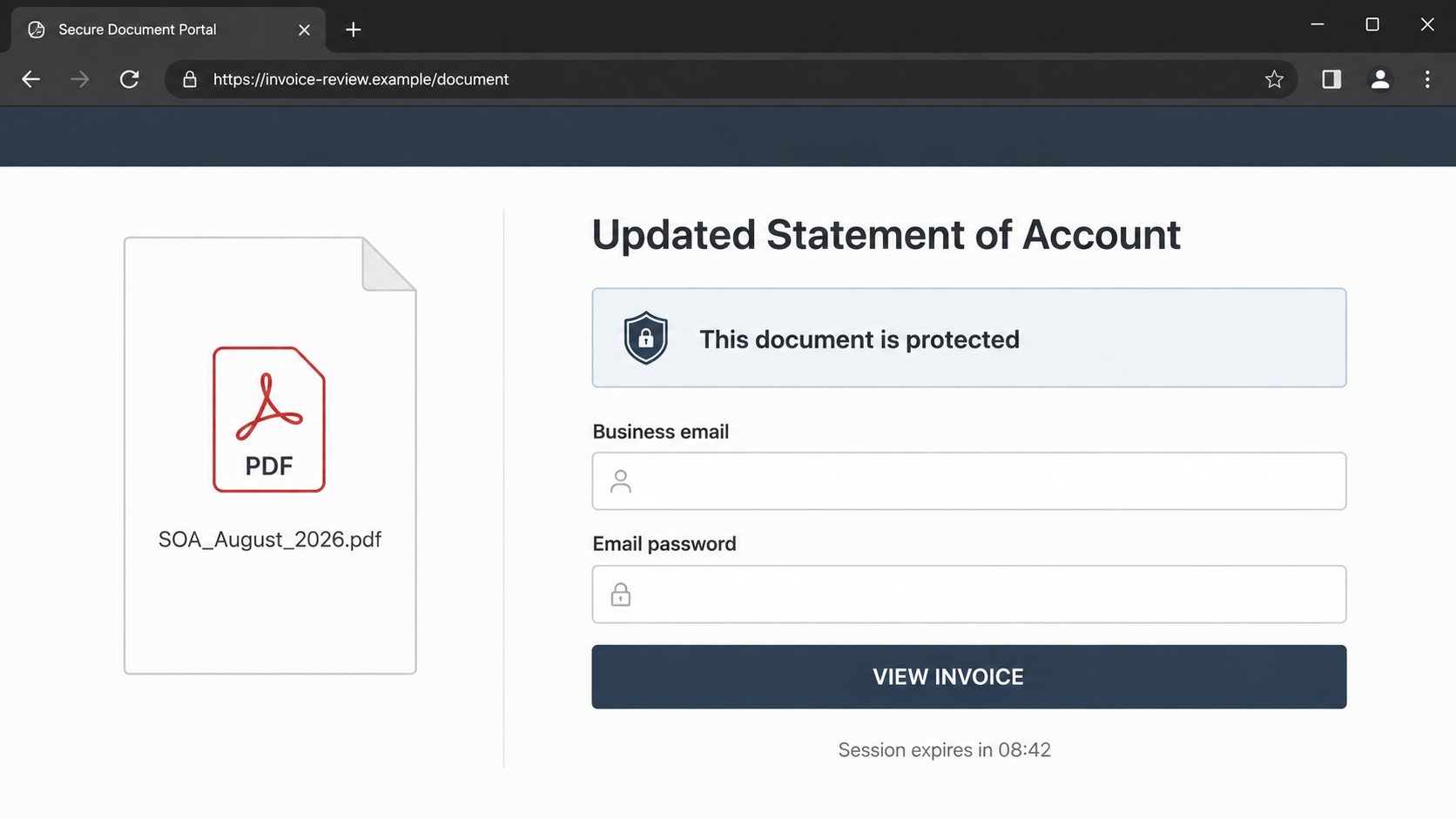
Invoice-themed phishing commonly displays a sign-in card before showing any document. The page may claim the file is encrypted or limited to the intended recipient.
It can prefill the target’s email address and imitate Microsoft, Google, or a generic workplace portal. The visible branding is easily copied.
The visitor is encouraged to use an email password to access a supplier document. That cross-company authentication request should prompt immediate caution.
If a legitimate portal uses single sign-on, begin from the organization’s approved dashboard. Never establish trust from the page reached through an unsolicited message.
Step 5: The operator tests access or collects more information
A submitted password may be tested against business email quickly. Multi-factor prompts can arrive while the victim still believes the invoice portal is loading.
Other pages may request a telephone number, verification code, or billing details. The form can change after detecting the recipient’s domain or device.
The examined inactive link prevents confirmation of its precise behavior. However, entering credentials into any unrelated invoice portal creates the same urgent recovery need.
A rejected password is not reassuring. Fake errors often collect the first entry and ask again, hoping to capture an accurate version.
Step 6: Mailbox access reveals real payment context
Finance inboxes contain supplier names, invoice values, payment dates, bank details, approvals, and signatures. That context can support a more dangerous second stage.
An intruder may monitor conversations until a genuine transfer is approaching. They can then insert changed instructions at a believable moment.
Replies sent inside an existing thread can bypass ordinary suspicion. Recipients see authentic history beneath the fraudulent request and assume continuity.
This business email compromise risk is a plausible consequence of mailbox theft. It was not confirmed as the outcome of every message in this campaign.
Step 7: Payment diversion can follow the original phish
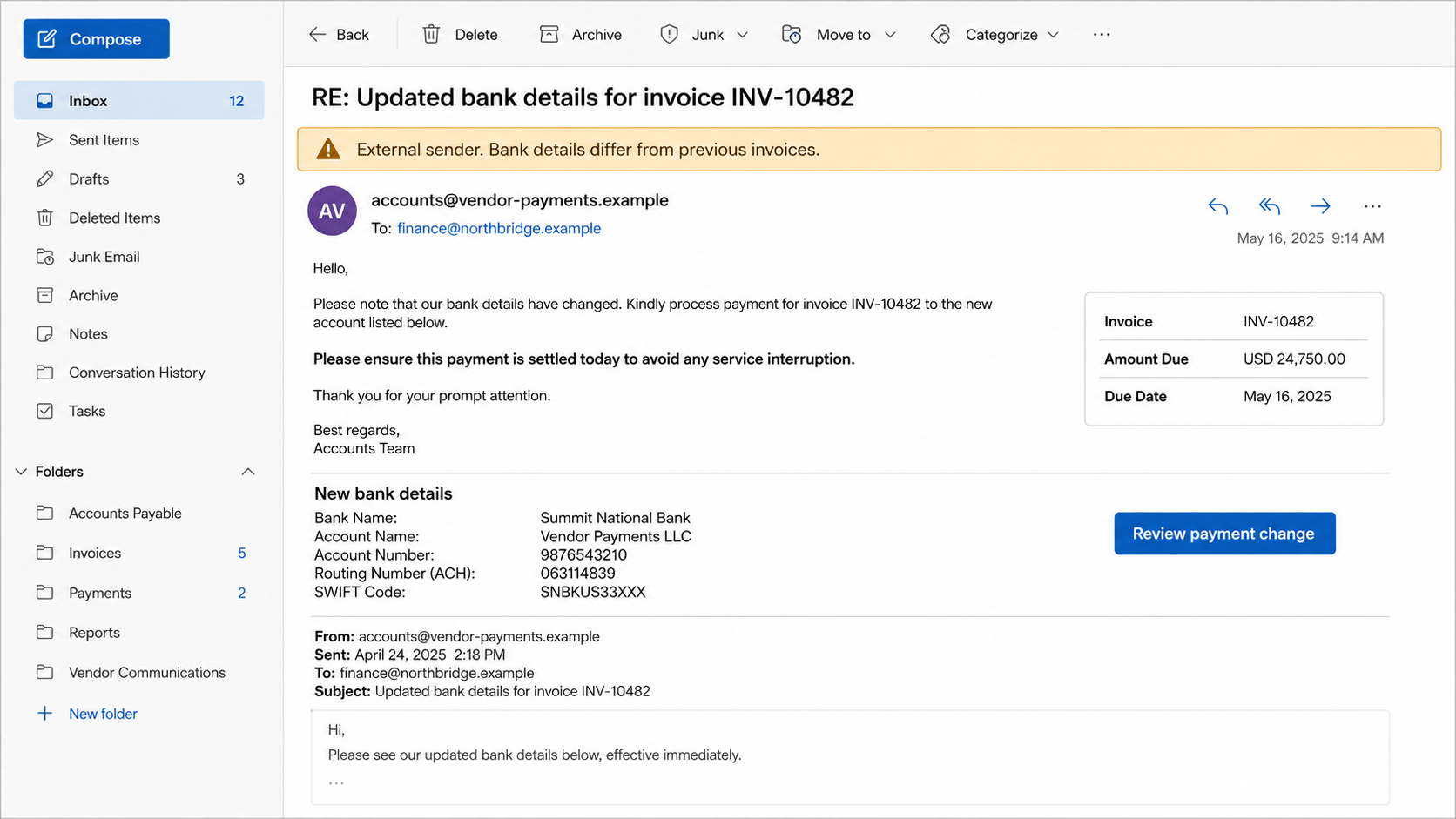
A later email may announce new bank details, a temporary account, or an urgent change caused by an audit. The request often demands same-day settlement.
Attackers can register lookalike supplier domains or send directly from a compromised account. Both approaches become stronger when they understand real invoice patterns.
After payment, they may keep the conversation quiet by deleting replies or forwarding messages. The supplier and customer discover the fraud when balances are reconciled.
Organizations should verify every bank-detail change through a known telephone number. Email alone is not a sufficient control for redirecting funds.
How to Verify an Invoice Without Helping the Sender
Match it against internal records
Search the accounting system for the supplier, purchase order, invoice number, amount, and approval owner. Do not use identifiers visible only in the suspicious email.
If there is no record, ask procurement whether a new vendor was onboarded. A genuine request should survive verification outside its own message.
Contact the supplier through an established channel
Call a number already stored in the vendor master record. Do not call the number included in the unexpected email or linked webpage.
Ask a known representative to confirm the statement and delivery method. Genuine suppliers generally understand controls designed to prevent payment fraud.
Treat bank changes as a separate high-risk event
A real invoice does not automatically validate new payment instructions. Confirm account changes with dual approval and a known contact before releasing funds.
Record who verified the change, when, and through which channel. This creates accountability and can expose inconsistent requests early.
What Makes Payment-Settlement Lures Dangerous
They exploit divided responsibility
One employee may receive invoices, another approves them, and a third releases payment. Scammers benefit when each assumes somebody else verified the supplier.
A generic message can move between teams until it reaches someone with system access. Forwarding may also strip away warnings visible to the first recipient.
Clear ownership prevents this drift. Every invoice should have a known approver and matching record before anyone follows its document link.
Ordinary amounts can be more persuasive
Not every fraudulent invoice demands a spectacular transfer. A value consistent with routine spending may attract less scrutiny and fit existing approval limits.
Operators with mailbox access can improve the match by studying previous transactions. That possibility makes post-phishing account review particularly important.
Payment controls should apply according to change and risk, not merely amount. A new beneficiary deserves verification even for a modest invoice.
Silence after payment can be engineered
Mailbox rules may hide supplier replies asking about an overdue balance. The customer assumes payment succeeded while the legitimate supplier sees nothing.
By the time reconciliation exposes the conflict, funds may have moved through additional accounts. Fast reporting gives banks more opportunity to intervene.
Finance teams should investigate unexplained communication gaps. A missing acknowledgment after changed payment details deserves a direct call to the established supplier.
Company, Address, and Fulfillment Checks
The supposed finance unit lacks an identity
A department label is not a legal entity. Look for the supplier’s registered name, tax details, contract reference, and established sender domain.
Generic signatures and missing telephone details prevent ordinary verification. Even complete details require comparison with records you already trust.
The sender and reply paths may differ
Expand the header to compare From, Reply-To, and return-path addresses. A reply routed elsewhere can expose an attempt to move communication away from the claimed organization.
Authentication failures strengthen suspicion, but a passing result is not absolute proof. Attackers can use properly authenticated lookalike domains or compromised mailboxes.
The document host should fit the relationship
Suppliers normally use predictable invoicing platforms. An unfamiliar storage page or unrelated domain requires confirmation before anyone signs in or downloads files.
Inactive infrastructure provides no assurance. Domains can be suspended after reports, then replaced in the next wave with another disposable address.
Payment details need independent validation
Compare the beneficiary name, account country, currency, and bank with previous payments. Unexpected differences require a trusted callback and a second approver.
Scammers may provide realistic addresses that belong to virtual offices, forwarding services, or unrelated companies. Search results cannot replace contractual records.
Keep vendor-master changes separate from invoice approval. One employee should not be able to alter bank information and release the related payment alone.
These controls protect against both external phishing and compromised legitimate accounts. A familiar sender should never exempt a payment change from verification.
What to Do if You Have Fallen Victim to This Scam
- Dismiss the linked page. Do not enter more information, retry a password, approve a sign-in, or download a replacement invoice from the same message.
- Contact internal security immediately. Use telephone or approved chat, especially when a work password was entered. Fast token revocation can reduce further access.
- Reset the affected credentials. Open the genuine mail service directly on a trusted device. Replace reused passwords on every important account.
- Revoke sessions and persistence. Remove unknown devices, forwarding rules, inbox filters, delegates, app passwords, recovery methods, and connected applications.
- Pause related payments. Tell accounts payable and treasury to hold invoices or bank changes connected with the message until the supplier is independently verified.
- Call the supplier using stored details. Ask whether it sent the statement and whether any payment instructions changed. Document the response.
- Contact the bank quickly after a transfer. Request a recall or fraud trace and provide beneficiary information. Recovery becomes harder as funds move onward.
- Inspect mailbox activity. Search sent, deleted, archived, and recoverable messages for invoice manipulation, hidden replies, or phishing sent to coworkers.
- Scan downloaded content. If a file opened or software installed, isolate the device and run Malwarebytes before using it for sensitive financial work.
- Reduce malicious redirects. AdGuard can block some known phishing and advertising infrastructure. It remains an extra layer, not a substitute for callbacks.
- Preserve evidence and report the loss. Save headers, URLs, invoices, bank instructions, login alerts, and transaction details for investigators, insurers, and financial institutions.
If you only read the email, no credential or payment was exposed. Report it internally so administrators can search for other recipients and block indicators.
If you clicked an inactive link, document the address and time. The failed page may still have recorded the visit, but it did not automatically prove account compromise.
Frequently Asked Questions
What does SOA mean in this email?
SOA usually means statement of account. The legitimate accounting term is used to make the fraudulent payment request sound routine.
Was the linked page confirmed as a credential form?
No. The recorded destination was inactive during examination. The email is fraudulent, while its precise final payload could not be observed.
Does a dead link mean I can ignore the message?
No. Report it and preserve evidence. Campaign infrastructure changes frequently, and coworkers may have received an active variant.
Should I open the invoice on another device?
No. Verify the invoice through accounting records and a known supplier contact. Another device does not make a phishing portal legitimate.
What if money was already sent?
Call the bank’s fraud department immediately and request a recall. Notify company leadership, security, legal counsel, and relevant authorities according to policy.
Can a real supplier account send fraudulent instructions?
Yes. Compromised mailboxes can send convincing requests inside genuine threads. Independently verify every bank-detail change, regardless of sender familiarity.
The Bottom Line
The Updated SOA and Invoice for Payment email disguises an unverified external link as routine finance work. Its inactive destination does not restore its credibility.
Match every invoice to internal records, verify suppliers through known channels, and treat changed payment instructions as a separate event requiring strong approval.

Join the discussion
0 commentsShare your experience or ask a question about this article.
Discussion
Start the conversation
Have a question or something useful to share? Add the first comment.