


A purchase order can arrive without warning, especially in a busy sales inbox. That ordinary possibility gives this message enough credibility to earn a hurried click.
The email looks polished and pleasantly routine. A closer inspection reveals details that deserve attention before anyone opens the promised document.
Overview
What the message claims
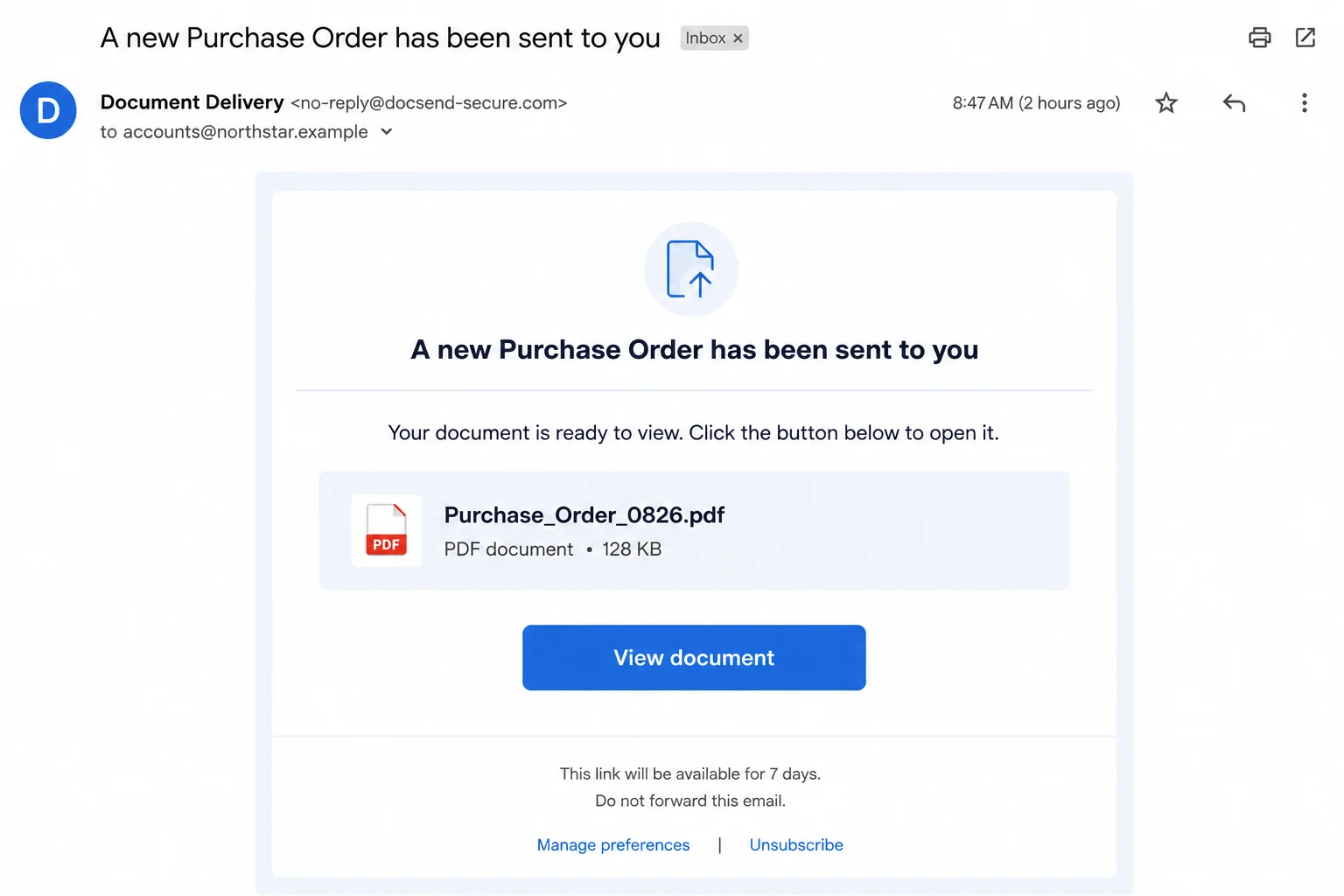
The WeTransfer Purchase Order email scam says a customer or business contact sent a new order through a file-sharing service.
A prominent button invites the recipient to view, review, or approve the document. The wording makes the task feel like normal sales administration.
The message may include a recipient address, file name, expiration notice, and footer links. Those details imitate the rhythm of a genuine transfer notification.
What happens after the click
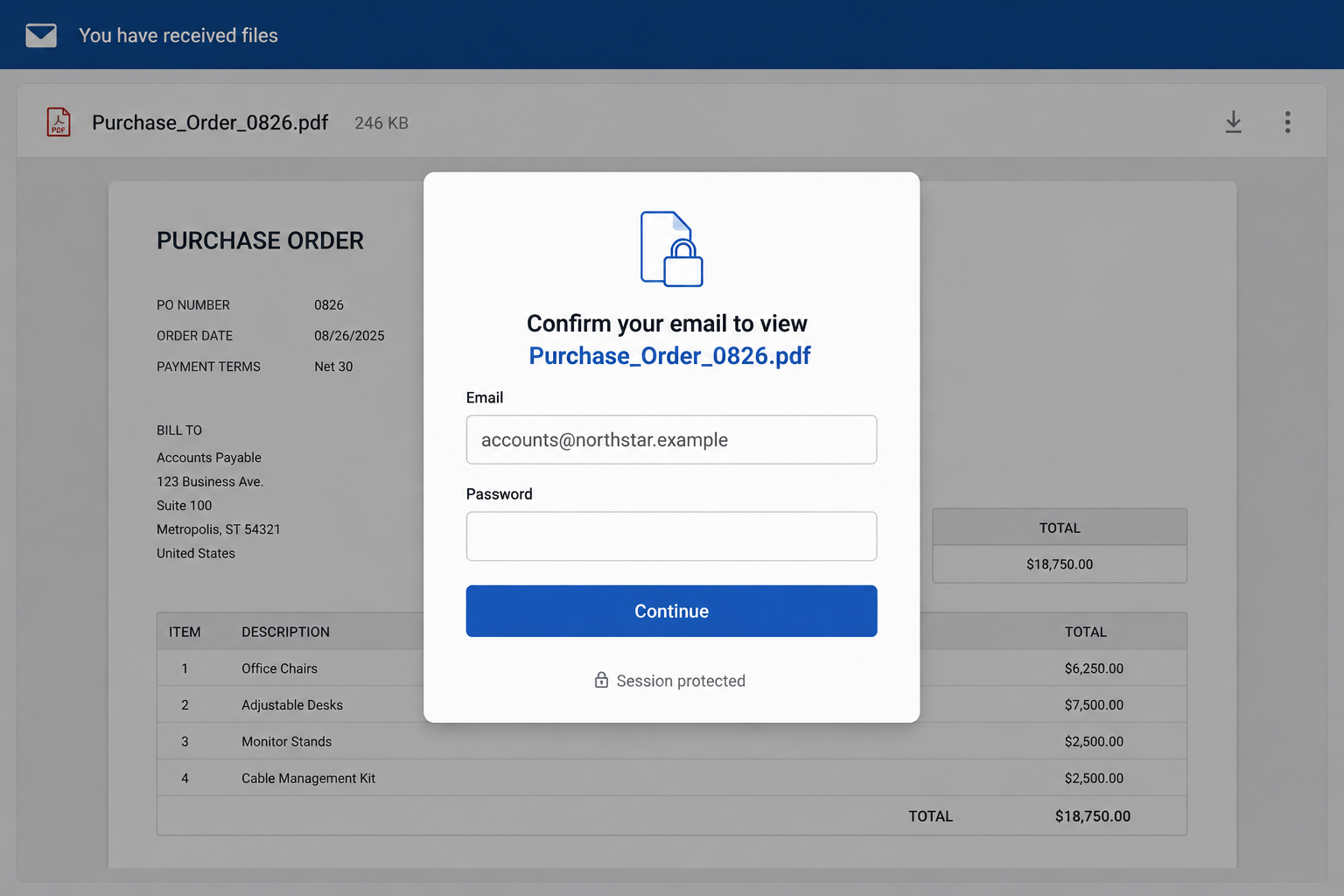
The button does not provide a trustworthy purchase order. It leads toward a counterfeit sign-in page built to collect an email address and password.
Some phishing pages adapt their appearance to the victim’s address. A company using Microsoft mail may see one design, while another provider triggers different colors.
That customization is not evidence of a real account connection. The attacker can read the email domain from the link and choose a matching template.
The warning signs in one place
- No known buyer announced the order through an established conversation.
- The sender address does not belong to the real file-transfer service.
- The link opens an unrelated or newly created domain.
- The supposed document requires the recipient’s mailbox password.
- The greeting, order number, or buyer identity remains unusually vague.
- Footer links exist mainly to make the email look complete.
WeTransfer is a legitimate service and is not responsible for the campaign. Criminals borrow familiar names because recipients already understand what a transfer email should do.
A real transfer can still be unexpected, so the brand name alone settles nothing. The sender, transfer details, and destination address must agree.
When an order matters, a genuine customer can confirm it through a known telephone number or earlier email thread. That check takes less time than recovering a mailbox.
How the WeTransfer Purchase Order Email Scam Works
Step 1: The attackers choose a believable business task
Purchase orders are ideal lures because they carry potential revenue. A salesperson, owner, or accounts employee may worry that hesitation could cost a new customer.
The message does not need detailed knowledge of the company. Many organizations publish sales addresses, staff names, supplier pages, and job roles on public websites.
Leaked contact lists give criminals more material. An address such as sales, accounts, procurement, or office immediately suggests which commercial story might work.
Mass campaigns can therefore feel targeted without involving careful research. The job function itself supplies the necessary context.
Step 2: A familiar sharing service lends borrowed trust
Recipients recognize file-transfer notifications, even if they rarely use the service. The design reduces the strangeness of receiving a document from an unknown buyer.
The fake email may reproduce spacing, colors, buttons, and preference links. None of those elements require access to the legitimate company’s systems.
Logos and layouts are easy to copy from public pages. Authentication depends on message headers and domains, not on how accurately a template looks.
The scam often avoids an attachment at this stage. A link can pass basic mail filters while keeping the dangerous content on an external server.
Step 3: The order language creates urgency without sounding panicked
Unlike a loud security warning, a purchase order uses quiet pressure. The recipient wants to acknowledge the buyer, check quantities, and prepare a quotation quickly.
Phrases such as “review and approve” imply that progress depends on immediate attention. An expiration date adds another reason not to postpone the task.
The attacker benefits when the recipient acts alone. Business inboxes are often busy, and routine document alerts receive less scrutiny than obvious payment requests.
A vague order is actually useful bait. Curiosity supplies the missing product, amount, and customer information after the click.
Step 4: The button crosses into attacker-controlled infrastructure
The visible button label says “View document,” but its real address may have no connection to WeTransfer or the alleged buyer.
The destination can use a compromised website, disposable subdomain, link shortener, or cloud-hosted page. HTTPS only encrypts the connection to that site.
A padlock does not prove the operator is honest. Free certificates are available to legitimate owners and criminals alike.
Hovering over a link on a desktop can expose the destination. On mobile, avoid pressing it and verify the transfer through a separate channel.
Step 5: A tailored login form captures the mailbox password
The fake page may display the recipient’s email address automatically. That familiar detail can make the form appear connected to the workplace account.
In reality, the address may be embedded in the link. The page then asks for the secret the attackers actually need, the password.
After submission, the site may show an error and request another attempt. This helps criminals collect current and recently changed password variations.
A redirect to a real service can follow. The genuine page loads, the document disappears, and the victim may blame an expired transfer.
Step 6: Stolen access becomes a business email compromise
If the password works, the intruder can search mail for invoices, customers, contracts, and payment conversations. That information supports more convincing fraud.
Multi-factor authentication can interrupt the login, but only if the victim rejects unexpected prompts. Some attackers immediately request approval after capturing the password.
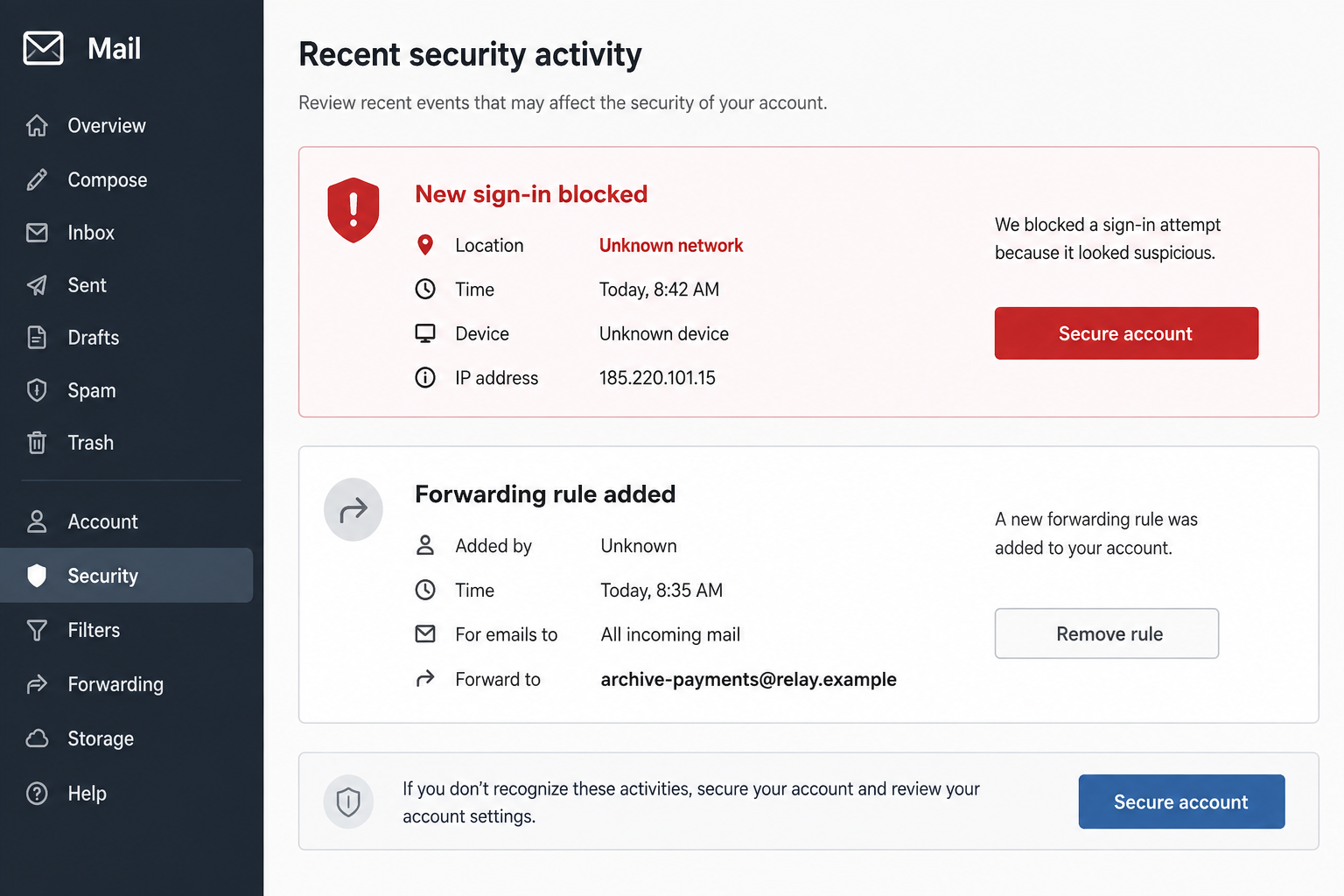
Once inside, criminals may create forwarding rules or hide replies. They want to observe valuable conversations without alerting the mailbox owner.
They can also send fresh purchase-order lures from the genuine account. Colleagues and suppliers are more likely to trust a message from a familiar address.
Step 7: The compromised conversation can redirect real money
The most damaging stage may arrive later. An attacker watches an authentic invoice exchange, then inserts replacement bank details at the right moment.
They might impersonate the victim, customer, or supplier. Because the language and signatures come from real emails, the request can look remarkably consistent.
Hidden mailbox rules can suppress the genuine party’s objections. Everyone believes the other side is slow to respond while the criminal controls the conversation.
This outcome is possible, not inevitable. Fast password changes, session revocation, and payment checks can stop a stolen login from becoming a financial loss.
How to Check a Real File Transfer Safely
Start with the person who supposedly sent it
Contact the buyer through a telephone number, customer record, or earlier conversation. Do not reply to the suspicious email as your only verification.
Ask for the transfer name, file name, and reason for the order. A real sender can describe what they uploaded without asking for your mailbox password.
Open the service independently
Type the official service address yourself or use a trusted bookmark. Avoid searching for a login page and selecting an advertisement.
Some genuine transfers are accessible through a unique link, but the domain should still belong to the service. A random host is not a harmless alternative.
Inspect the sender and destination separately
A display name can say anything. Expand the sender details and examine the complete address, including every character after the @ symbol.
Then examine the link destination. A plausible sender address cannot make an unrelated login domain safe.
Why the Fake Purchase Order Is More Dangerous Than It Looks
It targets shared and privileged inboxes
Sales and accounts mailboxes may be accessible to several employees. A captured credential can expose broader correspondence than one personal inbox.
Some shared addresses also connect to customer systems, cloud storage, or accounting tools. Password reuse can expand the damage beyond email.
It arrives during ordinary work
Employees are trained to notice threats and unusual payments. A document-sharing notice sits inside a familiar task and may not feel dangerous.
That ordinary appearance is the attack’s strength. The recipient is thinking about an order, not about account security.
It can turn one victim into a trusted sender
Messages sent from a compromised business account pass a powerful social test. Customers recognize the address and may continue an existing thread.
Technical filters also face a harder problem when mail originates from a legitimate service. Human verification remains important after account takeover.
What Organizations Should Investigate After a Click
Security staff should review successful and failed sign-ins around the reported time. Location, browser, device, and session details can identify unauthorized access.
Mailbox rules deserve their own examination. Look for forwarding, deletion, archive, or keyword filters that conceal invoices and security notices.
Search sent mail, deleted items, and audit logs. An intruder may remove visible copies while messages remain recorded elsewhere.
Accounts connected through single sign-on also need review. Email access may provide password resets or tokens for other business applications.
Finance teams should confirm recent and pending bank-detail changes. A small verification call can protect payments already moving through legitimate workflows.
Warn relevant partners carefully. Share the affected address, time window, and verification method without forwarding a live phishing link.
Common Mistakes That Keep the Intruder Hidden
Changing the password without revoking sessions may leave an active browser token usable. Sign out all sessions and remove unfamiliar trusted devices.
Deleting the phishing message does not remove forwarding rules. Those changes live in account settings and may continue copying new mail.
Assuming multi-factor authentication solved everything can also be risky. Review added methods, recovery addresses, application passwords, and connected applications.
Finally, do not treat a failed transfer as proof nothing happened. The fake page may fail deliberately after it has already collected the password.
Company, Address, and Fulfillment Checks
Verify the file-sharing company through its real domain
WeTransfer is a real business, but its name can be copied. Reach its help pages independently and compare the notification with official guidance.
A fake sender cannot be validated by clicking footer links inside the same message. Every route in that email may belong to the attacker.
Identify the alleged buyer before discussing an order
A company name, address, and telephone number can be copied from a public directory. Confirm the individual through independently sourced contact details.
For a new buyer, verify the business registration, domain, and purchasing contact. Do not rely on a signature block created by the sender.
Do not confuse a hosting address with a sender’s identity
Phishing pages may sit on compromised servers or cloud platforms. The hosting provider is not necessarily the criminal and does not authenticate the order.
The relevant connection is between the buyer, expected transaction, and verified transfer. If that chain breaks, stop.
Fulfillment details should follow verification, not replace it
A purchase order may contain delivery addresses and product quantities. Those details can be copied, invented, or stolen from earlier correspondence.
Do not ship goods or change payment terms until the customer confirms the order through a known channel and normal credit controls.
What to Do if You Have Fallen Victim to This Scam
- Close the phishing page. Preserve the email, full link, and approximate time, but do not revisit the destination to gather more evidence.
- Change the exposed password. Use the genuine account portal on a clean device and create a unique password not used anywhere else.
- Revoke every active session. Sign out other browsers and devices, remove unknown application passwords, and disconnect integrations you do not recognize.
- Repair multi-factor authentication. Delete unfamiliar methods, regenerate recovery codes, and reject approval prompts you did not initiate.
- Inspect mailbox rules. Remove forwarding, deletion, archive, and filtering rules created without permission. Check recovery addresses and delegated access.
- Notify your employer. Security and finance teams should review logs, sent mail, file access, and any payment-detail changes connected to the account.
- Warn affected contacts. Tell customers and suppliers which messages were unauthorized and provide a safe method for confirming future requests.
- Scan the device when appropriate. If anything downloaded or ran, use Microsoft Defender and Malwarebytes to check for credential stealers or remote-access malware.
- Add browser protection. AdGuard can block many known phishing and advertising destinations, although it cannot replace careful sender verification.
- Watch financial activity. Review invoices, outgoing payments, card statements, and bank-detail amendments for transactions influenced by the compromised mailbox.
Frequently Asked Questions
Is the WeTransfer Purchase Order email real?
The examined campaign is phishing. A genuine transfer remains possible, so verify the sender and official domain independently instead of trusting the button.
Is WeTransfer itself involved in the scam?
No. Criminals impersonate the legitimate service. Copied branding does not indicate that WeTransfer sent or approved the message.
How can the counterfeit form display my address?
The address can be encoded inside the link. Displaying it requires no connection to your mailbox and does not authenticate the page.
What if I entered my password but saw an error?
Treat the credential as stolen. Change it immediately, revoke sessions, review multi-factor methods, and inspect mailbox settings.
Can simply reading the email infect my computer?
Usually, viewing the message alone does not cause infection. Risk increases after opening a link, downloading a file, or running content.
Should I ask the sender by replying?
Use a known number or earlier trusted thread. Replying only confirms the address is active and keeps verification inside the attacker’s channel.
The Bottom Line
The WeTransfer Purchase Order email scam turns a promising business document into a password trap. Its professional appearance cannot validate the sender or destination.
Confirm unexpected orders outside the email and open services through known addresses. If credentials were submitted, secure the mailbox and verify payments before normal work resumes.

Join the discussion
0 commentsShare your experience or ask a question about this article.
Discussion
Start the conversation
Have a question or something useful to share? Add the first comment.