


A pay adjustment is personal, timely, and difficult to ignore. Even cautious employees may open the message before asking whether HR normally communicates this way.
The notice looks like routine payroll administration. Its details, deadline, and sign-in request need to be examined together.
Overview
What employees are told
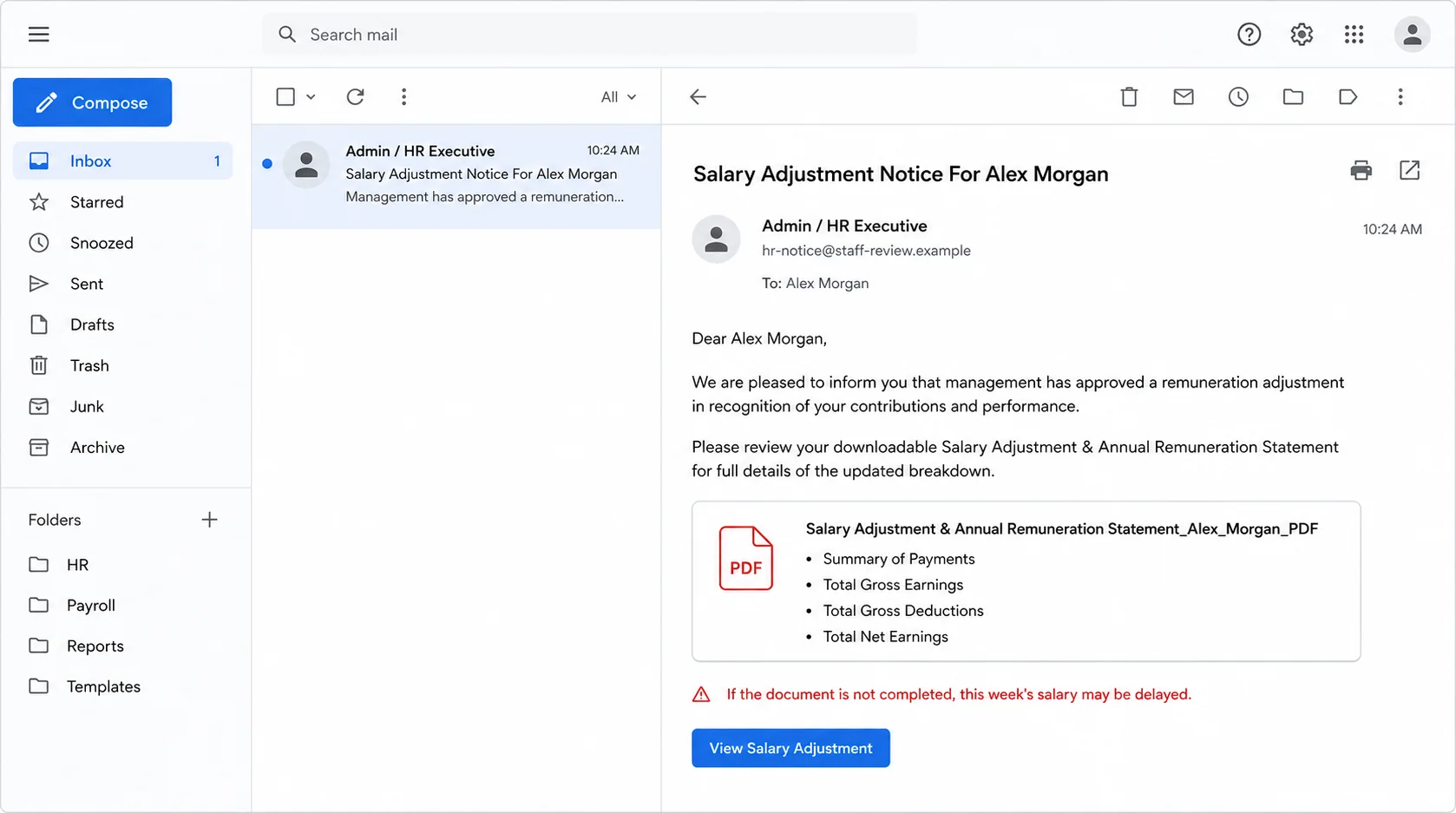
The Salary Adjustment Notice scam impersonates an administrator or HR executive. It claims management has approved a remuneration change for the named employee.
The email offers a document described as a salary adjustment and annual remuneration statement. It promises earnings, deductions, payments, and net-pay information.
Some versions warn that the week’s salary may be delayed unless the employee completes the document. That threat creates both curiosity and financial anxiety.
Where the supposed statement leads
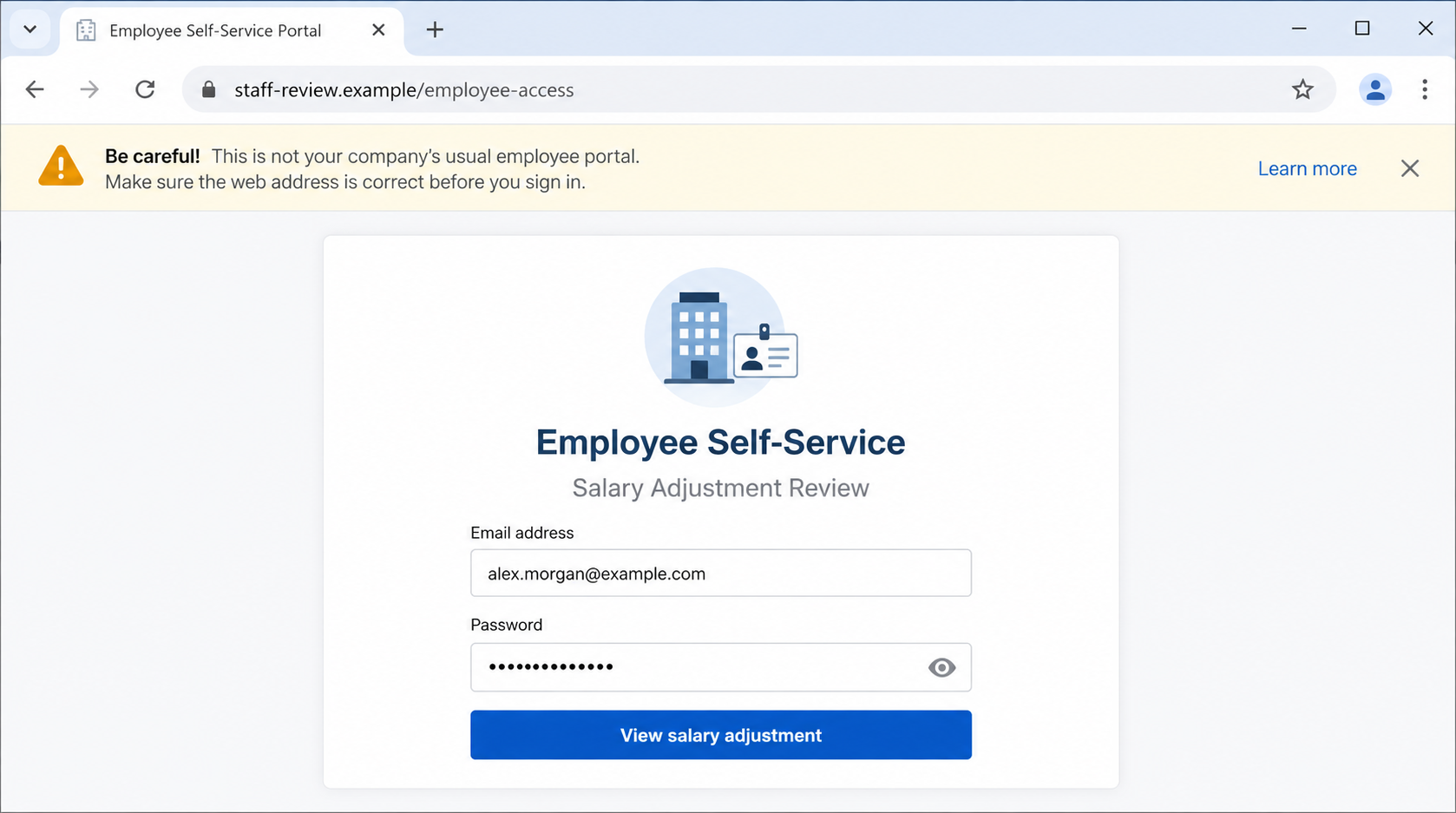
The button or document link does not open a trustworthy payroll record. It leads to a phishing page styled like the recipient’s email or employee portal.
The page asks for an email address and password to view the adjustment. Submitted credentials can be captured by the people operating the campaign.
Other versions use “Salary Review” or announce portal access. The wording changes, but the central objective remains the theft of workplace login information.
Warning signs worth remembering
- The employee did not expect a salary review or manager conversation.
- The sender uses a generic HR title rather than a known staff member.
- The message threatens delayed pay to force immediate action.
- The link opens outside the organization’s normal HR system.
- A document page requests the employee’s email password.
- The portal domain does not match the employer or approved payroll provider.
Legitimate employers may announce pay changes electronically. The subject alone is not proof of fraud, so employees should compare the message with established HR procedures.
The decisive questions are who sent it, where the link leads, and whether the change appears in the employee’s normal portal.
If payroll cannot confirm the notice through known channels, do not continue. Report the message so security staff can warn other employees.
How the Salary Adjustment Notice Scam Works
Step 1: The subject targets a private financial concern
Salary information naturally commands attention. Employees may expect annual reviews, cost-of-living adjustments, bonuses, or corrections at different times.
Criminals do not need to promise an enormous raise. A vague “adjustment” encourages the recipient to click simply to learn whether pay increased or decreased.
Using the employee’s name strengthens the illusion. Names, job titles, and employer relationships can come from public profiles, company pages, or previous data breaches.
The private subject can also discourage discussion. A recipient may avoid asking colleagues because compensation is sensitive, which removes a useful verification step.
Step 2: Payroll terminology creates an official appearance
The email lists gross earnings, deductions, net earnings, and payment summaries. Those headings resemble information found on genuine pay statements.
Formal phrases such as “annual remuneration” and “management approved” suggest an internal process. They are easy to copy into a phishing template.
A generic sign-off like “Admin/HR Executive” hides the absence of a verifiable person. Real HR communications usually connect to known staff or an established platform.
Employees should compare the format with prior notices. Unexpected changes in sender, tone, attachment method, or portal domain deserve investigation.
Step 3: The threat of delayed salary removes breathing room
The message may say the document must be completed before month-end or pay will not arrive that week. This is a coercive deadline.
Worry about rent, bills, and direct deposits can push recipients past normal checks. The attacker turns a basic financial need into pressure.
Real payroll teams rarely suspend earned wages because an employee did not open an unexpected emailed document. Policies and local laws govern any required acknowledgments.
Call payroll through the internal directory. A genuine deadline can be confirmed without using the message’s button.
Step 4: The link opens a counterfeit employee portal
The destination may copy the employer’s colors, a webmail layout, or a generic employee self-service page. Logos and headings can be reproduced easily.
The victim sees a familiar email address already filled in. That value may have been passed through the URL and does not prove account recognition.
The domain is the stronger clue. A workplace login should not appear on an unrelated host created for salary review or document access.
Employees should reach HR systems through the company intranet, a saved bookmark, or the approved mobile application, never through an unsolicited payroll link.
Step 5: The password form collects workplace credentials
When the employee submits a password, the page can send it to the phishing operator. No legitimate salary statement needs to appear afterward.
A false error may request another attempt. The site could also redirect to the real webmail login, leaving the victim to blame a temporary glitch.
If multi-factor authentication protects the account, the attacker may trigger a prompt immediately. Approving that request can complete the unauthorized login.
Do not approve unexpected prompts or share codes with anyone. Report repeated authentication requests to IT even after changing the password.
Step 6: A compromised account exposes workplace information
Employee mailboxes contain internal contacts, projects, schedules, invoices, benefits information, and password-reset messages. Access can support several kinds of fraud.
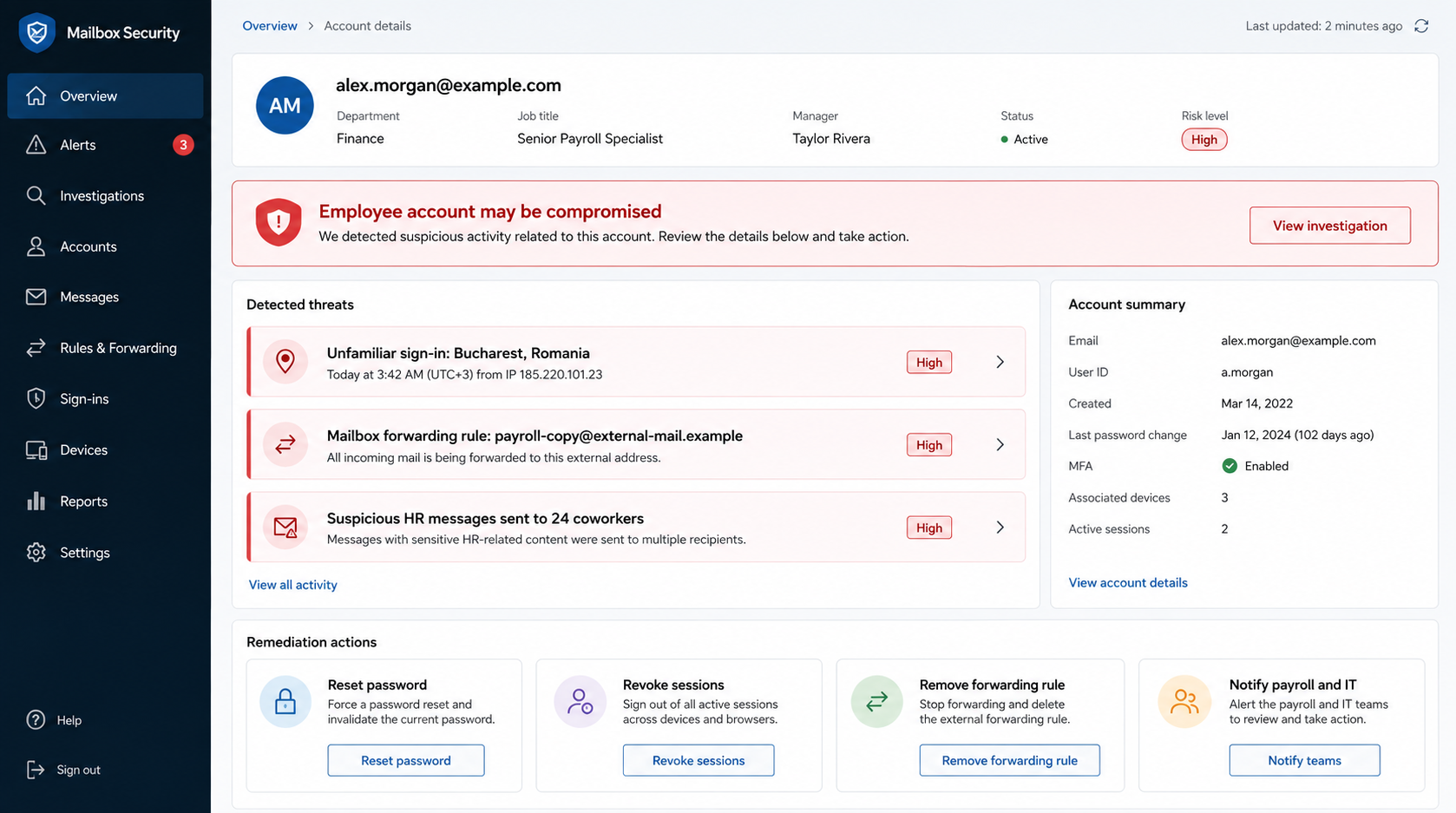
An intruder may search for payroll conversations or personal documents. They can create forwarding rules and monitor incoming messages without changing the visible inbox.
The account can also become a trusted sender for phishing coworkers. A genuine internal address makes the next salary notice more persuasive.
Organizations should search mail logs for messages sent after the suspicious login. Removing the first email alone does not contain an account takeover.
Step 7: Follow-up attacks exploit the stolen workplace identity
Criminals may request payroll bank changes, gift cards, confidential files, or password resets while impersonating the employee.
They could also target HR staff with realistic messages learned from the mailbox. A request for a direct-deposit change becomes stronger when it uses authentic signatures.
These are recognized risks of business account compromise, not proof that every salary-lure victim experienced each outcome.
Early reporting lets payroll place safeguards around bank-detail changes and helps IT stop internal messages before more employees respond.
How to Verify a Real Salary Change
Use the normal employee portal
Open the portal from the company intranet, password manager, or saved bookmark. Do not reach it through the unexpected email.
Look for a matching notice, compensation statement, or required acknowledgment. Absence does not prove fraud, but it requires direct confirmation from HR.
Ask your manager or payroll team
Use the internal directory, workplace chat, or a known telephone number. Avoid replying to the suspicious message because the sender may control that conversation.
A genuine adjustment usually follows a documented review, promotion, policy change, or payroll correction. The appropriate staff can explain the context.
Compare established procedures
Some employers use a third-party payroll provider. Employees should know the approved provider’s exact domain and normal authentication method.
Unexpected requests to enter email credentials on another company’s site are unsafe. The payroll provider should use its own account or documented single sign-on.
Why Salary Phishing Is So Effective
Curiosity and fear arrive together
A raise creates hope, while a possible delay creates anxiety. Combining both emotions leaves little room for slow, skeptical reading.
The message need not make an exact promise. Uncertainty itself drives the click because the recipient wants the missing number.
Employees expect confidentiality
People often avoid discussing compensation with coworkers. That privacy can prevent them from discovering that several colleagues received the same generic notice.
Security teams should provide a discreet reporting path. Employees need a way to verify sensitive messages without feeling they are sharing salary information publicly.
Internal accounts amplify credibility
Once one employee falls for the lure, their mailbox can send it to others. The campaign then appears to come from inside the organization.
Internal origin is useful context, not absolute proof. Compromised accounts require the same link and domain checks as external messages.
What HR and Payroll Teams Can Do to Reduce the Risk
Make the official route predictable
Employees should know where compensation documents appear and which domain hosts them. Consistent delivery removes the ambiguity that phishing campaigns exploit.
HR can announce that salary notices never request email passwords through document links. Clear rules give recipients permission to stop suspicious workflows.
Protect bank-detail changes separately
A mailbox login should not be enough to redirect pay. Direct-deposit changes deserve stronger authentication, confirmation notices, and a delay before taking effect.
Payroll staff should verify unusual requests through a known channel. A message sent from the employee’s real mailbox can still be fraudulent.
Give employees a private reporting option
Compensation is sensitive, so employees may hesitate to forward a notice to a general help desk. A confidential reporting route reduces that barrier.
Reports should trigger a search for similar subjects and URLs. One employee’s question may reveal a campaign targeting the entire organization.
Information the Fake Portal May Seek Next
The observed lure targets email credentials, but later forms can request telephone numbers, employee identifiers, tax details, or bank information.
Each additional field increases identity-theft and payroll risk. Stop at the first unexpected login rather than testing how far the form continues.
If sensitive data was entered, tell payroll exactly which fields were exposed. Their response can then cover account access, banking, and privacy obligations.
Keep a written timeline of the interaction. Accurate times help IT correlate sign-ins, messages, password resets, and changes with the phishing event.
Company, Address, and Fulfillment Checks
Identify the real employer or payroll provider
Confirm which legal entity employs you and which provider processes payroll. Use onboarding records, prior payslips, or internal documentation.
A copied company name does not authenticate a new portal. The domain and established workflow must match what the employer actually uses.
Do not trust contact details inside the notice
Scammers can add fake HR telephone numbers, addresses, and signatures. Contact payroll through the internal directory or a number already known to you.
If the employer uses a shared service center, verify it through management. An unfamiliar location is not automatically fraudulent, but it requires confirmation.
Check where personal data is being requested
Salary records contain sensitive information. A legitimate provider should explain its identity, privacy practices, and relationship with the employer.
Never send tax identifiers, banking details, passwords, or identity documents to an address established only by an unsolicited email.
Understand that product fulfillment is irrelevant
This is an account-theft scheme, not a retail order. Warehouses, return policies, and shipping addresses do not establish the portal’s legitimacy.
The meaningful checks involve employer confirmation, payroll-provider identity, domain ownership, login behavior, and internal security records.
What to Do if You Have Fallen Victim to This Scam
- Record and exit the counterfeit portal. Save its URL, close the page, and preserve the original email for IT or security review.
- Change your workplace password. Use a known-clean device and the official account portal. Create a unique password rather than a variation of the old one.
- Revoke sessions and review authentication. Sign out other devices, remove unfamiliar multi-factor methods, and reject unexpected approval requests.
- Examine the mailbox configuration. Find unauthorized forwarding, hidden filters, delegated users, connected applications, changed recovery details, and messages the intruder sent.
- Notify IT and payroll immediately. Ask them to protect direct-deposit changes, review sign-ins, and alert employees who received messages from your account.
- Verify pay and banking details. Confirm that your salary destination, tax elections, benefits, and personal information were not changed.
- Replace reused passwords. Secure personal email, banking, cloud, shopping, and social accounts that shared the same secret.
- Scan for additional threats. Run Microsoft Defender and Malwarebytes if anything downloaded, opened, or installed during the interaction.
- Use layered blocking. AdGuard can reduce access to known phishing and advertising domains, but it cannot verify an employer’s internal process.
- Monitor for identity misuse. Watch financial accounts, credit reports, payroll notices, and password resets if personal or banking information was also disclosed.
Frequently Asked Questions
Is the Salary Adjustment Notice email legitimate?
The examined messages were phishing. They impersonated HR and directed employees to pages designed to collect workplace email credentials.
Can a real employer send salary changes by email?
Yes. Verify the message through the normal employee portal, your manager, or payroll. Do not use the email’s link as proof.
Would payroll really delay salary for not opening a document?
That threat is highly suspicious. Confirm any genuine acknowledgment requirement through known HR channels and established policies.
What if I entered my password but the page showed an error?
Assume the password was captured. Change it, revoke sessions, review authentication methods, and notify IT without waiting for visible misuse.
Could attackers change my direct-deposit information?
They may attempt it if mailbox or HR access allows. Ask payroll to verify your banking details and flag unauthorized change requests.
Is this the same as an infected attachment?
Not necessarily. The observed campaign focuses on a phishing login. Scan the device if the route also downloaded or executed any file.
The Bottom Line
The Salary Adjustment Notice scam combines private financial curiosity with a threat of delayed pay, then sends employees to a counterfeit login page.
Open payroll systems independently and confirm compensation changes with known staff. If credentials were submitted, secure the account and alert payroll before attackers exploit the workplace identity.

Join the discussion
0 commentsShare your experience or ask a question about this article.
Discussion
Start the conversation
Have a question or something useful to share? Add the first comment.