

A signed purchase agreement sounds like the kind of file that cannot wait. It may involve a deadline, a supplier, or a deal already moving.
The message looks restrained and businesslike. Before opening anything, however, several small details deserve a closer look.
Overview
What the email claims
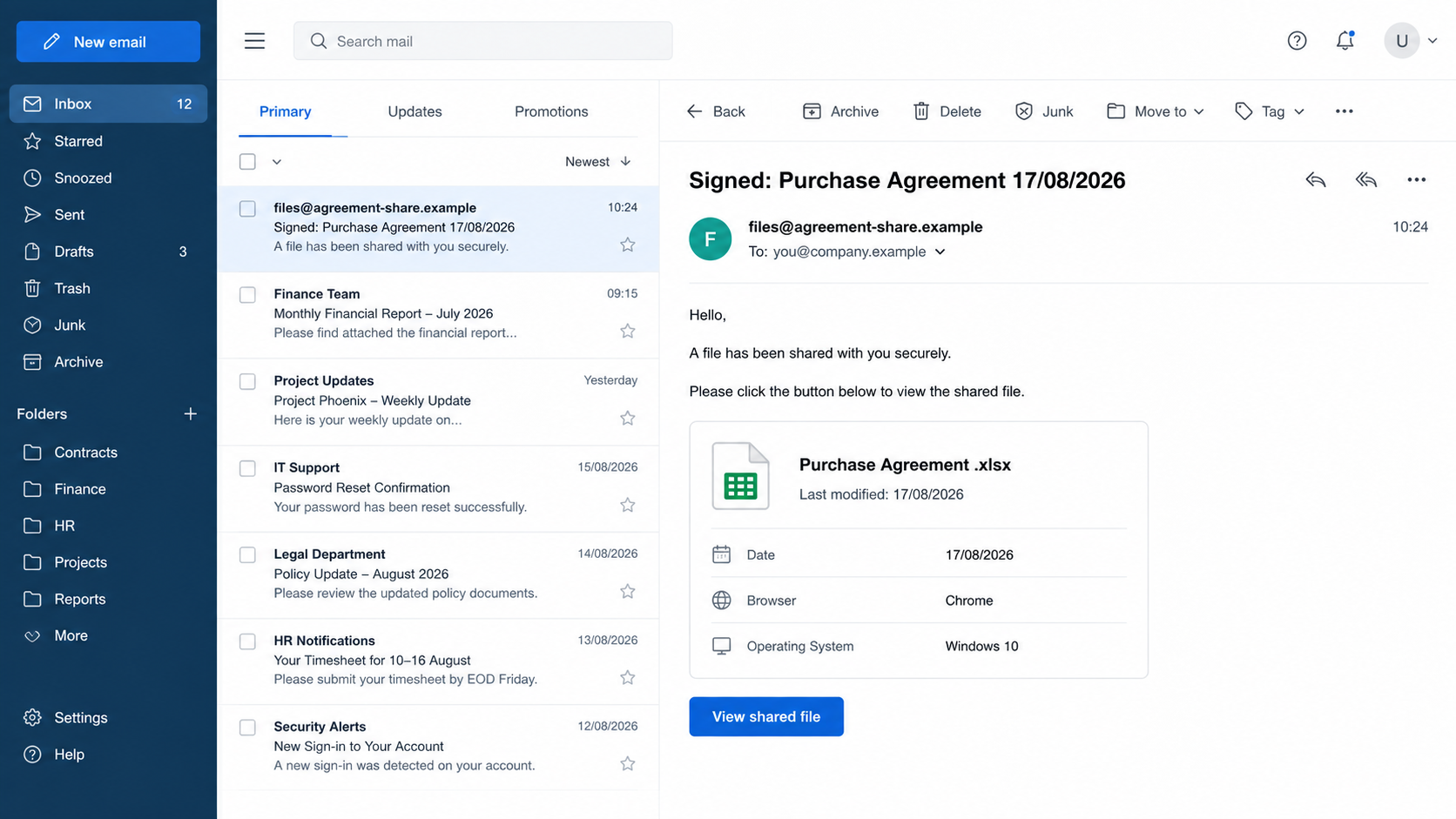
The Purchase Agreement Received scam arrives as a shared-file notification. One observed subject was “Signed: Purchase Agreement 17/08/2026.”
The body says a spreadsheet named “Purchase Agreement .xlsx” was shared securely. It invites the recipient to open the file through a prominent button.
To make the notification feel technical, the message displays a date, Chrome as the browser, and Windows 10 as the operating system.
What actually happens
No genuine agreement is waiting behind the button. The displayed file information and device details are part of the lure, not reliable access records.
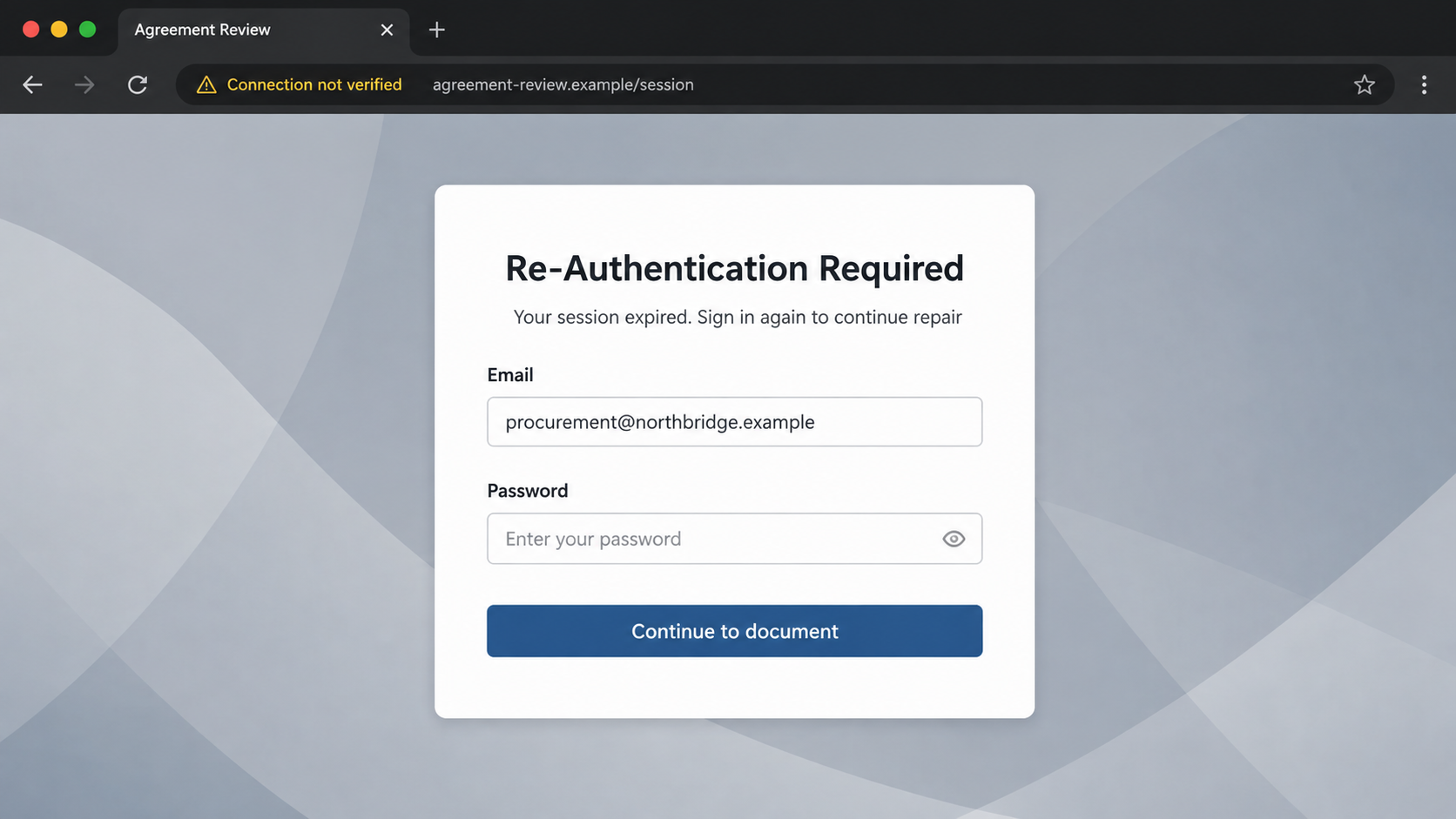
The examined link led to a compromised Hungarian website. That site displayed a fake “Re-Authentication Required” form with the recipient’s email address already inserted.
The form requested the mailbox password to continue. Anything typed there could be collected by the people controlling the phishing page.
The warning signs in one place
- An unexpected signed contract appears without a known negotiation or contact.
- The sender asks for an email password to view another company’s spreadsheet.
- Device details are presented without explaining how they were obtained.
- The destination belongs to an unrelated website, not a recognized document service.
- The page uses urgency and repair language to keep the recipient moving.
- No verifiable contract number, counterparty, or internal owner confirms the request.
The unrelated website may itself have been hacked. Its owner should not automatically be treated as the campaign operator simply because criminals used its pages.
That distinction does not make the form safe. A legitimate-looking domain can host malicious content after attackers compromise an outdated site or stolen administrator account.
The safest response is to verify the agreement through procurement, legal staff, or the known counterparty before interacting with the notification.
How the Purchase Agreement Received Scam Works
Step 1: A plausible contract notice reaches a business mailbox
Criminals begin with a subject that resembles normal corporate traffic. “Signed” implies that other people have already reviewed the document.
That single word reduces hesitation. A recipient may worry that ignoring the message could delay a purchase, shipment, partnership, or approval.
The lure works especially well against procurement, sales, legal, finance, and management accounts. Those teams regularly exchange contracts with people outside their organization.
The email may contain the recipient’s address or company name. Such details can come from public websites, data leaks, professional profiles, or earlier compromises.
Step 2: Fabricated metadata creates a sense of precision
The notification lists a date, browser, and operating system. These details imitate the audit information shown by legitimate document-sharing platforms.
They do not prove that anyone uploaded a file. A sender can place arbitrary text inside an email template, including common device information.
Windows and Chrome are safe guesses because they are widely used. A match with the recipient’s actual computer can feel personal even when it is coincidental.
A mismatch is also revealing. If the message claims Windows 10 when the recipient uses another system, the supposed activity record deserves immediate distrust.
Step 3: The button hides an unrelated destination
The visible button promises a shared spreadsheet. Its underlying address can lead somewhere entirely different from the sender shown in the message.
In the investigated sample, the route used a compromised legitimate website. That choice can look safer than a freshly registered, obviously random domain.
Attackers frequently place phishing kits inside hidden folders on vulnerable websites. The main homepage may remain normal while a specific path serves the fraudulent form.
Email filters may also trust an older domain more than a new one. This abuse turns another victim’s website reputation into temporary cover.
Step 4: A fake repair message explains the extra login
The landing page says re-authentication is required and may mention an expired session or document repair. This provides a reason for the unexpected password field.
The email address is often prefilled from a value embedded in the link. Seeing a correct address can persuade the visitor that the page recognizes them.
Prefilling is not authentication. Anyone who knows an address can place it inside a URL and display it in a form.
A real document service normally identifies itself clearly and uses its own established domain. It should not require a workplace password on an unrelated dental or business site.
Step 5: Submitted credentials are captured
When the visitor enters a password, the form can transmit it to a collection endpoint. The promised spreadsheet may never appear.
Some kits display an error and request the password again. The first entry may already be stolen, while the second helps confirm the victim’s usual spelling.
Others redirect to a harmless website after submission. That ending can make the failure feel like a broken document instead of credential theft.
Reading the email alone does not expose a password. The critical event is entering credentials into the fraudulent form or approving an unexpected authentication request.
Step 6: The mailbox becomes a source of business intelligence
A working password may give the attacker access immediately, unless multi-factor authentication or other controls block the login.
Inside a mailbox, criminals can find genuine agreements, signatures, supplier conversations, payment schedules, customer details, and internal approval patterns.
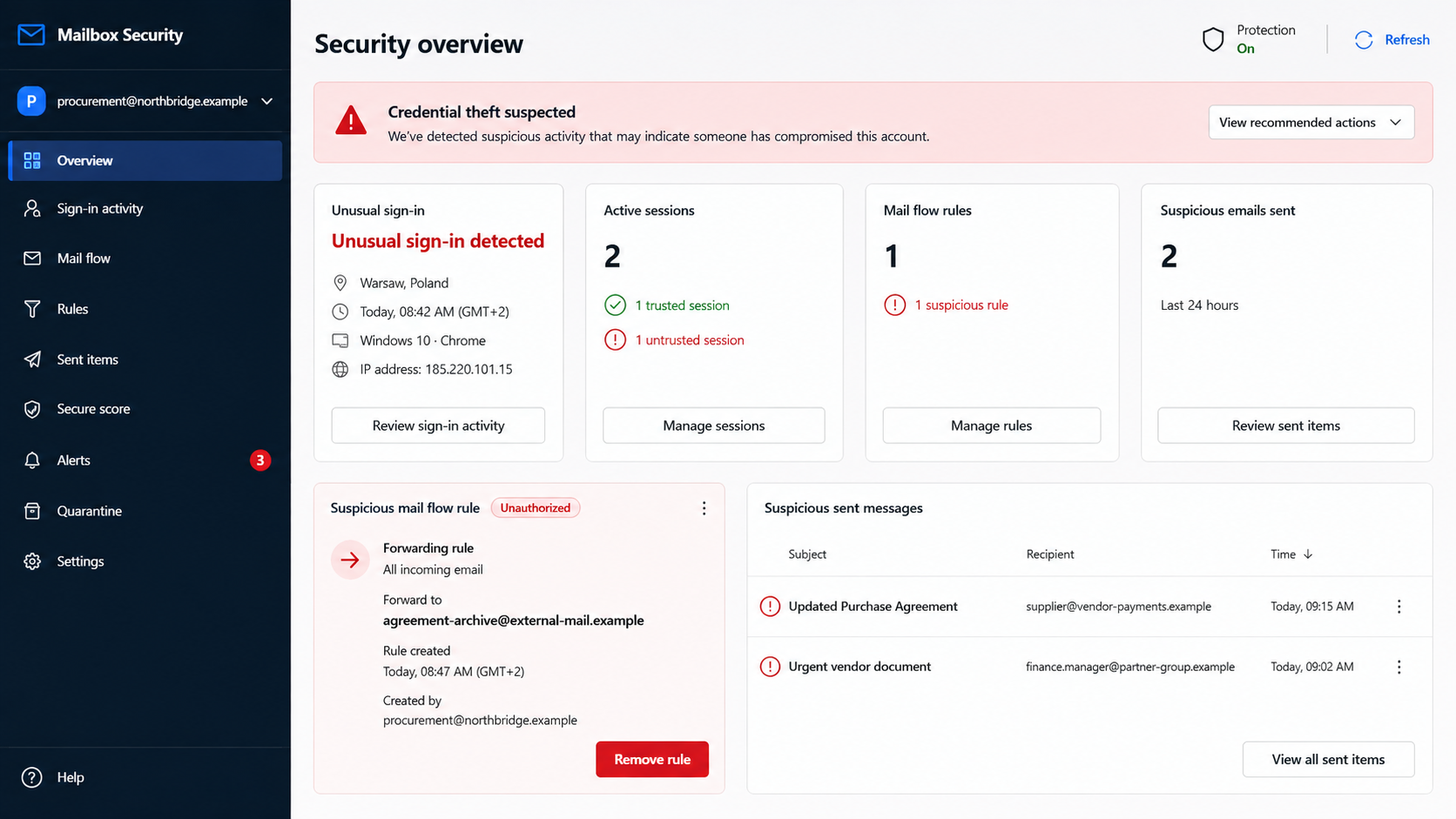
They may create forwarding rules, hide security notices, or search for valuable keywords. Terms such as “wire,” “invoice,” and “bank details” reveal promising conversations.
Access can also help them impersonate the victim. Messages sent from a familiar account are more convincing than another unsolicited notification.
Step 7: The original lure can grow into a larger compromise
The attacker may send more fake agreements to colleagues or external partners. Existing threads and genuine signatures make those follow-up messages difficult to spot.
Finance fraud is another possible consequence. A criminal can wait for a real payment conversation, then introduce replacement bank details at the right moment.
These later outcomes are risks of mailbox compromise, not proof that every recipient suffered them. Response should still begin before visible misuse appears.
Fast containment limits the time available for reconnaissance, forwarding rules, impersonation, and password reuse against other services.
How to Check a Shared Agreement Safely
Start with the business context
Ask whether a purchase agreement was expected. A real contract should connect to a supplier, negotiation, purchase order, project, or colleague that can be verified.
Search internal records independently. Do not use contact details, telephone numbers, or portal links supplied only by the suspicious email.
If the agreement is genuine, the known sender can resend it through the organization’s approved document platform. Verification should not depend on opening the original link.
Inspect the destination before visiting
Hover over the button or examine its destination on a managed device. Compare the registrable domain with the service the message claims to use.
A long path on an unrelated established website is still unrelated. The age or normal appearance of the homepage does not validate the hidden phishing page.
Shortened links and redirect services make inspection harder. Security staff can analyze them without exposing an employee’s everyday browser session.
Question any cross-service password request
A supplier’s document should not require the password for your email account on the supplier’s page. That crosses an important trust boundary.
Use saved bookmarks for Microsoft 365, Google Workspace, or the company portal. Signing in from a known starting point avoids trusting the email’s route.
If the organization uses single sign-on, the identity page should have a familiar domain and expected security controls. Report anything inconsistent before proceeding.
What Attackers Can Do With a Stolen Work Password
Read confidential contract discussions
Purchase agreements can expose prices, delivery commitments, disputes, customer names, and strategic plans. Even without payment theft, that information can harm a business.
Private attachments may also contain addresses, signatures, telephone numbers, and identifiers. Those details support highly personalized phishing against other employees or partners.
Hide inside normal correspondence
An intruder can reply within authentic threads. The message then inherits a familiar subject, participants, writing history, and prior attachments.
They may delete sent items or route replies elsewhere. Mailbox audit logs and forwarding-rule checks are therefore essential after suspected access.
Try the same password elsewhere
Password reuse can extend one phish into payroll, cloud storage, customer portals, and personal accounts. Criminals often automate these login attempts.
Every reused password must be changed independently. Altering only the workplace account leaves the same secret active on other services.
Why a Broken Link Does Not Clear the Email
Phishing pages often disappear quickly. Hosting providers remove them, compromised sites are cleaned, and operators abandon paths once defenders begin blocking them.
Some kits also show content selectively. Geography, browser type, referral data, or repeat visits can determine whether a visitor sees the form or an innocent page.
Therefore, a later blank page cannot prove the earlier message was genuine. The sender, route, and password request remain the relevant evidence.
Security teams should preserve the full URL and original email headers. Those details can connect a dead page with related messages and affected recipients.
Company, Address, and Fulfillment Checks
Verify the legal counterparty
A genuine purchase agreement names the parties, legal entities, representatives, and governing terms. A vague notification provides none of that assurance.
Compare the claimed sender with approved vendor records and prior correspondence. Small domain changes, added words, and free email accounts can signal impersonation.
Check the address independently
Look up the business address through contracts, registries, and known records. Do not trust an address printed only inside the suspicious file or message.
An unrelated website hosting the login page is not the contract party. It may be compromised infrastructure chosen only to carry the phishing form.
Call a known telephone number
Use a number already stored by procurement or listed on an independently verified corporate site. Ask the known contact whether they sent the agreement.
Do not call a number added to the email. Attackers can answer their own number and confirm the false story.
Separate hosting from responsibility
The observed phishing page appeared on a legitimate site that may have been breached. Hosting malicious content does not automatically identify the site owner as the criminal.
Report the exact malicious URL to the hosting provider and website owner. Include the email as an attachment so headers and routing information remain available.
What to Do if You Have Fallen Victim to This Scam
- Discontinue the visit. Close the page and do not submit another password. Preserve the email, URL, and time of interaction for your security team.
- Change the exposed password from a trusted device. Start from the official account portal or a saved bookmark, never from the suspicious link.
- Revoke active sessions. Sign out other devices and invalidate remembered sessions. A password change alone may not end every existing login token.
- Strengthen multi-factor authentication. Register a phishing-resistant security key or passkey when available. Review and remove unfamiliar authentication methods.
- Inspect mailbox settings. Check forwarding rules, inbox rules, delegates, connected applications, recovery details, sent items, deleted items, and recent sign-in locations.
- Tell IT, legal, and finance. They can search for related messages, protect colleagues, notify counterparties, and review any payment instructions touched by the account.
- Replace reused passwords. Change every account that shared the same or similar secret, beginning with financial, payroll, cloud storage, and administrator services.
- Scan the device if anything downloaded. Run Microsoft Defender and Malwarebytes. Credential phishing may be web-based, but downloads require a broader malware check.
- Block repeat exposure. AdGuard can reduce malicious advertising and known phishing destinations, but it cannot replace careful verification or account controls.
- Watch for secondary fraud. Warn suppliers and colleagues about possible impersonation. Confirm bank-detail changes verbally and monitor security alerts closely.
Frequently Asked Questions
Is the Purchase Agreement Received email genuine?
The examined campaign was not genuine. It invented a shared spreadsheet and led recipients to a password-collection page hosted on an unrelated website.
Can opening the email alone steal my password?
Normally, no. The main risk begins when you follow the link and enter credentials. Still, avoid loading unexpected remote content and report the message.
Why was my email address already filled in?
The address can be embedded inside the phishing link. Displaying information the sender already knows does not prove the page authenticated you.
Does a compromised legitimate website make the page trustworthy?
No. Attackers can hide phishing files on breached websites. Judge the exact page, its purpose, and its relationship to the claimed service.
What if I entered a password but multi-factor authentication blocked access?
Change the password immediately and review sessions anyway. The secret is exposed, and attackers may reuse it elsewhere or attempt additional prompts.
Should I contact the company named in the supposed agreement?
Yes, if there is a plausible relationship. Use independently stored contact details, not information contained in the suspicious email or landing page.
The Bottom Line
The Purchase Agreement Received scam turns an ordinary contract workflow into a credential trap. Its technical-looking metadata cannot replace a verifiable sender, domain, and business context.
Confirm unexpected agreements through known contacts. If a workplace password was submitted, treat the mailbox as potentially compromised and secure it before waiting for obvious damage.

Join the discussion
0 commentsShare your experience or ask a question about this article.
Discussion
Start the conversation
Have a question or something useful to share? Add the first comment.