

A message congratulating you on a new wallet card can feel like a routine product update. The button seems to offer one simple finishing step.
Yet the journey behind that button is unusually tangled. Following each handoff reveals which account the sender really wants.
Overview
The card invitation used as bait
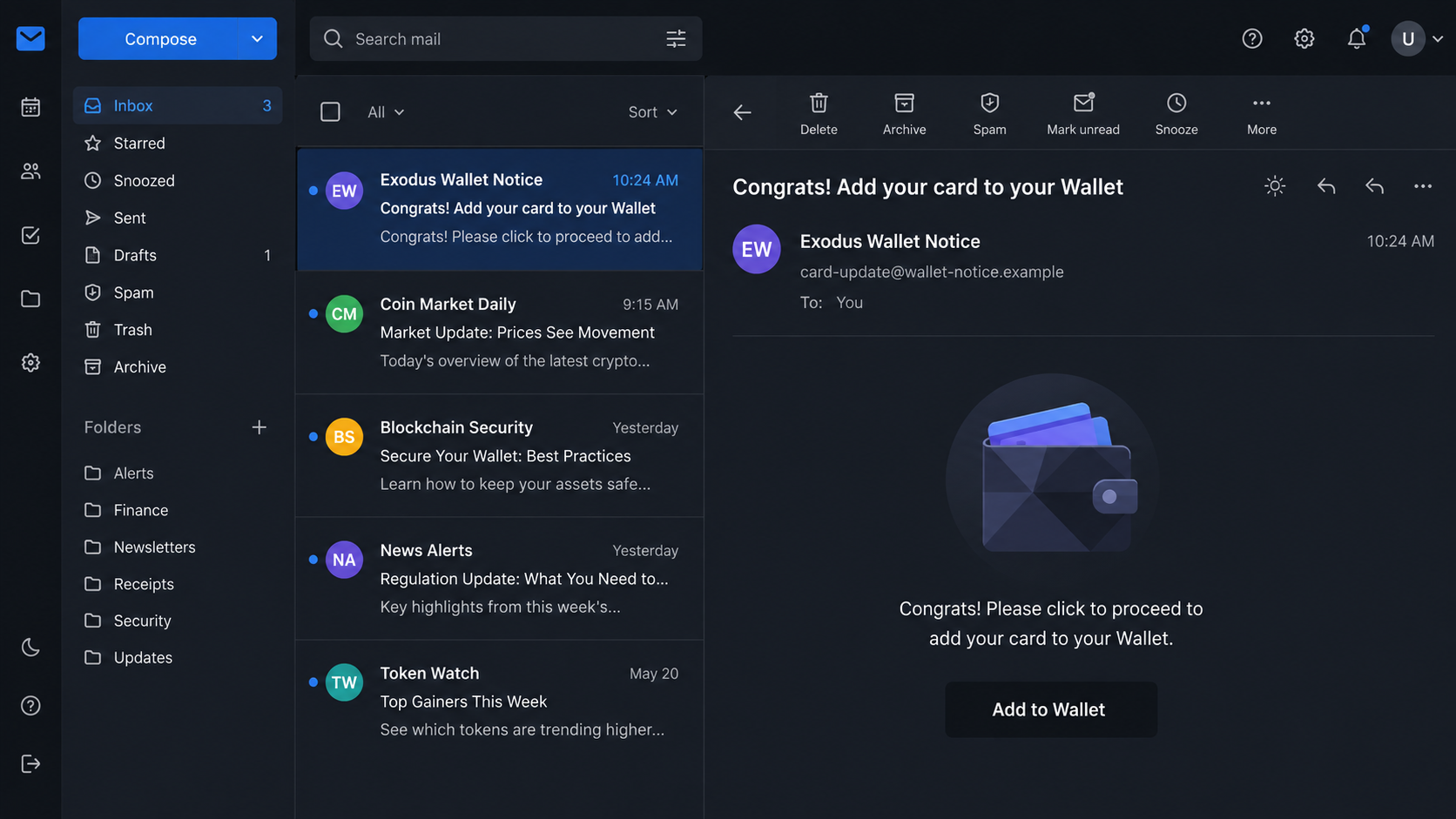
The Exodus Add Your Card to Your Wallet scam impersonates a cryptocurrency wallet company. One observed subject reads, “Congrats! Add your card to your Wallet.”
The message is brief and polished. It presents an “Add to Wallet” button without explaining which card was issued, when it was requested, or where it belongs.
That missing context is important. A genuine card activation notice should correspond with an application or account action the recipient remembers completing.
The strange path behind the button
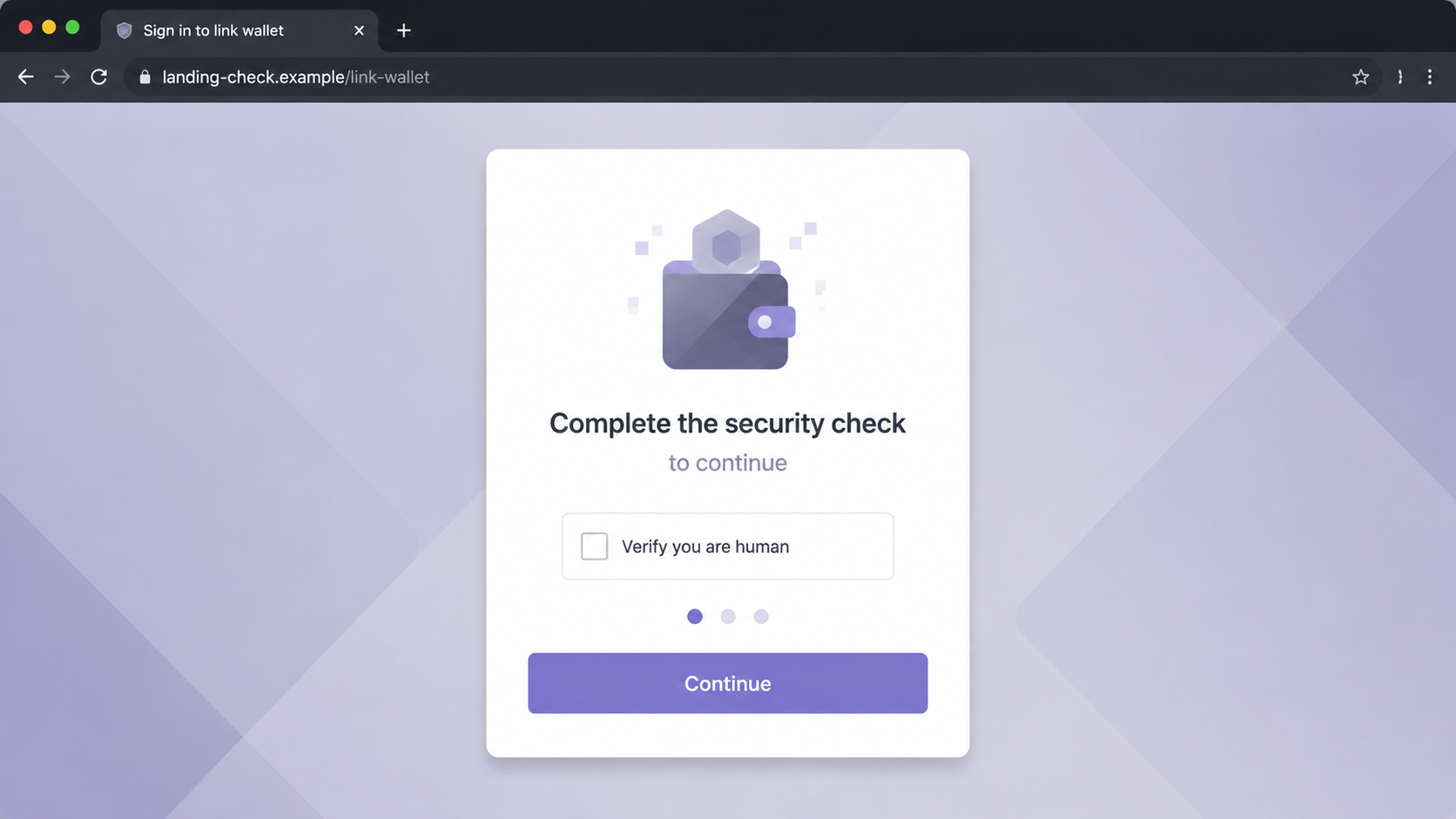
The examined button first opened a page on landing-click[.]com. It claimed the visitor needed to sign in to link Exodus and displayed a CAPTCHA-style checkpoint.
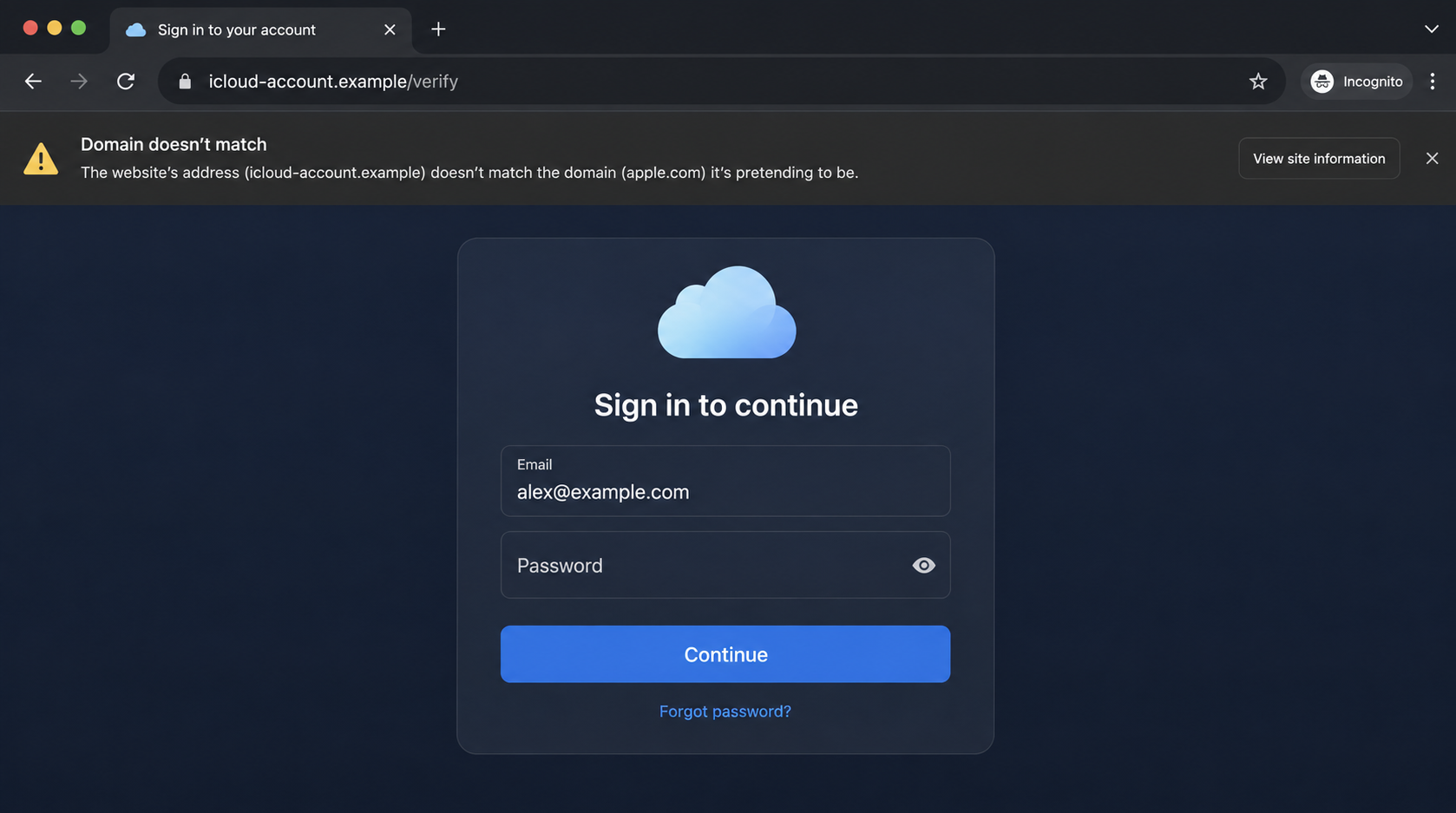
After that check, the visitor was redirected to icloud[.]spot. The final page imitated an Apple Account login rather than a cryptocurrency wallet.
This cross-brand jump exposes the central deception. A supposed Exodus card action has no sensible reason to demand Apple credentials on an unrelated domain.
Key facts recipients should know
- The email was not sent by Exodus.
- The first landing domain was unrelated to the claimed wallet service.
- A CAPTCHA-style screen may help the campaign evade automated scanners.
- The final observed page targeted Apple Account login information.
- Apple was not involved in the campaign.
- No legitimate card is unlocked by entering credentials on these domains.
The observed evidence supports Apple credential theft as the immediate objective. It does not establish that every visitor also lost cryptocurrency or a wallet recovery phrase.
However, an exposed Apple Account can reveal personal data, trusted devices, purchases, payment methods, backups, and account recovery information.
Anyone who submitted credentials should secure the Apple Account promptly. Wallet and financial accounts also deserve review if passwords were reused or additional information was entered.
How the Exodus Add Your Card Scam Works
Step 1: The email borrows trust from a cryptocurrency brand
Cryptocurrency users expect security alerts, wallet updates, and feature announcements. Scammers imitate that familiar traffic to make an unsolicited card invitation seem plausible.
The congratulatory subject supplies positive urgency. Recipients may click quickly because the message sounds like a benefit rather than a warning.
Brand colors, wallet imagery, and confident wording can be copied easily. None of those visual elements proves where the message originated.
The sender may not know whether the recipient uses Exodus. Broad campaigns can reach enough cryptocurrency users by chance to produce credible matches.
Step 2: The message withholds the details a real card notice would contain
A legitimate notice would normally identify the relevant account action, supported region, card program, and official place to manage it.
The scam provides almost none of that. Its job is to move the recipient toward the button before careful questions interrupt the momentum.
There may be no card number ending, application date, delivery status, or authenticated account message. The generic wording can be reused against anyone.
Recipients should open the official wallet application independently. If no matching card notice appears there, the email has no verified relationship to the account.
Step 3: A tracking domain begins the redirect chain
The button does not take the visitor to the wallet provider’s official domain. It begins on an unrelated landing domain instead.
Redirect chains give operators flexibility. They can replace the final page, count visits, separate mobile users, and stop showing malicious content to security systems.
A tracking-looking address is not automatically fraudulent. Here, its lack of a clear relationship to the claimed card service is a serious warning.
Checking only the first page can miss the real destination. Every transition matters, especially when the displayed brand changes during the journey.
Step 4: The CAPTCHA-style checkpoint filters visitors
The first page asks the visitor to prove they are human. That request can make the route feel protected and therefore more legitimate.
Criminal campaigns also use these checks to frustrate automated link scanners. A scanner may not complete the interaction or may receive different content.
The checkpoint can record browser details and decide what to display next. It does not verify that the underlying service is genuine.
A CAPTCHA proves, at most, that a site wants human interaction. It says nothing about who owns the site or why they are redirecting visitors.
Step 5: The story suddenly changes from wallet card to Apple login
After the checkpoint, the observed campaign sent visitors to a page imitating Apple Account sign-in. This switch has no coherent business purpose.
Exodus does not need a password typed into an unrelated Apple-looking webpage to add a card. The domain mismatch is decisive evidence of impersonation.
Some victims may mentally connect “wallet” with Apple Wallet and accept the transition. The campaign exploits that ambiguity between a crypto wallet and a phone wallet.
Legitimate integrations use documented authorization screens and recognizable domains. They do not conceal the destination behind unrelated landing and CAPTCHA pages.
Step 6: The final form collects Apple Account credentials
The fake sign-in page requests the victim’s Apple Account email and password. Submitted information can be delivered directly to the phishing operator.
A fake error may request another attempt. Multiple submissions can help criminals distinguish a mistyped entry from a valid password.
The page may later ask for a verification code, telephone number, or recovery detail. Never approve an unexpected sign-in prompt after visiting a suspicious link.
Entering only an email address reveals less than entering a password, but it can still confirm an active target for later attacks.
Step 7: Stolen access can support follow-up fraud
With valid Apple credentials, an attacker may inspect account information, devices, purchases, cloud data, and payment settings, depending on the account’s protections.
Multi-factor authentication may block a direct login. Criminals can then call or message the victim, pretending to be support and requesting the verification code.
Password reuse creates another path. The same secret may be tested against email, exchanges, shopping accounts, and other services.
The observed chain did not prove wallet theft. Still, cryptocurrency accounts require extra review because attackers may exploit any reused credentials or recovery information.
Why the Brand Switch Is the Biggest Warning
The word “wallet” does too much work
“Wallet” can describe a cryptocurrency application, a stored-payment feature, or a physical-card companion. The email leaves the meaning deliberately loose.
That ambiguity helps the scam move from Exodus imagery to an Apple-looking login. A hurried reader may accept the switch without asking which wallet started the process.
Write down the claimed service before clicking. If the destination requests another company’s credentials, stop and return through the official application.
A real integration preserves identity
Legitimate services explain which company is requesting access and what data will be shared. Their authorization screens use documented, verifiable domains.
They do not bounce through mystery hosts while changing the brand at each stage. Unexplained identity changes are evidence, not minor design flaws.
The final domain matters more than the artwork
A copied logo or cloud icon can look perfect. The registrable domain in the address bar shows who actually controls the page.
Extra words such as “secure,” “icloud,” “wallet,” or “verify” do not transform an unrelated domain into an official one.
How to Verify a Wallet Card Message
Open the official app yourself
Do not use the email button. Launch the known wallet application or type the official address from a trusted source.
Look for a matching card offer, notification, or pending action. If the account shows nothing, contact support through the application.
Check whether you requested the product
A congratulatory activation email should follow an action. If you never applied, joined a waitlist, or requested a card, the message lacks basic context.
Unexpected eligibility claims should be verified independently. Do not enter personal information merely to discover what the supposed offer means.
Follow the authentication boundary
If a card genuinely connects with another wallet, consult the provider’s official instructions first. Compare every domain and requested permission.
No legitimate workflow should ask you to reveal a seed phrase, private key, or recovery phrase. Those secrets provide direct control over cryptocurrency.
What Each Page Contributes to the Deception
The email supplies the reason to begin
The message creates a reward: a card ready to add. It avoids technical detail because its only purpose is to earn the first click.
A recipient who wants the feature may supply missing context themselves, assuming it relates to an earlier wallet update or eligibility announcement.
The checkpoint creates false reassurance
The CAPTCHA-like page looks like a protective barrier. In reality, it separates automated visitors from people who can enter useful credentials.
Passing a security-looking check can increase commitment. The visitor has completed one task and may be less likely to question the next page.
The final page changes the target
The Apple imitation requests the valuable secret. By this stage, the recipient has followed several prompts and may treat the login as completion.
Recognizing this sequence helps users stop earlier. Every additional redirect should increase scrutiny, especially when the identity and requested account suddenly change.
Company, Address, and Fulfillment Checks
Identify every company in the chain
The email names Exodus, while the final page imitates Apple. Neither company is connected with the observed fraudulent campaign.
A legitimate partnership should be documented by both services. One unsolicited email and copied branding are not evidence of that relationship.
Compare official domains and support channels
Find contact details inside the official application or a manually opened corporate website. Do not use telephone numbers or support links supplied by the message.
Ask whether the specific card program and activation route exist in your region. Support should not require your password, seed phrase, or verification code.
Do not invent a physical seller where none exists
This campaign is credential phishing, not a supplement or merchandise fulfillment dispute. Warehouse addresses, returns centers, and product shipping are not the relevant tests.
The meaningful checks are digital ownership, domain control, documented integrations, and the identity of the account requesting authentication.
Report the infrastructure carefully
Submit the phishing URLs to browser, hosting, and security providers. Include the redirect sequence because each domain plays a different role.
Do not publicly post active credentials, verification codes, or full personal data while documenting the incident. Redact sensitive information before sharing screenshots.
What to Do if You Have Fallen Victim to This Scam
- Exit every page in the chain. Do not repeat the CAPTCHA, submit another password, or approve any authentication notification that follows.
- Change your Apple Account password. Use a trusted device and the official settings or account website. Choose a unique password you have never reused.
- Review trusted devices and sessions. Remove unfamiliar devices, confirm trusted telephone numbers, and inspect recent account activity and recovery information.
- Keep multi-factor authentication enabled. Never share a verification code with an unsolicited caller or message, even if they claim to be fraud support.
- Check payment methods and purchases. Review unfamiliar transactions, subscriptions, account changes, and digital purchases. Contact the card issuer about unauthorized charges.
- Secure reused accounts. If the exposed password was used for email, exchanges, wallets, or shopping sites, replace it everywhere immediately.
- Review cryptocurrency security. Check exchange logins, withdrawal addresses, API keys, and wallet activity if any related credentials or recovery information were entered.
- Scan unexpected downloads. Run the built-in security scanner and Malwarebytes if the route downloaded a file or requested an extension.
- Add browsing protection. AdGuard can block many known malicious destinations and deceptive advertisements, but it cannot validate every new phishing domain.
- Report the message. Mark it as phishing, notify the impersonated services, and preserve the original email headers for investigation.
Frequently Asked Questions
Is the Exodus Add Your Card email real?
The examined email was fraudulent. It used an unrelated landing domain and ultimately displayed a fake Apple Account sign-in page.
Why would an Exodus message ask for my Apple password?
It should not. The brand switch is part of the deception, likely exploiting confusion between a cryptocurrency wallet and a phone’s payment wallet.
Does completing the CAPTCHA make the site safe?
No. A CAPTCHA can filter visitors and obstruct automated analysis. It does not verify the owner, purpose, or honesty of a website.
Can the scam steal my crypto wallet?
The observed page targeted Apple credentials. Wallet theft becomes possible if passwords were reused or if you later disclosed a seed phrase or exchange credentials.
What if I clicked but entered nothing?
Your risk is lower. Close the pages, remove any downloads, review browser notifications or extensions, and remain alert for follow-up messages.
Should I cancel a physical card?
Cancel only if real card information was exposed or unauthorized transactions appeared. Contact the actual issuer through the number printed on your card.
The Bottom Line
The Exodus Add Your Card scam hides an Apple credential trap behind a cheerful wallet invitation, an unrelated landing domain, and a CAPTCHA-style checkpoint.
When one brand’s message ends at another brand’s login, stop. Use the official apps directly, secure any exposed Apple credentials, and review reused passwords promptly.

Join the discussion
0 commentsShare your experience or ask a question about this article.
Discussion
Start the conversation
Have a question or something useful to share? Add the first comment.