

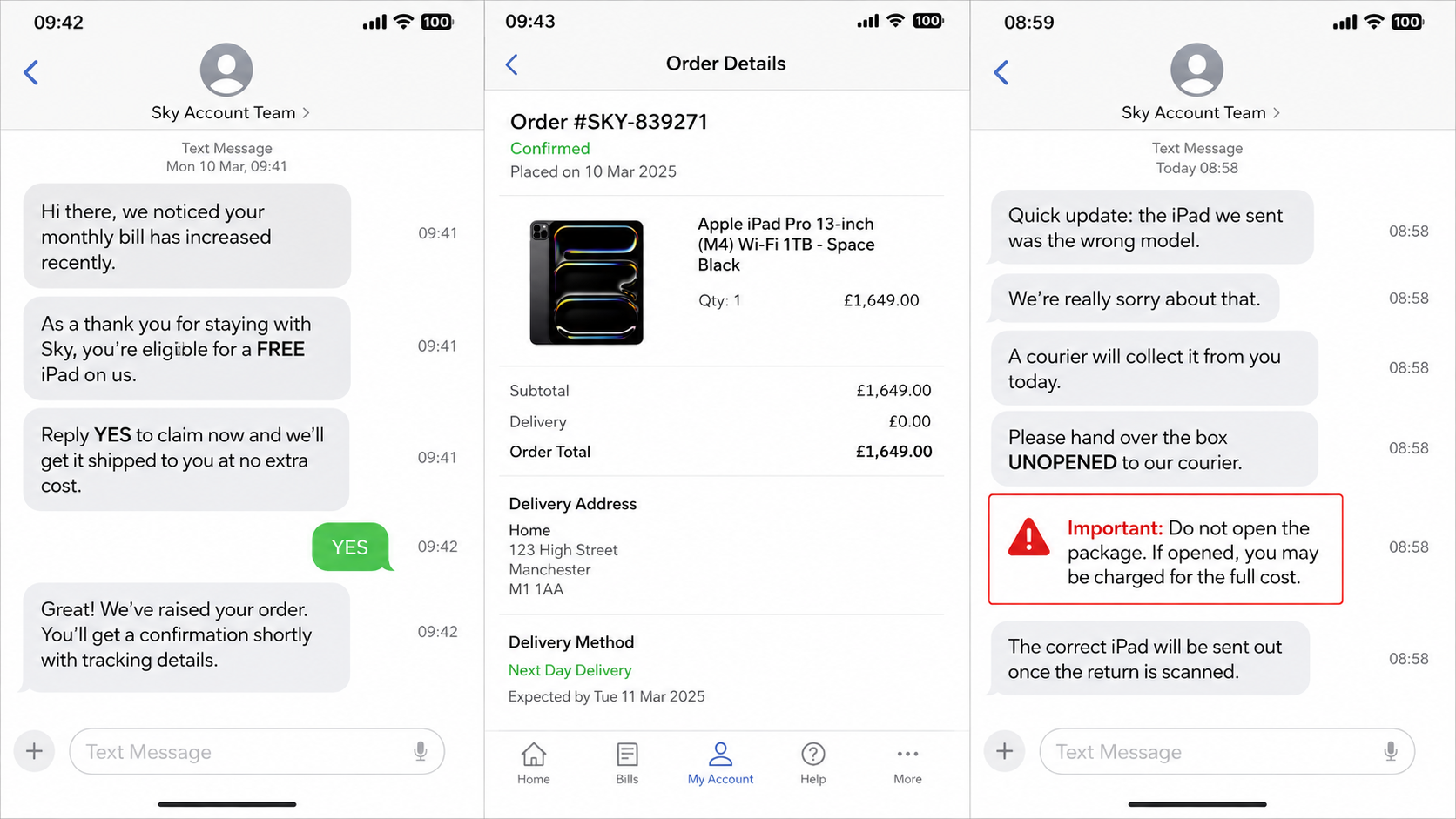
The caller says your broadband bill has increased, so Sky is sending a free iPad or laptop as a loyalty gift. Days later, a genuine parcel arrives at your real address.
Then the caller apologizes. The wrong model was sent, a courier is already nearby, and the unopened box must be handed over today.
The Sky free iPad scam feels real because the expensive device is real. What the caller does not explain is who ordered it or who will be left paying for it.
Overview
The free gift is a route into the customer’s account
The Sky free iPad scam begins with an unsolicited call offering a bill discount, account upgrade, free tablet, phone, watch, or laptop. The caller may know the customer’s name, address, package, or recent contact with Sky.
During the conversation, the operator gathers enough information to access the real Sky account or persuades the victim to reveal login and security details. The criminal then orders a high-value device through that account.
The device is shipped by Sky to the customer’s real address. That genuine delivery is not proof that the original caller was genuine. It is evidence that the account was used.
The “wrong item” story diverts a genuine delivery
After the parcel arrives, the impersonator calls again and claims a mistake was made. The customer was supposed to receive a different gift, the wrong color was sent, or the warehouse accidentally dispatched an expensive model.
A return label, collection code, or courier is arranged. The address and driver may look completely normal because the criminal can book a real delivery service. The courier does not need to know the parcel was obtained through fraud.
If the customer follows the caller’s instructions, the device goes to the criminal or an intermediary rather than back to Sky. The account holder may remain liable for the order.
Sky has warned customers about scam calls and account takeover
Sky’s official fraud and scams hub provides guidance for suspicious calls, messages, and account activity. Sky’s account takeover guidance tells customers who receive an unexpected parcel to contact the company and use its own return process.
The company’s support community contains repeated reports of the same free-gift pattern, including iPad offers followed by an unexpected device order and instructions to send it to a non-Sky destination. The details change, but the objective remains the same: turn the customer’s account and address into a supply chain for stolen electronics.
Warning signs include:
- An unexpected caller promises a large discount and a free device.
- The offer is not visible in the customer’s real Sky account.
- The caller asks for a password, code, or excessive account details.
- An expensive device arrives that the customer did not order.
- The same caller says the warehouse made a mistake.
- A courier collection is arranged outside Sky’s official return process.
- The customer is told not to open the parcel.
- Emotional pressure says an employee will lose their job.
- The parcel must be surrendered immediately.
How the Sky Free iPad Scam Works
Step 1: The impersonator calls with a welcome offer
The opening is positive, not threatening. A long-time customer supposedly qualifies for a discount because prices increased or because their account has excellent history. A free device is presented as a loyalty reward.
This lowers suspicion. People expect scammers to demand money, not volunteer an expensive tablet.
Step 2: Routine questions collect account access
The caller asks the victim to confirm a name, address, email, package, security answer, or telephone password. A code may be sent and described as proof that the promotion was accepted.
Some details may already be known. Mixing correct information with questions makes the operator sound as if they are reading an internal customer record.
Step 3: The real account is taken over or manipulated
The attacker signs in, resets credentials, or uses the collected information to place an order. The customer may receive genuine emails or order notifications from Sky.
The criminal wants the order to look normal enough to pass checks and reach the account address. The victim’s home becomes a trusted delivery point.
Step 4: A high-value device arrives
The parcel may contain a real iPad, iPhone, smartwatch, or another expensive product. The box, courier, tracking, and sender can all be genuine because Sky actually fulfilled the fraudulent account order.
This is the strongest piece of social proof in the scheme. Many victims reason that a scammer could not make a real telecom company send a real device. Account takeover is exactly how they do it.
Step 5: The caller invents a shipping mistake
The impersonator says the box contains the wrong gift or a device intended for another customer. They may apologize repeatedly and promise that the correct free item will be sent after the return is scanned.
Pressure follows. The warehouse needs the parcel today, the courier is already booked, or a staff member will be disciplined if the error is not corrected.
Step 6: A real courier carries the parcel to the wrong place
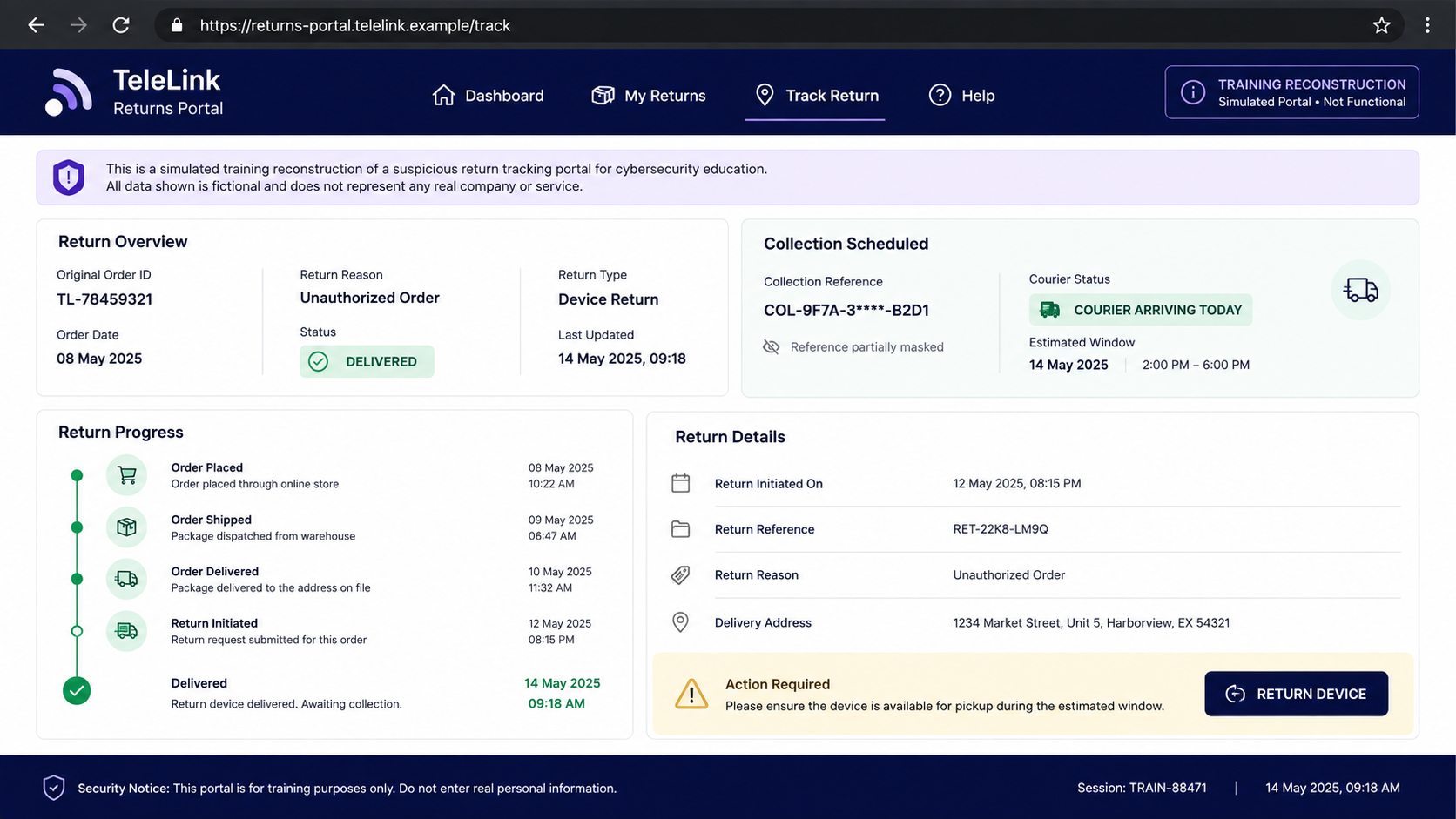
The criminal supplies a label, QR code, collection reference, or address. A legitimate courier may collect the box without knowing anything about the account fraud.
A real driver therefore does not authenticate the return. Only a return initiated through Sky’s verified channel can establish the correct destination.
Step 7: The criminal keeps the device and the victim keeps the bill
Once the parcel is delivered to the controlled address, the device can be resold. The customer later sees finance charges, a contract, an account change, or collection activity.
If the victim contacts the number that originally called, the operator may promise a refund or request another payment. Delay gives the device time to move through resale channels.
Why a Genuine Parcel Does Not Make the Caller Genuine
This scam separates two events that people naturally connect. Sky sends the parcel, but the criminal controls the phone conversation and return destination.
The customer sees authentic packaging and assumes the caller must work for the sender. In reality, a compromised account can make a real company perform the delivery while the attacker waits to redirect it.
The same logic applies to banks, retailers, and mobile carriers. A real email, code, or parcel can be generated by a criminal who is operating someone else’s account.
When an unexpected device arrives, do not let the caller define the solution. Contact Sky independently and ask it to identify the order and issue its own return packaging or instructions.
The Fake Return Is Where the Theft Happens
The strangest part of this scam is that a genuine device may arrive in genuine packaging from a genuine retailer or network. That delivery is not a prize. It is often an unauthorized order placed through the victim’s real account, with the cost hidden in a financing plan, an upgraded contract, or a future bill.
Once the parcel is visible in tracking, the caller invents an error and offers to arrange a convenient return. The collector may know the victim’s name, address, and expected delivery time because the criminal placed the order. A branded jacket, printed label, or convincing tracking page still does not make that collection authorized.
If the device is handed over, the criminal gets a high-value product that can be resold quickly while the account holder remains responsible for the order. The network sees that it shipped the correct item to the registered address. The supposed return travels outside its official system, leaving no valid warehouse scan or return reference.
That is why the correct response is to keep the parcel secure and contact Sky independently. Do not open, activate, forward, or sell the device. Ask the fraud team to confirm how it was ordered, lock the account, and provide the only approved return process.
A legitimate return should produce a reference that Sky can see before the parcel leaves your control.
Check the next several bills even after the account is secured. Fraudulent orders can change contract length, add a device repayment, alter contact details, or create a second service. Get written confirmation of every correction and keep the shipping label, serial number, and case reference until the account is fully restored.
Tell everyone at the delivery address not to release the parcel to an unexpected collector. Criminals may call several household members or return when the original target is away.
If someone appears at the door, keep it closed. Record the vehicle or collection details only if it is safe to do so, then contact the network and police through independently sourced numbers.
Do not let urgency turn an unverified doorstep visit into an official return.
Company, Address, and Fulfillment Checks
Open the real Sky account yourself
Do not use a link from the caller. Check recent orders, devices, profile details, and billing in the official app or a manually entered Sky address. Screenshot unfamiliar changes before they disappear.
Call Sky through a published channel
End the incoming call and contact Sky from its official help pages or by dialing the recognized service route for your account. A real case will still exist after the callback.
Verify the return address with Sky
Do not compare only the label design. Ask Sky to confirm the exact return process and reference. A scammer can print a professional label or hire a real courier to deliver elsewhere.
Treat the courier as transport, not authentication
The driver may be an innocent contractor following a booking. Do not hand over the parcel until Sky confirms the collection through an independently opened channel.
What to Do if You Have Fallen Victim to This Scam
- Keep any unexpected parcel secure. Do not hand it to a caller’s courier, post it using their label, or sell it. The device is evidence and may belong to Sky under the account dispute.
- Contact Sky immediately. Use the official help route, explain the free-gift call and unexpected order, and ask the fraud team to secure the account and provide written return instructions.
- Change the Sky password. Use a clean device, sign out other sessions if available, review contact details, and replace any telephone password or security answer shared with the caller.
- Secure the connected email. Change its password, remove unknown forwarding rules and recovery methods, and enable multifactor authentication.
- Review bills and contracts. Ask Sky to identify every new order, finance agreement, line, or subscription created during the compromise. Keep case numbers and copies of communications.
- Contact the courier if the parcel was collected. Provide the collection time, tracking number, label, and fraud reference. Ask whether delivery can be stopped or the destination preserved for investigators.
- Tell the bank about exposed payment data. Replace a card if its details were shared and monitor for direct debits, card charges, or identity-fraud attempts.
- Check the phone and computer. Remove unknown remote-support apps, profiles, and browser extensions. If the caller persuaded you to install anything, run a complete Malwarebytes scan.
- Preserve evidence. Save call logs, voicemails, messages, order emails, parcel labels, courier details, account screenshots, and Sky case references.
- Report the scam. Notify Action Fraud or the appropriate UK fraud-reporting service, your mobile provider, and local police if a courier collected valuable goods. Ofcom advises forwarding scam call details to 7726 when supported.
- Reduce repeat exposure. After cleanup, AdGuard can help block known phishing destinations, but it cannot authenticate a phone caller or parcel collection.
- Ignore paid recovery promises. Work only with Sky, the bank, courier, police, and official fraud services.
Frequently Asked Questions
Does Sky give loyal customers free iPads?
Do not trust an unsolicited caller’s claim. Check offers inside the real account and confirm them with Sky through an official channel before sharing information.
Why would Sky send a device if the offer was fake?
The criminal may have accessed the customer’s real account and placed an order. Sky can fulfil a genuine order request that was fraudulently created.
Should I refuse delivery?
If you know an unexpected device is arriving, contact Sky for instructions. If it is already in your possession, keep it secure and return it only through the process Sky confirms directly.
Can the courier be part of the scam without knowing it?
Yes. Criminals can book legitimate couriers. The driver’s uniform and tracking record prove transport was arranged, not that Sky authorized the destination.
What if I already handed over the box?
Call Sky and the courier immediately. Preserve the tracking and collection evidence, report the fraud, and ask whether the shipment can be intercepted.
Will changing my Sky password fix everything?
It is essential but not sufficient. Review orders, contracts, contact details, email security, payment methods, and any devices or lines added during the compromise.
The Bottom Line
The Sky free iPad scam does not rely on a fake plastic toy or empty box. It uses account access to create a genuine delivery, then turns a fake return instruction into theft.
A valuable parcel is a reason to slow down, not obey faster. Keep the device, end the caller’s process, and let Sky tell you through an official channel exactly how the order was created and where it must go.

Join the discussion
0 commentsShare your experience or ask a question about this article.
Discussion
Start the conversation
Have a question or something useful to share? Add the first comment.