

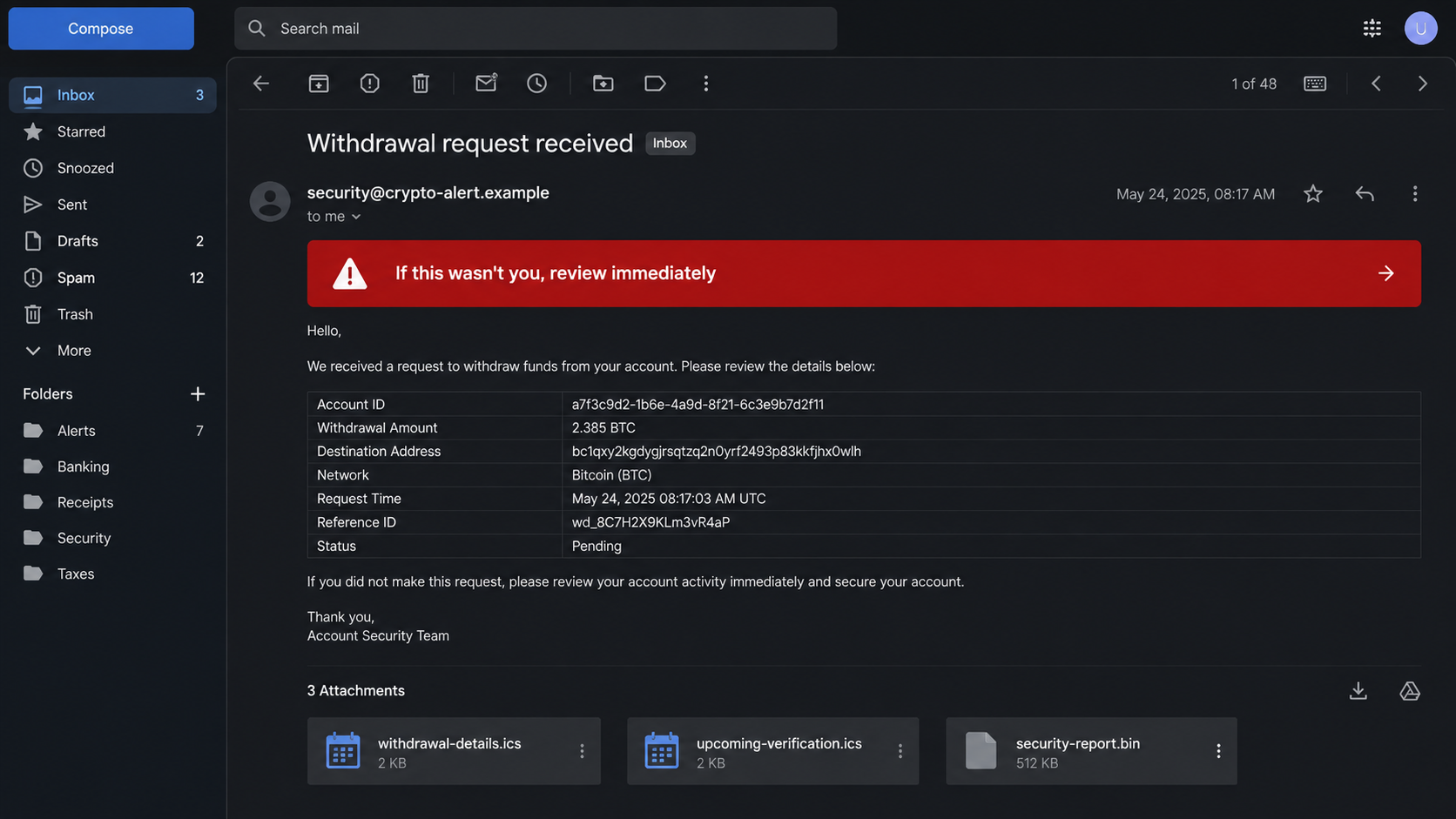
An email announces that cryptocurrency is leaving a Crypto.com account. The amount is large, the destination is unfamiliar, and the message appears to offer only a short window to stop it.
Three attachments sit beneath the warning. One looks like a calendar invitation, another like a security report, and all of them seem connected to the same urgent withdrawal.
The Crypto.com withdrawal email scam depends on the recipient reacting before checking whether the transaction exists inside the real app.
Overview
The alert describes a transaction that may not exist
The email claims a withdrawal request was received, an address was added, or funds are pending transfer. It includes a precise cryptocurrency amount, wallet string, reference number, and time to make the warning feel connected to a live account.
Those details can be fabricated without access to Crypto.com. The decisive check is the account’s activity inside the official app, opened independently. A transaction that exists only in an unsolicited email is not proof that funds moved.
Crypto.com tells users who receive notice of an action they did not request to contact support immediately through in-app chat. That official advice does not require opening the email’s link or attachments.
Attachments provide a less obvious route to the victim
Many people know not to click a large “Cancel Withdrawal” button. A calendar file or oddly named report may seem less dangerous. It can still contain links, create a persistent event with phishing instructions, exploit a vulnerable application, or disguise another file type.
A `.ics` invitation can place scam content directly into a calendar and generate reminders after the original email is deleted. A `.bin` file has no ordinary reason to be part of a consumer withdrawal alert. The unfamiliar format should increase caution, not curiosity.
The recipient does not need any attachment to secure a real Crypto.com account. Support, transaction history, withdrawal settings, and active security controls are available through the official app and website.
The fake emergency can target passwords, codes, or funds
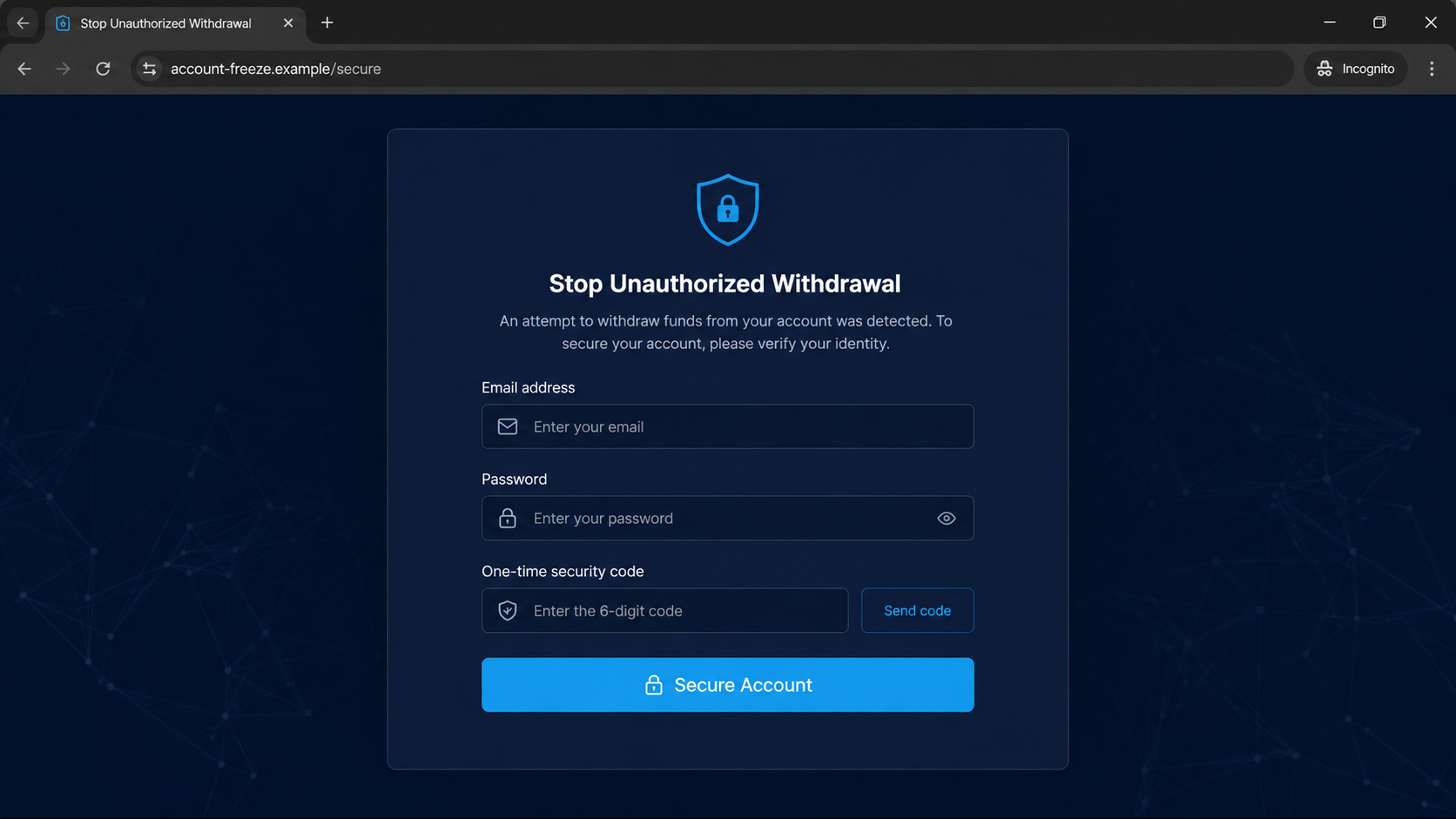
A link may open a cloned sign-in page that requests email, password, passcode, and a one-time code. Another version provides a telephone number where a fake agent asks the victim to move crypto into a “safe” wallet.
Some campaigns use malware instead of a form. An attachment or downloaded security tool can steal browser sessions, saved credentials, seed phrases, wallet data, or remote access to the device.
Warning signs include:
- The email creates panic around an unfamiliar withdrawal.
- The greeting is generic rather than tied to the account.
- The sender or reply-to address fails Crypto.com Verify.
- A configured anti-phishing code is missing or incorrect.
- The message contains `.ics`, `.bin`, executable, archive, or document attachments.
- A button points outside an official Crypto.com domain.
- The recipient is asked to enter a password to cancel a transaction.
- A telephone agent requests a one-time code or remote access.
- The victim is told to move assets to a safe wallet.
- The withdrawal does not appear inside the official app.
How the Crypto.com Withdrawal Email Scam Works
Step 1: The operator sends a high-value security alert
The campaign begins with email addresses collected from leaks, marketing lists, earlier phishing, or cryptocurrency-related communities. The sender does not need to know whether every recipient has a Crypto.com account. Bulk delivery makes occasional matches worthwhile.
The subject line names an unauthorized withdrawal because loss feels immediate. A recipient who does use the platform may focus on the amount and skip the sender address, anti-phishing code, and app history.
Step 2: Fabricated details simulate account access
The message includes a wallet address, network, reference ID, and status such as pending. Random strings look technical and are difficult to judge at a glance. A countdown or processing estimate adds the impression that delay is dangerous.
A real-looking wallet string proves only that the sender can type one. Unless the transaction appears in the official account and on the relevant blockchain, it does not show that the recipient’s assets are moving.
Step 3: The email redirects the rescue attempt
The victim is told to review, cancel, dispute, secure, or verify the withdrawal. The button, QR code, attachment, or telephone number is controlled by the scammer. Fear turns an ordinary phishing link into something that feels like an emergency tool.
Some emails avoid visible links in the body and hide the next step inside a calendar event or attached file. That tactic can pass casual inspection because the recipient expects attachments to hold transaction details.
Step 4: The cloned page captures authentication
A fake login form copies the colors and language of a cryptocurrency platform. It may ask for email and password, then display a second screen for the one-time code. The operator uses the code immediately while it remains valid.
If the victim has configured an anti-phishing code, a genuine Crypto.com email should display it. Crypto.com states that all App and Exchange emails include the code once enabled. Its absence is a strong reason to stop.
Step 5: The fake agent moves the victim’s real assets
A telephone version claims the original account is unsafe. The agent guides the victim through adding a wallet address, changing security settings, or transferring funds to a protected account. The destination actually belongs to the criminal.
No legitimate support agent needs a seed phrase, private key, password, or one-time authentication code. Crypto held in a self-controlled wallet cannot be recovered by a platform after the victim signs and sends it.
Step 6: Malware widens the compromise
If an attachment launches code or a fake security page delivers a tool, the incident may move beyond one exchange account. Information stealers look for saved passwords, browser cookies, wallet extensions, and authenticated sessions.
Remote-access software gives a scammer visibility and control while the victim signs in. An agent who tells you to install screen-sharing software to stop a withdrawal is creating access, not protecting it.
Step 7: The victim receives follow-up attacks
A failed login attempt still confirms that the email is active and the recipient uses cryptocurrency. Later messages can impersonate another exchange, a wallet provider, law enforcement, or a recovery service.
After a loss, the operator may claim funds were traced and can be recovered after tax or processing charges. That second advance-fee request compounds the original theft.
How to Check the Alert Without Touching the Email
Close the message and open the Crypto.com app from its normal icon. Review transaction history, external wallet addresses, security settings, and notifications. Do not follow the email’s button even if the URL preview appears close to the real domain.
Use Crypto.com Verify to check whether the sender address or communication channel is official. Enter the address manually into the verification feature. Do not let a link inside the suspicious email choose the verification page.
Check the anti-phishing code you configured. A correct code adds useful evidence because it is meant to appear in genuine Crypto.com emails. A missing code is suspicious, but a visible code should not override an unexpected link or attachment.
Contact support through in-app chat. Crypto.com’s current withdrawal guidance specifically recommends that route for an unrequested whitelisting or withdrawal email. Support can review the account and attempt to disable transactions if necessary.
If a transaction appears in the app, record its status, time, destination, and transaction ID. Move quickly through official support. If no transaction appears, preserve the phishing email and report it without replying.
Also compare the device and location shown in any genuine security history. An unfamiliar session is actionable evidence; a dramatic table inside the suspicious email is not.
Why Calendar Attachments Are Useful to Scammers
A calendar invitation can create a second notification channel. After the email is ignored, an event reminder may appear on a phone or computer with a telephone number or link. The warning now looks as if it came from the calendar service.
Accepting an event can tell the sender the address is monitored. It may also add repeated reminders that pressure the recipient long after the original message leaves the inbox.
Do not call a number inside the event. Delete the invitation without responding where possible, then verify the account from the official app. Review subscribed calendars if suspicious events keep returning.
A binary attachment is even less appropriate. Consumer account notices do not need raw `.bin` files. Do not rename it, open it with another program, or upload confidential account data to a website that promises to inspect it.
Organizations should quarantine the complete message for analysis rather than forwarding attachments between employees. Search mailboxes for matching subjects, hashes, domains, and sender infrastructure while warning users not to interact.
Company, Address, and Fulfillment Checks
The sender must pass Crypto.com Verify
Use the company’s official verification feature to check the email address. A display name can be forged, and a domain with extra words or altered characters is not an official channel because the logo looks accurate.
The anti-phishing code should match
When enabled, the personal code appears in all genuine Crypto.com App and Exchange emails. Never type that code into a suspicious page or reveal it to a caller. It is a recognition marker, not a login secret they need.
The transaction must exist in the real account
Email text is not a ledger. Check the app and, when relevant, the blockchain transaction ID. A made-up wallet address and status table do not prove that money left the account.
Support should be reached independently
Use in-app chat or the help center opened through the official site. Do not trust a telephone number, chat widget, or support profile supplied by the alert you are investigating.
What to Do if You Have Fallen Victim to This Scam
- Open the official app and contact support. Report the unrequested withdrawal through in-app chat. Ask support to review addresses, active sessions, passcode changes, and transaction status.
- Change the account passcode and login email if advised. Crypto.com notes that an unexpected withdrawal email may indicate compromise. Use official settings and a clean device, not the message link.
- Revoke access and strengthen authentication. Remove unfamiliar devices, addresses, API keys, and connected services. Enable a passkey, authenticator, withdrawal lock, and anti-phishing code where available.
- Secure the email account. Change its password, sign out other sessions, review forwarding rules and recovery options, and enable strong multi-factor authentication. Email control can reset financial accounts.
- Do not move crypto to a caller’s wallet. If a transfer is still pending, ask the real platform about stopping it. Never send another transaction to unlock, reverse, test, or protect the first.
- Scan devices after opening an attachment. Disconnect from sensitive accounts and run a full Malwarebytes scan if any file, extension, or remote-access tool was opened.
- Use blocking as an additional defense. AdGuard can block many known phishing domains and malicious advertising paths. It cannot remove an information stealer or reverse a signed blockchain transfer.
- Contact other exchanges and wallets. If credentials or a seed phrase were exposed, secure every related service. Move self-custodied assets only to a wallet created safely on a clean device and never share the new phrase.
- Preserve and report the evidence. Save full email headers, attachment names, domains, telephone numbers, wallet addresses, and transaction IDs. Report serious internet crime to IC3.gov and fraud to ReportFraud.ftc.gov.
- Remove malicious calendar entries. Delete the event without contacting its organizer and review calendar subscriptions. Block repeated invitations through the provider’s spam controls.
- Ignore guaranteed recovery services. Blockchain investigators cannot promise a refund. An unsolicited agent demanding an advance fee or wallet connection is likely another scammer.
Frequently Asked Questions
Does a withdrawal email mean my Crypto.com account was hacked?
Not necessarily. The message may be mass phishing. Check activity in the official app and contact in-app support immediately without opening the email’s links or files.
Why are `.ics` files attached?
A calendar file can add scam links, telephone numbers, and recurring reminders to another trusted interface. Delete unexpected invitations and verify the account independently.
What is the Crypto.com anti-phishing code?
It is a personal code shown in genuine App and Exchange emails after you enable it. A missing or incorrect code is a strong warning that the message is not authentic.
Can support ask for my one-time code?
Do not give passwords, seed phrases, private keys, or one-time authentication codes to a caller or chat contact. Reach official support through the app.
What if I clicked but entered nothing?
Close the page, report it, clear any download, and review the account. If a file ran or a QR login was approved, complete the full device and session response.
Can a cryptocurrency transfer be reversed?
Completed blockchain transfers are generally irreversible. Contact the platform immediately if a withdrawal is pending, preserve the transaction ID, and report the destination wallet.
The Bottom Line
The Crypto.com withdrawal email scam creates an imaginary emergency, then offers a criminal-controlled path to solve it. The account may be safe until the victim opens the attachment, enters credentials, shares a code, or moves real assets.
Check the official app first. Use Crypto.com Verify, confirm the anti-phishing code, and contact in-app support. Treat unexpected calendar and binary files as attack surfaces, not transaction evidence.








