Dr. William Li Asian Honey Drink Diabetes Scam Exposed: Is It Fake or Real?
Written by: Lapain Epuran
Published on:
A tearful family story introduces a golden drink that supposedly changed everything for a woman facing diabetes, medication, and an uncertain future.
The Dr. William Li Asian Honey Drink Diabetes Scam looks like compassionate health reporting, yet its polished surface leaves important questions unanswered.
Overview
The video impersonates a respected doctor and a health publication
Reviewed advertisements use the name and likeness of Dr. William Li, a physician known for speaking about food, health, and disease research.
His apparent endorsement gives the presentation instant credibility, especially for viewers who have seen genuine interviews featuring him.
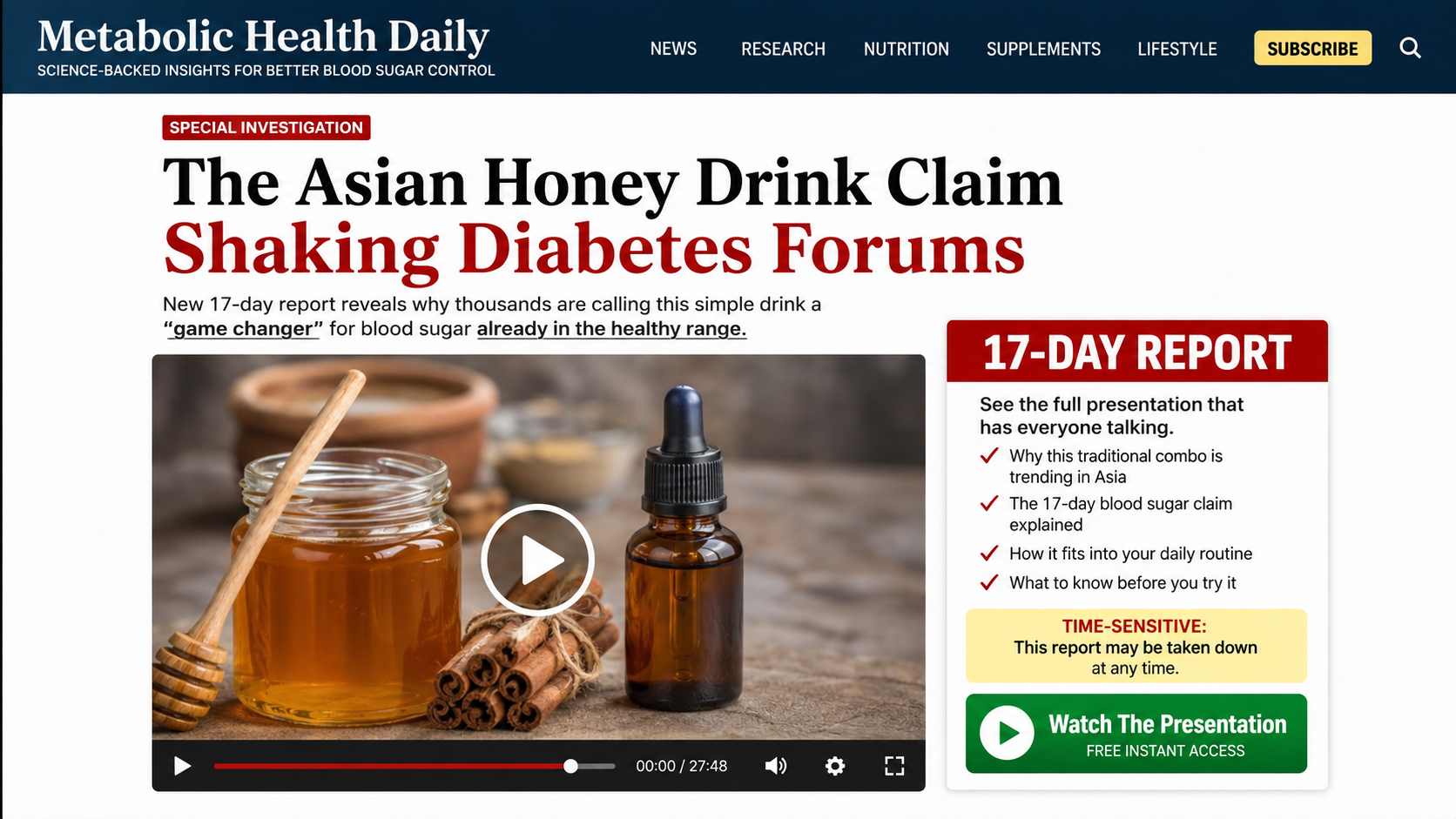
The surrounding page calls itself “Diabetes Health News” and presents a supposed journalist named Rebecca Morgan.
Neither a news-style masthead nor an authoritative narrator proves that a real newsroom created, reviewed, or published the report.
The story makes extraordinary promises about diabetes
The presentation claims an Asian honey drink can address a hidden cause of high blood sugar and deliver dramatic results within days.
Some versions suggest users can reach readings below 90, reverse diabetes, or stop relying on metformin after 17 or 21 days.
Those are disease-treatment claims, not ordinary statements about supporting healthy glucose metabolism.
A video cannot determine whether a viewer has type 1 diabetes, type 2 diabetes, prediabetes, medication-related changes, or another condition.
The free recipe becomes a bottle of Sugar Reset
The opening promise centers on a simple household drink, supposedly inspired by overseas medical research and hidden from American patients.
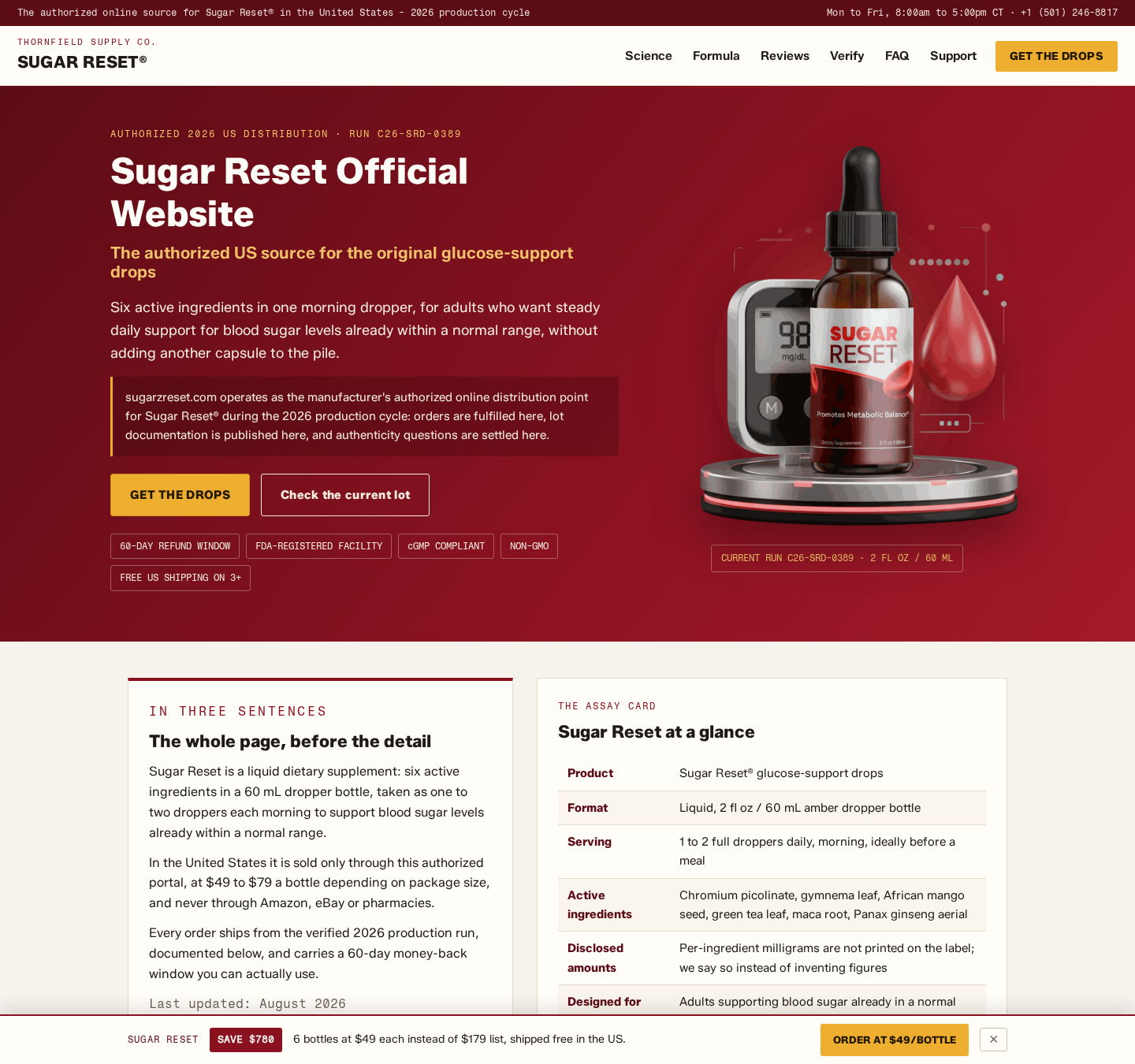
After a long sequence of revelations, the solution becomes Sugar Reset drops in the funnel examined.
The advertised supplement is only one interchangeable ending. Operators can redirect the same emotional narrative toward another glucose product later.
The repeated design matters more than the current label:
A sponsored clip borrows a physician’s identity.
A counterfeit health report supplies journalistic authority.
A spouse’s illness creates fear and sympathy.
A foreign discovery adds mystery and exclusivity.
A household ingredient promises an affordable answer.
The explanation expands into unsupported biological claims.
The recipe is withheld until a sales offer appears.
Package discounts encourage a larger initial payment.
The Fabricated Medical Narrative
The video’s fictional reporter describes a devoted husband searching for answers after his wife receives alarming diabetes news.
Viewers hear about crying, fear of complications, disappointing appointments, and a determination to find what conventional medicine supposedly ignored.
These details are not random. They place the viewer inside a recognizable family crisis before any product is mentioned.
The story then introduces a medical discovery associated with an Israeli hospital or Asian tradition, depending on the advertisement variant.
Scientific imagery and distant institutions make the claim harder for an ordinary viewer to verify quickly.
A parasite, toxin, or hidden biological obstruction may be blamed for blood-sugar problems.
That simple villain replaces the complicated relationship among insulin production, insulin resistance, genetics, nutrition, activity, sleep, medicine, illness, and other factors.
The narrator claims the drink removes or neutralizes this obstacle, allowing the body to regulate glucose normally again.
No clearly identified human trial, protocol, participant group, data table, or peer-reviewed paper supports the dramatic timeline shown.
Legitimate research does not become credible merely because a hospital name, laboratory animation, or country appears in the script.
Researchers must be identifiable, methods must be reviewable, and results must match the exact intervention being promoted.
The campaign instead relies on emotional certainty. The wife improves, the husband is relieved, and the supposed expert explains why others remain uninformed.
That tidy resolution is persuasive storytelling, not evidence that the events occurred.
Why Honey Makes an Effective Marketing Hook
Honey feels traditional, gentle, and familiar. It lets marketers present the discovery as something that was always hiding in the kitchen.
The contradiction also attracts attention. People with diabetes are usually cautious about sugar, so a sweet ingredient promising glucose control feels surprising.
Surprise creates curiosity, and curiosity keeps viewers inside a lengthy video.
The word “Asian” adds an aura of ancient knowledge without identifying one culture, recipe, dosage, or documented medical practice.
Vague geography makes the claim sound exotic while keeping it difficult to check.
Some scripts combine honey with another common ingredient, then suggest precise preparation unlocks a hidden benefit.
However, the full preparation remains frustratingly incomplete.
The presentation eventually argues that ordinary ingredients vary too much, absorb poorly, or lack a special concentrated component.
That pivot transforms a supposedly free drink into a commercial formula.
Honey can raise blood glucose, and individual responses vary. Anyone managing diabetes should include it within a clinician-approved nutrition plan.
A familiar food is not automatically safe in unlimited quantities, and “natural” does not mean suitable for every medication regimen.
Marketing that promises rapid normalization without monitoring can encourage unsafe self-experimentation.
Sugar Reset and the Offer Behind the Story
The current Sugar Reset page reviewed sells liquid drops through an entity identified as Thornfield Supply Co LLC.
It lists an address at 1024 W Capitol Avenue, Suite 318, Little Rock, Arkansas, plus a customer-support telephone number.
Those details are more useful than an anonymous order form, but they do not validate the upstream celebrity video or medical promises.
The sales page describes six active ingredients and displays package pricing ranging from $49 to $79 per bottle.
Buyers should examine whether the Supplement Facts panel provides meaningful amounts for every ingredient rather than a decorative list of familiar names.
Without exact quantities, a clinician cannot properly assess dose, duplication, interaction risk, or whether cited ingredient research applies.
The page advertises a 60-day refund period.
A time window alone does not explain whether opened bottles qualify, where returns travel, who pays postage, or when processing begins.
Read the full written policy before purchase and save a copy because web pages can change.
No verified evidence reviewed established that every Sugar Reset purchase automatically creates recurring monthly shipments.
Do not assume a subscription exists, but do not assume a one-time payment either.
The cart, order summary, checkbox language, and final confirmation control the agreement presented to that customer.
Similar “Sugar Reset” names appear across unrelated domains with different formulations, branding, policies, and company disclosures.
That ambiguity makes the exact domain and merchant descriptor essential when requesting support or disputing a charge.
A review for one seller cannot automatically describe every product sharing two common words.
The clearest confirmed problem is the deceptive route into the offer: impersonation, fake reporting, unsupported reversal claims, and a bait-and-switch from recipe to product.
How the Dr. William Li Asian Honey Drink Diabetes Scam Works
Step 1: A social advertisement promises a startling food discovery
The campaign begins with a short clip on Facebook, Instagram, YouTube, or another advertising platform.
It asks why doctors never mention a simple sweet drink that supposedly controls stubborn blood sugar.
A recognizable medical figure appears to validate the question, often through altered footage or synthetic speech.
Small screens and fast scrolling make imperfections in lip movement, lighting, and voice cadence easier to overlook.
Step 2: The click opens a counterfeit health-news page
The destination resembles an article from a specialist publication, complete with headlines, medical imagery, and a confident reporter.
Its address does not belong to a recognized diabetes publication or Dr. Li’s verified website.
Menu buttons may be decorative, while every important link moves visitors deeper into the funnel.
The actual registered domain matters more than the brand name drawn at the top.
Step 3: A family emergency lowers the viewer’s skepticism
Rebecca Morgan supposedly recounts how diabetes threatened a marriage, independence, and the future.
The wife cries, medication disappoints, and the husband refuses to accept an ordinary prognosis.
This intimate framing invites viewers to identify with the couple rather than evaluate a clinical claim.
Once empathy takes over, questioning the story can feel like abandoning somebody who suffered.
Step 4: An overseas discovery creates a hidden cure
The narrative travels to a foreign hospital, forgotten tradition, or isolated research team.
An invented parasite or concealed mechanism becomes the true cause that domestic clinicians allegedly missed.
Technical words appear alongside simplified graphics, but no accessible study establishes the claimed process.
Distance also makes verification difficult within the limited time created by the advertisement.
Step 5: The video borrows Dr. William Li’s authority
Real clips can be cut apart, redubbed, or placed beside claims the speaker never made.
Newer versions can generate convincing voice and facial movement from publicly available interviews.
The campaign counts on recognition, not careful verification.
Search the doctor’s verified pages for the exact statement and full original recording before accepting any endorsement.
Step 6: The honey recipe is delayed until the sales reveal
The narrator promises instructions soon, then adds more history, testimonials, threats, and supposed proof.
When the answer finally arrives, viewers learn that kitchen ingredients cannot reliably produce the required concentration.
Sugar Reset becomes the convenient ready-made solution in the examined funnel.
The campaign can preserve every earlier scene while changing that bottle, price, or checkout domain.
Step 7: Urgency and package math push immediate payment
A countdown, supply warning, or claim that the presentation may be removed discourages comparison.
The biggest bundle usually displays the lowest per-bottle figure and receives the strongest recommendation.
Customers can mistake that smaller figure for the total transaction.
Calculate quantity, shipping, tax, optional upgrades, and any continuity charge before submitting the order.
Step 8: Follow-up promotions keep the buyer inside the funnel
After payment, customers may see extra-bottle offers, expedited shipping, coaching, digital guides, or related supplements.
These pages can use buttons whose consequences are not equally clear.
Read every post-purchase screen and save the final confirmation showing quantities and total.
A later call offering verification or a refund may also be another attempt to collect information.
The Medical Risks Are More Serious Than the Bottle Price
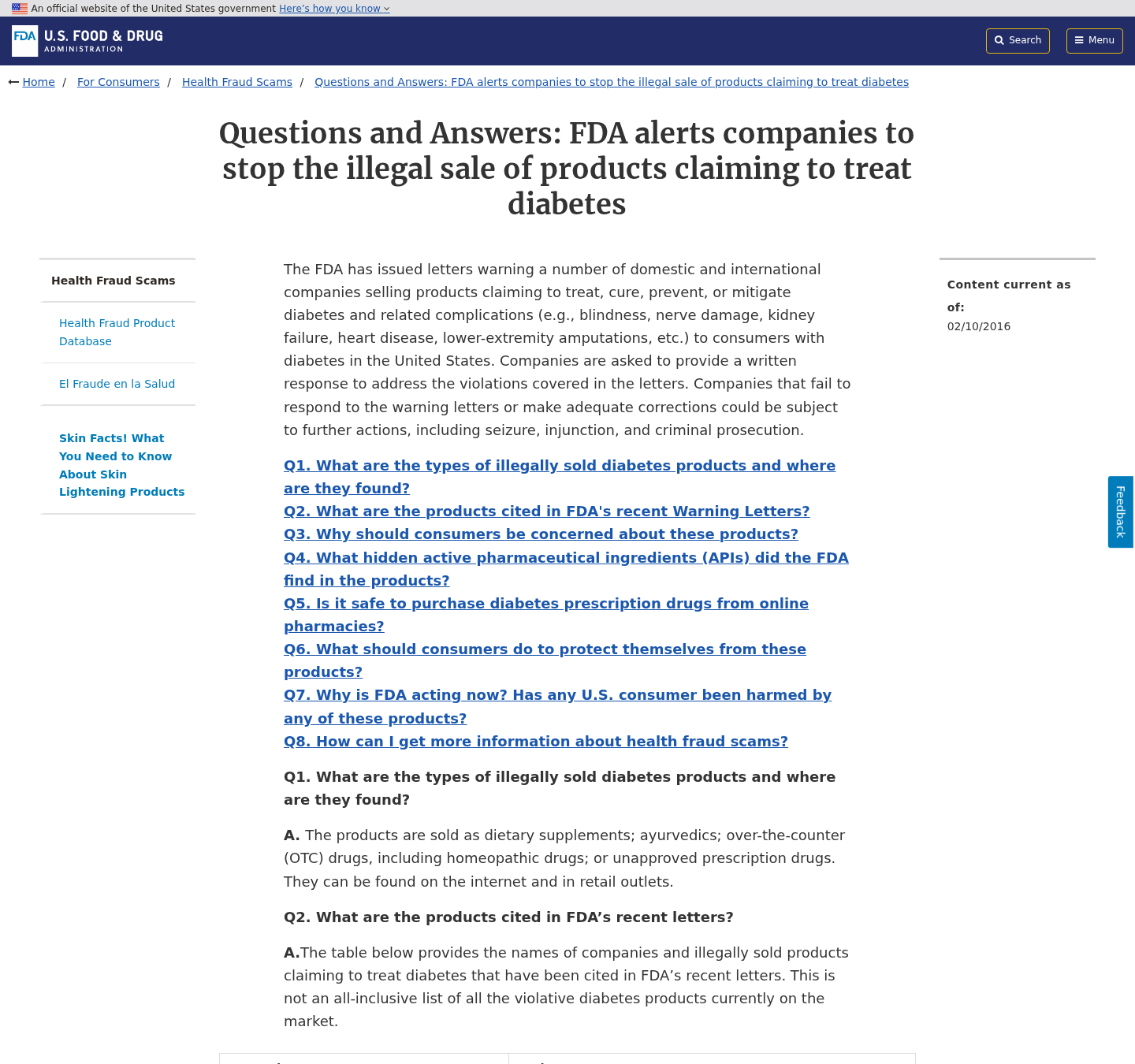
The FDA warns that illegally marketed diabetes products can contain hidden ingredients, interact with medication, or delay effective treatment.
That delay matters because uncontrolled glucose can harm blood vessels, kidneys, eyes, nerves, heart, and other organs over time.
Rapid improvement claims may encourage viewers to reduce medication without adequate monitoring.
Blood sugar can become dangerously high, while some combinations can also contribute to hypoglycemia.
Type 1 diabetes requires insulin. A supplement or honey recipe cannot replace it.
People with type 2 diabetes also need individualized guidance based on glucose patterns, other illnesses, medicines, nutrition, activity, and treatment goals.
The phrase “clinically tested ingredients” does not prove that the marketed blend was clinically tested.
An ingredient study may use another extract, dose, participant group, duration, and outcome.
Testimonials showing a glucose meter provide no verified baseline, identity, treatment history, or protection against selective editing.
A single reading also cannot establish durable reversal.
Hemoglobin A1C, fasting glucose, post-meal patterns, symptoms, and clinician evaluation provide a broader picture.
If a product page instructs customers to ignore a clinician, distrust pharmacists, or stop medicine immediately, leave the page.
Company, Address, and Fulfillment Checks
Find the business that actually accepted the order
Sugar Reset is a brand name, not necessarily the complete identity responsible for payment, warranties, manufacturing, and refunds.
Compare Thornfield Supply Co LLC with the entity shown in checkout, terms, receipt, parcel, and card statement.
Record every variation because the bank will ask which merchant received the disputed payment.
Unexplained identity changes deserve clarification before a card number is entered.
Test the Arkansas address instead of trusting printed text
An address can lead to a suite, shared office, mail service, warehouse, residence, or unrelated operation.
Its appearance in a policy does not prove executives, formulators, or support staff work there.
Ask whether 1024 W Capitol Avenue, Suite 318 accepts authorized returns for the exact order.
Never mail bottles until the seller confirms the destination and return number in writing.
Call support before the guarantee becomes necessary
Ask the listed telephone representative to identify the legal seller, exact product, subscription status, return conditions, and expected refund time.
Send the same questions in writing so you retain evidence.
Nonworking numbers, unanswered messages, generic responses, and agents who cannot locate the product weaken any reassuring guarantee.
Support responsiveness before payment predicts how difficult urgent cancellation may become later.
Demand traceable manufacturing and testing
A domestic return address does not establish where ingredients were grown, extracted, blended, tested, encapsulated, or bottled.
White-label supplements can be mass-produced in China or elsewhere, then branded by marketers and distributed through American fulfillment centers.
Overseas production is not proof of danger, but missing traceability prevents buyers from evaluating contamination, substitution, consistency, and recalls.
Request the manufacturer, country of origin, lot code, ingredient amounts, warnings, expiration date, and independent certificate matching that batch.
How to Verify a Diabetes Advertisement Safely
Start by searching the exact video quotation beside the celebrity’s name.
Look for the complete statement on verified pages, not reposted fragments uploaded by anonymous advertising accounts.
Pause on frames showing strange teeth, shifting glasses, blurred earrings, uneven blinking, or lip movement that does not match speech.
Those defects can support suspicion, although a smooth video can still be deceptive.
Check the page’s domain and publication archive.
A real health outlet should have working navigation, identifiable editors, corrections policies, contact information, and other independently indexed reporting.
Search the promised study through recognized medical databases.
Verify authors, journal, date, participant count, tested intervention, endpoints, and whether the finished product appears anywhere.
Read the label for ingredient quantities and warnings.
Take it to a pharmacist who can compare the formula with insulin, metformin, sulfonylureas, anticoagulants, and other medicines.
Finally, inspect the transaction.
Confirm total price, bottle count, renewal language, cancellation method, return location, opened-product eligibility, and the descriptor expected on the statement.
What to Do if You Have Fallen Victim to This Scam
Do not change diabetes treatment alone. Contact your clinician or pharmacist, explain the advertisement, and discuss any supplement already taken. Seek urgent help for severe symptoms.
Preserve the entire path. Save the social post, fake article, video address, order pages, confirmation, guarantee, bottle label, parcel, telephone numbers, and statement entry.
Write to the merchant immediately. Cancel unshipped items and any recurring authorization. Request the cancellation number, complete refund amount, and written confirmation.
Follow return instructions carefully. Obtain authorization before sending bottles, photograph the contents, use tracking, and retain proof that the package reached the approved destination.
Notify your card provider. Explain any misrepresentation or unauthorized repeat charge. Ask about blocking future attempts and replacing the card when appropriate.
Monitor glucose properly. Follow the testing plan provided by your medical team and report unexpected high or low readings promptly.
Protect your online accounts. Change reused passwords, enable multifactor authentication, and distrust callers claiming they need remote access to process a refund.
Check the device. Run Malwarebytes if the page triggered downloads or you installed a recommended application. Remove unfamiliar extensions and browser permissions.
Reduce repeat exposure. AdGuard can block many known malicious advertisements and redirects, although no filter can authenticate a medical endorsement.
File detailed reports. Send evidence to the advertising platform, FDA reporting channel, consumer-protection agency, and payment provider.
Is Your Device Infected? Run a Free Malware Scan
Slow performance, constant pop-ups, or strange behavior? These are classic signs of a malware infection. The fastest way to find out is to scan your device with Malwarebytes Anti-Malware Free — one of the most trusted malware removal tools available.
The free version detects and removes the most common threats, including:
Adware — the cause of those annoying pop-ups
Browser hijackers — unwanted redirects and changed homepages
Trojans and spyware — hidden programs stealing your data
Potentially unwanted programs (PUPs) — software you never asked for
👉 Select your device below — Windows, Mac, or Android — then follow the simple steps to download Malwarebytes, scan your system, and remove any threats it finds. The whole process takes about 5 minutes.
Malwarebytes for WindowsMalwarebytes for MacMalwarebytes for Android
Run a Malware Scan with Malwarebytes for Windows
Malwarebytes is one of the most popular and trusted anti-malware tools for Windows — and it’s completely free for removing infections. It catches threats that many antivirus programs miss, including adware, browser hijackers, and trojans. Follow the steps below to scan and clean your PC in just a few minutes.
Download Malwarebytes
Click the button below to download the latest version of Malwarebytes for Windows from the official source. The free version is all you need — it will scan your computer and remove adware, browser hijackers, and other malicious software at no cost.
(The link opens in a new page where your download will start)
Install Malwarebytes
When the download finishes, open your Downloads folder and double-click the MBSetup file. If Windows shows a User Account Control pop-up, click “Yes” to allow the installation.
Follow the On-Screen Prompts to Install Malwarebytes
The setup wizard will walk you through a few quick screens:
Choose where you’re installing the program — “Personal Computer” or “Work Computer” — then click Next.
Malwarebytes will now install on your device. This usually takes under a minute.
When installation is complete, the “Welcome to Malwarebytes” screen will open automatically.
On the final screen, click Open Malwarebytes to launch the program.
Enable “Scan for Rootkits”
Before scanning, turn on rootkit detection so Malwarebytes can find even the most hidden threats. Click the Settings gear icon on the left side of the screen.
In the settings menu, find “Scan for rootkits” and click the toggle so it turns blue.
Done? Click “Dashboard” in the left pane to return to the main screen.
Start the Scan
Click the blue Scan button. Malwarebytes will automatically update its virus database and start checking your computer for malware.
Wait for the Scan to Finish
The scan checks your entire system for browser hijackers and other malicious programs, so it can take several minutes. Feel free to do something else — just check back occasionally to see the progress.
Quarantine the Detected Threats
When the scan is done, you’ll see a list of everything Malwarebytes found — malware, adware, and potentially unwanted programs. Click the “Quarantine” button to remove all of them at once.
Malwarebytes will now remove the malicious files and registry entries and move them safely into quarantine.
Restart Your Computer
Some threats can only be fully removed after a reboot. If Malwarebytes asks you to restart, click Yes. Once you’re logged back in, your PC is clean and you can continue with the next steps in this guide.
When the scan finishes, click Quarantine to remove everything Malwarebytes found. That’s it — your Windows PC is now clean of trojans, adware, and other malware, and should be back to running smoothly.
If your current antivirus allowed this malicious program on your computer, you may want to consider purchasing Malwarebytes Premium to protect against these types of threats in the future. If you are still having problems with your computer after completing these instructions, then please follow one of the steps:
Malwarebytes for Mac is a free on-demand scanner that removes the malware other security software tends to miss — adware, browser hijackers, and unwanted programs included. Cleaning an infected Mac with Malwarebytes has always been completely free, and it’s our go-to recommendation. Follow the steps below to scan and clean your Mac in just a few minutes.
Download Malwarebytes for Mac
Click the button below to download the latest version of Malwarebytes for Mac.
When the download finishes, open your Downloads folder and double-click the setup file to begin the installation.
Follow the On-Screen Prompts to Install Malwarebytes
The Malwarebytes for Mac Installer will guide you through a few quick screens. Click “Continue” and keep following the prompts until the installation completes.
When the installation is complete, Malwarebytes opens to the Welcome to Malwarebytes screen. Click “Get started“.
Select “Personal Computer” or “Work Computer”
Malwarebytes will ask what type of computer you’re installing it on. Click either Personal Computer or Work Computer, whichever applies.
Start the Scan
Click the “Scan” button. Malwarebytes will automatically update its detection database and begin checking your Mac for malware.
Wait for the Scan to Finish
Malwarebytes will scan your Mac for adware, browser hijackers, and other malicious programs. This can take a few minutes, so feel free to do something else — just check back occasionally to see the progress.
Quarantine the Detected Threats
When the scan is done, you’ll see a list of everything Malwarebytes found. Click the “Quarantine” button to remove all the threats at once.
Restart Your Mac
Malwarebytes will now remove all the malicious files it found. Some threats can only be fully removed after a reboot — if Malwarebytes asks you to restart, allow it. Once you’re logged back in, your Mac is clean.
Once the scan is done, remove every threat it detected. Your Mac is now free of adware, rogue browser extensions, and other potentially harmful software.
If your current antivirus allowed a malicious program on your computer, you might want to consider purchasing the full-featured version of Malwarebytes Anti-Malware to protect against these types of threats in the future. If you are still experiencing problems while trying to remove a malicious program from your computer, please ask for help in our Mac Malware Removal Help & Support forum.
Run a Malware Scan with Malwarebytes for Android
Malwarebytes for Android automatically detects and removes dangerous threats like malware and ransomware so you don’t have to worry about your most-used device being compromised. Aggressive detection of adware and potentially unwanted programs keeps your Android phone or tablet running smooth.
Download Malwarebytes for Android.
You can download Malwarebytes for Android by clicking the link below.
In the Google Play Store, tap “Install” to install Malwarebytes for Android on your device.
When the installation process has finished, tap “Open” to begin using Malwarebytes for Android. You can also open Malwarebytes by tapping on its icon in your phone menu or home screen.
Follow the on-screen prompts to complete the setup process
When Malwarebytes will open, you will see the Malwarebytes Setup Wizard which will guide you through a series of permissions and other setup options. This is the first of two screens that explain the difference between the Premium and Free versions. Swipe this screen to continue. Tap on “Got it” to proceed to the next step. Malwarebytes for Android will now ask for a set of permissions that are required to scan your device and protect it from malware. Tap on “Give permission” to continue. Tap on “Allow” to permit Malwarebytes to access the files on your phone.
Update database and run a scan with Malwarebytes for Android
You will now be prompted to update the Malwarebytes database and run a full system scan.
Click on “Update database” to update the Malwarebytes for Android definitions to the latest version, then click on “Run full scan” to perform a system scan.
Wait for the Malwarebytes scan to complete.
Malwarebytes will now start scanning your phone for adware and other malicious apps. This process can take a few minutes, so we suggest you do something else and periodically check on the status of the scan to see when it is finished.
Click on “Remove Selected”.
When the scan has been completed, you will be presented with a screen showing the malware infections that Malwarebytes for Android has detected. To remove the malicious apps that Malwarebytes has found, tap on the “Remove Selected” button.
Restart your phone.
Malwarebytes for Android will now remove all the malicious apps that it has found. To complete the malware removal process, Malwarebytes may ask you to restart your device.
After the scan, tap Remove Selected to delete all detected threats. Your Android phone is now clean — no more malicious apps, adware, or browser redirects.
If your current antivirus allowed a malicious app on your phone, you may want to consider purchasing the full-featured version of Malwarebytes to protect against these types of threats in the future. If you are still having problems with your phone after completing these instructions, then please follow one of the steps:
Restore your phone to factory settings by going to Settings > General management > Reset > Factory data reset.
Now that your device is clean, keep it that way. Most infections start with a malicious ad or a fake download button — so blocking them at the source is your best defense.
We recommend AdGuard, which blocks malicious ads, phishing pages, and dangerous redirects before they can reach you.
The reviewed funnel did not establish an authentic endorsement through his verified channels or a complete original recording.
Treat altered or isolated clips as impersonation until independently confirmed.
Can an Asian honey drink reverse diabetes in 17 days?
No reliable evidence supports that sweeping promise for people with different diabetes types, histories, medicines, and health conditions.
Rapid reversal language should never guide medication changes.
Is Diabetes Health News a genuine medical publication?
The page examined functioned as an advertorial leading toward a product offer, not as verified independent medical journalism.
Judge the registered domain and editorial identity, not the masthead design.
Is Sugar Reset automatically a subscription?
No verified evidence showed that every purchase creates automatic refills.
Subscription status depends on the exact cart, options, terms, and confirmation presented during that transaction.
Does an FDA-registered facility mean the drops are approved?
No. Facility registration is not FDA approval of a dietary supplement’s safety, effectiveness, or disease claims.
The seller remains responsible for lawful labeling and marketing.
What should I do if my glucose rose after using the product?
Contact a qualified medical professional promptly and follow urgent-care advice for severe symptoms.
Bring the bottle, ingredient panel, dosage, glucose records, and details about any treatment changes.
The Bottom Line
The Dr. William Li Asian Honey Drink Diabetes Scam uses impersonation, fake reporting, family distress, and an elusive recipe to create trust before presenting a supplement.
Sugar Reset is the current destination, not the enduring identity. Another seller can reuse the story with different drops, packages, contact details, and checkout terms.
Diabetes deserves evidence-based care and careful monitoring. Verify every endorsement, medical promise, merchant, and payment condition before allowing an emotional video to influence treatment or spending.
10 Rules to Avoid Online Scams
Here are 10 practical safety rules to help you avoid malware, online shopping scams, crypto scams, and other online fraud. Each tip includes a quick “if you already got hit” action.
Stop and verify before you click, log in, download, or pay.
Most scams win by creating urgency. Verify using a trusted method: type the website address yourself, use the official app, or call a known number (not the one in the message).
If you already clicked: close the page, do not enter passwords, and run a malware scan.
Keep your operating system, browser, and apps updated.
Updates patch security holes used by malware and malicious ads. Turn on automatic updates where possible.
If you saw a scary “update now” pop-up: close it and update only through your device settings or the official app store.
Use layered protection: antivirus plus an ad blocker.
Antivirus helps block malware. An ad blocker reduces scam redirects, phishing pages, and malvertising.
If your browser is acting weird: remove unknown extensions, reset the browser, then run a full scan.
Install apps, software, and extensions only from official sources.
Avoid cracked software, “keygens,” and random downloads. During installs, choose Custom/Advanced and decline bundled offers you do not recognize.
If you already installed something suspicious: uninstall it, restart, and scan again.
Treat links and attachments as untrusted by default.
Phishing often impersonates delivery services, banks, and popular brands. If it is unexpected, do not open attachments or log in through the message.
If you entered credentials: change the password immediately and enable 2FA.
Shop safely: research the store, then pay with protection.
Be cautious with brand-new stores, “closing sale” stories, and prices that make no sense. Prefer credit cards or PayPal for dispute options. Avoid wire transfers, gift cards, and crypto payments.
If you already paid: contact your card issuer or PayPal quickly to dispute the transaction.
Crypto rule: never pay a “fee” to withdraw or recover money.
Common patterns include fake profits, then “tax,” “gas,” or “verification” fees. Another is a “recovery agent” who demands upfront crypto.
If you already sent crypto: stop paying, save evidence (wallet addresses, TXIDs, chats), and report the scam to the platform used.
Secure your accounts with unique passwords and 2FA (start with email).
Use a password manager and unique passwords for every account. Enable 2FA using an authenticator app when possible.
If you suspect an account takeover: change passwords, sign out of all devices, and review recent logins and recovery settings.
Back up important files and keep one backup offline.
Backups protect you from ransomware and device failure. Keep at least one backup on an external drive that is not always connected.
If you suspect infection: do not connect backup drives until the system is clean.
If you think you are a victim: stop losses, document evidence, and escalate fast.
Move quickly. Speed matters for disputes, account recovery, and limiting damage.
Stop payments and contact: do not send more money or respond to the scammer.
Call your bank or card issuer: block transactions, replace the card if needed, and start a dispute or chargeback.
Secure your email first: change the email password, enable 2FA, and remove unfamiliar recovery options.
Secure other accounts: change passwords, enable 2FA, and log out of all sessions.
Scan your device: remove suspicious apps or extensions, then run a full malware scan.
Save evidence: screenshots, emails, order pages, tracking pages, wallet addresses, TXIDs, and chat logs.
Report it: to the payment provider, marketplace, social platform, exchange, or wallet service involved.
These rules are intentionally simple. Most online losses happen when decisions are rushed. Slow down, verify independently, and use payment methods and account controls that give you recourse.
Hello! I'm Lapain Epuran, your go-to source for detailed and honest product reviews. From tech gadgets to miracle cures, I provide insights to help you make informed choices. Join me as we discover what's truly worth your time and money.