


A familiar advocate appears in a video about rosemary, memory loss, and a discovery that frightened families supposedly need to see before it disappears.
The Maria Shriver Rosemary Alzheimer’s Cure Scam wraps a deeply personal subject in reassuring kitchen imagery, polished interviews, and an urgent promise of hope.

Overview
Maria Shriver has rejected the supposed endorsement
The advertisements use Maria Shriver’s image and reputation to promote a claimed rosemary treatment for Alzheimer’s disease and dementia.
She has issued a direct public warning saying the deepfake videos and supplement endorsement are false.
Her Alzheimer’s advocacy organization is also not connected with the products promoted through these advertisements.
That statement settles the campaign’s central credibility claim. The person viewers think they recognize did not authorize the sales message.
The rosemary story is a bridge, not the final product
The advertisement sounds like it will reveal a household recipe involving rosemary, honey, or another ordinary pantry ingredient.
Viewers are moved into a lengthy presentation that repeatedly postpones the promised instructions.
Near the end, the alleged recipe becomes a reason to purchase a proprietary memory supplement.
MaroBrain appears in one observed version, but the same narrative can redirect to a different bottle without changing its opening promise.
The campaign exploits genuine fear with fabricated certainty
Families facing memory changes often want a clear explanation, a manageable action, and reassurance that decline can be stopped.
The campaign offers all three immediately, while real assessment and treatment remain individual, careful, and sometimes uncertain.
Its most important warning signs include:
- An emotional video presents Shriver as a supplement promoter.
- AI-generated speech imitates recognized medical or media figures.
- Rosemary is described as a suppressed Alzheimer’s breakthrough.
- A video delays the promised recipe until its final sales pitch.
- Unrelated doctors and celebrities appear as social proof.
- A bottle replaces the household instructions viewers expected.
- Product names can change while the script remains familiar.
- Refund and continuity details receive less attention than testimonials.
What Maria Shriver Actually Said
Shriver’s official statement describes fraudulent AI advertisements using her image to promote cognitive supplements with unproven Alzheimer’s claims.
She states that she has nothing to do with the supplement.
She also says the Women’s Alzheimer’s Movement at Cleveland Clinic has no involvement.
The warning is unusually valuable because it comes directly from the person being impersonated.
It removes the ambiguity that deceptive advertisers often exploit through vague phrases such as “as seen with” or “inspired by.”
The campaign does not merely quote her views on brain health.
It creates the false impression that she supports a specific commercial remedy and wants viewers to buy it.
That distinction should guide readers whenever a respected advocate suddenly appears inside an unfamiliar supplement funnel.
Search the person’s official website independently. Do not trust a verification button supplied within the advertisement.
If the endorsement is genuine, the person’s verified channels should provide a consistent, direct record.
Why Rosemary Is Such an Effective Hook
Rosemary is familiar, inexpensive, aromatic, and associated with cooking rather than pharmaceutical risk.
That familiarity makes a dramatic medical claim feel gentler than a mysterious chemical name.
The herb also carries broad cultural associations with memory, which the script can exaggerate into a disease-cure promise.
A traditional association is not equivalent to evidence that a recipe reverses Alzheimer’s pathology.
The video often shows rosemary steeping in hot water, sometimes beside honey or another comforting ingredient.
Those images make viewers believe usable instructions are only moments away.
Instead, each explanation introduces another unresolved question, testimonial, or alleged expert.
The ordinary herb keeps attention long enough for the sales narrative to build.
Similar funnels substitute baking soda, cinnamon, turmeric, salt, coffee, or apple cider vinegar.
The ingredient changes because recognition matters more than a stable scientific theory.
The Real Medical Picture Is More Careful
The National Institute on Aging says there is currently no known intervention that cures Alzheimer’s disease.
Some FDA-approved medicines manage symptoms, while certain immunotherapies can treat early disease in appropriately evaluated patients.
Those treatments have defined eligibility requirements, documented risks, clinical monitoring, and evidence from controlled studies.
They are not interchangeable with an anonymous supplement reached through a social advertisement.
Memory problems also do not automatically mean Alzheimer’s disease.
Medication effects, depression, sleep disorders, vitamin deficiencies, thyroid problems, infections, and other conditions can affect thinking.
A proper assessment considers symptoms, timing, function, medical history, examination, and testing.
Delaying that process for an unproven online remedy can waste valuable time.
A seller may point to laboratory research about rosemary compounds.
Laboratory interest does not prove that a commercial capsule cures dementia in people.
Readers should ask whether the finished product itself completed appropriate human trials for the exact claim being made.
Ingredient references, animal studies, and theoretical mechanisms cannot answer that question alone.

How the Maria Shriver Rosemary Alzheimer’s Cure Scam Works
Step 1: The advertisement finds families already searching for hope
Sponsored posts are aimed at older adults, caregivers, and people engaging with memory or healthy-aging content.
The opening avoids sounding like an ordinary product commercial.
It presents a personal revelation, urgent warning, or newly released interview.
That storytelling feels more trustworthy than a direct “buy now” message.
Step 2: A deepfake Maria Shriver delivers emotional credibility
Her long record of Alzheimer’s advocacy makes the imitation especially persuasive.
Synthetic audio can place product claims into her voice, while manipulated footage creates matching facial movement.
Short clips, subtitles, and rapid cuts conceal many technical flaws.
The viewer hears concern and authority before having time to inspect the evidence.
Step 3: More recognizable figures make the fiction look shared
Some presentations invoke Dr. Dale Bredesen, Dr. Jon LaPook, Dr. Randall Bateman, actors, or television personalities.
The names vary across versions, and their presence does not establish participation.
A procession of respected people produces the feeling that the discovery is already widely accepted.
It also makes independent verification seem unnecessary.
Step 4: A trusted-looking page hosts an unusually long video
The click opens a health-news or television-style layout on an unrelated domain.
The video may disable normal controls, making it difficult to skip forward or inspect the final offer.
Repeated promises keep the viewer waiting for the exact rosemary measurements.
Scarcity notices suggest the presentation could vanish at any moment.
Step 5: The script invents a hidden cause and simple reversal
Alzheimer’s disease is reduced to one toxin, protein, nutrient deficiency, or inflammatory trigger that mainstream medicine supposedly ignores.
The explanation uses scientific-sounding language but avoids testable details.
No credible protocol, registered trial, adverse-event record, or finished-product study supports the sweeping conclusion.
Personal stories are offered where clinical evidence should appear.
Step 6: The rosemary instructions transform into proprietary pills
Near the conclusion, the narrator says ordinary rosemary lacks the required concentration or absorption.
The supposed free recipe therefore becomes a reason to buy capsules.
MaroBrain has appeared at this stage, but other memory brands can be inserted into the identical framework.
The story remains useful to advertisers even after one product domain disappears.
Step 7: Bundles and guarantees create a larger commitment
The sales page favors three-bottle or six-bottle packages, usually emphasizing a low unit price.
The actual charge is the package total, plus any shipping, tax, upgrades, or continuity selected at checkout.
Guarantee language may sound unconditional while detailed terms require returns, authorization, or strict deadlines.
Buyers should record the entire checkout before entering payment information.
Product Rotation Is Part of the Design
A story-led funnel is valuable because the front end can survive product changes.
The advertiser can keep the Shriver and rosemary narrative while sending traffic toward a new supplement, merchant account, or checkout provider.
That is why searching only one bottle name gives an incomplete picture.
Useful searches combine the celebrity, recipe, claim, page headline, support number, address, and card descriptor.
One version may call the product MaroBrain and another may use a generic “memory support” label.
A new brand does not repair the fake endorsement or produce clinical proof.
Conversely, a real physical bottle does not validate the advertisement that sold it.
The marketing claim, merchant, formula, manufacturer, and fulfillment operation require separate verification.
Investigators should capture redirects because affiliate links often conceal the transition between those parties.
A receipt may reveal a seller name never displayed in the opening video.
Why the Offer Can Harm More Than a Bank Balance
Alzheimer’s fear affects the person experiencing symptoms and everyone who helps care for them.
An apparent endorsement from a trusted advocate can influence a family decision during an emotionally exhausting period.
Money lost to an unwanted bundle is serious, but delayed evaluation can carry greater consequences.
Some treatable conditions can resemble cognitive decline, and appropriate assessment matters.
Unknown supplements can also interact with prescriptions or complicate planned procedures.
A natural ingredient is still biologically active, and a proprietary blend may hide individual amounts.
Families should bring the physical bottle, label, and purchase page to a pharmacist.
Do not rely on a support agent’s assurance that the formula is safe with every medication.
Caregivers should also watch for repeated shipments that the purchaser may not recognize or remember authorizing.
Reviewing statements together can catch recurring charges without removing the person’s dignity or independence.
How to Check a Memory-Cure Advertisement
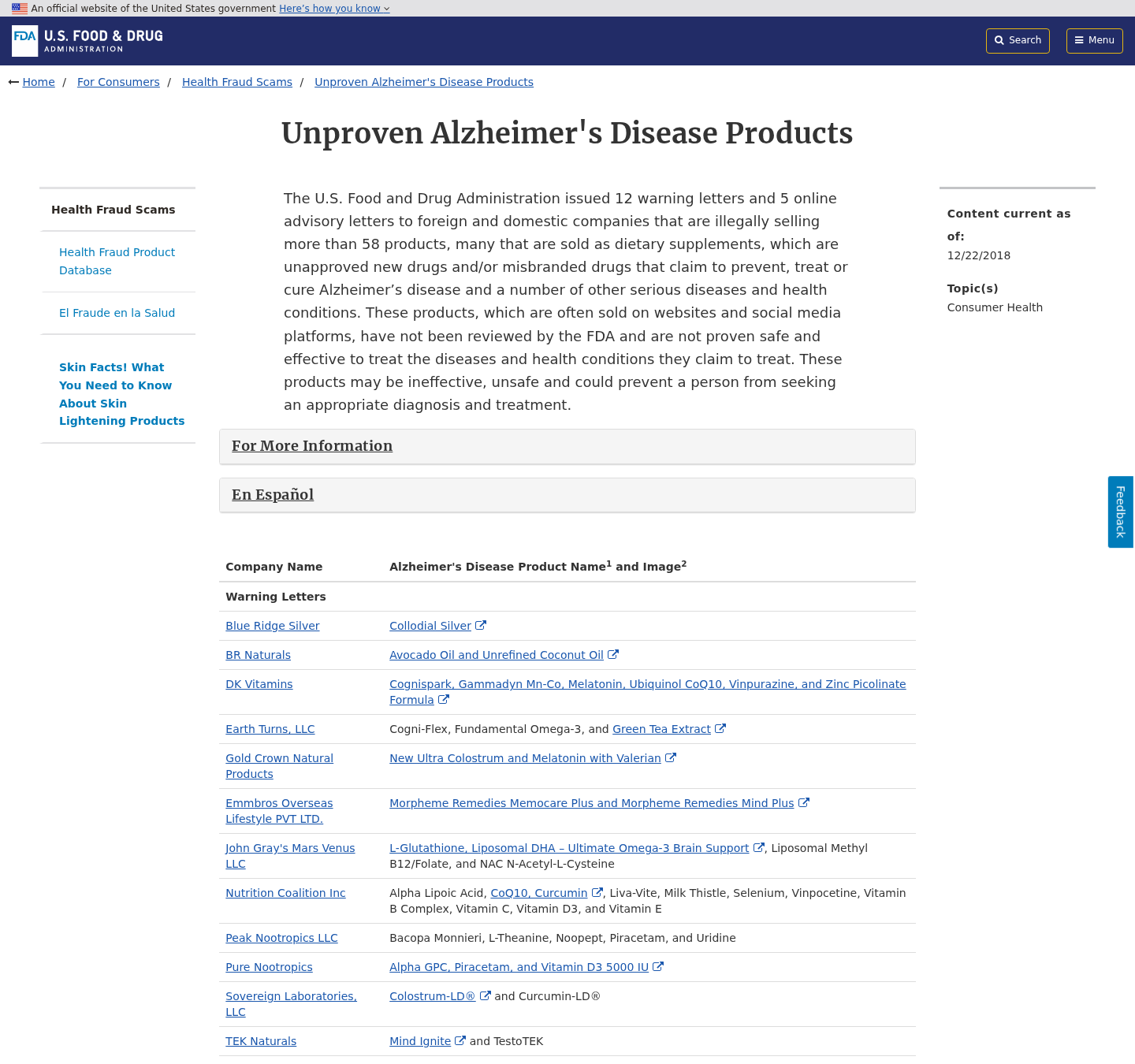
Begin with the person being quoted. Find their verified page without using links inside the advertisement.
Search the exact wording of the endorsement and look for a full, unedited statement.
Next, examine the website address.
A familiar logo placed on an unrelated domain is imitation, not evidence of publication.
Search the alleged study by author, institution, treatment, and trial identifier.
A real breakthrough should produce more than affiliate pages repeating one another.
Ask whether the finished commercial formulation was tested, not merely whether one ingredient has appeared in research.
Check the promised outcome. “Supports memory” and “cures Alzheimer’s” are radically different claims.
Read every purchase term before trusting a guarantee badge.
Look for package quantity, recurrence, return postage, opened-bottle rules, deadline calculation, and restocking deductions.
Finally, discuss the claim with a clinician who knows the patient.
A seller-created video cannot replace individualized medical judgment.
Company, Address, and Fulfillment Checks
The story may conceal the merchant until checkout
The rosemary presentation focuses on famous names, not the legal business responsible for the transaction.
Record the entity in the terms, receipt, statement, and parcel label.
A bottle brand alone is insufficient when requesting cancellation, reporting fraud, or serving formal correspondence.
A return depot is not proof of a research company
Search any address through maps, business records, and shipping databases.
It may belong to a fulfillment warehouse, mailbox provider, residence, or unrelated tenant.
Package handling at an address does not prove that doctors, laboratories, or corporate executives work there.
Unanswered support changes the value of a guarantee
Test the telephone number and email before paying.
Ask the agent to name the exact product, seller, renewal schedule, refund deadline, and return destination.
Generic replies, disconnected lines, or refusal to answer basic billing questions are serious warnings.
The bottle needs a traceable manufacturing chain
Look for a full Supplement Facts panel, lot code, responsible distributor, manufacturer, warnings, allergens, and exact ingredient quantities.
Private-label capsules can be produced domestically or overseas, including China.
Country alone does not establish safety. Missing factory identity, testing, importer accountability, and batch documentation create the real uncertainty.
What Caregivers Can Do Before Money Changes Hands
Pause the video and ask what the family actually knows at that moment.
Usually the answer is a celebrity image, an emotional story, and a promise, not a diagnosis or treatment plan.
Write down the page address and proposed product name.
Search them on another device or in a new browser window.
Call the physician’s office or pharmacist using established contact details.
Explain the specific cure claim and list every ingredient if available.
Review the order total together, including future shipments.
Do not let a timer define a health decision.
If the person wants to try a supplement for general wellness, separate that decision from the false endorsement.
Evaluate the formula, seller, interactions, and price on their own merits.
A respectful conversation works better than ridicule.
People targeted by these ads are responding to fear and hope, not a lack of intelligence.
What to Do if You Have Fallen Victim to This Scam
- Keep treatment unchanged for now. Speak with the patient’s clinician before stopping, reducing, or replacing any prescribed Alzheimer’s or other medicine.
- Preserve what persuaded you. Save the Shriver video, webpage address, rosemary claims, order screen, confirmation, product label, and shipping paperwork.
- Cancel every future shipment in writing. Name the order number and state that all memberships, refills, and continuity permissions are withdrawn.
- Demand precise return instructions. Request the correct depot, authorization code, eligible bottle condition, postage rule, deadline, and expected repayment.
- Notify your payment provider quickly. Describe the fabricated endorsement and identify charges that exceeded, repeated, or differed from your informed authorization.
- Monitor the vulnerable purchaser’s statements. Look for new merchant labels, small test transactions, repeated bundles, and charges from related billing entities.
- Arrange a medical review. Bring the supplement and ingredient panel so a pharmacist or doctor can assess interactions and any concerning symptoms.
- Document a harmful reaction. Obtain medical help first, then report the event to the FDA with the lot, seller, and product details.
- Submit impersonation reports. Alert the advertising platform, FTC, FDA, IC3, card network, and Maria Shriver’s official reporting channel.
- Run Malwarebytes after unusual downloads. A complete scan can identify malicious installers or extensions encountered beyond the sales webpage.
- Let AdGuard reduce repeat exposure. Filtering known advertising and fraudulent domains can help, although family verification remains essential.
- Ignore paid refund helpers. Anyone demanding remote access, cryptocurrency, gift cards, or advance payment is likely beginning a second fraud.
Is Your Device Infected? Run a Free Malware Scan
Slow performance, constant pop-ups, or strange behavior? These are classic signs of a malware infection. A quick way to check is to scan your device with Malwarebytes Free, one of the most trusted malware removal tools available. If you only visited a scam page and didn’t download or install anything, this scan is optional.
The free version detects and removes the most common threats, including:
- Adware — the cause of those annoying pop-ups
- Browser hijackers — unwanted redirects and changed homepages
- Trojans and spyware — hidden programs stealing your data
- Potentially unwanted programs (PUPs) — software you never asked for
👉 Select your device below — Windows, Mac, or Android — then follow the simple steps to download Malwarebytes, scan your system, and remove any threats it finds. The scan usually takes 5 to 20 minutes.
Run a Malware Scan with Malwarebytes for Windows
Malwarebytes is one of the most popular and trusted anti-malware tools for Windows — and it’s completely free for removing infections. It catches threats that many antivirus programs miss, including adware, browser hijackers, and trojans. Follow the steps below to scan your PC and remove what Malwarebytes finds.
Download Malwarebytes
Click the button below to download the latest version of Malwarebytes for Windows from the official source. The free version is all you need — it will scan your computer and remove adware, browser hijackers, and other malicious software at no cost.
Download MalwarebytesOfficial installer for Windows 11 and 10. Your download starts right away.Want real-time protection? See Malwarebytes Premium Malwarebytes Free for WindowsScans and removes malware at no cost
-
Install Malwarebytes
When the download finishes, open your Downloads folder and double-click the MBSetup file. If Windows shows a User Account Control pop-up, click “Yes” to allow the installation.

Follow the On-Screen Prompts to Install Malwarebytes
The setup wizard will walk you through a few quick screens:
-
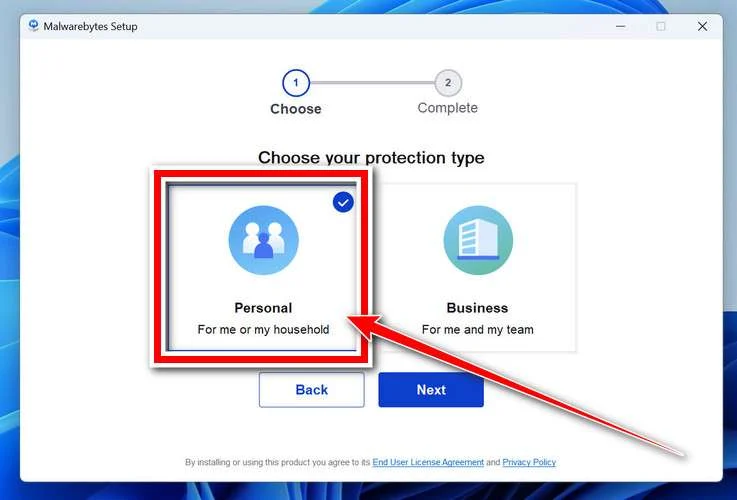
Choose where you’re installing the program — “Personal Computer” or “Work Computer” — then click Next.
-
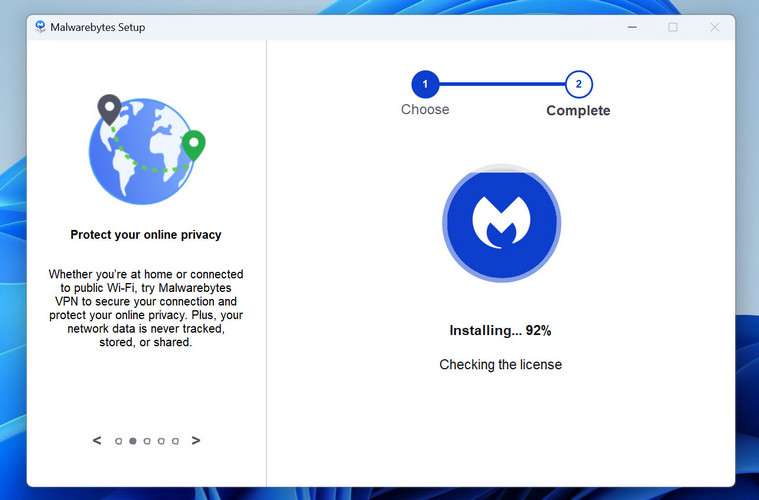
Malwarebytes will now install on your device. This usually takes under a minute.
-
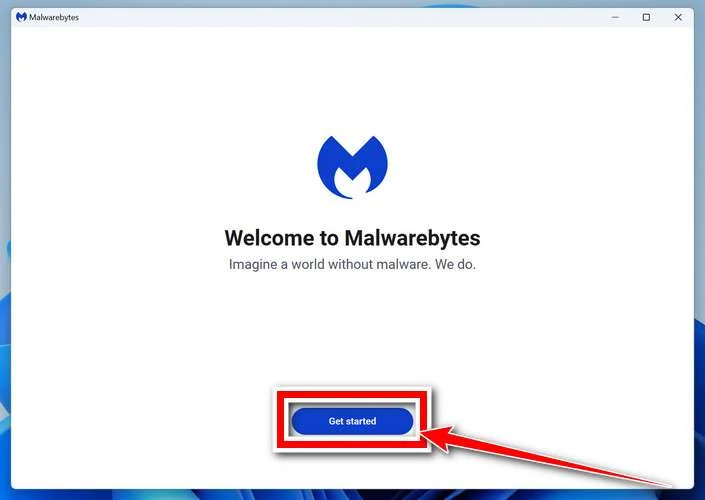
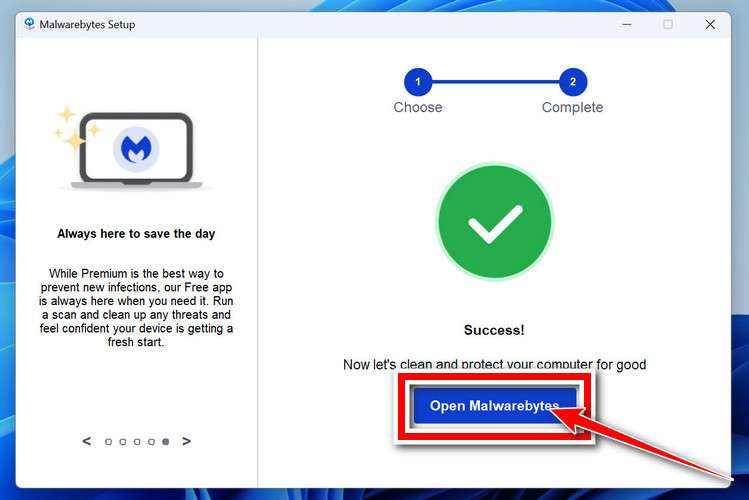
When installation is complete, the “Welcome to Malwarebytes” screen will open automatically.
-
On the final screen, click Open Malwarebytes to launch the program.
-
Optional: Check for rootkits with a Custom Scan
You don’t need to change any settings for a normal scan. The standard Threat Scan in the next step is enough for most problems, so you can go straight to it.
If you also want to check for rootkits, use a Custom Scan. In current versions of Malwarebytes, rootkit scanning is only available there:
- On the Scanner tile, click the three-dot menu and select Advanced Scan.
- Choose Custom Scan. In its options, check Scan for rootkits.
- Select your system drive (usually C:\) as the location to scan, then start the scan. It takes longer than a Threat Scan.
- When it finishes, review and quarantine the results as described in the steps below.
Rootkit scanning isn’t available on Windows devices with ARM processors.
Start the Scan
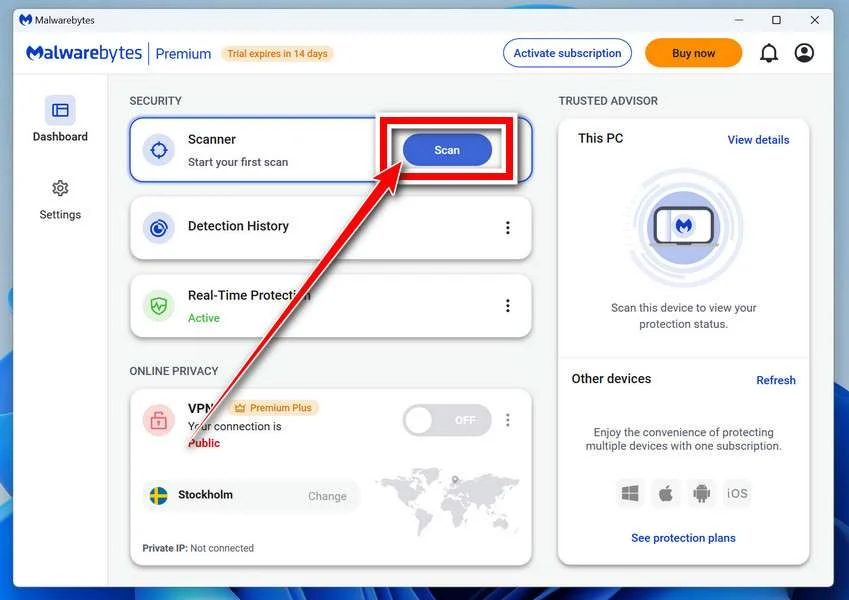
Click the blue Scan button. Malwarebytes will automatically update its virus database and start checking your computer for malware.
-
Wait for the Scan to Finish
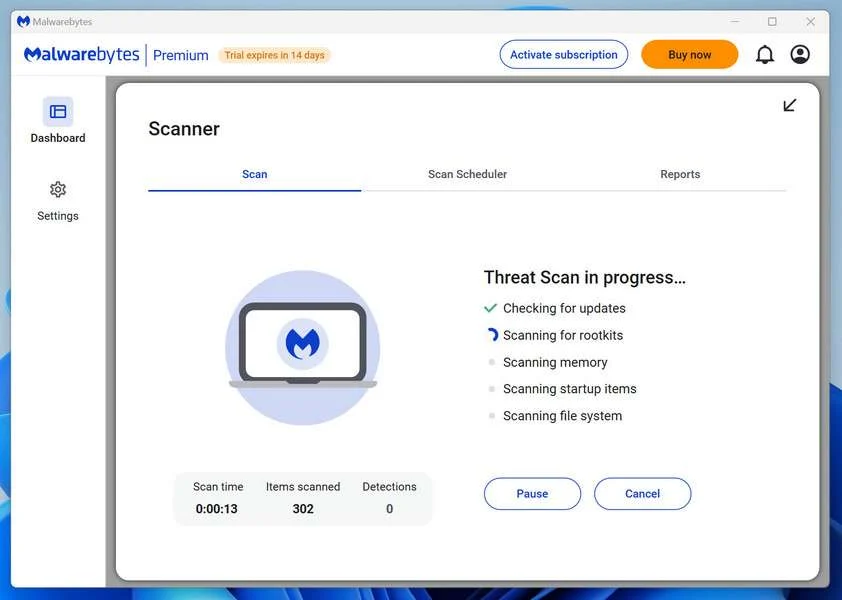
The scan checks your entire system for browser hijackers and other malicious programs, so it can take 5 to 20 minutes depending on your computer. Feel free to do something else — just check back occasionally to see the progress.
-
Quarantine the Detected Threats
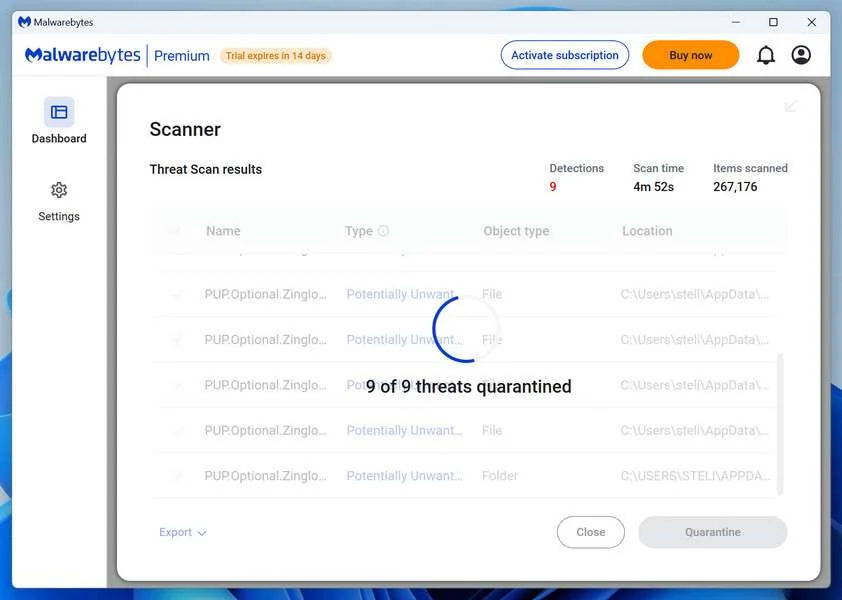
When the scan is done, you’ll see a list of everything Malwarebytes found — malware, adware, and potentially unwanted programs. Click the “Quarantine” button to remove all of them at once.
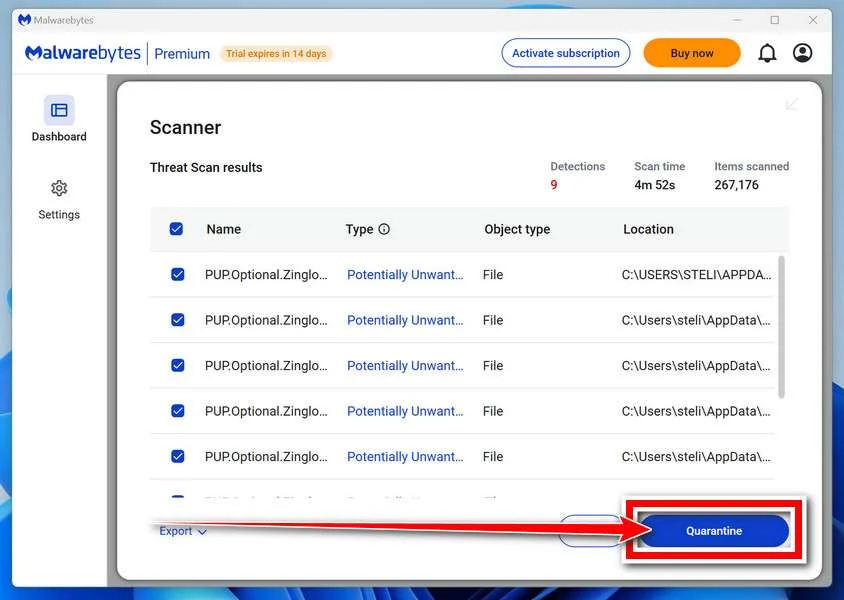
Malwarebytes will now remove the malicious files and registry entries and move them safely into quarantine.
-
Restart Your Computer
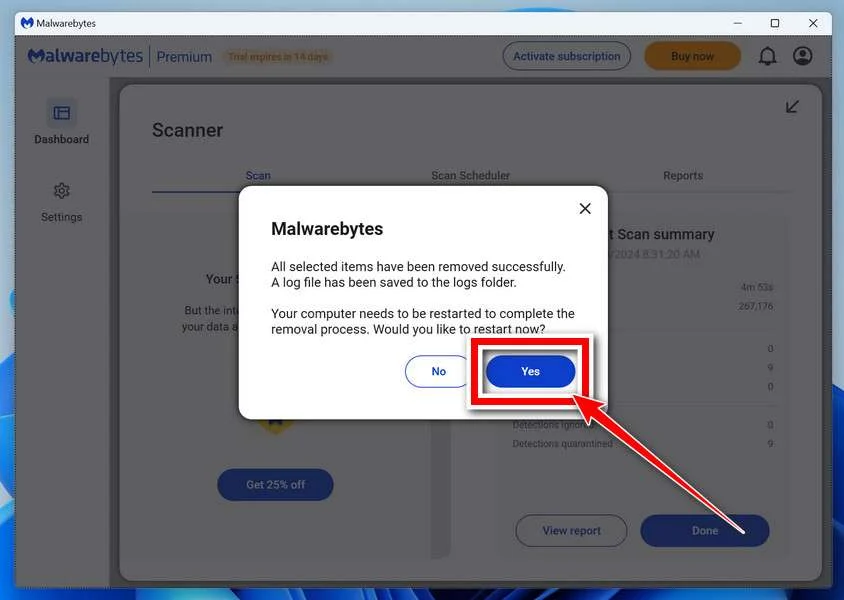
Some threats can only be fully removed after a reboot. If Malwarebytes asks you to restart, click Yes. Once you’re logged back in, Malwarebytes has finished removing the threats it found.
When the scan is done, check whether the problems you noticed have stopped. If they continue, see the options below.
If you are still having problems with your computer after completing these instructions, then please follow one of the steps:
- Run a computer scan with ESET Online Scanner
- Ask for help in our Windows Malware Removal Help & Support forum.
Run a Malware Scan with Malwarebytes for Mac
Malwarebytes for Mac is a free on-demand scanner that removes the malware other security software tends to miss — adware, browser hijackers, and unwanted programs included. Cleaning an infected Mac with Malwarebytes has always been completely free, and it’s our go-to recommendation. Follow the steps below to scan your Mac and remove what Malwarebytes finds.
-
Download Malwarebytes for Mac
Click the button below to download the latest version of Malwarebytes for Mac.
Download MalwarebytesOfficial installer for macOS. Your download starts right away.Want real-time protection? See Malwarebytes PremiumMalwarebytes Free for MacScans and removes malware at no cost -
Open the Malwarebytes setup file
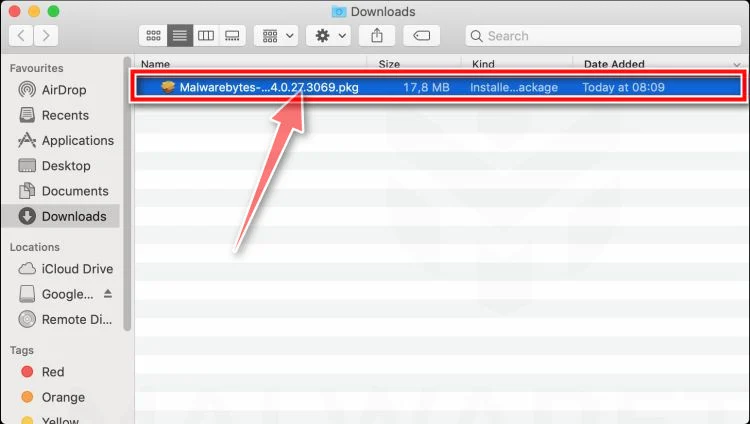
When the download finishes, open your Downloads folder and double-click the setup file to begin the installation.
-
Follow the On-Screen Prompts to Install Malwarebytes
The Malwarebytes for Mac Installer will guide you through a few quick screens. Click “Continue” and keep following the prompts until the installation completes.
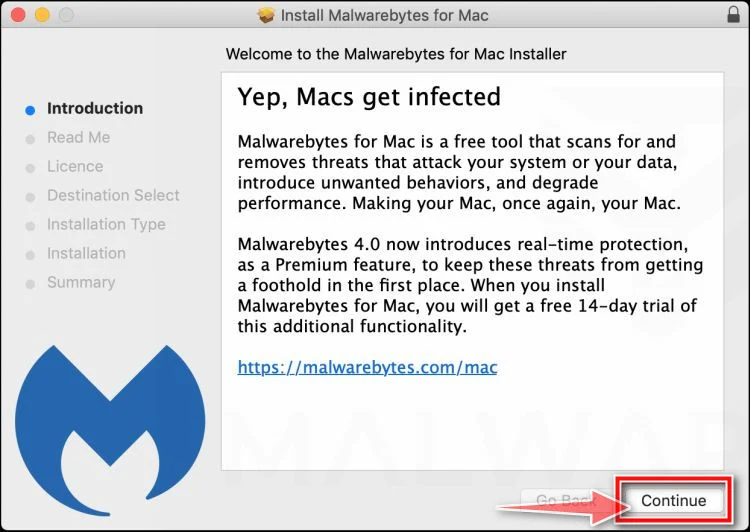
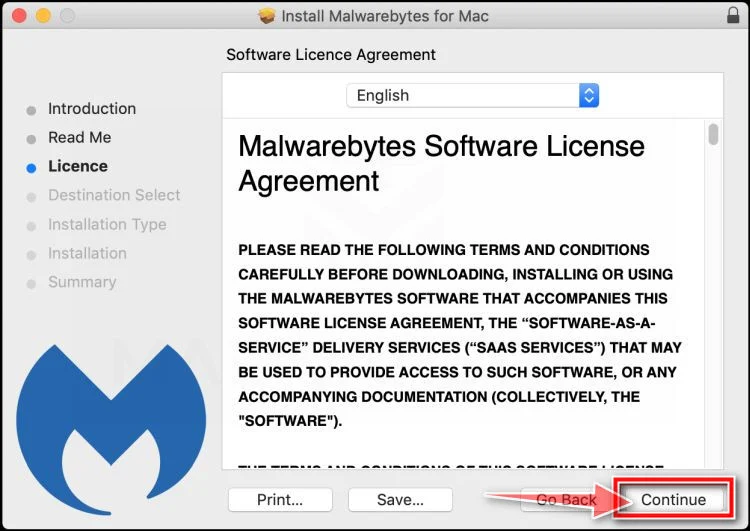
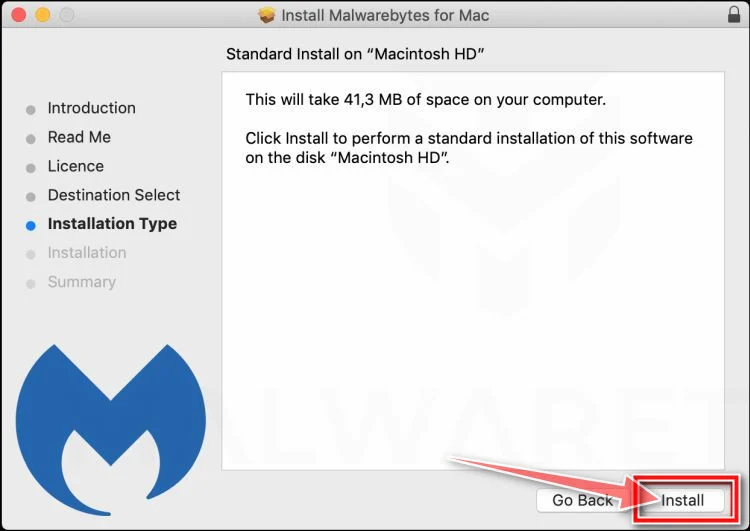
When the installation is complete, Malwarebytes opens to the Welcome to Malwarebytes screen. Click “Get started“.
Malwarebytes needs Full Disk Access to check your whole Mac. When it asks, open System Settings > Privacy & Security > Full Disk Access, turn on Malwarebytes (it may be listed as Malwarebytes Protection), and confirm with your password or Touch ID. Then return to Malwarebytes. On macOS Monterey and earlier, this setting is in System Preferences > Security & Privacy > Privacy.
-
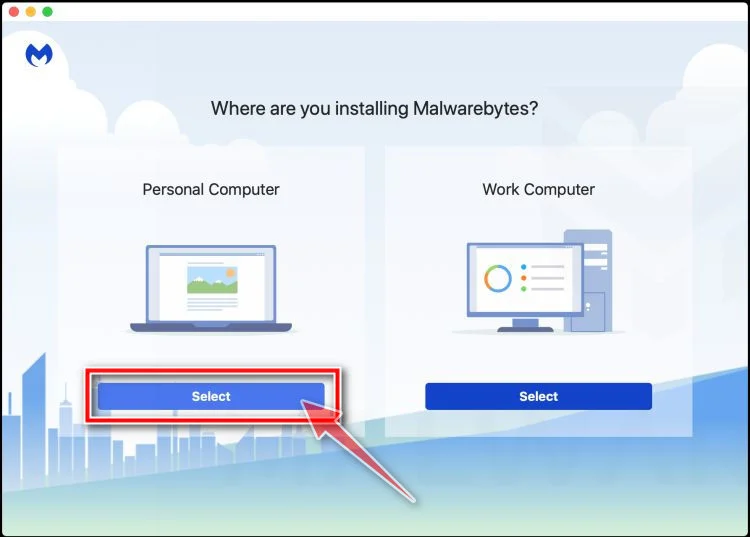
Select “Personal Computer” or “Work Computer”
Malwarebytes will ask what type of computer you’re installing it on. Click either Personal Computer or Work Computer, whichever applies.
-
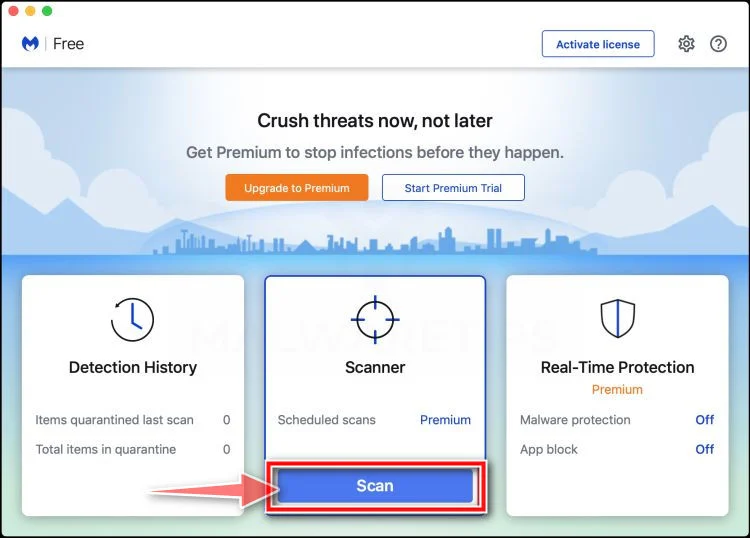
Start the Scan
Click the “Scan” button. Malwarebytes will automatically update its detection database and begin checking your Mac for malware.
-
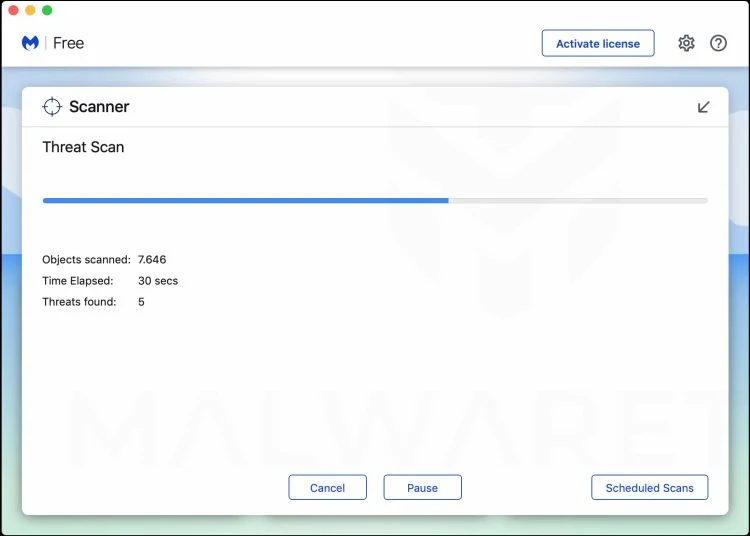
Wait for the Scan to Finish
Malwarebytes will scan your Mac for adware, browser hijackers, and other malicious programs. This can take a few minutes, so feel free to do something else — just check back occasionally to see the progress.
-
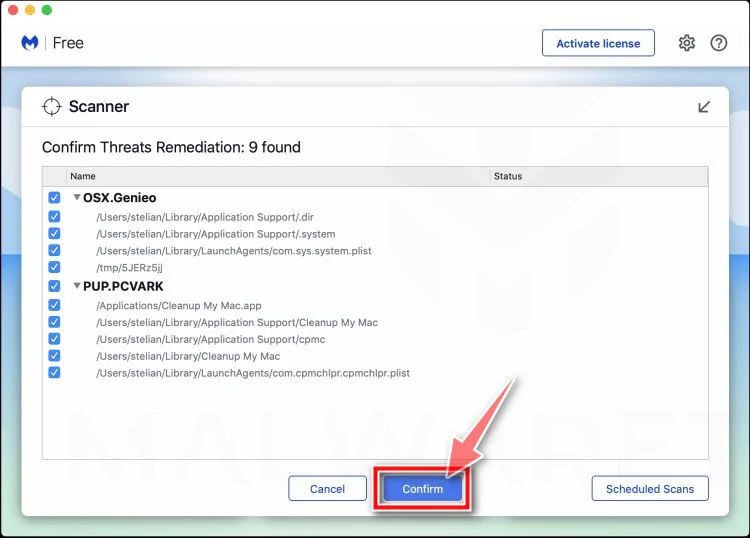
Quarantine the Detected Threats
When the scan is done, you’ll see a list of everything Malwarebytes found. Click the “Quarantine” button to remove all the threats at once.
-
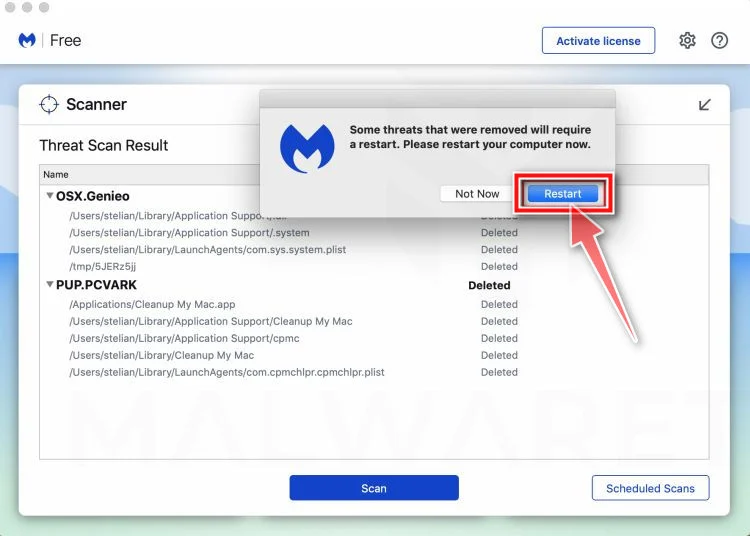
Restart Your Mac
Malwarebytes will now remove all the malicious files it found. Some threats can only be fully removed after a reboot — if Malwarebytes asks you to restart, allow it. Once you’re logged back in, check whether the problems you noticed have stopped. If they come back, save the scan report and ask for help in our forum.
If the problems you noticed continue after the scan, see the options below.
If you are still experiencing problems while trying to remove a malicious program from your computer, please ask for help in our Mac Malware Removal Help & Support forum.
Run a Malware Scan with Malwarebytes for Android
Malwarebytes for Android scans your phone or tablet for malware, adware, and potentially unwanted apps. The free version scans only when you start a scan. Real-time protection, which checks apps automatically, is part of the paid Premium version.
-
Download Malwarebytes for Android.
You can download Malwarebytes for Android by clicking the link below.
Get Malwarebytes for AndroidOpens Google Play in a new tab.Want real-time protection? See Malwarebytes Premium for AndroidMalwarebytes for AndroidScans your phone and removes malware at no cost -
Install Malwarebytes for Android on your phone.
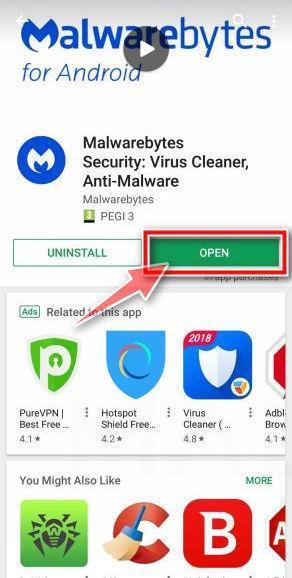
In the Google Play Store, tap “Install” to install Malwarebytes for Android on your device.
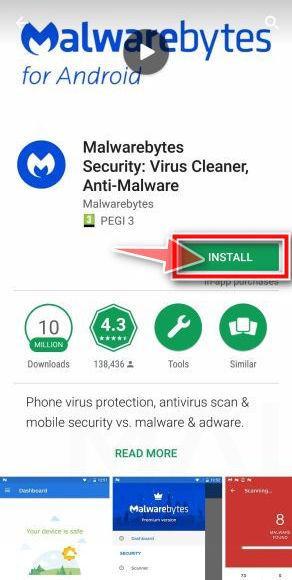
When the installation process has finished, tap “Open” to begin using Malwarebytes for Android. You can also open Malwarebytes by tapping on its icon in your phone menu or home screen.
-
Follow the on-screen prompts to complete the setup process
When Malwarebytes opens, it walks you through a short setup. Tap Get started and follow the prompts. If you see an offer for a trial or a paid plan, read it before you accept. You can skip it and keep using the free scanner.
Malwarebytes will ask for permission to access the files on your phone so it can scan them. Tap Allow, or turn on the permission in the Android screen that opens, then return to Malwarebytes.
-
Run a scan with Malwarebytes for Android
On the main screen, tap Scan now. In some versions, you open the menu, tap Scanner, and then tap Run a scan.
-
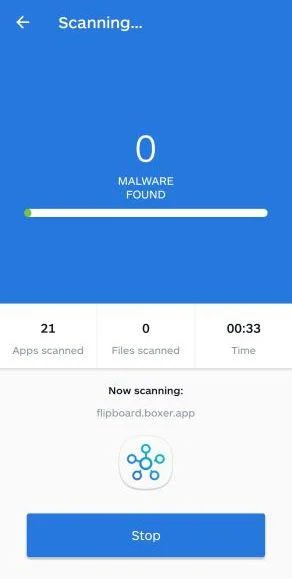
Wait for the Malwarebytes scan to complete.
Malwarebytes will now start scanning your phone for adware and other malicious apps. This process can take a few minutes, so we suggest you do something else and periodically check on the status of the scan to see when it is finished.
-
Remove the detected apps.
When the scan has been completed, you will see a list of the threats that Malwarebytes for Android has detected. Next to each detected item, tap the menu icon (three dots), then choose to uninstall the app or delete the file. Android then asks you to confirm. Tap OK or Uninstall to remove the app.
-
Restart your phone.
When the detected apps are removed, restart your phone if Malwarebytes asks you to. Then check whether the problems you noticed have stopped.
If the problems you noticed continue after the scan, see the options below.
If you are still having problems with your phone after completing these instructions, then please follow one of the steps:
- Ask for help in our Mobile Malware Removal Help & Support forum.
- Only as a last resort, reset your phone to factory settings. Read the warning below first.
- Back up your photos, videos, files, and messages, for example to your Google account or a computer.
- Make sure you know your Google account email and password. The phone asks for them after the reset. If you changed the password recently, Google recommends waiting 24 hours before you reset.
- On a Samsung phone, also make sure you know your Samsung account password.
- If you use an authenticator app for two-step verification, move your accounts to another device or save your backup codes first.
Stay Protected: Block Ads and Malicious Sites
No scan can prove a device is completely clean, so it helps to block threats before they reach you. Most infections start with a malicious ad or a fake download button — so blocking them at the source is your best defense.
We recommend AdGuard, which blocks malicious ads, phishing pages, and dangerous redirects before they can reach you.
👉 Download AdGuard and browse safely
Frequently Asked Questions
Did Maria Shriver endorse a rosemary Alzheimer’s supplement?
No. She publicly stated that the deepfake endorsement and associated Alzheimer’s supplement promotion are false.
Is the Women’s Alzheimer’s Movement involved?
No. Shriver’s statement says the organization she founded at Cleveland Clinic has no connection with the promoted supplement.
Can rosemary cure Alzheimer’s disease?
No credible evidence establishes a household rosemary recipe as an Alzheimer’s cure. Federal health guidance says no known intervention currently cures the disease.
Why does the advertised product name keep changing?
The recipe narrative can feed different affiliate offers. Replacing the bottle helps the promotion continue after one brand attracts scrutiny.
Does receiving capsules mean the advertisement was legitimate?
No. Delivery proves only that a package arrived. It does not validate the endorsement, cure claim, formula, or billing representation.
How can I verify a future celebrity health advertisement?
Check the person’s verified channels, the publisher’s real domain, the claimed study, and the merchant’s complete terms independently.
The Bottom Line
The Maria Shriver Rosemary Alzheimer’s Cure Scam steals credibility from genuine advocacy and turns a comforting household ingredient into a deceptive sales path.
Shriver’s own warning is clear, she and her organization are not associated with the advertised supplement.
Families should preserve hope, but place it in verified medical care and real research, not anonymous deepfakes and rotating pill offers.

Join the discussion
0 commentsShare your experience or ask a question about this article.
Community experiences
Did this happen to you?
Your experience could help someone recognize the same scam. Submit a private report for our team to review.
I experienced this tooReports are reviewed before publication. Sharing publicly is always your choice.
Discussion
Start the conversation
Have a question or something useful to share? Add the first comment.