

A search result or social post promises a Walmart clearance price that seems almost impossible to miss. The page that opens looks like a familiar retailer, right down to the colors, product cards, cart, and checkout button.
The address bar tells a different story. Instead of Walmart’s real domain, the shopper is standing inside a storefront placed under “goxox,” where a bargain can become a direct route to stolen payment details.
Overview
A familiar store name is attached to an unfamiliar domain
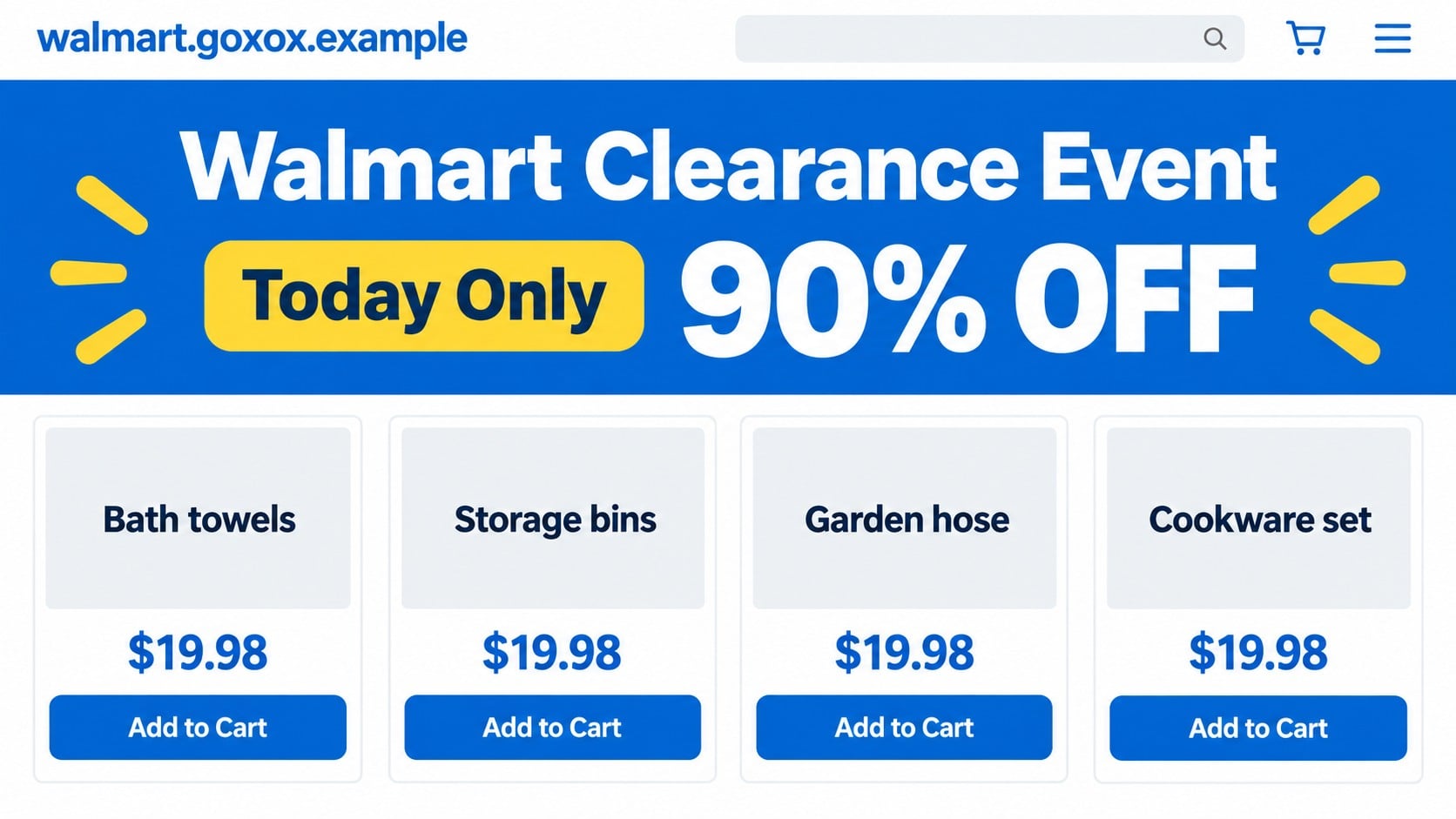
The Walmart Goxox scam refers to a lookalike shopping page reported at walmart.goxox.com. It used Walmart’s name while operating as a subdomain of goxox.com, which is separate from Walmart’s official retail domain.
That distinction is easy to miss on a small screen. Reading from right to left, the controlling domain is “goxox.com.” Placing “walmart” before it does not make the site part of Walmart, just as writing a bank name before an unrelated domain would not make it the bank’s website.
Extreme discounts push shoppers toward checkout
Reported versions advertised desirable products at implausibly low prices. The goal is to make the shopper focus on availability and savings instead of checking who operates the store, where returns go, or whether a real order will be fulfilled.
The page may collect a name, delivery address, telephone number, email address, and complete card details. Even if the final payment fails, the entered information may already have been transmitted.
The reported page is no longer reliably reachable
During our review, the reported subdomain did not resolve. That means its current checkout, operator, inventory, and policies could not be inspected directly. A dead site is not proof that every past transaction had the same outcome, but it prevents normal seller verification and buyer support.
- The address used an unrelated parent domain rather than walmart.com.
- The storefront reportedly paired a trusted name with unusually steep discounts.
- The current site could not be reached during our verification.
- Checkout pages of this type may collect identity and card information.
- Walmart publishes separate guidance about websites and messages impersonating its brand.
Why the Domain Is the Most Important Clue
Web addresses are read by structure, not by whichever brand word appears first. In walmart.goxox.com, “walmart” is a subdomain chosen by whoever controls goxox.com. The same operator could create other brand names before that parent domain.
Scammers count on people scanning from the left. A long address can also be cut off by a mobile browser, social app, or advertisement preview, leaving only the familiar word visible until the page is opened.
HTTPS does not solve this problem. Encryption can protect the connection to an impersonation site while the site itself collects the information. A padlock says nothing about whether Walmart owns the domain.
Walmart’s official fraud guidance tells shoppers to check whether a site has the branding, privacy notice, and overall appearance expected from Walmart. The domain remains the first check because a copied design can be reproduced quickly.
The Checkout Can Be the Real Product
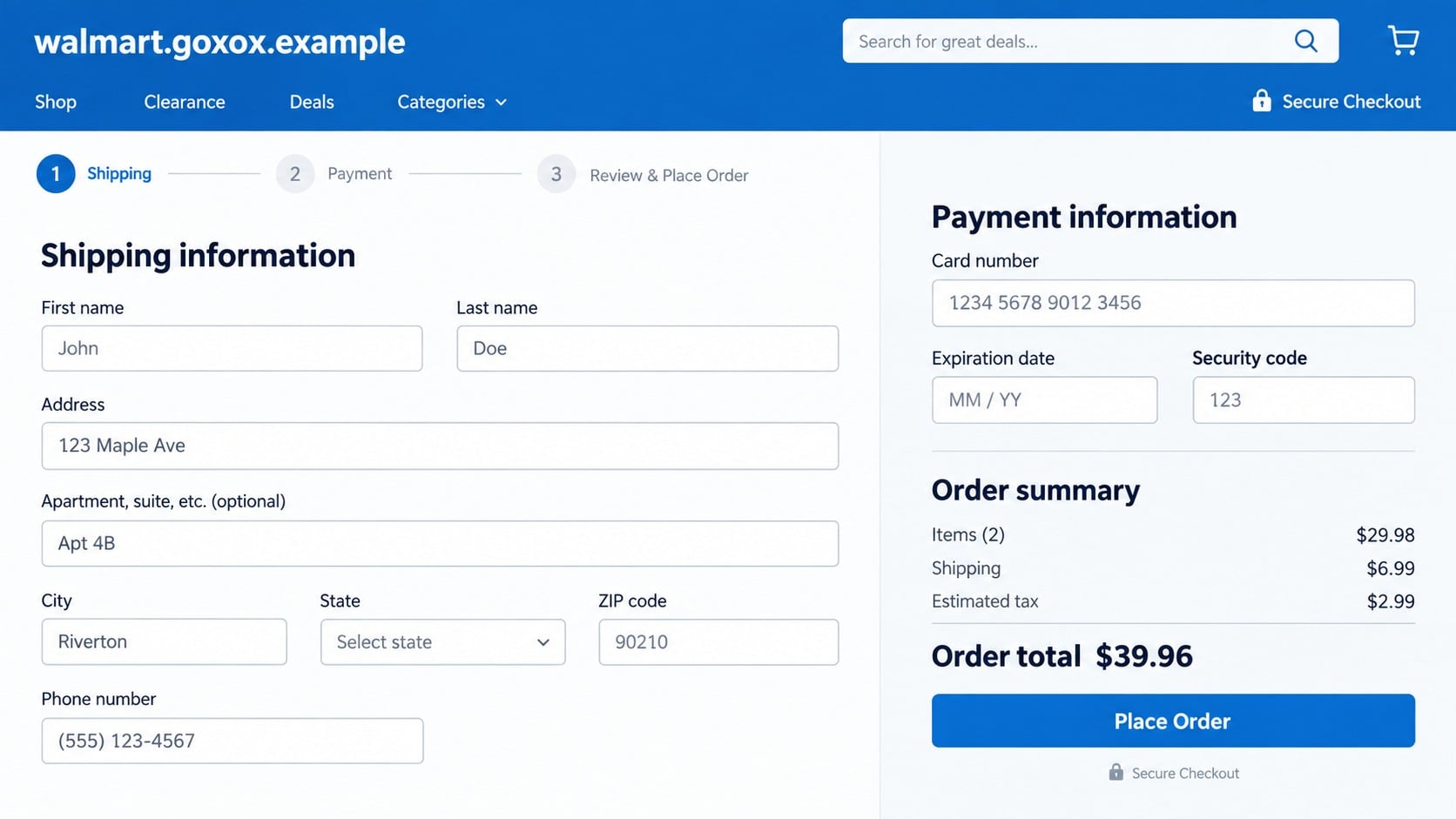
A fake shop does not need to process a successful order to harm a visitor. The form itself can capture the card number, expiration date, security code, billing address, phone number, and email address as soon as the shopper submits it.
Some fraudulent stores then display a payment error and ask for another card. A victim may provide two or three cards while trying to complete the bargain, giving the operator more usable financial data.
Other sites accept payment but provide no meaningful confirmation, send a worthless substitute, or create a tracking number that never reflects a genuine shipment. Without the live site and transaction records, those outcomes cannot be assigned categorically to every Goxox visitor.
The safe conclusion comes from what can be checked: the domain was not Walmart’s, the branding was used to create trust, and the reported subdomain was unavailable when revisited.
Why a Disappearing Store Still Matters
Short-lived shopping sites can vanish before buyers realize that an order is not moving. By the time a promised delivery window passes, the storefront, contact page, and order-status form may all be gone.
Save the advertisement, full web address, checkout page, receipt, and any confirmation message as soon as something feels wrong. Those records can help a card issuer identify the merchant descriptor and understand why the transaction is being disputed.
Do not wait for an unavailable seller to return before protecting the card. A disappearing page cannot explain whether submitted payment data was retained, even when the checkout displayed an error rather than a completed order.
How the Walmart Goxox Scam Works
Step 1: A bargain appears in search or social media
The shopper sees an advertisement, product result, or shared link promising clearance stock. The headline may name Walmart and present a price far below ordinary retail, often with language suggesting a warehouse closure, returned inventory, or one-day event.
The offer is designed for a quick tap. If the price creates excitement before the domain is visible, the fake shop begins with the emotional advantage.
Step 2: The landing page imitates a large retailer
The page borrows a blue retail palette, familiar navigation labels, shopping icons, and a grid of products. Those visual cues encourage the visitor to treat the site as a promotion inside Walmart rather than a separate business.
Product descriptions and photos can be copied from legitimate listings. Accurate product information therefore does not establish that the seller owns inventory or has permission to use the retailer’s identity.
Step 3: Scarcity keeps attention away from verification
Countdown clocks, “only three left” notices, recent-purchase pop-ups, and 90% off banners can create the sense that checking the seller will cost the deal. The pressure is psychological; a genuine retailer does not need the customer to ignore its own domain.
The cart may automatically add shipping insurance, priority processing, or another item. Review every line because the advertised price may not be the amount submitted at checkout.
Step 4: Checkout requests a complete identity profile
The form asks for information that appears normal for delivery: full name, address, phone, and email. It then requests the card number, expiration date, security code, and sometimes the billing ZIP code.
Together, those details can support unauthorized card attempts and targeted phishing. The email and phone number also give criminals channels for fake delivery updates or supposed fraud-department calls.
Step 5: A payment result creates confusion
The victim may see a generic decline, a spinning page, or a confirmation without a verifiable order record. A decline can be intentional, encouraging another card entry while the first card’s data has already been captured.
A confirmation number displayed by the same site is not independent proof of an order. Real verification requires a charge that identifies a merchant, a usable support route, and fulfillment that can be confirmed outside the storefront.
Step 6: Follow-up messages extend the scheme
Once contact details have been collected, messages may claim that shipping requires a small customs charge, address correction, or identity confirmation. Each new request appears connected to the original order and can collect another payment or login.
Victims may also receive calls pretending to be the card issuer. End the call and contact the issuer through its official app or the number printed on the card.
Company, Address, and Fulfillment Checks
The storefront name did not identify the legal seller
Displaying “Walmart” does not identify who owns goxox.com, receives payments, or accepts legal responsibility for orders. A legitimate marketplace seller should provide a business name that can be matched across its terms, receipt, and card statement.
The address could not be verified through the closed page
Because the reported subdomain did not resolve during review, we could not confirm a return address or operating location from the site. Even when an address appears, check whether it belongs to the named merchant instead of a mailbox, residence, or unrelated warehouse.
Support disappears when the domain stops resolving
A store that cannot be reached cannot provide ordinary order lookup, cancellation, return authorization, or privacy requests. Do not rely on telephone numbers from later unsolicited messages, because they may be operated by the same people who collected the order.
Inventory and fulfillment remain unproven
Copied product photos do not establish possession of stock. A verifiable seller should explain shipping times, carrier use, returns, and the legal party fulfilling the order. Those details could not be checked on the unavailable Goxox page.
Red Flags Shoppers Should Check Before Paying
- The retailer name appears before an unrelated parent domain.
- Every desirable item has nearly the same unusually low price.
- The offer claims 80% or 90% off without a verifiable promotion.
- The site lacks a legal company name that matches the payment recipient.
- Policies appear copied, incomplete, or refer to another store.
- The support email uses a free mailbox or unrelated domain.
- The checkout asks for another card after a vague error.
- Order confirmation exists only on the site and cannot be retrieved later.
Walmart maintains an official fraud alerts page describing impersonation and online-shopping scams. Use the official Walmart site or app to verify a promotion instead of trusting a logo copied into an advertisement.
What to Do if You Have Fallen Victim to This Scam
- Freeze the payment card before doing anything else. Use the issuer’s official app or the number printed on the card. Explain that its details were entered on a retailer-impersonation site, ask whether replacement is needed, and review recent pending transactions.
- Dispute any unauthorized payment. Give the issuer the amount, date, merchant descriptor, confirmation screen, and reason you believe the site impersonated Walmart. A chargeback is decided by the issuer, so respond quickly to requests for supporting evidence.
- Save the full evidence. Keep screenshots, the complete URL, advertisement, order page, emails, text messages, transaction descriptor, and any tracking number. Do not revisit a dangerous page merely to collect evidence that you did not already save.
- Change reused passwords. If the checkout made you create an account, replace that password anywhere else it was used. Start with email, shopping, and payment accounts, then enable multi-factor authentication from their official settings.
- Watch for delivery-themed follow-ups. Treat address-correction, customs-fee, and failed-delivery messages as suspicious. The scammer may know your name, address, and supposed order, making the next message sound unusually convincing.
- Protect identity information. If you submitted a birth date, government identifier, or other sensitive data, follow the recovery plan at IdentityTheft.gov and consider a fraud alert or credit freeze with the major credit bureaus.
- Scan the device when needed. If the site downloaded a file, requested a browser extension, or redirected through repeated pop-ups, run a complete Malwarebytes scan. This can find malicious or unwanted software that may persist beyond the browser session.
- Block repeat scam traffic. AdGuard can filter many malicious ads, tracking requests, and known scam destinations. It cannot authenticate a store, so continue checking the parent domain, seller identity, and payment recipient before ordering.
- Report the impersonation. Send the evidence to Walmart’s published abuse channel and report the fraud to the FTC or your national consumer-protection agency. You can also report the advertisement to the platform that displayed it.
- Reject paid recovery promises. A stranger who claims to retrieve the payment or punish the store for an advance fee may be targeting the victim again. Work with the card issuer and established authorities.
Frequently Asked Questions
Is walmart.goxox.com an official Walmart website?
No. In that address, goxox.com is the controlling domain and “walmart” is only a subdomain. Walmart’s official retail site uses walmart.com.
Is the Walmart Goxox site still online?
The reported subdomain did not resolve during our review. Domains can return, redirect, or be replaced, so its absence today does not make a similar future link safe.
What if the site said my card was declined?
Treat the card as exposed. A form can transmit the entered details before showing a decline. Contact the issuer and do not test a second card on the same site.
Does HTTPS prove that the checkout is legitimate?
No. HTTPS protects data in transit to the domain you visited. It does not prove that Walmart owns the domain or that the operator will fulfill an order.
Could the low prices be a real clearance?
Large retailers do run sales, but verify them inside the retailer’s official app or site. A familiar brand name on an unrelated domain is not a valid promotion channel.
Will Walmart refund a payment made to the fake site?
The payment was not made through Walmart’s official checkout. Contact your card issuer about the transaction and report the impersonation to Walmart so its security team can investigate.
The Bottom Line
The Walmart Goxox scam relies on a familiar word at the start of an unfamiliar address. The copied storefront and steep discounts encourage shoppers to overlook who actually controls the checkout.
Read the domain from right to left, verify promotions inside Walmart’s official site, and leave whenever the seller’s legal identity cannot be matched to the receipt and payment recipient.
If you entered card details, contact the issuer even if the page reported a failed payment. The form may have been the part of the store that worked exactly as intended.

Join the discussion
0 commentsShare your experience or ask a question about this article.
Discussion
Start the conversation
Have a question or something useful to share? Add the first comment.