

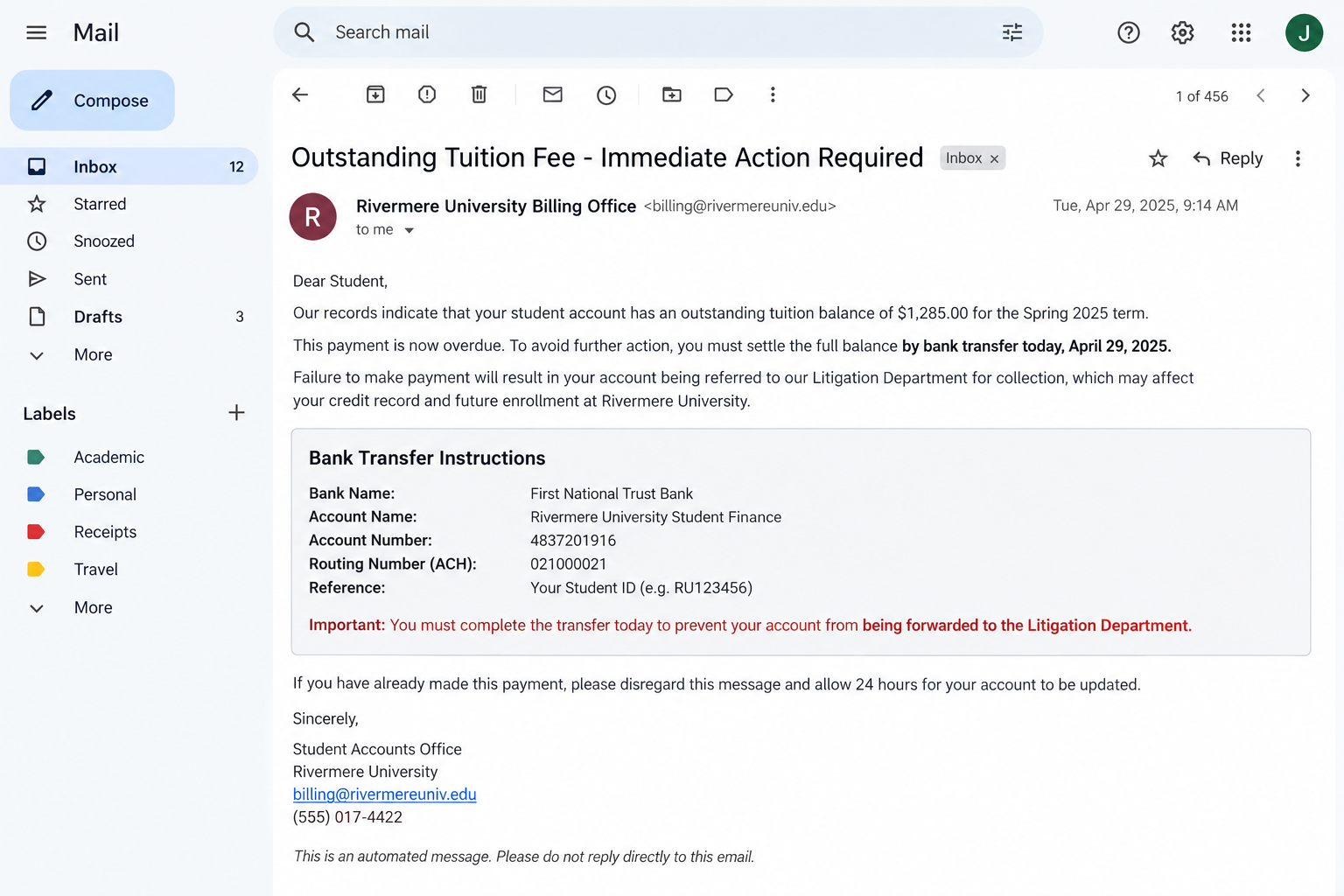
A fake tuition fee email lands in your inbox saying a balance is overdue and your enrollment is at risk. The message looks official, the amount feels plausible, and the deadline is today.
That combination can make a student or parent pay before checking where the money is actually going.
Overview
The email copies a real school billing problem
The fake tuition fee email impersonates a university, college, private school, or training provider. It claims the recipient has an unpaid balance that must be settled immediately to avoid a registration hold, late charge, collection action, or contact from a litigation department.
Tuition bills are large, time-sensitive, and often handled by several people. A student may forward the email to a parent, while a parent may assume the student already confirmed it. Scammers use that gap in communication to make an invented invoice feel routine.
The message may arrive during registration, before exams, or near the start of a term. That timing is deliberate. The recipient is already expecting school-related expenses, so a demand that would look strange in another month can feel believable.
The requested payment bypasses the real student portal
Instead of directing the recipient to the established billing account, the email supplies a bank account, payment link, QR code, or attached invoice. The destination belongs to the scammer or to a money mule, not to the educational institution named in the message.
Some emails come from lookalike domains with one changed letter. Others are sent from student accounts that criminals have taken over. A compromised campus mailbox can pass basic email checks and appear inside a familiar university directory.
The safest question is not whether the email looks professional. It is whether the same balance appears after you open the official student portal independently. If the debt exists only inside the message, do not pay it.
This is a confirmed impersonation scam
The Singapore Police Force warned about a resurgence of emails impersonating educational institutions in March 2026. Authorities reported at least 20 cases and at least $31,000 in losses during that month.
Police said the emails requested urgent payment of school or tuition fees, used compromised student accounts or domains similar to official school addresses, and threatened action by a supposed litigation department. Victims were told to send money directly to a bank account.
Common warning signs include:
- an unexpected balance appears outside the normal student portal;
- payment is demanded by bank transfer, QR code, or a new external link;
- the sender threatens enrollment problems or legal action within hours;
- the reply-to address differs from the visible sender;
- the domain contains an added word, missing letter, or unusual ending;
- the bank account belongs to a person or an unfamiliar company;
- the message tells you not to contact the bursar or finance office;
- the amount does not match the statement in your official account.
Why the Story Feels So Convincing
A convincing tuition scam rarely begins with an absurd promise. It begins with a familiar obligation. Students know that an unpaid balance can affect registration, housing, transcripts, or access to classes, even when the exact rules differ by institution.
The criminal adds just enough detail to activate that concern. The email may name a term, quote a student number, copy a billing signature, or mention a real department. None of those details proves that the sender controls the school account receiving the payment.
Public information supplies much of the personalization. Academic calendars, tuition schedules, department names, staff directories, and school branding are available online. Social posts can reveal where a student studies and whether registration is approaching.
A breached database or compromised mailbox can provide more. Once a criminal reads old conversations, the next message can imitate the tone of a real finance employee and refer to an earlier invoice. That is why grammar is a weak test.
Parents are especially vulnerable when the email creates urgency and the student is unavailable. A message sent during class may tell the parent that a payment must clear before a deadline. The parent pays to solve the problem, then asks the student afterward.
International students may be targeted with threats involving visas, enrollment confirmation, or removal from a course. The scammer counts on the recipient being unfamiliar with local payment procedures and afraid that a delay could have consequences beyond the bill.
A real institution may send reminders, but it should also maintain a stable billing system and verifiable contact channels. Close the message and navigate to the portal from a saved bookmark or the school’s public website. That simple break in the path defeats most versions of this scam.
How the Fake Tuition Fee Email Scam Works
Step 1: Scammers choose a busy academic deadline
The campaign is timed for a period when many recipients expect invoices or account notices. One mass email can reach students at several institutions, while smaller campaigns may copy the name and branding of a specific school.
The subject line often says “outstanding fee,” “final notice,” “registration hold,” or “payment required.” It is designed to look important in a crowded inbox without revealing enough detail for the recipient to verify it at a glance.
Step 2: The sender borrows a trusted identity
The display name may say Student Accounts, Bursar Office, Finance Department, or Tuition Services. A logo and formal signature make the message look administrative rather than promotional.
Lookalike domains can be difficult to notice on a small screen. In other cases, criminals take over a real student mailbox and use it to send the demand. The account is genuine, but the person controlling it is not.
Step 3: A threat removes time for verification
The email warns that the balance must be paid today. Possible consequences include a late charge, disabled portal access, cancelled enrollment, withheld results, collections, or referral to a supposed legal department.
Pressure is the mechanism, not proof. A legitimate balance does not become unverifiable because a deadline is close. The finance office can confirm the amount and explain the accepted payment route.
Step 4: The message introduces a new payment route
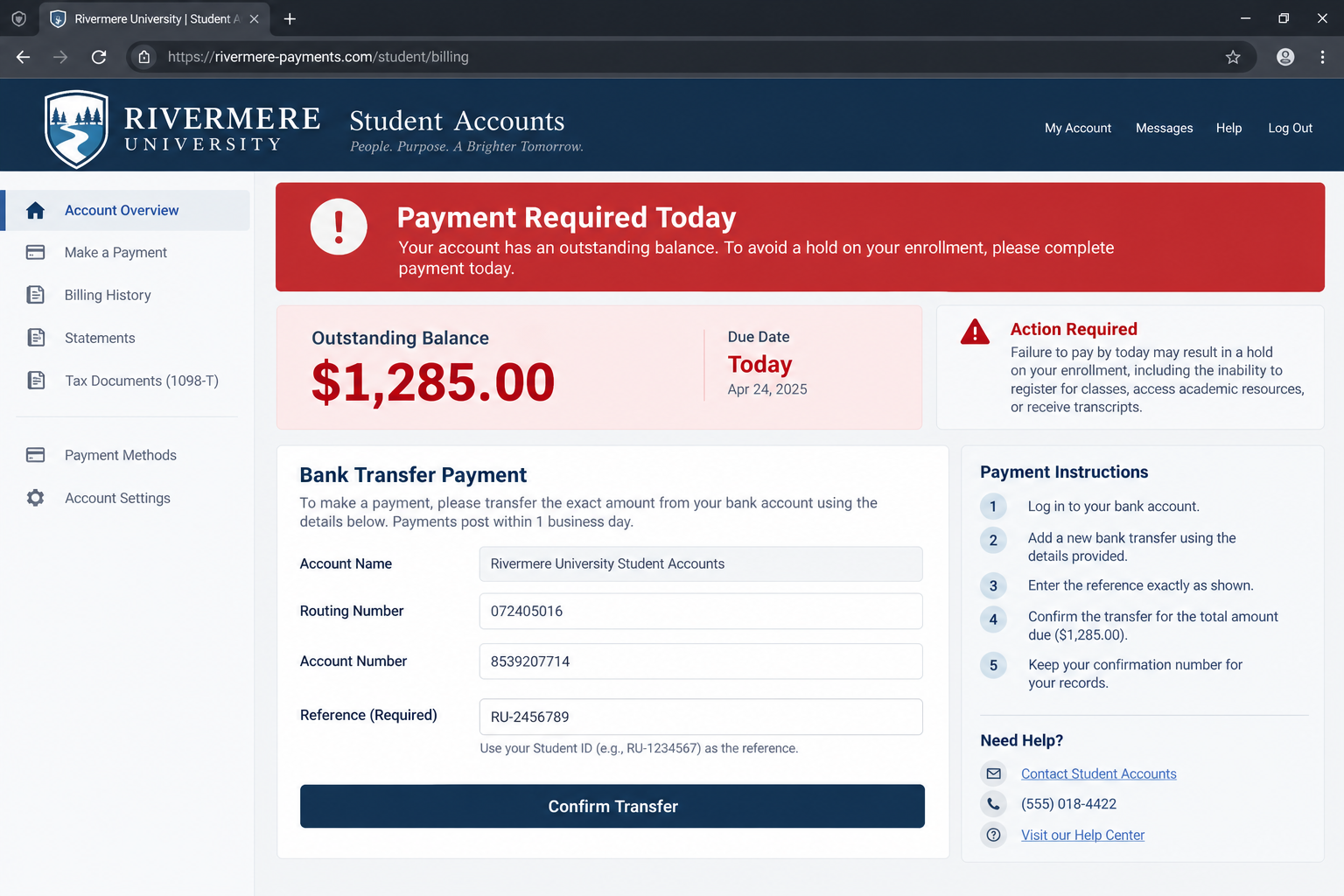
The recipient is told to send a bank transfer to details printed in the email or attachment. Another version opens a copied billing page that requests a card, bank login, or one-time code.
A new route is the crucial change. Even if the school accepts transfers, the account should be checked against instructions reached independently. Never confirm bank details by replying to the sender who supplied them.
Step 5: The payment goes to a mule account
The receiving account may have a plausible business name or may belong to an individual who was recruited to move funds. After the transfer arrives, the money can be sent onward, withdrawn, or converted before the victim discovers the mismatch.
A confirmation from the recipient’s bank proves only that the transfer was processed. It does not prove that the school received or credited it.
Step 6: A fake receipt delays the alarm
The scammer may send a polished receipt, mark the fictional balance as paid, or promise that the portal will update within 24 hours. That waiting period gives the criminals time to move the funds.
If the recipient questions the delay, the scammer may invent a second fee for verification, tax, or account release. Paying again does not unlock the first transfer.
Step 7: Stolen details fuel the next attack
A phishing version can collect portal credentials, email passwords, student numbers, addresses, and financial details. Those records support account takeover, identity fraud, or a more convincing follow-up call.
The next caller may claim to be from the school, bank, police, or a recovery service. Treat anyone who knows about the incident but requests another payment as a new threat until independently verified.
What the Official Warning Tells Students and Parents
The official warning matters because it describes a repeatable criminal campaign, not a dispute with a real school. Multiple victims received similar requests, transferred money, and discovered the deception only after checking with their institutions or seeing an anti-scam alert.
Authorities specifically advised people to be cautious when school fees are requested through direct payment, immediate bank transfers, or links outside official student portals. That guidance gives families a practical rule that works even when the email design changes.
If a payment is real, the institution should be able to confirm it through a telephone number or portal you locate yourself. The recipient does not need to rely on the reply address, link, or telephone number printed in the demand.
The compromised-student-account variant deserves extra attention. An email from an address ending in the correct school domain can still be malicious. The content, payment destination, and independent account record all need to agree.
Students should also protect their campus email because it can become a launch point against classmates. Reused passwords, fake document-sharing pages, and unexpected multifactor prompts are common paths into educational accounts.
Company, Address, and Fulfillment Checks
The institution should recognize the balance
Open the normal student billing portal without using the email. Compare the exact amount, term, due date, and invoice number. A balance visible only in an attachment or external form is not verified.
Call the finance or bursar office using the number on the official school website. Ask whether the department sent the notice and whether its payment instructions recently changed.
The domain must belong to the real school
Expand the complete sender and reply-to addresses. Check for inserted words, swapped letters, extra hyphens, and endings that the school does not use. A familiar display name can hide an unrelated mailbox.
Do the same with the payment page. HTTPS protects the connection to that domain; it does not establish that the domain belongs to the institution.
The bank beneficiary must match official records
Compare the beneficiary name and account details with a prior verified payment or instructions inside the trusted portal. Do not accept a change simply because the email says the school opened a new account.
If the beneficiary is an individual, unrelated processor, or unfamiliar overseas entity, stop. The bank may be able to check whether the destination matches the stated educational institution.
The payment should produce a real account record
A legitimate payment should appear in the official billing history and generate a receipt tied to the student’s account. A PDF created by the sender is not fulfillment.
When a school uses an outside payment provider, start from the school’s site and follow its approved link. Search advertisements and emailed buttons can lead to copycat pages.
What to Do if You Have Fallen Victim to This Scam
- Call the bank immediately. Ask the fraud team to recall or freeze the transfer. Give them the receiving account, amount, time, reference, and the fact that it resulted from impersonation.
- Contact the school through an independent channel. Confirm the genuine balance and report the copied department, domain, payment details, and compromised campus account if one was used.
- Do not send a second payment. A verification charge, release fee, refund deposit, or legal settlement is another attempt to take money.
- Preserve the evidence. Save the complete email headers, attachment, URL, screenshots, bank receipt, telephone numbers, and every reply. Do not edit the originals.
- Change exposed passwords. Start with email, then secure the student portal and any account that reused the same password. Sign out unknown sessions.
- Review email security. Remove unfamiliar forwarding rules, recovery addresses, application passwords, and connected apps. Enable strong multifactor authentication.
- Secure financial accounts. Replace a disclosed card, change online banking credentials from a trusted device, and review new payees, transfers, and alerts.
- Report the fraud. US victims can use ReportFraud.ftc.gov and IC3.gov. Also report to local police and the institution’s security team.
- Warn the mailbox owner. If the message came from another student, contact that person through a different channel so the school can contain the takeover.
- Check the device if anything was installed. Run a Malwarebytes scan after a download or remote-access prompt. AdGuard can help block known phishing and malicious advertising, but account recovery still must be completed directly.
- Monitor for identity misuse. Watch credit files, mobile accounts, school records, and financial statements if personal documents or identity numbers were entered.
- Reject recovery offers. Scammers may pose as investigators or refund agents. Banks and authorities do not require another transfer to investigate the first one.
Frequently Asked Questions
Can a real school send an urgent tuition reminder?
Yes. The safe response is to check the balance in the independently opened student portal and contact the finance office using published details. Do not let urgency turn an emailed payment route into proof.
Is an email from a school address automatically safe?
No. Criminals can compromise student or staff accounts. Verify the payment destination and the balance even when the domain is genuine.
What if the amount matches my real tuition?
A matching amount may come from an earlier invoice, compromised mailbox, or public fee schedule. Pay only through the route confirmed inside the real portal.
Can my bank reverse the transfer?
It may be possible if you act quickly, but recovery is not guaranteed. Call the bank’s fraud team immediately and request a recall or freeze.
What if I clicked but did not pay?
If you entered credentials, change them and secure the account. If a file was downloaded, scan the device. Preserve the URL and report it to the school.
Should I reply and ask whether the email is real?
No. A scammer will confirm the scammer’s own story. Start a new call or message using contact information from the official school website.
The Bottom Line
The fake tuition fee email succeeds by turning a normal school obligation into a private emergency. The invoice, threat, and deadline can all look convincing while the only important change is hidden in the payment destination.
Never settle an unexpected school balance through the path supplied by the warning. Check the official portal, call the finance office independently, and compare the beneficiary details. If money or credentials were sent, contact the bank and school immediately, then secure every affected account.

Join the discussion
0 commentsShare your experience or ask a question about this article.
Discussion
Start the conversation
Have a question or something useful to share? Add the first comment.