

A recruiter offers a remote developer role with the right salary, the right technology stack, and a short coding exercise. The repository opens normally, and the interviewer says a quick fix will get the project running.
The fake job interview scam does not need to ask for a fee. In the WaterPlum campaign, the assignment itself can be the path into a developer’s computer, browser, and cryptocurrency wallet.
Overview
A job opportunity is used to deliver malicious code
On September 18, 2026, an international group of security and law enforcement agencies published an alert about the North Korean WaterPlum group, commonly referred to as Contagious Interview.
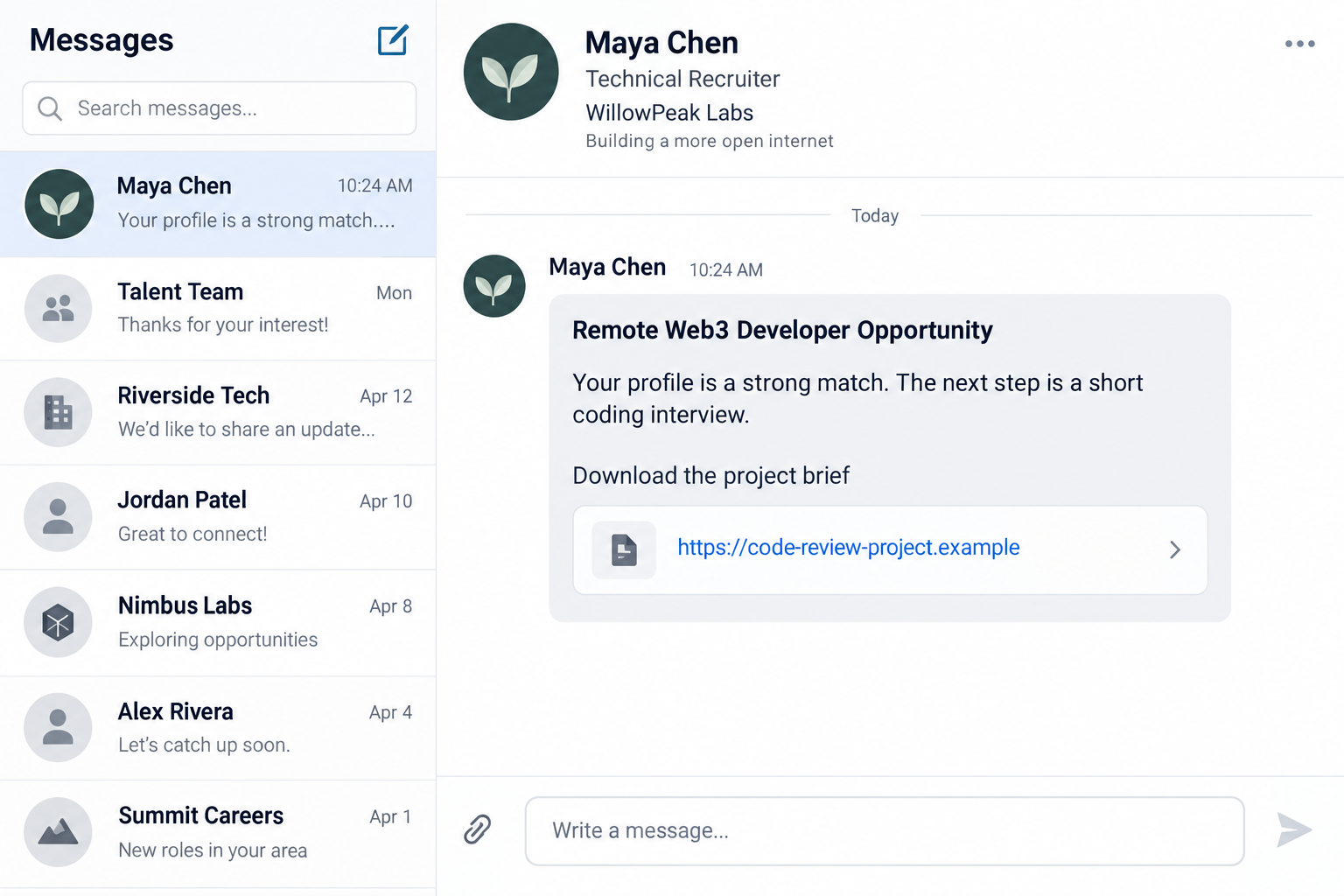
The joint WaterPlum advisory says the actors pose as prospective employers and target software developers, web freelancers, and other IT professionals with attractive opportunities.
During a technical interview or coding assignment, the target is instructed to download and execute files from collaboration platforms or code repositories. The project may also be presented as a fix for a video-conferencing error.
The campaign is confirmed at international scale
The agencies say WaterPlum exploited at least 30,000 devices in more than 100 countries between about December 2025 and July 2026. They report funds or account credentials taken from more than 7,000 cryptocurrency wallets.
The advisory attributes at least 1.7 billion Japanese yen, equivalent to about $10.71 million, in stolen cryptocurrency to activity on behalf of North Korea. Those figures describe the investigated period, not an estimate for every fake interview online.
The warning is therefore much stronger than a single applicant’s complaint. It documents a coordinated cyber campaign, named malware families, targeting methods, and mitigation steps from the FBI, Japan’s National Police Agency, and partner agencies.
Not every unusual interview belongs to WaterPlum
A delayed video call, take-home test, NPM package, or recruiter message is not proof of North Korean involvement. Legitimate employers also use code repositories and technical exercises.
The warning is about a particular combination: an unverified recruiter, an unfamiliar project, pressure to execute code, and behavior that exposes a real workstation or wallet.
- The recruiter approaches through social media, a job platform, gig site, or freelance marketplace.
- The company identity or job cannot be confirmed independently.
- The interview requires downloading and running a project.
- You are told to fix an error by executing supplied commands.
- The device also contains browser credentials, source code, or cryptocurrency data.
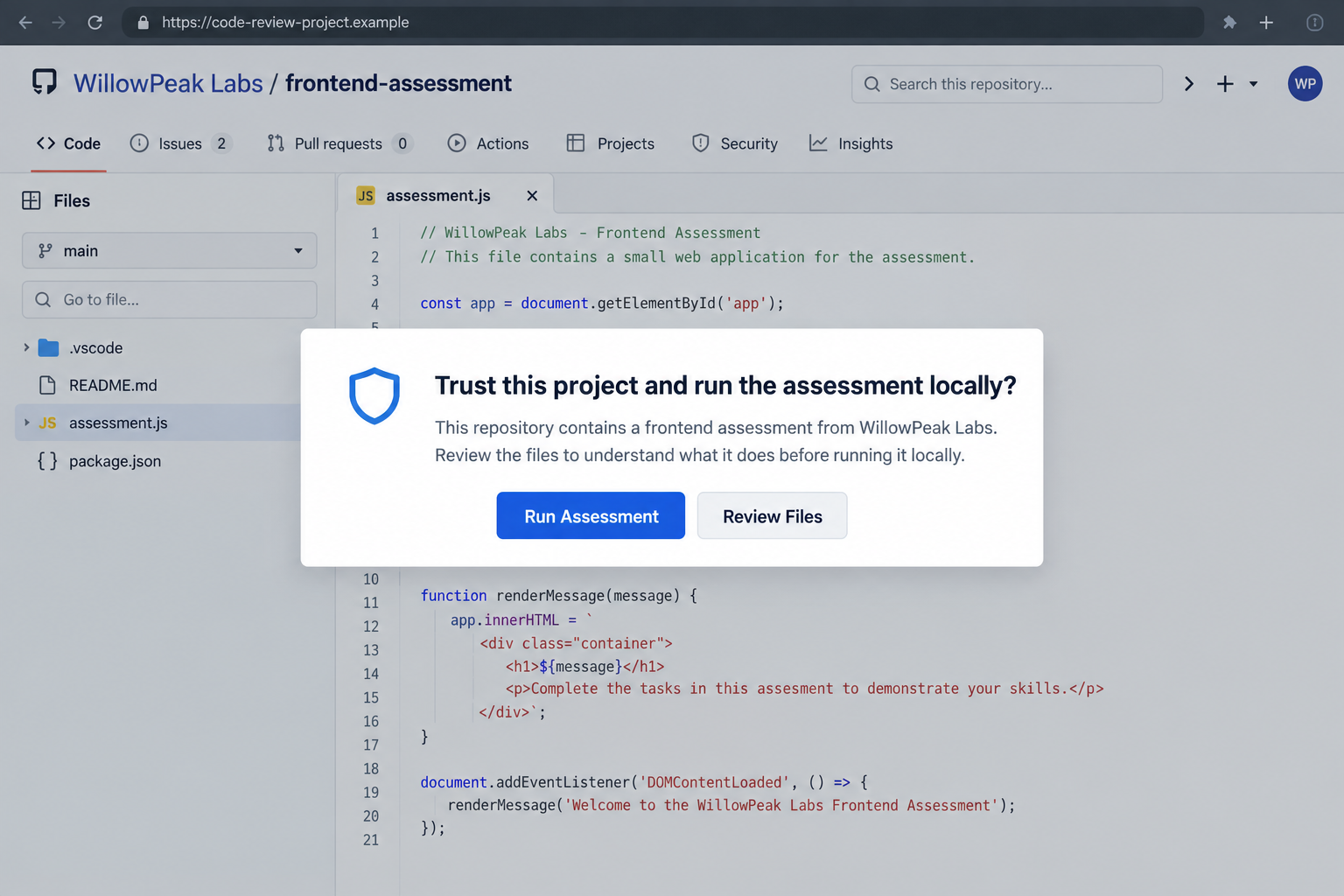
Our screenshots are non-functional reconstructions. The recruiter, company, domain, repository, and file names are fictional and do not reproduce malicious code.
Why Developers Are Especially Exposed
Software developers are accustomed to running packages, cloning repositories, opening projects, and troubleshooting build errors. Those are normal work activities, which makes a technical assignment a credible delivery mechanism.
A developer’s machine may also contain more than a personal inbox. Browser sessions, source repositories, client credentials, cloud access, API tokens, identification documents, and cryptocurrency wallets can all be valuable.
The advisory says WaterPlum targets browser authentication data, clipboard contents, keystrokes, screenshots, wallet private keys or seed phrases, and other files of interest. It also warns about harm to employers and clients after a personal workstation is compromised.
A polished repository is not automatically trustworthy. Code can look like a real application while a package, task configuration, install script, or obfuscated component performs an unrelated action.
Time pressure makes that setup more effective. A candidate who wants to appear responsive may run the project before reviewing its dependencies, workspace settings, scripts, or network behavior. A supposed interviewer can explain every warning as a routine setup issue and remain available to coach the next click.
Separating interview work from a daily workstation reduces the risk. A disposable environment with no saved credentials, wallets, private keys, client data, or corporate access limits what an unknown project can reach if the interview is malicious.
That is why the deciding question is not whether the sample app works. Ask whether the recruiter is verified and whether the code has been reviewed and isolated before anything executes.
The Malicious Project Can Hide in Familiar Developer Tools
The joint advisory names malicious NPM packages carrying BeaverTail, InvisibleFerret, OtterCookie, OtterCandy, or StoatWaffle malware and related variants.
Those names refer to observed malware families, not every coding test. Do not label a harmless dependency as one of them without analysis.
The alert also discusses malicious Visual Studio Code projects. A configuration file such as .vscode/tasks.json can be abused to trigger code when a folder is opened and trusted.
The danger is not limited to one programming language or one visible file. Package managers, build tools, editor tasks, post-install hooks, and copied troubleshooting commands can all create an execution path. Review the complete project behavior rather than checking only the file the recruiter mentions.
A known repository host is not a safety guarantee. User-controlled projects can appear professional, contain ordinary source files, and still load a malicious dependency or contact attacker infrastructure after execution.
Before running anything, inspect package scripts, lock files, dependencies, editor configuration, and outbound requests. Do that without granting the project access to production credentials or a workstation already signed in to sensitive services.
If the interviewer refuses a code review, insists that the test must run on your normal computer, or sends a custom fix when the project fails, pause the process. A legitimate employer can explain the assessment and accommodate reasonable security precautions.
Developers should also tell their employer or client before using a managed computer for an outside interview. A personal hiring conversation can become an organizational incident when the device contains work tokens or reaches an internal network.
A recruiter may frame execution as necessary to view the assignment, reproduce a bug, or repair a video-call problem. The second reconstruction shows a fictional repository with a request to trust and run the project. It contains no functioning payload or real command.
How the Fake Job Interview Scam Works
Step 1: A recruiter presents an attractive technical role
The approach can arrive through social media, online job platforms, gig-work sites, or freelance marketplaces. The role may concern AI, cryptocurrency, NFTs, Web3, or another field that regularly hires remote developers.
The recruiter can impersonate a legitimate company or use a new company identity that appears plausible. A real company name does not prove the person represents it.
Check whether the job exists on the employer’s own site and contact the employer through a separate route before opening interview files.
Step 2: The hiring process moves to a technical assignment
The target is asked to join a virtual interview, review a project, or complete a coding task. This feels more credible than an immediate request for money or identity documents.
The advisory says actors have instructed targets to download files from developer collaboration platforms and code repositories. A reputable hosting service can contain malicious user-controlled content.
Do not treat the hosting platform’s domain as an endorsement of the project. The relevant trust decision concerns the project owner and what the code does.
Step 3: A problem creates a reason to run the supplied fix
The assignment may not work immediately, or the interviewer may claim a conferencing error must be repaired. The target receives instructions that make execution sound like routine troubleshooting.
Do not copy and run a command you do not understand. Be especially cautious of encoded, hidden, or download-and-execute instructions, and of projects that demand broad permissions.
The safest review happens in an isolated environment with no personal sessions, wallets, client data, or access to the corporate network.
Step 4: Malware establishes access and steals information
The advisory says malicious loaders can establish a backdoor, while remote-access trojans maintain connectivity and information stealers send sensitive data to command-and-control infrastructure.
The victim may not see a dramatic crash. A project can appear to fail or run while a separate process collects browser data, wallet information, screenshots, clipboard contents, or files.
A successful antivirus alert is useful, but absence of an alert does not prove unfamiliar code was safe. Stop using the device when compromise is suspected.
Step 5: Access can reach wallets, clients, and employers
The immediate target may be an individual developer, but stolen credentials can expose client repositories, employer systems, cloud services, and cryptocurrency assets.
The advisory warns that successful infections can enable espionage, intellectual property theft, lateral movement, identity misuse, and extortion.
Notify the organization whose access may be present on the device. A quiet personal cleanup is not enough when corporate tokens or client files could have been copied.
Company and Recruiter Checks Before Running Code
The company name is not the recruiter’s identity
Compare the sender’s address, profile history, job listing, and interview invitation with the employer’s official careers page. A copied logo or employee name can support impersonation.
Contact the company through a published route and ask whether the recruiter, role, and repository are authorized.
The repository address does not prove ownership
A project hosted on a familiar developer platform is still controlled by the account that uploaded it. Review the owner, account age, commit history, dependencies, and code before execution.
A short-lived repository with copied documentation and an urgent run instruction deserves extra caution. Do not rely on stars or comments that could be manufactured.
Technical support should not require blind execution
A legitimate interviewer should be able to explain the assignment and accommodate a safe review process. Pressure to disable security, trust an unknown project, or run encoded commands is not a normal test requirement.
Ask for a written description, expected outputs, and a contact at the employer. Refusing an unsafe instruction is reasonable professional behavior.
The code path must be traceable
Identify every dependency, install script, task configuration, binary, and download location. Verify package names carefully because a near-match can be a different package.
Use a disposable sandbox or virtual machine when authorized and appropriate. Never test unknown interview code on a machine that holds production access, client secrets, or a cryptocurrency wallet.
What to Do if You Have Fallen Victim to This Scam
-
Disconnect the affected device. Remove it from wired, wireless, and corporate networks to interrupt additional communication. Do not continue opening files to discover what happened.
If this is an employer-managed device, contact the security team immediately and follow its evidence-preservation instructions before wiping anything.
-
Assume exposed data may already have left. List the accounts, repositories, wallets, browser sessions, and files accessible from the device. Do not limit the review to the fake recruiter account.
Tell affected clients or employers through the appropriate incident channel. Early token revocation can matter more than avoiding an uncomfortable conversation.
-
Revoke sessions and credentials from a clean device. Rotate passwords, API keys, SSH keys, cloud tokens, repository credentials, and recovery options according to organizational procedures.
A password change alone may not terminate every token or malicious application. Review sessions and integrations explicitly.
-
Protect cryptocurrency on a separate clean device. The advisory recommends creating a new wallet on a separate device, moving assets, and storing the new seed phrase offline when wallet information may be compromised.
Never type the old seed phrase into a website that offers to check or recover the wallet. Recovery scammers actively target people after crypto theft.
-
Investigate and rebuild appropriately. Malwarebytes can help scan a supported personal device for known malicious software, but a sophisticated backdoor may require professional analysis and a full operating-system reset.
AdGuard can block some malicious domains and ads during ordinary browsing, but it cannot make untrusted source code safe. Preserve needed evidence, back up essential non-executable data, and rebuild under expert guidance.
-
Report the recruiter, repository, and incident. Save messages, profile URLs, repository addresses, file hashes, commands, wallet transactions, and security alerts. Report to the platform and the FBI’s IC3 or the relevant national cyber authority.
Do not contact the actor or warn them before your security team preserves evidence. The campaign is an active international threat, not a hiring disagreement to resolve privately.
Frequently Asked Questions
Is WaterPlum the same as Contagious Interview?
The September 2026 joint advisory calls the North Korean group WaterPlum and notes that it is commonly referred to as Contagious Interview.
Does every fake developer job come from WaterPlum?
No. Many unrelated employment scams exist. Attribution requires evidence. Apply the safety checks to the behavior without claiming a particular actor from one message.
Can an NPM package or VS Code project really infect a computer?
Yes. The advisory documents malicious NPM packages and project configurations used to execute loaders, steal information, and maintain remote access.
Is a repository safe because it is on a known platform?
No. A legitimate hosting platform can contain user-uploaded malicious code. Verify the owner and review the project in isolation before execution.
Should I only change my password after running the project?
No. Review and revoke sessions, tokens, keys, connected applications, and wallet access. Use a clean device, and involve the employer or client security team when their data was accessible.
What if the coding test ran without an antivirus alert?
That does not prove it was harmless. If the recruiter or project matches the warning signs, disconnect, preserve evidence, and have the device and exposed accounts assessed.
The Bottom Line
The fake job interview scam succeeds because running code feels normal to a developer. WaterPlum turns that professional habit into access to the device, credentials, wallets, and sometimes an employer’s network.
Verify the recruiter before touching the repository. Review unknown code in isolation, and if you already ran it, disconnect the device and treat the incident as a real security compromise.








