

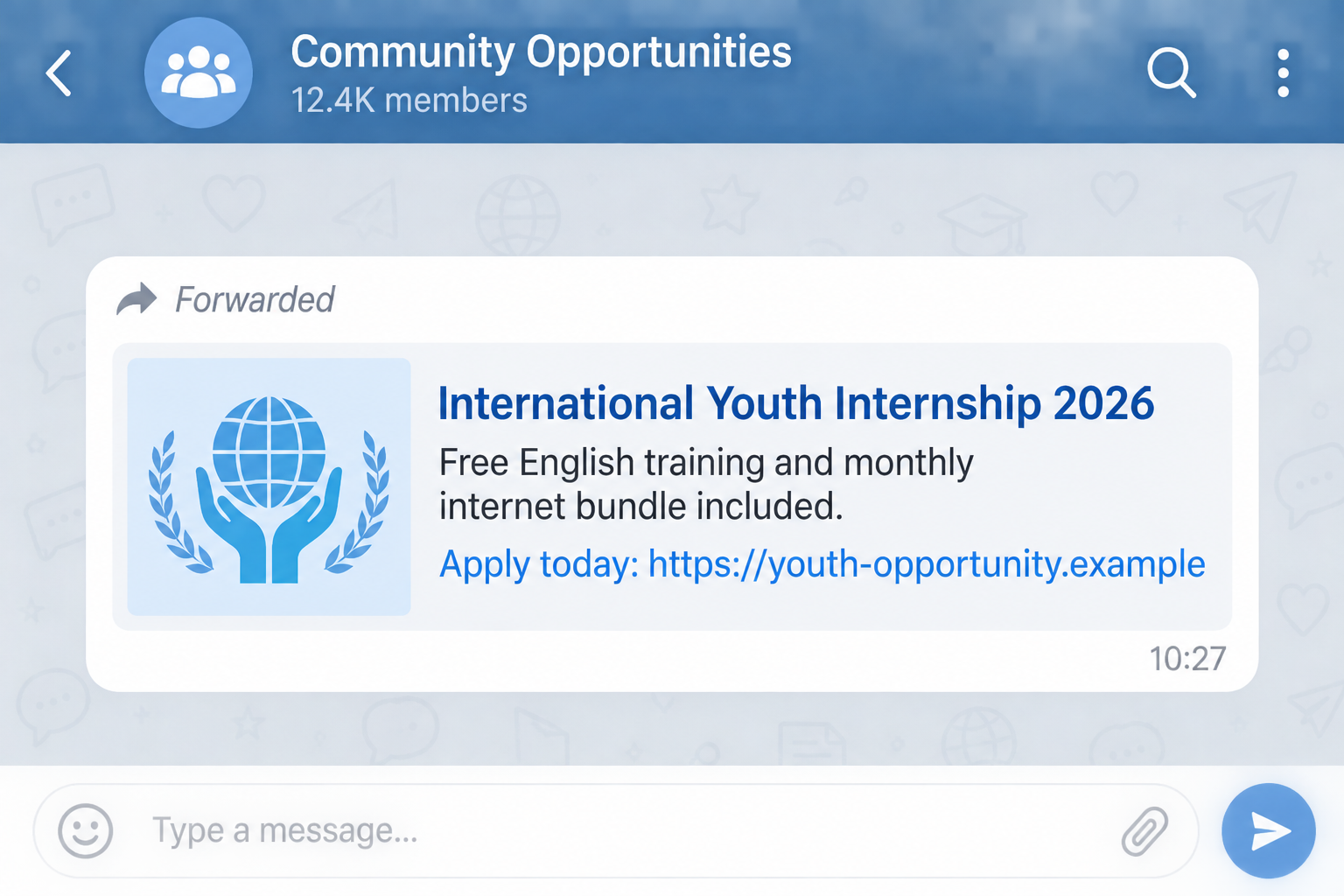
A message in a community chat offers an international internship, free English lessons, and a monthly internet bundle. It looks generous, urgent, and unusually easy to join.
That combination is now part of the confirmed UNICEF internship scam. UNICEF has warned that unauthorized posts and messages are using its name to draw people into fake opportunities.
Overview
The offer borrows trust from a real organization
The UNICEF internship scam does not need to invent a convincing institution. It borrows the name of one that students, job seekers, parents, and aid workers already recognize. A familiar name can make an unexpected message feel safer than it is.
In a September 2026 alert, UNICEF Afghanistan said fraudulent social media posts and messages were circulating through WhatsApp groups and other digital platforms. The posts promoted supposed internships and English-language programs, sometimes adding free internet bundles or other incentives.
The application leads away from official channels
The message may look like a forwarded opportunity rather than an obvious advertisement. It can arrive from a friend, a school group, or a community contact who believed it was real. That social handoff gives the offer credibility even when the original sender is unknown.
The important question is not who forwarded it. It is where the link goes, who controls the form, and whether the same opportunity appears on UNICEF’s official careers or country channels.
The real goal may change after you respond
One version may seek identity documents and personal details. Another may introduce an application, registration, verification, or processing payment. The pitch can also be used to build a list of responsive targets for later account theft or payment fraud.
UNICEF’s warning is clear: the circulating posts and messages are not authorized or endorsed. It advises people not to share personal data or documents, make payments, or send money in response.
- The opportunity arrives through a group message, social post, or forwarded link.
- It uses UNICEF’s name while sending applicants to an unofficial page or contact.
- It combines a desirable internship with training, data, or another incentive.
- It asks people to act before they independently verify the vacancy.
- It may request personal information, documents, money, or continued contact.
Why This Offer Reaches So Many People
A fake internship can travel farther than a conventional phishing email. People voluntarily repost opportunities in university chats, employment groups, family networks, and local community pages. Each forward gives the original claim another layer of borrowed trust.
The offer is also designed for a broad audience. An internship appeals to people seeking experience. English training appeals to students and workers. A monthly internet bundle can be especially persuasive where mobile data is expensive or access is limited.
None of those benefits proves that the person sharing the post intended harm. A well-meaning friend may be another recipient. Verification has to start with the organization being impersonated, not with the familiarity of the person who pressed Forward.
What the Official UNICEF Alert Confirms
UNICEF Afghanistan published its official scam alert on September 6, 2026. It reported an increase in fraudulent social media posts and messages falsely claiming to offer UNICEF internships, English-language programs, and free internet bundles or similar incentives.
The alert says the messages have circulated in WhatsApp groups and on other digital platforms. It also says the offers are neither authorized nor endorsed by UNICEF and directs the public to use verified UNICEF channels for legitimate opportunities.
That distinction matters. UNICEF is a real organization, but the people behind these posts are not entitled to use its name. This article is about the impersonation campaign, not about genuine UNICEF recruitment.
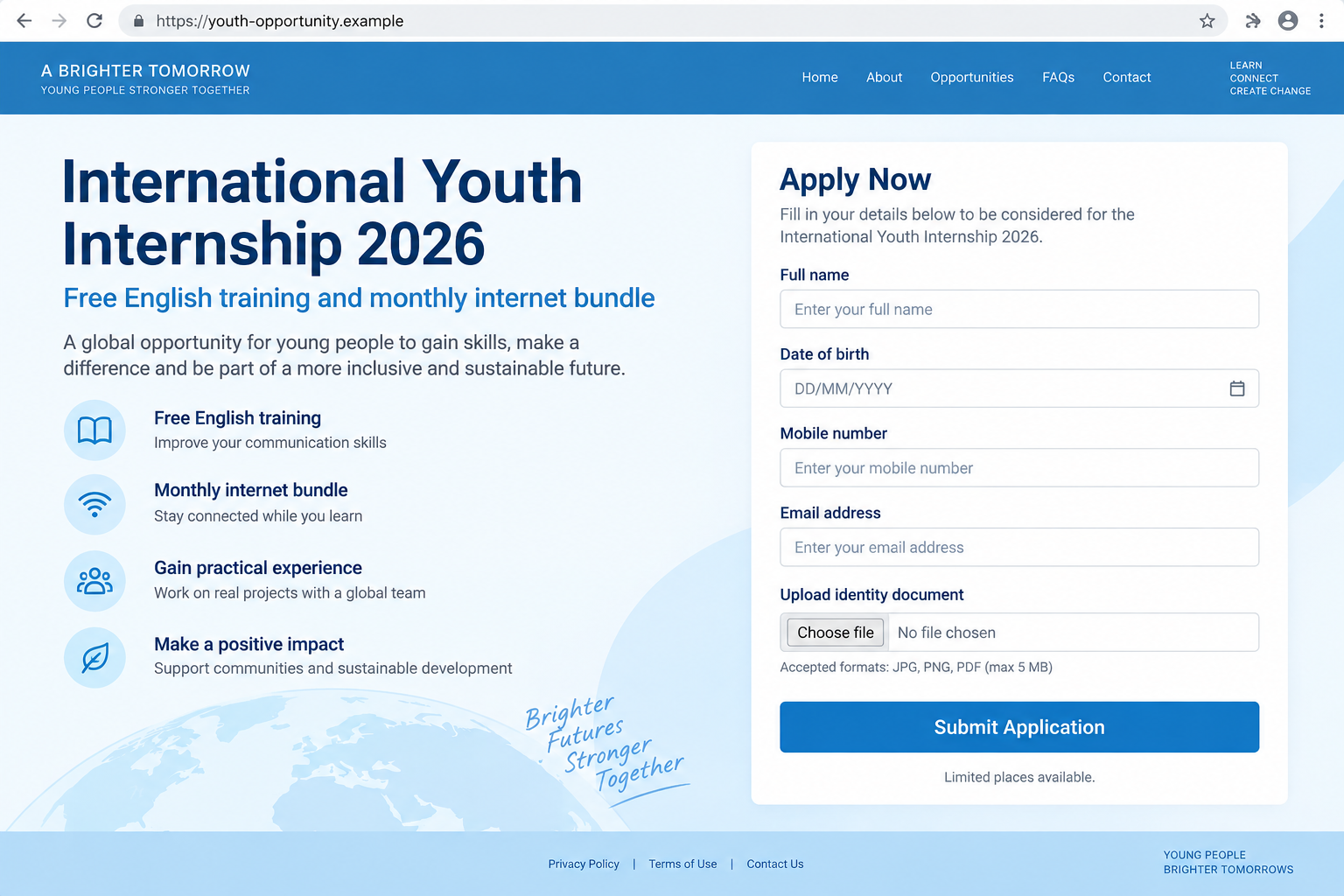
The example application screen above is an original reconstruction created to show how an unofficial form could look. It does not reproduce a particular live scam page, and the fictional .example address cannot be registered as a public website.
A scammer can replace a page, account, phone number, or form as soon as it receives reports. The safest test is therefore not whether one known bad URL appears on a blacklist. It is whether the opportunity can be traced to an official listing and verified through independently obtained contact information.
Be careful with copied logos and professional design. Brand artwork is easy to download, and a polished form proves only that someone created a polished form.
The same caution applies to testimonials, application counters, and comments claiming other applicants already received benefits. These elements can be written by the page operator or copied from unrelated programs. Verify the opportunity, not the decoration around it.
How the UNICEF Internship Scam Works
Step 1: A valuable opportunity appears in a trusted feed
The bait is placed where students and job seekers already look: WhatsApp groups, social media pages, digital communities, and direct messages. The wording may encourage recipients to share it quickly with friends who need work, training, or internet access.
This distribution method helps the scam cross social boundaries. By the time you see it, the message may have passed through several honest people who never checked its source.
Step 2: The post combines several rewards
Instead of offering only an internship, the message may add free English classes, a monthly internet bundle, a stipend, a certificate, or another attractive benefit. More rewards create more reasons to overlook missing details.
The offer may also use a deadline, limited places, or a claim that selection is first come, first served. Urgency reduces the chance that applicants will stop and search official channels.
Step 3: The link moves the applicant to an unofficial channel
The destination may be a lookalike website, a generic online form, a messaging account, or a social profile. It may use UNICEF colors and imagery while being controlled entirely by an impersonator.
A padlock icon does not prove the page belongs to UNICEF. Encryption only protects the connection to that particular site. It does not verify the identity or honesty of the person operating it.
Step 4: The form collects useful identity data
An applicant may be asked for a full name, date of birth, address, phone number, email, education history, photograph, identity document, or résumé. The requests can feel normal because real employers also screen candidates.
The difference is where the information goes. A criminal can use the data for targeted phishing, account recovery attempts, fake profiles, or later scams tailored to the applicant’s circumstances.
Step 5: A payment or follow-up demand may appear
After the applicant invests time, the operator may introduce a registration charge, processing fee, data activation payment, equipment deposit, or another invented cost. Some campaigns may focus on information rather than money, so the absence of an immediate fee does not make the form safe.
A follow-up contact can also ask for a one-time code, invite the applicant into another chat, or send additional links. Each small request moves the victim deeper into a relationship controlled by the scammer.
Step 6: The operator disappears or reuses the data
Once money or documents are sent, the account may stop responding. The same campaign can then return under a new page, group name, telephone number, or web address.
Stolen data may remain useful long after the original post vanishes. Victims can receive more convincing job, scholarship, bank, or account-security messages because the sender now knows what they applied for.
Company and Opportunity Checks Before You Apply
Find the vacancy from the organization’s own website
Do not use the link inside the forwarded post as your starting point. Type the known official UNICEF address yourself or open the official UNICEF internships page, then navigate to the relevant vacancy or country office.
If the exact opportunity cannot be found, treat that absence as a warning. A screenshot of a vacancy is not a substitute for a live official listing.
Inspect the complete address and contact route
Read the full domain, not just the words before the first dot. Extra words, hyphens, unfamiliar endings, URL shorteners, and free form services can hide an unofficial destination.
Likewise, a personal email account or messaging-only recruiter is not validated by a UNICEF display name. Contact the organization through details obtained independently from its official website.
Check what the application asks you to provide
Pause if an early form demands an identity document, financial details, account password, authentication code, or payment. Ask why each piece of information is necessary and whether the request occurs inside a documented official process.
Do not upload documents simply because the page contains a privacy statement. Anyone who controls a page can write reassuring text beneath a data-collection form.
Trace the first public appearance of the offer
Search an exact sentence from the message in quotation marks. Look for an official announcement, not a chain of copied posts that all repeat the same unsupported claim.
Reverse-search promotional images when possible. A reused poster, old photograph, or altered graphic may show that the campaign was assembled from unrelated material.
Red Flags That Matter More Than a Logo
A copied emblem is weak evidence. Stronger warning signs include a destination outside official domains, a promise that seems broader than the described role, pressure to share immediately, and an application that cannot be found through UNICEF’s own channels.
Watch for inconsistent language, vague job duties, missing location details, no named department, and a contact that refuses independent verification. A scammer may answer questions confidently while avoiding any route that you control.
The biggest red flag is a request to send money, sensitive documents, passwords, or verification codes before you can establish that the opportunity exists. Stop at that point and verify from scratch.
What to Do if You Have Fallen Victim to This Scam
-
Stop contact and do not send anything else. Do not pay another fee to release a refund, complete registration, activate a bundle, or secure your place. Those follow-up demands are part of the same risk.
Block the account after saving the evidence you need. Do not argue with the sender or announce that you are collecting evidence.
-
Record exactly what you shared. List every form field, document, photograph, password, code, and payment provided. Save the post, group name, account handle, web address, messages, receipts, and timestamps.
This inventory determines which protective steps matter. Someone who only opened a message faces a different risk from someone who uploaded an identity document.
-
Secure affected accounts from a trusted device. Change any reused or disclosed password, sign out unknown sessions, enable multifactor authentication, and review recovery email addresses and phone numbers.
If you shared a one-time code, contact the relevant service immediately. A code can authorize a login, password reset, or account change while the message still looks harmless.
-
Protect documents and financial information. Contact your bank or payment provider through an official number if money or card details were sent. Ask about stopping the payment, replacing the card, and monitoring the account.
If an identity document was exposed, follow the identity-theft guidance for your country. A local police or cybercrime report may help establish a record for later disputes.
-
Check the device if you downloaded anything. Remove unknown applications and browser extensions. Malwarebytes can help scan a supported personal device for known threats, but do not treat a clean scan as proof that stolen form data has been recovered.
AdGuard can reduce exposure to some malicious ads and known tracking or phishing domains, but it cannot validate a recruiter or reverse information already submitted.
-
Report the impersonation where it appeared. Report the post, profile, group message, website, and payment account to the platform. Send the details to the relevant cybercrime or consumer-protection authority and use UNICEF’s official channels to flag misuse of its name.
Warn the person or group that forwarded the message without accusing them of running it. A concise correction can stop the same link from reaching more applicants.
Frequently Asked Questions
Is UNICEF itself running an internship scam?
No. Criminals are impersonating UNICEF. The September 2026 alert says the circulating offers are not authorized or endorsed by the organization.
Are all UNICEF internships fake?
No. Genuine opportunities exist. Find them through official UNICEF career and country channels instead of following a forwarded application link.
Does a free internet bundle prove the message is fraudulent?
Not by itself, but UNICEF specifically warned that some fraudulent messages pair fake programs with free internet bundles or similar incentives. Verify the exact offer independently.
What if a friend sent me the post?
Your friend may have forwarded it in good faith. Familiarity with the messenger does not establish who created the offer or controls the application page.
Can I trust the form if it uses HTTPS?
No. HTTPS encrypts your connection, but a scam site can also use it. Ownership, official listing, and independently verified contact details matter more.
What if I submitted my résumé but did not pay?
Review what the résumé reveals, expect targeted follow-up messages, secure exposed accounts, and report the form. Payment is not the only possible objective of an impersonation scam.
The Bottom Line
The UNICEF internship scam turns a respected name and a generous-looking offer into a reason to act before checking. The real test is simple: can the exact opportunity be found and verified through UNICEF’s official channels?
Do not send documents, codes, or money through a forwarded link. If you already responded, preserve the evidence, secure what was exposed, and warn the community that shared the post.

Join the discussion
0 commentsShare your experience or ask a question about this article.
Discussion
Start the conversation
Have a question or something useful to share? Add the first comment.