€7,000 Casino Bonus Scam Exposed: The No-CRUKS Affiliate Trap Explained
Written by: Lapain Epuran
Published on:
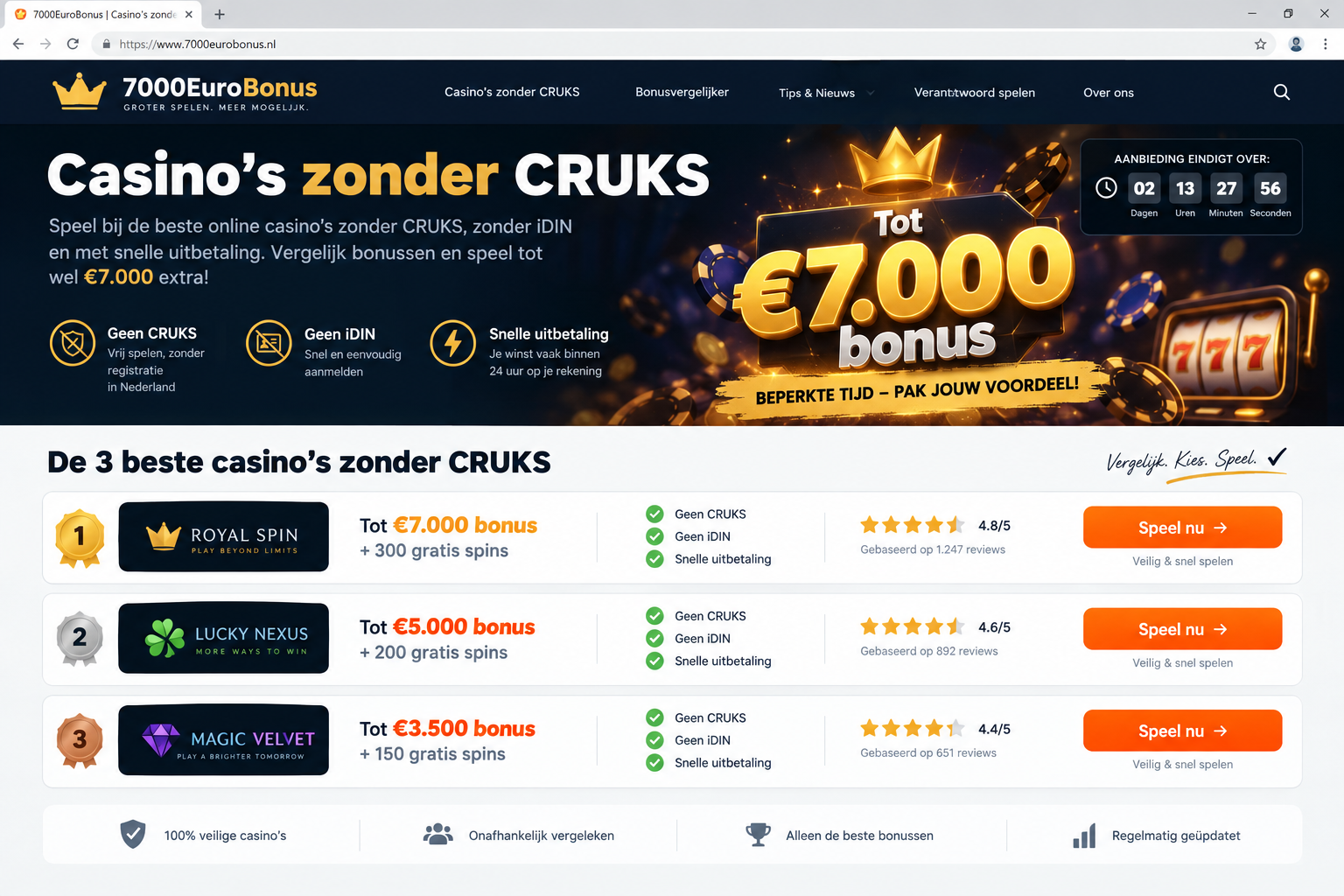
A comparison page promises casino bonuses worth as much as €7,000, fast payouts, and none of the Dutch checks that normally slow registration.
The absence of those checks is presented as freedom. For players in the Netherlands, it can also remove important protections when money becomes difficult to recover.
Overview
The headline sells access without Dutch safeguards
Sites such as 7000EuroBonus and 6000EuroBonus have promoted casinos described as operating without CRUKS, iDIN, DigiD, or normal identity checks.
CRUKS is the Dutch self-exclusion register. Licensed online gambling providers must check it before allowing a person to play.
Advertising the absence of that check targets players seeking to bypass a protection, including people who may have deliberately excluded themselves.
The comparison page earns from referrals
The page may present rankings, review scores, payout claims, and bright buttons as independent guidance. Its business model can depend on users opening accounts.
That financial incentive does not make every review false, but it creates a serious conflict when risks receive less attention than bonuses.
Operators can rotate domains and bonus amounts while directing traffic toward the same offshore casinos or newly branded alternatives.
The €7,000 figure is rarely spendable cash
A large bonus can require multiple deposits, wagering dozens of times, restricted games, time limits, and maximum withdrawal rules.
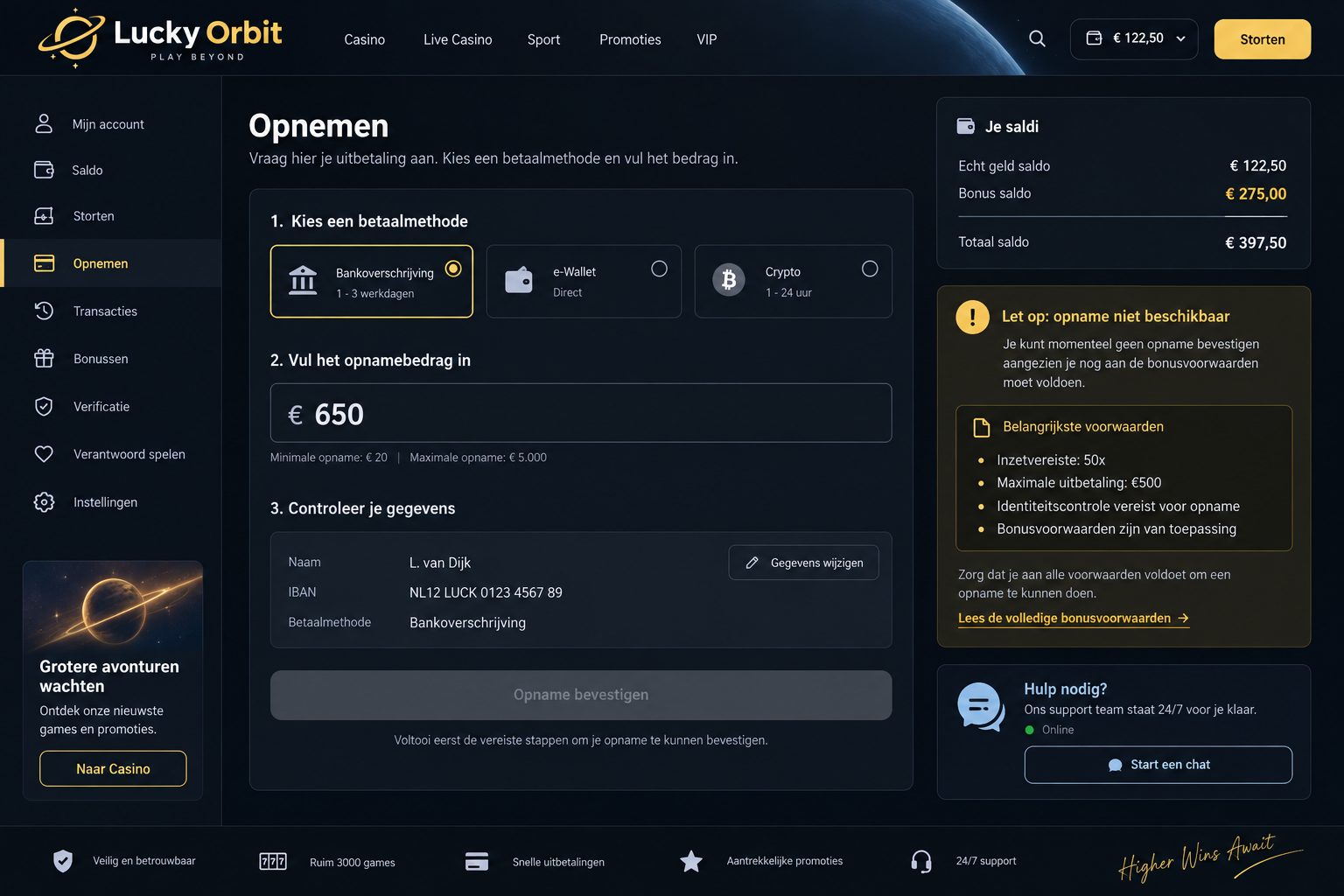
The player may see a large balance yet be unable to withdraw it. Violating one condition can allow the operator to remove bonus winnings.
The affiliate emphasizes avoiding CRUKS instead of licensed consumer protection.
The promoted casino may lack authorization for the Dutch market.
The headline bonus can depend on restrictive wagering conditions.
Rankings and ratings may be commercial rather than independent.
Payment and identity problems can emerge only during withdrawal.
Not every foreign casino is identical, and the comparison page is not the casino itself. The danger comes from steering users toward unlicensed gambling as a benefit.
What “Casino Without CRUKS” Really Means
CRUKS allows people to exclude themselves from gambling and requires licensed providers to check whether a customer is registered before play.
A Dutch license also places the operator under local rules, supervision, advertising restrictions, complaint expectations, and intervention requirements.
A casino saying it does not use CRUKS may operate under another jurisdiction, no meaningful license, or a license irrelevant to Dutch authorization.
It can still accept a Dutch visitor technically, but accessibility is not the same as legal permission to target the Dutch market.
The Dutch gambling regulator publishes a license register. Players can search the operator there before depositing rather than trusting an affiliate badge.
No iDIN or DigiD is also framed as convenience. Yet identity checks help establish age, account ownership, payment legitimacy, and responsible-gambling controls.
An operator may advertise no verification during signup and still demand extensive documents at withdrawal. That asymmetry favors deposits over payouts.
Cryptocurrency does not remove the issue. It can make payments faster while reducing chargeback options and complicating identification of the recipient.
How the No-CRUKS Casino Bonus Trap Works
Step 1: Search results and social posts promise unrestricted play
The campaign targets phrases such as casino without CRUKS, gambling despite exclusion, no ID casino, and immediate withdrawal.
The visitor is already looking for fewer barriers. The advertisement turns missing safeguards into the product’s most attractive feature.
Headlines add enormous bonuses, thousands of free spins, or instant payouts. The combination makes verification feel like an unnecessary delay.
Some pages present themselves as Dutch consumer guides. Language and local currency do not prove authorization or editorial independence.
Step 2: An affiliate ranking creates the appearance of comparison
The landing page lists several casinos with scores, badges, strengths, and call-to-action buttons. The top position appears objective.
Placement may instead reflect commission arrangements. An affiliate can be paid for registration, first deposit, or a share of player losses.
Important weaknesses may be buried below the fold while bonus size and play buttons dominate the visible screen.
Step 3: Domain rotation keeps the funnel alive
One version uses 7000EuroBonus, another uses 6000EuroBonus, and later versions can adopt a different number or spelling.
Rotating domains helps escape warnings, regulator attention, advertising blocks, and poor search results. The page design and outbound partners may remain similar.
A currently inactive domain does not end the campaign model. Users should recognize the behavior rather than memorize one address.
Step 4: Registration is deliberately easier than withdrawal
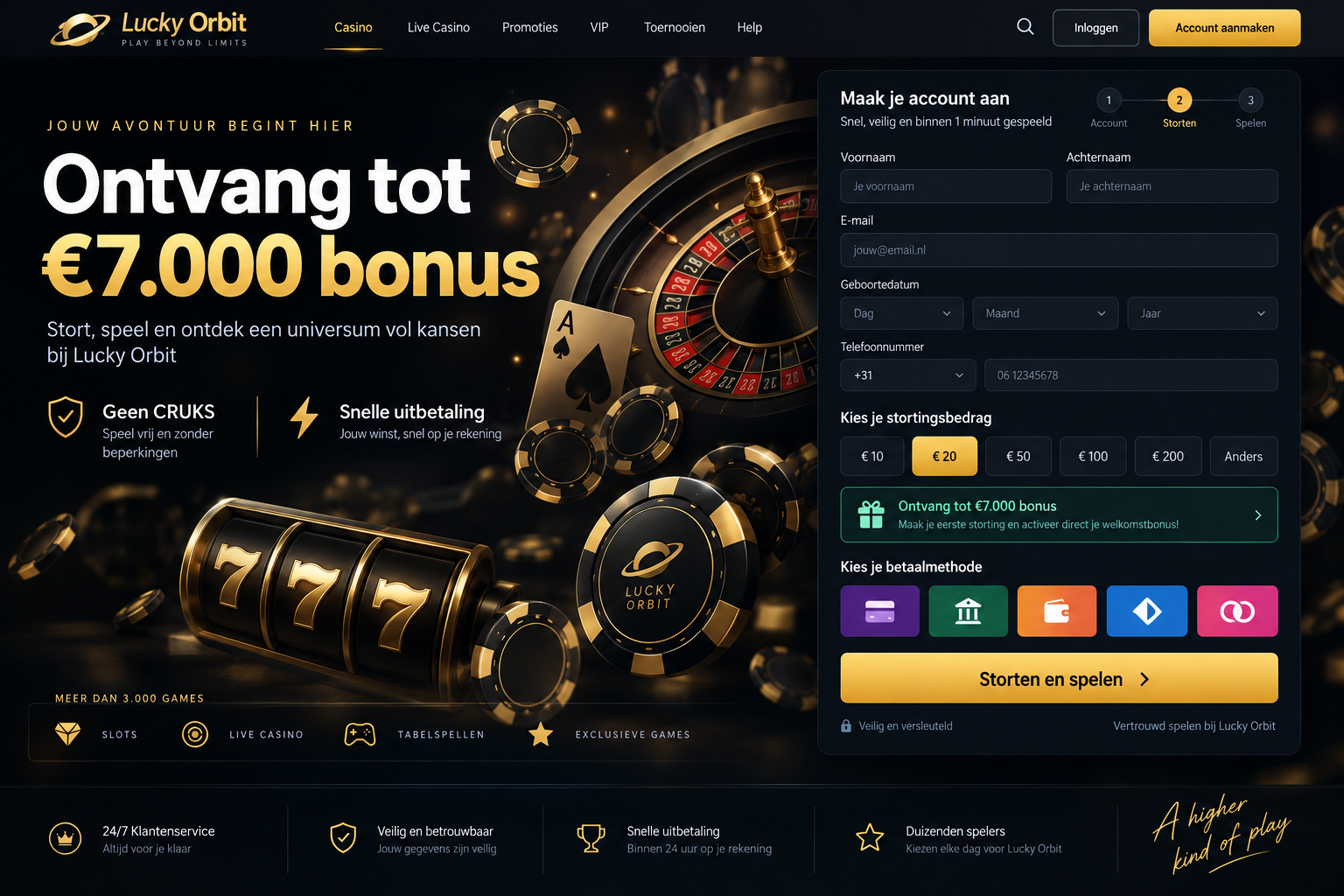
The casino may allow account creation with an email, telephone number, and minimal information. A deposit button appears before licensing details are clear.
Fast signup creates confidence that the service is uncomplicated. The difficult checks can be postponed until the player requests money.
This does not prove every promoted operator will refuse payment. It does create leverage after funds and personal documents are already inside the platform.
Step 5: A small deposit activates a very large bonus balance
The player deposits perhaps €20 and sees hundreds or thousands added as promotional credit. The balance can feel like immediate value.
Bonus money is normally conditional. It may not be withdrawable, and wagers can consume cash and bonus portions according to unfamiliar rules.
A large headline may describe a package spread across several deposits rather than one reward. Each stage encourages another payment.
Step 6: Wagering rules make the headline difficult to realize
A 50x wagering requirement can demand extensive betting before withdrawal. The calculation may apply to the bonus, deposit, or both.
Games can contribute at different rates. A player may bet for hours and discover that preferred games counted little toward the target.
Maximum bet limits, excluded games, expiration dates, and irregular-play clauses create additional reasons to remove promotional winnings.
Step 7: Withdrawal triggers documents and new restrictions
The operator may request identity, address, payment ownership, income source, or wallet evidence only when the customer attempts to withdraw.
Reasonable verification can be legitimate. The warning is a casino advertising no checks, then using unexpected verification as a payout obstacle.
A maximum cashout can cap winnings far below the displayed balance. Terms may also allow the operator to close an account for broadly defined violations.
Step 8: The affiliate and casino pass responsibility
When a player complains, the comparison site may say it merely provided information. The casino points to terms accepted during registration.
An overseas license or anonymous ownership structure can make escalation slow. Dutch regulators cannot guarantee recovery from an unauthorized provider.
The original affiliate domain may already be offline, leaving the player with screenshots, transaction records, and a distant support channel.
Why the €7,000 Bonus Can Be Misleading
The number is designed to dominate attention. Most visitors compare headline values before reading how many deposits and wagers produce them.
A package might award percentages across four deposits, with each installment capped. Receiving the full amount could require depositing much more than expected.
The wagering base changes the risk dramatically. A 50x condition on a €7,000 bonus can imply €350,000 in qualifying bets.
If the calculation includes deposit plus bonus, the required turnover can be even larger. The rules should state the formula plainly.
Slot contribution may be 100%, while table games contribute 10%, 5%, or nothing. A player cannot estimate completion from balance alone.
Maximum-bet clauses can void winnings after one oversized wager, even if the interface accepted it without warning.
Maximum cashout rules can limit withdrawal to a multiple of the deposit or a fixed amount. The visible bonus balance then exaggerates attainable value.
Expiration creates pressure to continue gambling. Stopping to consider losses can mean forfeiting the remaining bonus.
Terms may change or appear only in English despite Dutch advertising. Save the exact version presented when the promotion was accepted.
A reasonable bonus should be understood before deposit. If the operator cannot explain the calculation in a few clear sentences, do not fund it.
How Affiliate Rankings Can Distort Risk
A review table compresses complex legal and financial questions into stars. That format makes a high score feel easier to understand than the underlying operator.
Affiliate commissions can reward the publisher when a reader deposits or loses money. Clear disclosure should explain that relationship near the recommendation.
Ratings deserve a method. Readers should know how licensing, complaints, withdrawal tests, ownership, bonus fairness, and responsible-gambling controls influenced the score.
Repeated perfect ratings, identical praise, and no meaningful disadvantages indicate promotion rather than comparison. Independent analysis includes reasons to avoid an operator.
Search each casino separately from the affiliate page. Regulator notices, unresolved complaints, corporate records, and payment experiences may reveal missing context.
An affiliate domain disappearing does not erase its referrals. Save the exact outbound link because it may contain the campaign identifier tying traffic to a casino.
The Risk of Bypassing Self-Exclusion
Someone registered in CRUKS made, or received, a decision that gambling access should stop for a period. Seeking a workaround can undermine that protection.
Affiliate pages may describe the workaround as privacy, freedom, or faster play. They rarely show the emotional and financial consequences with equal prominence.
An unlicensed operator may not monitor harmful patterns, offer effective limits, or respond appropriately when a customer requests closure.
Promotional messages can continue after attempted self-exclusion. Bonuses, cashback, and personal offers are powerful triggers during recovery.
If the desire to bypass CRUKS feels urgent, step away before opening another account. Contact a trusted person or gambling-help service instead.
Blocking software and bank gambling controls can add friction across devices and payments. No single control is perfect, so layers are useful.
Do not share accounts or use another person’s identity. That creates additional legal, financial, and relationship harm while making recovery harder.
Licensed Casino Versus Affiliate Claims
The Dutch regulator’s license register is the primary check. An affiliate saying licensed or safe cannot substitute for that official record.
Look for the exact legal operator, not merely the casino’s trading name. One company can run several brands, and similar names can belong to different entities.
Verify the domain listed with the license. A copied seal on another address proves nothing.
Review complaint routes, responsible-gambling tools, deposit limits, age checks, and exclusion procedures before considering any payment.
Do not treat fast payout as guaranteed. Ask what verification is required, which methods can receive withdrawals, and how long manual review takes.
Read the bonus terms without accepting the bonus first. Some accounts automatically apply promotions unless the player opts out.
An independent review should explain weaknesses and commercial relationships. A page showing only perfect scores and play buttons behaves like advertising.
Company, Address, and Fulfillment Checks
Identify both the affiliate and the casino operator
The comparison site and gambling platform are separate businesses. Record the legal names, domains, registrations, and contact details for each.
If the affiliate hides ownership while making safety rankings, its recommendations deserve less weight.
Verify the license through the regulator
Search the Dutch license register for the exact operator and website. A foreign certificate does not equal permission to target Dutch players.
Follow regulator links rather than logos inside the casino. Fake seals can lead to copied validation pages.
Test support before depositing
Ask about identity checks, wagering formula, excluded games, maximum bet, withdrawal ceiling, account closure, and complaint escalation.
Save the transcript. Vague or contradictory answers become important if the operator later relies on different terms.
Trace the payment recipient
The statement name, crypto wallet, or payment intermediary may differ from the casino. Record transaction identifiers before raising any dispute.
Repeated processor changes can indicate elevated merchant risk. Never send extra money merely to release an existing balance.
Questions to Ask Before Depositing
Is the exact operator and domain listed by the Dutch gambling regulator?
Who owns the affiliate comparison page, and how is it paid?
Does the headline bonus require several deposits?
Is wagering calculated on the bonus, deposit, or both?
Which games contribute, and what maximum bet applies?
Is there a maximum withdrawal from bonus winnings?
What identity checks occur before deposit and withdrawal?
Can the bonus be declined without restricting cash withdrawals?
Which authority handles unresolved complaints?
If any answer remains unclear, do not deposit to discover it later. The operator has every opportunity to explain the agreement before receiving money.
Keep screenshots because bonus terms can change. Include the date, web address, account identifier, and full rules rather than only the headline.
What to Do if You Fell Victim to the No-CRUKS Casino Bonus Trap
Stop depositing. Do not send more money to meet wagering, verification, tax, unlocking, or withdrawal conditions that appeared after the fact.
Preserve the full record. Save affiliate pages, bonus terms, account balances, bets, chats, emails, identity requests, transactions, and withdrawal denials.
Request withdrawal and closure in writing. State the amount, preferred payment route, and responsible-gambling request. Keep the operator’s response.
Contact the payment provider. Explain the transaction accurately and ask what dispute, recall, or merchant-review options remain available.
Secure exposed identity documents. Watch financial accounts, consider fraud alerts where available, and reject unexpected verification or recovery contact.
Report unauthorized targeting. Send evidence to the Dutch gambling regulator and relevant advertising, hosting, and payment platforms.
Reinforce self-exclusion. Keep CRUKS active, add blocking tools and bank controls, and involve a trusted person in account protection.
Clean up the device. Let Malwarebytes inspect casino downloads and redirects. Configure AdGuard to reduce gambling promotions, aggressive trackers, and unsafe browser pop-ups.
Seek confidential support. Gambling-help services can assist without judgment when losses, secrecy, debt, or urges feel difficult to control.
Is Your Device Infected? Run a Free Malware Scan
Slow performance, constant pop-ups, or strange behavior? These are classic signs of a malware infection. The fastest way to find out is to scan your device with Malwarebytes Anti-Malware Free — one of the most trusted malware removal tools available.
The free version detects and removes the most common threats, including:
Adware — the cause of those annoying pop-ups
Browser hijackers — unwanted redirects and changed homepages
Trojans and spyware — hidden programs stealing your data
Potentially unwanted programs (PUPs) — software you never asked for
👉 Select your device below — Windows, Mac, or Android — then follow the simple steps to download Malwarebytes, scan your system, and remove any threats it finds. The whole process takes about 5 minutes.
Malwarebytes for WindowsMalwarebytes for MacMalwarebytes for Android
Run a Malware Scan with Malwarebytes for Windows
Malwarebytes is one of the most popular and trusted anti-malware tools for Windows — and it’s completely free for removing infections. It catches threats that many antivirus programs miss, including adware, browser hijackers, and trojans. Follow the steps below to scan and clean your PC in just a few minutes.
Download Malwarebytes
Click the button below to download the latest version of Malwarebytes for Windows from the official source. The free version is all you need — it will scan your computer and remove adware, browser hijackers, and other malicious software at no cost.
(The link opens in a new page where your download will start)
Install Malwarebytes
When the download finishes, open your Downloads folder and double-click the MBSetup file. If Windows shows a User Account Control pop-up, click “Yes” to allow the installation.
Follow the On-Screen Prompts to Install Malwarebytes
The setup wizard will walk you through a few quick screens:
Choose where you’re installing the program — “Personal Computer” or “Work Computer” — then click Next.
Malwarebytes will now install on your device. This usually takes under a minute.
When installation is complete, the “Welcome to Malwarebytes” screen will open automatically.
On the final screen, click Open Malwarebytes to launch the program.
Enable “Scan for Rootkits”
Before scanning, turn on rootkit detection so Malwarebytes can find even the most hidden threats. Click the Settings gear icon on the left side of the screen.
In the settings menu, find “Scan for rootkits” and click the toggle so it turns blue.
Done? Click “Dashboard” in the left pane to return to the main screen.
Start the Scan
Click the blue Scan button. Malwarebytes will automatically update its virus database and start checking your computer for malware.
Wait for the Scan to Finish
The scan checks your entire system for browser hijackers and other malicious programs, so it can take several minutes. Feel free to do something else — just check back occasionally to see the progress.
Quarantine the Detected Threats
When the scan is done, you’ll see a list of everything Malwarebytes found — malware, adware, and potentially unwanted programs. Click the “Quarantine” button to remove all of them at once.
Malwarebytes will now remove the malicious files and registry entries and move them safely into quarantine.
Restart Your Computer
Some threats can only be fully removed after a reboot. If Malwarebytes asks you to restart, click Yes. Once you’re logged back in, your PC is clean and you can continue with the next steps in this guide.
When the scan finishes, click Quarantine to remove everything Malwarebytes found. That’s it — your Windows PC is now clean of trojans, adware, and other malware, and should be back to running smoothly.
If your current antivirus allowed this malicious program on your computer, you may want to consider purchasing Malwarebytes Premium to protect against these types of threats in the future. If you are still having problems with your computer after completing these instructions, then please follow one of the steps:
Malwarebytes for Mac is a free on-demand scanner that removes the malware other security software tends to miss — adware, browser hijackers, and unwanted programs included. Cleaning an infected Mac with Malwarebytes has always been completely free, and it’s our go-to recommendation. Follow the steps below to scan and clean your Mac in just a few minutes.
Download Malwarebytes for Mac
Click the button below to download the latest version of Malwarebytes for Mac.
When the download finishes, open your Downloads folder and double-click the setup file to begin the installation.
Follow the On-Screen Prompts to Install Malwarebytes
The Malwarebytes for Mac Installer will guide you through a few quick screens. Click “Continue” and keep following the prompts until the installation completes.
When the installation is complete, Malwarebytes opens to the Welcome to Malwarebytes screen. Click “Get started“.
Select “Personal Computer” or “Work Computer”
Malwarebytes will ask what type of computer you’re installing it on. Click either Personal Computer or Work Computer, whichever applies.
Start the Scan
Click the “Scan” button. Malwarebytes will automatically update its detection database and begin checking your Mac for malware.
Wait for the Scan to Finish
Malwarebytes will scan your Mac for adware, browser hijackers, and other malicious programs. This can take a few minutes, so feel free to do something else — just check back occasionally to see the progress.
Quarantine the Detected Threats
When the scan is done, you’ll see a list of everything Malwarebytes found. Click the “Quarantine” button to remove all the threats at once.
Restart Your Mac
Malwarebytes will now remove all the malicious files it found. Some threats can only be fully removed after a reboot — if Malwarebytes asks you to restart, allow it. Once you’re logged back in, your Mac is clean.
Once the scan is done, remove every threat it detected. Your Mac is now free of adware, rogue browser extensions, and other potentially harmful software.
If your current antivirus allowed a malicious program on your computer, you might want to consider purchasing the full-featured version of Malwarebytes Anti-Malware to protect against these types of threats in the future. If you are still experiencing problems while trying to remove a malicious program from your computer, please ask for help in our Mac Malware Removal Help & Support forum.
Run a Malware Scan with Malwarebytes for Android
Malwarebytes for Android automatically detects and removes dangerous threats like malware and ransomware so you don’t have to worry about your most-used device being compromised. Aggressive detection of adware and potentially unwanted programs keeps your Android phone or tablet running smooth.
Download Malwarebytes for Android.
You can download Malwarebytes for Android by clicking the link below.
In the Google Play Store, tap “Install” to install Malwarebytes for Android on your device.
When the installation process has finished, tap “Open” to begin using Malwarebytes for Android. You can also open Malwarebytes by tapping on its icon in your phone menu or home screen.
Follow the on-screen prompts to complete the setup process
When Malwarebytes will open, you will see the Malwarebytes Setup Wizard which will guide you through a series of permissions and other setup options. This is the first of two screens that explain the difference between the Premium and Free versions. Swipe this screen to continue. Tap on “Got it” to proceed to the next step. Malwarebytes for Android will now ask for a set of permissions that are required to scan your device and protect it from malware. Tap on “Give permission” to continue. Tap on “Allow” to permit Malwarebytes to access the files on your phone.
Update database and run a scan with Malwarebytes for Android
You will now be prompted to update the Malwarebytes database and run a full system scan.
Click on “Update database” to update the Malwarebytes for Android definitions to the latest version, then click on “Run full scan” to perform a system scan.
Wait for the Malwarebytes scan to complete.
Malwarebytes will now start scanning your phone for adware and other malicious apps. This process can take a few minutes, so we suggest you do something else and periodically check on the status of the scan to see when it is finished.
Click on “Remove Selected”.
When the scan has been completed, you will be presented with a screen showing the malware infections that Malwarebytes for Android has detected. To remove the malicious apps that Malwarebytes has found, tap on the “Remove Selected” button.
Restart your phone.
Malwarebytes for Android will now remove all the malicious apps that it has found. To complete the malware removal process, Malwarebytes may ask you to restart your device.
After the scan, tap Remove Selected to delete all detected threats. Your Android phone is now clean — no more malicious apps, adware, or browser redirects.
If your current antivirus allowed a malicious app on your phone, you may want to consider purchasing the full-featured version of Malwarebytes to protect against these types of threats in the future. If you are still having problems with your phone after completing these instructions, then please follow one of the steps:
Restore your phone to factory settings by going to Settings > General management > Reset > Factory data reset.
Now that your device is clean, keep it that way. Most infections start with a malicious ad or a fake download button — so blocking them at the source is your best defense.
We recommend AdGuard, which blocks malicious ads, phishing pages, and dangerous redirects before they can reach you.
No single label proves theft. It does mean Dutch license protections may be absent, so authorization, ownership, terms, and complaint routes require careful verification.
What is CRUKS?
CRUKS is the Dutch gambling self-exclusion register. Licensed providers check it before granting access to their gambling services.
Can I really receive a €7,000 bonus?
The displayed amount may be conditional credit spread across deposits. Wagering, game, time, bet, and cashout rules can sharply reduce practical value.
Why does verification happen only during withdrawal?
Some operators postpone checks to simplify deposits. Legitimate verification can be necessary, but surprise demands contradict advertising based on having no checks.
Can a Dutch regulator recover my money?
Reporting helps enforcement, but recovery from an unauthorized overseas operator is not guaranteed. Contact payment providers promptly and preserve detailed evidence.
What should I do if I want to bypass CRUKS?
Pause and seek support instead of opening another account. Additional blocking, bank controls, and trusted-person involvement can strengthen the protection already chosen.
The Bottom Line
The €7,000 no-CRUKS pitch turns missing safeguards and conditional bonus credit into selling points while hiding the practical difficulty of withdrawal and dispute.
Check the official license register, reject unclear wagering terms, and never treat an affiliate ranking as permission to bypass protections built for safer gambling.
10 Rules to Avoid Online Scams
Here are 10 practical safety rules to help you avoid malware, online shopping scams, crypto scams, and other online fraud. Each tip includes a quick “if you already got hit” action.
Stop and verify before you click, log in, download, or pay.
Most scams win by creating urgency. Verify using a trusted method: type the website address yourself, use the official app, or call a known number (not the one in the message).
If you already clicked: close the page, do not enter passwords, and run a malware scan.
Keep your operating system, browser, and apps updated.
Updates patch security holes used by malware and malicious ads. Turn on automatic updates where possible.
If you saw a scary “update now” pop-up: close it and update only through your device settings or the official app store.
Use layered protection: antivirus plus an ad blocker.
Antivirus helps block malware. An ad blocker reduces scam redirects, phishing pages, and malvertising.
If your browser is acting weird: remove unknown extensions, reset the browser, then run a full scan.
Install apps, software, and extensions only from official sources.
Avoid cracked software, “keygens,” and random downloads. During installs, choose Custom/Advanced and decline bundled offers you do not recognize.
If you already installed something suspicious: uninstall it, restart, and scan again.
Treat links and attachments as untrusted by default.
Phishing often impersonates delivery services, banks, and popular brands. If it is unexpected, do not open attachments or log in through the message.
If you entered credentials: change the password immediately and enable 2FA.
Shop safely: research the store, then pay with protection.
Be cautious with brand-new stores, “closing sale” stories, and prices that make no sense. Prefer credit cards or PayPal for dispute options. Avoid wire transfers, gift cards, and crypto payments.
If you already paid: contact your card issuer or PayPal quickly to dispute the transaction.
Crypto rule: never pay a “fee” to withdraw or recover money.
Common patterns include fake profits, then “tax,” “gas,” or “verification” fees. Another is a “recovery agent” who demands upfront crypto.
If you already sent crypto: stop paying, save evidence (wallet addresses, TXIDs, chats), and report the scam to the platform used.
Secure your accounts with unique passwords and 2FA (start with email).
Use a password manager and unique passwords for every account. Enable 2FA using an authenticator app when possible.
If you suspect an account takeover: change passwords, sign out of all devices, and review recent logins and recovery settings.
Back up important files and keep one backup offline.
Backups protect you from ransomware and device failure. Keep at least one backup on an external drive that is not always connected.
If you suspect infection: do not connect backup drives until the system is clean.
If you think you are a victim: stop losses, document evidence, and escalate fast.
Move quickly. Speed matters for disputes, account recovery, and limiting damage.
Stop payments and contact: do not send more money or respond to the scammer.
Call your bank or card issuer: block transactions, replace the card if needed, and start a dispute or chargeback.
Secure your email first: change the email password, enable 2FA, and remove unfamiliar recovery options.
Secure other accounts: change passwords, enable 2FA, and log out of all sessions.
Scan your device: remove suspicious apps or extensions, then run a full malware scan.
Save evidence: screenshots, emails, order pages, tracking pages, wallet addresses, TXIDs, and chat logs.
Report it: to the payment provider, marketplace, social platform, exchange, or wallet service involved.
These rules are intentionally simple. Most online losses happen when decisions are rushed. Slow down, verify independently, and use payment methods and account controls that give you recourse.
Hello! I'm Lapain Epuran, your go-to source for detailed and honest product reviews. From tech gadgets to miracle cures, I provide insights to help you make informed choices. Join me as we discover what's truly worth your time and money.