


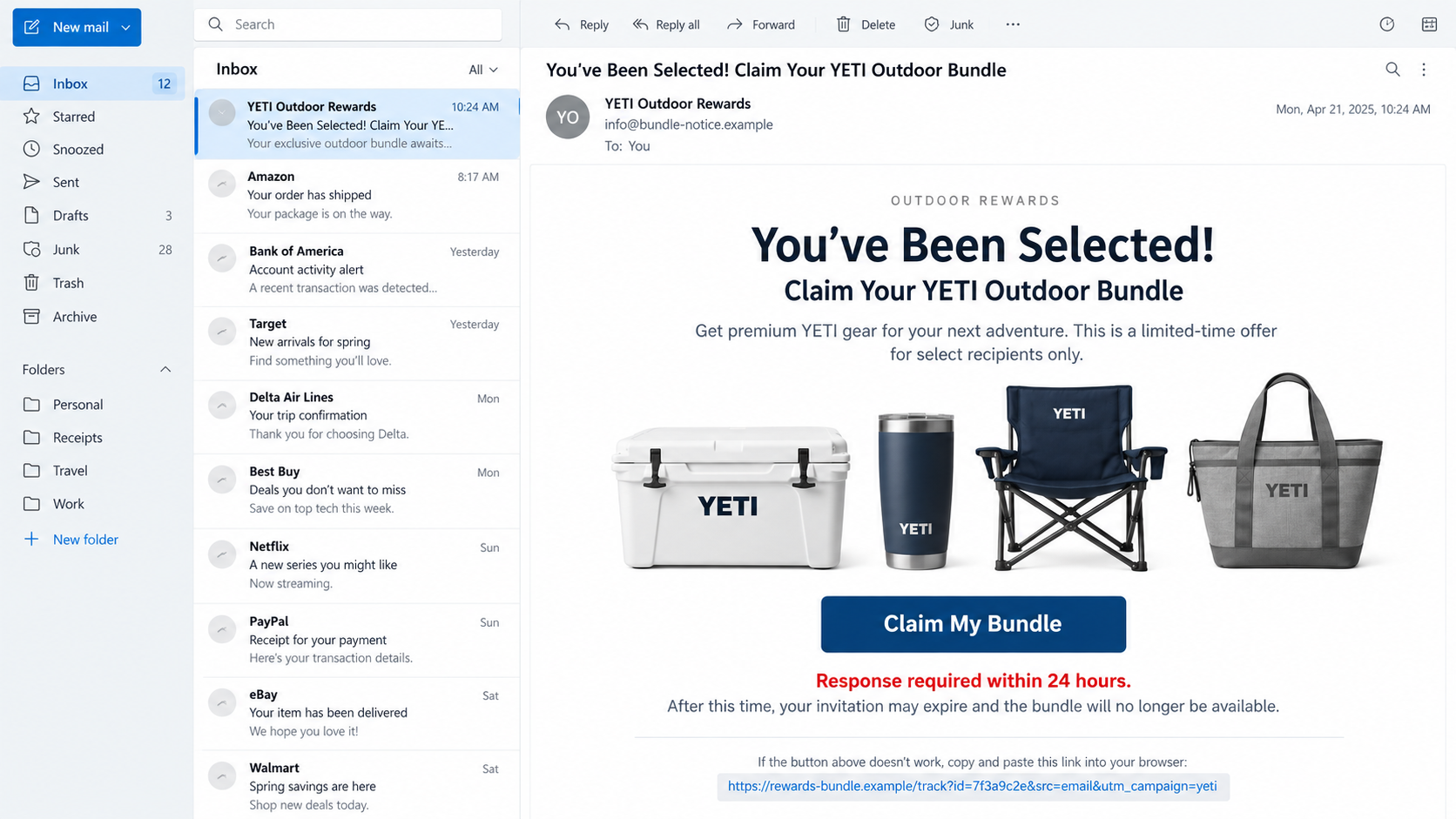
An email says an outdoor bundle has been reserved in your name. The message looks polished, the prize is desirable, and the deadline feels close.
A few ordinary questions appear to stand between you and the package. The decisive information sits much deeper than the congratulations headline.
Overview
The email borrows a premium outdoor brand
The YETI Outdoor Bundle email scam impersonates a recognizable brand or retailer to make an unrelated survey and subscription offer appear trustworthy.
Subject lines such as “You’ve Been Selected” suggest exclusivity. The body may mention a store, customer program, loyalty reward, or limited product-testing opportunity.
YETI is not responsible for these messages. Its name and product appeal are used by outside operators seeking clicks, personal information, and payment details.
The bundle is bait for a billing agreement
The recipient answers a short questionnaire and is told the bundle costs nothing beyond a modest shipping or processing charge.
The checkout can contain recurring membership terms in small text. Paying for delivery may therefore enroll the card in an unrelated monthly service.
A package may never arrive, or the customer may receive a low-value substitute. Either outcome leaves the recurring billing problem unresolved.
The sender and domains reveal the separation
Documented messages have arrived from unrelated, machine-generated addresses rather than a verified YETI or retailer domain.
Links can pass through trackers, survey pages, prize selectors, and payment sites controlled by different entities. That fragmentation makes accountability difficult.
- The sender is unrelated to YETI or the retailer named in the message.
- The questionnaire leads nearly every participant to the same prize.
- The bundle requires a card for shipping or processing.
- Renewal language may be separated from the main price.
- The merchant descriptor can differ from every name shown earlier.
This is not a normal product giveaway. It is a deceptive email funnel that uses a valued bundle to obtain consent and card access.
Is the YETI Outdoor Bundle Email Real?
YETI sells through its own website and authorized retailers. A genuine order or promotion should be verifiable through those channels without trusting an embedded email link.
Unexpected selection is the first warning. The recipient often entered no drawing, made no qualifying purchase, and has no account connected to the sender.
The From name can display YETI, BCF, Outdoor Rewards, or another plausible label while the actual address uses an unrelated domain.
That discrepancy matters more than logos. Email software lets a sender choose almost any visible display name.
The prize page may show convincing coolers, drinkware, bags, or hats. Product photographs can be copied from legitimate stores without inventory or permission.
A real promotion should provide official rules, dates, sponsor identity, eligibility, prize value, and a no-purchase entry method where legally required.
If the offer exists only behind a shipping payment, treat it as a purchase funnel rather than a complimentary brand reward.
Contact YETI or the named retailer using contact details you locate independently. Do not reply to the suspicious sender for confirmation.
How the YETI Outdoor Bundle Email Scam Works
Step 1: A bulk email announces a reserved prize
The campaign sends large numbers of messages because many recipients recognize outdoor products and have shopped at sporting-goods retailers.
The wording implies prior eligibility: selected customer, loyalty member, survey participant, or chosen product tester. That framing discourages questions about how selection occurred.
Urgency appears immediately. The recipient may have only a few hours, one remaining bundle, or a final reminder before the reservation expires.
Real deadlines can exist, but a surprise prize should never become more credible merely because a timer demands speed.
Step 2: The sender conceals the real operator
The display name carries the trusted brand while the address contains random letters or an unfamiliar mailing domain.
Some sending domains belong to bulk email infrastructure. That does not establish a relationship with the company pictured in the message.
Reply addresses, unsubscribe links, and destination links may all use different names. This separation helps the campaign replace one component after blocking.
Step 3: The link crosses multiple tracking domains
Clicking tells the sender that the address is active. It can also reveal device type, approximate location, language, and which email produced the response.
The browser may bounce through affiliate identifiers before reaching a survey. Every hop can assign credit and decide which offer the visitor sees.
Disposable domains protect the visible campaign. When complaints close one page, a cloned page can reopen elsewhere with the same images.
Step 4: A short survey creates legitimacy
Questions may ask about camping frequency, favorite products, shopping experience, or household activities. They create the appearance of brand research.
Almost any answer qualifies because the campaign needs buyers, not a representative research sample. The outcome is generally predetermined.
A progress bar encourages completion, while the prize remains visible. The visitor begins to feel they have earned the bundle through participation.
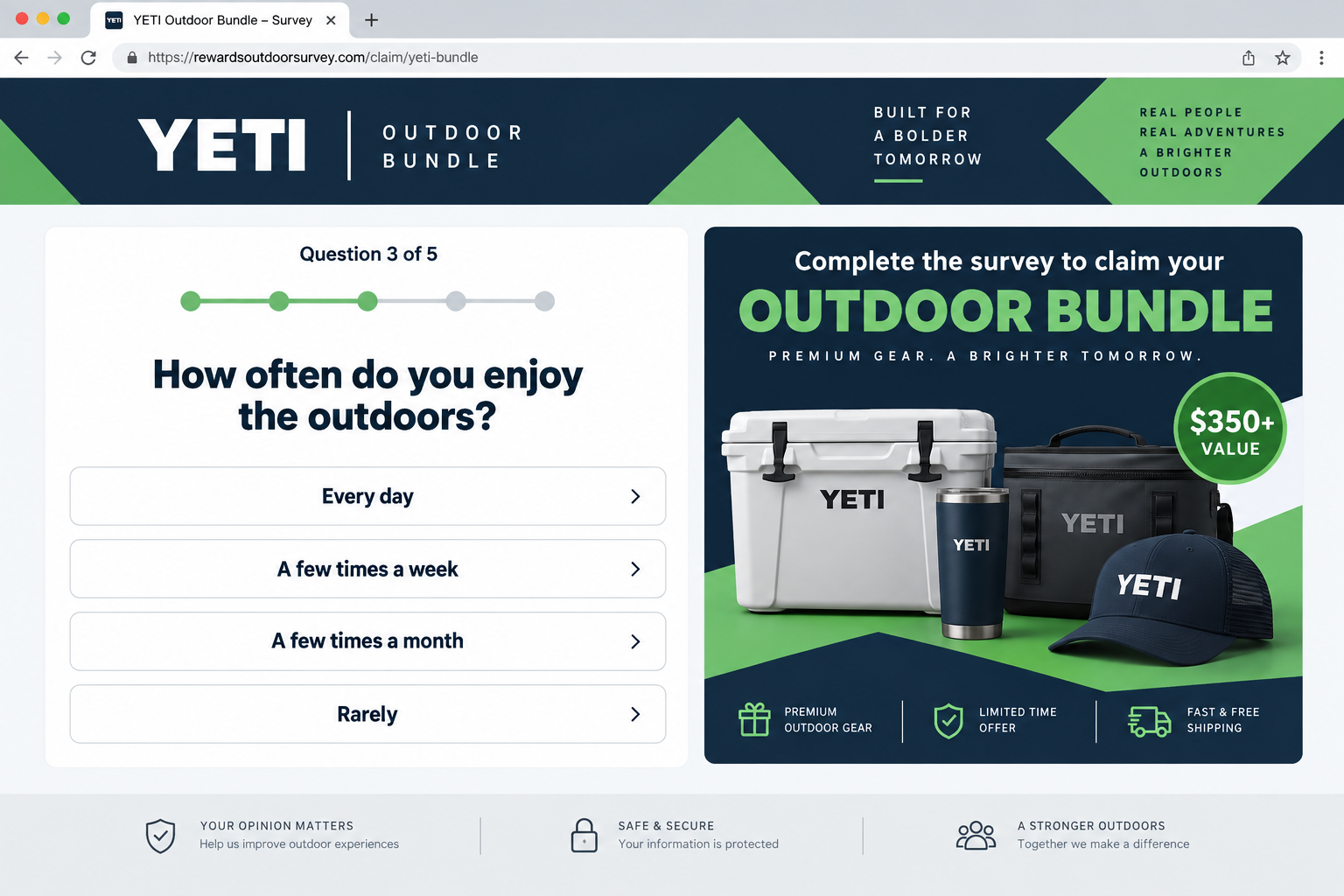
Step 5: Congratulations shift attention toward shipping
The page says the bundle is free and requests only delivery, insurance, handling, or verification. A large retail value makes the fee look insignificant.
Stock counters, recent-winner alerts, and countdown clocks create urgency. These elements can be programmed graphics rather than live fulfillment information.
Static comments may claim successful delivery. Unless they link to verifiable accounts outside the sales page, they are advertising content.
Step 6: The checkout gathers a complete identity profile
The form requests a name, address, email, telephone number, and card. Together, these details support billing and valuable follow-up marketing.
Autofill can make the step feel routine. Pause and read the domain, total, merchant name, preselected boxes, and text near the button.
Never provide an account password or banking login to prove shipping eligibility. A parcel does not require those credentials.
Step 7: Fine print introduces recurring membership charges
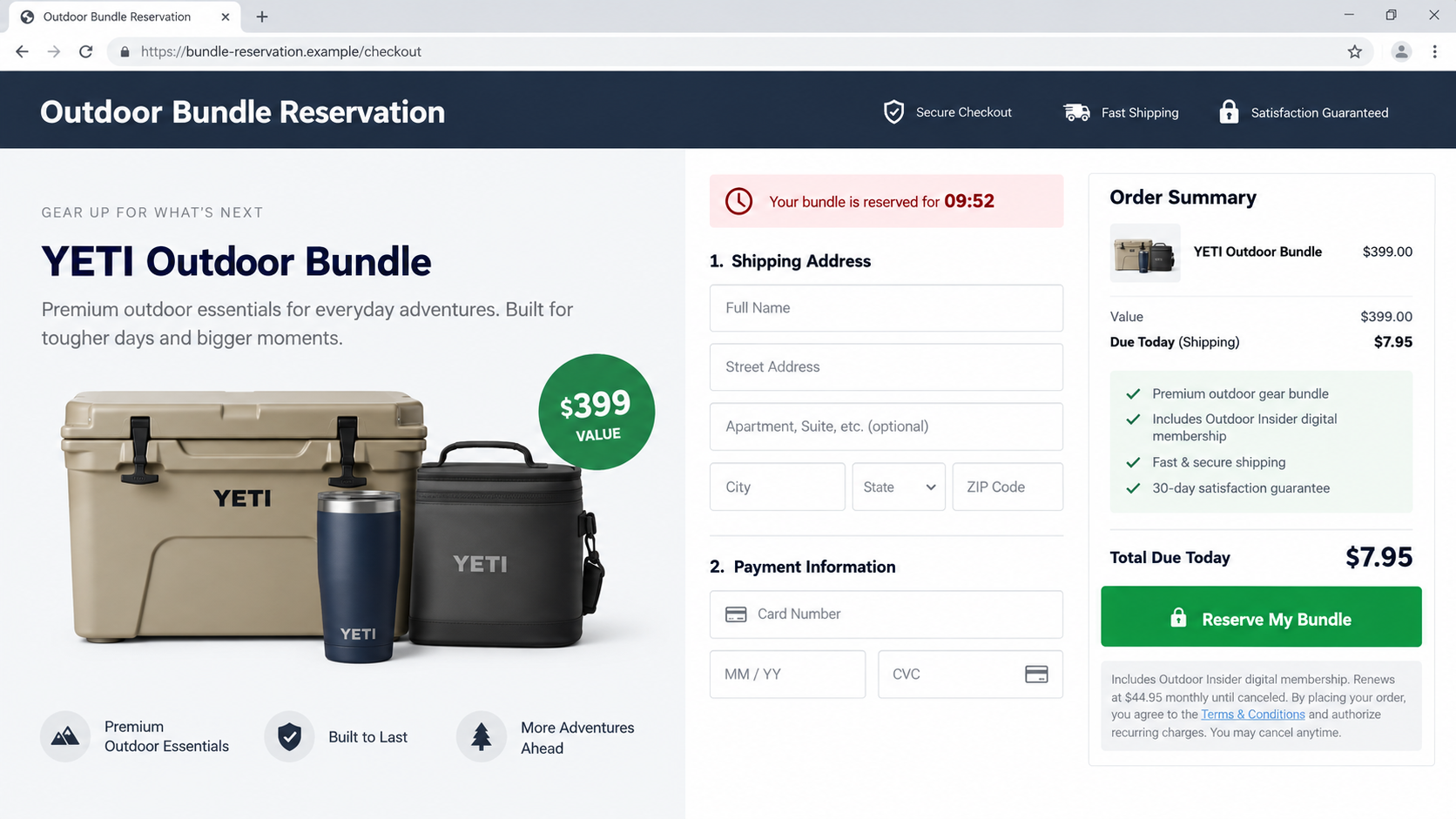
The visible total may show $6.95 shipping while a nearby sentence creates a short trial that renews at $44.95 monthly.
The membership can involve ebooks, entertainment, discount access, or digital content unrelated to YETI and the supposed bundle.
No obvious checkbox may separate the subscription from shipping. The operator later argues that clicking the main order button accepted every linked term.
Step 8: Cancellation becomes harder than enrollment
The card statement may show a generic descriptor that does not mention YETI. Customers can overlook it or struggle to identify the responsible company.
Support may require telephone cancellation during limited hours, ignore email, or demand details already submitted before confirming the account.
The bundle and membership may involve separate entities. Returning an item does not necessarily cancel digital billing.
Why a Small Shipping Charge Is So Effective
People understand that physical products cost money to deliver. A shipping fee therefore sounds practical even when the advertised item is supposedly free.
The contrast is persuasive. Paying $6.95 for products said to be worth hundreds feels like an obvious decision rather than a financial commitment.
That modest charge also confirms the card is active. A later renewal can be far larger than the amount that initially attracted attention.
Checkout design separates the amounts visually. Shipping appears near the order summary, while recurring terms sit below a button or inside linked text.
Mobile users see even less. Large product imagery and form fields can push the renewal sentence several screens below the first price.
The customer may rationalize uncertainty because the possible reward is valuable. That emotional calculation replaces the normal question of who is accepting payment.
A real free prize should not require an unexplained card authorization. Taxes or shipping must be transparent, documented, and connected to an identifiable sponsor.
What the Email Headers Can Reveal
The visible sender is only a label. Viewing full headers reveals the servers, return path, authentication results, and domains actually involved in delivery.
A failed SPF, DKIM, or DMARC result strengthens suspicion, although a passing result proves only that the message was authorized by its own domain.
Compare that authenticated domain with YETI and the named retailer. An unrelated mailing domain cannot become official through a matching display name.
Preserve headers before forwarding because some mail applications simplify them. They help providers trace the campaign more reliably than a cropped screenshot.
Do not paste full headers publicly without review. They can contain your email address, internal routing information, message identifiers, and other personal details.
What May Happen After You Order
Some victims receive no shipping update. Others get a generic tracking number that remains pending or leads to an inexpensive item.
A substitute product can be used to claim the merchant fulfilled an order. Its value may bear little resemblance to the pictured bundle.
The first recurring debit might occur after several days, when the customer no longer connects it with the original email.
Future charges can use slightly different descriptors. Reviewing only transactions containing YETI may therefore miss the membership.
Marketing messages may multiply because the submitted profile identifies someone willing to respond to prize offers.
A caller could mention delivery trouble and request another fee. Knowledge of the order does not prove the caller represents a real carrier.
Another message may promise a refund while asking for remote computer access, a verification code, or bank login. Those requests create a second scam.
Even if the merchant agrees to cancel, monitor several statements. Cancellation confirmation is important evidence if billing resumes.
Do not return an item without written instructions and tracked postage. Sending it to an address on the parcel may not satisfy the merchant’s policy.
The Brand, Retailer, and Sender Are Different Parties
The name YETI describes the products pictured. It does not identify the sender, survey company, affiliate, payment processor, membership provider, or fulfillment warehouse.
A retailer such as BCF may also be named to localize the message. That does not prove the retailer supplied customer data or authorized the offer.
Affiliates can buy traffic and receive payment for completed checkouts. The person who created the email may never handle merchandise or support.
The payment merchant controls recurring charges. Its legal name may appear only in dense checkout terms or the first bank descriptor.
A fulfillment company can mail a cheap product on another company’s behalf. It does not necessarily manage refunds or advertising complaints.
Separating these roles helps victims respond effectively. Report impersonation to the brand, but direct billing disputes to the card issuer and actual merchant.
Company, Address, and Fulfillment Checks
Identify the company charging the card
Read the checkout terms before payment and compare them with the confirmation email and statement descriptor. Save every legal name you find.
If the page never identifies the merchant, do not proceed. A logo and generic Reward Center label provide no meaningful accountability.
Investigate the physical address
Search the complete address and inspect map results. It may belong to a virtual mailbox, home, unrelated business, or shared returns warehouse.
A commercial-looking building proves only that mail can arrive there. It does not prove YETI affiliation or transparent subscription management.
Test telephone and email support
Ask the agent to state the exact renewal amount, next billing date, cancellation method, return location, and legal company name.
Numbers that never answer, inboxes that bounce, and agents handling numerous unnamed brands are serious warning signs.
Treat unknown products cautiously
A cheap cooler, bottle, electronic accessory, cosmetic, or supplement may arrive from a bulk fulfillment source without dependable manufacturer details.
Do not assume the item meets the quality suggested by copied branding. Check labels, materials, warnings, and recalls before use.
How to Recognize Similar Prize Emails
- You never entered the drawing or completed the purchase supposedly connected to selection.
- The visible brand differs from the sender’s actual domain.
- The message says every recipient was specially chosen.
- A timer or final notice demands immediate action.
- The link leads away from the brand and named retailer.
- Easy survey answers guarantee an expensive reward.
- The free prize requires card details for a small fee.
- Terms mention a trial, club, digital access, or monthly renewal.
Hover over links on a computer without opening them. On mobile, use the mail application’s link preview carefully and avoid accidental navigation.
Forward questionable messages to the impersonated company through its official reporting channel. Keep sensitive personal and payment details out of public screenshots.
What to Do if You Fell Victim to the YETI Outdoor Bundle Email Scam
- Save the evidence. Keep the original email, headers, links, survey, checkout, terms, receipt, tracking, support messages, and card descriptor.
- Call the card issuer promptly. Explain that a brand-impersonation offer obtained the card and may include hidden recurring billing.
- Review several statements. Look for shipping, trial, membership, duplicate, and international charges under names unrelated to YETI.
- Cancel each agreement in writing. Identify the billing merchant, demand the effective date, and keep confirmation. A product return is not enough.
- Dispute unauthorized transactions accurately. Tell the issuer what you expected, what arrived, and which renewal or additional amounts lacked informed approval.
- Protect submitted credentials. Change reused passwords, enable multifactor authentication, and review the email account for unfamiliar forwarding or recovery changes.
- Reject follow-up recovery stories. Do not grant remote access, share verification codes, or pay another fee for delivery, cancellation, or refund processing.
- Review the device. Scan with Malwarebytes if the message opened files or strange redirects. AdGuard can suppress many follow-up prize ads and unsafe pop-ups.
- Report the impersonation. Notify YETI, the named retailer, email provider, advertising network, payment processor, and relevant consumer authority.
Is Your Device Infected? Run a Free Malware Scan
Slow performance, constant pop-ups, or strange behavior? These are classic signs of a malware infection. The fastest way to find out is to scan your device with Malwarebytes Free — one of the most trusted malware removal tools available.
The free version detects and removes the most common threats, including:
- Adware — the cause of those annoying pop-ups
- Browser hijackers — unwanted redirects and changed homepages
- Trojans and spyware — hidden programs stealing your data
- Potentially unwanted programs (PUPs) — software you never asked for
👉 Select your device below — Windows, Mac, or Android — then follow the simple steps to download Malwarebytes, scan your system, and remove any threats it finds. The scan usually takes 5 to 20 minutes.
Run a Malware Scan with Malwarebytes for Windows
Malwarebytes is one of the most popular and trusted anti-malware tools for Windows — and it’s completely free for removing infections. It catches threats that many antivirus programs miss, including adware, browser hijackers, and trojans. Follow the steps below to scan and clean your PC in just a few minutes.
Download Malwarebytes
Click the button below to download the latest version of Malwarebytes for Windows from the official source. The free version is all you need — it will scan your computer and remove adware, browser hijackers, and other malicious software at no cost.
Download MalwarebytesOfficial installer for Windows 11 and 10. Your download starts right away.Want real-time protection? See Malwarebytes Premium Malwarebytes Free for WindowsScans and removes malware at no cost
-
Install Malwarebytes
When the download finishes, open your Downloads folder and double-click the MBSetup file. If Windows shows a User Account Control pop-up, click “Yes” to allow the installation.

Follow the On-Screen Prompts to Install Malwarebytes
The setup wizard will walk you through a few quick screens:
-
Choose where you’re installing the program — “Personal Computer” or “Work Computer” — then click Next.

-
Malwarebytes will now install on your device. This usually takes under a minute.

-
When installation is complete, the “Welcome to Malwarebytes” screen will open automatically.

-
On the final screen, click Open Malwarebytes to launch the program.

-
Enable “Scan for Rootkits”
Before scanning, turn on rootkit detection so Malwarebytes can find even the most hidden threats. Click the Settings gear icon on the left side of the screen.

In the settings menu, find “Scan for rootkits” and click the toggle so it turns blue.

Done? Click “Dashboard” in the left pane to return to the main screen.
Start the Scan
Click the blue Scan button. Malwarebytes will automatically update its virus database and start checking your computer for malware.

-
Wait for the Scan to Finish
The scan checks your entire system for browser hijackers and other malicious programs, so it can take 5 to 20 minutes depending on your computer. Feel free to do something else — just check back occasionally to see the progress.

-
Quarantine the Detected Threats
When the scan is done, you’ll see a list of everything Malwarebytes found — malware, adware, and potentially unwanted programs. Click the “Quarantine” button to remove all of them at once.

Malwarebytes will now remove the malicious files and registry entries and move them safely into quarantine.

-
Restart Your Computer
Some threats can only be fully removed after a reboot. If Malwarebytes asks you to restart, click Yes. Once you’re logged back in, Malwarebytes has finished removing the threats it found.

That’s it — your Windows PC is now clean of trojans, adware, and other malware, and should be back to running smoothly.
If you are still having problems with your computer after completing these instructions, then please follow one of the steps:
- Run a computer scan with ESET Online Scanner
- Ask for help in our Windows Malware Removal Help & Support forum.
Run a Malware Scan with Malwarebytes for Mac
Malwarebytes for Mac is a free on-demand scanner that removes the malware other security software tends to miss — adware, browser hijackers, and unwanted programs included. Cleaning an infected Mac with Malwarebytes has always been completely free, and it’s our go-to recommendation. Follow the steps below to scan and clean your Mac in just a few minutes.
-
Download Malwarebytes for Mac
Click the button below to download the latest version of Malwarebytes for Mac.
Download MalwarebytesOfficial installer for macOS. Your download starts right away.Want real-time protection? See Malwarebytes PremiumMalwarebytes Free for MacScans and removes malware at no cost -
Open the Malwarebytes setup file
When the download finishes, open your Downloads folder and double-click the setup file to begin the installation.

-
Follow the On-Screen Prompts to Install Malwarebytes
The Malwarebytes for Mac Installer will guide you through a few quick screens. Click “Continue” and keep following the prompts until the installation completes.



When the installation is complete, Malwarebytes opens to the Welcome to Malwarebytes screen. Click “Get started“.
-
Select “Personal Computer” or “Work Computer”
Malwarebytes will ask what type of computer you’re installing it on. Click either Personal Computer or Work Computer, whichever applies.

-
Start the Scan
Click the “Scan” button. Malwarebytes will automatically update its detection database and begin checking your Mac for malware.

-
Wait for the Scan to Finish
Malwarebytes will scan your Mac for adware, browser hijackers, and other malicious programs. This can take a few minutes, so feel free to do something else — just check back occasionally to see the progress.

-
Quarantine the Detected Threats
When the scan is done, you’ll see a list of everything Malwarebytes found. Click the “Quarantine” button to remove all the threats at once.

-
Restart Your Mac
Malwarebytes will now remove all the malicious files it found. Some threats can only be fully removed after a reboot — if Malwarebytes asks you to restart, allow it. Once you’re logged back in, your Mac is clean.

That’s it — your Mac is now free of adware, rogue browser extensions, and other potentially harmful software.
If you are still experiencing problems while trying to remove a malicious program from your computer, please ask for help in our Mac Malware Removal Help & Support forum.
Run a Malware Scan with Malwarebytes for Android
Malwarebytes for Android automatically detects and removes dangerous threats like malware and ransomware so you don’t have to worry about your most-used device being compromised. Aggressive detection of adware and potentially unwanted programs keeps your Android phone or tablet running smooth.
-
Download Malwarebytes for Android.
You can download Malwarebytes for Android by clicking the link below.
Get Malwarebytes for AndroidOpens Google Play in a new tab.Want real-time protection? See Malwarebytes Premium for AndroidMalwarebytes for AndroidScans your phone and removes malware at no cost -
Install Malwarebytes for Android on your phone.
In the Google Play Store, tap “Install” to install Malwarebytes for Android on your device.

When the installation process has finished, tap “Open” to begin using Malwarebytes for Android. You can also open Malwarebytes by tapping on its icon in your phone menu or home screen.

-
Follow the on-screen prompts to complete the setup process
When Malwarebytes will open, you will see the Malwarebytes Setup Wizard which will guide you through a series of permissions and other setup options.
This is the first of two screens that explain the difference between the Premium and Free versions. Swipe this screen to continue.
Tap on “Got it” to proceed to the next step.
Malwarebytes for Android will now ask for a set of permissions that are required to scan your device and protect it from malware. Tap on “Give permission” to continue.
Tap on “Allow” to permit Malwarebytes to access the files on your phone.
-
Update database and run a scan with Malwarebytes for Android
You will now be prompted to update the Malwarebytes database and run a full system scan.

Click on “Update database” to update the Malwarebytes for Android definitions to the latest version, then click on “Run full scan” to perform a system scan.

-
Wait for the Malwarebytes scan to complete.
Malwarebytes will now start scanning your phone for adware and other malicious apps. This process can take a few minutes, so we suggest you do something else and periodically check on the status of the scan to see when it is finished.

-
Click on “Remove Selected”.
When the scan has been completed, you will be presented with a screen showing the malware infections that Malwarebytes for Android has detected. To remove the malicious apps that Malwarebytes has found, tap on the “Remove Selected” button.

-
Restart your phone.
Malwarebytes for Android will now remove all the malicious apps that it has found. To complete the malware removal process, Malwarebytes may ask you to restart your device.
That’s it — your Android phone is now clean — no more malicious apps, adware, or browser redirects.
If you are still having problems with your phone after completing these instructions, then please follow one of the steps:
- Restore your phone to factory settings by going to Settings > General management > Reset > Factory data reset.
- Ask for help in our Mobile Malware Removal Help & Support forum.
Stay Protected: Block Ads and Malicious Sites
Now that your device is clean, keep it that way. Most infections start with a malicious ad or a fake download button — so blocking them at the source is your best defense.
We recommend AdGuard, which blocks malicious ads, phishing pages, and dangerous redirects before they can reach you.
👉 Download AdGuard and browse safely
Frequently Asked Questions
Is YETI giving away an Outdoor Bundle by email?
Do not assume so from an unexpected message. Verify any promotion through YETI’s official website or the independently confirmed retailer named in the offer.
Why does the email ask me to complete a survey?
The survey creates participation and makes the reward feel earned. In deceptive funnels, almost every response produces the same qualifying result.
Is paying only shipping safe?
No. A small shipping form exposes card details and may accept a recurring membership disclosed away from the prominent price.
What if a package actually arrives?
Delivery does not prove the promotion was authorized or cancel hidden billing. Compare the item, inspect statements, and follow written return requirements.
Can YETI refund the charge?
YETI generally cannot reverse a transaction processed by an unrelated impersonator. Contact the billing merchant and card issuer while reporting the brand misuse.
Why is the merchant name unfamiliar?
The checkout may enroll users in a separate digital service. Review the receipt and terms, then ask the issuer to identify the descriptor.
The Bottom Line
The YETI Outdoor Bundle email turns a premium product image and harmless survey into a checkout that can conceal unrelated recurring membership charges.
Verify promotions through official channels, never rush a prize payment, and respond quickly when a suspicious offer has received your card or personal information.

Join the discussion
0 commentsShare your experience or ask a question about this article.
Discussion
Start the conversation
Have a question or something useful to share? Add the first comment.