

A premium golf set for the price of postage sounds like a lucky break, especially when the offer appears beside familiar sporting imagery.
The small charge feels harmless. Yet the most important parts of this promotion only become visible after the excitement has already shaped the decision.
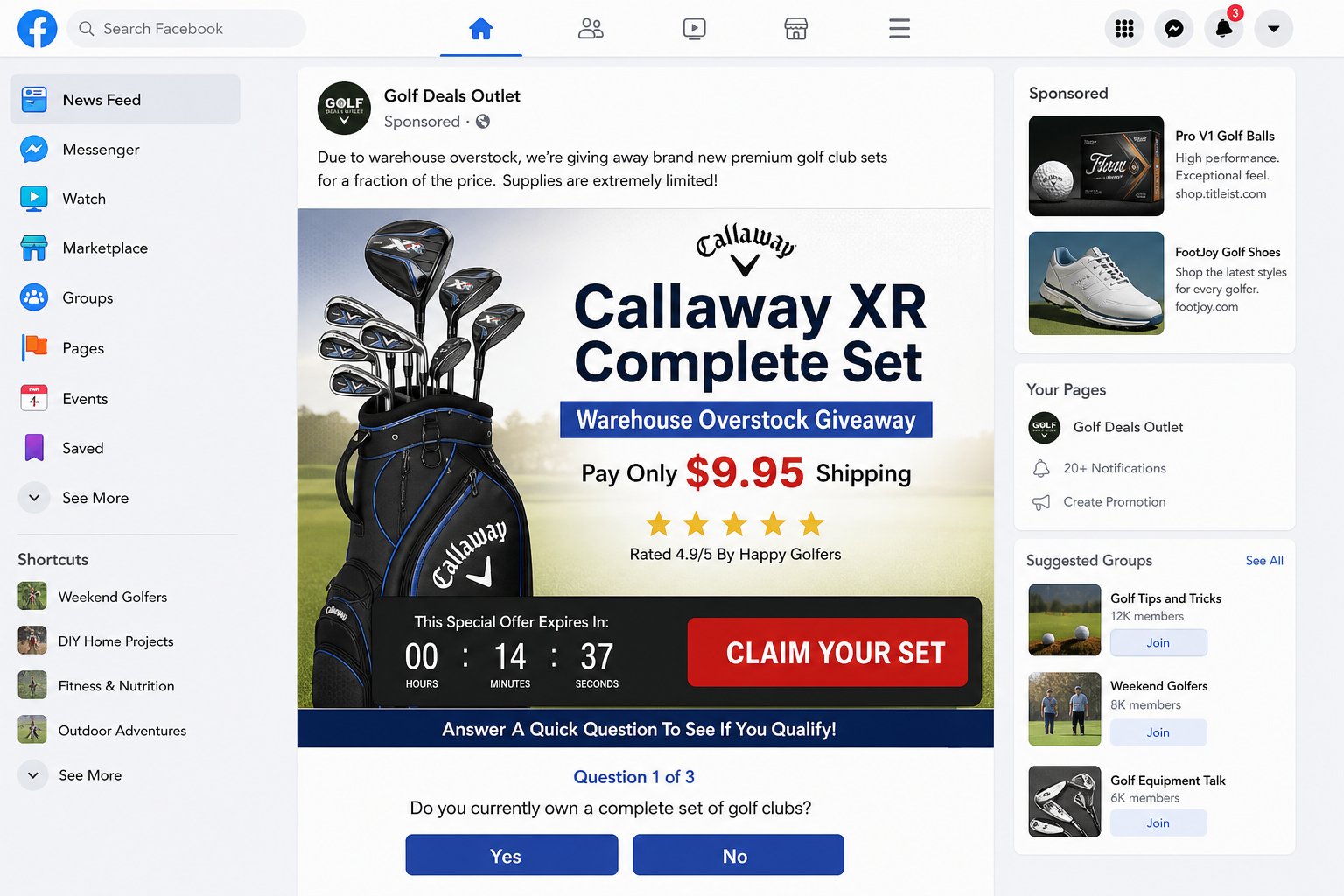
Overview
The giveaway is not an official Callaway promotion
The Callaway XR set is a real premium product. That fact makes the imitation offer more persuasive, but it does not authenticate the advertisement.
Callaway currently sells complete XR sets through its own store and recognized retailers at normal premium prices. A complete set is not realistically cleared for postage alone.
The deceptive promotion has appeared through unrelated advertising accounts and domains. Those routes do not establish any commercial connection with Callaway Golf.
The small shipping payment opens the real risk
The promotion asks for a modest shipping or processing charge, commonly around $6.95 or $9.95. That number lowers resistance to entering card details.
The supposed prize is not the valuable part of the transaction for the operator. A valid payment card and continuing billing consent can be worth far more.
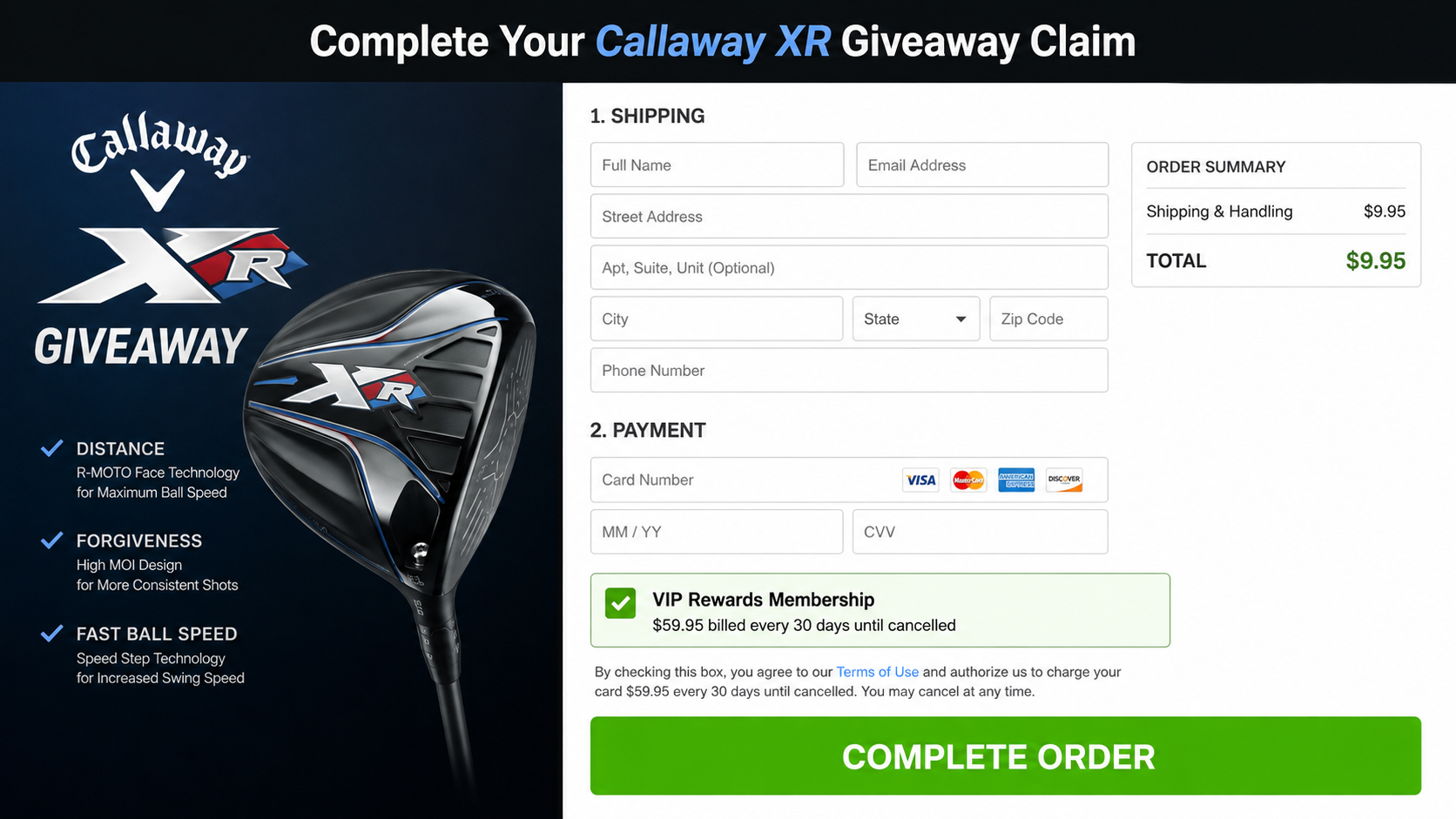
Some versions use preselected membership language or place continuity terms near the final button. Consumers report recurring charges after believing they bought only postage.
The brand name, survey, and countdown work together
A short survey creates the appearance of qualification. Almost every answer leads to congratulations, because the questions are part of the sales path.
Countdowns and inventory warnings discourage comparison shopping. The page wants the visitor to react before checking the domain, sponsor, terms, and real product price.
Key warning signs include:
- A complete premium club set is described as free after a tiny shipping payment.
- The advertiser is a generic deals page rather than Callaway Golf.
- A survey declares nearly every visitor eligible.
- A timer claims the reward will disappear within minutes.
- The checkout requests card details before clearly identifying the merchant.
- Membership or recurring language appears near the payment button.
- The advertised prize is absent from the receipt or shipping confirmation.
- Cancellation instructions point to a different company name.
Why the Offer Looks Believable
The campaign borrows a product that golfers recognize. A genuine model name, convincing photographs, and plausible warehouse language create a surface layer of credibility.
Retailers really do clear discontinued stock. Manufacturers also run contests. The deception works by attaching an impossible price to two things that occasionally happen.
The featured set provides another useful anchor. Callaway lists an XR complete set with numerous clubs, headcovers, and a stand bag for about $1,399.99.
A legitimate seller cannot routinely ship that inventory for $9.95 while giving away the equipment. The economics fail before any technical investigation begins.
The advertisement may claim a warehouse closure, packaging error, cancelled sponsorship, old model year, or customer appreciation event. Each explanation answers the obvious price question.
Those stories are difficult to verify because the page provides no named warehouse, inventory record, promotion rules, drawing date, or official Callaway announcement.
The survey adds ceremony. Questions about age, golfing frequency, handicap, or preferred club create participation without meaningfully determining eligibility.
After three easy answers, a congratulations screen feels earned. The visitor becomes more willing to finish a process they have already invested time completing.
Social proof can include five-star graphics, recent-winner popups, comments, and photographs. These elements are controlled by the page and are not independent customer evidence.
A real promotion should publish clear rules, sponsor identity, eligibility limits, prize quantity, closing date, selection method, and a no-purchase entry route where required.
The fake giveaway usually replaces those details with urgency. The absence of boring legal information is disguised by exciting visual movement and constant calls to claim.
How the Callaway XR Golf Set Giveaway Scam Works
Step 1: A sponsored post offers an unbelievable warehouse giveaway
The route begins with an advertisement on Facebook, Instagram, a news widget, or another high-traffic platform. It uses Callaway product photos and clearance language.
The advertiser may have a recently created name such as Golf Deals Outlet. A professional-looking profile picture does not prove brand authorization.
The offer says only a small number of sets remain. That invented scarcity encourages golfers to click before a friend or another buyer takes the opportunity.
Step 2: A simple survey manufactures eligibility
The landing page asks several easy questions. None requires proof that would genuinely determine who can receive a premium set.
The survey serves two psychological purposes. It makes the giveaway feel selective and creates a gradual sequence of small commitments toward the payment page.
A spinning wheel, progress bar, or checking-stock animation may appear afterward. The result is designed to look dynamic while delivering the same approval repeatedly.
Step 3: The page announces a prize but charges postage
The visitor is told the clubs cost $0, yet shipping, handling, insurance, or verification requires a card payment.
A charge around $9.95 feels proportionate to delivery, even though shipping a full golf bag and clubs would normally cost considerably more.
The small amount also tests whether the card is active. Once payment information is accepted, the operator can pursue larger or repeated charges.
Step 4: Recurring terms hide beside the order controls
Continuity language may appear below the button, inside linked terms, beside a checkbox, or in muted text that is easy to miss on mobile.
The wording can describe a rewards club, shopping membership, discount service, trial, or monthly benefits program. The title sounds unrelated to golf equipment.
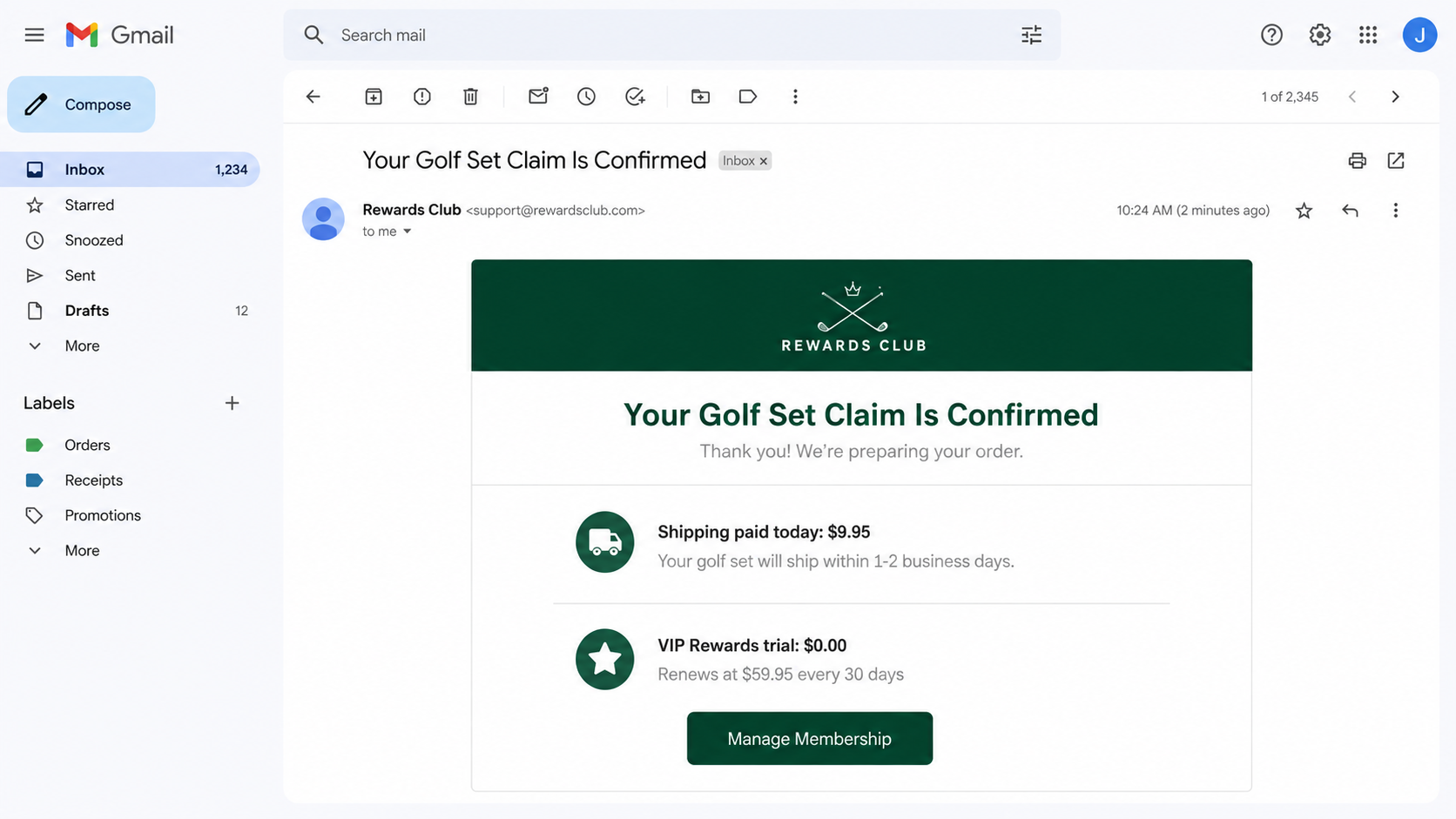
Some complaint records describe monthly charges exceeding $100 on similar ShopToWinDeals promotions. The precise amount depends on the version shown during checkout.
Never assume one screenshot proves every campaign uses the same fee. Save your own final screen because that is the authorization your bank will need.
Step 5: The expected club set never arrives
The customer may receive no shipment, a low-value item, a generic confirmation, or nothing that reasonably matches the promised Callaway set.
A tracking number can delay suspicion. It may describe only label creation, a tiny parcel, an unrelated destination, or a package that cannot contain clubs.
The delay gives the operator time to start membership billing and move advertising traffic to a new domain before complaints accumulate.
Step 6: Cancellation becomes a separate obstacle course
The card statement may display a merchant name never seen in the advertisement. Searching that descriptor becomes the first step toward finding support.
Telephone agents can offer partial refunds, require several calls, or insist the customer knowingly accepted terms. Emails may receive automated replies without a cancellation confirmation.
Each delay matters because another billing date may pass. A verbal promise is not enough; the consumer needs a dated written record and bank intervention.
The Real Product and the Fake Promotion Are Different Things
Callaway makes genuine golf equipment, and the XR complete set exists. The scam lies in the unauthorized giveaway route, not in the existence of the clubs.
This distinction protects both consumers and the legitimate brand. Criminal advertisers often use real products precisely because shoppers can confirm those products through ordinary searches.
A search result showing the XR set does not validate the seller collecting $9.95. Verification must connect the exact domain and promotion to Callaway.
Start from Callaway’s official website rather than from the advertisement. Search the official promotions, customer service, and authorized retailer pages for the alleged event.
Compare prices across recognized golf retailers. Discounts vary, but a roughly $1,400 set reduced to postage alone would require an extraordinary, publicly documented explanation.
Examine the domain character by character. Words such as outlet, reward, claim, survey, clearance, club, and deals can create familiarity without ownership.
Look for official rules. A genuine sweepstakes states the sponsor, dates, number and value of prizes, eligibility, odds, and selection process.
Do not treat HTTPS as proof. Encryption can protect data while it travels to the wrong merchant just as effectively as it protects a legitimate purchase.
The Checkout Details That Matter Most
The payment page deserves more attention than the advertisement. It reveals who wants authorization, what amount is due, and whether future charges are contemplated.
Read the order summary before entering a card. If it lists only shipping and never identifies the physical golf set, the page is not documenting the promise.
Search the page for monthly, recurring, renew, membership, trial, continuity, benefits, club, cancel, and billing. Check linked terms as well.
On mobile, expand every collapsed section. Operators know that small screens hide sidebars, footnotes, preselected boxes, and order details below the visible button.
Take screenshots before submission. Capture the URL, total, checkbox state, recurring terms, merchant name, return policy, and promised item.
Use a credit card rather than debit, wire, gift card, or cryptocurrency. Credit cards generally provide stronger dispute procedures for misrepresented online transactions.
A one-time virtual card can limit future exposure, although it cannot make a deceptive merchant trustworthy or guarantee recovery of the first payment.
Do not provide a Social Security number for a product giveaway. A golf promotion has no legitimate need to collect identity data used for credit or tax fraud.
If the page claims age verification requires card details, leave. Card authorization is a payment event, even when the amount is described as temporary.
Inspect the button label as well. Continue, claim, and verify can still authorize billing when the nearby disclosure defines the click as consent.
Check whether a preselected box enrolls you in prize alerts, shopping benefits, or discount access. Those generic services can hide recurring charges.
A countdown should never decide a financial agreement. Reloading the page often resets supposed deadlines because the pressure is part of the presentation.
Look for conflicting trial lengths across the landing page and terms. Inconsistent dates make timely cancellation unnecessarily difficult.
Search the merchant descriptor online before paying. Complaints under the billing name may reveal a subscription pattern that the golf-themed page conceals.
Do not assume a tiny authorization will remain tiny. Card details can support later attempts unless the issuer blocks the merchant relationship.
A receipt should name the item, total, merchant, delivery expectations, and cancellation terms. A generic membership confirmation does not prove clubs will ship.
Delivery insurance and expedited processing can be extra upsells rather than evidence of inventory. Add-on labels do not make the underlying promotion legitimate.
If the page prevents copying its terms, capture scrolling video. The exact wording visible before payment can matter during a billing dispute.
Close the page when key information remains ambiguous. Losing a supposed prize costs nothing compared with testing an opaque subscription using a real card.
Company, Address, and Fulfillment Checks
The advertiser may vanish behind a disposable domain
ShopToWinDeals and similar funnels can rotate landing pages quickly. A domain disappearing after payment makes support, evidence gathering, and accountability harder.
Record the full address before paying. A familiar product name in the page headline does not identify the legal operator collecting the card number.
The billing company may not match the promotion
Read the footer, terms, receipt, and card descriptor. If four different names appear, determine which entity accepted payment and which promises cancellation.
An unexplained merchant mismatch is a serious warning. It complicates disputes and allows support agents to deny responsibility for statements made on another page.
A mailing address does not prove golf inventory exists
Search any address in mapping, corporate, and postal records. A mailbox, registered-agent office, residence, or fulfillment warehouse is not proof of brand authorization.
A warehouse can mail low-value parcels without holding a single Callaway set. Ask for the actual shipper and package weight if tracking appears.
Unresponsive support turns a bad offer into continuing loss
Test the advertised telephone and email before ordering. Ask for the legal seller, subscription price, cancellation method, and exact return address.
If support cannot answer those questions in writing, do not trust a countdown or guarantee. Cancellation promises are worthless when nobody accepts the request.
What to Do if You Fell Victim to the Callaway Giveaway Scam
- Save the entire transaction. Capture the advertisement, URL, survey, checkout, receipt, emails, card descriptor, terms, and every message with support.
- Contact the card issuer immediately. Explain that the valuable prize was misrepresented and ask about blocking pending or future recurring charges.
- Dispute unauthorized billing. Identify each charge separately, including the shipping payment and any later membership amount you did not knowingly accept.
- Cancel in writing. Send a dated request to every support address shown, demand confirmation, and keep delivery records or ticket numbers.
- Consider replacing the card. Ask the issuer whether account updater services could transfer recurring billing to a replacement and how to prevent that.
- Secure reused credentials. Change any password entered on the promotion, starting with email, and enable multi-factor authentication on important accounts.
- Run Malwarebytes. Scan the device if the page downloaded a file, requested an extension, displayed alarming popups, or installed an unfamiliar application.
- Use AdGuard during cleanup. It can reduce malicious advertisements and redirects, although it cannot reverse a payment already authorized.
- Report the advertisement. Notify the social platform, Callaway, the FTC, and IC3 with the advertiser profile, destination domain, and transaction evidence.
- Watch for follow-up fraud. Treat refund agents, prize processors, and recovery services as suspicious when they request another fee or remote access.
Is Your Device Infected? Run a Free Malware Scan
Slow performance, constant pop-ups, or strange behavior? These are classic signs of a malware infection. The fastest way to find out is to scan your device with Malwarebytes Free — one of the most trusted malware removal tools available.
The free version detects and removes the most common threats, including:
- Adware — the cause of those annoying pop-ups
- Browser hijackers — unwanted redirects and changed homepages
- Trojans and spyware — hidden programs stealing your data
- Potentially unwanted programs (PUPs) — software you never asked for
👉 Select your device below — Windows, Mac, or Android — then follow the simple steps to download Malwarebytes, scan your system, and remove any threats it finds. The scan usually takes 5 to 20 minutes.
Run a Malware Scan with Malwarebytes for Windows
Malwarebytes is one of the most popular and trusted anti-malware tools for Windows — and it’s completely free for removing infections. It catches threats that many antivirus programs miss, including adware, browser hijackers, and trojans. Follow the steps below to scan and clean your PC in just a few minutes.
Download Malwarebytes
Click the button below to download the latest version of Malwarebytes for Windows from the official source. The free version is all you need — it will scan your computer and remove adware, browser hijackers, and other malicious software at no cost.
Download MalwarebytesOfficial installer for Windows 11 and 10. Your download starts right away.Want real-time protection? See Malwarebytes Premium Malwarebytes Free for WindowsScans and removes malware at no cost
-
Install Malwarebytes
When the download finishes, open your Downloads folder and double-click the MBSetup file. If Windows shows a User Account Control pop-up, click “Yes” to allow the installation.

Follow the On-Screen Prompts to Install Malwarebytes
The setup wizard will walk you through a few quick screens:
-
Choose where you’re installing the program — “Personal Computer” or “Work Computer” — then click Next.

-
Malwarebytes will now install on your device. This usually takes under a minute.

-
When installation is complete, the “Welcome to Malwarebytes” screen will open automatically.

-
On the final screen, click Open Malwarebytes to launch the program.

-
Enable “Scan for Rootkits”
Before scanning, turn on rootkit detection so Malwarebytes can find even the most hidden threats. Click the Settings gear icon on the left side of the screen.

In the settings menu, find “Scan for rootkits” and click the toggle so it turns blue.

Done? Click “Dashboard” in the left pane to return to the main screen.
Start the Scan
Click the blue Scan button. Malwarebytes will automatically update its virus database and start checking your computer for malware.

-
Wait for the Scan to Finish
The scan checks your entire system for browser hijackers and other malicious programs, so it can take 5 to 20 minutes depending on your computer. Feel free to do something else — just check back occasionally to see the progress.

-
Quarantine the Detected Threats
When the scan is done, you’ll see a list of everything Malwarebytes found — malware, adware, and potentially unwanted programs. Click the “Quarantine” button to remove all of them at once.

Malwarebytes will now remove the malicious files and registry entries and move them safely into quarantine.

-
Restart Your Computer
Some threats can only be fully removed after a reboot. If Malwarebytes asks you to restart, click Yes. Once you’re logged back in, Malwarebytes has finished removing the threats it found.

That’s it — your Windows PC is now clean of trojans, adware, and other malware, and should be back to running smoothly.
If you are still having problems with your computer after completing these instructions, then please follow one of the steps:
- Run a computer scan with ESET Online Scanner
- Ask for help in our Windows Malware Removal Help & Support forum.
Run a Malware Scan with Malwarebytes for Mac
Malwarebytes for Mac is a free on-demand scanner that removes the malware other security software tends to miss — adware, browser hijackers, and unwanted programs included. Cleaning an infected Mac with Malwarebytes has always been completely free, and it’s our go-to recommendation. Follow the steps below to scan and clean your Mac in just a few minutes.
-
Download Malwarebytes for Mac
Click the button below to download the latest version of Malwarebytes for Mac.
Download MalwarebytesOfficial installer for macOS. Your download starts right away.Want real-time protection? See Malwarebytes PremiumMalwarebytes Free for MacScans and removes malware at no cost -
Open the Malwarebytes setup file
When the download finishes, open your Downloads folder and double-click the setup file to begin the installation.

-
Follow the On-Screen Prompts to Install Malwarebytes
The Malwarebytes for Mac Installer will guide you through a few quick screens. Click “Continue” and keep following the prompts until the installation completes.



When the installation is complete, Malwarebytes opens to the Welcome to Malwarebytes screen. Click “Get started“.
-
Select “Personal Computer” or “Work Computer”
Malwarebytes will ask what type of computer you’re installing it on. Click either Personal Computer or Work Computer, whichever applies.

-
Start the Scan
Click the “Scan” button. Malwarebytes will automatically update its detection database and begin checking your Mac for malware.

-
Wait for the Scan to Finish
Malwarebytes will scan your Mac for adware, browser hijackers, and other malicious programs. This can take a few minutes, so feel free to do something else — just check back occasionally to see the progress.

-
Quarantine the Detected Threats
When the scan is done, you’ll see a list of everything Malwarebytes found. Click the “Quarantine” button to remove all the threats at once.

-
Restart Your Mac
Malwarebytes will now remove all the malicious files it found. Some threats can only be fully removed after a reboot — if Malwarebytes asks you to restart, allow it. Once you’re logged back in, your Mac is clean.

That’s it — your Mac is now free of adware, rogue browser extensions, and other potentially harmful software.
If you are still experiencing problems while trying to remove a malicious program from your computer, please ask for help in our Mac Malware Removal Help & Support forum.
Run a Malware Scan with Malwarebytes for Android
Malwarebytes for Android automatically detects and removes dangerous threats like malware and ransomware so you don’t have to worry about your most-used device being compromised. Aggressive detection of adware and potentially unwanted programs keeps your Android phone or tablet running smooth.
-
Download Malwarebytes for Android.
You can download Malwarebytes for Android by clicking the link below.
Get Malwarebytes for AndroidOpens Google Play in a new tab.Want real-time protection? See Malwarebytes Premium for AndroidMalwarebytes for AndroidScans your phone and removes malware at no cost -
Install Malwarebytes for Android on your phone.
In the Google Play Store, tap “Install” to install Malwarebytes for Android on your device.

When the installation process has finished, tap “Open” to begin using Malwarebytes for Android. You can also open Malwarebytes by tapping on its icon in your phone menu or home screen.

-
Follow the on-screen prompts to complete the setup process
When Malwarebytes will open, you will see the Malwarebytes Setup Wizard which will guide you through a series of permissions and other setup options.
This is the first of two screens that explain the difference between the Premium and Free versions. Swipe this screen to continue.
Tap on “Got it” to proceed to the next step.
Malwarebytes for Android will now ask for a set of permissions that are required to scan your device and protect it from malware. Tap on “Give permission” to continue.
Tap on “Allow” to permit Malwarebytes to access the files on your phone.
-
Update database and run a scan with Malwarebytes for Android
You will now be prompted to update the Malwarebytes database and run a full system scan.

Click on “Update database” to update the Malwarebytes for Android definitions to the latest version, then click on “Run full scan” to perform a system scan.

-
Wait for the Malwarebytes scan to complete.
Malwarebytes will now start scanning your phone for adware and other malicious apps. This process can take a few minutes, so we suggest you do something else and periodically check on the status of the scan to see when it is finished.

-
Click on “Remove Selected”.
When the scan has been completed, you will be presented with a screen showing the malware infections that Malwarebytes for Android has detected. To remove the malicious apps that Malwarebytes has found, tap on the “Remove Selected” button.

-
Restart your phone.
Malwarebytes for Android will now remove all the malicious apps that it has found. To complete the malware removal process, Malwarebytes may ask you to restart your device.
That’s it — your Android phone is now clean — no more malicious apps, adware, or browser redirects.
If you are still having problems with your phone after completing these instructions, then please follow one of the steps:
- Restore your phone to factory settings by going to Settings > General management > Reset > Factory data reset.
- Ask for help in our Mobile Malware Removal Help & Support forum.
Stay Protected: Block Ads and Malicious Sites
Now that your device is clean, keep it that way. Most infections start with a malicious ad or a fake download button — so blocking them at the source is your best defense.
We recommend AdGuard, which blocks malicious ads, phishing pages, and dangerous redirects before they can reach you.
👉 Download AdGuard and browse safely
Frequently Asked Questions
Is Callaway really giving away XR golf sets for $9.95 shipping?
We found no evidence that the unrelated survey promotion is an official Callaway giveaway. Verify any offer through Callaway’s own website and customer service.
Does the Callaway XR golf set actually exist?
Yes. The legitimate XR complete set exists and sells at a premium retail price. Its existence does not authenticate a third-party postage-only advertisement.
Why does the checkout ask for a credit card if the clubs are free?
The page calls the payment shipping or handling. That small authorization can expose the card to memberships, repeated charges, or other misuse.
Will a golf set arrive after I finish the survey?
Do not expect the advertised premium set. Reports about similar funnels describe missing prizes, low-value shipments, and recurring billing instead of the promised reward.
Can I stop the subscription by cancelling my card?
Contact the issuer first. Request a merchant block and ask whether automatic card-updater services could move the charge to a replacement account.
Is Callaway responsible for the deceptive advertisement?
The scam uses Callaway branding without proving authorization. The evidence points to an unrelated promotion exploiting a legitimate company’s product and reputation.
The Bottom Line
The Callaway XR giveaway turns a real, expensive golf set into bait for a tiny payment. The survey and countdown exist to move card details into an unrelated checkout.
Do not pay postage for an unverified prize. Confirm promotions through Callaway, read every billing term, and involve the card issuer quickly if unexpected charges appear.

Join the discussion
0 commentsShare your experience or ask a question about this article.
Discussion
Start the conversation
Have a question or something useful to share? Add the first comment.