

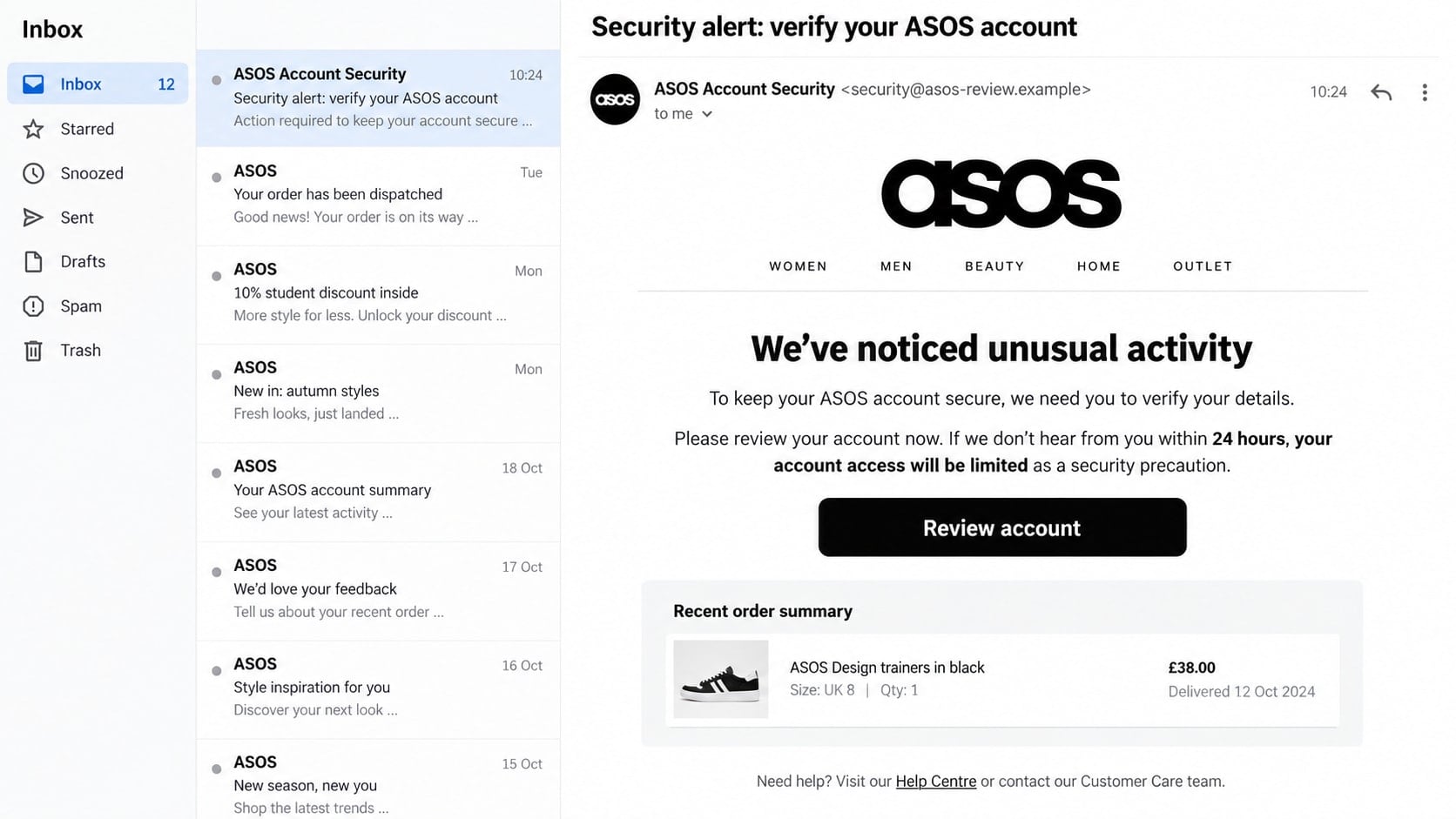
An email says someone has tried to enter your ASOS account, and the next click appears to be the quickest way to protect it. The message looks familiar enough to make hesitation feel risky.
That small burst of urgency is what gives the ASOS login scam its power. Before entering a password or card number, take a closer look at where the message is really trying to send you.
Overview
The message borrows a real retailer’s identity
The ASOS login scam is a phishing campaign that impersonates the fashion retailer in emails, text messages, social media replies, advertisements, and fake customer-service conversations. It commonly claims that an account was locked, an order was delayed, a refund needs approval, or a password must be confirmed.
ASOS is a legitimate company. The fraudulent part is the sender or website using its name without permission. The retailer has warned customers about impostors using fake websites, Gmail accounts, WhatsApp, and social media profiles.
The FTC’s phishing guidance recommends contacting a company through a website or phone number you already know is real, not the details in an unexpected message.
The link opens a copied sign-in or verification page
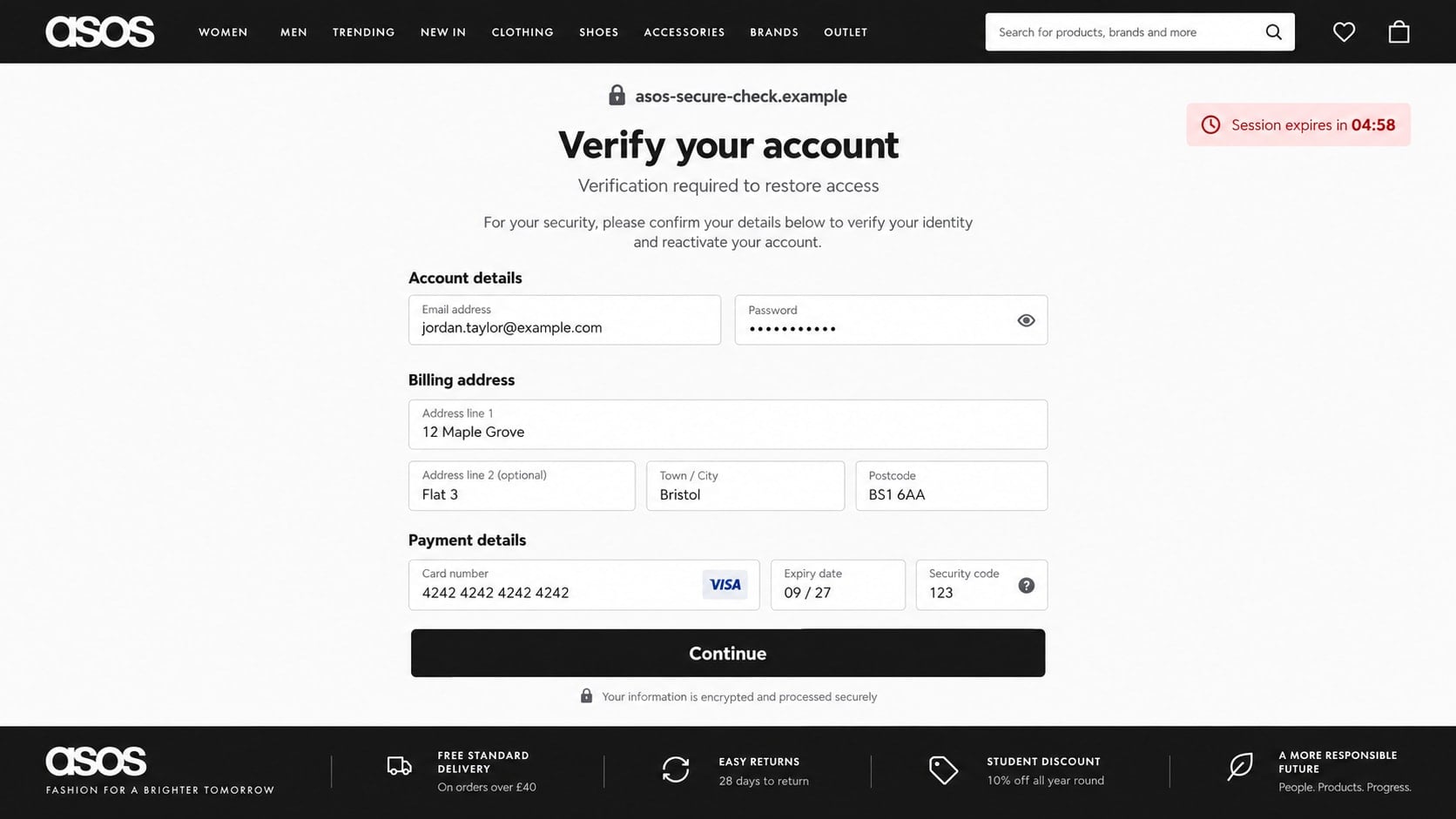
A button labeled “Review account,” “Track order,” or “Confirm refund” can lead to a page that closely resembles the genuine ASOS site. The colors, logo, product photography, and navigation may all look convincing while the address belongs to an unrelated domain.
The form can collect far more than an ASOS password. Depending on the story, it may request an email login, delivery address, date of birth, card details, security code, or one-time verification code.
Stolen details can unlock more than a shopping account
An ASOS account may contain addresses, order history, saved preferences, vouchers, and partial payment information. Reused credentials can also give an attacker a path into email, social media, or other shopping accounts.
The campaign may lead to several kinds of loss:
- An ASOS password is captured on a fake sign-in page.
- The same password is tested against email and other services.
- Card information is taken through a fabricated identity check.
- A one-time code authorizes an account change or transaction.
- A fake support agent asks for remote access to the victim’s device.
- Personal details are reused in more targeted delivery and refund scams.
Why the ASOS Login Alert Can Look So Convincing
Shopping messages already contain deadlines. A parcel is moving, a return window is closing, or an item is nearly sold out. Criminals do not need to invent a completely new emotion when the normal retail experience already encourages quick action.
A scam email may arrive soon after a real purchase by coincidence. Large phishing campaigns reach enough people that some recipients will genuinely be waiting for an ASOS order. Data from unrelated breaches and marketing lists can also help fraudsters personalize a message with a name or location.
Modern phishing templates are polished. Correct spelling, responsive design, familiar legal text, and a secure padlock do not prove that ASOS controls the page. The padlock only shows that traffic between the browser and that particular site is encrypted.
Even the visible sender can be misleading. Email applications often emphasize a friendly display name while hiding the complete address. “ASOS Account Security” is a label chosen by the sender, not an authentication certificate.
Social media adds another layer. A victim may complain publicly about a delayed order and receive a fast reply from an account using an ASOS logo. The impostor already knows the customer has a problem, so the request for an order number or verification link feels relevant.
How the ASOS Login Scam Works
Step 1: A security, delivery, or refund message creates urgency
The first contact claims that something needs attention. Common stories include an unfamiliar login, a locked account, a failed delivery, an incomplete return, a payment problem, or a refund that cannot be sent.
The message usually sets a short deadline. It may say access will be restricted within 24 hours or that the parcel will be returned unless the customer confirms details immediately.
Step 2: Familiar branding makes the request feel routine
The email or text uses ASOS wording, black-and-white styling, product images, and a professional footer. A social profile may copy official posts and use a name such as ASOS Support, ASOS Help Team, or ASOS Refund Desk.
None of those details establishes control of an official account. Logos are public, and a scammer can copy the visible design of a genuine message in minutes.
Step 3: The victim is pushed toward a link or private conversation
A prominent button creates the impression that the issue can be fixed in one step. On social media, the fake representative may move the exchange to WhatsApp or request a direct message so the platform and other users cannot see what follows.
Shortened addresses and tracking links make the destination difficult to inspect. Some campaigns pass through several redirects before landing on the phishing page, allowing the operator to replace a blocked domain without changing every message.
Step 4: A copied page collects the ASOS and email password
The page displays a sign-in form that appears to belong to ASOS. When the victim submits an email address and password, the site records them and may display an error so the same information is entered again.
Some versions offer buttons to continue with Google, Apple, or Facebook. Those options can open another copied sign-in page, turning a shopping lure into the theft of a more valuable identity account.
Step 5: An identity or payment check takes additional data
After the login, the visitor may be told that billing information is required to restore access or release a refund. The form asks for a name, address, card number, expiration date, and security code.
A small test charge may be described as refundable. The amount is meant to make the request seem harmless while proving that the card works and generating a real authorization request.
Step 6: A genuine one-time code is used inside the fake process
The attacker may attempt a real account login or card transaction as soon as the victim submits details. A legitimate code then arrives by text or email, and the fraudulent page asks the victim to type it into a “verification” field.
The code is genuine, but the explanation is false. Entering it can approve the attacker’s login, password change, wallet enrollment, or payment.
Step 7: The stolen account supports purchases and follow-up fraud
Once inside an account, the criminal may change contact details, use vouchers, place orders, or collect information for a more convincing phone call. A reused password can spread the compromise to email and other services.
The victim may later receive a call from a supposed bank or ASOS investigator. Because the caller can quote the submitted name, address, or transaction, the second approach sounds informed. It is usually another attempt to obtain codes, remote access, or a transfer.
Common Versions of the ASOS Impersonation
The account-warning email is only one opening. The same fake sign-in page can sit behind several messages, each chosen to fit a different customer concern.
- Unusual login: Someone supposedly entered the account from a new location.
- Delivery address problem: A parcel cannot be dispatched until an address is confirmed.
- Failed payment: The order will be cancelled unless card details are updated.
- Refund pending: Banking information is allegedly needed to return money.
- Gift card or discount: A large voucher is offered after a short survey or login.
- Fake customer care: An impostor responds to a public complaint and sends a private link.
- Influencer collaboration: A fake ASOS representative offers products or payment in exchange for identity information.
The emotional trigger changes, but the safety test remains the same. Do not resolve the issue through the channel that introduced it. Open ASOS independently and check whether the same order, return, or account notice exists.
Warning Signs of a Fake ASOS Login Page
A phishing page can look excellent, so do not wait for obvious grammar mistakes. Look at the entire route from sender to form and consider what the page asks you to surrender.
- The message comes from a free mailbox or a lookalike domain.
- The address contains extra words, hyphens, numbers, or an unfamiliar ending.
- The page threatens immediate suspension for a routine order issue.
- A refund requires a full card number, security code, or separate payment.
- A representative asks to continue only through WhatsApp or Telegram.
- The page requests an email password rather than an ASOS password.
- A one-time code is requested by a caller or form reached from the message.
- The order or alert does not appear after ASOS is opened independently.
- The supposed support agent discourages contact with the bank or official help team.
One unusual detail does not always prove fraud. Several mismatches around the sender, destination, urgency, and information request are much stronger evidence than the page’s visual quality.
Identity, Contact, and Payment Checks
Open ASOS through a route you already trust
Type asos.com yourself, use the official app, or open a saved bookmark. Sign in there and inspect orders, returns, payment status, account details, and customer-care options without touching the message link.
If the account shows no matching problem, do not try to reconcile the discrepancy on the suspicious page. Save the message and ask official customer care to confirm it.
Inspect the complete sender and destination
ASOS says it contacts customers through ASOS-branded email addresses or verified social accounts. Expand the email header and read the full address after the @ symbol rather than relying on the display name.
Preview a link without opening it when possible. The meaningful part is the registered domain, not an ASOS word placed in a subdomain, folder, or long string of text.
Match the story to a real order
A genuine delivery or return question should correspond to an order number, item, date, and status visible in the real account. A generic alert that cannot identify a purchase may have been sent to millions of addresses.
Do not send screenshots of bank accounts or full card details to prove a transaction. Official support can work with limited information and should explain exactly what is needed.
Keep payments and codes out of support conversations
A refund should not require a gift card, cryptocurrency transfer, remote-access session, or separate fee. Never move money to a “safe” account because an incoming caller says it will reverse an ASOS charge.
Read every security code before using it. The text normally explains the action being approved. If it describes a login or payment you did not start inside the official app, do not enter or share it.
How to Protect Your ASOS and Email Accounts
Use a unique password for ASOS. If a password appears on another site, a breach at that unrelated service can give criminals a working credential without sending any phishing email.
Protect the connected email account even more carefully. Email controls password resets and receives order records, so an attacker who owns the inbox can hide alerts and recover shopping accounts repeatedly.
Turn on the strongest sign-in protection available for your email and payment services. An authenticator app or passkey is generally more resistant to message-based code theft than ordinary SMS, although no method replaces checking the domain.
Review saved addresses, payment methods, vouchers, account profile details, and active sessions after any suspicious event. A criminal may make a small change first and return later when attention has faded.
Keep browsers and apps updated. Remove unknown extensions, especially coupon, shopping, and parcel-tracking add-ons that can read web pages or redirect searches.
What to Do if You Have Fallen Victim to This Scam
- Leave the fake page and stop communicating. Do not return to correct a field or ask the sender to delete your data. Capture the email, sender, URL, social profile, chat, and any transaction before blocking contact.
- Change the ASOS password through the genuine service. Open the official site or app yourself. Choose a password never used elsewhere, review profile changes and orders, and contact ASOS Customer Care about unauthorized activity.
- Secure the connected email account next. Replace its password, sign out unknown sessions, remove unfamiliar forwarding rules and recovery addresses, and check whether security alerts were deleted or marked as read.
- Replace every reused credential. If the submitted password protected any other account, assume it is exposed. Begin with banking, payment, cloud storage, social media, and shopping services that hold personal information.
- Call the card issuer if payment details were entered. Use the number printed on the card or shown inside the bank’s official app. Explain that the card was submitted to a phishing page and ask about blocking, replacement, and disputed transactions.
- Revoke the effect of any code you shared. Tell the affected bank or service exactly what the one-time message said. A code may have approved a login, card enrollment, password reset, or transfer that needs immediate investigation.
- Check the device if anything was downloaded. Remove unknown programs and browser extensions. Run a complete scan with Malwarebytes, particularly if the fake agent supplied an attachment, support tool, or security update.
- Reduce repeat exposure. AdGuard can block many known phishing and advertising destinations before they load, although it cannot undo credentials already submitted. Keep its filters current and continue verifying unexpected pages independently.
- Preserve and report the campaign. Mark the email as phishing, report the account to the social platform, and send relevant details to ASOS and the fraud-reporting service in your country. Retain reference numbers from every report.
- Watch for the second scam. Treat unsolicited recovery agents, bank investigators, and refund representatives as unverified. Criminals may reuse the exact information entered on the first page to make the next call sound authentic.
Frequently Asked Questions
Is ASOS itself connected to the login scam?
No. ASOS is a legitimate retailer whose branding is being impersonated. Judge the specific sender, domain, social account, and requested action rather than assuming the company created the message.
Can a real ASOS email contain a link?
Genuine retail emails can contain links, but an unexpected link should not become your verification method. Open ASOS separately and look for the same order or account information there.
What if the message includes my real name and order details?
Accurate details can come from a compromised account, exposed mailbox, data breach, public complaint, or stolen merchant record. Personalized information raises urgency, but it does not authenticate the sender.
Is the padlock beside the fake site’s address a sign it is safe?
No. It means the connection to that domain is encrypted. Criminals can obtain certificates for lookalike domains, so the exact registered address still matters.
Should I reply to ask whether the alert is genuine?
No. A reply confirms that the address is active and keeps you inside the scammer’s channel. Ask ASOS through contact options found on its official site.
What if I clicked but entered nothing?
Close the page and avoid downloading or allowing anything. The risk is much lower if no data, file, notification permission, or password was provided, but inspect the browser and remain alert for follow-up messages.
The Bottom Line
The ASOS login scam turns an ordinary shopping concern into a request for credentials, card details, or security codes. Its design may look authentic, but the sender and destination reveal who actually controls the conversation.
Ignore the message’s deadline, open ASOS independently, and keep passwords and payment information away from every unverified form. If details already left your control, secure email first, contact the bank quickly, and document the incident before the campaign disappears.








