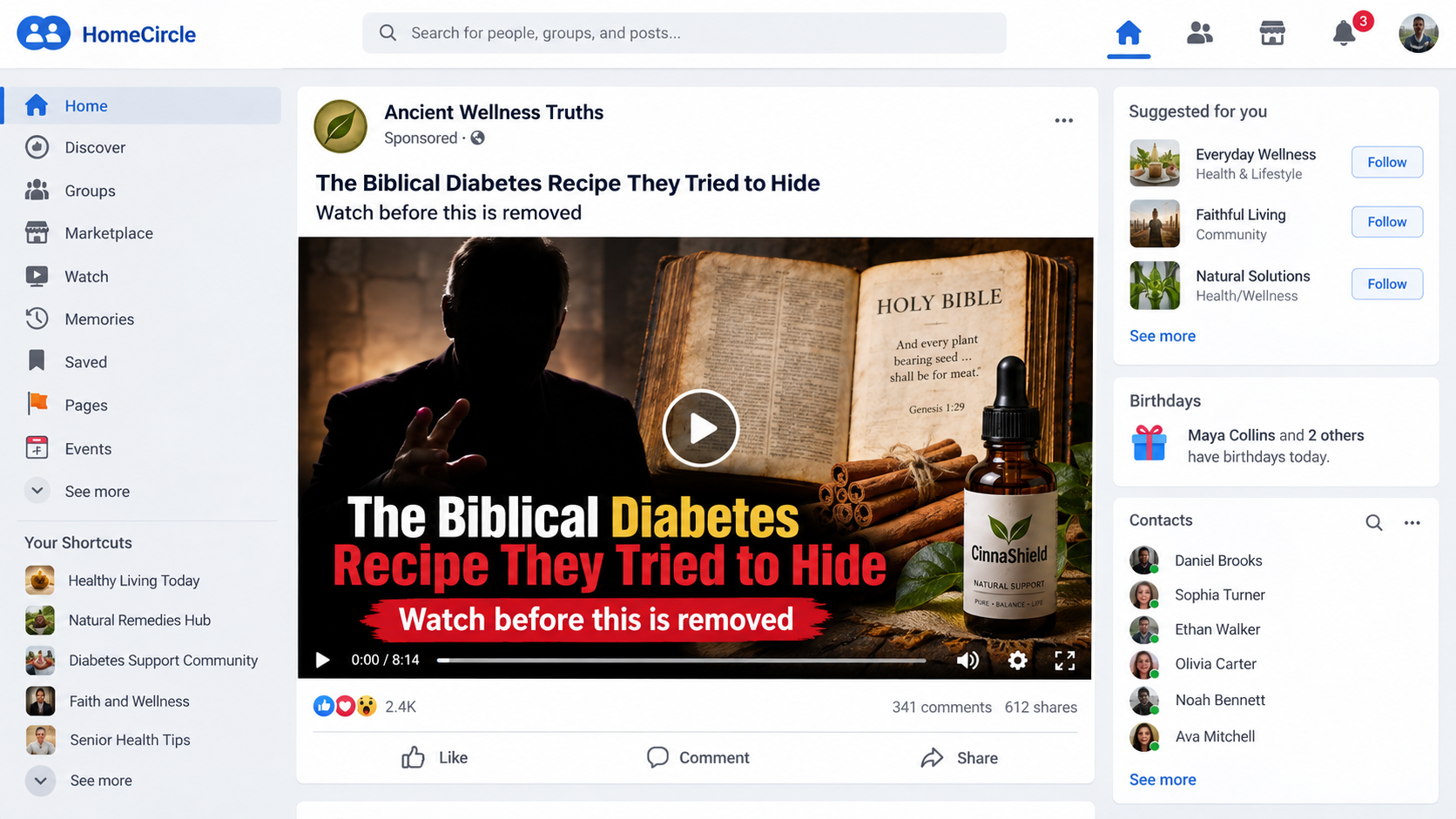
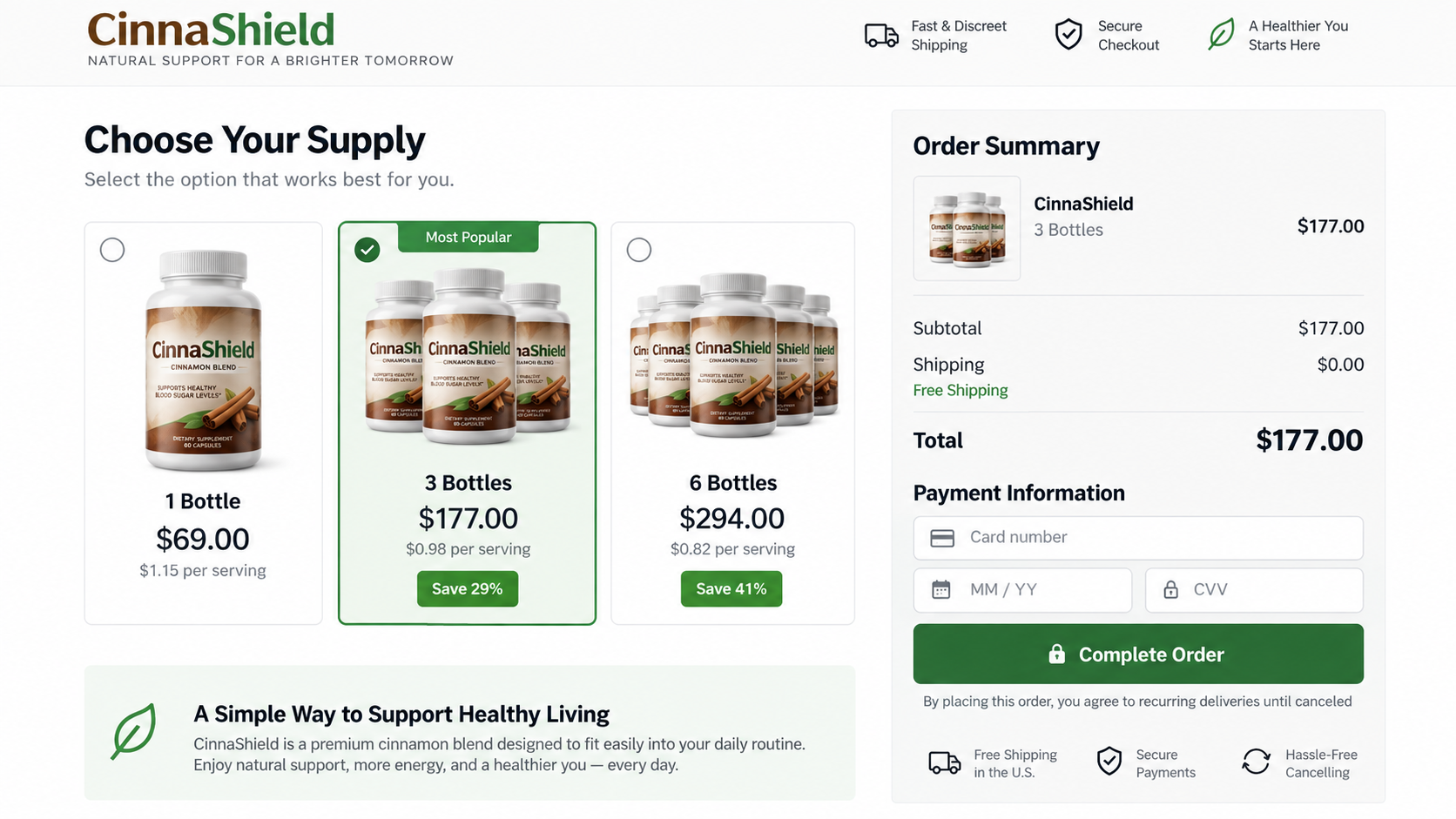
A familiar face appears beside a Bible, cinnamon, and a promise that feels both ancient and newly discovered.
The presentation is carefully built to earn trust before viewers have time to ask who created it, or why the story leads toward a checkout.
Overview
The advertisement borrows religious and celebrity trust
The campaign falsely presents actor Jonathan Roumie as the messenger behind a biblical diabetes recipe. Some versions also insert Dr. Phil or Dr. Oz.
Roumie is recognizable for portraying Jesus in The Chosen. That association makes scripture imagery feel personal, sincere, and unusually persuasive.
There is no reliable evidence that Roumie created, endorsed, or narrated this diabetes presentation. The voice and video are manipulated promotional material.
The promised recipe becomes a supplement sale
The opening advertisement suggests viewers will learn a simple ingredient hidden in scripture. It may promise normalized glucose within days or weeks.
The supposed lesson stretches into a long video. Instead of providing a proven treatment, it eventually introduces CinnaShield or another rotating supplement brand.
The product name is replaceable. The emotional story, stolen authority, health fear, and direct-response checkout remain the valuable parts of the operation.
The medical promise creates the greatest risk
Diabetes requires individual medical care. Delaying prescribed treatment for an unproven online recipe can allow serious complications to develop without obvious early warning.
Dietary supplements are not FDA-approved treatments for diabetes. A disclaimer at the bottom cannot neutralize a video that repeatedly promises reversal or a cure.
The celebrity endorsement is fabricated.
The biblical discovery story is a marketing device.
The video withholds the sales pitch until viewers are emotionally invested.
The supplement name can change while the advertisement stays almost identical.
Checkout totals, bundles, and continuing deliveries require careful inspection.
This is not a dispute about faith or cinnamon as food. It concerns impersonation, unsupported disease claims, and a funnel designed to convert trust into payment.
What the Biblical Diabetes Recipe Advertisement Claims
Different copies use slightly different scripts. Most describe an overlooked spice, seed, passage, or morning ritual that supposedly addresses diabetes at its hidden cause.
The narrator may claim drug companies suppressed the discovery. That conspiracy theme explains why viewers have never heard the story from their own clinicians.
Testimonials then describe dramatic glucose changes, renewed energy, weight loss, or freedom from medication. These stories are presented without verifiable patients or medical records.
A countdown, limited availability notice, or warning that the video could disappear creates urgency. Viewers are discouraged from pausing to research the names.
The campaign sometimes calls its ingredient natural and therefore safe. Natural substances can still interact with medication, affect glucose, or cause unwanted reactions.
The central contradiction appears late. A free household recipe should not require an expensive multi-bottle supplement order to deliver its supposed secret.
How the Jonathan Roumie Biblical Diabetes Recipe Scam Works
Step 1: A short social video stops the scroll
The first clip uses Roumie’s name, religious imagery, and a grave health warning. The combination reaches people through identity, hope, and medical concern.
AI voice cloning can make ordinary sentences sound like the actor. Lip movements may be altered, while fast cuts hide synchronization mistakes.
Some versions add television personalities or unnamed doctors. Their presence makes the message look independently confirmed, although every endorsement comes from the same advertisement.
Step 2: The click opens a disguised health article
The destination may resemble a news report, medical journal, or faith-based wellness publication. Its design supplies authority the seller has not earned.
A domain name, tiny sponsored label, or footer often reveals that the page is not connected to the celebrity, a hospital, or a recognized publisher.
The page can disappear after complaints and return under another address. That is why the story matters more than any single website name.
Step 3: A long video builds fear and hope
The video describes diabetes as a misunderstood crisis and portrays standard care as incomplete. It then introduces one alleged root cause that only this presentation explains.
Viewers hear emotional accounts of fatigue, frightened families, medication costs, and worsening test results. Those details make the sales journey feel like patient education.
The supposed recipe remains just out of reach. Each promised explanation leads to another story, keeping viewers engaged until the product reveal.
Step 4: Fabricated authority replaces evidence
A narrator may mention a university, FDA official, overseas tribe, laboratory, or unnamed clinical study. References are vague enough to sound impressive but resist verification.
Real evidence would identify authors, publication dates, methods, participant numbers, outcomes, and limitations. The advertisement normally supplies none of those details.
Celebrity footage does not repair that gap. Recognition is being used as a substitute for a credible medical source.
Step 5: The recipe turns into CinnaShield or another product
After the story establishes urgency, the presenter says ordinary cinnamon is insufficient, contaminated, wrongly processed, or missing a proprietary combination.
The viewer is directed to CinnaShield in one campaign. A later version can substitute drops, capsules, gummies, patches, or an entirely new brand.
This rotation protects the marketing funnel. Complaints tied to one product name do not prevent the same video framework from selling the next label.
Step 6: Bundles make the real price difficult to judge
The sales page emphasizes per-bottle savings and highlights a three-bottle or six-bottle package. The largest discount usually receives the strongest visual treatment.
A customer focused on one displayed price may miss quantity, shipping, protection plans, or recurring delivery language near the order button.
Never assume a highlighted amount is the complete charge. Record the final quantity, total, merchant name, and renewal terms before entering card details.
Step 7: The post-purchase process creates new pressure
After payment, upsell pages may offer extra bottles, faster results, priority shipping, or related products. A single click can add another charge.
Telephone agents may argue that the smallest order cannot work and encourage a longer supply. Health anxiety makes that pressure particularly effective.
Refund requests can encounter retention offers, partial refunds, return postage, unopened-package rules, or a warehouse address unrelated to the marketing company.
Why the Jonathan Roumie Video Is Not a Real Endorsement
A genuine endorsement should be traceable beyond the advertisement. It would appear through the person’s verified channels, representative, or a clearly identified commercial partnership.
These clips instead circulate through sponsored accounts with generic names. Their destination pages provide no credible relationship with Roumie or his official work.
Watch the mouth around difficult sounds. AI dubbing often produces soft edges, unnatural teeth, frozen skin texture, or expressions that do not match the sentence.
Listen for identical pacing across every phrase. Cloned speech may lack breathing, room changes, interruptions, and the subtle emphasis of an unscripted conversation.
Editing can be simpler than a complete deepfake. Scammers sometimes combine authentic footage with invented subtitles, a replacement voice, and unrelated product images.
The FTC warns that fabricated celebrity endorsements now use doctored audio and video. A convincing clip is therefore a reason to verify, not proof.
Search for the complete quote, not only the person’s name. Genuine interviews are normally available in longer context from the original broadcaster or creator.
If the only copies lead toward the same checkout, the commercial funnel is the source of the claim, not independent confirmation.
Why the Diabetes Claims Are Dangerous
Blood glucose can change for many reasons, including meals, medication, illness, sleep, stress, activity, and measurement timing. A single reading proves very little.
Diabetes management can involve nutrition, movement, monitoring, prescribed medication, and regular clinical review. The correct plan depends on diagnosis, health history, and current results.
A supplement seller cannot safely tell an unknown viewer to stop medication. Abrupt changes can cause severe high or low blood glucose.
The FDA states that supplements marketed to cure, treat, prevent, or mitigate diabetes meet the legal definition of drugs and require appropriate evaluation.
The agency has also warned that unapproved diabetes products may contain hidden ingredients, contamination, or unreliable amounts. A natural label does not guarantee safety.
Cinnamon has been studied, but research does not establish an online cinnamon blend as a replacement for standard diabetes care.
Even an ingredient with biological activity can create interactions. People taking glucose-lowering medication may face additional risk when combining products without professional advice.
Never use a dramatic testimonial to adjust insulin or other medicine. Contact the clinician managing your diabetes before adding any concentrated supplement.
How the Funnel Survives Complaints and Takedowns
The advertisement is assembled from replaceable pieces. A new domain, bottle label, narrator, and checkout can be attached without rebuilding the central story.
Affiliate marketers may run separate pages for the same offer. One removal therefore does not eliminate every copy circulating through social platforms.
Redirect services can send visitors to different destinations by country, device, or time. Investigators and ordinary buyers may see different versions.
A clean page can appear during review, while the aggressive video returns after approval. This practice makes platform enforcement more difficult.
Old advertisements can also redirect toward a newer product. The public figure and biblical hook keep producing clicks after the original bottle disappears.
Customer complaints become scattered across brand names. A search for one label may look quiet even when the broader operation generated substantial criticism.
Telephone support may use another company name than the website. Card statements can display a third descriptor, making connected transactions harder to recognize.
Saving screenshots at every stage preserves those links. Include the ad account, redirect address, final domain, checkout entity, and statement name.
Reports are more useful when they describe the narrative and infrastructure together. Mention the fake Roumie endorsement, biblical cure, product, merchant, and payment descriptor.
The operation depends on forgetting. A detailed record lets platforms, banks, and future buyers connect a renamed campaign to its earlier form.
Red Flags Visible Before the Checkout
A celebrity appears only inside paid advertisements, never through verified channels.
The page promises reversal, cure, or medication freedom on a fixed timetable.
The recipe stays hidden through an unusually long presentation.
Named studies cannot be located through normal scientific databases.
Testimonials provide first names but no verifiable medical documentation.
A countdown returns after refreshing the page.
Different domains display the same script and checkout.
The product name changes while the celebrity footage remains.
Company details appear only inside dense policy text.
Refund promises are prominent, while actual return conditions are restrictive.
No single design flaw proves fraud. The combined pattern shows that the page prioritizes emotional conversion over transparent medical and commercial information.
Company, Address, and Fulfillment Checks
Identify the legal seller, not the bottle name
CinnaShield can be a campaign label rather than the entity charging the card. Compare the terms, privacy policy, receipt, checkout, and statement descriptor.
Conflicting company names are not harmless. They make it difficult to know who controls the advertisement, product quality, billing, and refund decision.
Treat the listed address as a lead, not proof
Search the full address independently. It may belong to a virtual mailbox, residence, unrelated company, registered agent, or third-party fulfillment warehouse.
A fulfillment center only stores and ships inventory. It does not prove that the seller has offices there, formulated the supplement, or tested medical claims.
Test every support channel before paying
Call the number and name the exact product. Ask whether refills are automatic, which company appears on statements, and where opened packages are returned.
Fake or disposable operations often use unanswered email, changing numbers, and scripted agents. Save every message because support details can vanish with the storefront.
Demand traceable manufacturing information
Look for a complete Supplement Facts panel, ingredient amounts, lot code, warnings, manufacturer, and country information. Marketing adjectives cannot replace those basics.
Some direct-response supplements may use contract manufacturers or overseas ingredients. Origin alone proves nothing, but missing traceability makes contamination and accountability harder to assess.
Do not consume a bottle with broken seals, conflicting labels, unclear ingredients, or no usable lot information. Photograph it and seek professional advice.
What to Do if You Have Fallen Victim to This Scam
Do not change diabetes treatment. Continue the plan provided by your clinician. Seek urgent help for severe symptoms or dangerously abnormal readings.
Record the entire transaction. Save the advertisement, URL, video claims, checkout, receipt, package label, card descriptor, and every message.
Check the amount and quantity. Compare what you intended to buy with the confirmation. Look for extra bottles, shipping, warranties, and recurring plans.
Cancel continuing deliveries in writing. Use the seller’s stated process, request confirmation, and keep screenshots showing the date and exact request.
Ask for a refund clearly. State that the purchase relied on a fabricated endorsement or misleading health claim. Do not accept vague verbal promises.
Contact the card issuer. Dispute unauthorized quantities, recurring charges, or unfulfilled refunds. Ask how to block further merchant-initiated payments.
Discuss the product with a clinician. Bring the bottle or label, especially after taking it with prescription medicine or experiencing unusual symptoms.
Report the campaign. Notify the advertising platform, FTC, FDA health-fraud program, and your state consumer-protection office with saved evidence.
Secure your browser and device. Run Malwarebytes if the funnel downloaded files or triggered redirects. AdGuard can reduce repeated malicious ads and tracking.
Watch for follow-up contact. Treat unexpected refund calls, verification requests, and new miracle-product offers as possible attempts to collect more money.
Is Your Device Infected? Run a Free Malware Scan
Slow performance, constant pop-ups, or strange behavior? These are classic signs of a malware infection. The fastest way to find out is to scan your device with Malwarebytes Anti-Malware Free — one of the most trusted malware removal tools available.
The free version detects and removes the most common threats, including:
Adware — the cause of those annoying pop-ups
Browser hijackers — unwanted redirects and changed homepages
Trojans and spyware — hidden programs stealing your data
Potentially unwanted programs (PUPs) — software you never asked for
👉 Select your device below — Windows, Mac, or Android — then follow the simple steps to download Malwarebytes, scan your system, and remove any threats it finds. The whole process takes about 5 minutes.
Malwarebytes for WindowsMalwarebytes for MacMalwarebytes for Android
Run a Malware Scan with Malwarebytes for Windows
Malwarebytes is one of the most popular and trusted anti-malware tools for Windows — and it’s completely free for removing infections. It catches threats that many antivirus programs miss, including adware, browser hijackers, and trojans. Follow the steps below to scan and clean your PC in just a few minutes.
Download Malwarebytes
Click the button below to download the latest version of Malwarebytes for Windows from the official source. The free version is all you need — it will scan your computer and remove adware, browser hijackers, and other malicious software at no cost.
(The link opens in a new page where your download will start)
Install Malwarebytes
When the download finishes, open your Downloads folder and double-click the MBSetup file. If Windows shows a User Account Control pop-up, click “Yes” to allow the installation.
Follow the On-Screen Prompts to Install Malwarebytes
The setup wizard will walk you through a few quick screens:
Choose where you’re installing the program — “Personal Computer” or “Work Computer” — then click Next.
Malwarebytes will now install on your device. This usually takes under a minute.
When installation is complete, the “Welcome to Malwarebytes” screen will open automatically.
On the final screen, click Open Malwarebytes to launch the program.
Enable “Scan for Rootkits”
Before scanning, turn on rootkit detection so Malwarebytes can find even the most hidden threats. Click the Settings gear icon on the left side of the screen.
In the settings menu, find “Scan for rootkits” and click the toggle so it turns blue.
Done? Click “Dashboard” in the left pane to return to the main screen.
Start the Scan
Click the blue Scan button. Malwarebytes will automatically update its virus database and start checking your computer for malware.
Wait for the Scan to Finish
The scan checks your entire system for browser hijackers and other malicious programs, so it can take several minutes. Feel free to do something else — just check back occasionally to see the progress.
Quarantine the Detected Threats
When the scan is done, you’ll see a list of everything Malwarebytes found — malware, adware, and potentially unwanted programs. Click the “Quarantine” button to remove all of them at once.
Malwarebytes will now remove the malicious files and registry entries and move them safely into quarantine.
Restart Your Computer
Some threats can only be fully removed after a reboot. If Malwarebytes asks you to restart, click Yes. Once you’re logged back in, your PC is clean and you can continue with the next steps in this guide.
When the scan finishes, click Quarantine to remove everything Malwarebytes found. That’s it — your Windows PC is now clean of trojans, adware, and other malware, and should be back to running smoothly.
If your current antivirus allowed this malicious program on your computer, you may want to consider purchasing Malwarebytes Premium to protect against these types of threats in the future. If you are still having problems with your computer after completing these instructions, then please follow one of the steps:
Malwarebytes for Mac is a free on-demand scanner that removes the malware other security software tends to miss — adware, browser hijackers, and unwanted programs included. Cleaning an infected Mac with Malwarebytes has always been completely free, and it’s our go-to recommendation. Follow the steps below to scan and clean your Mac in just a few minutes.
Download Malwarebytes for Mac
Click the button below to download the latest version of Malwarebytes for Mac.
When the download finishes, open your Downloads folder and double-click the setup file to begin the installation.
Follow the On-Screen Prompts to Install Malwarebytes
The Malwarebytes for Mac Installer will guide you through a few quick screens. Click “Continue” and keep following the prompts until the installation completes.
When the installation is complete, Malwarebytes opens to the Welcome to Malwarebytes screen. Click “Get started“.
Select “Personal Computer” or “Work Computer”
Malwarebytes will ask what type of computer you’re installing it on. Click either Personal Computer or Work Computer, whichever applies.
Start the Scan
Click the “Scan” button. Malwarebytes will automatically update its detection database and begin checking your Mac for malware.
Wait for the Scan to Finish
Malwarebytes will scan your Mac for adware, browser hijackers, and other malicious programs. This can take a few minutes, so feel free to do something else — just check back occasionally to see the progress.
Quarantine the Detected Threats
When the scan is done, you’ll see a list of everything Malwarebytes found. Click the “Quarantine” button to remove all the threats at once.
Restart Your Mac
Malwarebytes will now remove all the malicious files it found. Some threats can only be fully removed after a reboot — if Malwarebytes asks you to restart, allow it. Once you’re logged back in, your Mac is clean.
Once the scan is done, remove every threat it detected. Your Mac is now free of adware, rogue browser extensions, and other potentially harmful software.
If your current antivirus allowed a malicious program on your computer, you might want to consider purchasing the full-featured version of Malwarebytes Anti-Malware to protect against these types of threats in the future. If you are still experiencing problems while trying to remove a malicious program from your computer, please ask for help in our Mac Malware Removal Help & Support forum.
Run a Malware Scan with Malwarebytes for Android
Malwarebytes for Android automatically detects and removes dangerous threats like malware and ransomware so you don’t have to worry about your most-used device being compromised. Aggressive detection of adware and potentially unwanted programs keeps your Android phone or tablet running smooth.
Download Malwarebytes for Android.
You can download Malwarebytes for Android by clicking the link below.
In the Google Play Store, tap “Install” to install Malwarebytes for Android on your device.
When the installation process has finished, tap “Open” to begin using Malwarebytes for Android. You can also open Malwarebytes by tapping on its icon in your phone menu or home screen.
Follow the on-screen prompts to complete the setup process
When Malwarebytes will open, you will see the Malwarebytes Setup Wizard which will guide you through a series of permissions and other setup options. This is the first of two screens that explain the difference between the Premium and Free versions. Swipe this screen to continue. Tap on “Got it” to proceed to the next step. Malwarebytes for Android will now ask for a set of permissions that are required to scan your device and protect it from malware. Tap on “Give permission” to continue. Tap on “Allow” to permit Malwarebytes to access the files on your phone.
Update database and run a scan with Malwarebytes for Android
You will now be prompted to update the Malwarebytes database and run a full system scan.
Click on “Update database” to update the Malwarebytes for Android definitions to the latest version, then click on “Run full scan” to perform a system scan.
Wait for the Malwarebytes scan to complete.
Malwarebytes will now start scanning your phone for adware and other malicious apps. This process can take a few minutes, so we suggest you do something else and periodically check on the status of the scan to see when it is finished.
Click on “Remove Selected”.
When the scan has been completed, you will be presented with a screen showing the malware infections that Malwarebytes for Android has detected. To remove the malicious apps that Malwarebytes has found, tap on the “Remove Selected” button.
Restart your phone.
Malwarebytes for Android will now remove all the malicious apps that it has found. To complete the malware removal process, Malwarebytes may ask you to restart your device.
After the scan, tap Remove Selected to delete all detected threats. Your Android phone is now clean — no more malicious apps, adware, or browser redirects.
If your current antivirus allowed a malicious app on your phone, you may want to consider purchasing the full-featured version of Malwarebytes to protect against these types of threats in the future. If you are still having problems with your phone after completing these instructions, then please follow one of the steps:
Restore your phone to factory settings by going to Settings > General management > Reset > Factory data reset.
Now that your device is clean, keep it that way. Most infections start with a malicious ad or a fake download button — so blocking them at the source is your best defense.
We recommend AdGuard, which blocks malicious ads, phishing pages, and dangerous redirects before they can reach you.
Did Jonathan Roumie endorse a biblical diabetes recipe?
No reliable evidence supports that claim. The campaign uses manipulated celebrity material to create an endorsement that cannot be verified through official channels.
Is the Bible recipe itself real?
The advertisement uses scripture as a storytelling device. It does not provide credible clinical evidence that a biblical ingredient reverses diabetes.
Is CinnaShield the only product sold through these ads?
No. CinnaShield is one destination. Operators can replace the label, bottle, domain, or dosage while reusing the same celebrity and biblical narrative.
Can cinnamon cure type 2 diabetes?
No cinnamon supplement is an approved cure for diabetes. Research on cinnamon does not justify abandoning prescribed treatment or expecting guaranteed reversal.
Does an FDA-registered facility mean the supplement is approved?
No. Facility registration is not FDA approval of a supplement, its formula, or claims that it can treat disease.
What if the company offers only a partial refund?
Keep the offer in writing. If the charge was unauthorized or materially misrepresented, ask the card issuer about a dispute before deadlines expire.
The Bottom Line
The Jonathan Roumie biblical diabetes recipe is a fabricated endorsement wrapped around a flexible supplement sales funnel, not a verified celebrity health recommendation.
Ignore the urgency, preserve your medical care, and investigate the seller before paying. A changing bottle cannot make a false story trustworthy.
10 Rules to Avoid Online Scams
Here are 10 practical safety rules to help you avoid malware, online shopping scams, crypto scams, and other online fraud. Each tip includes a quick “if you already got hit” action.
Stop and verify before you click, log in, download, or pay.
Most scams win by creating urgency. Verify using a trusted method: type the website address yourself, use the official app, or call a known number (not the one in the message).
If you already clicked: close the page, do not enter passwords, and run a malware scan.
Keep your operating system, browser, and apps updated.
Updates patch security holes used by malware and malicious ads. Turn on automatic updates where possible.
If you saw a scary “update now” pop-up: close it and update only through your device settings or the official app store.
Use layered protection: antivirus plus an ad blocker.
Antivirus helps block malware. An ad blocker reduces scam redirects, phishing pages, and malvertising.
If your browser is acting weird: remove unknown extensions, reset the browser, then run a full scan.
Install apps, software, and extensions only from official sources.
Avoid cracked software, “keygens,” and random downloads. During installs, choose Custom/Advanced and decline bundled offers you do not recognize.
If you already installed something suspicious: uninstall it, restart, and scan again.
Treat links and attachments as untrusted by default.
Phishing often impersonates delivery services, banks, and popular brands. If it is unexpected, do not open attachments or log in through the message.
If you entered credentials: change the password immediately and enable 2FA.
Shop safely: research the store, then pay with protection.
Be cautious with brand-new stores, “closing sale” stories, and prices that make no sense. Prefer credit cards or PayPal for dispute options. Avoid wire transfers, gift cards, and crypto payments.
If you already paid: contact your card issuer or PayPal quickly to dispute the transaction.
Crypto rule: never pay a “fee” to withdraw or recover money.
Common patterns include fake profits, then “tax,” “gas,” or “verification” fees. Another is a “recovery agent” who demands upfront crypto.
If you already sent crypto: stop paying, save evidence (wallet addresses, TXIDs, chats), and report the scam to the platform used.
Secure your accounts with unique passwords and 2FA (start with email).
Use a password manager and unique passwords for every account. Enable 2FA using an authenticator app when possible.
If you suspect an account takeover: change passwords, sign out of all devices, and review recent logins and recovery settings.
Back up important files and keep one backup offline.
Backups protect you from ransomware and device failure. Keep at least one backup on an external drive that is not always connected.
If you suspect infection: do not connect backup drives until the system is clean.
If you think you are a victim: stop losses, document evidence, and escalate fast.
Move quickly. Speed matters for disputes, account recovery, and limiting damage.
Stop payments and contact: do not send more money or respond to the scammer.
Call your bank or card issuer: block transactions, replace the card if needed, and start a dispute or chargeback.
Secure your email first: change the email password, enable 2FA, and remove unfamiliar recovery options.
Secure other accounts: change passwords, enable 2FA, and log out of all sessions.
Scan your device: remove suspicious apps or extensions, then run a full malware scan.
Save evidence: screenshots, emails, order pages, tracking pages, wallet addresses, TXIDs, and chat logs.
Report it: to the payment provider, marketplace, social platform, exchange, or wallet service involved.
These rules are intentionally simple. Most online losses happen when decisions are rushed. Slow down, verify independently, and use payment methods and account controls that give you recourse.
Hello! I'm Lapain Epuran, your go-to source for detailed and honest product reviews. From tech gadgets to miracle cures, I provide insights to help you make informed choices. Join me as we discover what's truly worth your time and money.