Dr. Robert Stevens Glucose Reset Scam Exposed: Fake Doctor and AI Video
Written by: Lapain Epuran
Published on:
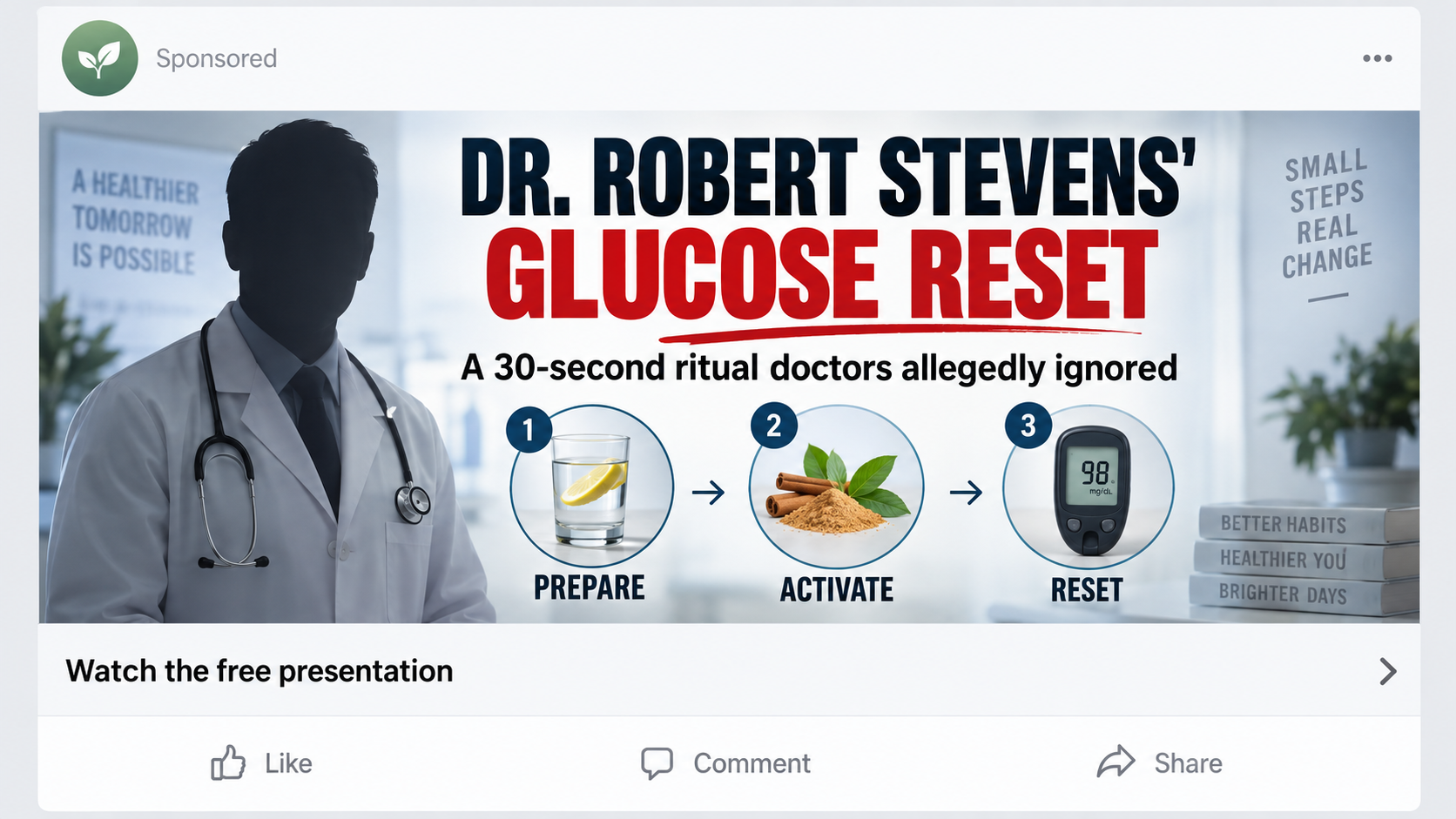
A calm physician appears to explain why ordinary diabetes advice supposedly misses one simple switch controlling blood sugar.
The name, hospital references, and polished presentation invite trust. Small identity checks reveal that the doctor in this story is not who the advertisement claims.
Overview
The advertised diabetes expert is a constructed identity
The campaign introduces Dr. Robert Stevens as a board-certified Johns Hopkins endocrinologist and author of a natural diabetes guide.
The man shown is not the Johns Hopkins physician named Robert Stevens. Investigators traced the footage to a different doctor whose image was used without authorization.
A real Johns Hopkins clinician with that name exists in another specialty. That coincidence helps the fabricated biography survive a quick search.
The glucose reset ritual is a sales narrative
The video promises a simple ritual that supposedly addresses diabetes at its root. It may invoke celebrities, laboratories, suppressed research, and rapid changes.
After a long explanation, the supposed educational presentation directs viewers toward GLPro Patches or another rotating blood-sugar product.
The patch is not the permanent center of the campaign. The fake doctor, hidden cause, and breakthrough ritual can lead to a different label tomorrow.
Identity deception magnifies medical risk
Viewers may treat the advice as coming from a recognized hospital. That borrowed authority can persuade them to ignore appropriate care or share payment information.
No dietary supplement or wellness patch becomes an approved diabetes treatment because an actor wears a white coat or a page mentions Johns Hopkins.
The advertised biography does not match the person shown.
The genuine Johns Hopkins physician is not endorsing this campaign.
Celebrity clips can be inserted without permission.
The long video ultimately promotes a commercial product.
Billing and upsell terms require independent verification.
This campaign is especially deceptive because it exploits two identities at once: the person in the footage and a real physician with a similar name.
Who Is the Real Robert Stevens?
Johns Hopkins has a physician named Robert D. Stevens whose documented work is associated with critical care and neurological medicine, not this supplement funnel.
The advertisement instead describes an endocrinologist, diabetes authority, and author of The Guide to Reverse Type 2 Diabetes Naturally.
Those claimed credentials should produce a professional profile, medical license trail, publications, publisher record, lectures, and contactable institution. The campaign provides no coherent match.
The image used in some promotions has been identified as Dr. Evgeniy Nikolaevich Bozhev. His appearance does not transform the scripted voice into his recommendation.
Scammers benefit when viewers search only the name. Finding a real physician at a prestigious institution can feel like confirmation, even when specialty and photograph differ.
Verify the complete identity: full middle name, specialty, institution page, photograph, license, publications, and the exact statement being advertised.
A legitimate hospital endorsement would be discoverable through official channels. It would not exist solely inside advertisements that lead to one checkout.
How the Dr. Robert Stevens Glucose Reset Scam Works
Step 1: A white coat introduces instant authority
The opening clip places an anonymous or misidentified man in a clinical setting. A lower-third graphic supplies an impressive name and hospital affiliation.
Professional lighting, a stethoscope, and medical vocabulary encourage viewers to evaluate appearance instead of verifying the speaker’s actual identity.
The audio may be cloned, dubbed, or generated. The person’s mouth is only briefly visible, reducing the chance that mismatched speech will be noticed.
Step 2: The story describes a hidden glucose switch
The narrator claims mainstream doctors manage symptoms while missing a deeper cause. One toxin, hormone, organ, or cellular mechanism becomes the universal explanation.
Complex biology is compressed into a simple villain. That makes one ritual appear capable of producing results across different forms and stages of diabetes.
Real medical guidance includes uncertainty, contraindications, monitoring, and individual factors. The video replaces those details with certainty and a countdown.
Step 3: Prestige is layered through names and institutions
Johns Hopkins provides academic authority. Celebrity footage involving Samuel L. Jackson or Chris Hemsworth may add familiarity and social proof.
None of those names proves participation. Edited clips, synthetic voices, false captions, and unrelated interviews can create an apparent endorsement from existing material.
Each borrowed identity distracts from the same missing item: a verifiable clinical trial supporting the specific ritual and product.
Step 4: The viewer enters a long video sales letter
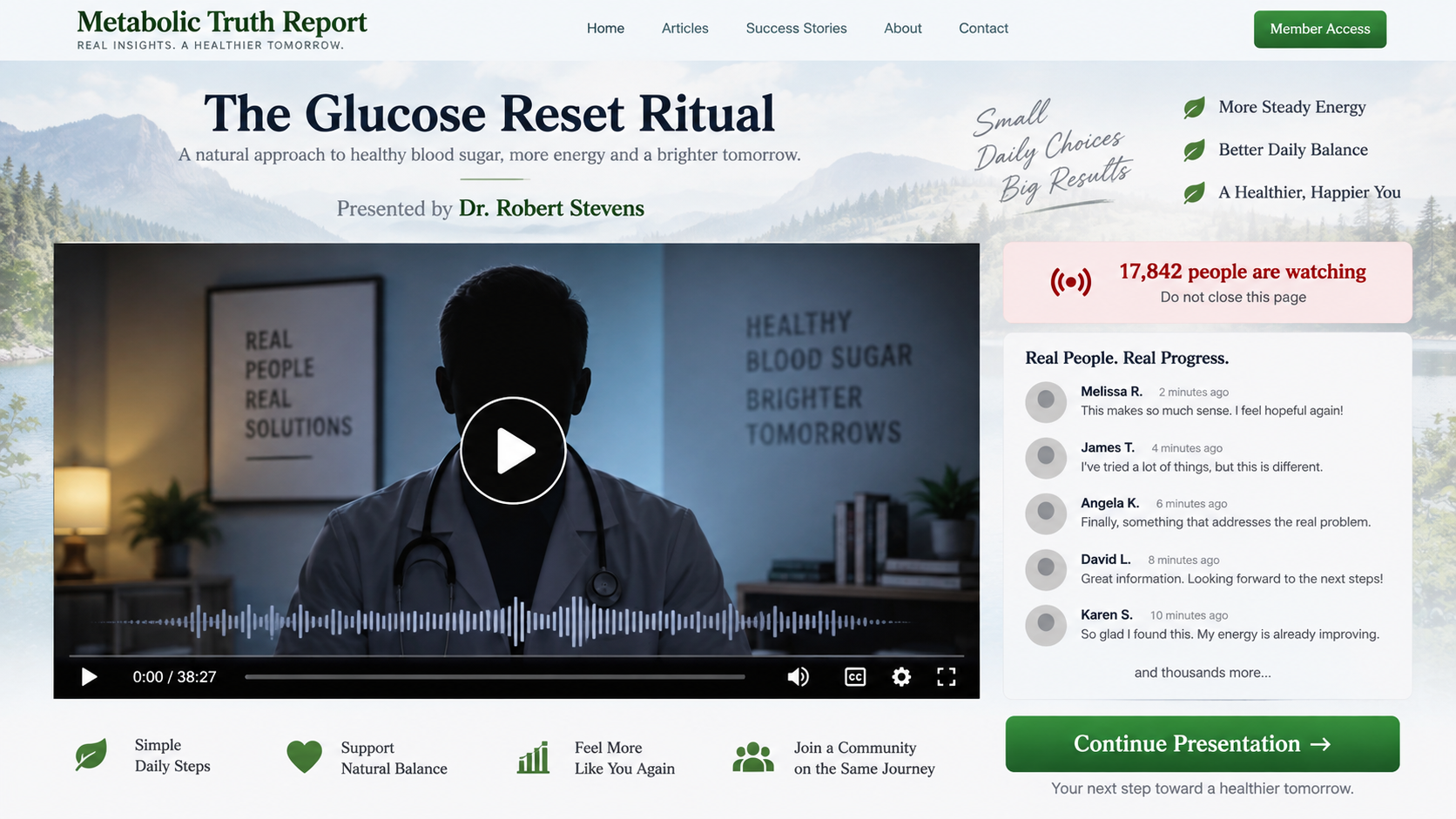
The destination page says not to close the window and shows a large live-viewer count. A long progress bar suggests important information is still coming.
Comments praise early improvements, but the page may offer no way to submit an independent comment. The conversation is part of the layout.
The product remains hidden while the narrator deepens fear about complications. Viewers become invested before learning what they are expected to buy.
Step 5: The ritual becomes GLPro Patches
The presentation eventually says ordinary solutions cannot reach the relevant pathway. A patch is introduced as an easier or more efficient delivery method.
Transdermal delivery is a scientific concept, but not every ingredient crosses skin at a meaningful dose. Product-specific evidence is necessary.
A package photograph and ingredient list do not establish absorption, effective concentration, diabetes treatment, or compatibility with prescription medication.
Step 6: The offer expands through bundles and calls
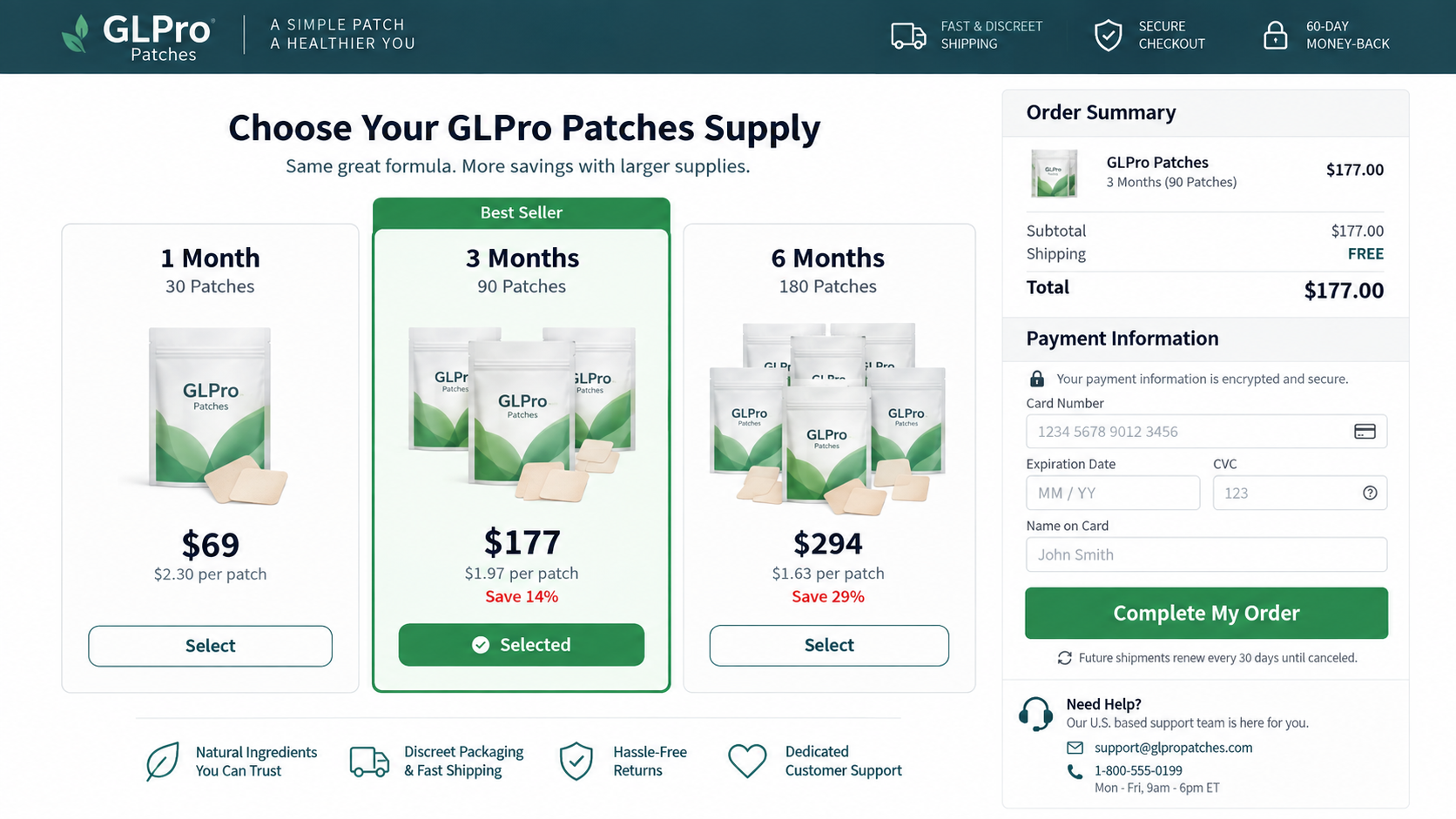
The order page promotes one, three, or six months. Savings per patch make the largest supply appear medically sensible rather than commercially advantageous.
Call-center agents may recommend more packages after asking about health concerns. That conversation is a sale, not a confidential consultation with the advertised physician.
Some campaigns can add continuity terms or follow-up products. Confirm every charge on the final page and the emailed receipt.
Step 7: Refund friction protects the revenue
A guarantee may promise confidence while requiring returns to a distant warehouse. Opened packages, shipping, or handling deductions can reduce the refund.
Retention agents may first offer 25% or 50% back, arguing that a full return is inconvenient. Accepting can close the dispute.
Document the original medical and identity claims. They explain why the transaction was not simply dissatisfaction with an ordinary product.
Why a Skin Patch Does Not Prove Diabetes Treatment
The skin is designed to block outside substances. Successful prescription patches use ingredients and delivery systems specifically studied for transdermal absorption.
Many botanical compounds do not cross intact skin efficiently. An adhesive pad containing herbs cannot be assumed to deliver a therapeutic dose.
Even proven absorption would answer only one question. The seller must still demonstrate that the delivered amount safely improves a defined diabetes outcome.
Reliable trials compare the product with a control, use transparent methods, include enough participants, and publish complete results for scrutiny.
Before-and-after glucose screenshots are weak evidence. They rarely show meal timing, medication, device accuracy, baseline variation, or whether the same person produced both readings.
Testimonials also select success stories while hiding nonresponders and adverse reactions. A customer cannot know how many purchasers saw no benefit.
A disclaimer saying the product is not intended to treat disease conflicts with a video that repeatedly promises diabetes reversal. Evaluate the total message.
Anyone using insulin or glucose-lowering medicine should discuss new products with a clinician. Unexpected changes could increase the risk of hypoglycemia.
How to Verify a Doctor in a Health Advertisement
Start at the institution’s official website, not the advertiser’s biography. Compare the photograph, middle initial, specialty, education, and current appointment.
Use a state medical board database to verify licensing. A license confirms identity and status, not that the physician endorsed a particular product.
Search the exact book title in library and publisher databases. Invented books often appear only in affiliate posts repeating the advertisement.
Look for the full video through the alleged broadcaster or speaker. A cropped advertisement can remove the original subject and replace the audio.
Search a distinctive sentence in quotation marks. If every result is a purchase page, there is no independent record of the claimed interview.
Contact the institution through an official directory when necessary. Do not use telephone numbers or email addresses supplied inside the suspect page.
Remember that two people can share a name. Matching letters are not enough when the specialty, face, and professional history disagree.
Why the Shared Name Makes This Impersonation Effective
A completely invented doctor may disappear under basic research. Borrowing a real physician’s name creates search results that look reassuring from a distance.
The viewer sees Johns Hopkins and Robert Stevens in both places, then unconsciously fills the gaps. Specialty and photograph receive less attention.
Search engines also summarize pages. A short result can place the real institution near the fake claim without explaining that two identities were combined.
Advertisers exploit that ambiguity through careful wording. They may imply an affiliation visually while avoiding a complete, checkable professional biography.
Verification must therefore be exact. Match the face, full name, department, publication record, quoted words, and official contact information as one coherent identity.
If one element fails, stop. A seller does not deserve payment simply because another person with the same name has legitimate credentials.
How Fake Medical Authority Changes Buyer Behavior
A hospital name reduces perceived risk before viewers examine the formula. They assume someone else already checked safety, evidence, and manufacturing.
The white coat also changes how ordinary sales language sounds. A bundle recommendation can feel like a treatment plan rather than inventory marketing.
Health anxiety narrows attention. Someone worried about complications may prioritize promised relief over contradictions in the biography or checkout.
Prestigious affiliation can silence family skepticism. Buyers may defend the offer because rejecting it feels like rejecting an expert institution.
The campaign then uses urgency to prevent consultation. A disappearing presentation and limited supply make calling a clinician seem like a costly delay.
Real medical consent works differently. Patients receive alternatives, limitations, risks, monitoring guidance, and space to ask questions without a sales countdown.
A product guarantee cannot replace informed consent. Refund terms address money, while unsupported advice may affect health before any return is requested.
Recognizing this pressure helps buyers pause. Verify the professional first, then investigate evidence and commercial terms as separate questions.
Never let institutional imagery make the decision automatically. Hospitals, licenses, and research affiliations can be checked through sources the seller does not control.
Red Flags in the Glucose Reset Presentation
The physician’s name matches a real doctor, but the photograph does not.
The claimed specialty differs from the official institutional profile.
A book title lacks a traceable publisher or library record.
Celebrity clips appear without links to original interviews.
The ritual promises rapid reversal across many patients.
The video cannot be skipped or read as a transcript.
A fake viewer count creates social pressure.
The product appears only after an extended fear narrative.
Bundle pricing is framed as a treatment requirement.
Support staff provide medical-sounding sales advice.
The fake biography is not a minor typo. It is the mechanism that makes unsupported health claims sound as though a trusted institution approved them.
Company, Address, and Fulfillment Checks
Identify the company behind GLPro Patches
Search every page for the legal seller. Compare its name with the privacy policy, terms, receipt, parcel label, and card descriptor.
If the brand exists without a stable legal entity, customers cannot tell who controls formulation, billing, medical claims, or refund decisions.
Verify addresses in context
A returns address may belong to a fulfillment center, virtual office, residence, or unrelated tenant. Search the suite and postal format independently.
Warehouses move boxes for many campaigns. They are not automatically the headquarters, patch manufacturer, or party responsible for the fake doctor.
Test telephone and email support
Ask whether the purchase is one-time, how renewals are canceled, where returns go, and which legal name appears on the card.
Then ask for product-specific absorption studies and the manufacturer. A scripted agent who cannot answer basic questions should not guide diabetes decisions.
Inspect manufacturing and label traceability
Look for ingredients, amounts, warnings, lot, expiration, manufacturer, and importer. A leaf graphic and doctor-formulated phrase provide no quality assurance.
Mass-produced patches can be relabeled for many storefronts. Unknown origin, missing batch data, and unsupported absorption claims create avoidable safety concerns.
What to Do if You Have Fallen Victim to This Scam
Protect your treatment plan. Do not stop or change diabetes medication because of the video. Contact your clinician about readings or symptoms.
Stop using the patch after a reaction. Remove it after severe irritation, swelling, breathing difficulty, or other concerning symptoms and seek appropriate care.
Preserve identity evidence. Save the fake doctor biography, hospital references, celebrity clips, product claims, checkout, receipt, and package.
Inspect every charge. Check for multi-month bundles, upgrades, telephone upsells, and recurring shipments that were not knowingly authorized.
Cancel in writing. Request an immediate stop to future shipments and ask for confirmation from the legal merchant.
Demand a documented refund. Explain that the sale relied on a misidentified doctor and unsupported diabetes claims, not merely disappointing results.
Contact the card issuer. Dispute unauthorized or unresolved charges before applicable deadlines. Ask about blocking further merchant payments.
Report the impersonation. Notify the ad platform, institution, FTC, FDA health-fraud program, and state consumer authorities.
Check your device. Run Malwarebytes after unwanted downloads or redirects. AdGuard can reduce repeated deceptive advertisements and tracking.
Reject recovery calls. Anyone promising a refund in exchange for remote access, gift cards, or another payment is attempting a second scam.
Is Your Device Infected? Run a Free Malware Scan
Slow performance, constant pop-ups, or strange behavior? These are classic signs of a malware infection. The fastest way to find out is to scan your device with Malwarebytes Anti-Malware Free — one of the most trusted malware removal tools available.
The free version detects and removes the most common threats, including:
Adware — the cause of those annoying pop-ups
Browser hijackers — unwanted redirects and changed homepages
Trojans and spyware — hidden programs stealing your data
Potentially unwanted programs (PUPs) — software you never asked for
👉 Select your device below — Windows, Mac, or Android — then follow the simple steps to download Malwarebytes, scan your system, and remove any threats it finds. The whole process takes about 5 minutes.
Malwarebytes for WindowsMalwarebytes for MacMalwarebytes for Android
Run a Malware Scan with Malwarebytes for Windows
Malwarebytes is one of the most popular and trusted anti-malware tools for Windows — and it’s completely free for removing infections. It catches threats that many antivirus programs miss, including adware, browser hijackers, and trojans. Follow the steps below to scan and clean your PC in just a few minutes.
Download Malwarebytes
Click the button below to download the latest version of Malwarebytes for Windows from the official source. The free version is all you need — it will scan your computer and remove adware, browser hijackers, and other malicious software at no cost.
(The link opens in a new page where your download will start)
Install Malwarebytes
When the download finishes, open your Downloads folder and double-click the MBSetup file. If Windows shows a User Account Control pop-up, click “Yes” to allow the installation.
Follow the On-Screen Prompts to Install Malwarebytes
The setup wizard will walk you through a few quick screens:
Choose where you’re installing the program — “Personal Computer” or “Work Computer” — then click Next.
Malwarebytes will now install on your device. This usually takes under a minute.
When installation is complete, the “Welcome to Malwarebytes” screen will open automatically.
On the final screen, click Open Malwarebytes to launch the program.
Enable “Scan for Rootkits”
Before scanning, turn on rootkit detection so Malwarebytes can find even the most hidden threats. Click the Settings gear icon on the left side of the screen.
In the settings menu, find “Scan for rootkits” and click the toggle so it turns blue.
Done? Click “Dashboard” in the left pane to return to the main screen.
Start the Scan
Click the blue Scan button. Malwarebytes will automatically update its virus database and start checking your computer for malware.
Wait for the Scan to Finish
The scan checks your entire system for browser hijackers and other malicious programs, so it can take several minutes. Feel free to do something else — just check back occasionally to see the progress.
Quarantine the Detected Threats
When the scan is done, you’ll see a list of everything Malwarebytes found — malware, adware, and potentially unwanted programs. Click the “Quarantine” button to remove all of them at once.
Malwarebytes will now remove the malicious files and registry entries and move them safely into quarantine.
Restart Your Computer
Some threats can only be fully removed after a reboot. If Malwarebytes asks you to restart, click Yes. Once you’re logged back in, your PC is clean and you can continue with the next steps in this guide.
When the scan finishes, click Quarantine to remove everything Malwarebytes found. That’s it — your Windows PC is now clean of trojans, adware, and other malware, and should be back to running smoothly.
If your current antivirus allowed this malicious program on your computer, you may want to consider purchasing Malwarebytes Premium to protect against these types of threats in the future. If you are still having problems with your computer after completing these instructions, then please follow one of the steps:
Malwarebytes for Mac is a free on-demand scanner that removes the malware other security software tends to miss — adware, browser hijackers, and unwanted programs included. Cleaning an infected Mac with Malwarebytes has always been completely free, and it’s our go-to recommendation. Follow the steps below to scan and clean your Mac in just a few minutes.
Download Malwarebytes for Mac
Click the button below to download the latest version of Malwarebytes for Mac.
When the download finishes, open your Downloads folder and double-click the setup file to begin the installation.
Follow the On-Screen Prompts to Install Malwarebytes
The Malwarebytes for Mac Installer will guide you through a few quick screens. Click “Continue” and keep following the prompts until the installation completes.
When the installation is complete, Malwarebytes opens to the Welcome to Malwarebytes screen. Click “Get started“.
Select “Personal Computer” or “Work Computer”
Malwarebytes will ask what type of computer you’re installing it on. Click either Personal Computer or Work Computer, whichever applies.
Start the Scan
Click the “Scan” button. Malwarebytes will automatically update its detection database and begin checking your Mac for malware.
Wait for the Scan to Finish
Malwarebytes will scan your Mac for adware, browser hijackers, and other malicious programs. This can take a few minutes, so feel free to do something else — just check back occasionally to see the progress.
Quarantine the Detected Threats
When the scan is done, you’ll see a list of everything Malwarebytes found. Click the “Quarantine” button to remove all the threats at once.
Restart Your Mac
Malwarebytes will now remove all the malicious files it found. Some threats can only be fully removed after a reboot — if Malwarebytes asks you to restart, allow it. Once you’re logged back in, your Mac is clean.
Once the scan is done, remove every threat it detected. Your Mac is now free of adware, rogue browser extensions, and other potentially harmful software.
If your current antivirus allowed a malicious program on your computer, you might want to consider purchasing the full-featured version of Malwarebytes Anti-Malware to protect against these types of threats in the future. If you are still experiencing problems while trying to remove a malicious program from your computer, please ask for help in our Mac Malware Removal Help & Support forum.
Run a Malware Scan with Malwarebytes for Android
Malwarebytes for Android automatically detects and removes dangerous threats like malware and ransomware so you don’t have to worry about your most-used device being compromised. Aggressive detection of adware and potentially unwanted programs keeps your Android phone or tablet running smooth.
Download Malwarebytes for Android.
You can download Malwarebytes for Android by clicking the link below.
In the Google Play Store, tap “Install” to install Malwarebytes for Android on your device.
When the installation process has finished, tap “Open” to begin using Malwarebytes for Android. You can also open Malwarebytes by tapping on its icon in your phone menu or home screen.
Follow the on-screen prompts to complete the setup process
When Malwarebytes will open, you will see the Malwarebytes Setup Wizard which will guide you through a series of permissions and other setup options. This is the first of two screens that explain the difference between the Premium and Free versions. Swipe this screen to continue. Tap on “Got it” to proceed to the next step. Malwarebytes for Android will now ask for a set of permissions that are required to scan your device and protect it from malware. Tap on “Give permission” to continue. Tap on “Allow” to permit Malwarebytes to access the files on your phone.
Update database and run a scan with Malwarebytes for Android
You will now be prompted to update the Malwarebytes database and run a full system scan.
Click on “Update database” to update the Malwarebytes for Android definitions to the latest version, then click on “Run full scan” to perform a system scan.
Wait for the Malwarebytes scan to complete.
Malwarebytes will now start scanning your phone for adware and other malicious apps. This process can take a few minutes, so we suggest you do something else and periodically check on the status of the scan to see when it is finished.
Click on “Remove Selected”.
When the scan has been completed, you will be presented with a screen showing the malware infections that Malwarebytes for Android has detected. To remove the malicious apps that Malwarebytes has found, tap on the “Remove Selected” button.
Restart your phone.
Malwarebytes for Android will now remove all the malicious apps that it has found. To complete the malware removal process, Malwarebytes may ask you to restart your device.
After the scan, tap Remove Selected to delete all detected threats. Your Android phone is now clean — no more malicious apps, adware, or browser redirects.
If your current antivirus allowed a malicious app on your phone, you may want to consider purchasing the full-featured version of Malwarebytes to protect against these types of threats in the future. If you are still having problems with your phone after completing these instructions, then please follow one of the steps:
Restore your phone to factory settings by going to Settings > General management > Reset > Factory data reset.
Now that your device is clean, keep it that way. Most infections start with a malicious ad or a fake download button — so blocking them at the source is your best defense.
We recommend AdGuard, which blocks malicious ads, phishing pages, and dangerous redirects before they can reach you.
Is Dr. Robert Stevens a real Johns Hopkins endocrinologist?
The advertisement’s biography does not match the real Johns Hopkins physician with that name. The genuine doctor is not the pictured diabetes spokesperson.
Who is the man shown in the video?
Investigators identified footage of another physician, Dr. Evgeniy Nikolaevich Bozhev, used to construct the false presentation.
Did Samuel L. Jackson or Chris Hemsworth endorse GLPro Patches?
No reliable evidence supports those endorsements. Celebrity footage can be edited, dubbed, or removed from its original context.
Can a patch reverse type 2 diabetes?
No over-the-counter wellness patch is an approved diabetes cure. Product-specific absorption, safety, and clinical efficacy would require credible evidence.
Why does a real doctor appear when I search the name?
The campaign exploits a shared name. Always compare photograph, middle initial, specialty, institution, and the exact advertised statement.
Should I return opened patch packages?
Ask for written instructions first. Preserve labels and photographs, then discuss chargeback rights if restrictive conditions contradict the advertised guarantee.
The Bottom Line
The Robert Stevens glucose reset campaign builds medical authority from a mismatched identity, altered footage, and prestigious names before steering viewers toward replaceable patches.
Verify the entire doctor, not only the name. Keep diabetes care with qualified clinicians and keep payment details away from unverifiable health presentations.
10 Rules to Avoid Online Scams
Here are 10 practical safety rules to help you avoid malware, online shopping scams, crypto scams, and other online fraud. Each tip includes a quick “if you already got hit” action.
Stop and verify before you click, log in, download, or pay.
Most scams win by creating urgency. Verify using a trusted method: type the website address yourself, use the official app, or call a known number (not the one in the message).
If you already clicked: close the page, do not enter passwords, and run a malware scan.
Keep your operating system, browser, and apps updated.
Updates patch security holes used by malware and malicious ads. Turn on automatic updates where possible.
If you saw a scary “update now” pop-up: close it and update only through your device settings or the official app store.
Use layered protection: antivirus plus an ad blocker.
Antivirus helps block malware. An ad blocker reduces scam redirects, phishing pages, and malvertising.
If your browser is acting weird: remove unknown extensions, reset the browser, then run a full scan.
Install apps, software, and extensions only from official sources.
Avoid cracked software, “keygens,” and random downloads. During installs, choose Custom/Advanced and decline bundled offers you do not recognize.
If you already installed something suspicious: uninstall it, restart, and scan again.
Treat links and attachments as untrusted by default.
Phishing often impersonates delivery services, banks, and popular brands. If it is unexpected, do not open attachments or log in through the message.
If you entered credentials: change the password immediately and enable 2FA.
Shop safely: research the store, then pay with protection.
Be cautious with brand-new stores, “closing sale” stories, and prices that make no sense. Prefer credit cards or PayPal for dispute options. Avoid wire transfers, gift cards, and crypto payments.
If you already paid: contact your card issuer or PayPal quickly to dispute the transaction.
Crypto rule: never pay a “fee” to withdraw or recover money.
Common patterns include fake profits, then “tax,” “gas,” or “verification” fees. Another is a “recovery agent” who demands upfront crypto.
If you already sent crypto: stop paying, save evidence (wallet addresses, TXIDs, chats), and report the scam to the platform used.
Secure your accounts with unique passwords and 2FA (start with email).
Use a password manager and unique passwords for every account. Enable 2FA using an authenticator app when possible.
If you suspect an account takeover: change passwords, sign out of all devices, and review recent logins and recovery settings.
Back up important files and keep one backup offline.
Backups protect you from ransomware and device failure. Keep at least one backup on an external drive that is not always connected.
If you suspect infection: do not connect backup drives until the system is clean.
If you think you are a victim: stop losses, document evidence, and escalate fast.
Move quickly. Speed matters for disputes, account recovery, and limiting damage.
Stop payments and contact: do not send more money or respond to the scammer.
Call your bank or card issuer: block transactions, replace the card if needed, and start a dispute or chargeback.
Secure your email first: change the email password, enable 2FA, and remove unfamiliar recovery options.
Secure other accounts: change passwords, enable 2FA, and log out of all sessions.
Scan your device: remove suspicious apps or extensions, then run a full malware scan.
Save evidence: screenshots, emails, order pages, tracking pages, wallet addresses, TXIDs, and chat logs.
Report it: to the payment provider, marketplace, social platform, exchange, or wallet service involved.
These rules are intentionally simple. Most online losses happen when decisions are rushed. Slow down, verify independently, and use payment methods and account controls that give you recourse.
Hello! I'm Lapain Epuran, your go-to source for detailed and honest product reviews. From tech gadgets to miracle cures, I provide insights to help you make informed choices. Join me as we discover what's truly worth your time and money.