Viral Torch Lighter Scam Exposed: AI Images, Imports, and Refund Traps
Written by: Lapain Epuran
Published on:
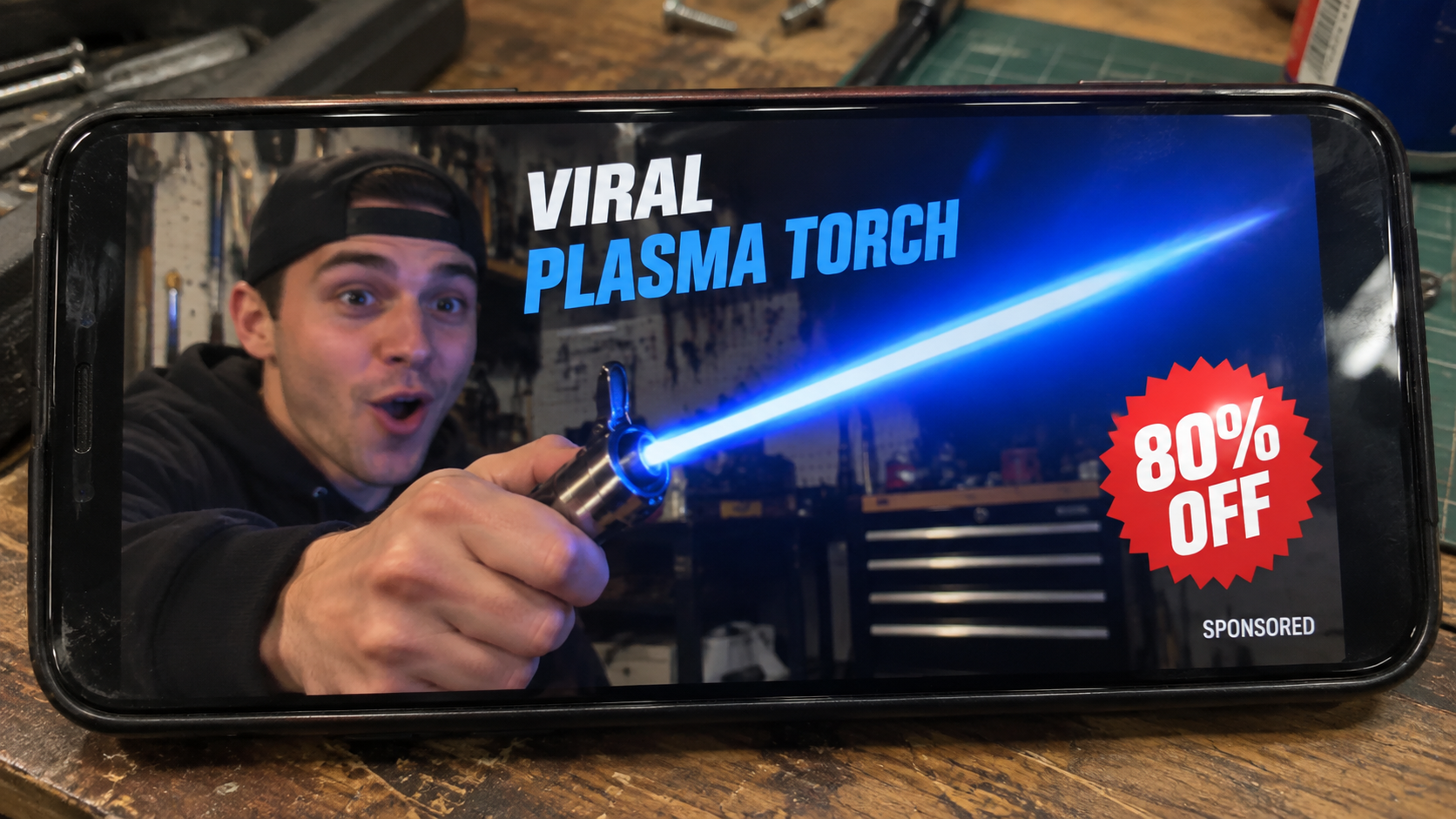
A thumb-sized lighter produces a blue beam that looks closer to a movie prop than a household flame. The video makes the impossible seem purchasable.
Names and storefronts keep changing, yet the same polished pictures return. What arrives can be far smaller, cheaper, and less impressive.
Overview
AI images exaggerate what the lighter can produce
Viral advertisements depict a rigid blue beam, enormous flame, or plasma effect that ordinary pocket hardware cannot safely replicate.
Generated product pictures remove fuel limits, heat, wind, scale, and human reaction. The result resembles a fantasy tool rather than a documented demonstration.
Edited videos can extend flames, hide cuts, and combine a larger torch with a smaller product shot. A dramatic clip is not a performance test.
One generic lighter is sold under many identities
Names such as Blazara, Insta Blaze, FlameSpade, and other short-lived brands may appear around very similar metal or plastic lighters.
The same casing is often available from marketplace suppliers at a fraction of the advertised price. A new logo creates the appearance of exclusivity.
Dropshipping itself is not automatically fraudulent. Deception begins when sellers misrepresent construction, flame type, safety, origin, availability, or refund access.
Fire safety makes this more than a disappointing purchase
A torch lighter contains pressurized fuel or a high-voltage ignition system. Unknown manufacturing quality can create leakage, ignition, burn, or fire hazards.
CPSC rules require covered lighters to use effective child-resistant mechanisms. Imported novelty products may not satisfy applicable requirements despite attractive marketing.
A delivered lighter does not prove the viral demonstration was genuine. Product existence and advertising truth are separate questions.
What Viral Torch Lighter Ads Promise
The first clip usually begins with an instant ignition. A brilliant blue flame remains narrow and stable while the presenter moves it through the air.
Some advertisements call the effect plasma, windproof, military-grade, jet-powered, or capable of reaching an extreme temperature within seconds.
Promoters may show the lighter cutting rope, heating metal, starting charcoal, soldering, melting ice, and lighting candles without refilling.
One compact product is therefore presented as a survival tool, workshop torch, kitchen accessory, camping essential, and collectible gadget.
A founder story claims the design came from aerospace engineering or professional welding. No named engineer, patent, factory, or recognized certification supports that biography.
Review cards praise weight, battery life, fuel efficiency, and flame control. The same wording can reappear on stores using another brand.
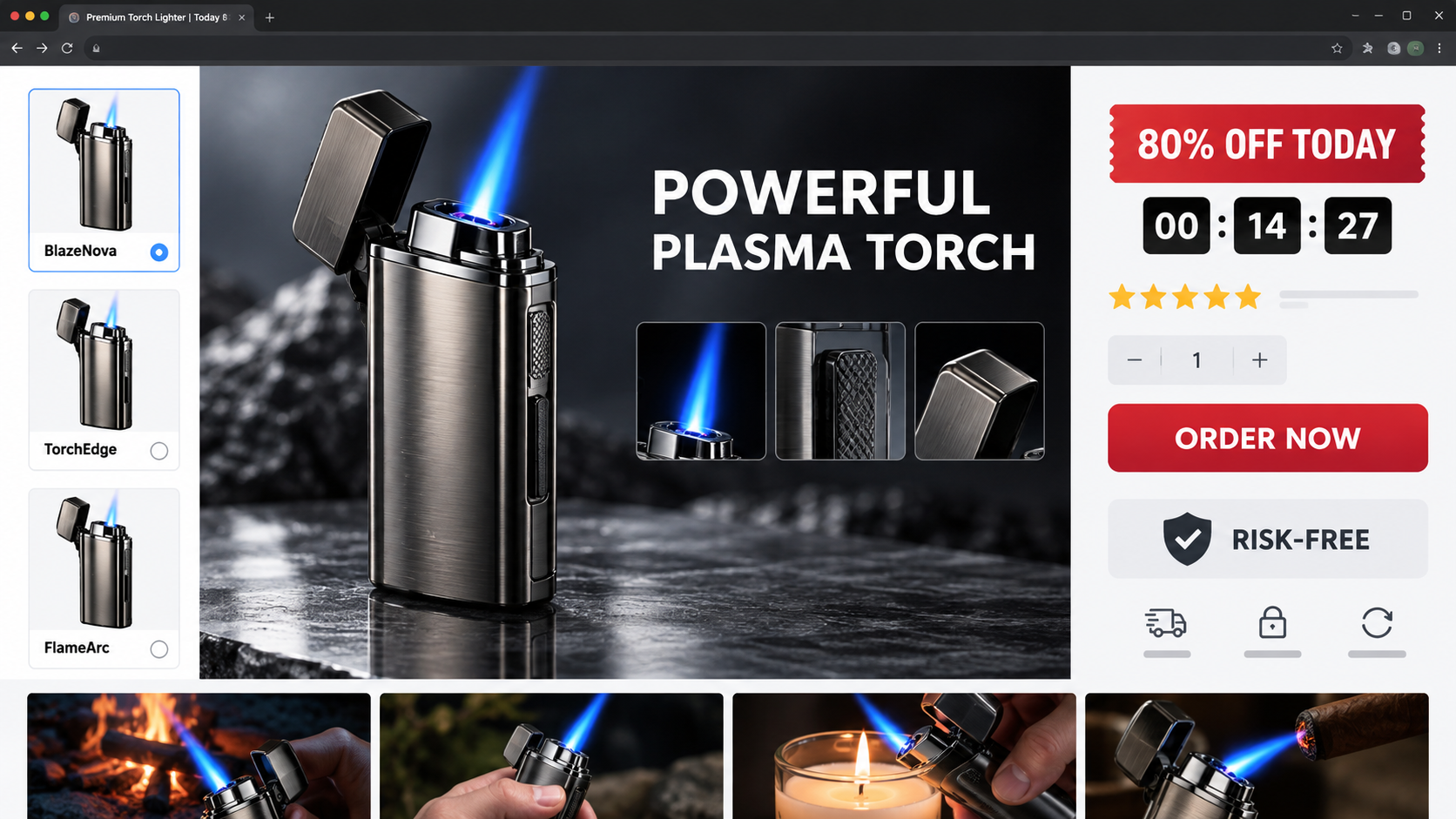
Large discount badges make the item appear reduced from $99 to less than $30. The crossed-out figure may never have been a genuine selling price.
Risk-free language appears beside the order button, while the actual return policy sits in a footer with conditions and overseas postage requirements.
How the Images and Demonstrations Can Mislead
Flame length is easy to manipulate visually
An editor can stretch a flame, add a glow, increase saturation, or overlay a beam. Short clips conceal the transition around the lighter nozzle.
AI generation can create a complete scene with physically impossible light and heat behavior. Hands and nearby materials may show no reaction to the supposed intensity.
Watch reflections. A powerful blue source should illuminate skin, metal, walls, and smoke consistently. Missing or contradictory light reveals fabrication.
Scale changes between the advertisement and delivery
Close camera angles make a palm-sized object appear substantial. Wide lenses enlarge the front nozzle while shrinking the presenter’s hand.
Product-only renders remove reference objects entirely. Buyers cannot judge dimensions until a small package arrives.
Check listed measurements and weight, then compare them with common lighters. Descriptive words such as heavy-duty have no standardized meaning.
Different tools can be substituted between cuts
A large culinary torch may perform the heating demonstration. The video cuts to the advertised pocket lighter only after the result appears.
Identical gloves, backgrounds, and camera movement make the substitution difficult to notice. Pause before and after every transition.
A trustworthy test keeps the product, fuel source, target, and camera angle visible continuously.
Electronic arc and butane flame are not interchangeable
An electric arc lighter creates a short arc between electrodes. It can ignite suitable material but does not project a long blue flame.
A butane torch burns pressurized fuel and needs refilling. Calling both technologies plasma lets sellers combine their most attractive qualities incorrectly.
Ask which mechanism the exact model uses. A page showing USB charging and a fuel window without explanation may be mixing multiple products.
How the Viral Torch Lighter Scam Works
Step 1: An impossible demonstration earns the click
The social video opens with the most dramatic visual, not the product specifications. A lightsaber-like flame makes viewers stop before considering physics or safety.
The creator appears surprised, which signals authenticity. That reaction can be scripted, generated, or copied from an unrelated gadget video.
Comment counters and enthusiastic replies add social proof. Advertisers can moderate criticism or populate a new account with promotional responses.
Step 2: The landing page turns spectacle into usefulness
The sales page expands the fantasy flame into dozens of practical uses. Campers, cooks, mechanics, smokers, and homeowners are all addressed.
Feature icons replace detailed specifications. Terms like aerospace alloy and high-density energy core sound impressive but may identify no verifiable material.
Safety is framed as confidence rather than evidence. A shield graphic cannot substitute for test reports, warnings, and compliance information.
Step 3: A temporary brand claims exclusive ownership
The merchant presents the lighter as patented or unavailable in stores. Reverse-image searching can reveal matching supplier photographs and older brand names.
Blazara, Insta Blaze, and FlameSpade illustrate how labels can rotate around the same concept. Future names may use identical video assets.
Brand turnover reduces the value of reputation. By the time complaints rank in search results, traffic has moved to the next storefront.
Step 4: The discount disguises the true market value
A high anchor price makes $29.95 seem like a bargain. Comparable unbranded lighters may cost only a few units of currency wholesale.
Shipping and protection fees restore profit after the apparent discount. Taxes or international charges may appear only at the final screen.
Buyers should compare specifications, not just photographs. A visually similar listing can still differ in materials and safety, but it reveals the marketing markup.
Step 5: The checkout encourages extra lighters
Quantity discounts suggest buying gifts or keeping one in every vehicle. A curiosity purchase becomes a multi-unit order.
Preselected bundles and bright best-value labels can hide the smallest option. Verify the quantity shown in the final order summary.
Membership clubs, extended warranties, or recurring accessory plans may be placed near the payment button. Uncheck anything not wanted.
Step 6: The parcel contains an ordinary product
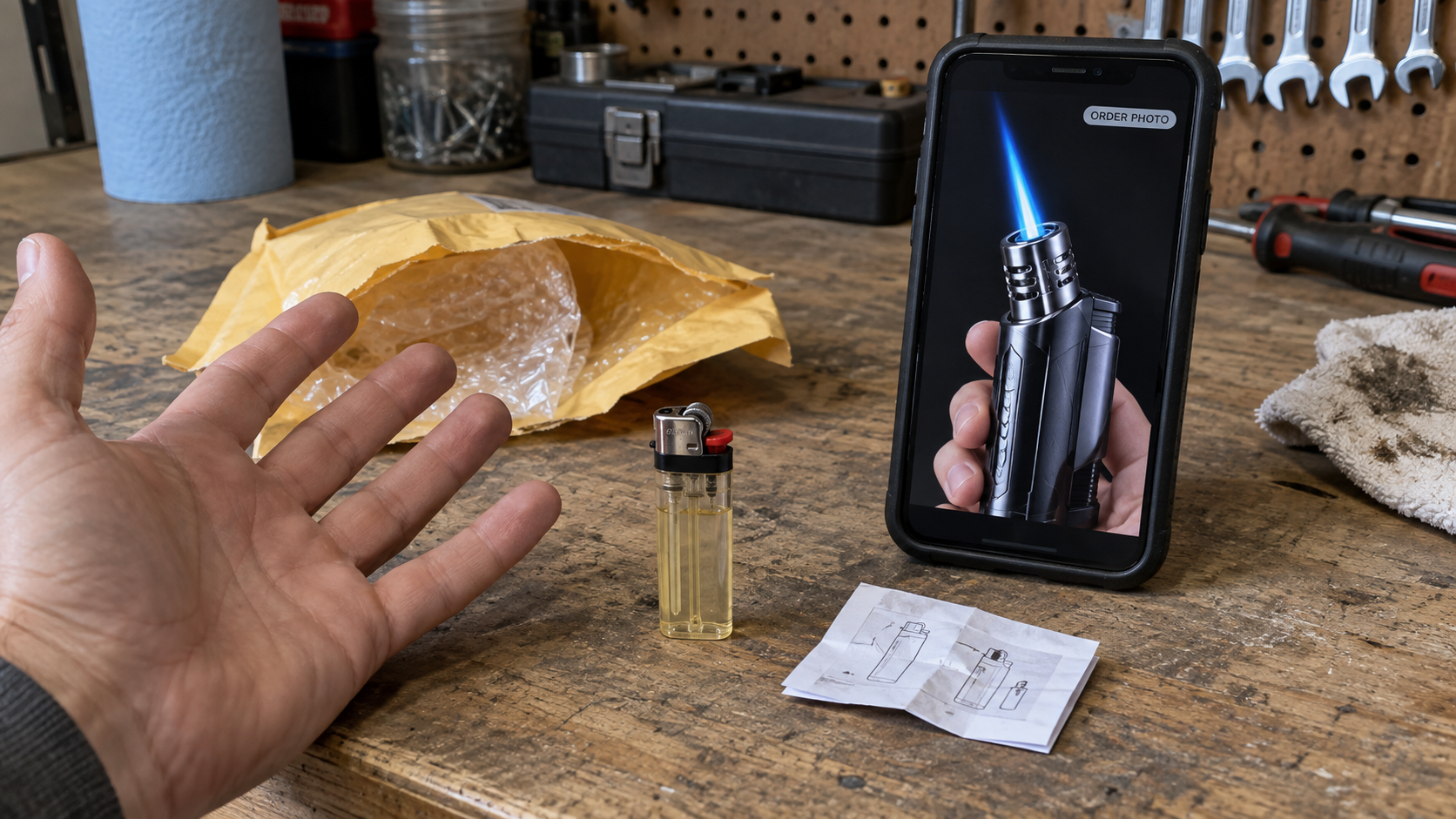
Delivery may take weeks and arrive in a plain mailer. The lighter can lack the advertised beam, weight, finish, instructions, or included fuel.
Some buyers receive a basic item that functions normally but bears little resemblance to the cinematic demonstration.
Do not fill, charge, or ignite an unfamiliar model before reading its markings and safety information. Testing can affect return eligibility and create risk.
Step 7: Refund obstacles protect the markup
Support may ask for a video proving the flame is weak, even though recording a dangerous test is unreasonable.
Return instructions can point overseas and require tracking. A partial refund offer encourages the buyer to keep a product worth far less than paid.
If the shop disappears, emails bounce and policy promises become useless. Card-dispute deadlines may continue running while the customer waits.
Safety Checks Before Using an Unknown Lighter
Examine the casing for cracks, gaps, loose controls, damaged seals, or a strong fuel odor. Do not ignite a leaking device.
Read every marking and warning. Missing manufacturer, model, fuel type, instructions, and compliance information make safe operation difficult to assess.
Keep the product away from children. Novelty appearance and bright effects can make a lighter especially attractive to young users.
Never test an exaggerated flame indoors, near curtains, paper, solvents, aerosol cans, batteries, or other combustible materials.
Use only the specified fuel or charging method. Incorrect refilling can damage seals, overpressurize a chamber, or release flammable vapor.
Do not modify a nozzle, valve, ignition circuit, or safety lock to reproduce an advertisement. The depicted performance may never have been physically real.
Stop using a unit that overheats, self-ignites, fails to extinguish, leaks, or produces an unstable flame.
Check CPSC and equivalent national recall databases by manufacturer and model. A temporary storefront may not notify customers about safety actions.
How to Compare the Advertised Lighter With What Arrived
Begin with dimensions and materials
Measure height, width, depth, and weight, then compare them with the saved product page. Camera perspective cannot change written specifications.
Inspect whether advertised metal parts are actually painted plastic. Look at seams, hinge movement, finish consistency, and control alignment without disassembling anything.
Photograph differences beside a ruler. Clear comparisons are more persuasive to a payment provider than statements that the item feels cheap.
Do not scrape coatings or conduct destructive tests. Altering the product can weaken a refund claim and expose internal hazards.
Match the mechanism to the description
A USB arc lighter should have electrodes and charging specifications. A butane model should identify approved fuel and safe refill procedures.
If the page promised both systems, ask the seller to explain exactly where each mechanism exists on the delivered unit.
Check whether flame adjustment, safety lock, battery indicator, fuel window, and ignition controls match the listed features.
Missing controls establish an objective product difference without requiring ignition or contact with flammable material.
Look for traceable compliance information
Packaging should identify the manufacturer or importer, model, warnings, and instructions appropriate to the destination market.
Certification marks deserve independent verification. Search the issuing organization’s database and confirm that the model description matches.
A copied logo printed on a box is not testing evidence. Scammers know consumers recognize symbols even when they never check registration.
Safety documentation should address storage, refilling, charging, disposal, children, malfunction, and extinguishing the flame.
Evaluate the demonstration without recreating it
Compare nozzle geometry and advertised flame origin. A beam emerging from the wrong location may reveal digital compositing.
Watch whether smoke, shadows, reflections, and nearby objects respond consistently. Artificial effects frequently illuminate only the added flame.
Search for longer independent demonstrations showing startup, continuous operation, shutdown, and refilling without cuts.
If safe evidence cannot verify the claim, do not risk injury to prove the seller wrong. Documentation is enough for a dispute.
Retain the external packaging until the case closes. Hazard labels, postage origin, and customs descriptions can identify supply-chain inconsistencies.
Check whether the advertised guarantee covers opened goods. Some policies contradict the demonstration by forbidding ordinary inspection after delivery.
Compare the order timestamp with advertisement archives. Sellers may quietly replace images after complaints begin.
Keep the unit in a cool, ventilated location away from ignition sources while awaiting disposal or compliant return instructions.
Never leave the questionable lighter charging unattended overnight.
Company, Address, and Fulfillment Checks
The name on the lighter may be purely promotional
A trademark-style logo does not identify the factory, importer, or legally responsible seller. Search packaging and instructions for those parties.
If no accountable company appears, consider how a defect, injury, or recall would be handled after the storefront closes.
The return location can be a third-party warehouse
A domestic address may only process parcels for many online merchants. It does not prove the brand designs or inspects the product there.
Confirm the return authorization in writing. An unannounced package can be rejected or remain unmatched to the order.
Unanswered support is especially concerning for fuel products
Ask about fuel type, child resistance, model certification, warranty, and disposal before buying. Generic replies suggest no technical support exists.
A seller handling potentially hazardous hardware should provide more than a contact form and an automated shipping response.
Mass production can hide inconsistent batches
Generic lighters may come from several factories while using nearly identical photographs. Internal valves, seals, batteries, and safety locks can vary.
Products manufactured in China are not inherently unsafe. The risk rises when an anonymous importer provides no traceability, testing, or quality-control evidence.
What to Do if You Have Fallen Victim to This Scam
Do not imitate the viral demonstration. Keep the lighter off, away from heat and children, especially when construction or fuel type is uncertain.
Document the mismatch. Photograph the mailer, markings, dimensions, accessories, instructions, and unopened condition alongside saved advertising images.
Request a refund safely. Describe differences without performing hazardous tests, and require written return instructions before mailing a fuel-related item.
Ask the carrier about restrictions. Lighters and pressurized fuel can be regulated in mail. Never ship a filled device contrary to carrier rules.
Dispute deceptive billing. Give the card issuer the advertisement, final total, correspondence, delivery evidence, and explanation of the materially different product.
Check for repeated charges. Review statements for memberships, warranty services, priority clubs, or another merchant descriptor tied to checkout.
Report dangerous hardware. Contact CPSC through SaferProducts.gov, or your national product-safety authority, if the lighter leaks, malfunctions, or lacks required safeguards.
Protect the ordering device. Run Malwarebytes after suspicious redirects or downloads, and remove unfamiliar browser notifications and extensions.
Limit future ad exposure. AdGuard can block many deceptive creatives and trackers, while platform reports help remove the specific campaign.
Is Your Device Infected? Run a Free Malware Scan
Slow performance, constant pop-ups, or strange behavior? These are classic signs of a malware infection. The fastest way to find out is to scan your device with Malwarebytes Anti-Malware Free — one of the most trusted malware removal tools available.
The free version detects and removes the most common threats, including:
Adware — the cause of those annoying pop-ups
Browser hijackers — unwanted redirects and changed homepages
Trojans and spyware — hidden programs stealing your data
Potentially unwanted programs (PUPs) — software you never asked for
👉 Select your device below — Windows, Mac, or Android — then follow the simple steps to download Malwarebytes, scan your system, and remove any threats it finds. The whole process takes about 5 minutes.
Malwarebytes for WindowsMalwarebytes for MacMalwarebytes for Android
Run a Malware Scan with Malwarebytes for Windows
Malwarebytes is one of the most popular and trusted anti-malware tools for Windows — and it’s completely free for removing infections. It catches threats that many antivirus programs miss, including adware, browser hijackers, and trojans. Follow the steps below to scan and clean your PC in just a few minutes.
Download Malwarebytes
Click the button below to download the latest version of Malwarebytes for Windows from the official source. The free version is all you need — it will scan your computer and remove adware, browser hijackers, and other malicious software at no cost.
(The link opens in a new page where your download will start)
Install Malwarebytes
When the download finishes, open your Downloads folder and double-click the MBSetup file. If Windows shows a User Account Control pop-up, click “Yes” to allow the installation.
Follow the On-Screen Prompts to Install Malwarebytes
The setup wizard will walk you through a few quick screens:
Choose where you’re installing the program — “Personal Computer” or “Work Computer” — then click Next.
Malwarebytes will now install on your device. This usually takes under a minute.
When installation is complete, the “Welcome to Malwarebytes” screen will open automatically.
On the final screen, click Open Malwarebytes to launch the program.
Enable “Scan for Rootkits”
Before scanning, turn on rootkit detection so Malwarebytes can find even the most hidden threats. Click the Settings gear icon on the left side of the screen.
In the settings menu, find “Scan for rootkits” and click the toggle so it turns blue.
Done? Click “Dashboard” in the left pane to return to the main screen.
Start the Scan
Click the blue Scan button. Malwarebytes will automatically update its virus database and start checking your computer for malware.
Wait for the Scan to Finish
The scan checks your entire system for browser hijackers and other malicious programs, so it can take several minutes. Feel free to do something else — just check back occasionally to see the progress.
Quarantine the Detected Threats
When the scan is done, you’ll see a list of everything Malwarebytes found — malware, adware, and potentially unwanted programs. Click the “Quarantine” button to remove all of them at once.
Malwarebytes will now remove the malicious files and registry entries and move them safely into quarantine.
Restart Your Computer
Some threats can only be fully removed after a reboot. If Malwarebytes asks you to restart, click Yes. Once you’re logged back in, your PC is clean and you can continue with the next steps in this guide.
When the scan finishes, click Quarantine to remove everything Malwarebytes found. That’s it — your Windows PC is now clean of trojans, adware, and other malware, and should be back to running smoothly.
If your current antivirus allowed this malicious program on your computer, you may want to consider purchasing Malwarebytes Premium to protect against these types of threats in the future. If you are still having problems with your computer after completing these instructions, then please follow one of the steps:
Malwarebytes for Mac is a free on-demand scanner that removes the malware other security software tends to miss — adware, browser hijackers, and unwanted programs included. Cleaning an infected Mac with Malwarebytes has always been completely free, and it’s our go-to recommendation. Follow the steps below to scan and clean your Mac in just a few minutes.
Download Malwarebytes for Mac
Click the button below to download the latest version of Malwarebytes for Mac.
When the download finishes, open your Downloads folder and double-click the setup file to begin the installation.
Follow the On-Screen Prompts to Install Malwarebytes
The Malwarebytes for Mac Installer will guide you through a few quick screens. Click “Continue” and keep following the prompts until the installation completes.
When the installation is complete, Malwarebytes opens to the Welcome to Malwarebytes screen. Click “Get started“.
Select “Personal Computer” or “Work Computer”
Malwarebytes will ask what type of computer you’re installing it on. Click either Personal Computer or Work Computer, whichever applies.
Start the Scan
Click the “Scan” button. Malwarebytes will automatically update its detection database and begin checking your Mac for malware.
Wait for the Scan to Finish
Malwarebytes will scan your Mac for adware, browser hijackers, and other malicious programs. This can take a few minutes, so feel free to do something else — just check back occasionally to see the progress.
Quarantine the Detected Threats
When the scan is done, you’ll see a list of everything Malwarebytes found. Click the “Quarantine” button to remove all the threats at once.
Restart Your Mac
Malwarebytes will now remove all the malicious files it found. Some threats can only be fully removed after a reboot — if Malwarebytes asks you to restart, allow it. Once you’re logged back in, your Mac is clean.
Once the scan is done, remove every threat it detected. Your Mac is now free of adware, rogue browser extensions, and other potentially harmful software.
If your current antivirus allowed a malicious program on your computer, you might want to consider purchasing the full-featured version of Malwarebytes Anti-Malware to protect against these types of threats in the future. If you are still experiencing problems while trying to remove a malicious program from your computer, please ask for help in our Mac Malware Removal Help & Support forum.
Run a Malware Scan with Malwarebytes for Android
Malwarebytes for Android automatically detects and removes dangerous threats like malware and ransomware so you don’t have to worry about your most-used device being compromised. Aggressive detection of adware and potentially unwanted programs keeps your Android phone or tablet running smooth.
Download Malwarebytes for Android.
You can download Malwarebytes for Android by clicking the link below.
In the Google Play Store, tap “Install” to install Malwarebytes for Android on your device.
When the installation process has finished, tap “Open” to begin using Malwarebytes for Android. You can also open Malwarebytes by tapping on its icon in your phone menu or home screen.
Follow the on-screen prompts to complete the setup process
When Malwarebytes will open, you will see the Malwarebytes Setup Wizard which will guide you through a series of permissions and other setup options. This is the first of two screens that explain the difference between the Premium and Free versions. Swipe this screen to continue. Tap on “Got it” to proceed to the next step. Malwarebytes for Android will now ask for a set of permissions that are required to scan your device and protect it from malware. Tap on “Give permission” to continue. Tap on “Allow” to permit Malwarebytes to access the files on your phone.
Update database and run a scan with Malwarebytes for Android
You will now be prompted to update the Malwarebytes database and run a full system scan.
Click on “Update database” to update the Malwarebytes for Android definitions to the latest version, then click on “Run full scan” to perform a system scan.
Wait for the Malwarebytes scan to complete.
Malwarebytes will now start scanning your phone for adware and other malicious apps. This process can take a few minutes, so we suggest you do something else and periodically check on the status of the scan to see when it is finished.
Click on “Remove Selected”.
When the scan has been completed, you will be presented with a screen showing the malware infections that Malwarebytes for Android has detected. To remove the malicious apps that Malwarebytes has found, tap on the “Remove Selected” button.
Restart your phone.
Malwarebytes for Android will now remove all the malicious apps that it has found. To complete the malware removal process, Malwarebytes may ask you to restart your device.
After the scan, tap Remove Selected to delete all detected threats. Your Android phone is now clean — no more malicious apps, adware, or browser redirects.
If your current antivirus allowed a malicious app on your phone, you may want to consider purchasing the full-featured version of Malwarebytes to protect against these types of threats in the future. If you are still having problems with your phone after completing these instructions, then please follow one of the steps:
Restore your phone to factory settings by going to Settings > General management > Reset > Factory data reset.
Now that your device is clean, keep it that way. Most infections start with a malicious ad or a fake download button — so blocking them at the source is your best defense.
We recommend AdGuard, which blocks malicious ads, phishing pages, and dangerous redirects before they can reach you.
Can a pocket lighter produce a lightsaber-style flame?
The rigid, extremely long beams shown in viral ads are not credible ordinary-lighter performance and may be generated or digitally extended.
Are Blazara, Insta Blaze, and FlameSpade identical?
They are associated with similar marketing concepts, but exact hardware can vary. Compare model markings, dimensions, mechanisms, and responsible sellers.
Is dropshipping illegal?
No. The issue is deceptive presentation, hidden origin, false exclusivity, unsafe goods, undisclosed charges, or refund promises that are not honored.
Should I test the lighter before requesting a refund?
Not if testing seems unsafe. Photograph the unused condition and explain that missing information or visible defects prevent responsible operation.
Can I mail a butane lighter back normally?
Shipping restrictions may apply. Ask the carrier and seller for compliant instructions, and never mail a fuel-filled device improperly.
Does a domestic return address prove a local company?
No. Fulfillment providers routinely process returns for overseas or anonymous merchants without controlling product design, claims, or refunds.
The Bottom Line
The viral torch lighter scheme transforms generic hardware into a cinematic invention through AI imagery, edited flames, temporary brands, and inflated discount pricing.
Treat unknown lighters as safety products, not novelty clicks. Verify the model, seller, testing, return route, and real-world demonstration before bringing one home.
10 Rules to Avoid Online Scams
Here are 10 practical safety rules to help you avoid malware, online shopping scams, crypto scams, and other online fraud. Each tip includes a quick “if you already got hit” action.
Stop and verify before you click, log in, download, or pay.
Most scams win by creating urgency. Verify using a trusted method: type the website address yourself, use the official app, or call a known number (not the one in the message).
If you already clicked: close the page, do not enter passwords, and run a malware scan.
Keep your operating system, browser, and apps updated.
Updates patch security holes used by malware and malicious ads. Turn on automatic updates where possible.
If you saw a scary “update now” pop-up: close it and update only through your device settings or the official app store.
Use layered protection: antivirus plus an ad blocker.
Antivirus helps block malware. An ad blocker reduces scam redirects, phishing pages, and malvertising.
If your browser is acting weird: remove unknown extensions, reset the browser, then run a full scan.
Install apps, software, and extensions only from official sources.
Avoid cracked software, “keygens,” and random downloads. During installs, choose Custom/Advanced and decline bundled offers you do not recognize.
If you already installed something suspicious: uninstall it, restart, and scan again.
Treat links and attachments as untrusted by default.
Phishing often impersonates delivery services, banks, and popular brands. If it is unexpected, do not open attachments or log in through the message.
If you entered credentials: change the password immediately and enable 2FA.
Shop safely: research the store, then pay with protection.
Be cautious with brand-new stores, “closing sale” stories, and prices that make no sense. Prefer credit cards or PayPal for dispute options. Avoid wire transfers, gift cards, and crypto payments.
If you already paid: contact your card issuer or PayPal quickly to dispute the transaction.
Crypto rule: never pay a “fee” to withdraw or recover money.
Common patterns include fake profits, then “tax,” “gas,” or “verification” fees. Another is a “recovery agent” who demands upfront crypto.
If you already sent crypto: stop paying, save evidence (wallet addresses, TXIDs, chats), and report the scam to the platform used.
Secure your accounts with unique passwords and 2FA (start with email).
Use a password manager and unique passwords for every account. Enable 2FA using an authenticator app when possible.
If you suspect an account takeover: change passwords, sign out of all devices, and review recent logins and recovery settings.
Back up important files and keep one backup offline.
Backups protect you from ransomware and device failure. Keep at least one backup on an external drive that is not always connected.
If you suspect infection: do not connect backup drives until the system is clean.
If you think you are a victim: stop losses, document evidence, and escalate fast.
Move quickly. Speed matters for disputes, account recovery, and limiting damage.
Stop payments and contact: do not send more money or respond to the scammer.
Call your bank or card issuer: block transactions, replace the card if needed, and start a dispute or chargeback.
Secure your email first: change the email password, enable 2FA, and remove unfamiliar recovery options.
Secure other accounts: change passwords, enable 2FA, and log out of all sessions.
Scan your device: remove suspicious apps or extensions, then run a full malware scan.
Save evidence: screenshots, emails, order pages, tracking pages, wallet addresses, TXIDs, and chat logs.
Report it: to the payment provider, marketplace, social platform, exchange, or wallet service involved.
These rules are intentionally simple. Most online losses happen when decisions are rushed. Slow down, verify independently, and use payment methods and account controls that give you recourse.
Hello! I'm Lapain Epuran, your go-to source for detailed and honest product reviews. From tech gadgets to miracle cures, I provide insights to help you make informed choices. Join me as we discover what's truly worth your time and money.