

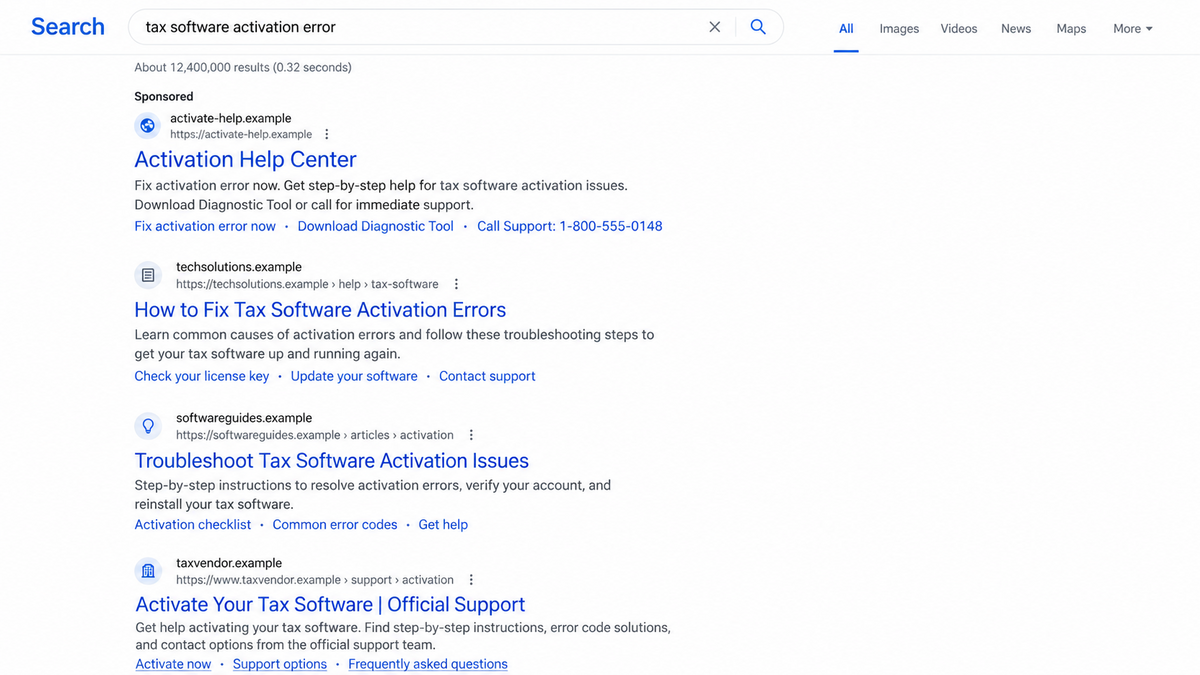
A printer stops working, a tax program rejects an activation code, or a streaming account refuses to load. The quickest solution seems obvious: search the error and call the support number in the first convincing result.
The page has the right product name, clean instructions, and a support button waiting at the bottom. It looks like someone built it for exactly this problem.
That helpful result may have been built to turn the search itself into an infection or a fraudulent phone call.
Overview
BengalSEO places fake help pages in search results
The DFIR Report identified a widespread search-engine optimization poisoning operation in March 2026 and traced related activity back to at least 2015. The researchers track the operation as BengalSEO and assessed with high confidence that it is linked to a group in Rajasthan, India.
The campaign creates large numbers of pages designed to rank for support, activation, login, download, and troubleshooting searches. Instead of advertising one fake product, it intercepts people who are already looking for help with tax software, antivirus tools, games, streaming services, gift cards, healthcare accounts, and credit-card activation.
A victim can therefore begin on Bing or another search engine with a completely legitimate question. The scam enters when a poisoned result outranks or resembles the real support page.
The same network can deliver malware or fake support
The DFIR Report’s investigation found two major outcomes. Some visitors were directed toward a custom malware family named MayaBot. Others were pushed into fraudulent technical-support call centers.
That flexibility makes the operation especially dangerous. A visitor on one device or from one location may see a download, while another sees a phone number or a different page. The result can change after researchers inspect it.
The operators use traffic filtering and redirection so that search crawlers, automated scanners, researchers, and intended victims do not always receive the same content.
The infrastructure is built for scale and replacement
Researchers identified 84 active GitHub accounts used between January 2024 and March 2026, along with hundreds of domains and certificates. One infrastructure pivot exposed 411 subdomains. Public page-hosting services and disposable domains helped the pages spread quickly.
The visible support brand is only one tile in a larger system. A blocked page can be replaced while the search phrases, templates, analytics, redirect logic, and call-center workflow continue.
- The victim searches for a real product, activation task, or error message.
- A manipulated result imitates a help article, login, or official support page.
- CAPTCHA and browser checks filter visitors before the final destination.
- Tracking tools fingerprint traffic and decide which path to show.
- Rotating domains make the trail difficult to follow.
- One path delivers the custom MayaBot malware.
- Another displays a fake support number and sends the victim to a call center.
- The page topic changes easily, but the underlying operation remains reusable.
Why Poisoned Search Results Catch Careful People
The victim chooses the search, not the attacker
Many scams begin with an unsolicited message. Search poisoning reverses that relationship. The user decides when to search and what to type, so the result feels like an answer they found rather than a lure sent by a criminal.
That sense of control lowers suspicion. Someone who would ignore a cold call may willingly phone a number found while troubleshooting a real problem.
Specific pages look more relevant than official homepages
An official company page may use broad navigation and ask the user to choose a product. A poisoned page can repeat the exact error code, model number, or activation phrase from the search. Relevance feels like expertise.
The text may be awkward or repetitive because it was written to capture many search variations. Under pressure, the large support button and exact keywords can matter more to the visitor than the quality of the prose.
The final page may hide from investigators
BengalSEO uses a traffic distribution system, CAPTCHA gates, and visitor fingerprinting. A crawler might see harmless text while a target receives a malware download or phone prompt.
This selective behavior helps malicious pages remain indexed. It also explains why revisiting a link later may not reproduce what the victim saw.
Company and Checkout Checks
The product name does not identify the page owner
A page can mention a real antivirus brand, tax service, bank, or streaming platform without belonging to that company. Look at the registrable domain, not just words elsewhere in the address or page title.
Official support pages normally stay within the company’s known domain. A blog-hosting subdomain, raw code repository, unrelated marketing domain, or misspelled address should not be treated as authorized support.
The web address may be one disposable redirect
The first search result may pass through several addresses before showing the support page. Each redirect makes it harder to know who operates the final service and easier for the campaign to replace a blocked destination.
Copying a company logo and adding HTTPS do not solve that identity problem. Encryption protects the connection to the wrong site just as effectively as it protects a connection to the right one.
The support number is part of the conversion path
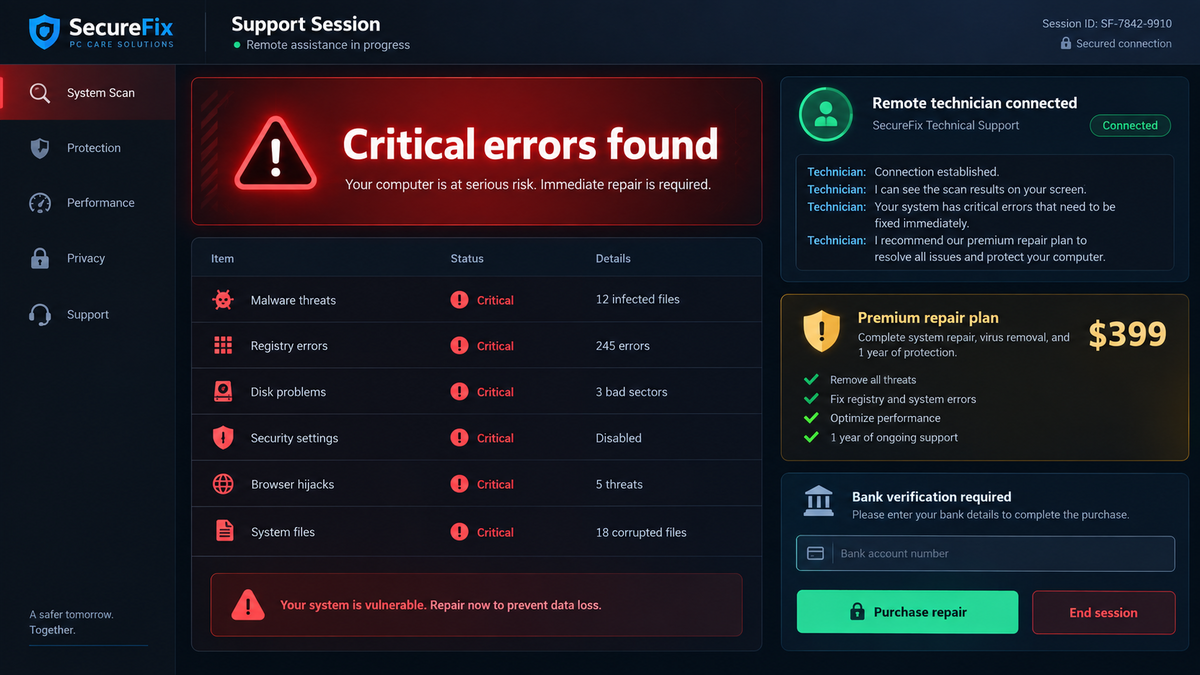
A prominent phone number can be the real goal of the page. Once the victim calls, an operator can adapt the story, request remote access, sell an unnecessary plan, or claim that the computer and bank account are compromised.
Verify support numbers from the product’s official application, receipt, printed documentation, or known corporate domain. Never rely on the same search result that raised the question.
The download has no trustworthy supply chain
A file labeled update, activator, diagnostic tool, or support utility may have no relationship to the real product. The DFIR Report identified MayaBot as a custom malware outcome within the operation.
Only download software through the vendor’s verified domain or official store. A hash, filename, or professional icon on an unverified page does not establish who compiled the file.
How the BengalSEO Search Scam Works
Step 1: The network publishes pages for high-intent searches
The operators create pages around phrases used by people who are ready to act: activate a card, renew software, fix an error, call support, download an update, or sign in to an account.
Templates make it possible to swap the product name and search terms across many domains and hosting accounts. The page does not need regular readers. It needs to rank for a narrow moment of urgency.
Step 2: Search optimization pushes the page toward users
Keyword-heavy text, linked pages, abused hosting platforms, and large numbers of URLs help the content appear in results. Some visitors may also encounter paid placements, but the documented operation focuses heavily on organic search manipulation.
A high position is not an endorsement by the search engine. Ranking systems estimate relevance and quality at scale, and attackers deliberately study how to appear useful.
Step 3: CAPTCHA and fingerprinting sort the traffic
The visitor may be asked to complete a CAPTCHA or wait while the page verifies the browser. This can feel like a security feature. It also gives the operator information about the visitor and keeps simple automated scanners from reaching the next step.
The campaign used analytics and traffic-distribution logic to decide what content to serve. A target and a researcher can receive different outcomes from the same starting link.
Step 4: Redirect domains move the visitor away from the indexed page
The page that ranks does not need to host the final scam. It can forward the browser through rotating domains, allowing the operator to change the destination without rebuilding every search result.
Redirects also break the visual connection between the brand searched and the organization controlling the page. Many users focus on the answer and stop checking the address after the first click.
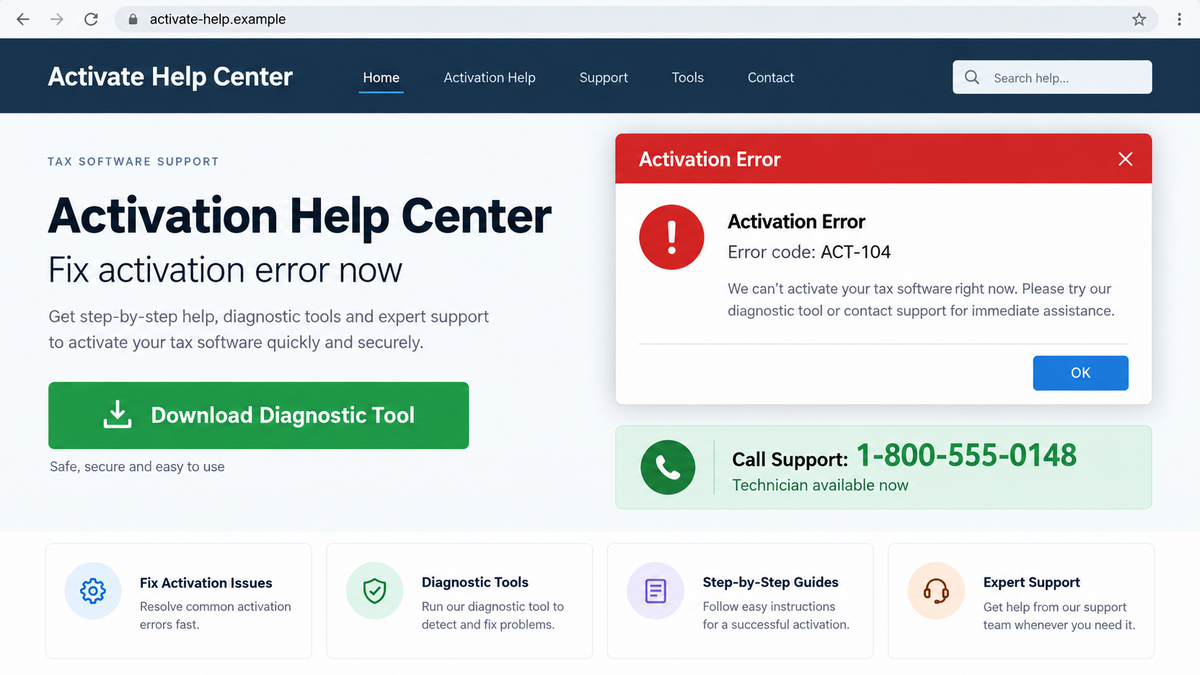
Step 5: One route offers a malicious download
The visitor may be told that a diagnostic tool, update, or activation program will solve the problem. The downloaded file can install MayaBot, giving the operators a foothold on the Windows computer.
Running the file may trigger additional downloads, persistence, command execution, or data theft. The exact behavior can evolve as the malware is updated.
Step 6: Another route displays a fake support number
Instead of a file, the page may claim that the issue requires an expert. A toll-free-looking number or chat button connects the victim to a call center that has no authorized relationship with the real product.
The operator can ask for remote access, invent infections, request payment, or move the conversation toward bank theft. Because the victim made the call, the operator begins with more trust than a cold caller would receive.
Step 7: The domain disappears and the template returns elsewhere
Reports and browser protections eventually block some pages. BengalSEO’s scale allows the operation to move to fresh domains, hosting accounts, repositories, and product themes.
The reliable defense is not memorizing one hostname. It is verifying the owner of every support page before downloading a file, calling a number, or granting remote access.
Safe Ways to Find Real Product Support
Start from something you already trust. Open the installed application and use its Help menu, type the company’s known homepage yourself, or consult the receipt and printed manual. These paths reduce the chance that a search intermediary controls the answer.
If search is necessary, compare several signals before acting. The page should use the company’s exact primary domain, match the legal business, provide consistent contact details, and avoid pushing immediate downloads or remote access.
- Do not call a number merely because it appears in a featured snippet.
- Ignore pages that repeat the error phrase unnaturally in every heading.
- Leave if a CAPTCHA immediately redirects to a different domain.
- Do not install a “fix” from a code-hosting or document-sharing page.
- Never let a stranger view a bank account during technical support.
- Do not buy gift cards, cryptocurrency, or a wire transfer for a repair.
- Check the vendor’s security page for official support contacts.
- Ask whether the supposed support company is actually authorized by the brand.
Real support may charge for out-of-warranty help, but it will identify the company, explain the service, and provide normal billing documentation. It will not claim that moving money to a “safe account” is part of fixing a computer.
What to Do if You Have Fallen Victim to This Scam
- End the call and remote session. Disconnect the computer from the internet. Do not argue with the operator or follow instructions to reconnect.
- Remove remote-access software. From a clean state, uninstall tools added during the call and disable unattended access. If you are unsure what changed, use a trusted technician.
- Run a Malwarebytes scan. Update Malwarebytes and perform a full scan for MayaBot, droppers, and other malware delivered by the page. Quarantine detections and reboot if prompted.
- Change passwords from another device. Begin with email, banking, Microsoft or Google accounts, and any password entered while the caller watched the screen. Revoke active sessions.
- Call the bank through an official number. Report any card payment, transfer, exposed login, or screen sharing involving financial information. Ask about recalls, card replacement, and additional monitoring.
- Preserve the search trail. Save the search phrase, result title, URLs, phone number, downloaded filename, payment receipt, and call time. Browser history may be valuable even if the page has vanished.
- Review the computer for persistence. Check startup items, browser extensions, scheduled tasks, new user accounts, security exclusions, and remote services. A professional reinstallation may be appropriate after confirmed access.
- Use AdGuard to reduce exposure. AdGuard can block many known malicious and advertising domains before they load. It cannot verify every search result, so continue checking the official domain.
- Report the result. Use the search engine’s report function, notify the impersonated company, report the host or registrar, and file a police or cybercrime report for malware or financial loss.
- Reject recovery offers. Anyone promising to recover the payment for an upfront fee may be using information shared by the first scammer.
If a work computer or company account was involved, notify the employer immediately. The infection may expose shared systems even when no personal money was lost.
Frequently Asked Questions
Is BengalSEO a confirmed scam and malware operation?
Yes. The DFIR Report connected years of infrastructure, accounts, domains, redirect behavior, MayaBot delivery, and fake support activity to the operation it tracks as BengalSEO.
Does every suspicious Bing result belong to BengalSEO?
No. Search poisoning is used by many groups, and a poor result is not proof of this specific operation. The documented campaign is one large example of the method.
Can the first search result be malicious?
Yes. Ranking reflects automated signals, not a guarantee of ownership or safety. Verify the domain before calling, signing in, or downloading software.
What is MayaBot?
MayaBot is the custom malware identified as one outcome of the BengalSEO traffic chain. It can give attackers a foothold after the victim runs a fake support or update download.
Why did the page look harmless when I reopened it?
Traffic filtering can show different content based on location, device, browser, prior visits, and automated-scanner signals. The malicious destination may also have rotated.
How can I find a genuine support number?
Use the product’s installed Help menu, official receipt, printed documentation, or verified corporate domain. Do not copy the number from an unverified search result.
The Bottom Line
BengalSEO turns a reasonable search for help into a choice between malware and a fraudulent call center. The operation is confirmed, technically documented, and designed to survive the loss of any single domain.
A search result is a suggestion, not proof of identity. Before downloading a fix or calling support, verify that the domain belongs to the company whose name appears on the page.








