

The video promises the one thing every streaming fan wants: live television, sports, and premium channels on an Android phone without another monthly bill.
A polished social ad leads to a download page that looks like a shortcut around expensive subscriptions. The app is not in the official store, but the instructions make that sound like a minor technicality.
Once installed, the free-TV offer becomes something entirely different.
Overview
The campaign sells free television through paid social ads
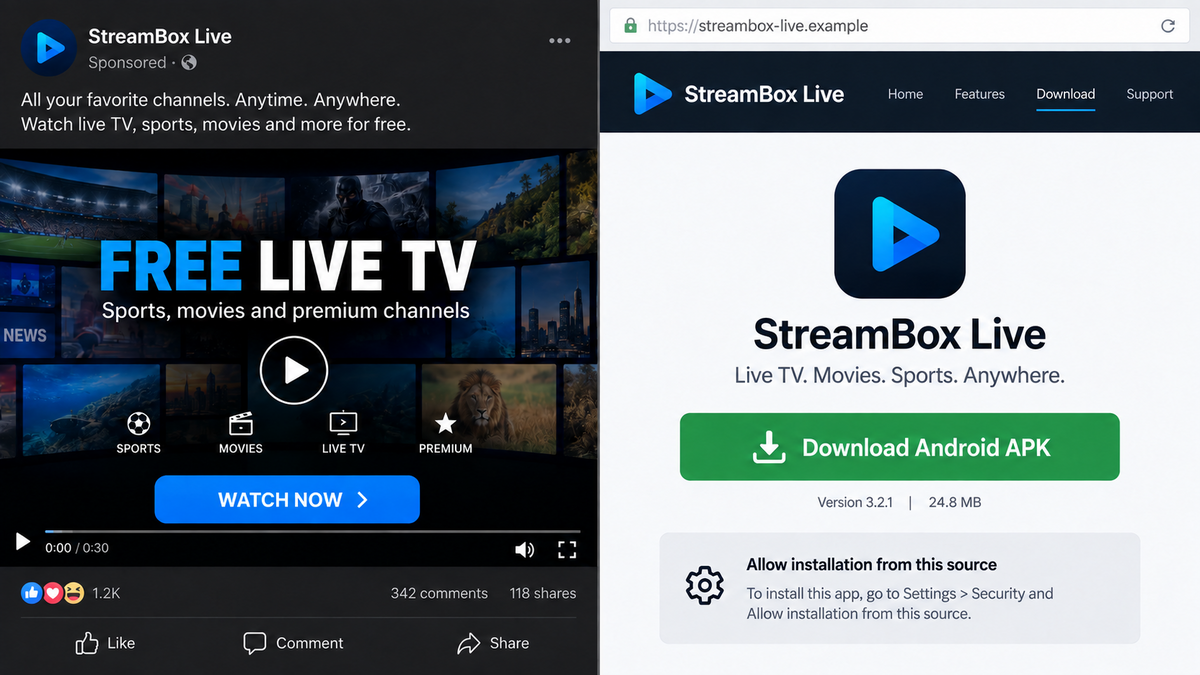
ThreatFabric uncovered an Android banking trojan called StreamRat being promoted to Spanish-speaking users through Meta and TikTok ads. The bait was a supposed free television-streaming service, not a security alert or a visibly suspicious attachment.
The offer borrows the look of familiar streaming apps and presents installation as a way to unlock live channels. One documented Meta campaign reached roughly 570,000 users between June 11 and July 3, 2026. That scale makes this more than one bad download link shared in a private group.
The advertisement is the trust-building stage. It normalizes the app before asking the user to leave the official store and install an Android package directly.
The sideloaded app can take over the phone
ThreatFabric’s StreamRat analysis describes a banking trojan with remote-access capabilities. After installation and permission abuse, operators can interact with the device, watch the screen, steal credentials, manipulate apps, and target financial accounts.
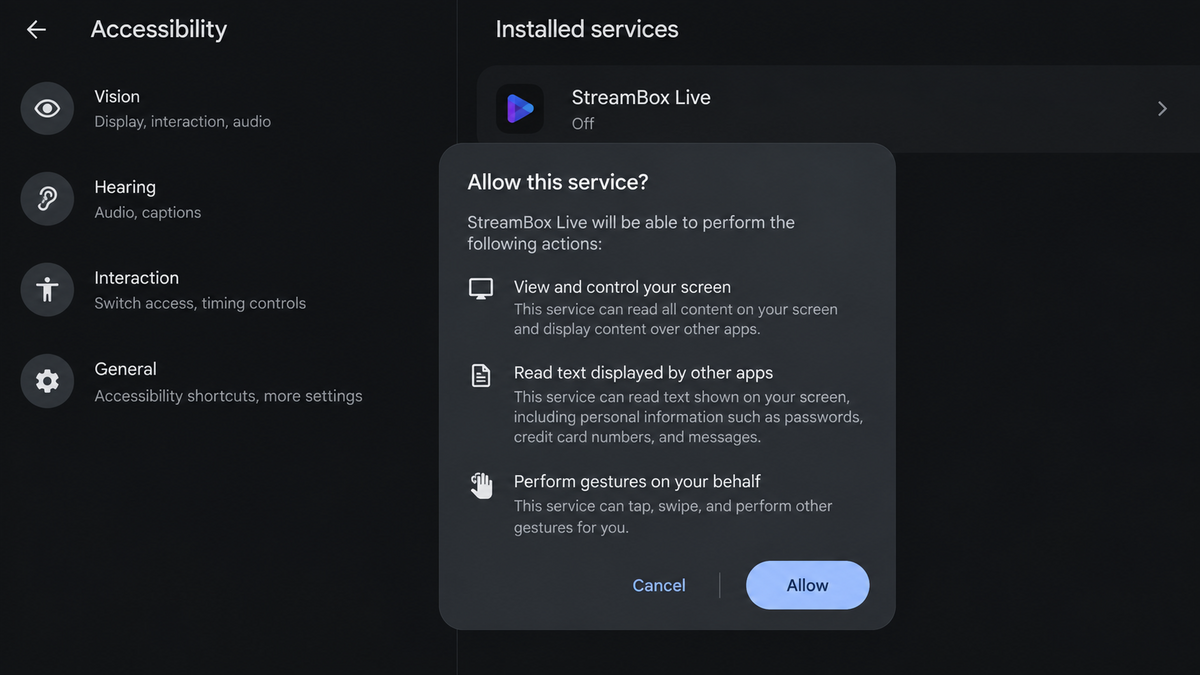
The danger is not limited to one streaming password. Accessibility access can let malware read what appears on screen and press buttons on the user’s behalf. Screen capture and remote-control features turn the victim’s own phone into the attacker’s working environment.
Because actions can occur on the familiar device, banks and other services may see a known handset, known SIM, and expected location. That can make fraudulent activity harder to distinguish from the owner’s normal behavior.
The free-TV brand can change while the malware stays
Scam campaigns built around pirated or free content rarely depend on one durable company name. A blocked domain can be replaced, a new app icon can appear, and an ad can promote a different package without changing the core installation and permission sequence.
That is why the story is better understood as a free-streaming ad scam than as a review of one entertainment brand. The critical clues are the paid ad, the off-store APK, and the demand for powerful permissions.
- Meta and TikTok ads promise free live television or premium channels.
- The click leads outside Google Play to a direct APK download.
- Instructions teach the user to allow installation from an unknown source.
- The app asks for accessibility and other high-risk permissions.
- StreamRat can display overlays, capture information, and control the device remotely.
- Bank logins, passwords, messages, and one-time codes may be exposed.
- The operators can change the visible streaming name and continue advertising.
Why the Free Streaming Pitch Works
The offer matches a real frustration
Streaming costs are fragmented. A viewer may need several services to follow sports, news, films, and regional channels. An app that claims to combine everything for free sounds like a rebellious bargain rather than an obvious trap.
The scammer does not have to persuade the victim that unknown software is generally safe. The promise of avoiding recurring fees gives the victim a reason to make an exception this one time.
Installation warnings are reframed as instructions
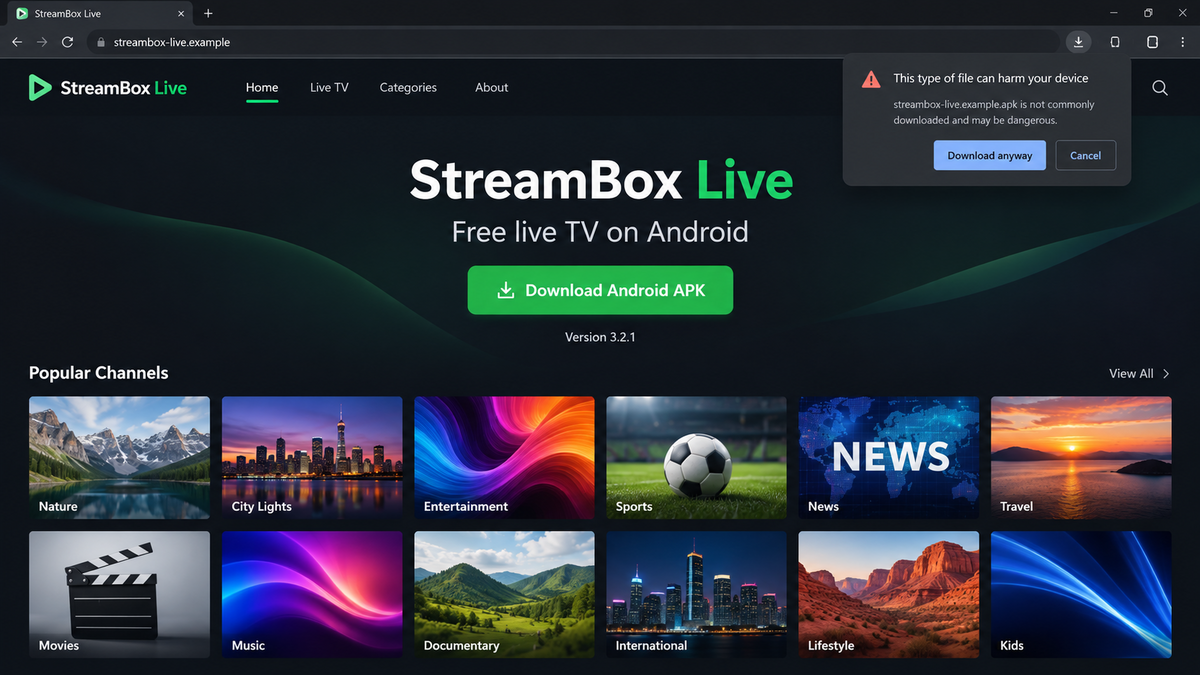
Android warns users before an app from outside the official store can be installed. The fake streaming page anticipates this. It may provide a step-by-step guide that tells people where to enable “Install unknown apps” and how to continue past the warning.
That guide turns a safety barrier into proof that the process is working. A cautious message from Android starts to feel like a routine obstacle imposed on an unofficial entertainment app.
The app can appear useful at first
Malware does not always crash or demand money immediately. It may show channel lists, a loading screen, or a simple player while malicious services run in the background. A little visible functionality can keep the app installed longer.
Even if some streams play, that does not make the package safe. A working front end and a banking trojan can exist in the same app.
Company and Checkout Checks
The streaming name is not a verified operator
A logo and a list of channels do not identify a licensed streaming company. Check for a real legal entity, copyright terms, distribution rights, a stable support history, and an app-store developer account that matches the website.
When hundreds of paid channels are supposedly offered for free, the site should be able to explain how it obtained those rights. Silence on that question is not a bargain. It is a warning that the visible entertainment service may be disposable.
The download domain is not a legitimate storefront
Direct APK sites can change quickly and may use newly registered domains, generic hosting, or redirect links. A padlock only encrypts the connection. It does not confirm who built the software or what the package will do after installation.
Compare the domain in the ad with the final download host. Multiple unrelated addresses, forced redirects, and a file served from generic storage make accountability weaker.
Support cannot undo remote access
Malicious streaming apps are not supported like legitimate subscriptions. A contact form may collect more personal information, and a messaging account can disappear as soon as the campaign is reported.
If the app was granted accessibility or screen-sharing access, do not ask its operator to “fix” the phone. Remove access from a clean state and contact banks through numbers printed on cards or found in official apps.
The real cost appears in stolen access
There may be no checkout at all. Instead of charging a subscription, the operator monetizes access to the device and the accounts opened on it. Banking credentials, email sessions, card details, crypto wallets, and one-time passwords can be worth more than a monthly streaming payment.
“Free” therefore describes only the visible app price. It says nothing about the financial exposure created by the permissions.
How the StreamRat Free TV Scam Works
Step 1: A social ad promises premium television for free
The victim sees a sponsored video or image on Meta or TikTok. It highlights sports, films, or live channels and may imply that the app is a new way to watch without paying multiple subscriptions.
Paid distribution gives the campaign reach and a layer of legitimacy. The fact that an ad passed automated review does not mean the promoted file is safe.
Step 2: The landing page offers an APK download
Instead of opening Google Play, the button loads a website and downloads an Android package. The page may claim the app is unavailable in the store because of regional restrictions or because broadcasters oppose free access.
That story gives a flattering explanation for the missing store listing. In reality, sideloading removes an important review and update channel.
Step 3: The victim is coached past Android protections
The page explains how to approve unknown-source installation. Once installed, the app requests permissions that a television player does not need, especially accessibility access, screen capture, or control over other apps.
Permission prompts may use vague names or claim that access is required to improve playback. The true effect is much broader than displaying video.
Step 4: StreamRat connects the phone to its operators
The malware registers the device with command infrastructure and waits for instructions. Operators can collect device information, monitor activity, and choose when to begin a hands-on session.
This remote model lets criminals adapt. They can wait until a banking app opens, change the screen shown to the victim, or guide the phone through actions that a fixed script could not predict.
Step 5: Overlays and remote control expose financial accounts
A fake login screen can appear over a real bank or wallet app. The victim enters credentials into what looks like the normal service, while the malware records them.
Accessibility controls can also read text, click buttons, approve prompts, or hide parts of the attack. Messages and notifications may reveal one-time codes that would otherwise protect an account.
Step 6: The attacker acts from the victim’s device
Remote control allows the operator to open apps, change settings, and attempt transactions on the compromised phone. Fraud performed from a familiar device can carry the victim’s cookies, app registration, and network context.
The user may see a blank overlay, frozen screen, or fake update message while activity continues underneath. By the time the display returns, the attacker may already have changed recovery details or moved money.
Step 7: The ad and streaming brand rotate
When researchers or platforms block one version, the operator can launch another advertisement and package. A new name does not mean a new threat when the download and permission pattern are the same.
This is why searching only for today’s app name is not enough. Free-TV ads that demand sideloading and accessibility access should be treated as dangerous regardless of the logo.
What the App Can Expose
Accessibility access is intended to help people interact with their devices. In the hands of malware, it becomes a way to observe and automate the phone. The app may be able to read on-screen content, identify buttons, and carry out actions inside other apps.
Screen capture and overlays deepen the risk. An overlay can imitate a login page, while screen capture reveals information from genuine applications. Together, those features can expose:
- Banking and payment-app usernames and passwords.
- Card numbers entered into shopping or wallet apps.
- Text messages, notifications, and one-time verification codes.
- Email sessions used to reset other accounts.
- Crypto-wallet apps and exchange credentials.
- Contacts that can receive new scam messages from a trusted account.
- Photos or documents visible during a remote session.
- Device settings that control security and account recovery.
A person does not need to see every capability used before taking action. Granting a free streaming app this level of control is enough to treat the phone as compromised.
What to Do if You Have Fallen Victim to This Scam
- Stop using the phone for banking. Put the device in airplane mode. Use a different, trusted device to contact financial institutions and change passwords.
- Call banks immediately. Explain that an Android remote-access trojan may have controlled the phone. Ask them to secure sessions, review transfers, replace exposed cards, and watch for new payees.
- Revoke accessibility and administrator access. In Android settings, turn off the suspicious service under Accessibility. Also check Device admin apps, Notification access, VPN, and Install unknown apps.
- Uninstall the APK. Remove the streaming app and any other package installed at the same time. If it cannot be removed safely, get help from a trusted technician.
- Run a Malwarebytes scan. Update Malwarebytes for Android and scan for the known package, droppers, or related components. A clean result does not reverse stolen credentials, so continue with account recovery.
- Change passwords from a clean device. Start with the primary email and Google account, then banking, payments, social accounts, and crypto services. Sign out other sessions and replace reused passwords.
- Review account recovery settings. Check for new forwarding rules, phone numbers, passkeys, trusted devices, app passwords, and authenticator changes.
- Consider a factory reset. For a confirmed remote-access infection, backing up essential personal files and resetting the phone is the safest way to restore trust. Do not restore the suspicious APK from backup.
- Use AdGuard to reduce malicious ad exposure. Its filtering can block many known scam domains and aggressive redirects. Keep Android and the browser updated as well.
- Report the campaign. Report the ad to Meta or TikTok, the download URL to the hosting provider, and financial loss to police or the national cybercrime reporting service.
Tell close contacts if the attacker accessed messaging or social accounts. A criminal may use the compromised identity to send the same streaming link or an emergency-money request to friends.
Frequently Asked Questions
Is StreamRat a confirmed Android banking trojan?
Yes. ThreatFabric analyzed the malware, its command system, and the social-ad distribution that promoted it as a free television service.
Was the campaign really advertised on Meta and TikTok?
Yes. Researchers documented paid promotion on both platforms, including a Meta campaign estimated to have reached about 570,000 users.
Can a streaming app control another Android app?
Not with ordinary video permissions. StreamRat abuses powerful access, including Android accessibility features, to observe and interact with other parts of the phone.
Am I safe if the app showed working television channels?
No. Visible streaming functionality does not disprove hidden malware. A trojan can provide a convincing front end while harmful services run in the background.
Will deleting the APK protect my bank account?
Deletion helps stop further access, but credentials or sessions may already be stolen. Contact banks and change passwords from a clean device.
Can I safely install a free-TV APK from another ad?
No ad can make an unverified APK safe. Use official stores and legitimate streaming providers, and never give a media app accessibility control.
The Bottom Line
The StreamRat free-TV ads disguise a serious Android takeover as a way to save on entertainment. The campaign is confirmed, widespread, and capable of putting far more than a streaming account at risk.
When a free television ad asks you to sideload an app and enable accessibility, the right response is to close it. No bundle of channels is worth handing a stranger control of your phone.

Join the discussion
0 commentsShare your experience or ask a question about this article.
Discussion
Start the conversation
Have a question or something useful to share? Add the first comment.