

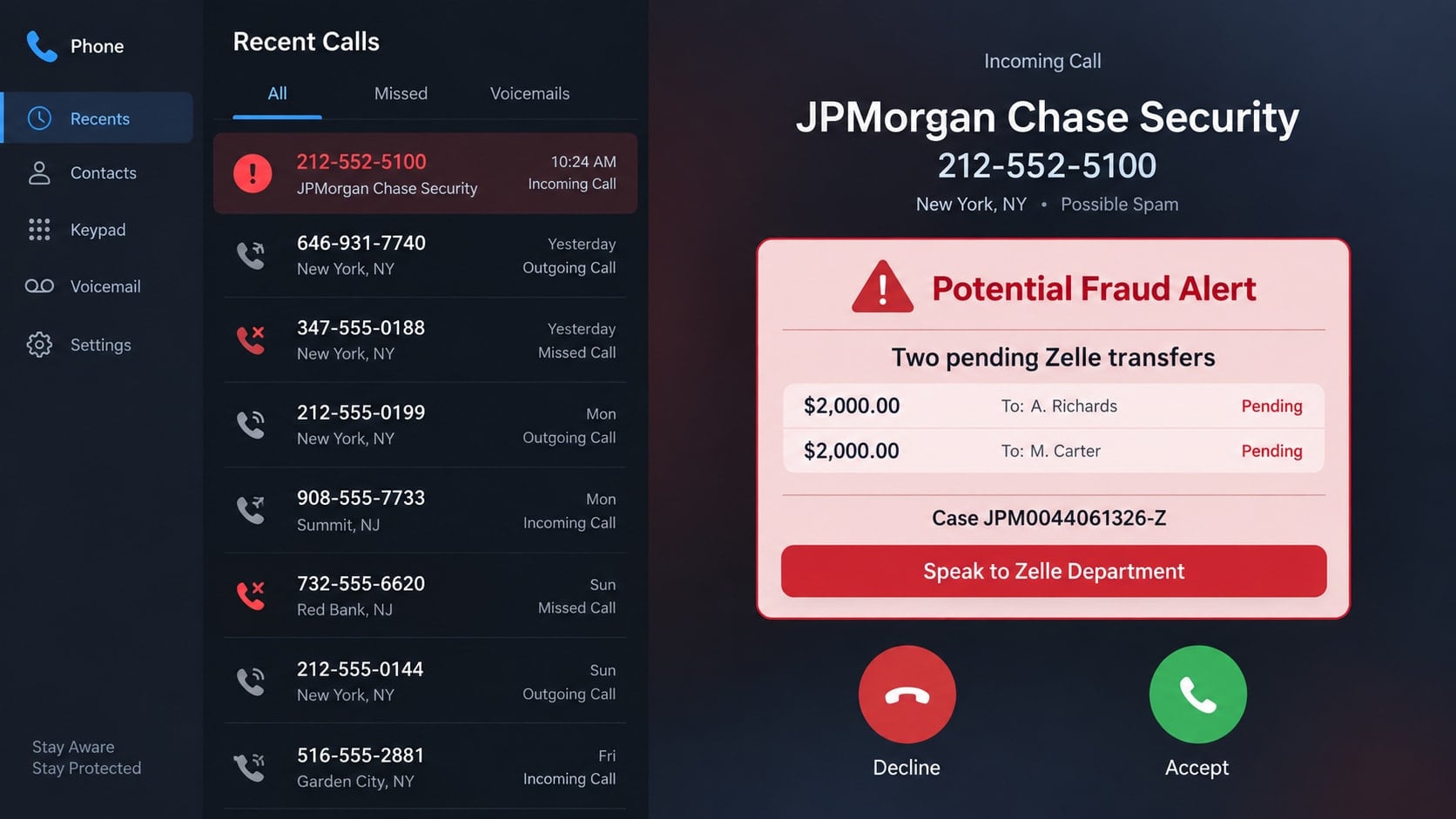
Your phone rings from 212-552-5100, and the caller ID appears to say JPMorgan Chase. A calm representative claims that someone opened an account in your name and sent two $2,000 Zelle transfers. Before you can process the shock, you are given a case number and transferred to a supposed Zelle department.
The caller may even promise not to ask for personal information. That reassuring line is part of the setup. The real request comes moments later, when you are told to open your banking app and move money to cancel transactions that never existed.
Overview
The number looks trustworthy because caller ID can be spoofed
The 212-552-5100 Chase Zelle scam is a bank impersonation call. Scammers manipulate caller ID so an incoming call displays a recognizable company name or a number associated with that company. Seeing a familiar result in a quick web search does not prove that the person calling controls that number.
The caller then uses details that sound like a real fraud investigation. These may include transaction amounts, names of supposed recipients, a case number, a transfer to another department, or a claim that your Social Security number has been exposed.
The fake problem is designed to make you move real money
The central lie is that you must send a payment to cancel, reverse, verify, or protect another payment. A legitimate bank does not resolve an unauthorized transaction by asking the customer to create a new Zelle transfer.
Chase specifically warns that legitimate banks will never ask customers to move money to resolve a fraud issue. It also advises customers to end uncertain calls and use the number printed on the back of their card. That guidance applies even when the caller ID appears genuine.
The script can change while the money-transfer trap stays the same
One caller may claim that a new account was opened in your name. Another may describe a pending transfer, a compromised Zelle profile, a criminal investigation, or a security hold. The names and amounts can change, but the goal is to get you to authorize a transfer yourself.
- The call arrives unexpectedly and creates an urgent financial emergency.
- The caller supplies official-sounding case or cancellation numbers.
- You are transferred to a second person who supposedly represents Zelle.
- You are told to stay on the line while opening your real banking app.
- A transfer is described as a cancellation, test, reversal, or protected payment.
- The caller discourages you from contacting your bank independently.
Why a Real-Looking Caller ID Proves So Little
Caller ID was built to display information supplied by the calling network. It was not designed as proof of identity. Internet calling systems make it possible for criminals to insert a misleading name or number, including a number that belongs to a real bank.
This is why searching 212-552-5100 while the caller waits can create false confidence. The search may confirm that the number has an association with JPMorgan Chase, but it cannot confirm the origin of the current call.
A scammer may also know your name, phone number, former address, bank name, or other information obtained from data breaches and public records. Familiar facts can make the story feel personal, but they do not prove the caller has access to your account.
The safe verification method is separation. End the call, wait a moment, and start a new contact through a channel you selected. Use the number on your card, the official mobile app opened independently, or the bank website typed into your browser.
How the 212-552-5100 Chase Zelle Scam Works
Step 1: The spoofed call creates instant credibility
The phone displays 212-552-5100 or a Chase-related caller name. The criminal expects the victim to trust what appears on the screen, especially if a search result associates the number with a real organization.
The caller introduces themselves as a bank security employee, fraud investigator, or account-protection specialist. They speak in a measured tone and quickly move into a specific allegation.
Step 2: A frightening transaction story narrows your attention
You are told that someone opened an account using your identity or sent one or more Zelle payments. Amounts such as $1,200, $2,000, or $5,000 are large enough to feel urgent but believable enough to keep you engaged.
The caller asks whether you recognize the transactions. When you say no, that predictable answer becomes permission to begin the fake recovery process.
Step 3: Case numbers and transfers make the call feel organized
The scammer reads a case ID, client number, cancellation code, or employee number. These strings are inexpensive props. They do not connect the caller to a real investigation, but they make the conversation resemble a formal workflow.
You may then be transferred to a second criminal introduced as a Zelle specialist. The handoff makes the operation seem larger and reduces the chance that you will stop to question the first story.
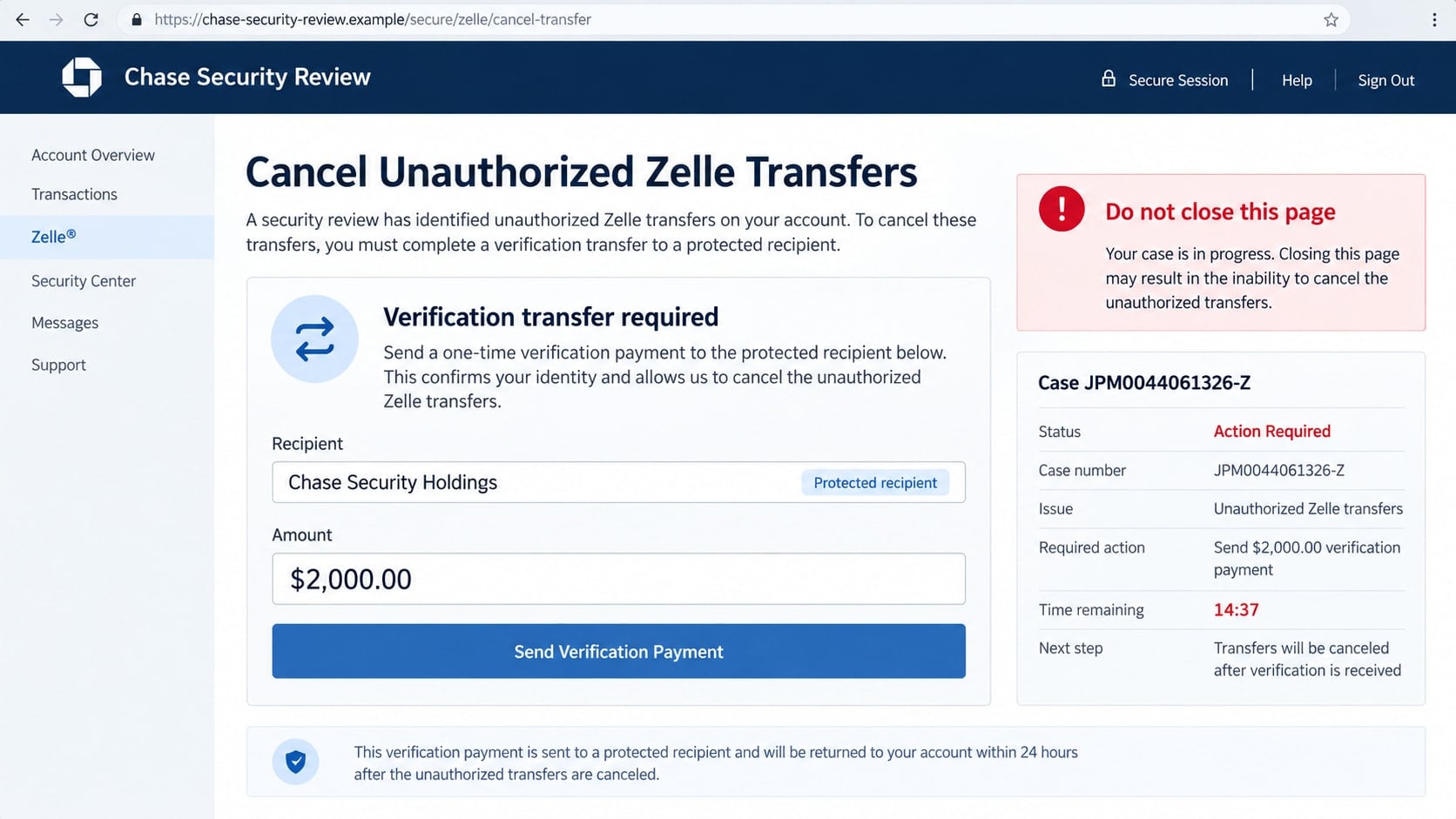
Step 4: The caller gets you inside your real banking app
The caller may say they do not need your password because you will complete the process yourself. That statement sounds safe, but it hides the actual danger. You are being guided to authorize a real payment from an authenticated account.
Instructions may include adding a recipient, typing a code into the name field, entering a transfer amount, or choosing a reason that will avoid a warning. The caller may say that unusual instructions are necessary because the transaction is part of a fraud case.
Step 5: A real transfer is renamed as a security procedure
The payment may be described as a verification transfer, reversal token, cancellation payment, protected holding transaction, or test. None of those labels change what is happening. If the app says you are sending money, you are sending money.
Warnings from the banking app may be dismissed as routine. The scammer may insist the recipient is a secure bank account or that the money will automatically return after the unauthorized transfers are canceled.
Step 6: Pressure keeps you from independently checking
The criminal may warn that hanging up will close the case, release the pending transfer, or leave your identity exposed. Some tell victims not to speak with branch employees because the account is under investigation.
Once a payment succeeds, the caller may request another transfer for a second transaction, tax, verification fee, or account. If you resist, the calm tone can turn impatient or aggressive because the script depends on speed.
Identity, Contact, and Payment Checks
Caller ID is not identity
Treat the displayed number as an unverified label. Do not use a search result, caller name, or information supplied during the call as your proof. A genuine number can be copied onto a fraudulent call.
Start a completely new contact
Hang up and call the number printed on your physical bank card. You can also open the bank app from its normal icon, not from a link or instruction sent by the caller. Ask whether any fraud case or transaction actually exists.
Check the payment screen literally
Ignore verbal labels such as cancellation or protection. Read what the app says will happen. If it identifies a recipient and asks you to confirm an amount, the action is a payment, not a reversal.
Verify Zelle activity inside the real account
Review the activity in your official bank app and contact the bank through a trusted channel. Do not install another app, share your screen, disclose one-time codes, or approve prompts while an unexpected caller directs you.
Warning Signs That Should End the Call
- The caller says money must be sent to protect other money.
- A bank investigation depends on secrecy or staying on the phone.
- You are told to ignore warnings displayed by your banking app.
- A case number is used as the main proof that the caller is legitimate.
- The caller becomes impatient when you want to contact the bank yourself.
- A Zelle recipient is described as a cancellation code or secure holding account.
- You are asked for a one-time passcode, screen share, remote access, or card details.
Chase’s official scam guidance explains that banks do not ask customers to move money to fix fraud and recommends using the number on the back of the card. Review that advice directly on the Chase Security Center, not through a link supplied by a caller.
Why Zelle Warnings Must Be Read Literally
Banking apps often display a warning before a new recipient receives money. The message may ask whether you know the person, remind you that transfers can be difficult to reverse, or explain that a bank employee will not request the payment. Those warnings describe the risk in plain language.
A scammer must reinterpret the warning to keep the transaction moving. They may say the notice appears on every cancellation, that the recipient name represents an internal department, or that choosing “yes” simply confirms the security case. None of those explanations changes the transfer.
Read each confirmation screen aloud and focus on its verbs. If it says send, pay, transfer, or recipient, money is leaving your account. A real fraud department can investigate a disputed transaction without asking you to manufacture another one.
The caller may also ask you to enter a code or reference in the recipient field. A label typed into your app does not turn a stranger into a bank account. The financial institution sees the actual destination, not the story attached to it during the call.
If you reached the final confirmation screen, stop without submitting. Take a screenshot if it is safe, end the call, and contact the bank independently. You do not owe the caller an explanation, and no legitimate investigation is canceled because a customer verifies a request.
What to Do if You Have Fallen Victim to This Scam
- End the call and contact your bank immediately. Use the number on the back of your card. Explain that you authorized a Zelle transfer because of a bank-impersonation scam. Ask the fraud team to attempt a recall, contact the receiving institution, restrict risky transfers, and document the report.
- Report the Zelle payment through the bank that provides your Zelle service. Give the exact recipient, amount, time, confirmation number, and the false explanation used by the caller. Speed matters, although recovery is never guaranteed.
- Secure online banking and email. Change passwords from a trusted device, sign out other sessions, review contact information, enable strong multi-factor authentication, and remove unknown recipients or linked devices. Secure email first if it can reset your financial accounts.
- Preserve the evidence. Save call logs, voicemail, screenshots, payment confirmations, recipient details, case numbers, names, and any texts or links. Write down the order of events while it is still fresh.
- Protect exposed identity information. If you shared a Social Security number, date of birth, address, or identity document, use IdentityTheft.gov to build a recovery plan. Consider fraud alerts or a credit freeze with the major credit bureaus.
- Check the device if you installed software or shared access. Disconnect it from the internet, remove unknown remote-control tools, and run a full scan with Malwarebytes. Malwarebytes can help detect malicious software that may have been installed during the call.
- Block malicious follow-up pages and ads. AdGuard can reduce exposure to known phishing destinations and malicious advertising. It is an additional layer, not a replacement for contacting the bank and changing compromised credentials.
- Report the impersonation. File a report with the FTC at ReportFraud.ftc.gov, notify local police if money was lost, and report the number to your mobile carrier.
- Ignore recovery offers. Criminals may return pretending to be investigators, lawyers, or fund-recovery specialists. Do not pay anyone who promises to retrieve the transfer for an upfront fee.
Frequently Asked Questions
Is 212-552-5100 really associated with JPMorgan Chase?
A number may have a legitimate business association and still appear on a spoofed call. The displayed number does not prove who originated the current call. Hang up and contact Chase using the number on your card.
Can a bank ask me to send a Zelle payment to reverse fraud?
No legitimate fraud resolution requires you to create a new person-to-person payment. If an app asks you to name a recipient and confirm an amount, stop and contact the bank independently.
What if the caller already knows personal information about me?
Scammers can obtain names, addresses, phone numbers, and account relationships from breaches, public records, and previous scams. Known information makes the story convincing but does not authenticate the caller.
Why does the caller say they will not ask for my password?
That promise lowers your guard. The scammer may not need your password if they can persuade you to sign in and authorize the transfer yourself.
Can my bank recover a Zelle transfer sent to a scammer?
Recovery is not guaranteed, but report it immediately. The bank may be able to contact the receiving institution, restrict the recipient, or investigate before the money moves again.
Should I call 212-552-5100 back to verify the case?
No. Use a contact method you obtained independently, preferably the number on the back of your card or the official app. Do not rely on a callback number from the same suspicious interaction.
The Bottom Line
The 212-552-5100 Chase Zelle scam works because the number, case language, and department transfer make a fabricated emergency feel official. The decisive red flag is the request to send money in order to protect or cancel money.
Hang up, open your bank account independently, and speak with the real fraud team through a trusted number. A legitimate bank will help investigate a transaction without directing you to create a new Zelle payment.








