

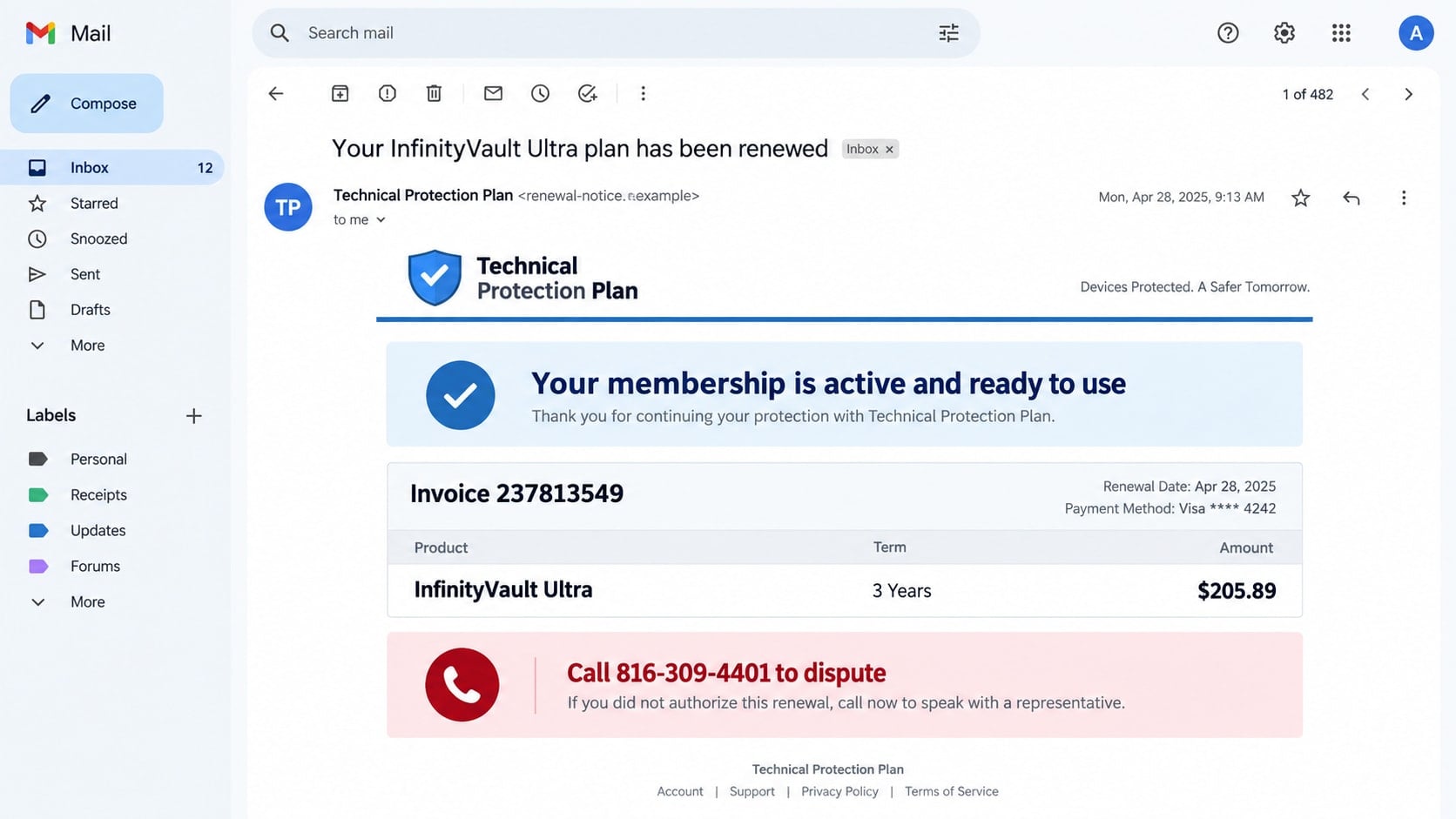
An invoice in your inbox says a Geek Squad protection plan has renewed for $205.89. You do not remember buying it, and the charge is supposedly about to reach your account. A phone number, 816-309-4401, is presented as the only way to cancel.
The unfamiliar purchase is meant to provoke a call, not collect a legitimate subscription payment. Once someone dials the number, a fake billing representative can turn a simple cancellation request into remote access, a refund trick, or a demand for gift cards.
Overview
The invoice advertises a renewal that does not exist
The Geek Squad 816-309-4401 scam begins with an unsolicited invoice or renewal notice. One reported version lists a three-year “InfinityVault Ultra” plan for $205.89 and directs the recipient to call 816-309-4401 with billing questions.
The product name, amount, order number, and renewal date are props. The message is sent broadly, including to people who have no Geek Squad subscription and no matching charge.
The callback creates a live social-engineering opportunity
The criminals want the recipient to call before checking a bank statement or official account. On the phone, they can adjust the script to the victim’s level of concern, technical experience, and available funds.
The number may stop working or later be assigned to someone else. Its appearance in one fraudulent campaign does not mean every future owner or unrelated call involving that number is part of the same operation.
The fake refund can be more dangerous than the fake charge
A supposed cancellation agent may request remote access, direct the victim to sign in to online banking, or claim that too much money was refunded. The victim is then pressured to return the imaginary excess through gift cards, cash, cryptocurrency, or a bank transfer.
- The invoice arrives without a matching order or account history.
- The message says the renewal is automatic, final, or already processing.
- Cancellation is available only by calling the listed phone number.
- The agent requests remote-control software or online banking access.
- A refund screen appears to show more money than expected.
- The victim is ordered to repay the difference through an unusual method.
Why Fake Renewal Invoices Generate So Many Calls
A phishing email that asks for a password can look suspicious immediately. A fake invoice uses a different psychological route. It tells the recipient that something has already happened and that inaction will cost money.
The amount is often chosen carefully. A figure around $200 or $400 is large enough to create concern but not so extraordinary that it looks impossible. A multi-year plan also helps explain why the recipient does not remember a recent purchase.
The document may resemble an ordinary PDF receipt, with a customer ID, invoice date, item table, tax line, and support note. Those details make it look like a record generated by a billing system even though they can be created in minutes.
Most importantly, the message keeps the interaction away from official support. If recipients call the number in the invoice, the scammers control the entire conversation and every instruction that follows.
How the Geek Squad 816-309-4401 Scam Works
Step 1: A fake invoice announces an unwanted subscription
The email may use Geek Squad, Best Buy, antivirus, device protection, or cloud backup language. It thanks the recipient for renewing and says the card or bank account will be charged unless the order is canceled immediately.
The sender may attach a PDF or place the invoice in the email body. An attachment can help the message bypass simple link filters because the first action requested is a phone call.
Step 2: A callback routes the victim to a fake billing desk
When the recipient calls 816-309-4401, the person answering may use a company greeting and ask for the invoice number. That information was created by the same scammers and does not identify a real account.
The agent confirms that the charge can be canceled and may apologize for the inconvenience. Cooperation at this stage lowers suspicion and makes later requests sound like necessary refund steps.
Step 3: The agent requests access to the victim’s screen
The caller is told to install a remote-support application or visit a website that provides a session code. The agent may say access is required to complete a cancellation form, remove the subscription, or connect securely to the billing server.
Remote access can expose files, saved passwords, email, and financial accounts. The criminal may blank the screen, lock the keyboard, transfer files, or leave unattended-access software behind.
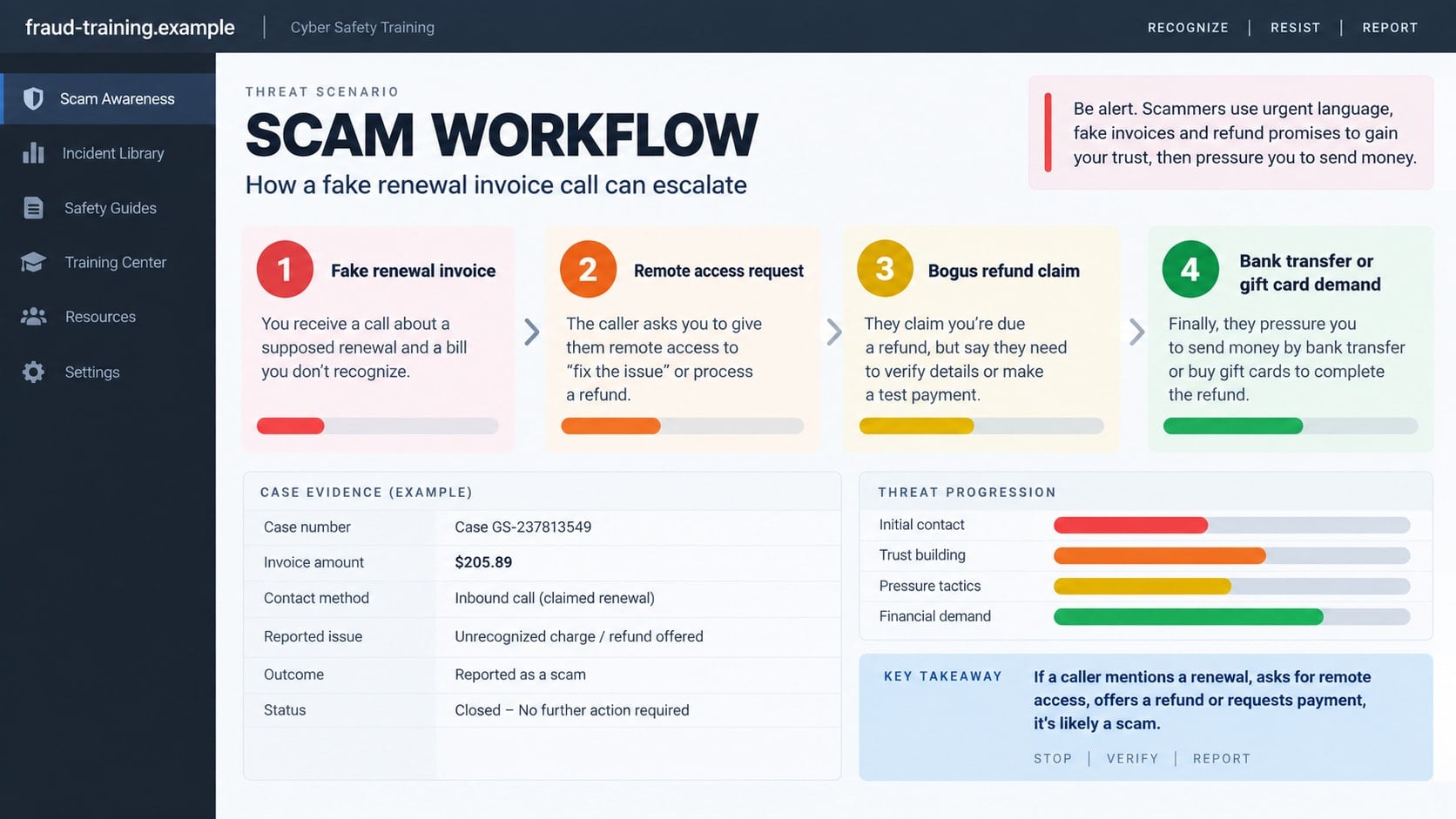
Step 4: Online banking becomes part of the supposed refund
The fake representative may ask the victim to sign in to a bank account while screen sharing remains active. They explain that the refund will appear instantly or that the balance must be checked before the cancellation can close.
No legitimate support agent needs to watch a customer enter online banking credentials to cancel a service. A genuine merchant returns money to the original payment method without editing the customer’s bank screen.
Step 5: A fake balance creates an overpayment emergency
The scammer manipulates what appears in the browser, edits page text, or moves the victim’s own money between accounts. A planned $205.89 refund may appear as $20,589, making it seem that an employee made a costly mistake.
The victim may be told not to refresh the page or contact the bank. The criminal claims their job is at risk and asks the victim to return the excess before an audit discovers it.
Step 6: Real money is sent to correct an imaginary error
The requested repayment may involve gift cards, a wire transfer, cryptocurrency, cash in a parcel, or a payment to a personal account. The agent can remain on the phone while the victim travels to a bank or store.
Once the payment is complete, another fee or mistake may appear. The original renewal was fake, the displayed refund was fake, and only the victim’s outgoing payment is real.
Identity, Contact, and Payment Checks
Check for a real charge before reacting
Open your bank or card account through its official app and search posted and pending transactions. An emailed invoice does not prove that any money moved.
Use official account and support channels
Sign in through the official Best Buy or Geek Squad website you locate independently. If support is needed, use the contact information published there, not 816-309-4401 or another number printed in the suspicious message.
Inspect the sender and attachment carefully
Expand the full email address and compare it with the company domain. Treat free email accounts, unrelated domains, vague greetings, and an invoice for an unknown service as strong warning signs.
Refuse remote access and unusual refunds
A merchant does not need control of your device or visibility into online banking to issue a refund. Never return an alleged overpayment with gift cards, cash, cryptocurrency, or a transfer to an individual.
How to Verify the Invoice Without Calling 816-309-4401
- Do not reply, open an unexpected attachment, or call the invoice number.
- Check your actual statements for the exact merchant and amount.
- Open the official retailer account independently and review purchases.
- Search your email for the original order and compare dates and plan names.
- Locate customer support from the official company website.
- Ask the card issuer about an unfamiliar posted charge, not the email sender.
The FTC has documented fake Geek Squad renewal messages that tell recipients to call about a charge. Its consumer guidance on Geek Squad impersonation explains that the email and phone number are part of the scam, even when the invoice looks professional.
If no corresponding charge exists, there is nothing for the caller to cancel. Delete or report the message after saving any evidence you may need. Calling “just to ask” exposes your number to a group that already knows how to apply pressure.
If a real charge does exist, contact the card issuer and the merchant through official channels. Criminals sometimes combine phishing with stolen payment information, so the presence of a transaction still does not make the invoice phone number trustworthy.
Remote Access and the Fake Refund Screen
Remote-support tools are legitimate products, but they are powerful. Once permission is granted, another person may be able to view the screen, control the pointer, transfer files, and change settings. A stranger who called the session a refund is not made safe by the software’s reputation.
During refund scams, criminals may use browser developer tools to alter the text displayed on a banking page. They can also move money from savings or a credit line into checking, creating the illusion that an external refund arrived.
The account total may look higher, but no merchant overpayment occurred. Refreshing the page, reviewing transaction history from a clean device, or calling the bank would expose the trick, which is why the scammer tries to keep the victim isolated and hurried.
Some attackers activate a black screen while moving through files or accounts. Others ask the victim to type information into a plain form, claiming the fields are hidden for privacy. The remote operator may still capture the entries.
If support access was granted, assume more than the visible session may have changed. The computer should be disconnected, checked for persistent remote tools, and secured before it is used for new password changes.
Why Calling the Number Changes the Risk
Ignoring the invoice deprives the operation of its most useful moment: a live conversation with someone who is already worried. A callback confirms that the address and phone number reach a real person and reveals which part of the story caused concern.
The agent can then choose a suitable path. A technically cautious caller may be offered a simple cancellation form, while a person focused on the charge may be rushed into a refund. The script adapts in a way a static phishing page cannot.
Even if no money is sent, the conversation can collect a full name, bank name, device type, approximate age, and other details useful in later scams. Ending the call does not require politeness or a final explanation.
What to Do if You Have Fallen Victim to This Scam
- End the call and disconnect remote access. Turn off Wi-Fi or unplug the network cable if the person still controls the screen. Do not argue with the caller or follow additional shutdown instructions.
- Call the bank or card issuer immediately. Use the number on the card or official website. Report transfers, gift card purchases, card exposure, or suspicious account movement and ask what can be stopped or recalled.
- Remove unauthorized remote software. From a safe device, change the password for any remote-support account. On the affected computer, uninstall unfamiliar access tools and disable unattended access only after disconnecting it from the internet.
- Run a full security scan. Use Malwarebytes to look for malicious files, remote-access tools, and unwanted programs. If sensitive financial activity occurred during the session, consider having the device professionally inspected or reset.
- Change exposed passwords from a clean device. Start with email, banking, shopping, and password-manager accounts. Use unique passwords, enable multi-factor authentication, and review recovery options and active sessions.
- Secure gift cards quickly. Contact the card issuer using the official number on the card and provide the receipt. Ask whether the balance can be frozen. Do not send card images or codes to anyone claiming they can recover the money.
- Preserve the evidence. Save the invoice, sender address, attachment, phone number, call time, remote-access session details, payment receipts, and a timeline of what appeared on the screen.
- Block repeat contact. AdGuard can help block known malicious sites and misleading ad destinations, but phone scammers can rotate numbers. Block the caller and ignore anyone offering paid recovery.
- Report the incident. File a report at ReportFraud.ftc.gov, notify the impersonated company, and contact local police when money or identity information was stolen.
Frequently Asked Questions
Is 816-309-4401 a real Geek Squad support number?
The number was presented in a reported fake renewal campaign and should not be used to verify that invoice. Find current support details through the official Best Buy or Geek Squad website.
Was I charged because the invoice includes an order number?
Not necessarily. Scammers generate order numbers to make invoices look authentic. Only your official account and financial statement can confirm whether a transaction exists.
Can I safely call the number without giving information?
It is better not to call. The conversation confirms your number is active and gives the scammer a chance to apply a customized script. Verify through official channels instead.
Why would a refund agent need remote access?
A legitimate merchant does not. Remote access lets criminals manipulate the screen, view accounts, steal data, and create a fake overpayment that leads to a real payment demand.
What if I installed the software but ended the session quickly?
Disconnect the device, remove the software, check unattended-access settings, run a security scan, and change exposed passwords from a clean device. A short session can still allow changes.
Can the bank reverse money sent during a refund scam?
Recovery depends on the payment method and speed of reporting. Contact the bank immediately. Ignore anyone who guarantees recovery in exchange for an upfront fee.
The Bottom Line
The Geek Squad 816-309-4401 scam uses a fake $205.89 renewal to start a phone conversation. The invoice is only the opening. Remote access, a manipulated bank balance, and an invented refund error are the tools that can produce the real loss.
Check your statement before reacting and contact the company through a channel you find yourself. If the charge exists only in the email, do not call the number. If remote access or payment has already occurred, disconnect, contact the bank, and secure the device immediately.

Join the discussion
0 commentsShare your experience or ask a question about this article.
Discussion
Start the conversation
Have a question or something useful to share? Add the first comment.