

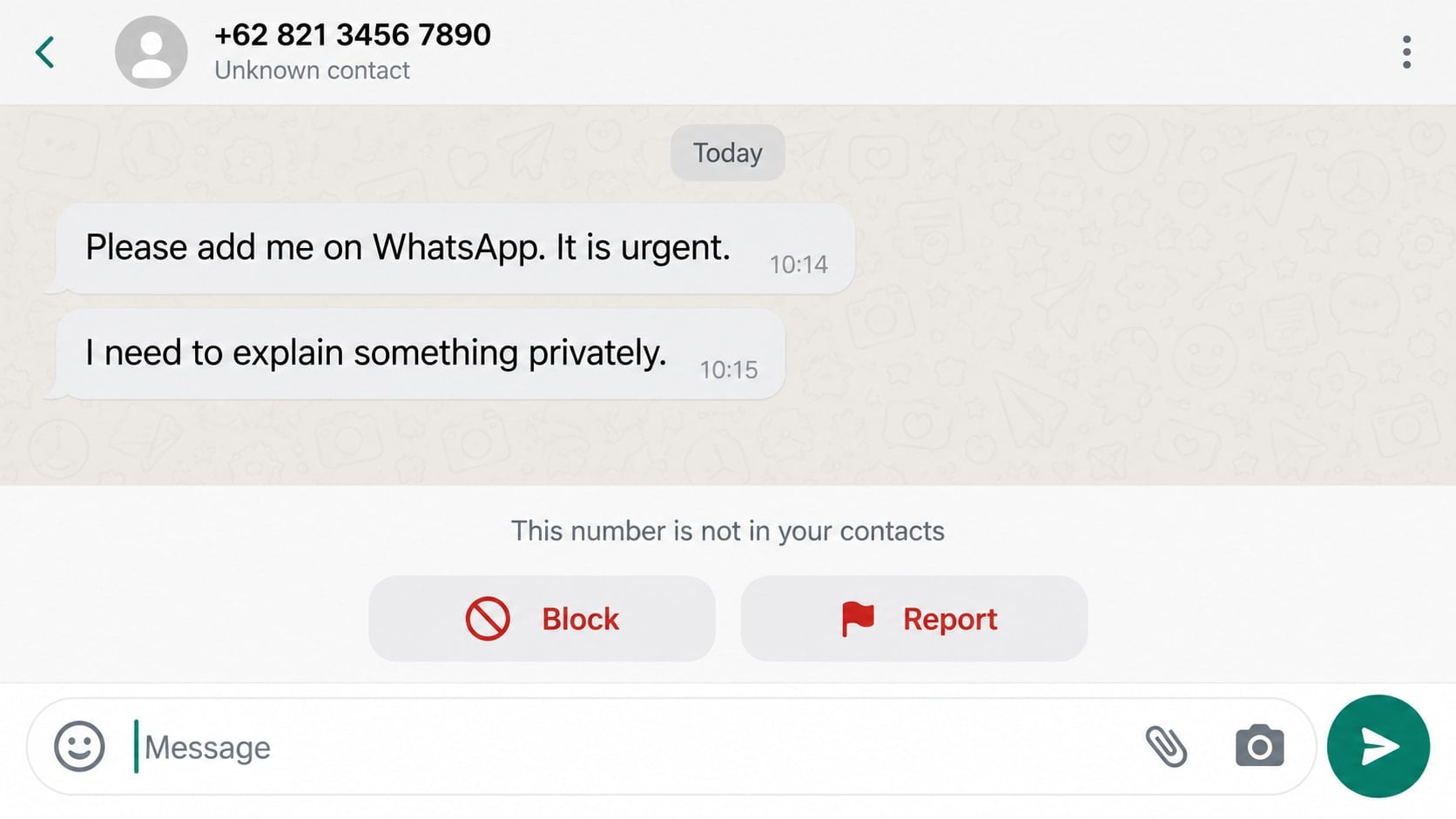
A stranger leaves a voicemail or text with a strangely simple request: “Please add me on WhatsApp. It is urgent.” There is no explanation, no recognizable name, and just enough mystery to make a reply feel harmless.
The Please Add Me on WhatsApp scam depends on that first moment of curiosity. What follows can be an account takeover, a fake job, an investment pitch, or a much more personal manipulation.
Overview
The opening message is deliberately vague
The sender may use a text, missed call, robocall, or voicemail to ask that an unknown number be added on WhatsApp. The request often sounds private or urgent but provides no verifiable reason for the contact.
That vagueness is useful to the scammer. A recipient might assume the person is a customer, recruiter, relative, neighbor, or someone whose number was not saved. Replying confirms that the number is active and that the person is willing to engage.
Moving the conversation gives the scammer more options
Once the stranger is accepted on WhatsApp, they can send links, files, voice notes, photos, and repeated messages. They may also see whatever profile information the recipient’s privacy settings expose.
The next story is not always the same. Some operators ask for a six-digit registration code, while others introduce a remote job, friendship, romance, investment, prize, or emergency request.
A security code can hand over the entire account
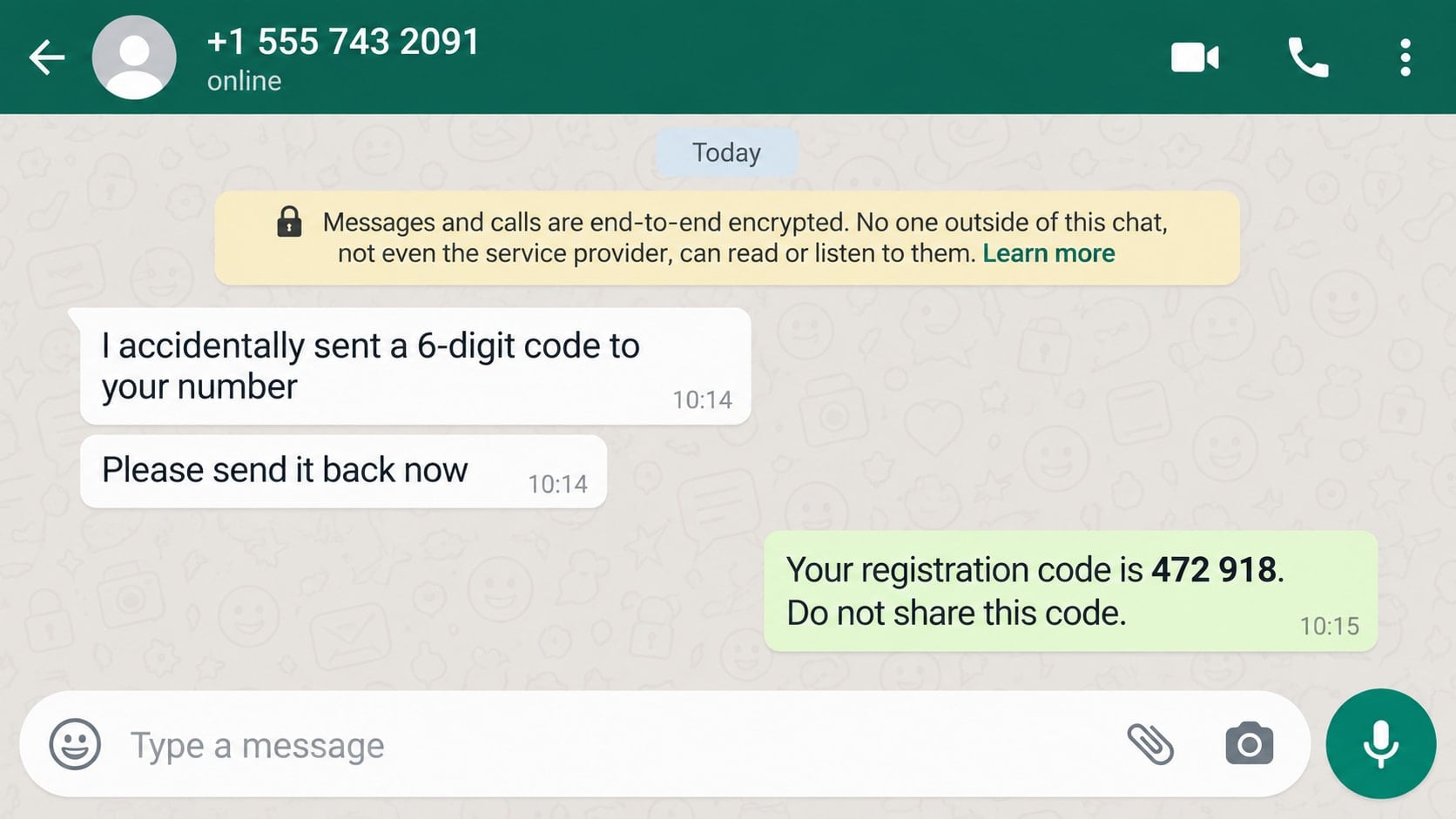
One especially dangerous version begins when the scammer tries to register the victim’s phone number on another device. WhatsApp sends the real owner a registration code, and the stranger invents a reason to ask for it.
Sharing that code can log the attacker into the account. The criminal can then pose as the victim and ask friends, relatives, or group members for money.
- The contact begins outside WhatsApp or from an unknown number.
- The sender avoids explaining how they know the recipient.
- The conversation quickly becomes private, urgent, or emotional.
- A six-digit registration code is requested or discussed.
- The stranger offers easy work, guaranteed returns, or quick money.
- Links lead to unfamiliar login, payment, or investment pages.
Why “Just Add Me” Is an Effective Opening
The request sounds smaller than it really is. Adding a contact is not the same as sending money, so many people do not recognize it as a meaningful security decision.
It also places the burden of interpretation on the recipient. A person expecting a delivery, job response, school message, or family update may create an innocent explanation before the stranger provides one.
The move to an encrypted messaging service can feel safer, but encryption does not verify who is behind an account. It protects the content of a conversation in transit, including a conversation with a fraudster.
Once the recipient answers, the operator learns the preferred language, response speed, and level of skepticism. The script can then be adjusted in real time.
How the Please Add Me on WhatsApp Scam Works
Step 1: A mass message searches for active numbers
Scammers can contact large lists of numbers with the same short line. The number may come from a data leak, public listing, marketing database, or random dialing rather than from anyone who actually knows the recipient.
A response tells the sender that the number is active. Even a cautious question such as “Who is this?” can make the recipient a more valuable target for future attempts.
Step 2: The conversation moves into WhatsApp
The operator may claim the original channel is unreliable, private matters cannot be discussed there, or a voice note must be shared. The goal is to establish an ongoing chat where messages can continue without another cold introduction.
If privacy settings are open, the new contact may see a profile name, image, status, or group connection. Those details can be reused to make later claims sound more personal.
Step 3: A believable role replaces the mystery
The stranger may become a recruiter offering simple online tasks, a former colleague with a new number, a neighbor seeking help, or a friendly person who supposedly contacted the wrong number.
Some conversations remain casual for days. A slow approach helps the scammer collect background details and discover which story is most likely to produce money, credentials, or trust.
Step 4: The scammer asks for a code, payment, or link visit
In the takeover version, the sender says a six-digit code reached the victim by mistake and asks that it be copied into the chat. The code is actually authorizing registration of the victim’s own account elsewhere.
Other versions introduce a training fee, task deposit, crypto platform, parcel charge, or identity-verification page. Each request is framed as a small step needed to continue the opportunity or resolve the invented problem.
Step 5: Access or investment is made to look successful
If the code is shared, the attacker can activate the account and may log the real owner out. If the victim follows a money-making pitch, a fake dashboard can display profits that cannot be withdrawn.
A task scam may even pay a tiny amount at first. That controlled success makes a larger deposit feel less risky, although the displayed balance is only a number controlled by the operator.
Step 6: The victim’s trust network becomes the next target
A stolen WhatsApp account is valuable because messages appear to come from someone friends already know. The attacker can claim an emergency, request a quick loan, or send the same malicious link to multiple groups.
When the original victim tries to recover access, the scammer may demand more codes or pose as support. In investment and job versions, withdrawal fees continue until the victim stops paying.
The Four Common Outcomes Behind the Same Message
The short invitation is a flexible opening rather than one fixed scheme. Recognizing the possible destinations makes it easier to leave before the conversation develops.
- Account takeover: the stranger requests a registration code and uses it to activate the victim’s account.
- Task or job fraud: small online assignments lead to deposits required to unlock better commissions.
- Investment grooming: friendly conversation moves toward a fake crypto or trading platform.
- Malicious links: login pages, apps, or files are used to collect credentials or install unwanted software.
The sender does not need to choose the final route immediately. Answers about work, finances, relationships, and technology help the operator select the most promising one.
Identity, Contact, and Payment Checks
Ask how the person obtained your number
A genuine contact should be able to identify themselves, explain the shared connection, and provide a fact you can verify without coaching. A vague claim of “you know me” is not enough.
If the person names a friend or company, contact that party through a separate known channel rather than using details supplied in the chat.
Treat every registration code as private
A WhatsApp code is meant to prove control of your phone number. It is not a delivery code, refund number, recruiter reference, or message intended for someone else.
WhatsApp’s registration and two-step verification guidance says never to share the six-digit registration code or password. A legitimate employee will not ask you to read it aloud or forward it.
Verify offers outside the conversation
Search for the employer, website, and recruiter independently. Real hiring processes do not require candidates to deposit money to perform tasks, release wages, or upgrade a work account.
Likewise, a private trading link and guaranteed profit chart do not establish that an investment platform is licensed or that withdrawals are possible.
Keep payments inside accountable channels
Do not send cryptocurrency, gift cards, payment-app transfers, or bank payments to a new contact who created an urgent story. Those methods can be difficult to reverse.
If someone you know appears to request money, call their established number or speak in person. A familiar profile picture can belong to a stolen account.
Privacy Settings That Reduce the Attack Surface
Limit who can see your profile photo, About information, status, last-seen details, and group membership. Less public context gives an unknown contact fewer ingredients for a convincing impersonation.
Enable two-step verification and add a recovery email you control. This extra layer can prevent a registration code alone from being enough to take over the account.
Review linked devices periodically. Remove sessions you do not recognize, especially after an unexpected code request or login alert.
Use the built-in Block and Report controls for unsolicited approaches. Do not keep the chat open merely to investigate the sender yourself.
What Encryption Does Not Tell You
End-to-end encryption protects message content from being read while it travels between participants. It does not investigate a participant’s name, story, job offer, wallet, or reason for contacting you.
A scammer’s chat can therefore display the same encryption notice as a conversation with a close friend. The notice describes how messages are transported, not whether the person at the other end is honest.
Profile photos and names are also self-selected. An operator can copy a recruiter portrait, company badge, family photograph, or familiar display name without gaining control of the real person’s identity.
Account age is not decisive either. Criminals buy, steal, and recycle established accounts because an older profile attracts less suspicion than a new one.
Trust should come from independent verification. Confirm a recruiter through the company’s published directory, a relative through a known telephone number, and a business through its established website.
When the sender resists that verification or says secrecy is required, the encryption banner offers no protection from the social engineering taking place inside the chat.
The safest default is simple: unknown identity first, conversation second, and no security code under any circumstances.
What to Do if You Have Fallen Victim to This Scam
- Stop replying and block the account. Do not send a final warning, another code, or proof of identity. Save screenshots first if they are needed for a report.
- Re-register your phone number if access was lost. Open the official WhatsApp application and complete registration with the code sent directly to you. Successful registration normally logs out the other session.
- Secure the account after recovery. Turn on two-step verification, add a trusted recovery email, inspect linked devices, and remove any session you do not recognize.
- Warn close contacts through another channel. Tell friends, relatives, and group administrators that messages sent during the takeover may be fraudulent. Ask anyone who paid to contact their provider immediately.
- Protect email and financial accounts. Change passwords if you typed them into a linked page or reused them elsewhere. Review recovery details and enable strong multifactor authentication.
- Run a Malwarebytes scan after opening files or installing apps. Malwarebytes can help detect malicious downloads, spyware, or unwanted applications delivered during the chat. A code-only takeover does not automatically mean malware was installed.
- Use AdGuard to reduce risky follow-up traffic. AdGuard can block many known scam pages, intrusive ads, and tracking requests that may appear in later messages. Continue checking links carefully because no filter catches everything.
- Notify the payment service without delay. Describe the transfer as fraud, provide the recipient details, and request any available hold or reversal. Contact a crypto exchange as well if funds passed through one.
- Document and report the approach. Keep numbers, usernames, wallet addresses, URLs, payment receipts, and chat exports. Report the account inside WhatsApp and submit financial fraud to the relevant national authority.
Frequently Asked Questions
Is my phone hacked because I received the message?
No. Receiving a text, call, or voicemail does not by itself give the sender control of your device. Risk increases when you share a code, install software, open a malicious file, or disclose information.
What happens if I add the number but never reply?
The stranger may see information allowed by your privacy settings and may continue contacting you. Block and report the account, then review what unknown contacts can view.
Why did I receive a WhatsApp code I did not request?
Someone may have entered your number by mistake or may be attempting to register your account. Do not share the code with anyone and enable two-step verification.
Can a friend asking for money still be a scam?
Yes. The friend’s account may have been taken over. Confirm the request by calling a known number or asking a question that the attacker cannot answer from public information.
Are all unknown WhatsApp contacts fraudulent?
No, wrong numbers and legitimate introductions happen. The danger lies in unverifiable identity, secrecy, code requests, payment pressure, and links that move the conversation into an untrusted transaction.
Can WhatsApp support recover money sent to a scammer?
Reporting can help address the abusive account, but payment recovery usually depends on the bank, card issuer, app, or exchange that processed the transfer. Contact that provider immediately.
The Bottom Line
The Please Add Me on WhatsApp scam turns a tiny request into a private channel for code theft, fake jobs, investment grooming, or malicious links. An unknown person has no valid reason to receive your registration code or rush you into a payment.
Leave the conversation, verify identities elsewhere, enable two-step protection, and warn contacts quickly if the account was taken over. A few calm minutes can stop the stranger from borrowing your identity and trust network.








