

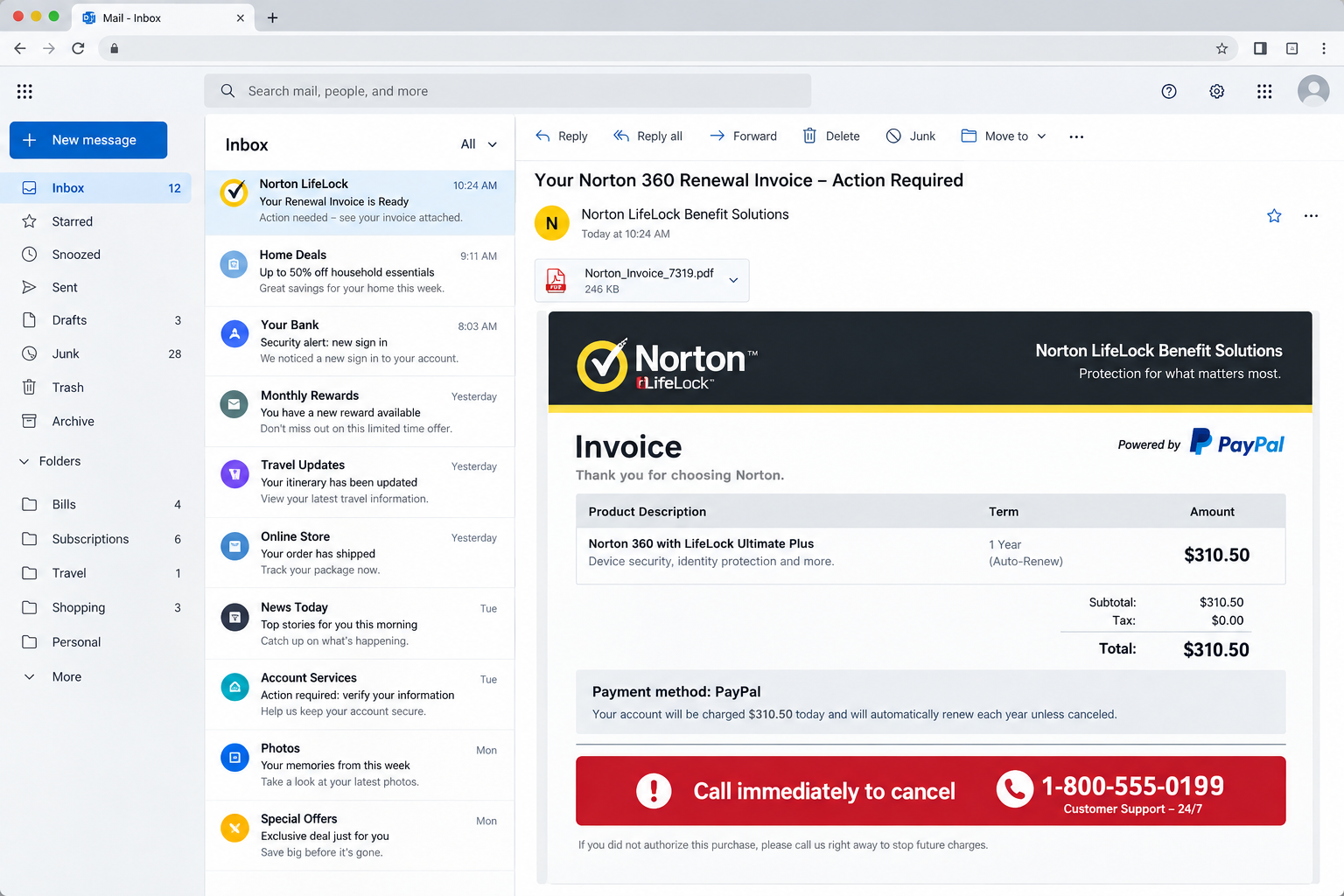
An unexpected Norton invoice lands in your inbox and says PayPal approved a $310.50 payment. The attachment looks formal, and the cancellation deadline feels immediate.
Before calling the prominent support number, pause. That number is the most dangerous part of the message.
Overview
The invoice is a phone trap, not a billing notice
This campaign uses a counterfeit Norton renewal invoice to frighten recipients into calling criminals. The message may claim PayPal processed a $310.50 security subscription.
Recent versions use names such as “Norton LifeLock Benefit Solutions” and “DirectLine Priority Desk.” Those labels are designed to sound official, not to identify real support.
The PDF or image attachment is only bait. The fraud begins when someone calls the number printed beside cancellation, refund, dispute, or customer service instructions.
Why the message feels convincing
The scammers combine familiar brands, an exact amount, invoice formatting, and a same-day deadline. That combination creates urgency without needing a malicious link.
Many recipients have used Norton or PayPal before. Even people without an active subscription may worry that an old account or stolen card was charged.
A real-looking invoice number adds another layer of credibility. In observed examples, simple numbers such as 888 or 812 appeared as transaction references.
What the criminals want
The first objective is a phone conversation. From there, the caller may be pushed toward remote-access software, a fake refund form, gift cards, cryptocurrency, or bank transfers.
The criminals can also collect names, addresses, payment details, passwords, and screenshots. Remote access may expose email, banking sessions, tax records, and saved browser credentials.
- The claimed $310.50 charge may not exist.
- The phone number does not lead to Norton or PayPal.
- The attachment creates fear rather than infecting the device by itself.
- The “refund” process is designed to extract money or access.
- Verification should happen inside official accounts, never through the invoice.
Warning Signs Inside the Fake Invoice
The sender address often has no meaningful connection to Norton. It may use a free mailbox, a compromised business account, or a random domain.
The display name can still say Norton, PayPal, Billing Team, or Customer Support. Email applications show that editable label more prominently than the true address.
The product name may be slightly wrong, unusually worded, or mixed with corporate phrases. “Benefit Solutions” and “Priority Desk” create authority without proving identity.
The message usually tells you to call instead of signing in. Legitimate companies do not require customers to use a phone number found only inside an unexpected attachment.
Urgency is another clue. A short cancellation period discourages recipients from checking PayPal, their bank, or Norton’s official website first.
The invoice may lack a recognizable account identifier, valid billing history, or the final digits of the actual payment method. Generic personalization makes mass distribution easier.
How the Norton PayPal Invoice Scam Works
Step 1: A fake renewal invoice arrives unexpectedly
The recipient gets an email with a PDF, image, or formatted message. It says a Norton service renewed and PayPal authorized a $310.50 payment.
No genuine charge is required. The amount exists to create enough concern that the recipient responds before checking an account independently.
The sender may distribute thousands of nearly identical invoices. Only a small number of calls are needed for the campaign to become profitable.
Step 2: The cancellation number reaches a fake support desk
The recipient calls the number in the attachment. A person answers as Norton billing, PayPal security, or a combined refund department.
The operator may ask for the invoice number to continue the performance. That small interaction makes the call feel connected to a real internal system.
The operator then asks questions about devices, online banking, payment methods, and the recipient’s ability to access the supposed refund.
Step 3: The caller is asked to install remote-access software
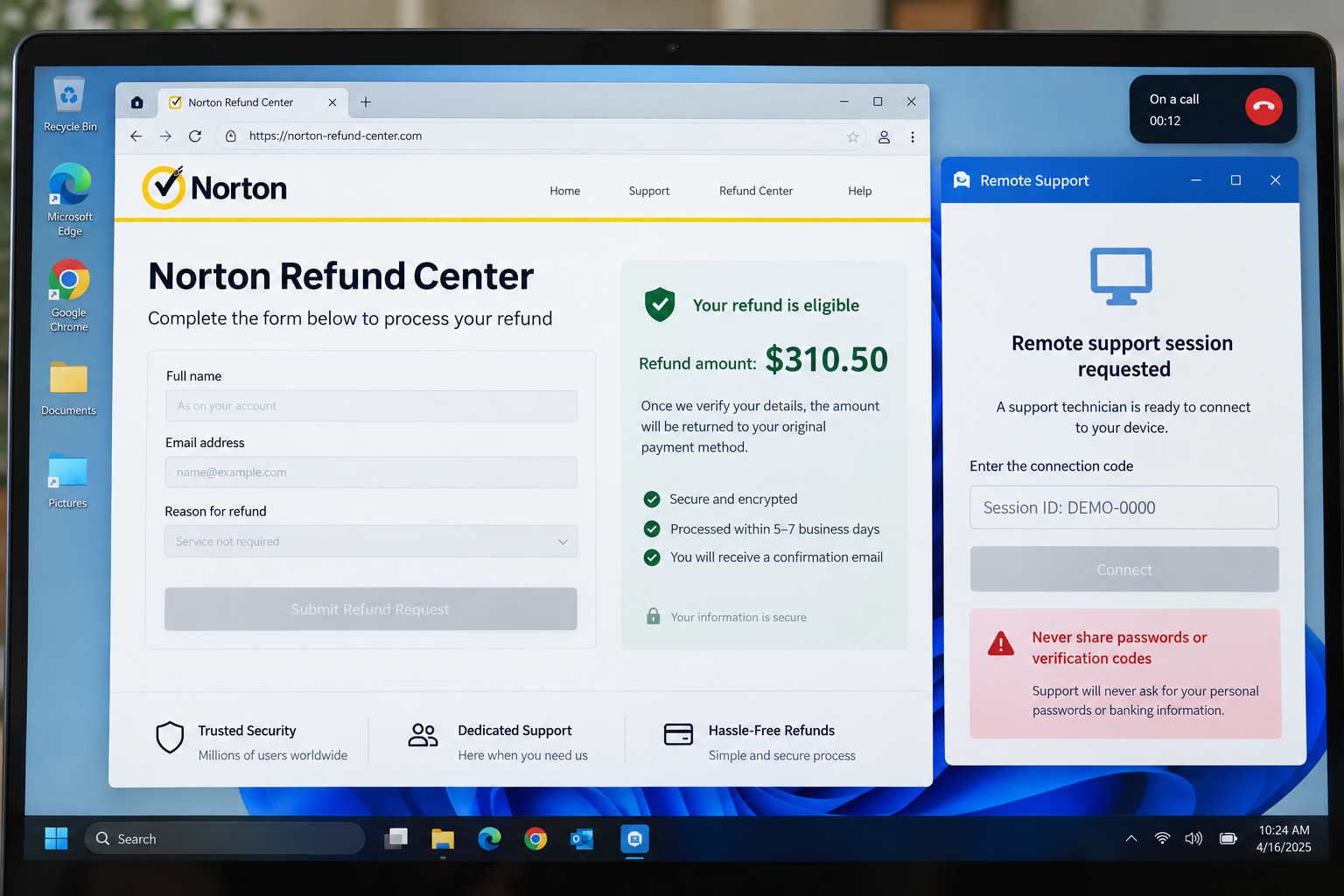
The scammer claims remote access is necessary to cancel the subscription, inspect the charge, or complete a secure refund form.
Common tools are legitimate programs misused by criminals. Once connected, the operator can view the screen, control the mouse, transfer files, and hide activity.
The victim may be told to ignore security warnings because they are “system messages.” No legitimate refund requires surrendering control of a personal computer.
Step 4: A fake refund page creates an expensive mistake
The operator opens a counterfeit form or edits a webpage on the victim’s screen. It may ask the victim to type the supposed refund amount.
The scammer then makes it appear that $3,105 or $31,050 was returned instead of $310.50. Screen manipulation replaces an actual banking transaction.
The operator becomes distressed and claims the victim must repay the excess immediately. This emotional reversal turns the target from suspicious customer into worried debtor.
Step 5: The victim is directed toward irreversible payment
The fake employee may demand gift cards, cash, cryptocurrency, a wire transfer, or a payment-app transaction. These methods are difficult to reverse.
Victims are sometimes told to lie to bank employees or store clerks. The scammer says secrecy protects the refund or prevents the employee from losing a job.
That instruction is decisive evidence of fraud. Genuine support representatives never require gift cards or deception to correct a company payment.
Step 6: Remote access can continue after the call
If unattended access was enabled, the criminal may reconnect later. Saved banking sessions, email, documents, photographs, and password-manager windows may remain exposed.
Some operators install additional tools, change settings, or create startup entries. Closing the visible support window does not always remove the remote application.
Stolen identity details can be reused for account takeover, impersonation, loan applications, or follow-up scams pretending to recover the original loss.
Step 7: A second scam may target the same victim
Criminal groups often retain contact lists. Someone who paid once may later receive calls from fake banks, investigators, refund agents, or government recovery programs.
The new caller may know the loss amount and method, making the story sound credible. That knowledge usually came from the first fraud, not an investigation.
Recovery services demanding upfront payment should be treated with extreme caution. Real agencies do not guarantee that stolen money will be returned.
How to Verify the Charge Safely
Do not click the attachment’s links or use its phone number. Open a fresh browser window and type the official Norton or PayPal address yourself.
Check PayPal Activity for the exact $310.50 amount. Also inspect the connected card or bank account, because a fake invoice may mention PayPal without any transaction.
Sign in to your Norton account through the official website. Review subscriptions, renewal dates, payment history, and active devices.
If no matching transaction exists, there is nothing to cancel or refund. Mark the email as phishing and preserve a copy if you plan to report it.
If a real unauthorized transaction exists, start the dispute inside the official service. Use the number printed on your card when speaking with the bank.
Norton asks recipients to forward suspicious messages as attachments to its published spam-reporting address. Forwarding preserves technical headers that screenshots may omit.
Company, Phone, and Sender Checks
Inspect the actual sender address
Expand the message details and compare the domain with Norton’s official domain. A convincing display name does not authenticate the account behind it.
Look for a different reply-to address. Scammers may send through one account while directing responses to another mailbox they control.
Never trust the number inside the attachment
Search results can also contain misleading sponsored numbers. Navigate to the company’s official support page or use the contact details inside your authenticated account.
A caller who answers “billing department” without clearly naming the company may operate several scam scripts from the same call center.
Check the transaction where money actually moves
An invoice is not proof of payment. Only the official PayPal ledger, card account, bank statement, or verified Norton account can establish a real charge.
Do not read one-time passcodes to anyone. A scammer may trigger a legitimate security code and misrepresent it as a refund confirmation.
Question every remote-access request
Norton and PayPal do not need to control your personal computer to issue an ordinary refund. End the call when remote access is introduced.
If software was installed, disconnect the device from the internet. Use another trusted device for banking changes and account recovery.
What to Do if You Fell Victim to the Norton Invoice Scam
- End contact immediately. Hang up, block the number, and stop responding to messages. Do not warn the caller about your next actions.
- Disconnect the affected computer. Turn off Wi-Fi or unplug Ethernet if remote access was granted. Do not continue banking from that device.
- Call the financial institution. Use the number on your card or official website. Explain the payment method, amount, recipient, and remote-access exposure.
- Contact the payment provider. Report PayPal, gift-card, wire, cryptocurrency, or payment-app transfers immediately. Speed can determine whether funds remain recoverable.
- Remove remote tools. Uninstall the program and revoke unattended-access permissions. Review startup applications, browser extensions, user accounts, and recently installed software.
- Run security scans. Use Malwarebytes for a complete scan. AdGuard can help block malicious pages and aggressive redirects during future browsing.
- Change critical passwords. Start with email, banking, PayPal, and password managers. Use a clean device and unique passwords with multifactor authentication.
- Review account activity. Examine sent email, forwarding rules, PayPal permissions, banking beneficiaries, card transactions, and login histories for unfamiliar changes.
- Preserve evidence. Save the email, attachment, phone number, receipts, chat logs, remote-session details, and transaction records. Do not edit original files.
- Report the fraud. Submit reports to Norton, PayPal, the FTC, and local police when money or identity information was stolen.
What the Fake Support Operator May Say
Knowing the script makes it easier to recognize manipulation while adrenaline is high. The operator may begin calmly and thank you for reporting the charge.
They might claim the invoice was generated because your identity appeared on a server, a foreign purchase, or a recently activated security plan.
Next comes false reassurance. The caller says the charge can be removed immediately, provided you remain on the line and follow every instruction.
When remote software appears, it may be described as a secure Norton connection or PayPal verification tool. That description does not change its capabilities.
The scammer can ask you to darken the screen, press unfamiliar key combinations, or avoid touching the mouse. Those instructions conceal unauthorized activity.
If you refuse, the tone may change. The operator might threaten account suspension, additional charges, tax consequences, or permanent loss of the supposed refund.
Some callers pretend to transfer you to a senior manager. A second criminal then joins with greater authority while continuing the same deception.
During the overpayment trick, the operator may beg for help and claim personal responsibility. This is emotional pressure designed to override careful financial judgment.
The victim may be told that notifying family, bank employees, or police will freeze the refund. Legitimate investigations do not require that kind of secrecy.
Criminals sometimes stay connected while the victim travels to a bank or store. They use the open call to coach answers and monitor resistance.
If a clerk asks questions, the operator may instruct the victim to say gift cards are for family. Lying about a purchase purpose is a decisive warning.
No matter how convincing the caller sounds, end the session. Contact the real company through a separately verified channel and explain exactly what occurred.
Protecting Other People in the Household
Tell family members about the invoice before deleting it. The same message may reach shared accounts, spouses, coworkers, or older relatives.
Create a simple household rule: unexpected billing problems are verified independently, and nobody installs remote software during an incoming support conversation.
Offer to review suspicious messages without judgment. Shame keeps victims silent and gives criminals more time to request additional payments.
Frequently Asked Questions
Did PayPal really charge $310.50 for Norton?
Usually no. Verify inside PayPal Activity and your financial accounts. The invoice itself cannot prove that any payment occurred.
Is the Norton invoice attachment infected?
Some attachments may be harmless visual bait, while others can be dangerous. Do not open unexpected files merely to determine which type you received.
Why does the scam use a phone number instead of a link?
A phone call lets criminals adapt the story, build pressure, request remote access, and guide victims through payments that email filters cannot automatically block.
Will Norton ask me to install remote-access software?
Not to cancel an unexpected invoice or receive an ordinary refund. Treat that request as a critical warning and end the call.
Can gift-card payments be recovered?
Recovery is difficult, but contact the card issuer immediately with the receipt and card number. Report the fraud before discarding anything.
What if I called but did not pay?
Change any information you disclosed, remove installed software, scan the device, and monitor accounts. The risk can continue even without an immediate payment.
The Bottom Line
The Norton PayPal $310.50 invoice is designed to manufacture a billing emergency. Its phone number leads victims into a tech-support and refund scam.
Never call a number found only inside an unexpected invoice. Verify charges through official accounts, and never grant remote computer access for a refund.
If you already engaged, move quickly. Disconnect the device, contact financial providers, secure accounts, preserve evidence, and report the fraud.








