

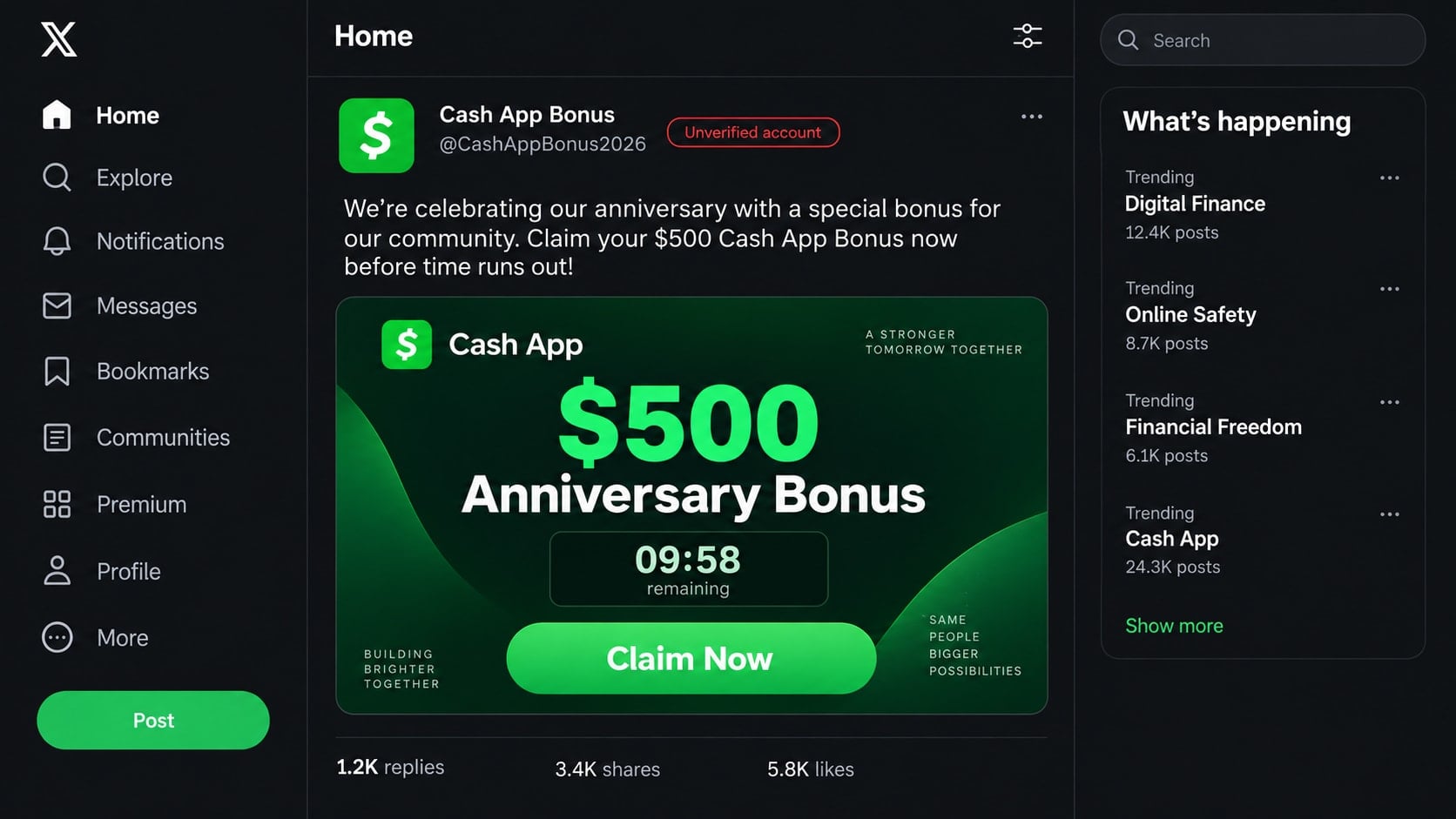
A social post promises a $500 Cash App anniversary bonus and says only a few minutes remain to claim it. The account looks busy, the replies celebrate successful payouts, and the button seems to lead straight to free money.
The giveaway is built to take something real before it gives anything back.
Overview
The post invents a Cash App anniversary reward
The Cash App anniversary scam is a fake giveaway shared through social posts, direct messages, texts, or copied websites. It says selected users can receive a $500 bonus for loyalty, an anniversary celebration, or a limited promotional event.
The amount and wording can change. Some versions offer $100, $750, or $1,000. The reward is not the important part. The promise exists to make the visitor complete a form, share the link, reveal account credentials, or send a fee.
The claim page asks for information no giveaway needs
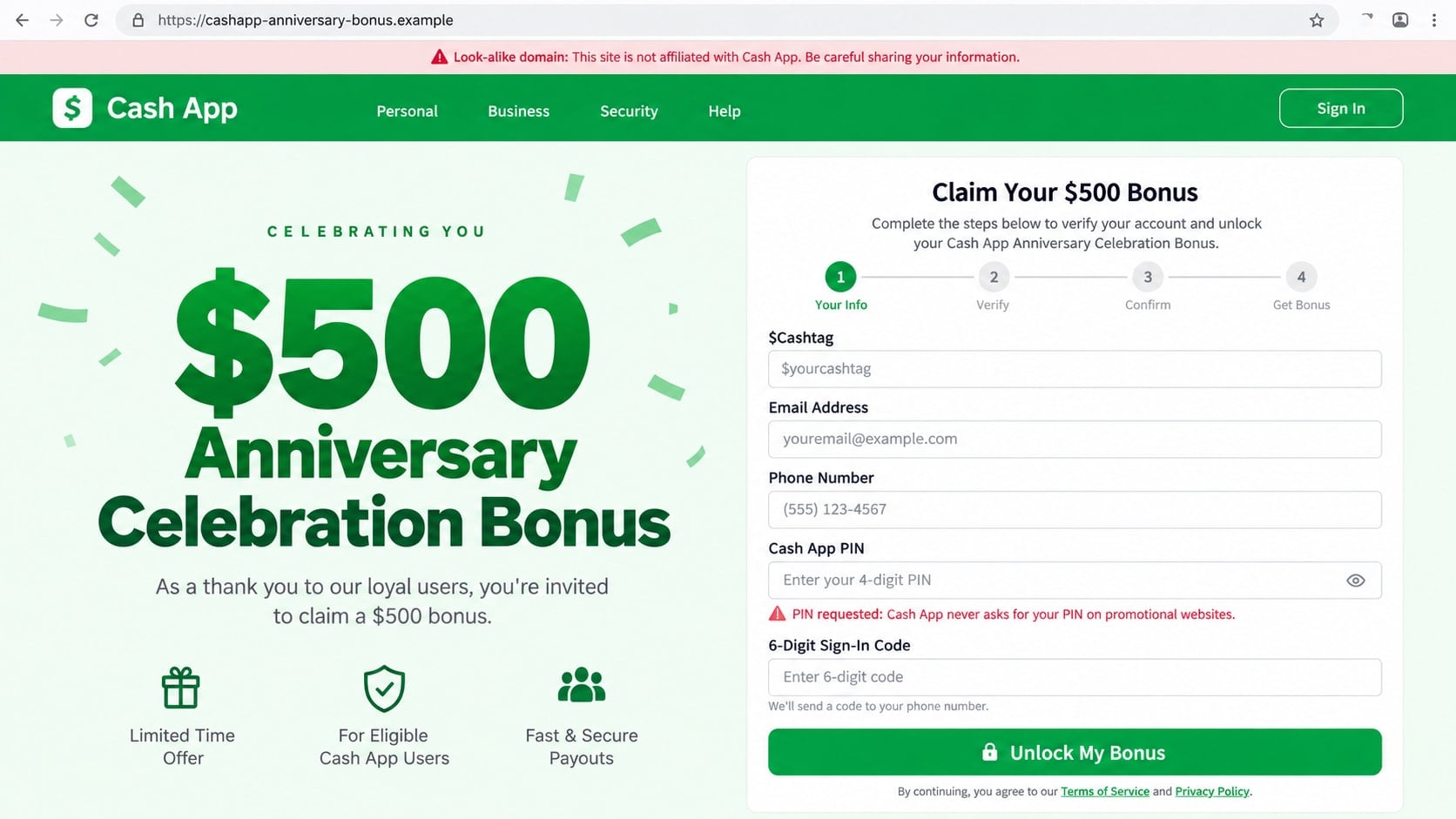
After clicking, the visitor sees a green-and-white page requesting a $Cashtag, phone number, email, Cash App PIN, or sign-in code. A progress bar makes each request feel like a normal stage in claiming the reward.
A legitimate promotion does not need the secret credentials that protect an account. A PIN and sign-in code can let a criminal enter the account and move real money.
Sharing the promotion spreads the scam to friends
Some pages say the bonus unlocks only after the visitor shares it with several contacts or groups. The requirement turns each victim into a distributor and gives the next recipient a message that appears to come from someone they know.
- The account promoting the offer is new or unverified.
- The reward has a countdown or artificial claim limit.
- The page requests a PIN, password, or sign-in code.
- A processing fee must be sent before the bonus arrives.
- The visitor must share the link to unlock the reward.
- Official rules and eligibility details are missing.
Why the Fake Giveaway Can Look Popular
Scammers can buy followers, generate automated replies, and copy branding from genuine Cash App pages. A post showing thousands of likes may still belong to an account created days earlier.
Comments such as “I received mine” are easy to fabricate. They are social proof, not payment records. A real participant’s name can also be copied into a fake profile to make the conversation look organic.
The timing is chosen carefully. An anniversary, holiday, tax season, or period of high living costs makes free money feel possible and useful. The countdown then leaves little room to inspect the account or rules.
Cash App’s official giveaway-scam guidance says legitimate promotions are announced through its website or verified accounts. It also warns that a real giveaway does not require payment, a password, PIN, or sign-in code.
How the Cash App Anniversary Scam Works
Step 1: A fake promotional post promises a large bonus
The campaign begins with a polished social post, sponsored advertisement, text, or forwarded message. It celebrates an anniversary and claims Cash App is distributing a limited number of $500 rewards.
A fake handle may differ from the official account by one letter or an added word such as bonus, rewards, event, or support. The branding is familiar enough that the difference is easy to miss while scrolling.
Step 2: A countdown creates a reason to act immediately
The post shows a clock, a remaining-claims counter, or a deadline measured in minutes. Refreshing the page may reset the same timer, revealing that the urgency is programmed rather than real.
The visitor is encouraged to click before reading comments critically, searching for official rules, or checking Cash App’s verified channels.
Step 3: The claim page collects basic contact details
The first screen may request a $Cashtag, name, phone number, and email address. These fields feel less dangerous than a password, so the victim begins cooperating.
Contact information lets the criminal send tailored follow-up messages. A later text can mention the $500 claim and say one final verification is needed.
Step 4: The form requests the PIN and sign-in code
The next stage says the account must be verified before payment. It asks for the Cash App PIN or a code that has just arrived by text or email.
The scammer may be attempting a real login at the same time. Entering the live code on the fake page can complete that login and place the account under the criminal’s control.
Step 5: A fee or money flip appears before payout
Another version skips credential theft and says a small processing, tax, or release fee is required. The victim may be instructed to send $10, $25, or $50 to a $Cashtag to unlock the larger reward.
Once the first payment is sent, a new problem appears. The scammer asks for an additional verification fee, claims the payment used the wrong type, or promises an even larger bonus after another transfer.
Step 6: The victim is redirected or blocked
After collecting the information, the page may show a congratulations screen and promise delivery within 24 hours. It can redirect to the genuine Cash App site to make the process look complete.
If the victim sent money through a social profile, the account may block them immediately. The same campaign continues under another username while stolen credentials and contact details are reused.
How to Verify a Cash App Giveaway
Start with the source. Open Cash App’s official website or verified social profile independently and look for the same promotion. A screenshot, forwarded message, or copied logo is not a substitute for an announcement on a verified channel.
Read the official rules. A genuine sweepstakes explains eligibility, dates, entry method, prize count, sponsor, and selection process. A page that contains only a claim button and countdown is missing the information a legitimate promotion needs.
Check what the promotion asks you to provide. A prize does not require a PIN, sign-in code, password, Social Security number, or advance payment. Those requests are enough to stop.
Finally, inspect the activity inside the app. A screenshot or email saying money was sent does not mean it arrived. Trust the authenticated balance and activity feed, not evidence supplied by the sender.
Identity, Contact, and Payment Checks
Verify the social account and domain
Look for the platform’s verified-account indicator and compare the exact handle with the one linked from Cash App’s official website. Added words and recent creation dates are common warning signs.
On a claim page, read the complete hostname. A domain containing the words cash and app can still belong to a criminal.
Look for published official rules
A legitimate giveaway should explain who can enter, how winners are chosen, and what organization sponsors the promotion. Search for those rules independently.
Do not accept a document sent by the promoter as final proof. Confirm that the rules are hosted on an official Cash App property.
Keep account secrets out of promotions
Cash App says it will not ask for a PIN or sign-in code. Do not provide those secrets through a social message, phone call, email, or promotional form.
If a real security notification arrives while claiming a prize, assume someone is attempting to access the account. Stop the process and secure the account directly.
Reject fees and send-first offers
A prize that requires payment is not free. Do not send a processing charge, tax, activation deposit, or test payment to unlock a bonus.
The same rule applies to money flips. There is no secret Cash App program that multiplies a transfer simply because it was sent to a promotional $Cashtag.
What the Scammer Can Do With the Data
A stolen Cash App session can expose balances, transaction history, contacts, linked payment methods, and identifying information. The intruder may send money, change account settings, or use the account to approach people the victim knows.
Contact details can be sold or used for more precise phishing. A second message may claim the anniversary claim failed and include personal information from the first form.
If the victim reused a password, the criminal can test it on email, social media, shopping, and financial services. That is why recovery must extend beyond Cash App.
Even a simple share creates harm. Friends may trust the link because it came from a known account, and a compromised social profile can continue sending the promotion without the victim realizing it.
Variations That Use the Same Anniversary Story
A survey version asks several harmless preference questions before revealing that the visitor must complete paid offers. The promised bonus never arrives, while the form gathers contact information for marketing and later scams.
A direct-message version says the recipient was selected from people who liked or commented on a popular Cash App post. The message comes from an unverified account that copied the official profile image and added words such as winner or claims to its handle.
Another campaign uses a QR code in a social image. Scanning it moves the visitor to a phone browser, where the shortened address is harder to examine. A QR code is only another type of link and deserves the same domain check.
The money-flip variation asks the victim to send a smaller amount so the anniversary system can “verify” the account and return several times more. Any returned screenshot can be edited, and a pending request is not a completed payment.
Fake support agents sometimes join after a failed claim. They say the bonus is frozen because the account lacks business status, then request another fee or instruct the victim to replace an email address with one controlled by the attacker.
These variations share a simple test: the recipient must surrender money, credentials, or distribution before receiving anything. A genuine promotion can explain its rules without crossing those boundaries.
What to Do if You Have Fallen Victim to This Scam
- Stop interacting and preserve the post. Take screenshots of the profile, handle, URL, messages, $Cashtag, and payment details before blocking the account.
- Secure Cash App through the official app. Change the PIN if it was exposed, review account and security settings, enable Security Lock, and examine the activity feed for transactions you do not recognize.
- Report the payment or account. Select the relevant transaction in Cash App and use the reporting option. Contact official support promptly because completed person-to-person payments can be difficult to reverse.
- Contact the linked bank or card issuer. Explain how the payment occurred and ask about blocking further transfers, replacing exposed cards, and disputing unauthorized activity.
- Secure email and social accounts. Change reused passwords, enable multifactor authentication, review active sessions, and remove unfamiliar recovery methods or connected applications.
- Warn contacts who received the link. Tell them the promotion was fake and ask them not to open or share it. Delete public reposts after saving evidence.
- Run a Malwarebytes scan. If a file or application was downloaded, update Malwarebytes and perform a complete scan. Remove threats and review browser extensions and installed programs.
- Use AdGuard as an additional layer. AdGuard can block many known phishing domains, deceptive ads, and tracking links. It cannot recover funds, so finish the account and payment steps first.
- Report the campaign. Report the profile and post to the social platform, file a report with the FTC, and give Cash App the screenshots and transaction identifiers.
- Ignore recovery impostors. Nobody can guarantee the return of a completed payment for an advance fee. Verify every new contact through the app.
Frequently Asked Questions
Is Cash App giving everyone a $500 anniversary bonus?
No broad reward should be trusted because a social post says so. Confirm promotions on Cash App’s official website or verified accounts and read the published rules before participating.
Are all Cash App giveaways fake?
No. Cash App can run legitimate promotions, but official giveaways appear through documented verified channels and do not require a payment, PIN, password, or sign-in code.
Why does the page ask me to share with friends?
The sharing requirement helps the campaign spread and makes the next message appear to come from a trusted person. It does not verify eligibility or unlock a real reward.
What if I entered my $Cashtag but nothing else?
A $Cashtag is less sensitive than a PIN or code, but targeted requests and messages may follow. Keep security notifications enabled and ignore unfamiliar payment requests.
Can Cash App reverse money sent to a scammer?
Report the transaction immediately. Some pending payments may be cancellable, while completed authorized transfers are harder to recover. Cash App and the linked bank determine the available options.
How do I identify official Cash App support?
Start support inside the official app or at cash.app. Do not rely on phone numbers or profiles found in comments, advertisements, or direct messages.
The Bottom Line
The Cash App anniversary scam uses the promise of a $500 bonus to collect credentials, fees, shares, or personal information. Popular-looking engagement and a countdown are persuasion tools, not evidence of a real promotion.
Verify every giveaway through official Cash App channels, never reveal a PIN or sign-in code, and never pay to receive a prize. If you interacted, secure the account and report the transaction before answering anyone else.








