

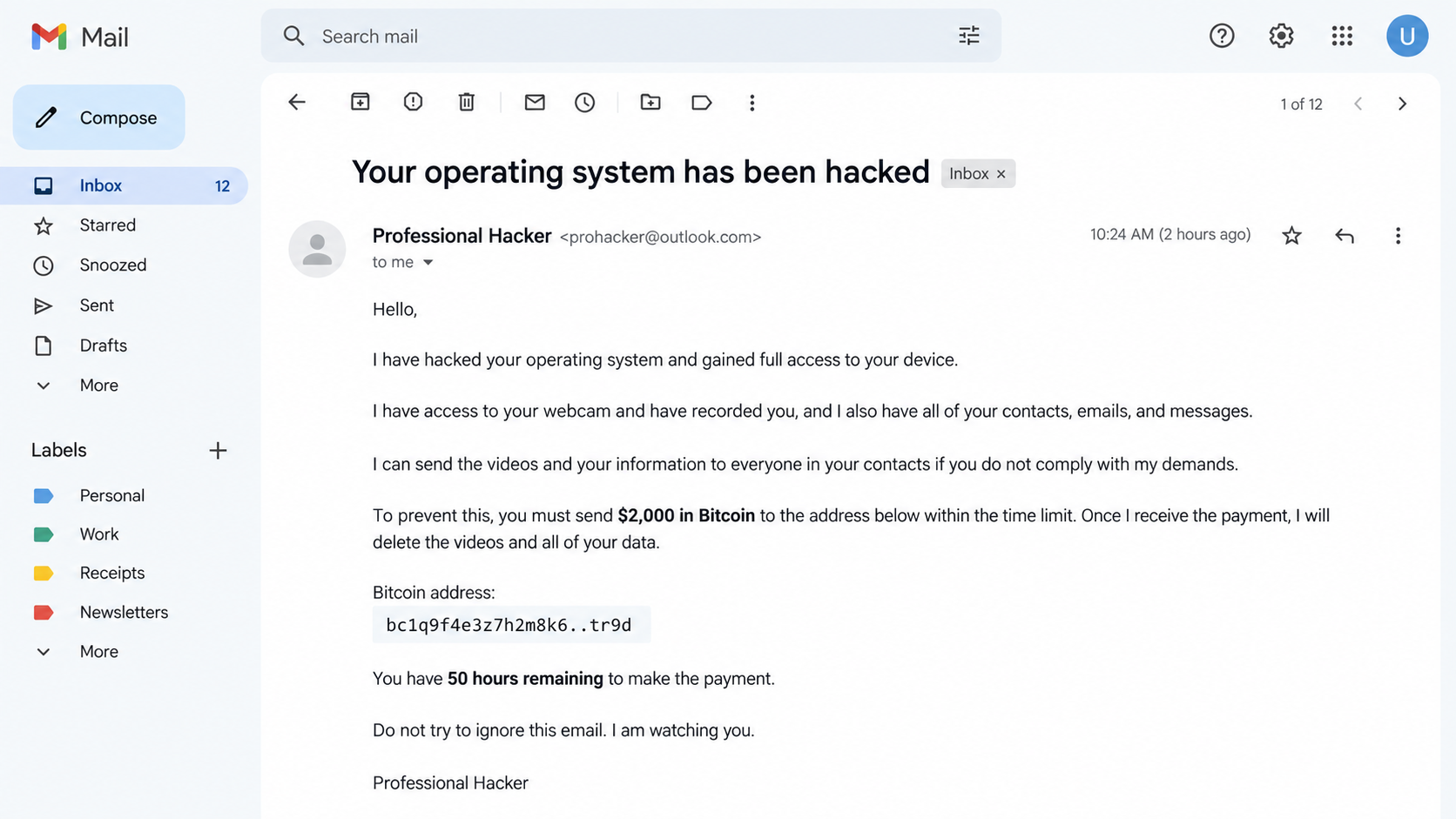
An email from a self-described “Professional Hacker” lands with a blunt announcement: your operating system was hacked, your camera was activated, and a private recording is ready to be sent to everyone you know.
The message gives you 50 hours to send $2,000 in Bitcoin. Its confidence is unsettling, but confidence is the one thing this sender can manufacture at no cost.
Overview
The email sells fear rather than evidence
The Professional Hacker sextortion scam is a mass-mailed blackmail attempt. It claims that malware captured embarrassing video, copied contacts, and recorded browsing activity, yet it normally supplies no original image, device detail, or file that demonstrates any of those claims.
The sender relies on the recipient imagining the worst. A humiliating allegation can make an otherwise cautious person act before noticing how generic the story is.
A leaked password can make the lie feel personal
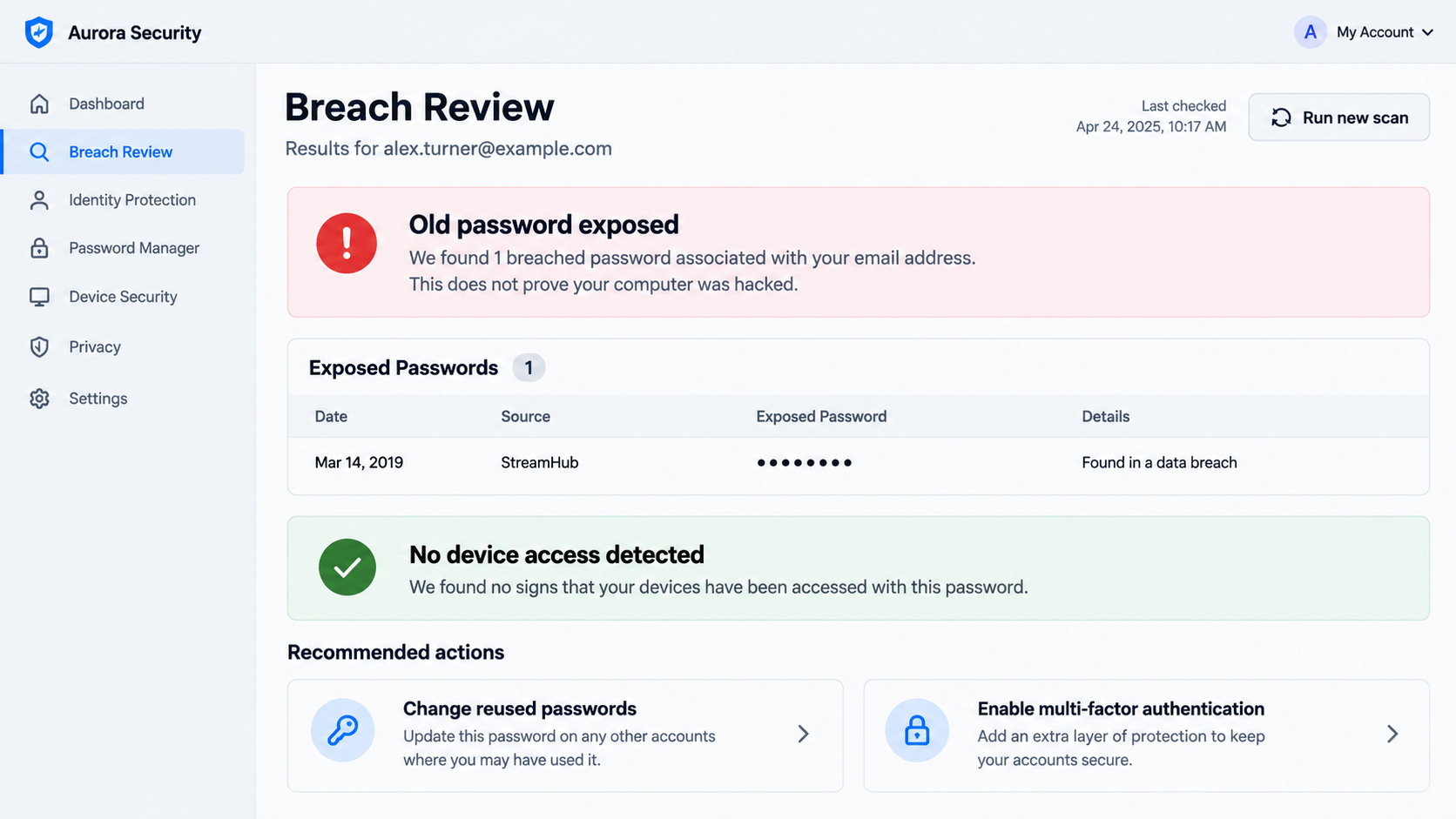
Some versions include a current or former password in the subject line or opening sentence. That password may have come from an old breach, credential list, or infostealer log, not from live control of the recipient’s computer.
A real password exposure still deserves attention. It means the password must be changed anywhere it remains in use, but it does not prove that the extortionist recorded a video.
Bitcoin and a short deadline protect the criminal
Cryptocurrency lets the scammer receive funds without using a conventional merchant account. The 50-hour countdown discourages the victim from asking for help, reviewing account activity, or recognizing that identical language was sent to many addresses.
Paying does not buy a reliable deletion service. It only confirms that the address reaches someone who is frightened and willing to pay, which can invite additional demands.
- The sender claims to have compromised the operating system and webcam.
- The email threatens to distribute a private recording to contacts.
- An old password may be displayed as supposed proof of access.
- A $2,000 Bitcoin payment is demanded within 50 hours.
- The recipient is warned not to contact police or tell anyone.
- No verifiable sample of the alleged recording is provided.
Why the “Professional Hacker” Story Sounds Convincing
The script borrows technical phrases that many readers recognize but cannot easily verify. References to an operating system exploit, remote desktop access, a keylogger, camera control, and synchronized video create the appearance of a detailed intrusion report.
Those terms do not form evidence. A genuine incident investigation would identify affected devices, timestamps, malicious files, account sessions, or network activity. The email substitutes a dramatic narrative for those testable facts.
The sender may say that a special “driver-based virus” defeated antivirus software. This line is designed to neutralize reassurance from a clean security scan before the recipient even runs one.
Another common claim says the malware deleted itself after collecting the recording. That conveniently explains why the victim will not find a suspicious program and prevents the scammer from having to name a real infection.
The threat to message family, friends, and coworkers raises the emotional cost. Victims may worry that merely discussing the email will make the accusation appear credible, so they isolate themselves at exactly the moment a second opinion would help.
The FTC has warned that Bitcoin blackmail emails commonly claim to have webcam footage and contact lists. Its practical advice is direct: do not pay, delete the message, secure any exposed password, and report the attempt.
How the Professional Hacker Sextortion Scam Works
Step 1: Addresses are collected from breaches and marketing lists
Criminals obtain email addresses from leaked databases, scraped websites, compromised accounts, or lists traded in underground markets. A campaign can reach thousands of people without the sender knowing anything about their current devices.
If a breached record includes a password, the campaign may merge it into the message automatically. The personalization is created by a spreadsheet-style mail merge, not by a hacker watching the recipient.
Step 2: A frightening technical story is delivered
The email announces that the operating system has been hacked and that the attacker has monitored the camera, microphone, screen, and browser. It may claim to have installed malware months earlier through an adult website.
The story is intentionally broad enough to fit Windows, macOS, and mobile users. It rarely names a device model, operating system version, browser session, or date that only a genuine intruder could know.
Step 3: A password or email spoof is presented as proof
An exposed password creates a powerful jolt because the recipient recognizes it. Yet stolen credential collections regularly pair email addresses with old passwords, and attackers can buy those lists without accessing the related computer.
Some messages appear to come from the recipient’s own address. Email sender fields can be spoofed, much like a return address written on an envelope. Check the Sent folder and sign-in history rather than trusting the displayed From line.
Step 4: Shame and urgency suppress verification
The criminal sets a 50-hour deadline and says the countdown began when the email was opened. Ordinary email generally does not give a stranger the precise surveillance capability described, although tracking pixels can sometimes reveal that a message loaded.
The sender also orders the victim not to reply, report the message, or seek assistance. That instruction is social engineering: it removes opportunities for someone else to point out the recycled script and missing evidence.
Step 5: Bitcoin is demanded at a one-way address
The message gives a wallet address and may explain how to purchase Bitcoin. Unlike a credit card payment, a cryptocurrency transfer has no normal chargeback process and no customer-service desk that can reverse an authorized transaction.
Wallet activity is publicly visible on the blockchain, but identifying the person controlling a wallet can require exchange records and law-enforcement work. That imbalance is why extortion campaigns favor cryptocurrency.
Step 6: Payment can lead to renewed blackmail
The email promises that the recording will be deleted after payment. There is no contract, technical proof, or trusted intermediary enforcing that promise, and the scammer may simply demand another payment for a newly invented reason.
A payer can also be tagged as responsive. The same address may receive follow-up extortion, fake recovery offers, or messages from a different persona that claims to investigate the first criminal.
What the Email Can and Cannot Prove
A quoted password proves only that someone obtained that string. It does not show when it was obtained, where it was used, whether it still works, or whether the sender ever connected to a device.
A correct name, phone number, employer, or address can come from public profiles and data-broker records. Combining several ordinary facts makes a template feel like surveillance while revealing nothing about webcam access.
A screenshot of the desktop would be more specific, but even that needs examination. Images may be old, taken from a breached cloud account, or fabricated. Do not open an unexpected attachment offered as “proof,” because it could contain malware.
Actual compromise usually leaves other signs: unfamiliar sign-ins, password-reset notices, new forwarding rules, security settings changed without permission, unexpected remote-access software, or detections from reputable security tools.
The absence of those signs does not make every device invulnerable. It does mean the email’s claims should be tested through independent checks rather than accepted because the writer sounds certain.
If the message includes a password you still use, treat the credential exposure as a separate incident. Secure the account first, then investigate whether any unauthorized session occurred.
How to Check Your Accounts and Device Safely
Start with the email account because it often controls password resets elsewhere. Review recent sign-ins, recovery addresses, trusted devices, application passwords, connected apps, and forwarding rules.
Change a reused password from a trusted device. Choose a unique passphrase generated by a password manager and enable multi-factor authentication, preferably with an authenticator app, passkey, or security key where available.
Install operating system, browser, and application updates before running a full security scan. Updates close known vulnerabilities and reduce the chance that an unrelated real infection remains active.
Check installed applications and browser extensions for tools you do not recognize. Remote-control software deserves particular attention, especially if someone previously persuaded you to install it during a support call.
Covering a camera can provide privacy reassurance, but it is not a substitute for account review and malware scanning. The important question is whether the sender presents verifiable access, not whether the email mentions a webcam.
Do not paste the scammer’s wallet address into random “recovery” sites. Some services use the fear created by the first scam to sell worthless tracing, hacking, or fund-retrieval promises.
Company, Address, and Fulfillment Checks
Look for a verifiable identity behind the sender
“Professional Hacker” is a role, not a legal identity. The email normally provides no registered business, physical office, support channel, privacy policy, or person who can be independently verified.
An anonymous mailbox combined with a Bitcoin address is consistent with extortion, not a legitimate security disclosure. Ethical researchers do not demand secret payment to suppress alleged personal footage.
Examine the technical claims for specific evidence
Ask what exact device, date, operating system build, malicious file, or account session the sender identifies. Generic statements that fit every recipient carry little evidentiary value.
Do not reply to request proof. Engagement confirms that the mailbox is active and can prompt more pressure or a dangerous attachment.
Check the payment route and promised outcome
A direct Bitcoin transfer offers no escrow, receipt tied to an enforceable identity, refund policy, or assurance that alleged data will be deleted. The promised outcome cannot be audited.
Any demand that depends on secrecy and an irreversible payment method should be treated as hostile, regardless of how polished the wording appears.
Verify through records the sender cannot control
Use your email provider’s sign-in log, device security history, password manager, and reputable breach-notification services. These records are more useful than screenshots or claims supplied by the extortionist.
If the message names an employer or school account, contact the organization’s security team through a known internal channel. Preserve the email headers so investigators can examine routing details.
What to Do if You Have Fallen Victim to This Scam
- Stop communicating and do not send more Bitcoin. Additional payment does not guarantee deletion and can produce another demand.
- Preserve the evidence. Save the original email, full headers, wallet address, transaction ID, timestamps, and any replies. Do not keep opening suspicious attachments.
- Change exposed passwords. Begin with email, banking, cloud storage, and social accounts. Replace every reuse with a unique password and enable multi-factor authentication.
- Review account sessions. Sign out unfamiliar devices, remove unknown recovery methods, delete malicious forwarding rules, and revoke applications you did not authorize.
- Scan the device. Update the operating system and run a full scan with a reputable product such as Malwarebytes, especially if you opened a file or installed software.
- Reduce repeat exposure. AdGuard can block many known malicious pages and deceptive advertisements, but it cannot reverse a cryptocurrency transfer or replace compromised credentials.
- Contact the exchange immediately. If Bitcoin was purchased through an exchange, report the extortion and provide the receiving wallet and transaction ID. A recovery is uncertain, but rapid reporting matters.
- Report the crime. File with the FTC and IC3 in the United States or the appropriate cybercrime authority in your country. Tell workplace security if a business account was involved.
- Get personal support. Sextortion messages are designed to create panic and shame. Speak with someone you trust, and seek professional help if the threat causes severe distress.
If the attacker possesses genuine intimate material, contact law enforcement and a victim-support organization without negotiating alone. Never send additional images in response to a demand for proof or deletion.
Frequently Asked Questions
Is the Professional Hacker email real?
The blackmail claim is normally a mass-produced scam. Treat a displayed password as a possible breach warning, but do not treat it as proof that the sender recorded you.
How did the sender know one of my passwords?
The password may have appeared in an older website breach, credential dump, or stolen data set. Change it anywhere it remains active and review the affected accounts.
Can an email reveal that I opened it?
Some emails contain tracking pixels that can report a load, but that does not give the sender camera access or validate the threatened recording.
Should I ask the hacker to send proof?
No. Replying confirms that your address is active and can lead to stronger threats or a malicious attachment. Preserve the message and investigate independently.
Will paying $2,000 make the threat disappear?
There is no reliable guarantee. Payment can encourage another demand and cannot force an anonymous criminal to delete anything.
Do I need to wipe my computer?
Not solely because the email says so. Update and scan the device, inspect accounts and installed software, and seek technical help if you find concrete signs of compromise.
The Bottom Line
The Professional Hacker sextortion scam turns breached data and technical language into a believable crisis. Its power comes from fear, secrecy, and a deadline, not from verifiable proof of a recording.
Do not pay. Secure any exposed password, review your accounts and device, preserve the email, and report the extortion. A calm independent check is far more protective than following instructions written by the person demanding Bitcoin.








