

A message says your photo prints are waiting. You pause, trying to remember whether you ordered pictures or someone in your family arranged a pickup.
That small uncertainty makes a Walgreens Photo scam worth a closer look. Before checking the collection details, check how the message reached you.
Overview
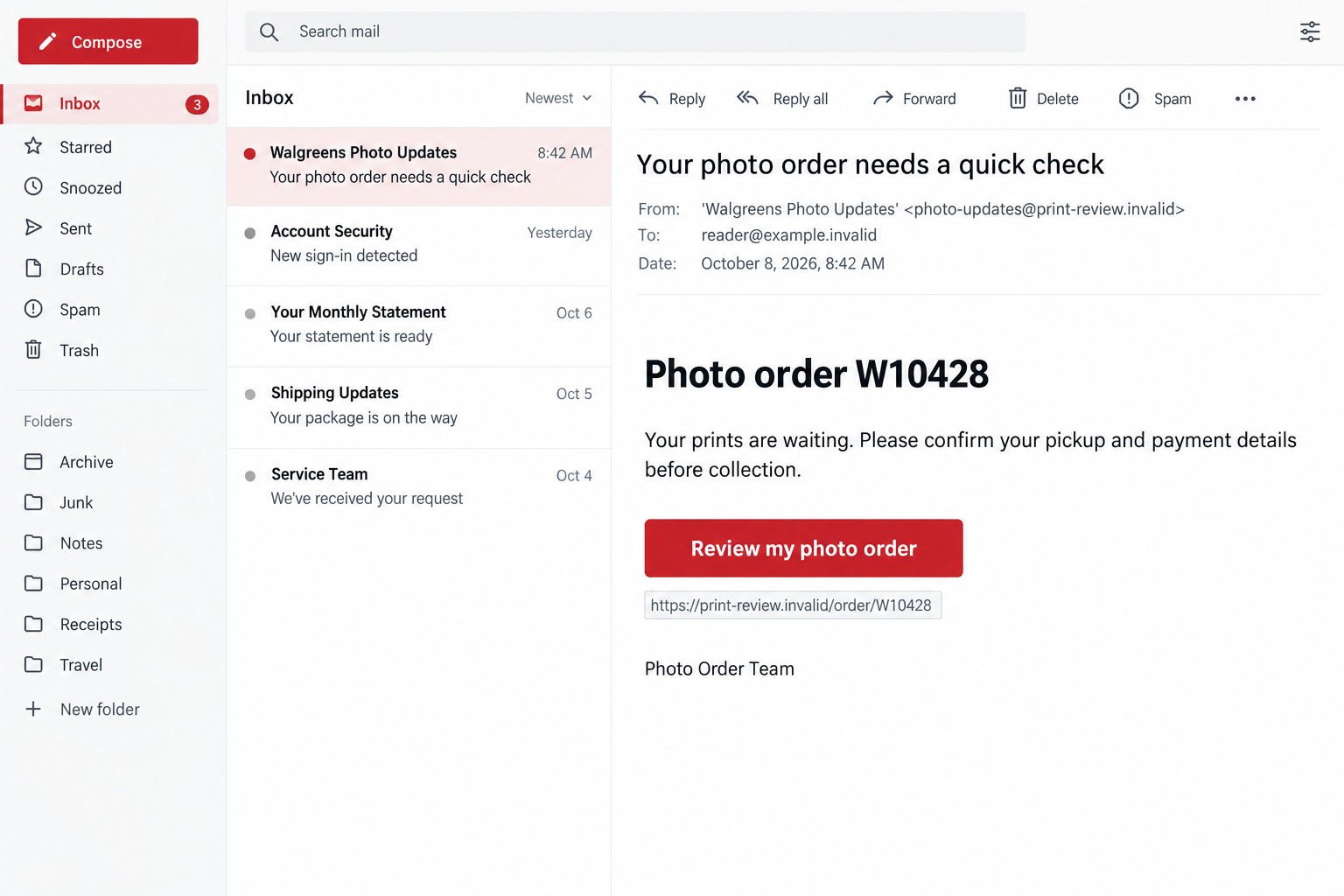
The fake order notice borrows a real service
Walgreens operates a genuine photo service. The scam discussed here is an outsider pretending to provide an order update, not wrongdoing by that service.
The message may mention completed prints, a pickup problem, or details that need correcting. It uses a routine purchase question to encourage an unverified click.
Its danger is the destination: a supposed order check can become a request for account credentials, payment information, or other details the sender should not receive.
A message about an unfamiliar order deserves investigation. It does not mean you should investigate through the link that supplied the alarming claim.
The official warning supports order impersonation, not every reported detail
Walgreens’ fraud guidance identifies fake order confirmations and receipts among phishing examples. It directs customers to check their account independently.
This supports the order-notification scam mechanism. It does not establish one specific intercepted photo email, active phishing address, or loss affecting every recipient.
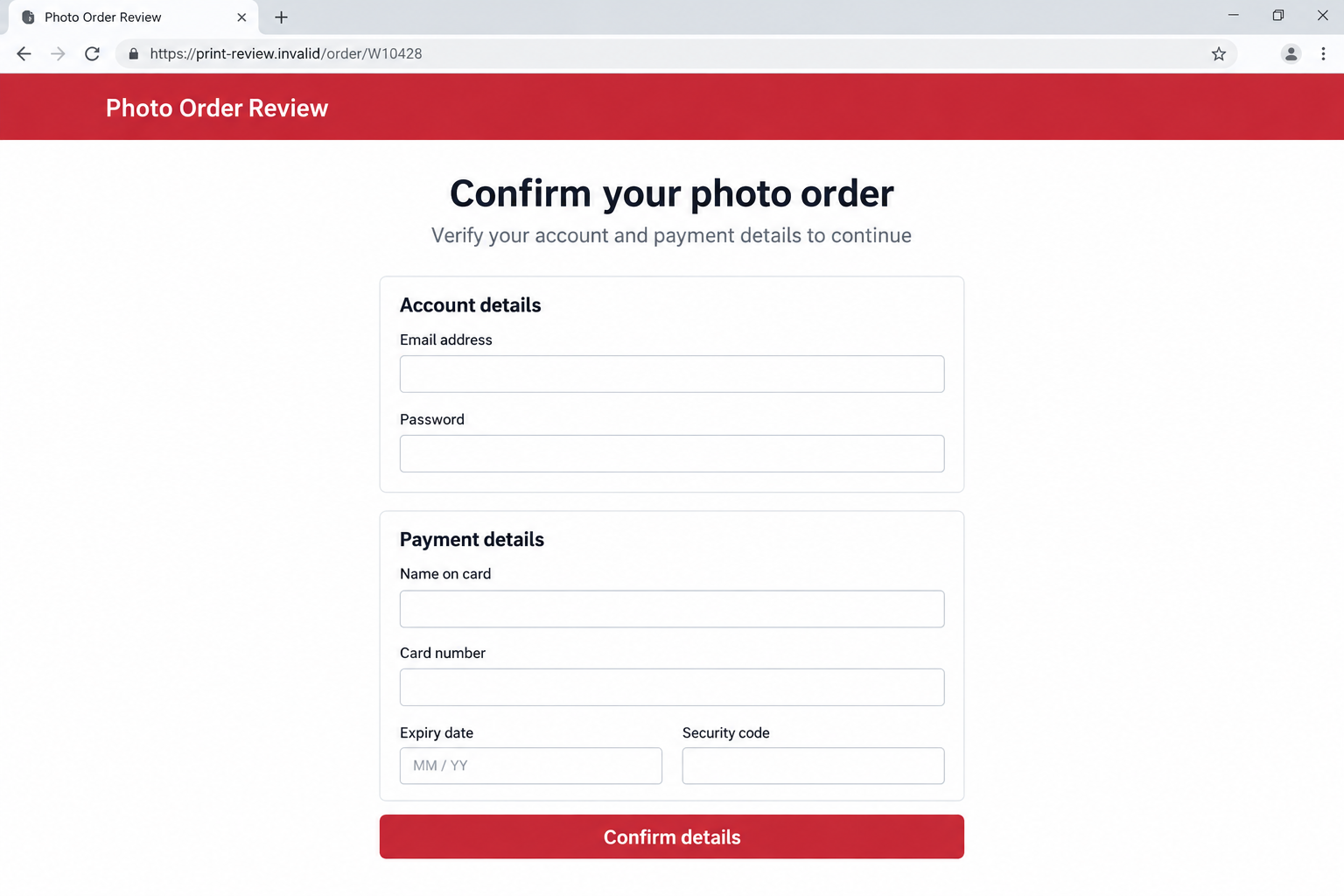
The illustrations here are fictional, nonfunctional examples. Their addresses, order numbers, and requests explain the risk without representing captured campaign evidence.
Real order updates can also exist. Treat an unexpected message as something to verify, not automatic proof that Walgreens contacted you or your account was compromised.
The request matters more than the familiar name
Before responding, ask what action the message requires and whether that action makes sense for the order shown inside your genuine account.
- A pickup notice should not make an unrelated page your account’s new login route.
- A claimed payment correction needs verification before any card details are entered.
- An unfamiliar order number is not independent evidence that the order exists.
- A short deadline does not authenticate the sender.
- A copied name or color scheme cannot confirm the destination’s ownership.
- An account or bank record deserves more weight than the message’s description.
You can resolve a genuine order question without surrendering the choice of where to sign in. Open the account yourself and start there.
Why a Photo Pickup Notice Can Catch You Off Guard
It asks you to remember something ordinary
A warning about printed pictures is less dramatic than a threat of arrest. It can feel like a forgotten errand rather than a security decision.
You might have discussed family photos, uploaded images elsewhere, or recently collected an online purchase. Those associations can make an unexpected notice seem plausible.
The sender does not need to prove that connection. A few familiar words can persuade you to fill in the missing story yourself.
Instead of asking whether you could have ordered something, ask whether your own records show that you did. Possibility is not confirmation.
A small administrative problem lowers your guard
Correcting a pickup detail sounds harmless. The wording can hide the moment when you are actually authorizing a login, disclosing a card, or providing personal information.
A message might suggest the order cannot proceed until a form is completed. That makes the form appear to be part of customer service.
The requested fields still need a reason. A password is not merely a collection reference, and a card security code is not an order number.
Read the action literally. You are not just checking your prints if the next screen asks you to submit information that grants access or enables payment.
How the Walgreens Photo Scam Works
Step 1: An order story creates a reason to open the message
The approach begins with a photo-related notice. Possible wording includes a completed order, prints awaiting collection, or an issue that supposedly needs your attention.
These are examples of the pretext, not a claim that every message uses an identical subject line. The underlying tactic is borrowing an order relationship.
A real-looking reference number can make the notice feel organized. Without a matching account entry or receipt, however, it remains a claim made by the sender.
The safest first question is whether this corresponds to your activity. Do not provide the missing details just to help an unknown sender complete its story.
Step 2: The link presents itself as an order-management shortcut
A button may promise to display pickup information, correct a detail, or review the order. Those labels describe an intended impression, not the destination’s identity.
The link can take you away from the genuine service. A page can contain the Walgreens name while being controlled by someone else.
The FTC’s phishing guidance recommends independently contacting the organization instead of using an unexpected message’s links or contact details.
You do not need to open the link to test its honesty. Checking the genuine account answers the order question without trusting the supplied route.
Step 3: A familiar-looking page makes the transition feel routine
The next page may repeat the company name and order reference. That consistency can make the message and website appear to confirm each other.
They may simply be two parts of the same false story. A detail copied between them does not become independent evidence through repetition.
A polished layout is also not proof of authorization. Neat fields, privacy links, and ordinary customer-service language can be added to an unauthorized page.
Pause before interacting. The question is not whether the screen resembles a retailer, but whether you reached the retailer through a route you trust.
Step 4: The order check becomes an information request
A credential-focused page can ask for an email address and password. A payment-focused version may seek card details under the explanation of correcting an order.
Other requests can be mixed into the same form. A pickup name or address may appear beside sensitive fields, making the entire request feel administrative.
Only provide information after independently confirming the actual issue. The order’s existence and the page’s authority are separate things to establish.
The second illustration shows a hypothetical combined account-and-payment form. It is not a verified destination or evidence that all photo-order scams request every field.
Step 5: Repeated prompts can make you disclose more
If a page reports an error, you may assume you mistyped something. Entering the same information again gives the recipient another submission, not reassurance.
A further verification prompt can also seem like progress. Before sharing a code, read the actual notification that explains what the code would authorize.
Do not let a page reinterpret an account-access code as confirmation that your prints are ready. The surrounding explanation does not change the code’s purpose.
If the process becomes confusing, leave it. Use genuine support to discuss the order rather than continuing because you already spent time on the form.
Step 6: The exposure can outlast the original order notice
A disclosed password can create an account-security problem even if the alleged prints never existed. Card details and identity information require different follow-up checks.
The sender may stop communicating after receiving information. Silence does not tell you whether the details were used, stored, or passed elsewhere.
Respond to what you actually submitted. You do not need a confirmed fraudulent charge before telling the relevant account or card provider about the exposure.
Likewise, do not assume every account has been stolen. Identify which credentials, fields, codes, downloads, or permissions were involved and act on those facts.
How to Check Whether the Photo Order Is Real
Compare the notice with your own purchase record
Open Walgreens through your existing app or a saved official address. Find your order history without copying the message’s link into a new tab.
Look for the item, collection location, order reference, and account used. A notice that does not match deserves clarification before you supply anything.
If a family member arranged the order, ask them directly. Do not enter someone else’s account credentials because a message claims you are the pickup contact.
A genuine order can still receive a fraudulent follow-up. Matching one detail is useful context, but it does not authorize every subsequent request.
Check the sender and destination separately
The displayed sender name may be familiar while the actual address is unrelated. Read both instead of treating the friendly label as the complete identity.
When a link target is visible without opening it, compare the whole address. A company name placed inside a longer address is not ownership proof.
For example, a name appearing before another domain can be part of that other site’s label. Do not decide from the first recognizable word.
Do not rely on spelling mistakes alone. Well-written messages can be fraudulent, and a legitimate message may contain an error without becoming a scam.
Keep three possible explanations in mind
An unfamiliar notice can be phishing, a misdirected communication, or a sign of activity you did not authorize. These possibilities call for verification, not guesswork.
If the order is missing from your genuine account, ask official support about the notice. Do not use the suspicious sender to settle the uncertainty.
If an unfamiliar purchase really appears, report that account issue too. A fraudulent email and an unauthorized order are not mutually exclusive explanations.
Checking independently prevents both mistakes: following an impostor’s instructions and dismissing a real account problem simply because the first message looked strange.
If You Already Clicked, Start With What Happened Next
A click is not the same as a completed submission
Write down whether you only viewed the page, typed information, pressed a submit button, downloaded anything, or accepted browser permissions. The response depends on that sequence.
If you merely opened a page, close it and avoid further interaction. Do not invent a password exposure that did not happen.
If you entered sensitive information, treat it as potentially disclosed. Do not depend on an error message or a missing confirmation to prove otherwise.
If software or permissions were involved, review that separate risk. A payment dispute cannot remove an unwanted extension, just as a device scan cannot replace a card.
Preserve useful evidence without repeating the risky journey
Save the original notice, sender details, visible link, and any records already available. Note when the message arrived and which action you took.
You do not need to revisit the page to assemble a perfect report. Describe missing details honestly and let the appropriate provider explain what it needs.
Keep account numbers, card details, and private photos out of public comments. Use the provider’s private reporting channel when sensitive evidence is requested.
A short factual timeline is often more useful than a long theory about the attacker. It helps support distinguish an account exposure from an order misunderstanding.
What to Do if You Have Fallen Victim to This Scam
-
Leave the false order-review process. Close the suspicious page and stop responding. Do not make another payment or complete another form to cancel the first interaction.
Keep the genuine order question separate. You can investigate your prints through official support after the unverified conversation has ended.
If the sender threatens deletion or an extra fee, save that message. The threat is not a reason to let them control your next action.
-
Secure credentials you supplied. Change an exposed password through the real account and replace it anywhere else you used the same password.
Check available account-security controls and unfamiliar changes. If you cannot sign in, ask genuine support for the appropriate account-recovery process.
If you shared a code, explain its stated purpose to support. An account-login code and a payment approval need different investigation.
-
Contact your card provider about disclosed payment details. Explain whether you entered a card number, security code, or payment approval, and identify any resulting transaction.
Ask whether replacement, restrictions, or a dispute are appropriate. Follow the issuer’s process rather than assuming every exposure produces the same remedy.
The FTC’s scam-recovery guidance recommends contacting the payment service promptly. A timely report is worthwhile, but recovery is not guaranteed.
-
Review the actual order and account history. Look for purchases or account changes you do not recognize. Tell Walgreens about anything that appears inside the genuine account.
Do not cancel a legitimate family order based only on a suspicious email. Confirm which order, if any, belongs to the incident.
Keep written support responses and case references. They help you track what was reported and avoid having to explain the entire story from memory.
-
Investigate relevant device or browser exposure. If you installed an app, opened a downloaded attachment, or approved remote access, seek trusted help and scan with Malwarebytes.
Review unfamiliar extensions and notification permissions you enabled. AdGuard may help reduce unwanted advertising or redirects, but it cannot undo a disclosed password or payment.
Receiving a notice alone is not proof of malware. Match the device response to actual downloads or changes rather than buying tools out of fear.
-
Report the message and keep watch for follow-ups. Walgreens lists report-fraud@walgreens.com for suspicious emails. Forward the preserved message without supplying new account information.
Use your email service’s phishing-report option as well. For a text, use your carrier’s available reporting process and block the sender after preserving evidence.
If an unknown person later offers recovery for a fee, pause again. Continue through your account and payment providers, not a stranger attracted by the incident.
Frequently Asked Questions
Is the real Walgreens Photo service a scam?
No. This warning concerns unauthorized messages and pages impersonating the service. It does not accuse Walgreens of sending the deceptive order-review requests.
Does an unexpected pickup message prove my account was hacked?
No. Check your genuine account for unfamiliar activity. Phishing, a misdirected notice, and an actual unauthorized order require different responses.
Should I follow the link if I recently ordered prints?
Check the order through your app or independently accessed account instead. A real purchase does not authenticate a separate message asking for sensitive information.
What if the message shows the right order number?
A matching number gives context, not permission to trust the destination. Confirm the request and any payment issue inside the genuine service.
Do I need a malware scan just because I opened the email?
Not merely because it arrived or was read. Downloads, installed software, browser changes, or remote access make a device check more relevant.
Where should I report a suspicious Walgreens email?
Use the reporting details in Walgreens’ current fraud guidance. Its listed email is report-fraud@walgreens.com; your email provider may also offer a phishing-report option.
The Bottom Line
The Walgreens Photo scam turns an ordinary order question into a reason to trust an unfamiliar page. Verify the order without following the sender’s route.
If you disclosed information, secure that specific account or payment method and report the notice. You can protect yourself while still resolving any genuine photo purchase.

Join the discussion
0 commentsShare your experience or ask a question about this article.
Discussion
Start the conversation
Have a question or something useful to share? Add the first comment.