

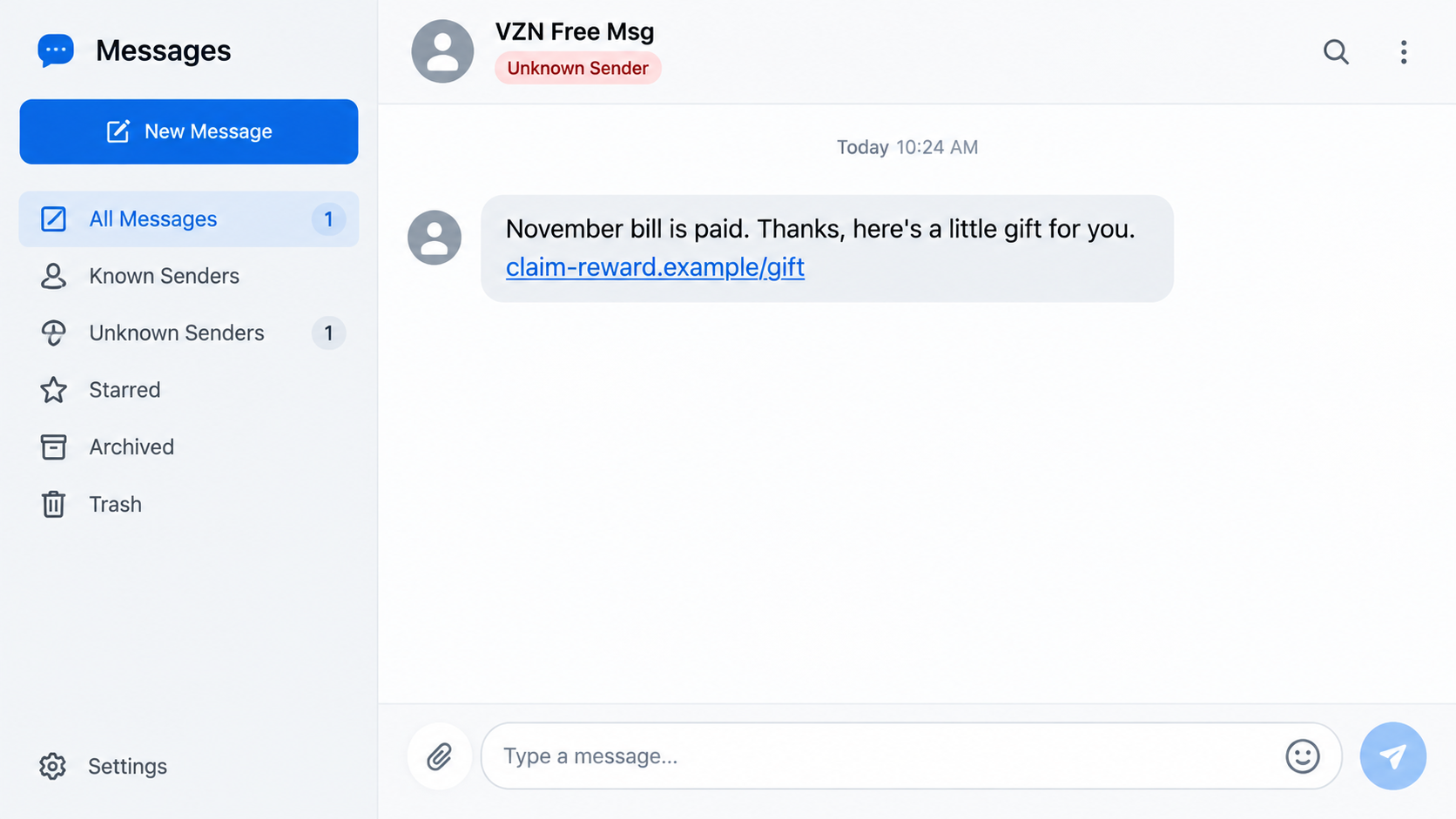
“VZN Free Msg: November bill is paid. Thanks, here’s a little gift for you.” The sentence feels casual, timely, and just specific enough to resemble a carrier’s customer appreciation text.
The unfamiliar link beneath it is where a pleasant surprise can turn into stolen card data, identity information, or a recurring charge that was buried in the fine print.
Overview
“VZN” is meant to be recognized as Verizon
The abbreviation lets scammers suggest a familiar carrier without consistently using the company’s full name. Recipients who recently paid a bill may mentally complete the connection and interpret the message as a harmless loyalty reward.
That recognition is not authentication. A sender label can be typed by a scammer, and ordinary ten-digit numbers, email-to-text gateways, or compromised messaging accounts can distribute the same lure at scale.
The gift creates curiosity before suspicion
The text does not begin with a threat. It congratulates the recipient for paying, then offers “a little gift,” which feels less risky than an urgent security alert and encourages an impulsive tap.
After the link opens, a survey, prize selection, or low shipping charge keeps the interaction moving. Each small action makes the next request feel like part of a normal redemption process.
The reward page is built to collect valuable details
A fraudulent page may request a name, mailing address, phone number, carrier login, and payment card. The promised gift is either nonexistent, a low-value item tied to hidden billing, or simply an excuse to capture information.
Verizon states that it will not ask for personal or account information by text. It advises recipients not to respond, click links, open attachments, or submit data to sites named in suspicious messages.
- The message uses “VZN” or another shortened carrier name.
- It claims a monthly bill was successfully paid.
- A surprise loyalty gift is offered through an unfamiliar link.
- The landing page asks the visitor to answer a brief survey.
- A small shipping payment unlocks the supposed reward.
- Card data, credentials, or recurring billing authorization may be captured.
Why a Paid-Bill Reward Is Such an Effective Lure
Millions of people pay wireless bills every month, often through automatic payment. A text sent at random has a good chance of reaching someone whose account was recently charged, making the timing feel personalized.
The message usually avoids displaying an account number or exact bill amount. Those omissions help the same template fit prepaid, postpaid, family, and business customers.
Calling the offer a “little gift” lowers expectations. A recipient may not demand the formal terms they would expect for a large sweepstakes prize, while still feeling that a free speaker, watch, or accessory is worth claiming.
The link may contain the recipient’s phone number or a tracking code. When the page greets the visitor or recognizes a location, the personalization can look like confirmation even though the information came from the link or browser.
Scammers also exploit mobile screens, where the full web address is easy to overlook. A page can copy colors, navigation, and account language while operating on a domain that has no connection to the carrier.
The safest verification happens outside the message. Open the carrier’s official app, type the known website address, or call the number shown on a statement.
How the VZN Free Message Scam Works
Step 1: A mass text is timed around routine billing
Fraudsters send the “bill is paid” message to large blocks of phone numbers. They do not need access to a Verizon account because the statement is likely to feel plausible to many recipients at some point during the month.
Different campaigns swap the month, punctuation, gift description, and shortened link. The central story remains stable: payment has been received, gratitude is due, and a reward waits.
Step 2: The link identifies who engaged
Tapping the URL can record the phone number or campaign identifier embedded in it, along with the IP address, browser, approximate location, and time. That information tells the operator which recipients are responsive.
The destination may redirect through several domains before reaching the visible offer. Redirects make the final address harder to predict and let criminals replace a blocked landing page without resending every text.
Step 3: A short survey builds commitment
The page asks easy questions about service quality, device preference, or customer satisfaction. The answers are often irrelevant; the survey exists to make the reward appear earned rather than randomly promised.
A progress bar, remaining-gifts counter, or congratulatory animation moves the visitor toward a prize selection. These design elements manufacture momentum and scarcity without proving that inventory exists.
Step 4: Personal and payment information is requested
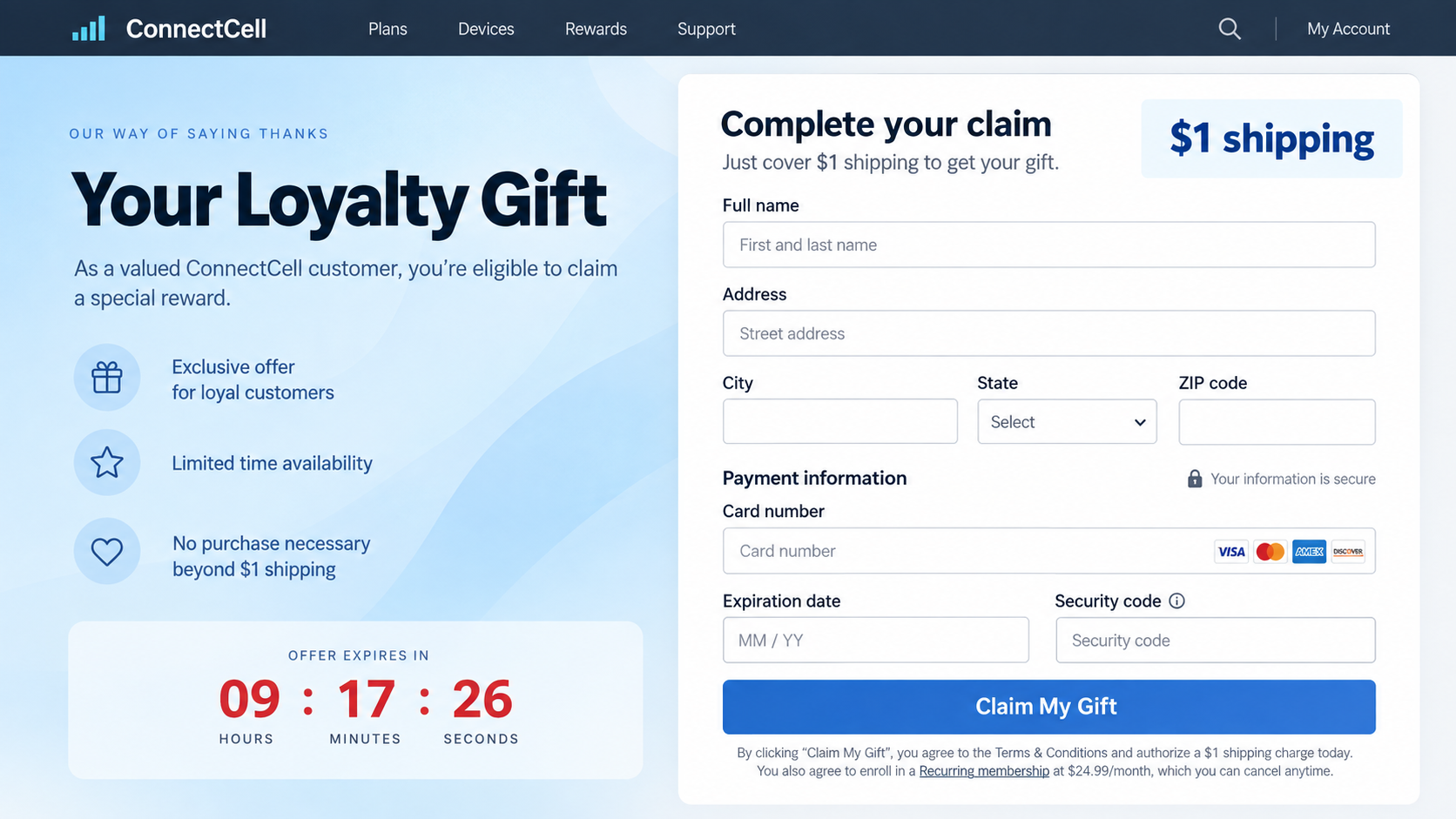
To deliver the gift, the site asks for a full name, address, email, and phone number. A $1 or similarly small shipping charge then provides a reason to collect the complete card number, expiration date, and security code.
The low amount reduces resistance. The real value to the operator may be the card credentials, a verified identity profile, or consent language that authorizes later charges.
Step 5: Hidden terms can create recurring billing
Fine print near the button may enroll the visitor in a trial, discount club, or entertainment membership. After a short period, charges can rise to $24.99, $49.99, or another recurring amount.
Other pages simply submit the card to criminals and display an error. The victim may try another card, unintentionally exposing two accounts while believing the first payment failed.
Step 6: The data supports further fraud
Captured carrier credentials can reveal account details and may support SIM-swap attempts. Card information can be used for unauthorized purchases, while names and addresses improve future impersonation messages.
The recipient may later receive a call from someone who knows about the attempted gift claim. That knowledge is used to pose as fraud support and request a verification code or additional payment.
Common Versions of the Carrier Gift Text
One variation says the recipient’s bill was paid and offers a reward for being a loyal customer. Another claims that reward points will expire tonight unless they are redeemed through the supplied link.
A refund version says the carrier overcharged the account. The page asks for a card or bank login so the refund can supposedly be deposited, but the information instead enables theft.
Some messages offer a free device upgrade. The victim is told to pay shipping or activation, then submits identity details that can be misused to order equipment or open accounts.
A survey version promises a premium smartphone after four questions. The questionnaire always produces a winning result, because its purpose is to move every visitor to the checkout form.
Scammers may also claim that an account credit is waiting after a service outage. Real credits should appear inside the authenticated account and do not require card details to receive.
The sending number can change repeatedly. Blocking one number reduces nuisance from that sender but does not establish whether the underlying offer is genuine.
A link that uses HTTPS still may be fraudulent. The padlock indicates encrypted communication with that domain; it does not verify that Verizon owns the site or endorses the offer.
Typos are useful warning signs, but polished grammar is not proof of legitimacy. Modern scam kits and automated writing tools can produce convincing language and responsive pages.
How to Verify a Verizon Reward or Account Message
Leave the text closed and open My Verizon through the installed app or a bookmark you already trust. Check notifications, billing history, rewards, and account messages there.
A genuine bill payment should match an entry in the account and the payment method statement. The text’s broad claim is meaningless if no corresponding official record exists.
Look at the domain as a whole. Words such as vzn, verizon, reward, loyalty, or secure can appear anywhere in a fraudulent address. The meaningful ownership sits immediately before the top-level ending.
Do not call a number printed on the landing page. Use contact information from the official app, a paper bill, or the carrier’s independently typed website.
Verizon asks customers to forward suspicious texts that claim to be from the company to 7726 and then delete them. It also says not to respond, even with “STOP,” when the message itself appears fraudulent.
If you only received the message and did not click, reply, or share information, exposure is generally limited. Report, block, and remove it rather than opening the link to investigate.
Be cautious when a reward page claims that your IP address proves eligibility. Every website can see connection information; displaying it is not evidence that the site has access to a carrier billing record.
A page may show positive reviews beside the claim form. Reviews embedded by the seller can be invented, copied, or selectively displayed, so they should not replace independent verification.
Check card statements for several months after a low-cost checkout. Subscription merchants sometimes wait until a trial period ends, and the later charge may use a business name that does not resemble the gift page.
Family-plan managers should warn every line user about the message. One person’s submission can expose account details that affect device financing, number transfers, and other members on the plan.
Company, Address, and Fulfillment Checks
Confirm the offer inside the official account
A carrier reward should be visible through a trusted account channel and governed by identifiable terms. A text-only offer that disappears when you visit the official app is not verified.
Search the account’s message center for the same wording, eligibility rules, expiration date, and redemption path. Do not use screenshots supplied by the sender as confirmation.
Inspect the merchant taking the payment
The checkout may name an unrelated subscription company rather than Verizon. Read the merchant name, billing schedule, cancellation policy, and support details before entering a card.
A hidden recurring membership beneath a $1 shipping offer changes the transaction entirely. Do not treat tiny type as a harmless formality.
Check the destination and return terms
A real physical reward needs a clear fulfillment timeline, shipping origin, return process, and responsible seller. Vague promises with no deliverable description are a serious warning.
Search the listed address independently. A mailbox, residential property, copied business location, or address that belongs to another company does not support the seller’s story.
Use carrier contact details obtained independently
Contact Verizon through its app, official website, or a statement number. Ask whether the specific promotion and redemption domain are recognized.
Verizon’s guidance says it will never request personal or account information through a text message. A form that does so should be closed.
What to Do if You Have Fallen Victim to This Scam
- Close the page and stop responding. Do not revisit the link to test whether it still works, and do not negotiate with a supposed prize agent.
- Contact the card issuer. If card data was entered, report it as exposed, ask whether replacement is appropriate, and dispute any unauthorized or recurring charge.
- Secure the carrier account. Change the password through My Verizon, review authorized users and devices, add an account PIN, and ask about SIM-swap protection.
- Protect other accounts. Replace any reused password, beginning with email and financial services. Turn on strong multi-factor authentication.
- Check the device. If a file or application was installed, remove it and run a full scan with a reputable tool such as Malwarebytes.
- Block known malicious destinations. AdGuard can reduce repeat exposure to phishing pages and deceptive advertising, although it cannot cancel a submitted card or membership.
- Document the offer. Save screenshots, the URL, sender, time, terms, receipts, and bank entries. Hide sensitive card and account numbers in copies shared publicly.
- Report the message. Forward it to 7726, use the messaging app’s spam control, notify Verizon through an official channel, and file a report with the FTC.
- Watch for follow-up impersonation. Criminals may call as carrier security and request a one-time code. End the call and contact the provider yourself.
If identity details such as a Social Security number were submitted, place fraud alerts or credit freezes with the major credit bureaus and monitor new-account inquiries.
Frequently Asked Questions
Is the VZN Free Message text really from Verizon?
The name alone does not prove it. Verify any reward inside My Verizon and avoid a link that requests personal, account, or payment information.
Does Verizon give gifts after a bill is paid?
Promotions can exist, but an unexpected text with an unfamiliar redemption domain should be checked through the official app or website before any interaction.
What happens if I only clicked the link?
Close it, clear any granted permissions, and watch for unusual behavior. The highest risk begins when credentials, card data, codes, or software are submitted.
Why does the page ask for $1 shipping?
The small charge makes card collection feel reasonable. It may also activate hidden recurring billing or simply deliver usable card details to criminals.
Should I reply STOP to the message?
Not when the text appears fraudulent. Verizon advises recipients not to respond and to forward suspicious carrier messages to 7726.
Can a security app recover money taken by the scam?
No. Security software can help detect malicious files and block known sites, but financial recovery requires prompt contact with the card issuer or payment provider.
The Bottom Line
The VZN Free Message scam turns an ordinary monthly payment into a reason to trust an extraordinary gift. Its fake reward path is designed to collect far more value than the promised item could ever provide.
Ignore the link, verify offers through the official carrier account, and forward the text to 7726. If you entered information, secure the carrier login and payment card immediately rather than waiting for a visible charge.








