

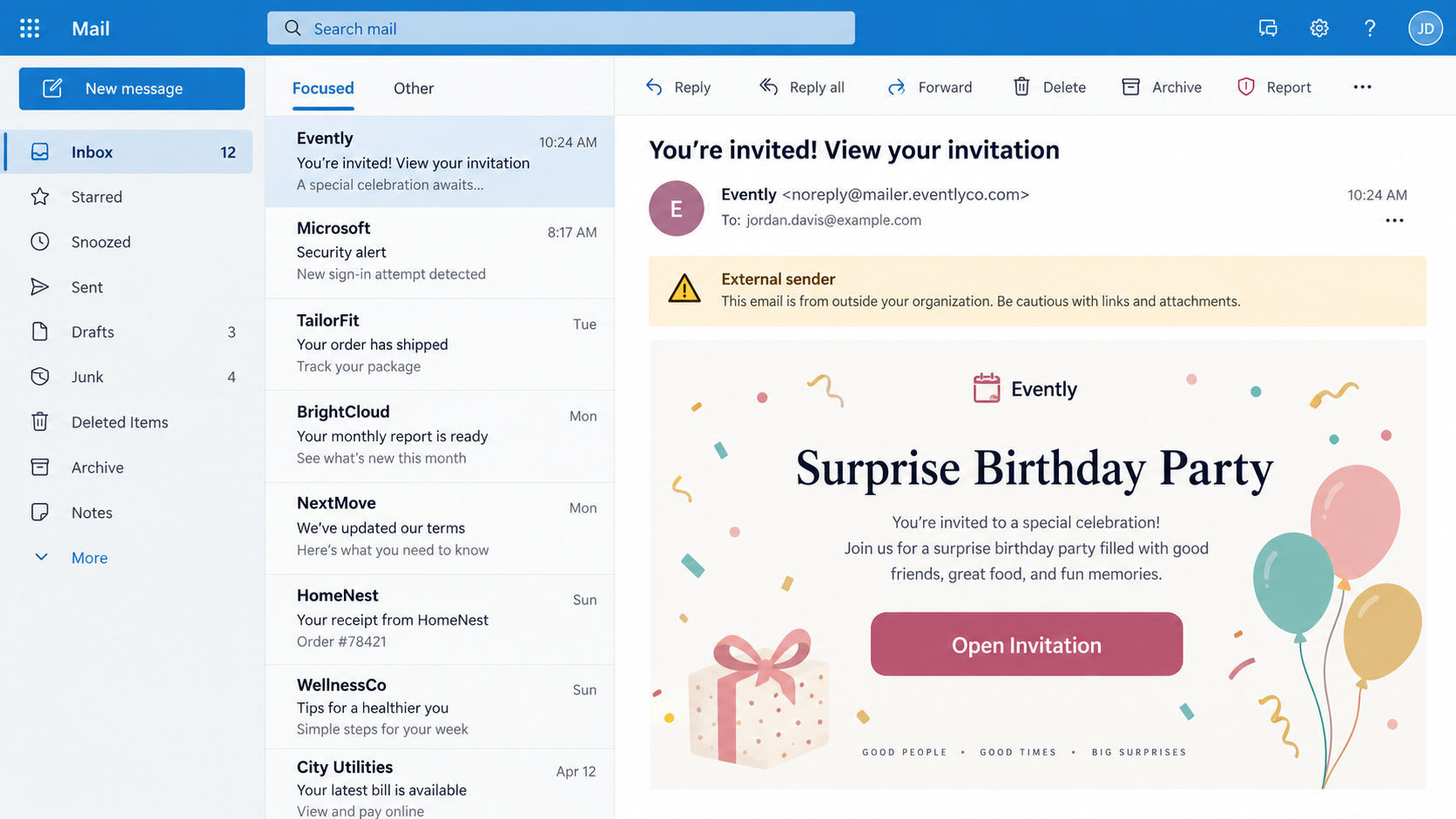
An unexpected invitation can feel too personal to ignore. The subject hints at a birthday, wedding, retirement, or private gathering, while the sender leaves just enough mystery to make the “Open Invitation” button irresistible.
When that button asks for your email password before revealing the host, the event is no longer the important part of the message.
Overview
A legitimate invitation format is being impersonated
Greetings Island is a real service for creating cards and invitations. The scam does not make the genuine platform fraudulent; it borrows the idea, name, or appearance of a digital invitation to give a phishing email social credibility.
Criminals can imitate any invitation provider with copied colors, a calendar icon, and a polished event card. The decisive question is where the link goes and what information the destination requests.
Mystery makes the recipient click first
Some fake invitations omit the host’s name or say that details are private until the recipient signs in. A person who worries about missing a family event may click before checking whether the sender address makes sense.
The invitation can be timed around graduation season, holidays, weddings, or office celebrations. It may also mention a familiar first name collected from social media or a compromised contact list.
The real target is often the email account
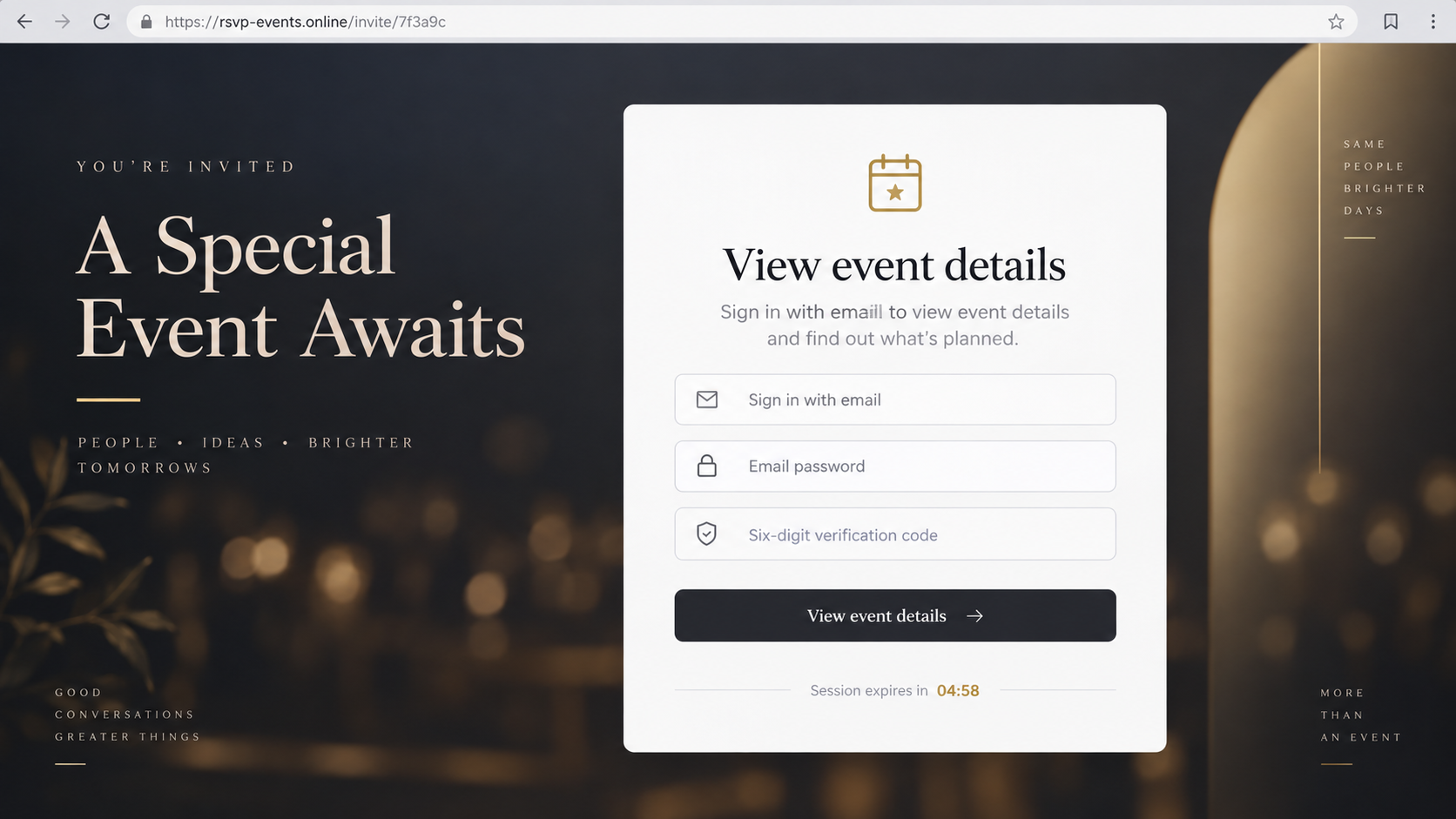
A fraudulent RSVP page may request an email address, mailbox password, and six-digit verification code. Those are not needed merely to display an invitation, but they can let an attacker take over email in real time.
The FTC has warned that fake party invitations may ask recipients to enter email credentials or a special code. It recommends contacting the supposed host through a known channel instead of using the message.
- An unexpected email claims that a private invitation is waiting.
- The host or event details remain vague until a button is clicked.
- The destination uses a domain unrelated to the named invitation service.
- A form asks for an email password or verification code.
- A timer says the invitation or RSVP session will expire.
- Stolen mailbox access is used for resets and further impersonation.
Why Fake Invitations Bypass Ordinary Skepticism
Invitations arrive unexpectedly by nature. Unlike a bank alert, an event notice does not need to match a recent transaction, which gives the criminal more room to explain why the recipient was not expecting it.
Curiosity and social anxiety work together. People want to know who invited them, whether attendance is expected, and whether ignoring the message could offend someone important.
Event language is also flexible. “A special celebration awaits” can plausibly refer to a birthday, engagement, retirement, baby shower, memorial, or workplace gathering without identifying any one occasion.
A visually attractive card can distract from technical inconsistencies. Decorative type, balloons, flowers, or a formal border may receive more attention than the sender’s domain and the browser address.
The login request is framed as privacy protection. The page claims that only invited guests may view details, turning an unreasonable demand for a mailbox password into a supposed security feature.
A legitimate service might let a guest enter a name, email address, or RSVP response. It should not require the password that unlocks the guest’s separate email account.
How the Greetings Island Invitation Scam Works
Step 1: The criminal chooses a believable social occasion
Campaigns are built around common events with broad appeal. A surprise party or wedding announcement creates excitement, while a memorial or urgent schedule change can create concern.
Names and relationships may be drawn from public social profiles, breached address books, or earlier email compromise. Even one recognizable name can make a generic invitation feel private.
Step 2: A fake invitation email reaches the inbox
The message may display “Greetings Island,” “Evently,” or another event-related sender name. The actual address can use a free mailbox, a recently registered domain, or a compromised account belonging to an unrelated organization.
A large button encourages the recipient to open, view, preview, or RSVP. The sender avoids putting useful details in the email because uncertainty is what drives the click.
Step 3: The link opens a convincing event page
The landing page repeats the recipient’s email or first name and shows a professionally designed card. That personalization may have been carried in the URL and does not prove a connection to the genuine service.
A countdown or “private guest list” notice adds pressure. The site says authentication is necessary before the location, date, and host can be displayed.
Step 4: The page captures email credentials
The first form may ask only for an email address, then adapt its appearance to imitate the corresponding provider. A password field appears on the next screen, sometimes after a fake loading animation.
Entering the password can trigger a genuine sign-in attempt by the criminal. If the account uses multi-factor authentication, the victim then receives a real code or approval prompt.
Step 5: A real security code completes the takeover
The fake page labels the code as RSVP confirmation or guest verification. In reality, the digits may authorize a sign-in, password reset, recovery-method change, or new device.
Because one-time codes expire quickly, the phishing page uses timers and error messages to keep the victim synchronized with the attacker’s live attempt.
Step 6: The mailbox becomes a launch point
Once inside, criminals search for invoices, financial conversations, cloud links, and password-reset messages. They may create forwarding rules, delete security alerts, and reset accounts tied to that email address.
The compromised mailbox can send fresh invitations to real contacts. Messages from a familiar address are more likely to be opened, allowing the cycle to expand through a family, workplace, or community group.
Other Ways the Invitation Theme Is Abused
Some pages skip credential theft and request a small RSVP deposit, venue contribution, or gift-pool payment. The event is invented, and the payment goes directly to the scammer.
A calendar attachment may contain a link to a phishing page. Adding the event can place the malicious reminder inside a trusted calendar, where it resurfaces closer to the supposed date.
QR codes are another route. The email asks recipients to scan for privacy or mobile compatibility, moving the destination to a phone where the complete address is less visible.
A workplace version claims that an administrator added the recipient to a team event. The link imitates a company sign-in and attempts to capture business credentials.
Wedding and baby-shower variants may point to fake registries. Visitors are asked to purchase gifts through a cloned checkout that collects card details and never sends merchandise.
A subscription trap can hide behind printable cards or premium invitations. The visitor enters a card for a low-cost trial and later discovers recurring charges that were minimized in the checkout.
Malware delivery is possible when an invitation arrives as an executable archive, script, or macro-enabled document. Normal event details do not require installing a program.
The common defense is to separate the social claim from the supplied technology. Contact the person who supposedly organized the event, then use the genuine service independently if the invitation is real.
How to Verify an Online Invitation
Message the host using a phone number, email thread, or social account you already know. Ask a simple question about the event without forwarding the suspicious link.
Inspect the full sender address, not only the display name. A real-looking label paired with an unrelated free mailbox or misspelled domain deserves caution.
Hover over the button on a desktop or long-press carefully to preview the destination without opening it. The registered domain should belong to the service the email claims to use.
Type greetingsisland.com yourself if the message specifically names Greetings Island. The genuine site provides normal account and support paths, including a published support address.
Never enter an email password on an invitation page. If a service offers a sign-in option, reach it from the service’s own homepage and verify the browser address before authenticating.
Read every verification prompt literally. A code that says it approves an email sign-in or password change is not an RSVP code, regardless of what the invitation page claims.
Check whether the message contains a real event date before opening anything. Scammers often rely on decorative design while avoiding the basic details that a genuine guest needs.
Search the subject line in your mailbox. Multiple identical invitations sent to aliases, shared accounts, or unrelated coworkers strongly suggest a broad campaign rather than a personal event.
Workplace recipients should use the organization’s phishing-report button where available. Security teams can block the destination across the company and check whether other employees submitted credentials.
If a calendar entry appeared automatically, remove it without following its embedded links. Review calendar sharing and application permissions, because a connected app can continue creating deceptive events.
Parents should verify invitations involving children directly with another parent or the school. A stranger should never receive a child’s name, schedule, school, or attendance information through an unverified RSVP form.
Event organizers can reduce confusion by telling guests which service and sender address they will use. A short advance notice gives recipients a trusted reference when the real invitation arrives.
Company, Address, and Fulfillment Checks
Separate the real service from the message
Confirm that the provider exists, but do not stop there. Scammers routinely impersonate legitimate companies, so a real corporate website does not validate a specific email.
Compare the message domain, destination domain, and official support information. All three should make sense together.
Confirm the host and event independently
A genuine organizer should be reachable through a channel that the invitation did not create. If no one recognizes the gathering, do not supply information to discover more.
Check whether the date, venue, and guest context are plausible. Missing basics should increase caution rather than curiosity.
Evaluate what the RSVP actually requests
A name, attendance choice, meal preference, or guest count can be reasonable. A mailbox password, authentication code, banking login, or remote-access installation is not.
Close the page if it reframes sensitive credentials as guest verification. No event host needs control of your email account.
Verify payments and gifts outside the invitation
Contact the host before paying a deposit or purchasing from a registry. Use a known registry link or retailer rather than the destination embedded in an unexpected message.
Read the merchant name and recurring terms on any checkout. A legitimate event does not make an unrelated subscription safe.
What to Do if You Have Fallen Victim to This Scam
- Change the email password now. Use the provider’s official app or typed website on a trusted device, not the invitation link.
- Revoke unauthorized access. Sign out other sessions, remove unknown devices and recovery methods, and review connected applications.
- Inspect mailbox rules. Delete forwarding, filtering, or deletion rules you did not create, and check Sent, Trash, and Archive for attacker activity.
- Secure linked accounts. Change reused passwords and prioritize banking, cloud storage, shopping, social media, and workplace services.
- Scan affected devices. If you downloaded an attachment or application, update the system and run a reputable scan such as Malwarebytes.
- Add phishing protection. AdGuard can help block known malicious domains and deceptive ads, but it cannot remove an attacker who already has valid account access.
- Warn contacts carefully. Tell people that invitations sent from your mailbox may be fraudulent. Do not resend the live phishing link.
- Contact payment providers. Report any card, bank, gift-card, or app payment immediately and ask whether the transaction can be stopped or disputed.
- Report the campaign. Notify the impersonated service, your email provider, the FTC, and workplace security when a business account is involved.
If a verification code was entered, identify what the original code notification authorized. That wording can reveal whether the attacker signed in, reset a password, or changed recovery settings.
Frequently Asked Questions
Is Greetings Island a legitimate website?
Yes, the genuine invitation and card service is legitimate. Criminals can still impersonate its name or the broader digital-invitation format in phishing messages.
Why would an invitation ask for my email password?
It should not. A phishing page requests the password because email access enables account resets, data theft, and convincing messages to your contacts.
Can I safely preview the invitation link?
Previewing the destination may help, but the safer action is to ask the host through a known channel and open the real service independently.
What if the email came from someone I know?
Their account may be compromised. Confirm with that person using another method before trusting the message or its link.
Does an RSVP need a six-digit verification code?
A code can exist for some services, but never submit one that says it authorizes an email sign-in, reset, new device, or security change.
Can the scam spread through my address book?
Yes. A hijacked mailbox can send believable invitations to existing contacts, so warn them promptly and remove unauthorized sessions and rules.
The Bottom Line
The Greetings Island invitation scam hides an account-takeover attempt inside a familiar social ritual. The card may look warm and personal, but a request for your email password exposes its real purpose.
Confirm the host independently, visit invitation services through addresses you trust, and never reinterpret an email security code as an RSVP step. If credentials were entered, secure the mailbox before investigating the event.








