

An unexpected banking alert can stop you in the middle of an ordinary day. A payment you do not recognize, a warning about restricted access, and a convenient review button all seem to demand the same thing: deal with this now.
That is the uncomfortable moment an Atlantic Union Bank scam tries to exploit. Before following the message, it helps to understand what a genuine security conversation should never require you to hand over.
Overview
The bank is real; the unexpected request needs checking
This warning concerns criminals impersonating Atlantic Union Bank, not an allegation that the bank operates the scam. The familiar name supplies credibility, while the message supplies a reason to act before checking who sent it.
Atlantic Union Bank states on its fraud protection page that it will not contact customers to request sensitive information such as their password, PIN, or one-time code. It advises customers to end suspicious conversations and contact the bank independently.
That distinction matters because banks do send real account notifications. An unfamiliar transaction should be checked, but checking it does not mean following the link, telephone number, or instructions supplied by whoever raised the alarm.
What the impersonator wants you to do
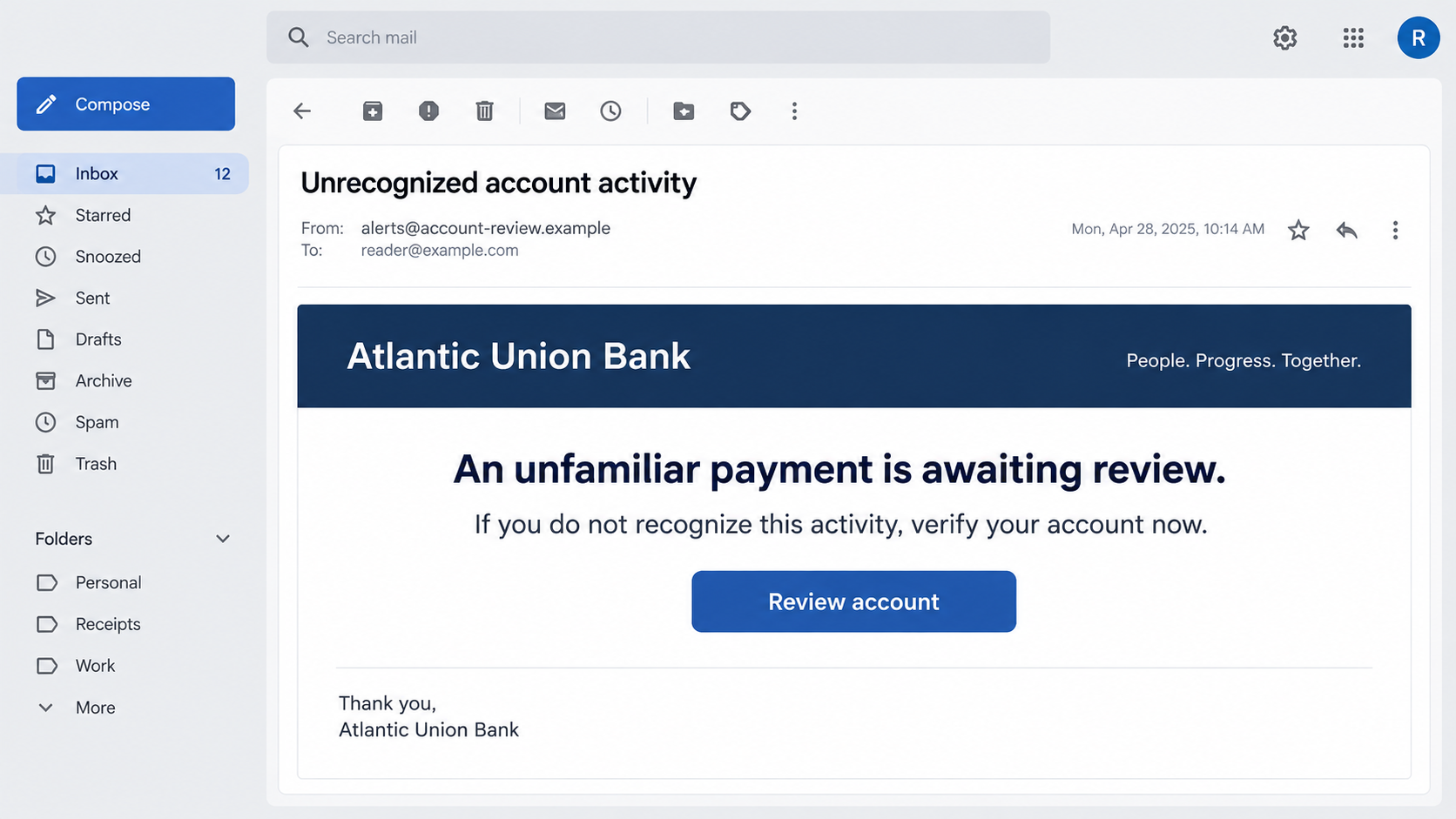
The initial message may describe an account restriction or unrecognized activity. The next request reveals the danger: enter banking credentials on a linked page, disclose a security code, or follow payment instructions supposedly intended to protect your balance.
These approaches can appear through email, text, and telephone calls. They do not necessarily belong to one operation. A warning about impersonation does not establish that every suspicious message uses the same website, script, or destination account.
- A link offers to restore access or review an unfamiliar payment.
- A caller claims to be handling the security problem described in a message.
- A verification request asks for a password, PIN, or one-time code.
- An instruction to move money is presented as a protective measure.
- A deadline discourages you from calling the bank yourself.
How to read the examples in this article
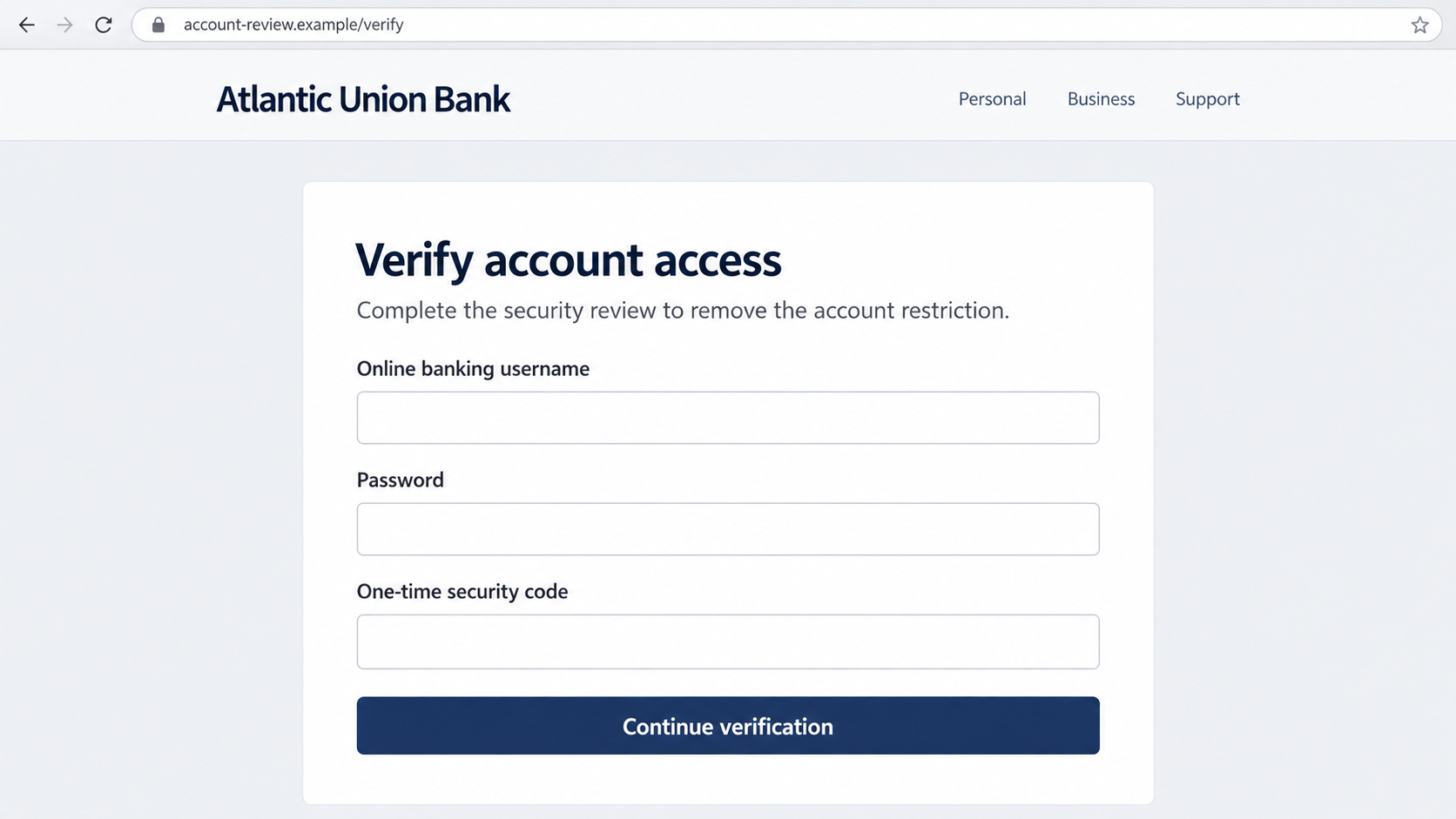
The two images are illustrative reconstructions using fictional addresses. They show the difference between the message that attracts attention and the form that requests secrets. They are not intercepted Atlantic Union Bank communications or proof of a particular live phishing domain.
The reliable evidence here is the bank’s own warning and the behavior of the request. A copied heading or professional-looking page cannot override a demand that conflicts with the bank’s published security guidance.
Recognizing that conflict is more useful than memorizing a particular subject line. Attackers can change a few words in seconds. Your rule can stay the same: investigate through a channel you chose independently.
Why a Fraud Alert Can Feel So Convincing
A message about possible theft puts you in the role of someone trying to prevent a loss. You are not being asked to buy an unfamiliar product. You are being asked to defend money you already believe belongs to you.
That framing can make an unreasonable request sound like part of a sensible security procedure. A caller who says a code will cancel a transaction may be asking for the very code needed to approve access or another account action.
Small familiar details can strengthen the story. Your name, an old address, or part of a telephone number might come from many places. Their presence does not establish that the sender can see your actual bank account.
Likewise, an accurate-looking caller ID is not identity verification. A displayed number can be spoofed. Looking up that number while staying on the call does not prove that the person speaking controls the real bank’s telephone line.
The useful pause is practical, not confrontational. End the interaction, open your usual banking app, and contact the bank using the number on your card or a trusted statement. You do not owe an unknown caller an explanation.
How the Atlantic Union Bank Scam Works
Step 1: An unexpected warning creates a reason to respond
The approach begins with a security problem you were not investigating before the message arrived. It might describe a payment, a restricted account, or activity that supposedly needs immediate confirmation.
The wording encourages you to focus on whether the transaction is yours, rather than whether the message is genuine. If you do not recognize the activity, the offered review process seems like the obvious next step.
Do not assume the message proves that money has moved. A claim in an email is different from a transaction visible after you independently sign in to your real account. Establish that difference before discussing any supposed solution.
Step 2: The message supplies its own route to help
A button, embedded link, callback number, or follow-up call keeps the investigation inside the sender’s control. The person who described the emergency also gets to decide how you resolve it.
That is the dangerous handoff. You may think you have moved from an alert to a secure support channel, when both were supplied by the same unverified party. A different screen does not mean a different source.
Even if you only intend to ask a question, avoid the supplied contact route. A persuasive operator can use your questions to learn what you believe, what accounts you use, and how to tailor the next request.
Step 3: A lookalike page turns verification into disclosure
A phishing page can display the bank’s name while being hosted somewhere unrelated. Its form may request ordinary login details before introducing extra fields described as a security check.
The reconstructed example illustrates this escalation. A password and a one-time code should not be treated as harmless form entries simply because a page says your account is restricted.
A padlock or HTTPS address only means the connection to that website is encrypted. It does not establish that the website belongs to your bank. Avoid testing a suspicious page with real or reused credentials.
Step 4: The attacker may use a live conversation to obtain a code
Some attempts move into a call or chat when an additional verification step appears. The caller may describe the code as a way to confirm your identity, stop fraud, or remove the restriction.
Read the actual code message yourself. Its wording may describe a login, password reset, payment, or another action. The caller’s interpretation is not a substitute for that description.
A code can be genuinely generated by your bank while the person requesting it is an impostor. Receiving a real security message therefore does not authenticate the caller. Never forward or read out a code in response to an unsolicited approach.
Step 5: The supposed rescue can become a financial loss
Stolen credentials may be used to attempt account access. In a different branch of bank impersonation, the victim is persuaded to initiate a transfer. These are different events, and you should describe exactly what happened when reporting them.
A demand to move funds to a replacement, holding, or safe account is a major warning sign. Do not let the caller tell you what to say to bank staff or ask you to conceal the reason for a transfer.
Not every attempt succeeds, and not every click results in a theft. The response should match your exposure. Sharing a password, disclosing a code, installing software, and sending money each require different follow-up actions.
Identity and Account Verification Checks
Check the institution through your own records
Start with the card, statement, or app you already use. A real institution’s name on a message establishes only what the sender claims, not who is communicating with you.
If you are not a customer, do not create an account to investigate an alert. An unsolicited message can reach the wrong person or be sent broadly. You can report it without providing more information about yourself.
Read the destination, not the decoration
A website address containing bank-related words is not necessarily the bank’s address. Extra words, unfamiliar endings, and misleading subdomains can make an unrelated location look reassuring at a glance.
The safest check does not require decoding every address trick. Close the message and reach the bank through your established route. You should not need to navigate a suspicious domain to prove that it is suspicious.
Verify support after ending the original contact
Use an independently obtained number and explain that you received an unsolicited security alert. Ask whether any relevant account event exists. Give staff the message details, not the response that the caller instructed you to give.
Keep the reference number for any genuine fraud report. A legitimate case record is useful for follow-up, especially if you need to discuss both account access and a disputed transaction.
Trace the actual account action
Look beyond the account balance. Review recent transfers, added recipients, contact information, recovery settings, and unfamiliar access where those records are available. Ask support to inspect anything you cannot see yourself.
A reassuring balance immediately after the incident does not close the matter if access was exposed. Equally, an alert alone is not proof of compromise. Let the bank investigate the actual changes rather than guessing from the scammer’s story.
What Different Levels of Exposure Mean
If you only received the message, preserve it if needed, report it, and delete it. You do not need to buy a cleanup service simply because your address or number received spam.
If you opened a link without entering information, close it and check whether anything downloaded or any permission was granted. A visit alone does not prove malware was installed, although suspicious downloads deserve attention.
If you typed a password, assume it was exposed even if the page displayed an error. A form can transmit information before showing a final confirmation. Change reused passwords elsewhere after securing the banking account.
If you shared a code or followed a transfer instruction, contact the bank immediately. Tell staff what the code message actually said and whether you personally approved any transaction. Accurate details help them choose the right response.
What to Do if You Have Fallen Victim to This Scam
- End the conversation and contact the bank independently.
Use your card, statement, or trusted app. Explain whether you shared credentials, supplied a code, allowed remote access, or sent money. Ask the fraud team what needs to be restricted immediately.
Do this before returning to the suspicious message for a lengthy investigation. If another person has active access, speed matters more than collecting a perfect set of screenshots.
- Report specific transactions and request urgent review.
Identify the amount, time, recipient, and payment method for anything suspicious. Ask whether a pending transfer can be stopped or a recall attempted. Do not assume a refund is automatic or impossible.
Request written confirmation or a case reference and ask what further information the bank needs. Keep your account of events factual, including any action you took under the caller’s instructions.
- Replace exposed credentials through a trusted route.
Change your banking password and any reused passwords. If device access was granted, use a different trusted device. Ask the bank to review active access and reset relevant authentication arrangements.
Check your email account too if it was involved. An attacker with email access may interfere with recovery messages even after the banking password changes.
- Review cards, recipients, and contact changes.
Ask whether an exposed card needs replacement. Check for unfamiliar payment recipients, telephone numbers, email addresses, and account recovery changes. A temporary card lock does not necessarily protect every type of bank transfer.
- Preserve a useful evidence trail.
Save the original message, sender details, destination address, call time, and transaction references. Write a short timeline while you remember the sequence. Keep sensitive records private rather than posting them in public comments.
- Address any software or browser changes.
If the caller persuaded you to install remote-access software, end its access and ask a trusted technician for help if needed. Malwarebytes can help scan supported devices for malware or unwanted software after a suspicious download.
AdGuard can help filter malicious advertising and known dangerous destinations where supported. Neither tool reverses a bank transfer or guarantees that a newly created phishing page will be blocked.
- Report the impersonation and monitor follow-up activity.
Use the bank’s official reporting instructions. In the United States, you can also report the incident at ReportFraud.ftc.gov. If identity information was misused, IdentityTheft.gov provides a recovery planning route.
Watch for new messages pretending to be investigators or refund specialists. A person who promises recovery in exchange for another payment may be exploiting the same incident a second time.
Frequently Asked Questions
Is Atlantic Union Bank itself a scam?
No. This article concerns impersonation of the bank. A criminal can misuse the name of a real institution without any connection to it. Verify a particular message through the bank rather than assuming the name proves its origin.
Does a genuine-looking fraud alert mean I should click?
No. Check the underlying concern through your usual app or an independently obtained contact number. You can investigate a real account issue without trusting the route provided in an unsolicited message.
Can the bank’s real number appear on a scam call?
Yes. Caller ID can be spoofed. End the call and start a new conversation using a trusted number yourself. A displayed number is not the same as independently reaching the institution.
What if the code really came from the bank?
A genuine code may have been triggered by someone attempting an account action. Do not give it to an unsolicited caller or enter it on a linked page. Contact the bank to check the underlying event.
Did clicking the message automatically expose my account?
Not necessarily. What you entered, downloaded, approved, or installed matters. Close the page, review your actions, and report any disclosure to the bank. Do not confuse a suspicious visit with confirmed account theft.
Should I move my balance to the safe account the caller supplied?
No. Do not send money under an unverified caller’s direction. Contact your real bank independently and describe the proposed transfer before doing anything. Calling a destination safe does not make it yours or protect the funds.
The Bottom Line
The Atlantic Union Bank scam turns a reasonable concern about account security into a request for access, codes, or money. The most important check is not whether the alert looks polished. It is whether you independently reached the bank before acting.
If you have already responded, focus on the facts: what you shared, what changed, and whether money moved. Contact the bank promptly, secure the exposed accounts, and ignore anyone who demands another payment to make the problem disappear.








